SAP Cost Center Report
A cost center report reads SAP's CO actual line items and joins the cost center and cost element texts, so every posting reads with its names and amounts on one Excel row.
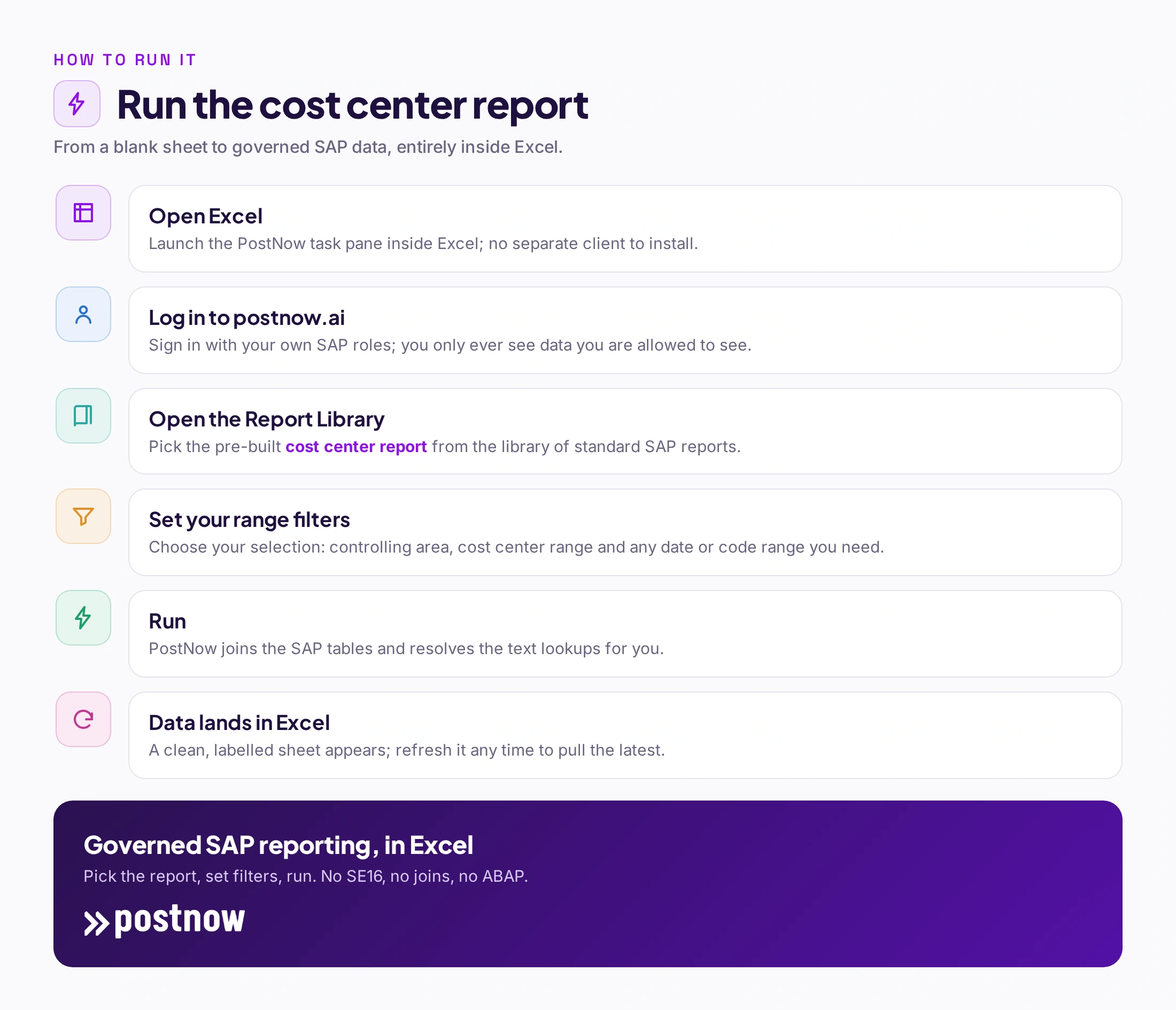
- PostNow ships this report out of the box – pick it, set filters, run, and it lands in Excel; no SE16, joins or ABAP.
- The data spans several tables. It joins COEP, COBK, CSKS / CSKT, SKAT on KOKRS + BELNR and resolves the text lookups.
- The standard route is manual. Teams use KSB1 for a single record, then SE16 or SQVI to stitch tables together in Excel.
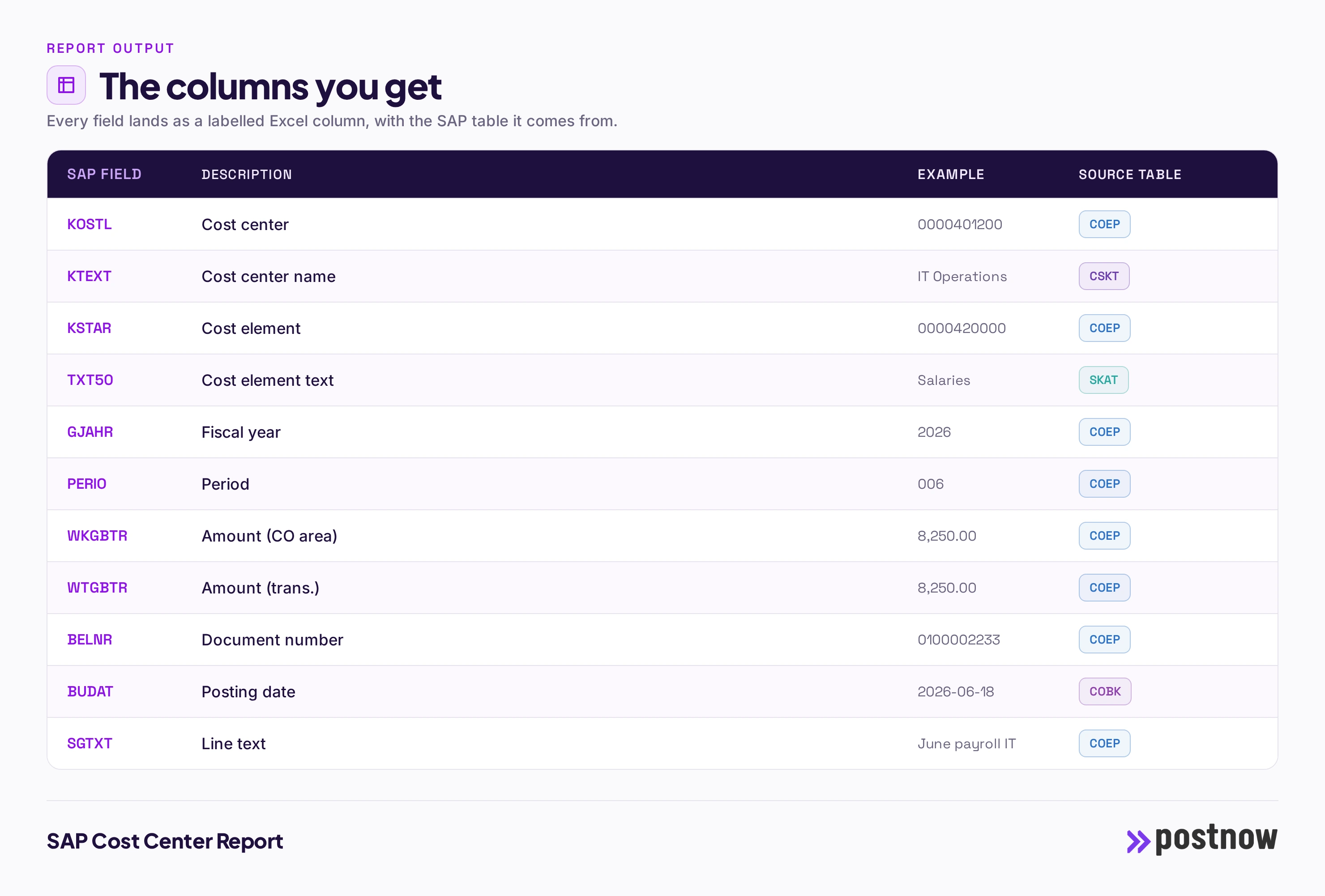
- You get clean, labelled columns. KOSTL, KTEXT, KSTAR, TXT50, GJAHR, PERIO and more, each with a plain-English heading.
- Refreshable, not a one-off dump. Rerun the report to pull the latest, with your own SAP authorizations enforced. Works on ECC and S/4HANA.
What the cost center report shows
A SAP cost center report answers a simple question that SAP makes surprisingly hard: give me every cost center record, with all the attributes that matter, in one place I can filter and share. On screen, SAP shows one record at a time and splits its attributes across several views. This report flattens all of that into a single Excel sheet, one row per record, with the codes turned into readable labels.
Because the output is a plain sheet, it becomes the starting point for the work people actually do with it: a data-quality review, a cleanup before a migration, a hand-off to an auditor, or a source for a pivot. The value is not just the extract, it is that the extract is complete and consistent every time you run it.
The SAP tables behind it
COEP holds the CO actual line items: every posting to a cost center by cost element and period, keyed by the controlling area, document number and line. The CO document header COBK adds the posting date and document details. The cost center name comes from CSKS and its text table CSKT, keyed by the cost center KOSTL. The cost element description comes from SKAT, keyed by the account KSTAR. The result is a line-item actuals report where each posting shows its cost center name and cost element text instead of bare codes.
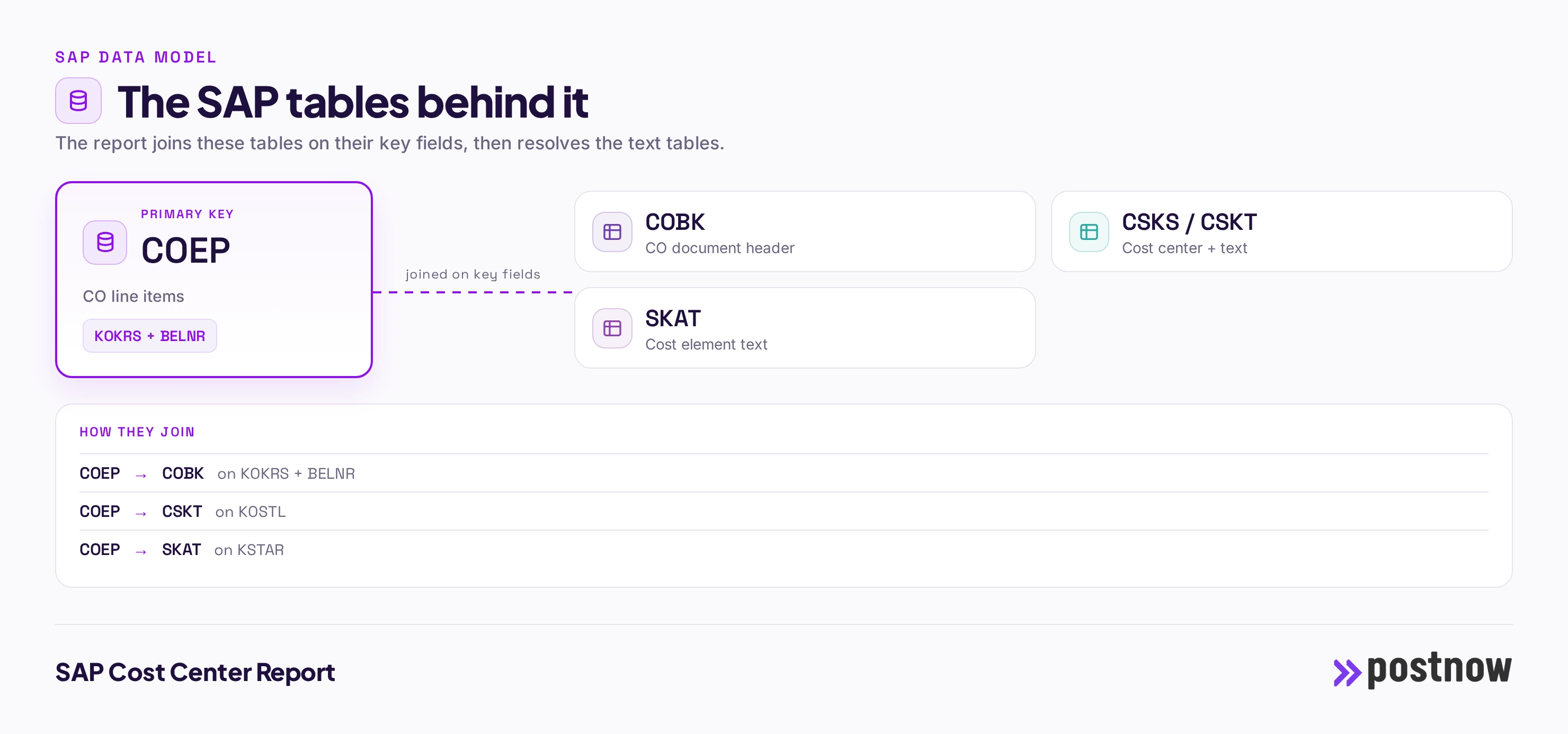
The joins are the whole reason this is worth automating. Miss one and the report is subtly wrong; get the key fields slightly off and rows fan out or drop. Doing it once, correctly, and then reusing it is what turns a fragile spreadsheet exercise into a reliable report.
The columns you get
Every column below is a real SAP field, labelled in plain English, with the table it is read from. These are the fields most teams want on a cost center report; a tool like PostNow lets you add or remove columns without touching the underlying join.
| SAP field | What it is | Source |
|---|---|---|
| KOSTL | Cost center | COEP |
| KTEXT | Cost center name | CSKT |
| KSTAR | Cost element | COEP |
| TXT50 | Cost element text | SKAT |
| GJAHR | Fiscal year | COEP |
| PERIO | Period | COEP |
| WKGBTR | Amount (CO area) | COEP |
| WTGBTR | Amount (trans.) | COEP |
| BELNR | Document number | COEP |
| BUDAT | Posting date | COBK |
| SGTXT | Line text | COEP |
Building it yourself: KSB1, SE16 or SQVI
KSB1 shows cost center actual line items on screen and exports them, but it is a per-selection display, and assembling a broad, flat file across many cost centers and periods with the exact columns you want is awkward. The S_ALR standard reports are summarised, not line-item extracts. SE16 on COEP gives you the raw line items, but leaves the cost center names from CSKT, the cost element texts from SKAT and the header dates from COBK to be matched in Excel. Any custom slice of the actuals means a query or an ABAP program.
None of this is impossible; people do it every month. The problem is that it is manual, easy to get subtly wrong, and stale the moment it is saved. Each refresh means repeating the same exports and the same lookups, and any new column means another round with a developer. For a one-off you can push through it. For a report you run every period, the cost adds up. If you want the general landscape of options first, see our overview of SAP reporting tools and how to get SAP to Excel.
The out-of-the-box way: PostNow's cost center report
PostNow's Report Library already contains this exact report, pre-built. You do not assemble the joins or resolve the texts; that is done for you. You open Excel, log in to postnow.ai from the task pane, pick the cost center report, set your range filters, and run. The governed, joined data lands in the sheet, ready to filter, pivot or share, and you can refresh it whenever you need the latest.
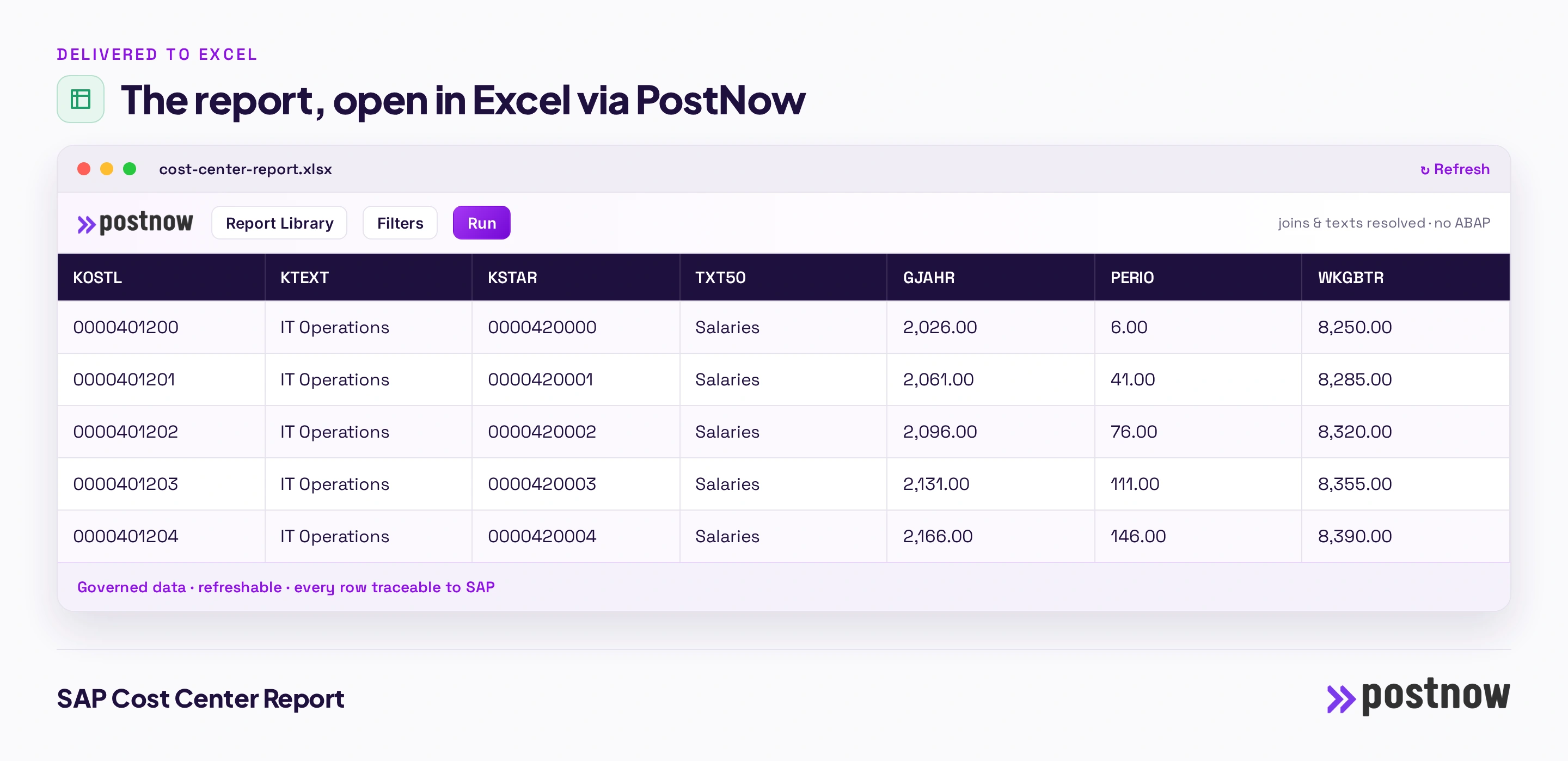
Two things make this different from a SE16 dump. First, it is governed: PostNow enforces your own SAP authorizations, so you only ever see the data you are entitled to, and every row can be traced back to its source. Second, it is repeatable: the same report, the same columns, refreshable on demand, with no ABAP to write or maintain. That is the payoff of teaching the hard version first, then handing you the shortcut.
Filters and selection you'll want
A good cost center report is only as useful as the selection you can put on it. The filters most teams reach for are:
- Controlling area (KOKRS)
- Cost center range (KOSTL)
- Cost element (KSTAR)
- Fiscal year (GJAHR)
- Period range (PERIO)
- Posting date (BUDAT)
You set these once as your selection, then reuse or adjust them each run. Because the selection travels with the report, a monthly extract becomes a single refresh rather than a rebuild.
ECC vs S/4HANA
In S/4HANA the CO actuals live in the Universal Journal ACDOCA rather than in COEP, but PostNow reads both, so a cost center line-item report works the same on ECC and S/4HANA.
The practical takeaway is that a report built on the tables and read through standard interfaces survives a migration far better than one wired to a specific screen or a custom program. When you eventually move from ECC to S/4HANA, a table-based cost center report keeps working, which is one less thing to rebuild in an already large project.
Frequently asked questions
How do I get a cost center report out of SAP into Excel?
You can export the underlying tables with SE16 and stitch them together in Excel, build a query in SQVI, or ask a developer for an ABAP report. The quickest governed route is a tool that already has the report built: in PostNow you log in to postnow.ai from the Excel task pane, pick the cost center report from the Report Library, set your filters and run, and the joined data lands in the sheet.
Which SAP tables hold cost center data?
The data is spread across several tables that have to be joined on their key fields: COEP, COBK, CSKS / CSKT, SKAT. The report links them on KOKRS + BELNR and resolves the text tables so the output reads in plain language.
Is there a standard SAP report or transaction for cost center?
There are standard transactions (KSB1 and others), but they are built for on-screen display or for a fixed layout, not for a clean, refreshable Excel extract with exactly the columns you want. That is why most teams fall back to SE16 exports or a custom report.
How do I export cost center data to Excel without ABAP?
Use a tool whose SAP connection is set up once and then reads through standard interfaces, so no ABAP is needed for day-to-day reporting. PostNow reads the cost center tables, performs the joins and text lookups, and writes the result straight into Excel, refreshable on demand, with your own SAP authorizations enforced.
Can I refresh or schedule the report?
Yes. Because the report keeps its connection and selection, you can refresh it to pull the latest data at any time rather than rebuilding the extract. This is the main advantage over a one-off SE16 dump, which is stale the moment it is saved.
Does it work in S/4HANA?
In S/4HANA the CO actuals live in the Universal Journal ACDOCA rather than in COEP, but PostNow reads both, so a cost center line-item report works the same on ECC and S/4HANA.
Where do SAP cost center actuals come from?
Actual postings to cost centers are stored as CO line items in COEP, and in ACDOCA in S/4HANA, one row per posting by cost element and period. A report reads these, joins the cost center and cost element texts, and returns a line-item actuals extract you can filter and pivot.
Can I report actuals by period and cost element?
Yes. COEP carries the fiscal year, period, cost center and cost element on every line, so you can filter and group by any of them. A PostNow report lets you set a period range and cost center range and returns the matching actual line items.