Calling an SAP BAPI from Excel
An SAP BAPI lets Excel hand a structured business request to SAP without re-keying the same data through a transaction screen. The spreadsheet supplies the source data, the integration layer maps it into the BAPI structures, SAP performs its own business logic and the result comes back to Excel.
- Find the right BAPI first. The technical interface has to match the actual SAP business object.
- Map structures, not just column names. Header, item, schedule and account-assignment data often live in different BAPI structures.
- Validate before commit. Spreadsheet checks and SAP simulation reduce cleanup after posting.
- Design for partial failure. Successful rows stay successful; failed rows are corrected and retried.
- Keep SAP in control. BAPIs execute SAP business logic and authorization checks; Excel should not reimplement them.
What is a BAPI, and why call it from Excel?
A BAPI is a published interface to an SAP business object. Instead of automating a series of mouse clicks, a program sends structured data to SAP and asks SAP to perform a business operation.
That difference matters. A purchase order is not just a collection of values that happen to appear on an SAP screen. SAP determines required fields, partner data, account assignment, tolerances, number ranges, authorizations and dozens of other rules around the transaction. A BAPI gives an external tool a supported way to ask SAP to do that work.
Excel is a natural front end because so much business data already arrives there. Finance teams prepare posting batches in spreadsheets. Buyers receive order files. Master-data teams review mass changes. The inefficient part is often not the business decision; it is turning spreadsheet rows into SAP transactions one record at a time.
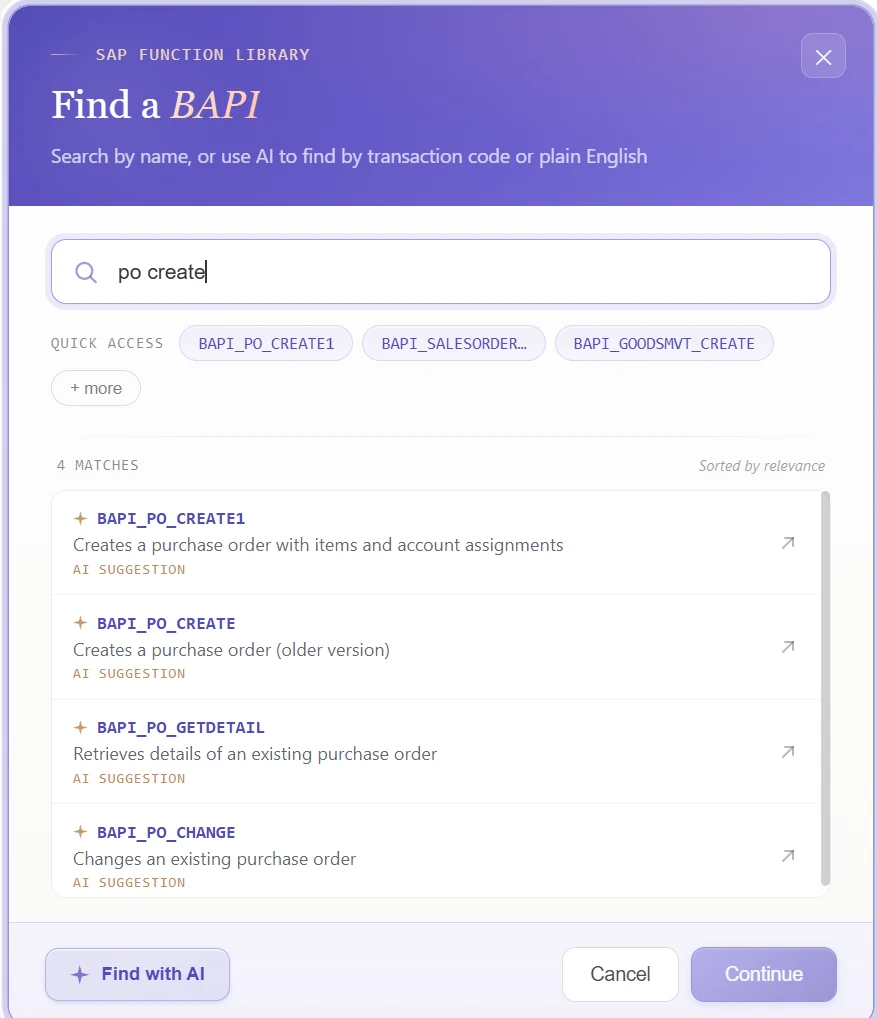
Step 1: find the right SAP BAPI
This is the step that gets underestimated most often. The difficult question is not “how do I call a BAPI?” It is “which BAPI actually represents the business operation I need?”
For purchase orders, BAPI_PO_CREATE1 is a familiar example. For accounting documents, BAPI_ACC_DOCUMENT_POST is widely used. Goods movements use their own interfaces. Materials, customers, Business Partners and sales documents have different structures again.
Choosing by name alone can be misleading. Two functions can sound similar while supporting different capabilities, different object versions or different data structures. Before mapping a spreadsheet, confirm the business object, create/change intent, required structures, commit behavior and the messages the interface returns.
The anatomy of an Excel-to-BAPI mapping
A spreadsheet is flat. A BAPI usually is not.
A typical SAP business interface can contain import parameters, structures, internal tables, X-structures, extension structures and return messages. A purchase order may require header data, item data, schedule lines and account assignments. A single business document can therefore span several spreadsheet rows.
| Excel concept | BAPI concept | Example |
|---|---|---|
| One column | One field in a structure/table | Company Code → POHEADER-COMP_CODE |
| One document-level row/value | Header structure | Vendor, document type |
| Repeated rows | Item table | Material, quantity, price |
| Control flag | X-structure | Mark which fields are supplied |
| Result column | RETURN/result values | Document number, error text |
This is why “map Excel column A to SAP field B” is only part of the problem. You also need to know which structure the field belongs to, whether the BAPI expects an X-pair, how item numbers relate to headers and how the final result should be written back to the workbook.
Step 2: map Excel columns to BAPI structures
Once the BAPI is known, the technical mapping should become visible and reviewable. Hidden mapping buried inside custom code is difficult for the next person to inspect and harder to reuse.
PostNow.ai exposes the BAPI structures and fields alongside the Excel column assignments. That makes the mapping a reusable configuration rather than a one-off development artifact.
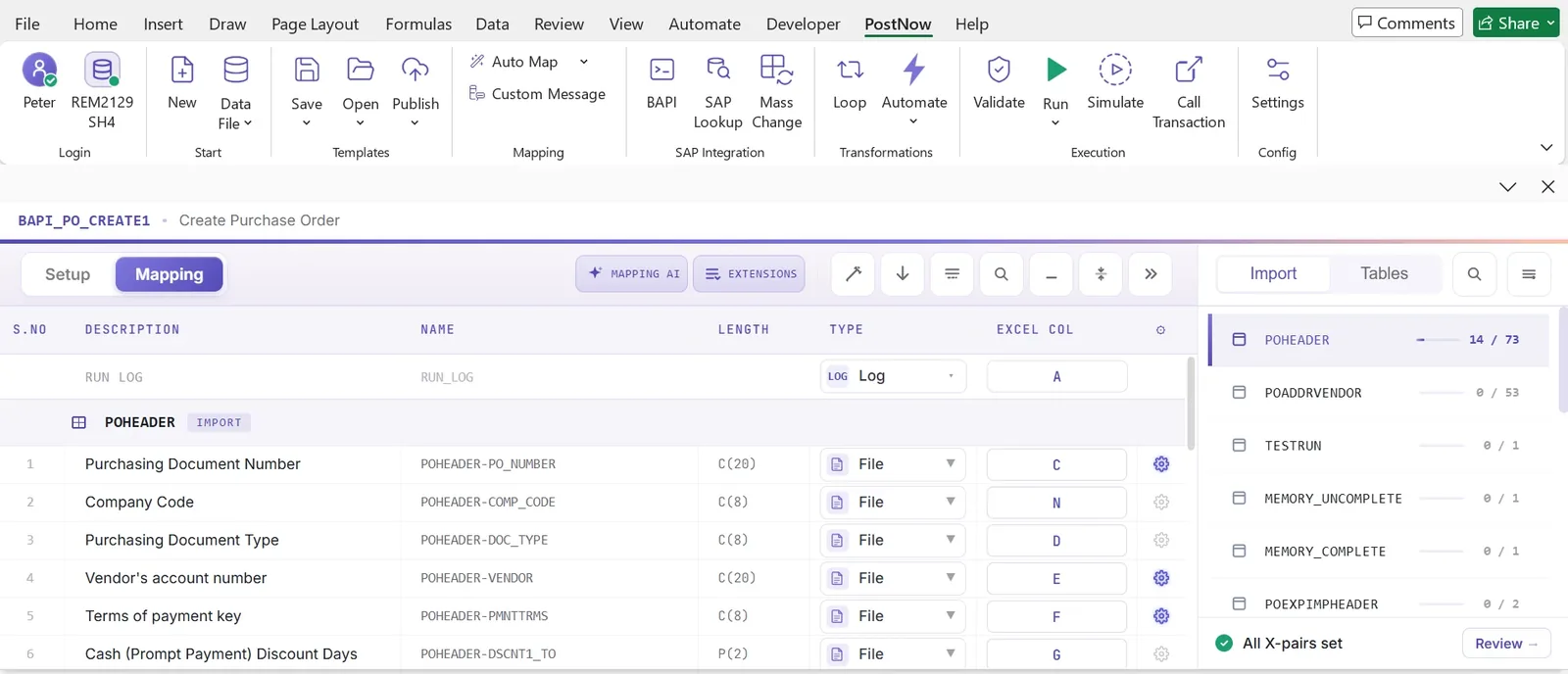
That visibility matters when a template needs to change. If Finance adds a reference field or Procurement introduces a new document type, a reviewer can see exactly how the workbook connects to the SAP interface before the next run.
Use AI for the repetitive mapping work, not for SAP business logic
AI is useful here because the task is repetitive and pattern-heavy. A spreadsheet headed “Company Code”, “Vendor”, “Posting Date” and “Currency” already contains clues about the SAP fields it probably represents.
PostNow.ai's Mapping AI can read the spreadsheet and suggest likely field relationships. The user reviews the suggestions before the mapping becomes part of a template.
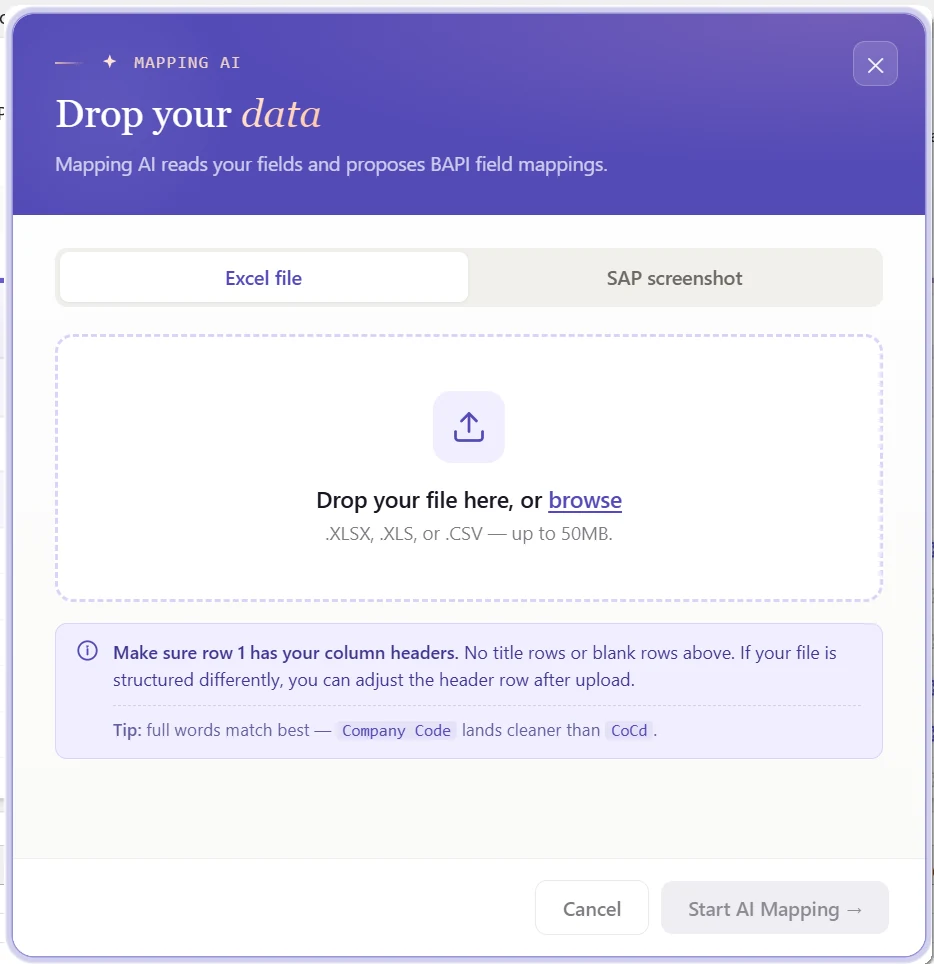
The boundary is deliberate: AI can help interpret the spreadsheet and reduce setup effort, but SAP still decides whether the transaction is valid.
Single-record vs header/detail mapping
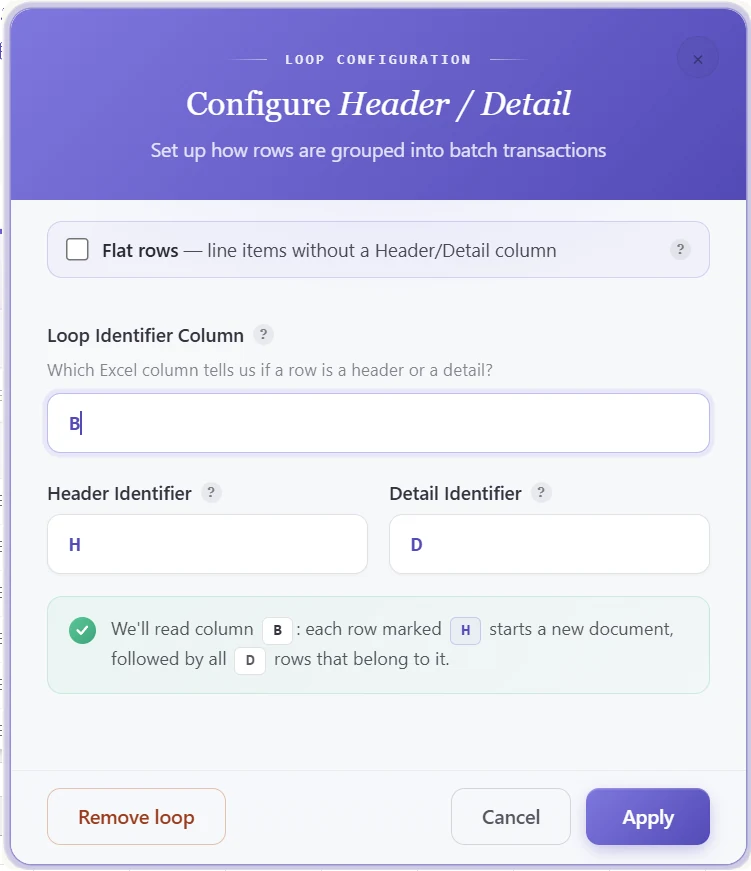
Some BAPI calls are naturally one row per object. Others are document-oriented. Purchase orders, sales orders and accounting documents commonly contain one header followed by multiple details.
If that structure is not made explicit, a flat spreadsheet can accidentally create one SAP document per line item or combine unrelated items into the same document.
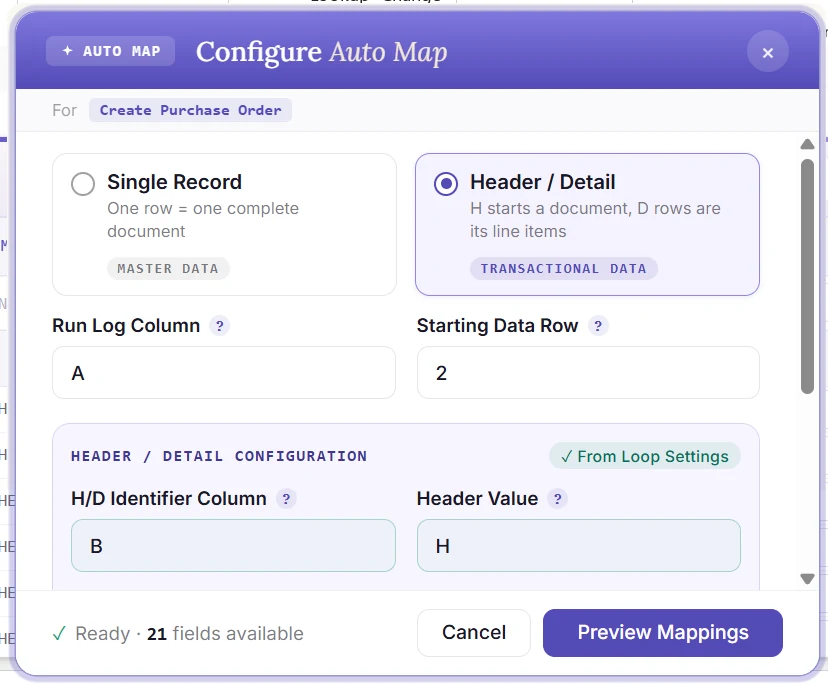
For transactional documents, a simple H/D identifier is often enough to make grouping readable to both the system and the user.
Do not forget X-structures and change indicators
Many SAP BAPIs use companion X-structures to indicate which fields are being supplied or changed. This is especially important in change scenarios.
Providing a value in a data structure does not always mean SAP will act on it. The corresponding X-field may also need to be marked. Conversely, marking an X-field without understanding the value can produce unintended changes.
A reusable mapping layer should treat these relationships explicitly rather than leaving them as hidden technical knowledge. That makes templates easier to review and safer to hand over.
Step 3: validate before calling the BAPI
A BAPI is not a substitute for data preparation. It will reject invalid records, but allowing SAP to discover every spreadsheet mistake one transaction at a time is an expensive way to validate a file.
Validation should happen in layers:
- Spreadsheet structure. Required columns, blank keys, date and number formats.
- SAP reference data. Company codes, plants, materials, cost centers, payment terms and other check values.
- Business rules. Requirements that vary by document type, account group or configuration.
- Simulation where available. Let SAP evaluate the proposed transaction before the final post.
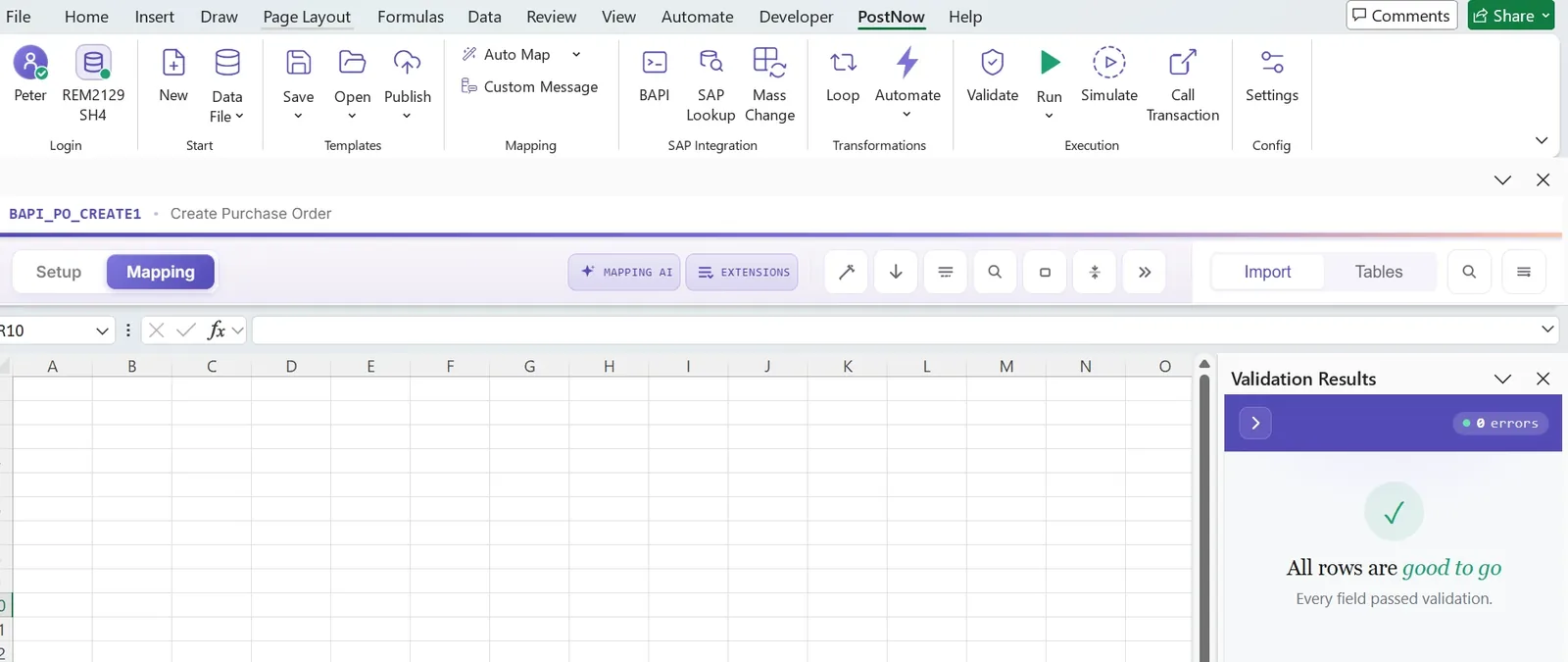
The objective is not zero messages. The objective is to find the messages while correction is still cheap.
Step 4: execute the BAPI and return the SAP result to Excel
When the data is ready, SAP should execute the business operation and return a structured result. That result belongs back in the workbook because the spreadsheet is the user's source context.
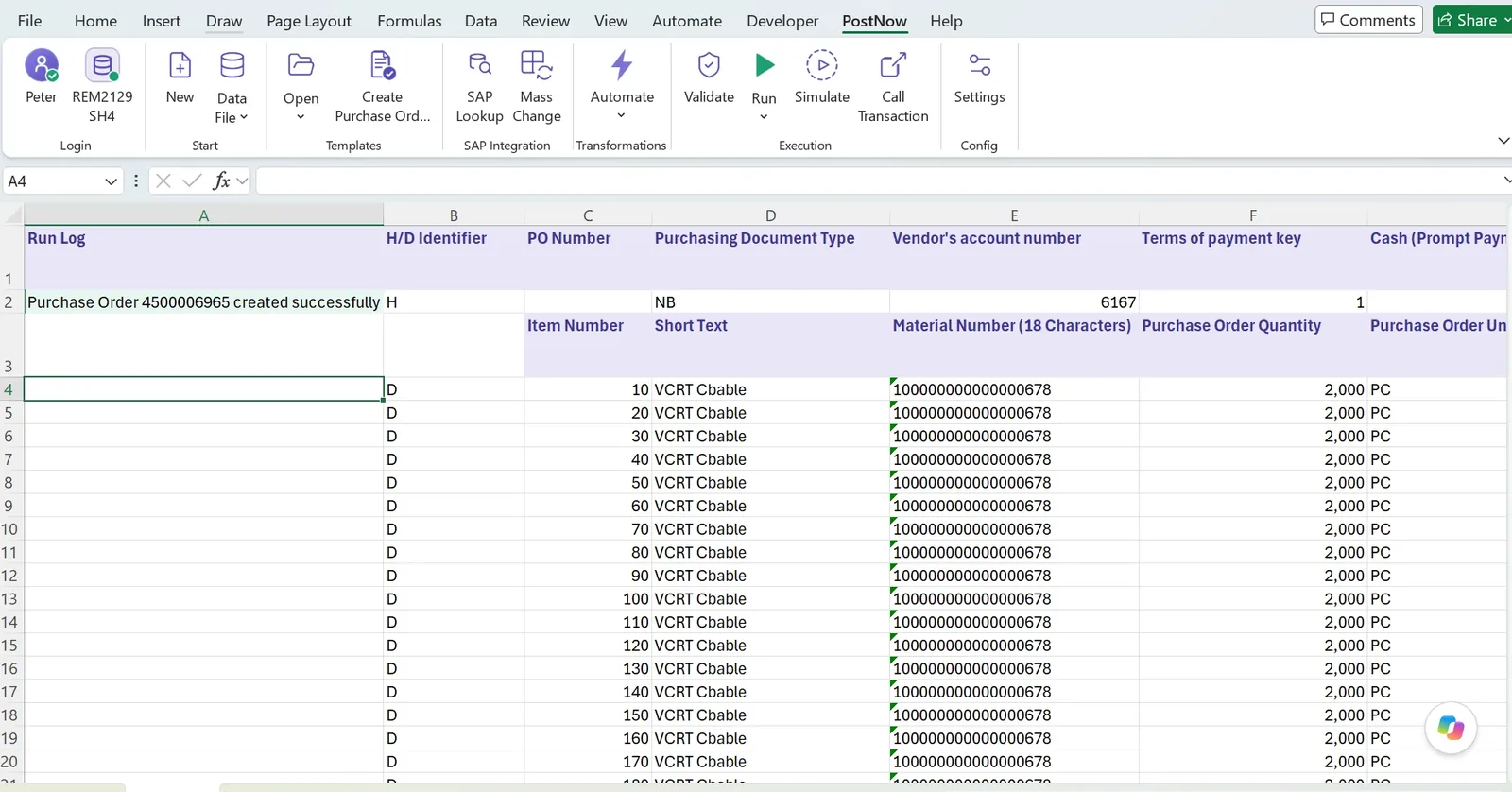
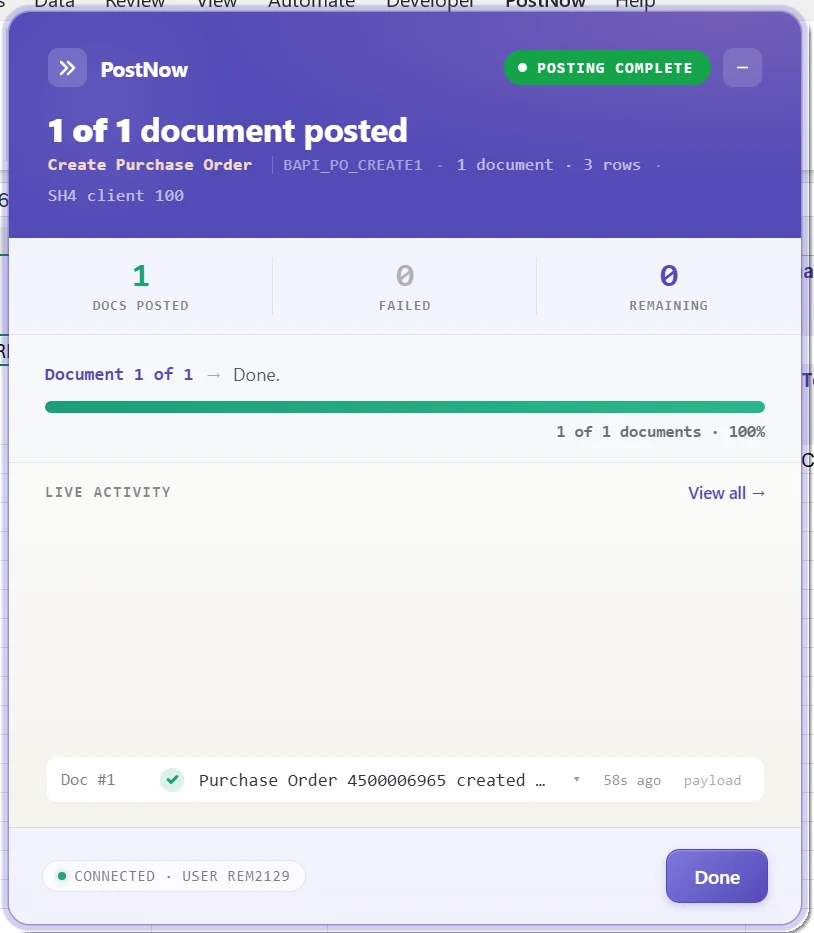
For a successful purchase-order call, the run may return the PO number. For a failed row, the BAPI return table may contain one or more messages. The Excel integration should make both outcomes traceable.
Make BAPI return messages useful to the person fixing the file
SAP return messages are valuable because they are structured, but the wording is not always obvious to the business user preparing the spreadsheet.
A good Excel-to-BAPI process keeps the original SAP message, identifies the affected row or document and presents enough context to make correction possible. PostNow.ai also includes AI Review to explain SAP messages in plainer language without replacing the original response.
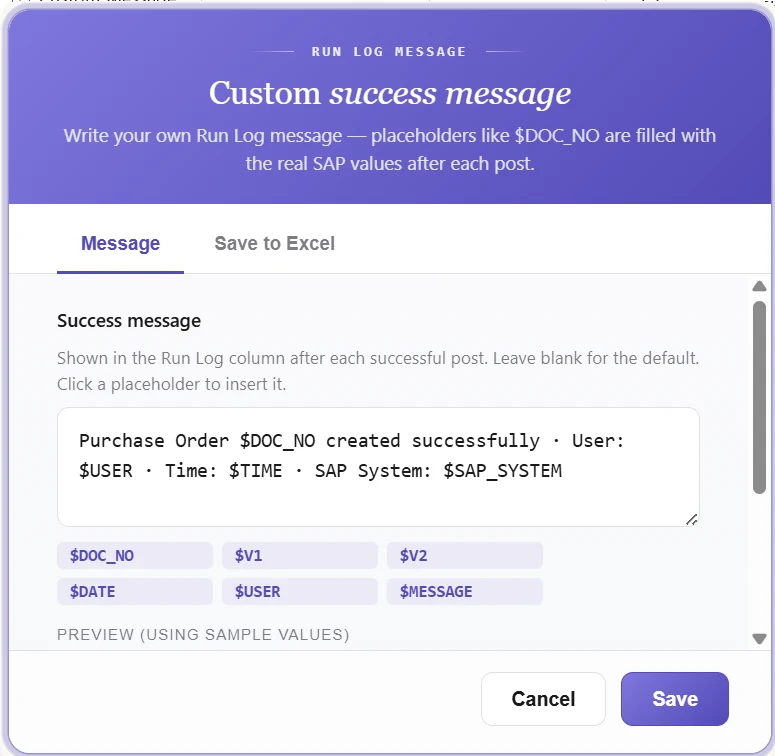
Successful rows benefit from the same idea. The run log can contain the document number, user, timestamp or other values returned by SAP.
Partial failure is normal; double posting is not
Suppose an Excel file represents 500 business documents. SAP accepts 487 and rejects 13.
The wrong recovery strategy is to rerun all 500.
The correct strategy is:
This is where a run-log column becomes more than a convenience. If a document number has already been returned, the template can protect that source record from accidental reposting.
Understand commit behavior
Many BAPI implementations separate the business call from the database commit. This is useful because it lets the caller inspect the return messages before finalizing the transaction.
The exact pattern varies by interface, but the design question is always the same: what counts as success, when is the SAP transaction committed, and how will the caller behave if the connection fails between execution and confirmation?
This is not academic. Poor commit handling is how duplicate postings and ambiguous run states appear.
Example: BAPI_PO_CREATE1 from Excel
Purchase orders are a good example because they expose most of the real design issues in one interface.
An Excel file might contain a header row with vendor, company code and document type, followed by detail rows for materials and quantities. The BAPI expects the corresponding data across header, item and schedule structures.
| Business value | Typical BAPI area | Excel treatment |
|---|---|---|
| Company Code | POHEADER | Header-level column |
| Vendor | POHEADER | Header-level column |
| Document Type | POHEADER | Header-level column |
| Item Number | POITEM | Detail row |
| Material | POITEM | Detail row |
| Quantity | POITEM / schedule data | Detail row |
| PO Number | Return result | Run Log / result column |
The point is not that every purchase-order file must look exactly like this. The point is that the worksheet needs an explicit model for how flat rows become one structured SAP document.
Once that model is saved as a template, the next purchase-order run becomes operational work rather than another development project.
Calling a BAPI from Excel should not bypass SAP security
A BAPI call is still an SAP operation. The integration should connect using an authorized SAP identity and SAP should enforce the relevant permissions.
Excel should not become a parallel security model. If the user is not permitted to create a purchase order or change a master record in SAP, the add-in should not silently grant that capability.
PostNow.ai respects SAP authorizations and uses SAP's application layer. That keeps the control boundary where SAP teams expect it.
ECC and S/4HANA
BAPI-based automation is useful in both ECC and S/4HANA, although the business object and recommended interface can change as the landscape evolves.
S/4HANA introduces structural changes such as the Business Partner model and may offer newer APIs for some scenarios. That does not make every existing BAPI irrelevant, nor does it mean the same interface should be used blindly in both systems.
The durable design principle is to keep the Excel layer separate from the SAP business interface. The workbook and user workflow can remain familiar while the underlying SAP interface is selected for the actual system and object.
BAPI vs BDC when automating from Excel
| Area | BAPI | BDC / transaction recording |
|---|---|---|
| Interface | Structured business interface | Replays transaction screens |
| Screen dependency | Low | Higher |
| Error messages | Structured return messages | Transaction/screen messages |
| Coverage | Only where suitable interface exists | Can cover many transactions without a BAPI |
| Best use | Preferred route where available | Practical fallback |
I would not turn this into an ideological choice. Use the most stable interface SAP provides for the process. A BAPI is usually preferable; a recording is valuable when no suitable BAPI exists.
For a deeper comparison, see BAPI vs BDC in SAP and the BDC recording guide.
BAPI from Excel vs a custom ABAP upload program
Custom ABAP remains the right answer for many specialized requirements. The question is whether every recurring spreadsheet process really needs another custom program that rebuilds the same plumbing.
A typical custom upload repeatedly implements:
- Excel or file parsing
- field mapping
- validation
- BAPI execution
- message handling
- partial-failure recovery
- run logs
- operator instructions
If the business logic is unique, keep the custom logic. If the surrounding Excel-to-SAP infrastructure is the same every time, make that part reusable.
How PostNow.ai handles BAPI automation from Excel
PostNow.ai is designed to make the recurring parts of an Excel-to-BAPI process configurable rather than custom-coded for every use case.
From spreadsheet to SAP business logic
Find the SAP interface, map Excel columns, validate the data, run the BAPI and keep the SAP result against every source document.
Search BAPIs by name, transaction intent or plain language.
Save Excel-to-BAPI field mappings as reusable templates.
Catch spreadsheet and SAP errors before posting.
Return SAP document numbers and messages to Excel.
What to look for in an Excel-to-BAPI tool
| Question | Why it matters |
|---|---|
| Can it discover and inspect BAPIs? | Choosing the interface is part of the work. |
| Can it expose all relevant structures and tables? | Real business documents are not flat. |
| Does it handle X-structures? | Create/change BAPIs often depend on explicit field indicators. |
| Can it model header/detail data? | Multiple Excel rows may belong to one SAP document. |
| Can it validate before post? | Prevents SAP cleanup rather than accelerating it. |
| Does it return results row by row? | Makes failed records correctable and restartable. |
| Can it prevent duplicate reposting? | Critical after partial failures or interrupted runs. |
| Does it respect SAP authorizations? | Excel must not bypass SAP controls. |
| What happens when there is no BAPI? | Determines practical transaction coverage. |
Common mistakes when calling SAP BAPIs from Excel
- Choosing the BAPI by name only. Confirm the business object, operation and supported structures first.
- Ignoring header/detail grouping. Flat rows can create the wrong document boundaries.
- Forgetting X-structures. A supplied value is not always enough for SAP to treat a field as changed.
- Using SAP as the first validator. Catch obvious spreadsheet and reference-data errors before execution.
- Dropping the BAPI messages. The return table is part of the business result, not debug noise.
- Re-running everything after a partial failure. Retry only unprocessed or failed source documents.
- Ignoring commit and retry behavior. Ambiguous transaction state creates duplicates.
- Writing directly to tables because it seems simpler. It bypasses the business logic the BAPI exists to protect.
Frequently asked questions
What is an SAP BAPI?
Can Excel call an SAP BAPI?
Do I need ABAP to call a BAPI from Excel?
Is BAPI better than BDC?
Can one Excel row create one SAP document?
How are SAP BAPI errors returned to Excel?
Can I use BAPI_PO_CREATE1 from Excel?
Can I simulate before posting?
Does PostNow.ai work with ECC and S/4HANA?
Does PostNow.ai write directly to SAP tables?
The bigger picture
Calling an SAP BAPI from Excel is not really about making Excel “control SAP.” It is about removing manual translation from a process where the business data already exists in a spreadsheet and SAP already contains the business rules.
The clean division of responsibility is simple:
Excel prepares and reviews the data. The integration maps and orchestrates it. SAP executes the business transaction.
When that design is reusable, the value compounds. The first BAPI template may save a few hours. The twentieth means the organization no longer needs to rebuild Excel parsing, mapping, validation and result handling for every recurring SAP process.
That is where BAPI automation stops being a clever upload and becomes an operating model.