BAPI vs BDC in SAP
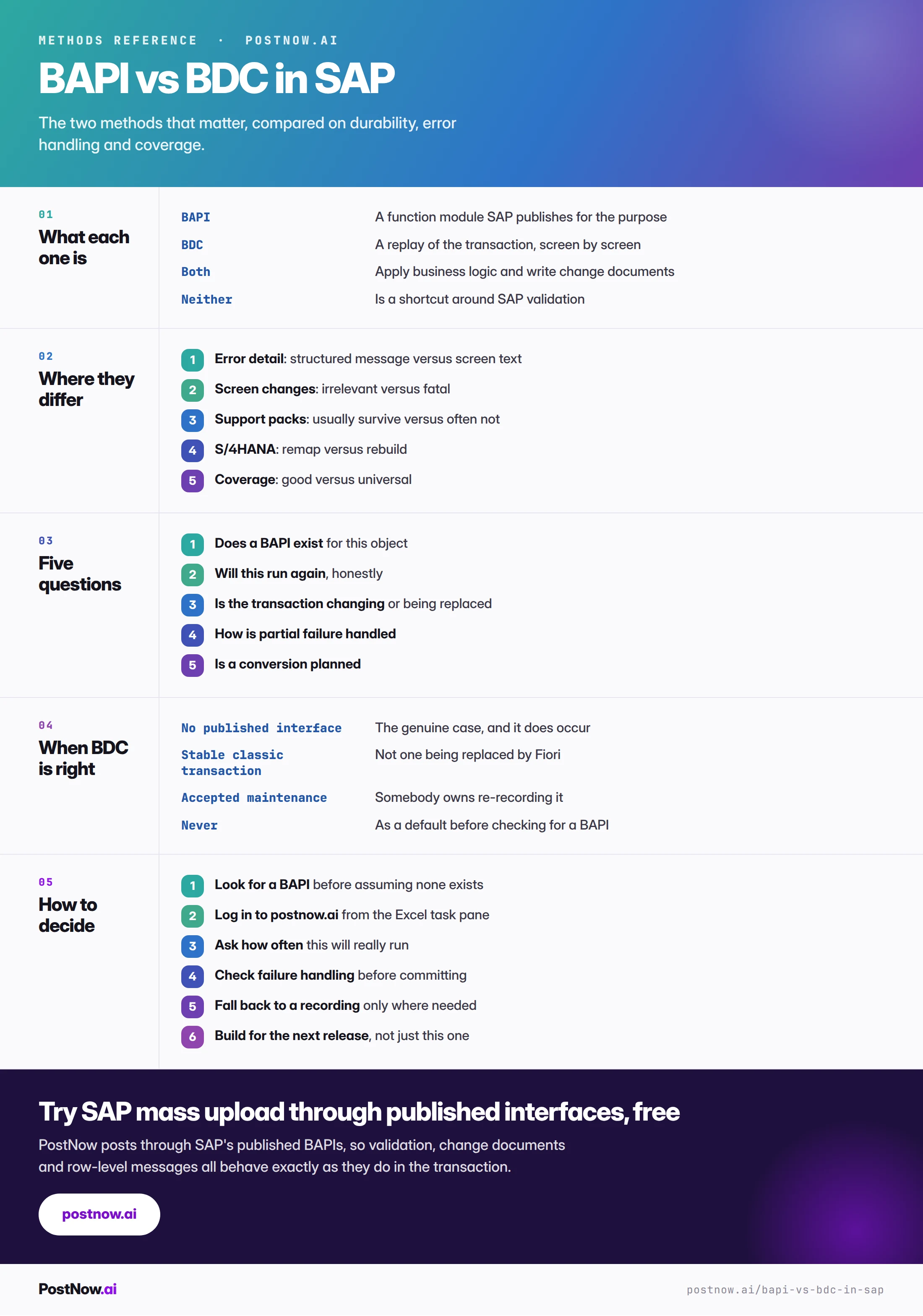
A BAPI is a function module SAP publishes so external systems can create records the same way a transaction does. A BDC recording replays a transaction screen by screen. Both apply SAP's business logic and both write change documents, so neither is a shortcut around validation.
- Neither skips validation. A BAPI applies the checks SAP built into it; a recording applies them because the transaction genuinely runs.
- A BAPI describes intent, a recording describes a path. When the screen changes the path is wrong even though the intent has not changed.
- Error handling is the practical difference. A structured message per row makes a run restartable; screen text at four thousand rows does not.
- BDC wins on coverage alone. Anything on a screen can be recorded, which is the entire reason the method still exists.
- Check before assuming no BAPI exists. Coverage is better than reputation suggests for the objects that carry volume.
BAPI and BDC, defined
A BAPI is a function module SAP publishes so external systems can create or change records the same way a transaction does. A BDC recording replays a transaction screen by screen, filling fields in the sequence a person would. Both are legitimate methods for mass loading, both apply SAP's business logic, and both write change documents.
The comparison matters because these are the only two methods most teams should be choosing between. The methods hub covers the wider field, including LSMW, GUI scripting and direct table writes, and the short version is that two of those are legacy and two should not be used at all.
Neither is a shortcut around validation. That misconception drives a lot of unnecessary anxiety about mass loading. A BAPI applies the same checks the transaction applies because SAP built it to. A recording applies them because the transaction is genuinely running. The difference between them is durability and error handling, not whether the data is checked.
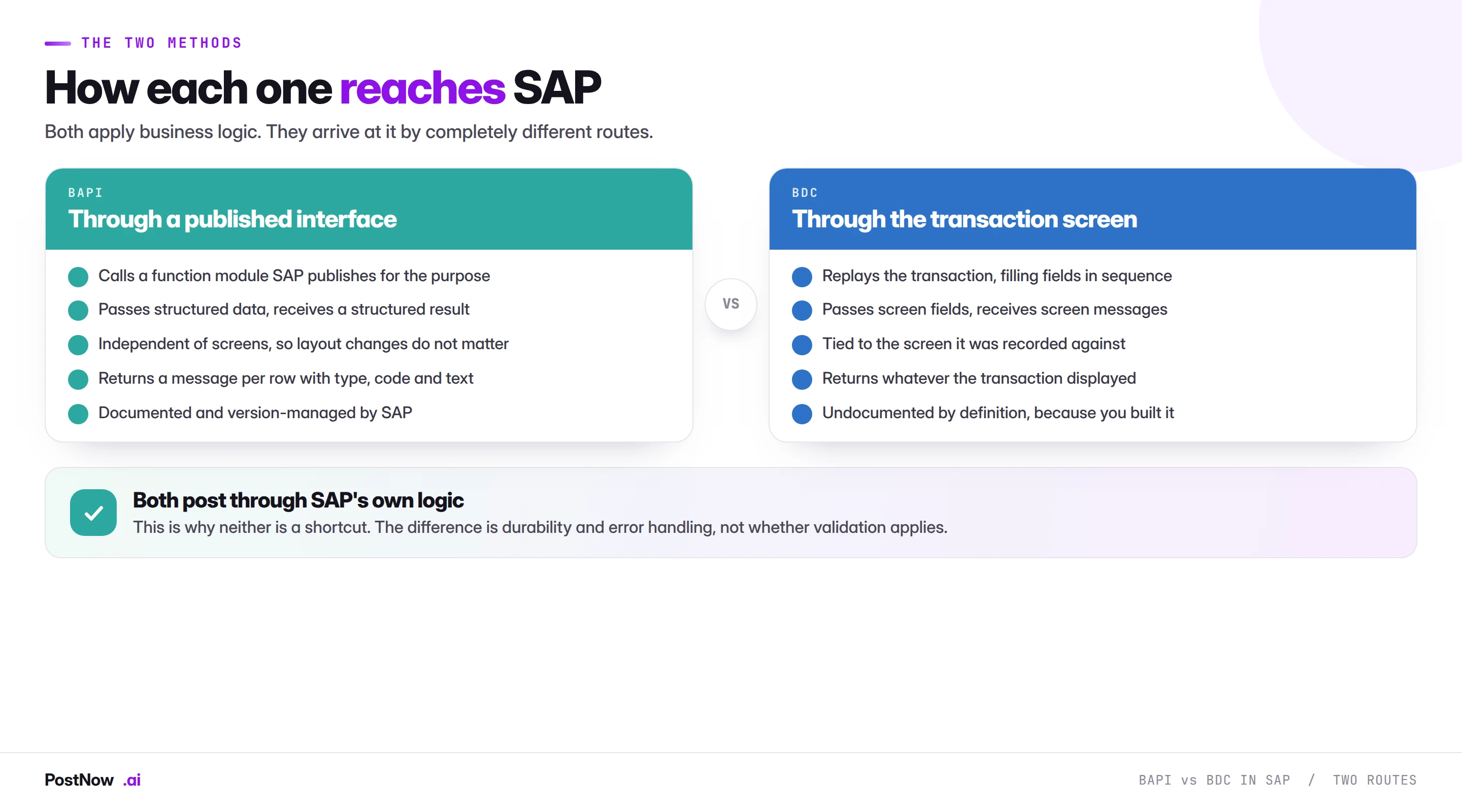
How each one reaches SAP
A BAPI takes structured data and returns a structured result. You pass a set of fields, it validates and posts them, and it returns a table of messages with a type, a code and a text. No screen is involved, which means screen layout, field position and user defaults are all irrelevant.
A recording takes the same data and types it into a screen. The recording holds a sequence of screen numbers, field names and OK codes, captured through SHDB when somebody performed the transaction once. Replaying it fills those fields with values from your file, row after row.
An LSMW batch input recording works the same way, which is why LSMW objects built on recordings are exposed to the same screen changes.
The consequence follows directly. A BAPI describes an intent: create this purchase order with these fields. A recording describes a path: go to this screen, type here, press this. When the path changes, the recording is wrong even though the intent has not changed at all.
The comparison that matters
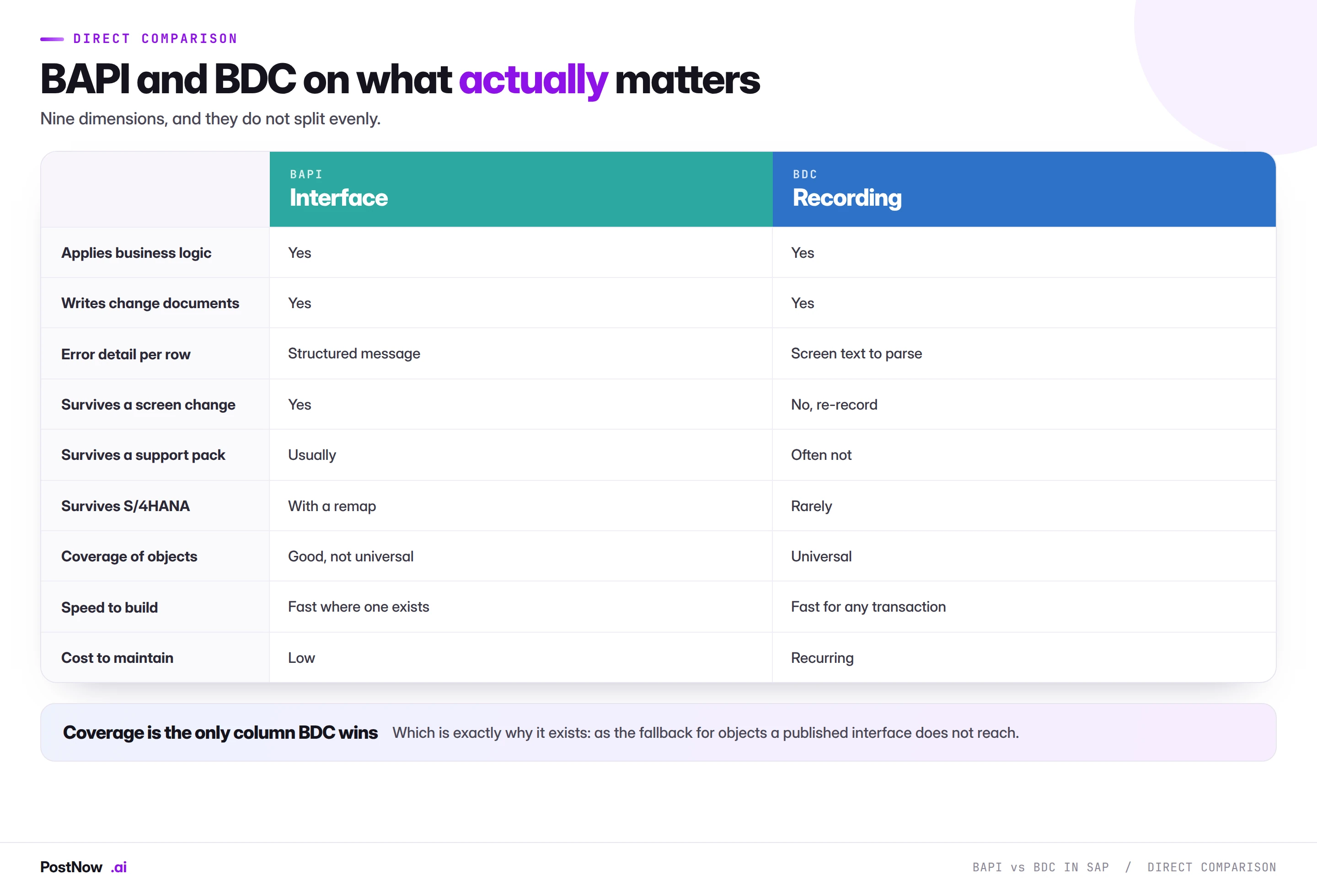
Nine dimensions, and the split is lopsided in a way worth being explicit about.
They tie on the things people worry about. Business logic, change documents, authorisation. Both post through SAP's own processing, so both produce records indistinguishable from manual entry and both leave an audit trail.
The BAPI wins on error handling. A structured message per row tells you exactly which row failed and why, in a form a process can act on. A recording gives you whatever appeared on screen, which has to be parsed and matched back to a source row. At twenty rows this is a minor inconvenience. At four thousand it is the difference between a restartable run and a manual reconciliation.
The BAPI wins on durability. Screen changes, support packs and conversions all break recordings and mostly leave interfaces alone. This is the cost that arrives later, which is why it gets discounted when the method is chosen.
BDC wins on coverage, and only on coverage. Anything you can do on a screen can be recorded. That is genuinely valuable for the objects a published interface does not reach, and it is the entire reason the method still exists.
Checking whether a BAPI exists
The most common expensive mistake in this decision is assuming there is no interface without looking, then building a recording that will need maintaining for years.
Coverage is better than reputation suggests, particularly for the objects that carry real volume. Every transaction covered in this content cluster has one:
BAPI_ACC_DOCUMENT_POSTfor journals, vendor invoices and general postingsBAPI_MATERIAL_SAVEDATAfor material masterBAPI_PO_CREATE1for purchase orders andBAPI_PR_CREATEfor requisitionsBAPI_SALESORDER_CREATEFROMDAT2for sales ordersBAPI_GOODSMVT_CREATEfor goods movements andBAPI_INCOMINGINVOICE_CREATEfor invoicesBAPI_COSTCENTER_CREATEMULTIPLEfor cost centres,HR_INFOTYPE_OPERATIONfor HR infotypes
On S/4HANA the equivalent question is whether a released OData service exists. A released service carries the same commitment a BAPI does, and where one covers your object it is the natural target.
Where genuinely nothing exists, that is the case a recording was designed for. It does occur, particularly for older or highly configured functionality, and choosing a recording there is correct rather than a compromise.
Five questions that settle it
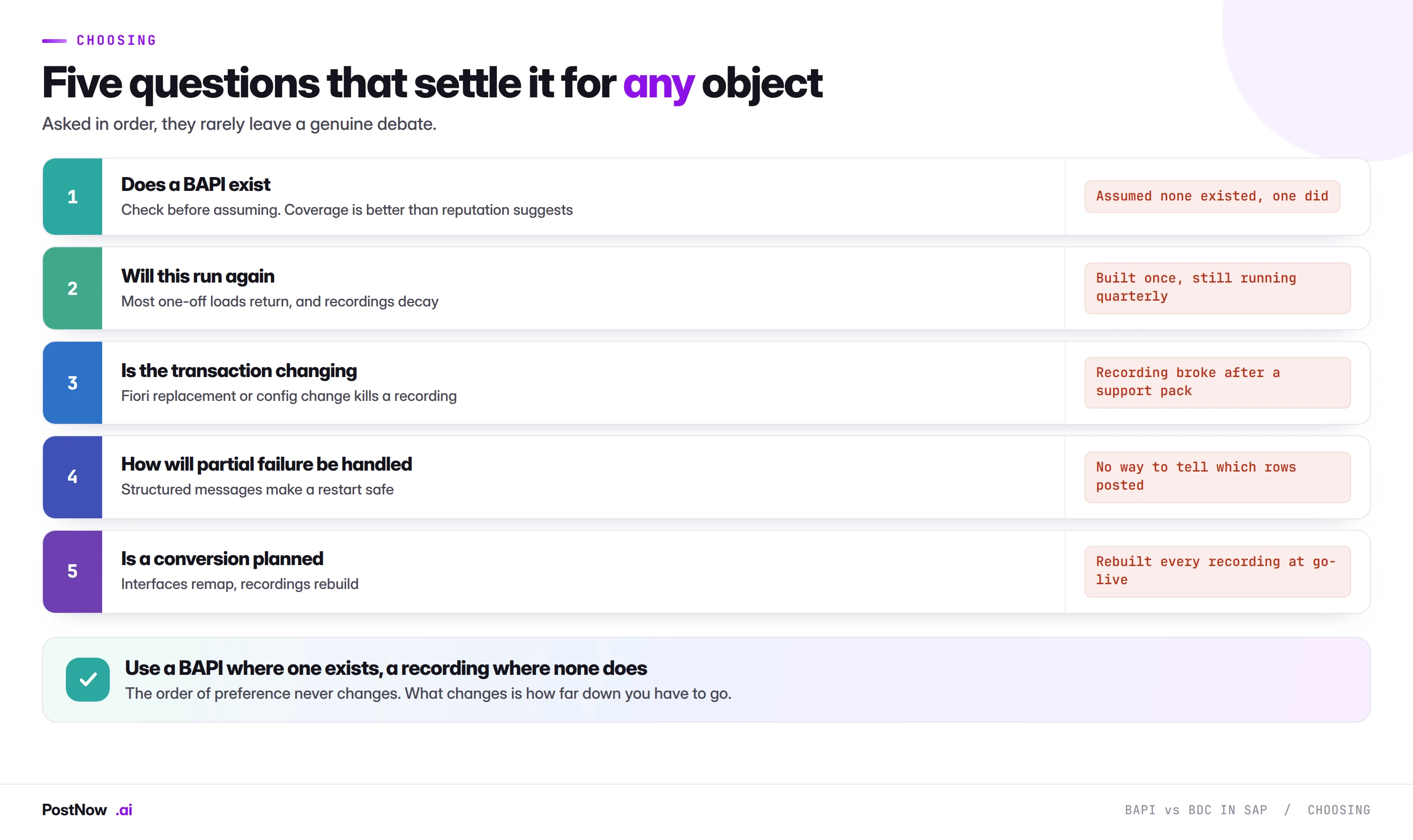
Two of these get asked far less often than they should.
Will this run again, honestly? Most loads described as one-off return. Month-end accruals, price lists, plant extensions and receipting backlogs all come back. Choosing a method that only works once, because this time is special, is the commonest planning error in mass upload work and the one that compounds most.
Is a conversion planned? An S/4HANA project is the moment every recording gets rebuilt. Knowing that in advance changes the calculation: building on an interface now costs about the same as building on a recording and does not have to be repeated.
Where PostNow sits
PostNow posts through published BAPIs
It is the first column of the comparison rather than a third method. PostNow adds a task pane to Excel, signs in with your own credentials, and calls the same function modules listed above, so validation, change documents and row-level messages behave exactly as they do in the transaction.
Nothing to break when a layout or support pack changes.
A structured message per line, so partial failures are recoverable.
Change documents written exactly as manual maintenance would.
A mapping that remaps at conversion rather than rebuilding.
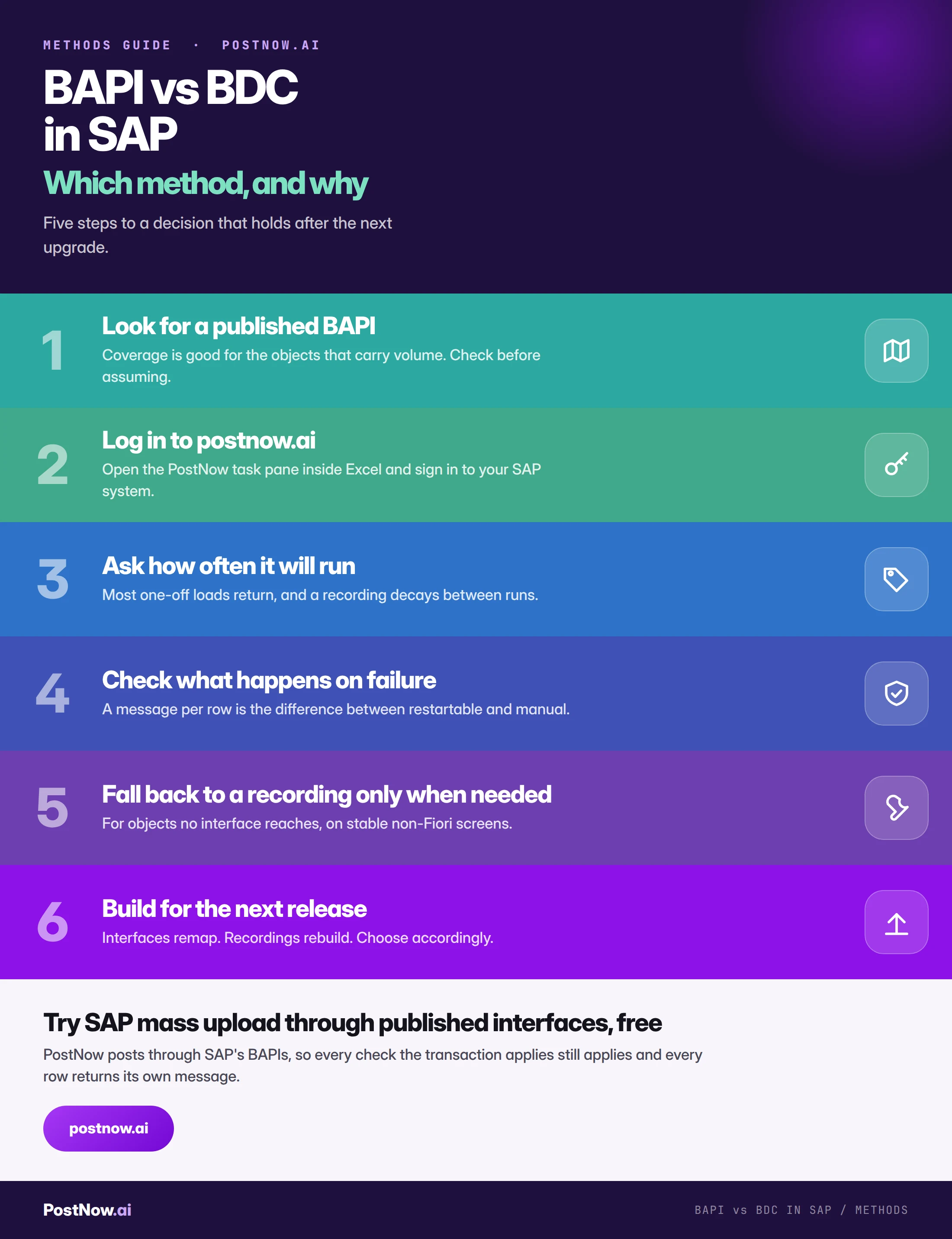
Choosing between them, step by step
Using both in one estate
Most organisations end up with a mix, and that is fine provided the mix is deliberate.
The defensible pattern is interfaces for the high-volume recurring objects that carry the business, plus a recording for the one awkward transaction that has no BAPI. What causes trouble is the accidental version, where the method was chosen by whoever happened to build each load and the estate accumulates several approaches with several sets of skills and several failure modes.
- Standardise on interfaces where coverage allows. One approach, one skill set, one thing to remap at conversion.
- Document the exceptions. Which objects use a recording and why, so the decision gets revisited rather than inherited.
- Review after every support pack. The moment recordings break, and a reasonable moment to check whether an interface has appeared since.
- Name an owner for each recording. They decay, and an unowned one fails at the worst possible time.
Common mistakes
- Assuming no BAPI exists without checking. The most expensive mistake here, because the consequence is years of maintenance.
- Believing a BAPI skips validation. It applies exactly the checks the transaction does.
- Choosing for the first run rather than the tenth. Recordings decay between runs and most loads return.
- Recording a transaction being replaced by Fiori. The work is thrown away at conversion.
- Ignoring error handling until it matters. At four thousand rows it is the whole difference.
- Leaving a recording unowned. It will break, and it will break at month end.
The complete comparison reference
Go deeper
SAP data upload methods
The wider field, including LSMW, GUI scripting and why direct table writes are never acceptable.
Moving off LSMW
What replaces LSMW, by scenario, and how to retire an existing estate.
SAP mass upload
The pillar guide covering validation, error handling and governance.