What is SAP Process Automation?
SAP process automation is the use of tools and workflows to run repetitive SAP business processes with far less manual effort, so they execute the same way every time.
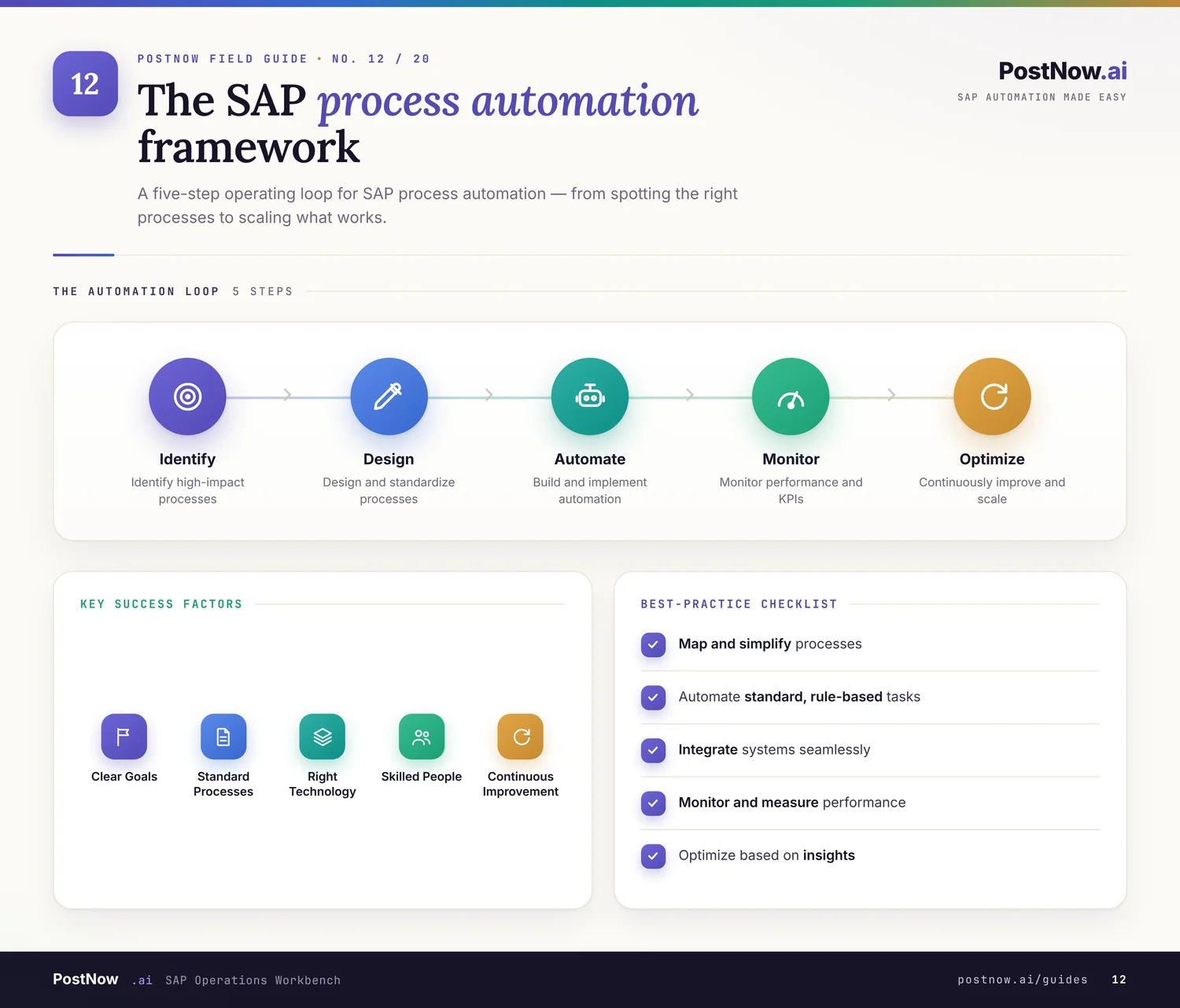
A business process is a sequence of steps that produces a result, such as paying an invoice or fulfilling an order. Automation takes the predictable parts of that sequence and lets software carry them out, while people handle the judgment and the exceptions.
Business value. The payoff is not only speed. Automated processes are more consistent, easier to audit, and simpler to scale, because the rules live in the system rather than in people's heads.
Why organizations automate. Teams reach for automation when a process is high in volume, repeats often, follows clear rules, and matters enough that errors are costly. Most finance, procurement, and supply chain work fits that description.
From manual to automated. Many SAP processes still run as a chain of manual screens and emailed approvals. Automation replaces that chain with defined steps, validation, and routing, turning a fragile routine into a dependable one.
It also helps to separate automation from simply going faster. A process can be quick and still be inconsistent or impossible to audit. The aim of SAP process automation is a process that is fast and dependable and reviewable at the same time, which is what makes it safe to lean on.
For managers, architects, and process owners, the appeal is that automation makes a process legible. Once the steps, rules, and approvals are written into the system, the process can be explained, measured, and improved, instead of living as tribal knowledge that varies with whoever happens to be running it that week.
Why SAP process automation matters
Processes are where an SAP system meets daily work, so improving how they run has an outsized effect on the whole business.
Operational efficiency
Removing repetitive steps frees people to focus on work that needs a human, not a keyboard.
Process consistency
An automated process runs the same way on a quiet Tuesday and a busy month-end alike.
Compliance
Built-in approvals and logs make it far easier to show that rules were followed.
Data quality
Validation inside the process keeps bad data from entering SAP in the first place.
Reduced manual effort
The system handles the routine load, so the team is not the bottleneck.
Business scalability
Volume can grow without a matching growth in headcount or overtime.
Together these benefits explain why automation is rarely just an IT initiative. It changes how finance closes the books, how procurement raises orders, and how operations keeps stock accurate.
It is worth saying that automation is not all or nothing. Most teams begin by automating the busiest steps and leave the rare exceptions to people. That mix, machines on the routine and humans on the judgment, is usually where the biggest gains come from with the least disruption.
There is a strategic angle too. As organizations move to S/4HANA and lean on real-time data, the processes feeding that data have to be dependable. Automation keeps the inputs trustworthy, so the modern reporting and analytics built on top of SAP actually rest on solid ground.
Types of SAP process automation
Automation shows up across every function. The processes differ, but the pattern of standardize, validate, and execute is shared.
Finance automation
- Journal entries posted in bulk with consistent coding and balanced documents.
- Vendor invoices entered and matched without rekeying every line.
- Asset postings handled with the right classes and values.
- Financial data processing that runs to a schedule rather than to spare time.
Procurement automation
- Vendor onboarding that creates supplier records cleanly and quickly.
- Purchase requisitions raised in volume ahead of approval.
- Purchase orders generated from a prepared list.
- Goods movements posted as receipts arrive.
Sales automation
- Customer onboarding that sets up accounts with the right data from the start.
- Sales orders created from a worksheet of lines.
- Pricing updates applied consistently across many records.
Inventory automation
- Inventory adjustments aligned to physical counts.
- Stock movements recorded as they happen.
- Material transactions processed without manual screen work.
Across all four areas, the best candidates for automation share a profile: they happen often, follow predictable rules, and touch SAP data directly. Spotting that profile is a skill in itself, and it is what turns a long wish list into a short, high-value set of processes worth starting with.
A practical way to scope a first project is to follow a single document type end to end, such as a vendor invoice or a sales order, rather than trying to automate a whole function at once. One process, done thoroughly, teaches more and risks less than a broad effort spread thin.
Common SAP process challenges
Before automation, most SAP processes carry the same recurring friction.
- Manual data entry, which is slow and prone to slips.
- Process bottlenecks, where work piles up at a single step or person.
- Inconsistent execution, as different people run the same process in different ways.
- Approval delays, when requests sit in inboxes waiting for a decision.
- Human error, from mistyped values to missed steps.
- Compliance challenges, when there is no clean record of what was done.
None of these challenges is unique to SAP, but SAP raises the stakes, because its processes sit at the center of finance and operations. A bottleneck or a recurring error here does not stay contained; it ripples into reporting, payments, and service. That reach is exactly why the routine steps are worth automating.
SAP process automation lifecycle
Automating a process well follows a clear path. Each step earns the right to the next, so the result is dependable rather than fragile.
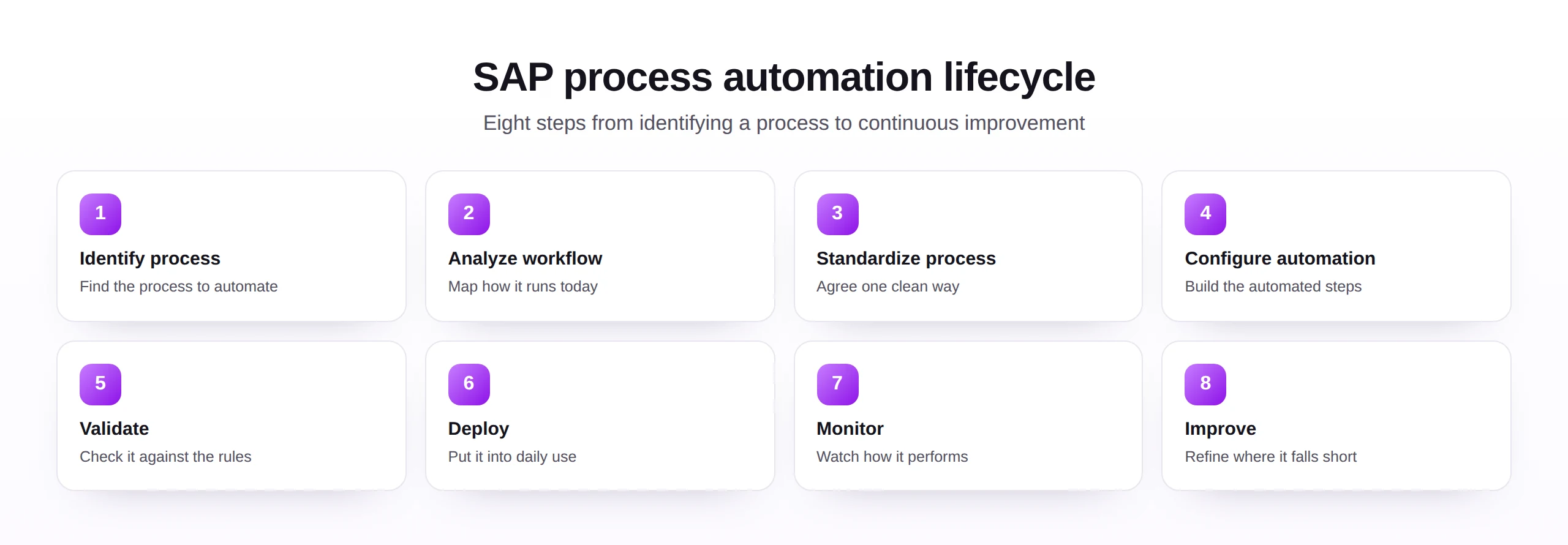
The step that earns the most from patience is standardization. Automating before the process is agreed simply locks in confusion, while a little time spent settling on one clean version pays back many times over once the automation is built on top of it.
SAP workflow automation
Workflow is the part of automation that moves work between people and steps, so nothing waits on someone remembering to act.
Good workflow is mostly invisible when it works. The sign of it is simple: requests move forward on their own, and the only time a person steps in is when their judgment is genuinely needed.
Workflow and data automation are two halves of the same picture. Routing work to the right people matters little if the underlying data is wrong, and clean data matters little if approvals stall in an inbox. The strongest processes pair reliable data handling with dependable workflow.
Exception handling is the quiet test of a workflow. Any design can route the easy cases; the good ones make the unusual case visible and give a person the context to resolve it quickly, instead of letting it vanish into a queue no one watches.
SAP process automation technologies
Several technologies sit behind automation. Most real solutions combine a few, chosen to fit the process and the people who run it.
| Technology | What it does |
|---|---|
| SAP standard tools | Built-in capabilities for workflow and processing, supported directly by SAP. |
| BAPIs | Standard interfaces that post data through the application's own validated logic. |
| APIs | Modern interfaces for connecting SAP to other systems in near real time. |
| Workflow tools | Engines that route tasks, apply rules, and manage approvals. |
| Automation platforms | Tools that combine mapping, validation, execution, and logging in one place. |
| Excel-to-SAP automation | Spreadsheet-driven loads that bring business users into the process safely. |
The right blend depends less on the technology label and more on the outcome: a process that runs reliably, can be governed, and is comfortable for the people who own it. The broader set of SAP automation tools exists to make that blend practical.
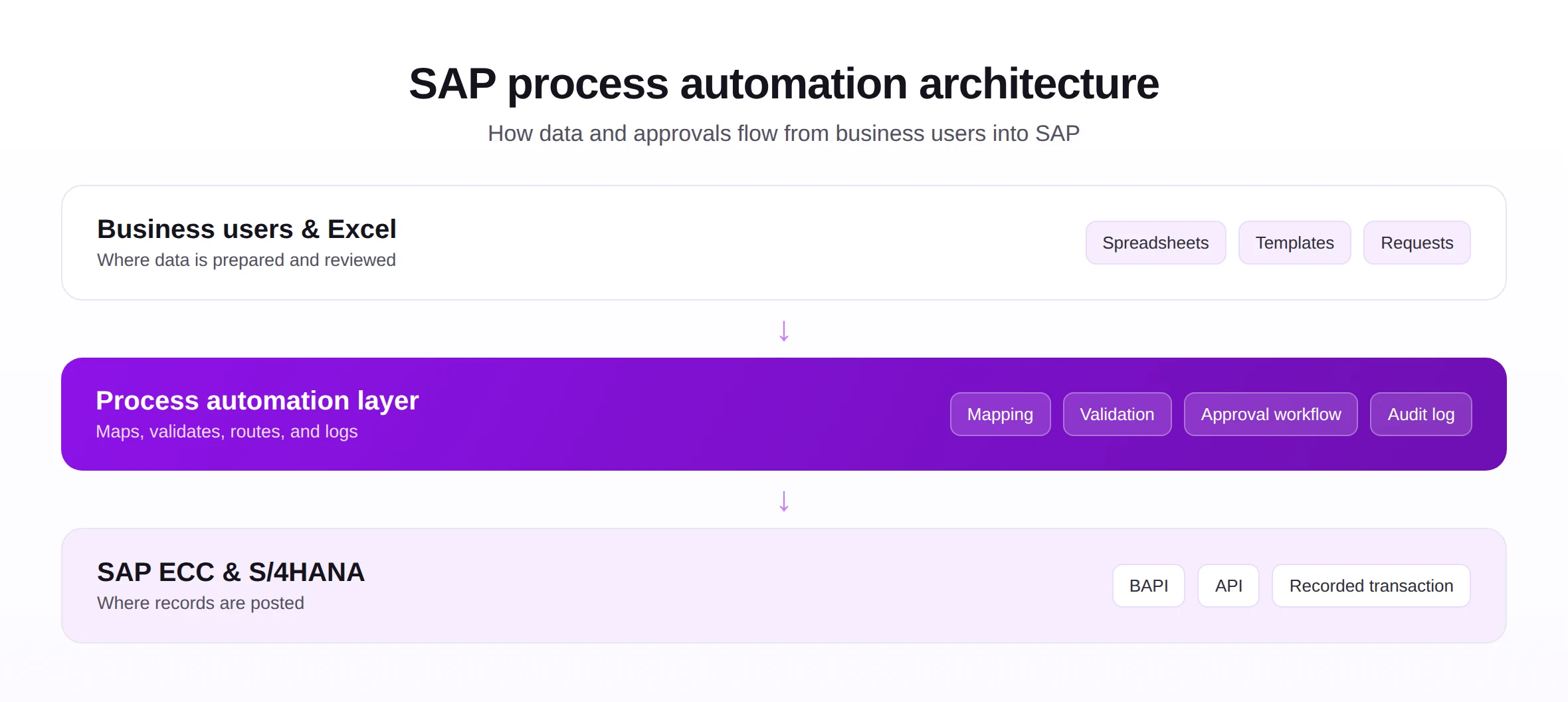
A helpful way to read the architecture is from the user inward. The business team works where it is comfortable, the automation layer does the careful translation and checking, and SAP receives only data that has already been validated. Keeping those layers distinct makes each one easier to trust and to change.
SAP process automation best practices
A few principles keep automation valuable as it spreads across teams.
- Standardize first, so you are not automating several conflicting versions of a process.
- Govern it, with clear ownership and rules on who can change what.
- Manage the change, bringing the people who run the process along with you.
- Validate throughout, checking data and outcomes at each step.
- Monitor in production, so issues surface as signals, not as surprises.
- Earn adoption, by making the automated way easier than the manual one.
The thread running through all of these is trust. People rely on an automated process only when it is consistent, transparent, and clearly better than what it replaced.
Adoption deserves special attention, because it is where good automation quietly fails. If the automated path is slower, more confusing, or less forgiving than the manual one, people will route around it. Designing for the person who has to use it, not just the process on paper, is what makes automation stick.
Monitoring deserves to be built in from the start rather than added after something goes wrong. A few clear signals, such as how many items completed, how many needed a human, and where time was lost, turn a running process into something a team can actively manage.
SAP process automation framework
A simple framework keeps automation balanced, bringing five dimensions together around dependable, governed processes.
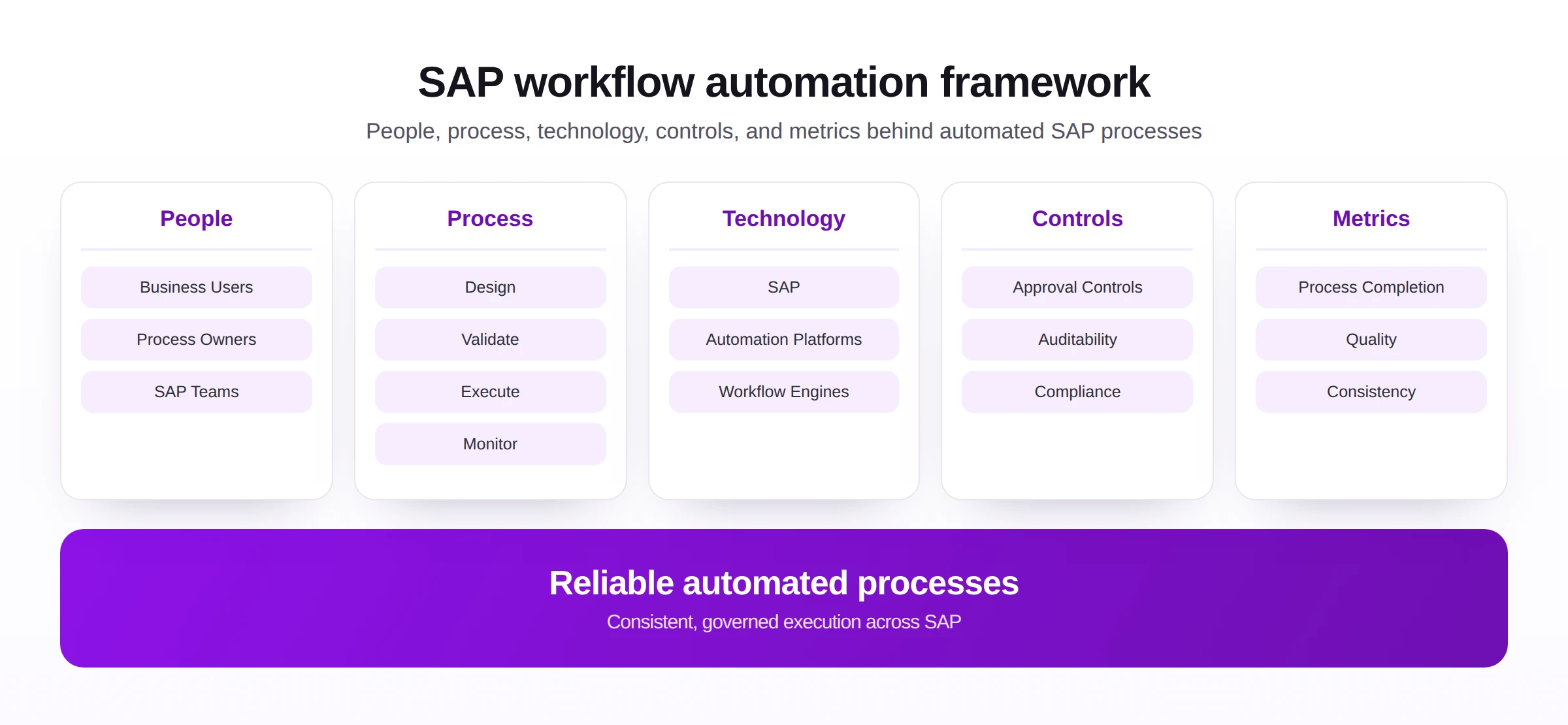
The framework is deliberately balanced, because automation tends to fail at its weakest dimension. Strong technology cannot rescue an unowned process, and tight controls cannot fix a process no one designed properly. Keeping the five dimensions roughly in step is what carries automation from a pilot to a standard way of working.
SAP process automation implementation roadmap
This roadmap turns the framework into an order of work, from spotting opportunities to a process that keeps getting better.
- Identify automation opportunities. Look for high-effort, repetitive, rule-based work.
- Prioritize processes. Start where the value is clear and the risk is manageable.
- Define requirements. Capture the steps, rules, and approvals the process needs.
- Configure automation. Build the steps, validation, and routing.
- Test. Trial the process on safe data and confirm the outcomes.
- Deploy. Roll it out to the team that owns the process.
- Train users. Make sure people understand the new flow and their part in it.
- Monitor and optimize. Track results and improve where the process strains.
The order of the roadmap guards against the most common failure, which is rushing to build before the process is understood. Time spent identifying, prioritizing, and defining is rarely wasted; it is what makes the later configuration and testing go smoothly rather than turning into a cycle of rework.
It also pays to treat the first automated process as a template for the rest. The decisions made about ownership, testing, and monitoring on that first project become the pattern others follow, so getting it right sets the tone for everything that comes after.
Common SAP process automation mistakes
The usual failures are about approach, not technology.
Each one is avoidable. Fix the process before you automate it, agree who owns it, test it properly, bring users with you, and keep an eye on it once it is live.
A simple discipline prevents most of these mistakes: automate a process only after it has been cleaned up, agreed, and given an owner. Automation is an amplifier, so it is worth being sure that what it amplifies is something you actually want more of.
The future of SAP process automation
Automation is moving from fixed scripts toward processes that adapt and improve, while the need for control stays the same.
- AI-assisted automation, suggesting steps and spotting anomalies as a process runs.
- Intelligent workflows, that route and adjust based on context rather than fixed rules alone.
- Process mining, which reveals how processes really behave so the right ones get automated.
- Low-code automation, letting business teams build and change processes with less technical help.
- Enterprise automation platforms, bringing many processes under shared standards and oversight.
The tooling will keep advancing, but the principle holds: automation pays off when it is built on standardized processes, sound data, and clear controls, not when it is bolted onto chaos.
Through all of these shifts, the role of the business user grows rather than shrinks. As routine execution moves to software, people spend more of their time designing processes, judging exceptions, and deciding what good looks like, which is where their expertise matters most.
SAP process automation and Excel-to-SAP automation
For many teams, the practical road into process automation begins in a spreadsheet, because that is where so many processes already start.
The role of spreadsheets. A great deal of SAP work originates as a list in Excel, prepared by the people who know the data. Bringing that step into the process, rather than treating it as a side activity, is often the fastest way to start automating.
Structured templates. A consistent template gives each process a clean, predictable input, which is what makes the rest of the automation reliable.
Data validation. Checking the spreadsheet against SAP before anything posts keeps errors out of the process from the very first step.
Process acceleration. Loading prepared data in bulk, with the same checks every time, removes the slowest and most error-prone part of many processes.
Governance. Done well, spreadsheet-driven steps are not a loophole around control; they carry the same validation, approval, and logging as the rest of the automated process.
This is the bridge from a single upload to a fuller program, connecting Excel to SAP automation with strong master data management and, where a system move is involved, data migration. It covers everyday work from journal entries and vendor invoices to purchase orders and sales orders.
Approached this way, the spreadsheet is not the opposite of process automation; it is often its front door. The same template, validation, and logging that make a single upload safe are the building blocks of a larger, governed process the whole team can rely on.
That front-door role is why so many automation programs begin with the spreadsheet step and grow outward. Once one upload is governed and trusted, extending the same discipline to the next process becomes a small step rather than a fresh project.