
For a detailed, step-by-step reference, see the SAP data migration planning and execution guide.
What is SAP data migration? SAP data migration is the controlled transfer of master data (business partners, materials, GL accounts) and open transactional data (purchase orders, stock, open items, balances) from legacy systems into SAP. Teams cleanse and map the data, load objects in dependency order, rehearse in two or three reconciled mock loads, then repeat the loads at cutover. In S/4HANA, SAP’s standard tool is the Migration Cockpit.
Migration loads usually fail on details: a missing dependency, a lost leading zero or a value SAP rejects only at load time, and each failure costs another mock-load cycle. PostNow.ai loads each object from Excel through a standard BAPI or a recorded transaction, validates and simulates every row first, and writes the SAP document number or error beside it, so every mock load leaves a row-by-row record to reconcile and the same published template runs unchanged at cutover. It fits objects and fields outside SAP’s delivered migration objects, ECC loads, and corrections after go-live.
How SAP data migration works: approaches, tools and steps
PostNow.ai is one tool inside a larger SAP migration process. This is the SAP-standard picture, and where PostNow.ai fits in it.
Transition approach. Moving to S/4HANA follows one of three paths: a new implementation (greenfield), where master data and open items are loaded into a clean system; a system conversion (brownfield), where the existing SAP ERP system is converted and its data comes with it; or a selective data transition, where chosen configuration, master and transactional data are moved, usually as a consulting or service offering.SAP Help
SAP’s standard tool. The SAP S/4HANA Migration Cockpit, opened through the Fiori app Migrate Your Data, loads SAP-delivered migration objects in two ways: through staging tables (filled from migration templates or an ETL tool) or by direct transfer from certain SAP source systems. It also simulates before migrating.SAP Help LSMW still exists in S/4HANA on-premise, but SAP Note 2287723 states that using it to load S/4HANA is not recommended and at the customer’s own responsibility.SAP Note 2287723
| Step | What happens in an SAP project | Where PostNow.ai fits |
|---|---|---|
| 1. Scope and cleanse | Decide which objects and how much history move; profile, de-duplicate and cleanse at source | Duplicate vendor and customer reports and Validate surface issues; cleansing decisions stay with the project team |
| 2. Map | Map legacy fields and values to SAP fields (in the Migration Cockpit: its mapping tasks) | Mapping AI and field rules per template |
| 3. Load in dependency order | Configuration first, then master data, then open items and balances | One template per object via BAPI or recording; load order below |
| 4. Mock loads | Two or three full rehearsals in a test client, fixing errors between runs | Published run-only templates, Validate, Simulate, Run Log, Retry Failed |
| 5. Reconcile | Compare counts and balances between source and SAP; business sign-off | Run Log plus Report Library and query builder reads |
| 6. Cutover | Timed production loads during the system freeze, then go-live | Same templates, started by an operator on their own computer; no scheduling |
Where the Migration Cockpit fits better: standard objects into a new S/4HANA system, direct transfer from an SAP ERP source, and S/4HANA Cloud, public edition, where it is the tool provided for data migration. PostNow.ai fits objects or fields outside the delivered list, ECC targets, open items that need grouping rules, and loads after go-live.
How PostNow.ai handles SAP data migration
PostNow.ai turns each migration object into an Excel template that a designer builds once, operators rehearse in every mock load, and the cutover team runs unchanged. The steps are the same for a new S/4HANA implementation, an ECC-to-S/4HANA move or a consolidation.
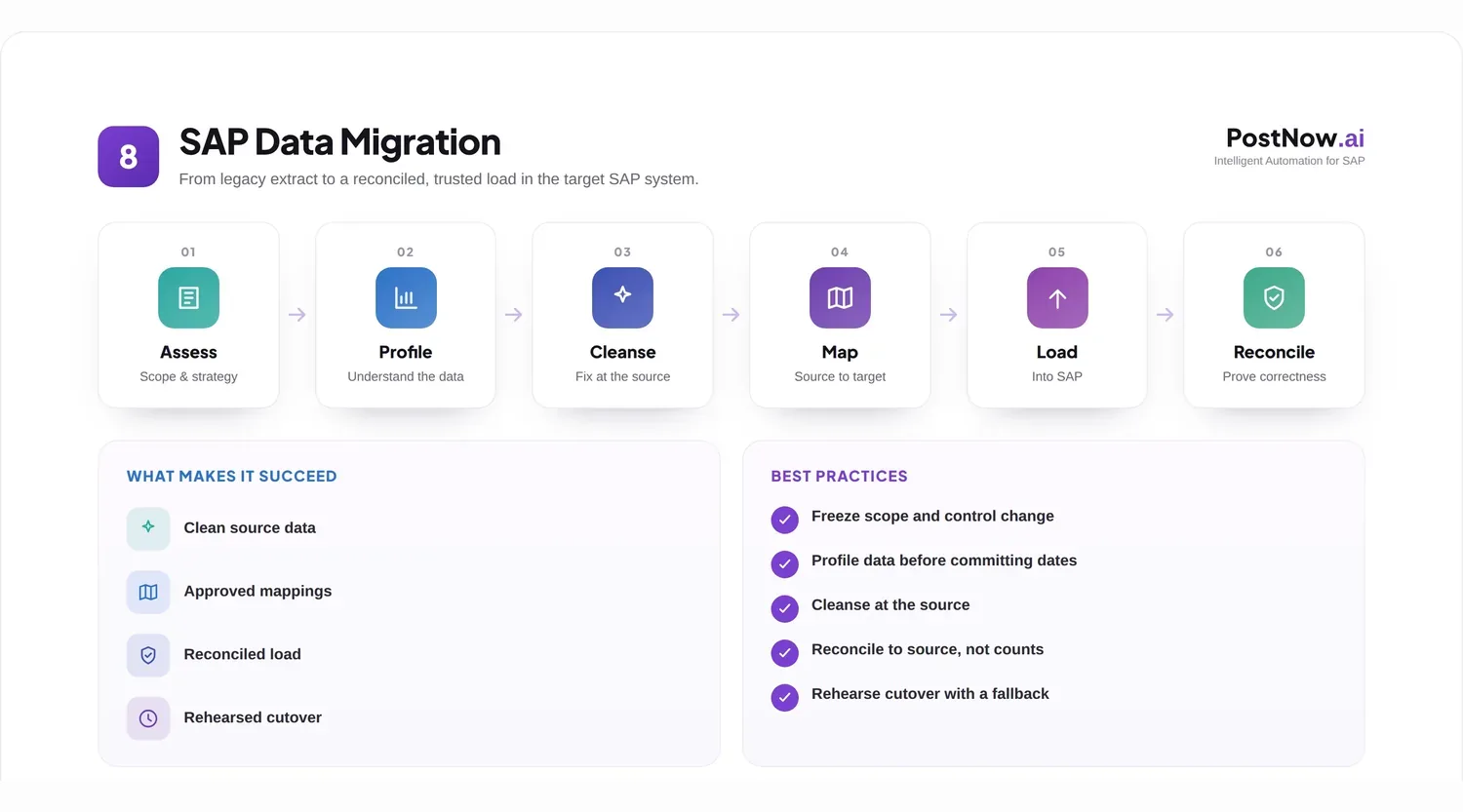
- Pick the object and its posting method. Start from one of the 75 free SAP Excel upload templates, each mapped to its BAPI, or build your own from any BAPI or a transaction recorded through SHDB. Object guides: materials (MM01), vendors (XK01), open items and balances (FB01), open purchase orders (ME21N).
- Map the legacy extract once. Drop a sample legacy file onto Mapping AI: it matches columns exact, then fuzzy, then with AI, using only headers and BAPI field metadata, never row values, and you preview before applying.
- Publish it. The designer publishes a self-contained, run-only workbook; operators get a run-only ribbon, so the template that passed mock load 1 is the one used at cutover.
- Validate, then Simulate. Validate checks the sheet offline and can confirm referenced master data exists; Simulate lets SAP check each row without keeping anything.
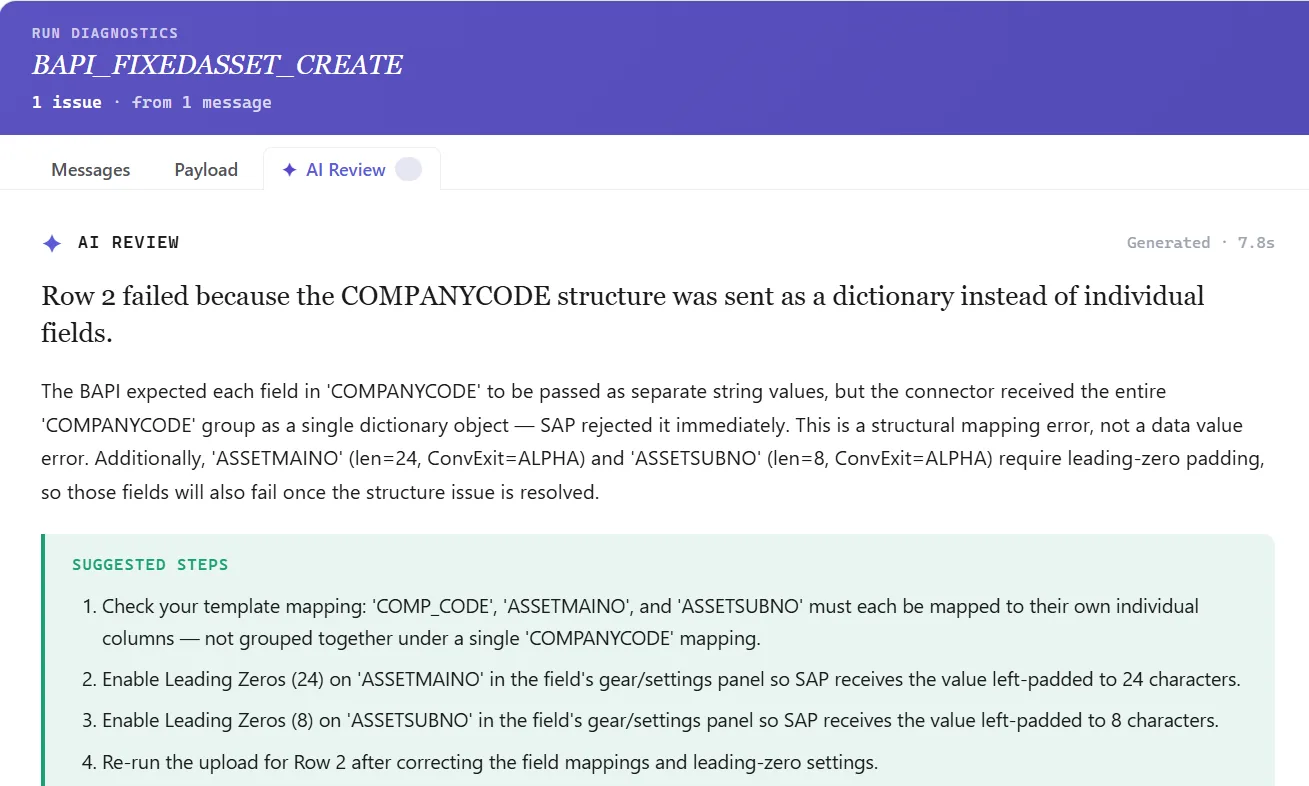
- Run and read the Run Log. Each row gets its SAP document number or error written beside it; AI Review explains failures and Retry Failed re-posts only ERROR rows.
- Reconcile in Excel. Pull loaded records back with the Report Library and compare counts with the source.
Clean data fails less at cutover: the SAP data quality best practices guide sets measurable targets per object, SAP master data management covers keeping records clean after go-live, and SAP master data migration goes deeper on the tables behind each master object.
SAP migration load order: objects, BAPIs and dependencies
PostNow.ai loads one object per template, so the table below is also the order your templates run in, mock load and cutover alike. Each object needs the rows above it to exist in SAP already.
| # | Object | SAP transaction / BAPI | Depends on | PostNow.ai mode |
|---|---|---|---|---|
| 1 | GL accounts | FS00 | Chart of accounts and company code configuration | Recorded transaction |
| 2 | Profit centres | KE51 / BAPI_PROFITCENTER_CREATE | Controlling area, profit centre hierarchy | BAPI |
| 3 | Cost centres | KS01 / BAPI_COSTCENTER_CREATEMULTIPLE | Controlling area, standard hierarchy, profit centres | BAPI |
| 4 | Vendors and customers | BP in S/4HANA (BAPI_BUPA_CREATE_FROM_DATA creates the business partner; roles and company code data are further steps); XK01 / XD01 in ECC | Reconciliation GL accounts, payment terms | BAPI or recorded transaction |
| 5 | Materials | MM01 / BAPI_MATERIAL_SAVEDATA | Plants, material types, valuation configuration | BAPI |
| 6 | Open purchase orders | ME21N / BAPI_PO_CREATE1 | Vendors, materials, cost centres for account-assigned items | BAPI, header/detail |
| 7 | Stock opening balances | MIGO, movement type 561 (initial entry of stock balances)SAP Help / BAPI_GOODSMVT_CREATE | Materials, plants, storage locations | BAPI |
| 8 | Open AP and AR items | F-43, F-22 or FB01 / BAPI_ACC_DOCUMENT_POST | Vendors, customers, GL accounts, migration offset account | BAPI or recorded transaction, header/detail or flat rows |
| 9 | GL opening balances | FB50 or FB01 / BAPI_ACC_DOCUMENT_POST | All of the above posted, so the offset account can be checked | BAPI, or recorded FB50 with Simulate |
In S/4HANA, the Business Partner is the leading object for customer and supplier master data, and XK01 and XD01 lead to transaction BP, so an XK01 or XD01 recording made in ECC will not carry over.SAP Help Record BP or map the BAPI; with BAPI_BUPA_CREATE_FROM_DATA, the supplier or customer role and the company code, purchasing or sales data are added in further steps, so plan BP as more than one load. In S/4HANA, the FI documents posted in steps 8 and 9 land in the universal journal (table ACDOCA). And an open item whose vendor failed in step 4 fails again in step 8; PostNow.ai's Validate existence check finds those rows before the run.
Free Excel templates
Download the templates for these objects
Each workbook is mapped to its SAP BAPI, with required fields marked and an About, Field Guide and BAPI Mapping sheet. Free, no signup.
BAPI or recorded transaction: choosing a load method per object
PostNow.ai gives every template one of two posting modes, and the right choice depends on the object rather than on preference.
- Use a BAPI when one exists for the object, especially for documents with many lines. PostNow.ai commits only when SAP returns no E or A message, fills X-structures such as
POITEMXfrom the DDIC shape (ambiguous cases go to a Review X-pairs dialog), and supportsEXTENSIONINand Z-fields. - Use a recorded transaction when no suitable BAPI exists or the field only lives on a screen. It posts by CALL TRANSACTION, so SAP's screen validation applies, and PostNow.ai flags message 00 349 ("Field does not exist on screen"), which otherwise drops a value silently. Debug runs it in the foreground in SAP GUI.
- Know the hard limits. MIRO cannot be posted by batch input at all, so invoice re-entry goes through
BAPI_INCOMINGINVOICE_CREATE(MIRO upload). Multi-line purchase orders go throughBAPI_PO_CREATE1, not an ME21N recording. - Find the BAPI and its fields faster. Find with AI turns a plain-English need into ranked suggestions, for example BP to
BAPI_BUPA_CREATE_FROM_DATA. The reference viewer holds 23 read-to-create field mappings (purchase order, MIRO invoice,BAPI_ACC_DOCUMENT_POST, material, BP, cost centre, asset, BOM and more), and Copy from SAP prefills a template from a document you created by hand in the mock client.
Open items: turning spreadsheet rows into SAP documents
PostNow.ai offers two ways to group rows into documents, and open items are where the choice matters most, because one legacy item usually becomes a document with a vendor or customer line plus an offset line.
Header/detail. A marker column labels one header row and its detail rows, posted as one document; AutoMap H/D creates the columns. Use it when the extract already separates headers from lines.
Flat rows. No marker column; a split column decides where a new document starts: on value, on change, on change ignoring blanks, or on blank. For a legacy AP extract with the legacy document number on every line, split on change of that number, and sort by it first, or one legacy document breaks into several.
Catching errors before the load: field rules, Validate and Simulate
PostNow.ai checks a migration file in three layers before anything is kept in SAP: field rules applied as values are read, Validate across the whole sheet, and Simulate against SAP itself.
- Field rules. Per field, in order: trim, default value, leading zeros to a target length (vendor
100087becomes0000100087), uppercase. Each date field has its own format (DD.MM.YYYY, MM/DD/YYYY, YYYYMMDD, Excel serial and more), which matters when several legacy extracts are merged. - Value help and allow-lists. A field can offer SAP lookup (F4 from the check table) or a custom list; Restrict makes the list a hard allow-list checked at Validate, for example only the company codes or payment terms in this wave.
- Validate. Checks required fields, type, length, invalid characters, date format, decimals and allowed values, and optionally whether referenced master data exists in SAP (does this vendor, this cost centre exist?). Error cells turn coral and errors export to CSV for the data owners.
- Simulate. In BAPI mode the BAPI is called and always rolled back. For recorded transactions the verdict has three states: would post, review (warnings only, the row is not failed), would not post. With a simulate OK-code, such as
=BSfor FB50 and other FI postings that support one, SAP runs its full document check including balance; without one, only the screens are checked.
From mock load 1 to cutover with the same template
PostNow.ai is built so the cutover is the fourth run of a template, not its first. What changes between mock loads is the data and, through the designer, the published template, never an operator's copy.
- Pilot a slice. Run scope takes a start and end row, so the first 20 rows post first; clicking a written-back document number opens its display transaction (FB03, MM03, XK03, ME23N and others).
- Retry only what failed. Retry Failed re-posts only rows whose Run Log starts with ERROR, never posted ones.
- Plan for Stop. Stop cancels a run, but documents already posted stay in SAP; there is no rollback and no undo of postings. If a cutover run is stopped, the Run Log shows the last posted row: restart with the start row set after it, never re-run the whole sheet, and reverse anything wrong with SAP's own reversal transactions.
- Chain dependent steps. A chain runs several BAPI templates per row, passing the document number through a column (create, then change or release); each step runs on previous success, always, or on failure.
- Gate the sensitive loads. If an approval policy covers a template, such as opening balances, Run is blocked until it is approved. The approval is tied to a fingerprint of the data, so any edit afterwards invalidates it, and the person who submitted cannot approve.
- Keep the evidence. Save the Run Log workbook from each mock load; every run's per-document outcome (transaction, template, system, client, user, result, document number) is also recorded centrally in the admin portal.
PostNow.ai runs on the operator's own computer under their own SAP login, started by that person; it does not schedule loads or run them unattended. Plan who runs each object, on which computer, inside the cutover window.
Worked example: mock load 2 of 3
PostNow.ai templates at work in an S/4HANA project, from mock load to cutover.
The team loads into the quality client in the order of the load-order table. Mock load 1 had already fixed the leading-zero and date-format rules. Mock load 2 results:
| Object | Rows | Caught by | What was wrong | Fix before mock 3 |
|---|---|---|---|---|
| Materials | 4,800 | Validate: 162 rows | 121 missing material group; 41 legacy unit "PCS" not in the base-unit allow-list | Material group added at source; unit conversion added to the extract |
| Materials | Run: 7 rows | Valuation class not allowed for the material type | Valuation class corrected; Retry Failed | |
| Vendors (BP) | 900 | Duplicate vendors report on mock 1 data: 13 pairs | Duplicate vendors from two legacy systems | Merged at source; surviving numbers kept in a mapping table |
| Vendors (BP) | Validate: 9 rows | Payment terms not in the allow-list for this company code | Payment terms mapped to target values | |
| Open AP items | 2,300 | Existence check: 64 rows | Items still pointing at the 13 merged vendors | Vendor numbers replaced from the mapping table |
| Open AP items | Simulate: 12 documents | 9 out of balance by rounding in the currency conversion; 3 in a posting period not open in the quality client | Rounding fixed in the extract; period opened (OB52) |
All 2,300 open items then posted and were reconciled against the AP open items report. Entry criteria for mock 3: zero Validate errors and a fully green Simulate on every object.
Reconciling loaded data against the source
PostNow.ai gives you two reconciliation sources in Excel: the Run Log in the load workbook, and SAP data read back through the Report Library or the query builder.
- Count three numbers per object: rows in the source extract, rows with a document number in the Run Log, and records found in SAP.
- Read SAP back with ready reports. The Report Library has 82 pre-built reports that operators can run, including the material master report, the vendor master report, AP open items and aging, AR open items and the trial balance. Aging buckets are derived from a key date in Excel, not computed by the tool.
- Find partial loads with the query builder. Designers can join tables and use the "has no matching record" filter, for example materials in MARA with no plant record in MARC.
SAP data migration tools compared
PostNow.ai is one of four common ways to load data into SAP. They do not integrate with each other; projects often use more than one, object by object.
| Tool | Targets | How it loads | Fits best | Watch out for |
|---|---|---|---|---|
| PostNow.ai (Excel add-in) | ECC and S/4HANA | Excel templates mapped to any BAPI or a recorded transaction; Validate, Simulate, per-row Run Log | Objects without a standard migration object, open items with grouping rules, repeated mock loads run by business teams, post-go-live loads and corrections | Runs on a user's computer, started by the user; no scheduling; a stopped run is not rolled back |
| SAP S/4HANA Migration Cockpit | S/4HANA only | SAP-delivered migration objects, loaded from files or staging tables, or transferred directly from certain SAP source systemsSAP Help | Initial load of standard objects into a new S/4HANA system | Objects outside the delivered list, or extra fields, need the Migration Object Modeler or another method |
| LSMW | ECC; still present in S/4HANA on-premise | Recordings, batch input, IDocs or BAPIs | Existing ECC loads that already work | SAP Note 2287723SAP Note: loading S/4HANA with LSMW is not recommended and at the customer's own responsibility; recordings break where transactions changed, such as vendor and customer to BP |
| Custom ABAP programs | Any SAP system | Developer-written programs calling BAPIs or batch input | Complex transformations owned by IT | A development and transport cycle for every change; business users cannot adjust it |
Teams moving off LSMW can compare options in the LSMW alternative guide.
Cutover checklist for SAP data loads
PostNow.ai users can work through this list per object in the cutover window; each line maps to something checked in the template or the Run Log.
- Freeze the templates. Use the version that passed the last mock load; no republishing.
- Set permissions. Operators have run and simulate rights only; the designer can hide Debug.
- Complete approvals. Opening balances and other gated templates are approved on the final data; no edits after approval.
- Open posting periods and confirm number ranges in the production client.
- Follow the load order. Do not start an object until the one it depends on is reconciled.
- Validate with the existence check against production, then Simulate; zero red rows before Run.
- Pilot the first rows with run scope, open two documents through their links, then run the rest.
- If a run stops, resume from the row after the last posted one.
- Reconcile and sign off with the source counts, Run Log counts and Report Library reads; save each Run Log workbook.
After go-live: corrections and ongoing loads
PostNow.ai templates stay useful after cutover: the same template posts new records, and SAP Mass Change handles corrections to migrated ones.
Mass Change queries SAP records into the sheet, you edit them, and only the changed rows post. It runs up to 100 rows by default, asks for confirmation above 500, and works on flat templates only, not header/detail. Ongoing data quality is covered in SAP master data management.