SAP Mass GL Account Creation with FS00
SAP mass GL account creation is the practice of creating many general ledger accounts in one controlled run from a file, instead of maintaining each through FS00. GL accounts are the master data underneath every finance posting, and they have the same two-segment structure as a vendor master record. Good SAP GL account automation is therefore as much about the chart of accounts as about the upload.
- An account needs both segments. Chart of accounts data is global; company code data is what makes it postable in that entity.
- Without the company code segment it rejects every posting. The account exists, validates and appears in searches, which makes the failure confusing.
- The account group fixes the number range. Getting it wrong means deletion and recreation, only possible before anything posts.
- Three settings are effectively permanent. Open item management, line item display and reconciliation type all resist change once a balance exists.
- Extending to a new company code is not the same as creating. Mixing the two produces contradictory errors.
What SAP mass GL account creation means
SAP mass GL account creation is the practice of creating many general ledger accounts in one controlled run from a structured file, instead of maintaining each through FS00. A GL account is the master data underneath every finance posting in this cluster: the journals, the vendor invoices, the billing documents and the accounting side of every goods movement all post to accounts that have to exist first.
It has the same two-segment structure as a vendor, and the same failure mode: an account created in the chart but not in the company code exists, appears in searches, and rejects every posting.
Two segments, global and local
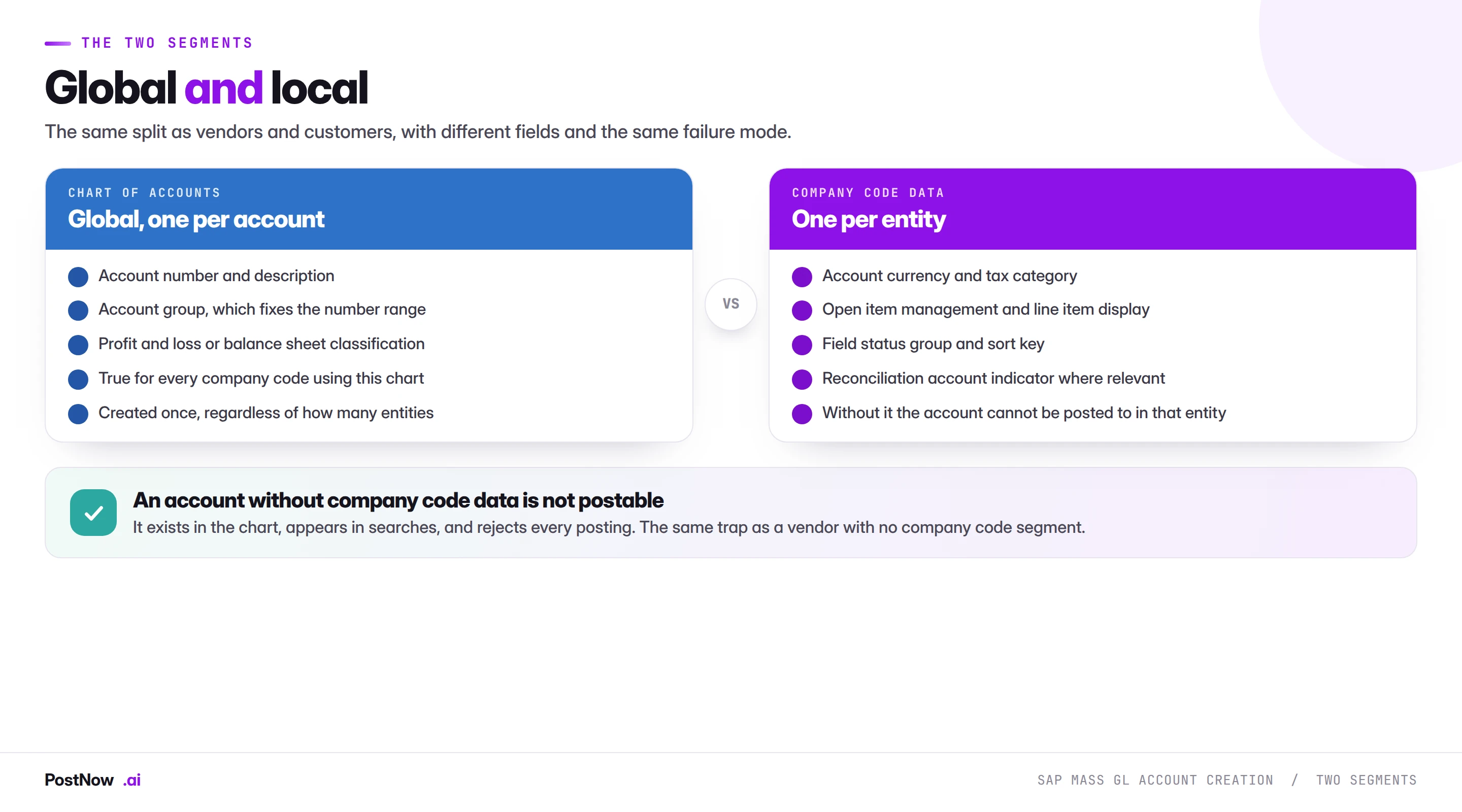
Chart of accounts data is global. The account number, the description, the account group and whether the account is a profit and loss or balance sheet item. Created once, true for every company code using that chart.
Company code data is per entity. Account currency, tax category, open item management, line item display, field status group and sort key. This is what makes the account postable in that company code.
The row count follows directly: one row per account in the chart, plus one row per account per company code. A file of four hundred accounts across three company codes is four hundred chart rows and twelve hundred company code rows, which is the same organisational level arithmetic the master data bridge describes for every object.
The account group decides more than it looks
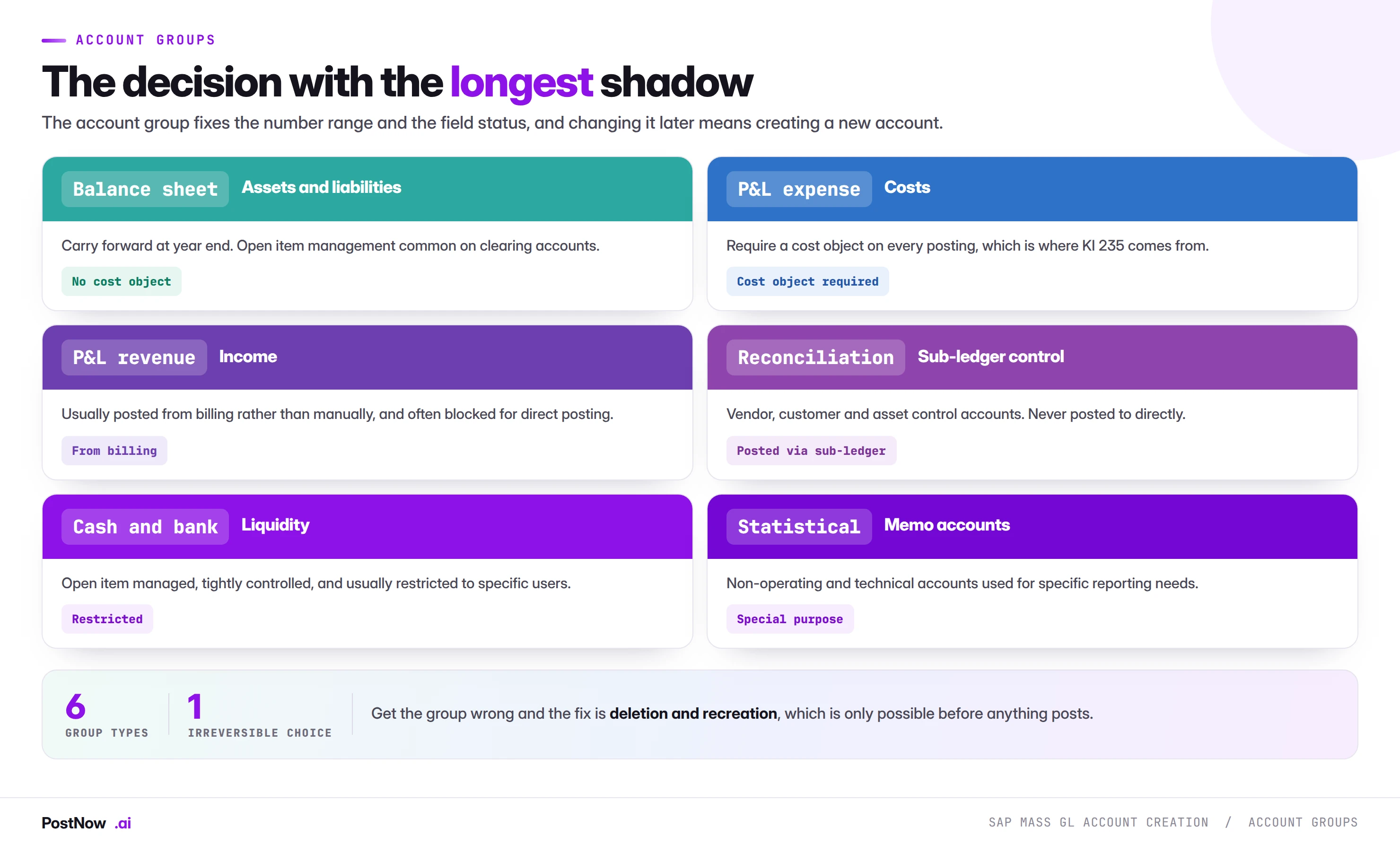
The account group is the decision with the longest shadow, exactly as it is for vendors. It fixes the number range the account must fall within, and the field status determining which fields are required, optional or suppressed.
Getting it wrong is not a field correction. Because the number range is tied to the group, changing the group means the account number is no longer valid, so the fix is deletion and recreation under a new number. That is only possible before anything has posted to it.
The groups that matter most on a mass file:
- Balance sheet accounts carry forward at year end and often use open item management on clearing accounts.
- Profit and loss expense accounts require a cost object on every posting, which is where the KI 235 errors throughout this cluster come from.
- Revenue accounts are usually posted from billing rather than manually, and frequently blocked for direct posting.
- Reconciliation accounts control sub-ledgers for vendors, customers and assets, and can never be posted to directly. Setting the reconciliation indicator on an ordinary account makes it unusable.
Settings that cannot be changed later
Three company code settings are effectively permanent once postings exist, which makes them worth getting right at creation rather than discovering afterwards.
Open item management. Determines whether items on the account are cleared against each other, which is essential on clearing accounts such as GR/IR and wrong on most expense accounts. Switching it later requires the account balance to be zero, which on a live account means clearing everything first.
Line item display. Determines whether individual items can be viewed. Turning it on later does not retrospectively create the display for existing postings, so the history is permanently harder to analyse.
Reconciliation account type. Once a sub-ledger is using an account as its control account, changing the type is not a maintenance activity.
The practical implication for a mass run is that these three columns deserve more review than anything else on the file. A wrong description is embarrassing; a wrong open item management setting on a clearing account is a reconciliation problem for as long as the account exists.
Validation: six checks before a single account is created
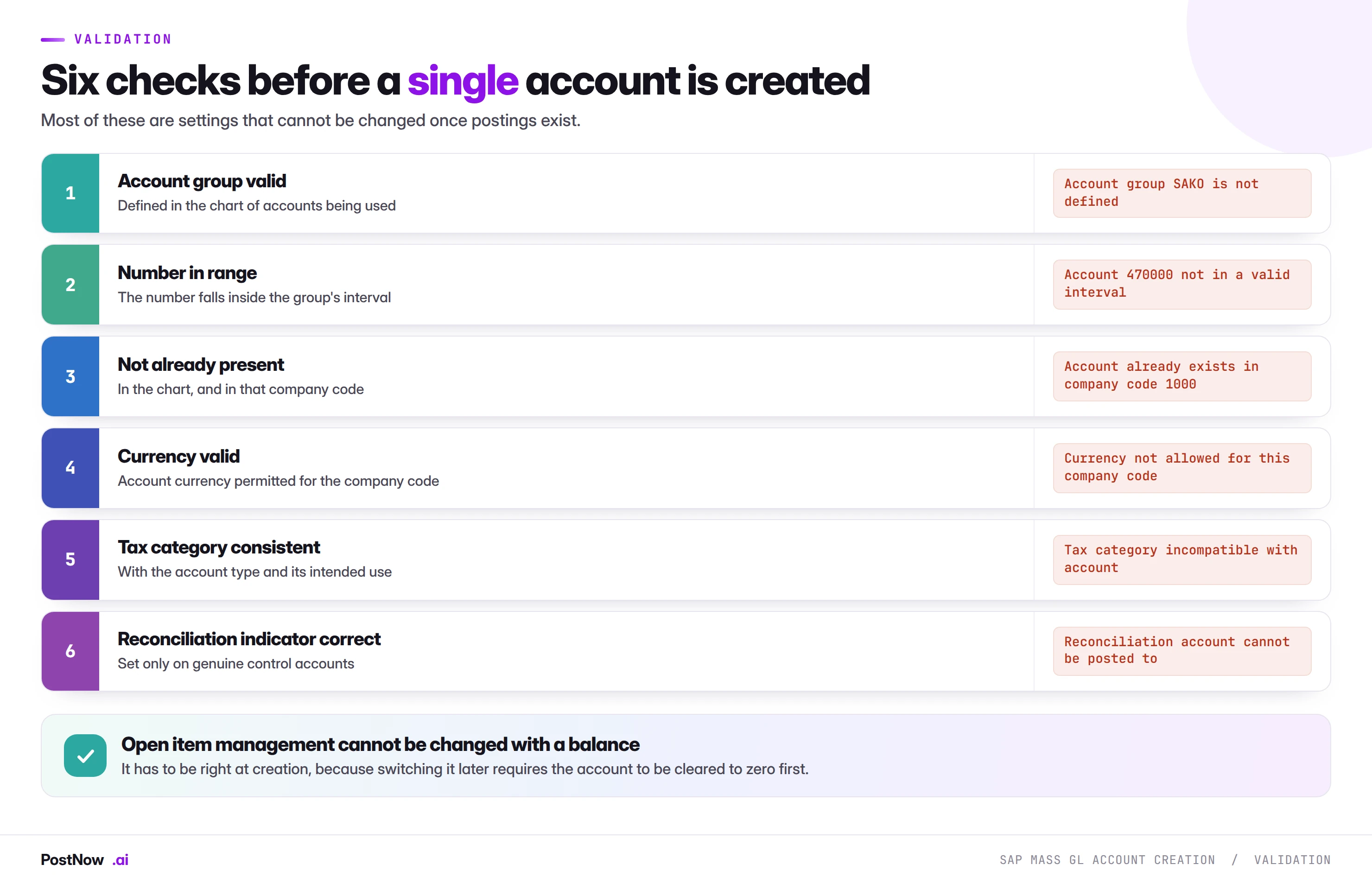
Two are worth expanding.
Number in range. Number ranges are structured by function in most charts: a block for assets, a block for revenue, a block for expenses. A number outside every interval for its group fails, and a number inside the wrong block loads successfully into a badly organised chart, which is worse because nothing errors.
Tax category consistent. The tax category controls whether and how tax can be posted to the account. An expense account with no tax category rejects postings carrying tax codes, and a balance sheet account with an inappropriate category accepts postings it should not.
Running GL account creation from Excel
PostNow runs SAP mass GL account creation from Excel
Chart of accounts work arrives as a spreadsheet from finance, usually during a restructure, an acquisition or a migration. PostNow adds a task pane to Excel, connects with your own credentials, and creates both segments from the same file.
Chart of accounts data and company code data from one sheet.
Account numbers validated against the group's intervals.
Open item management and line item display surfaced for review.
A test posting per account type rather than a record count.
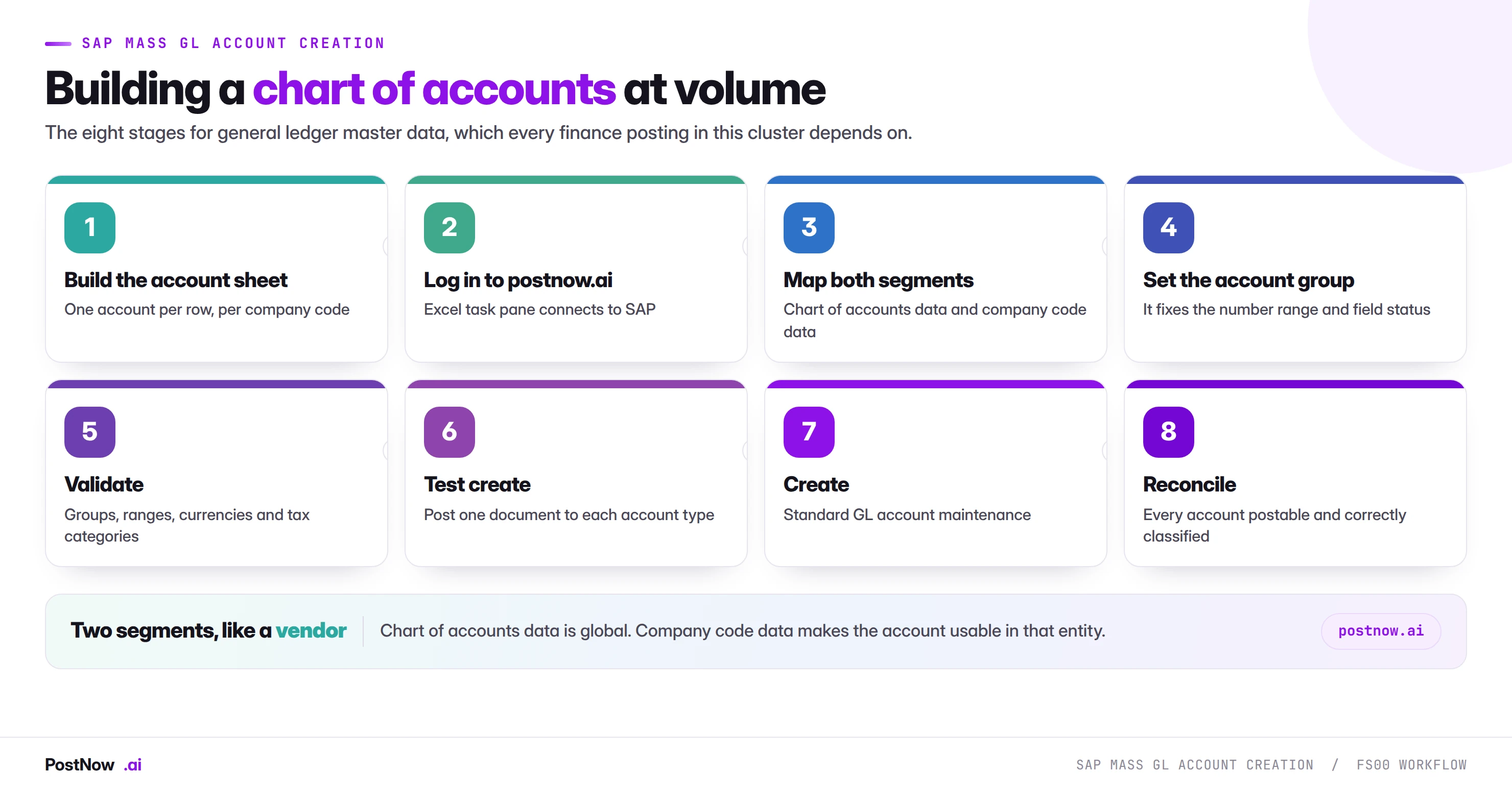
Step by step
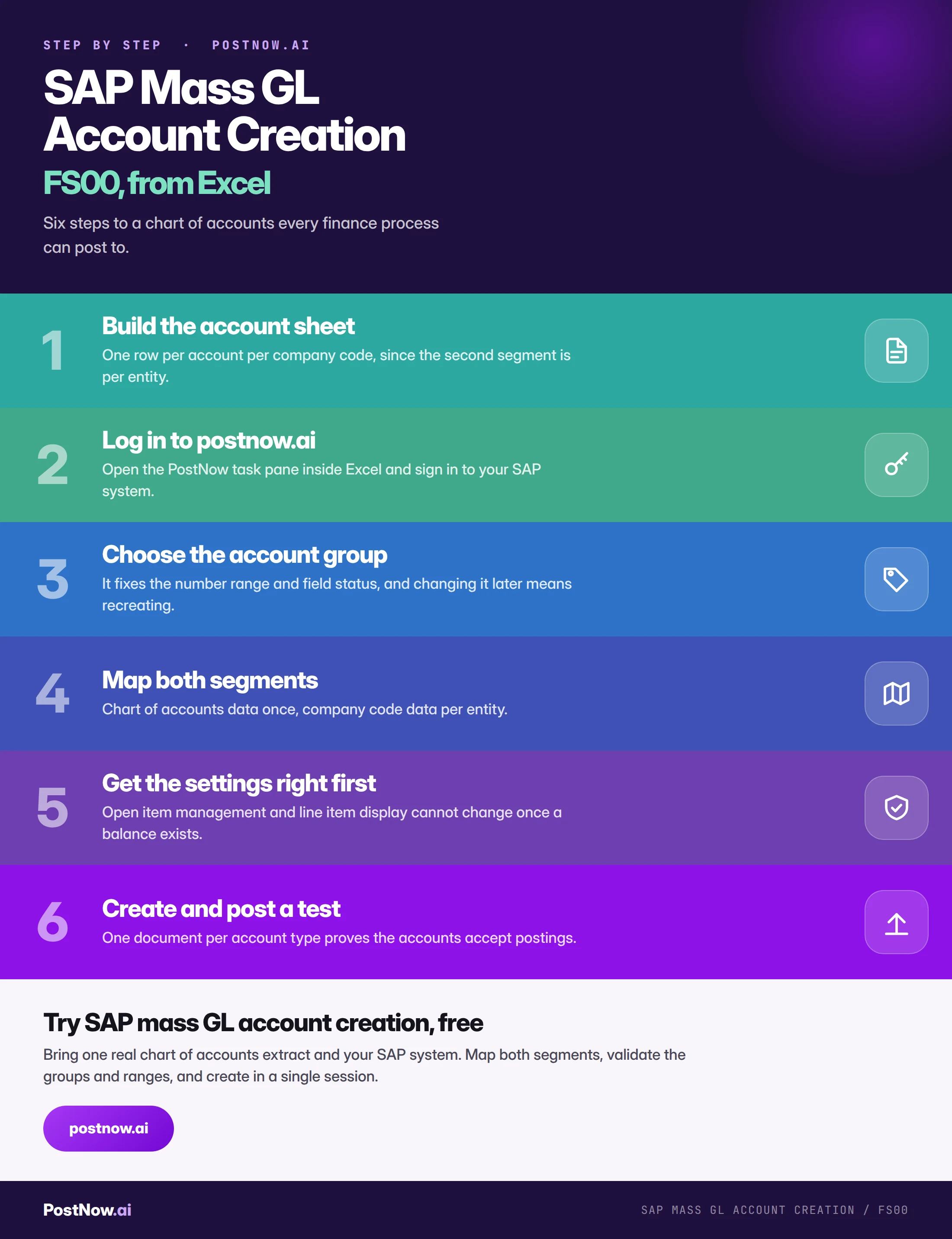
Where GL account volume comes from
- New company code. An entity added to an existing chart needs every relevant account extending to it, which is the commonest case and is an extend rather than a create.
- Chart harmonisation. Two entities merging onto one chart, with mapping between old and new account numbers that has to be preserved for reporting.
- Acquisition. An acquired entity's accounts mapped into your chart, usually with gaps to fill.
- Restructure. New reporting requirements needing accounts split or added across the chart.
- Migration. The chart of accounts loaded as one of the earliest layers of a cutover, as described in the migration guide, because everything else references it.
The extension case deserves a note: extending existing accounts to a new company code is a different job from creating new accounts, and mixing the two in one file produces the contradictory errors the master data bridge warns about.
Common mistakes
- Creating the chart segment only. The account exists and rejects every posting in that company code.
- Getting the account group wrong. The fix is deletion and recreation, and only before anything posts.
- Wrong open item management. Cannot be changed once a balance exists without clearing the account first.
- Numbers in the wrong range block. Loads successfully into a badly organised chart, with nothing erroring.
- Setting the reconciliation indicator on an ordinary account. Makes it impossible to post to directly.
- Mixing creates and company code extensions. Half the rows fail with contradictory errors.
- Proving success with a record count. Only a test posting proves an account accepts entries.
Complete reference
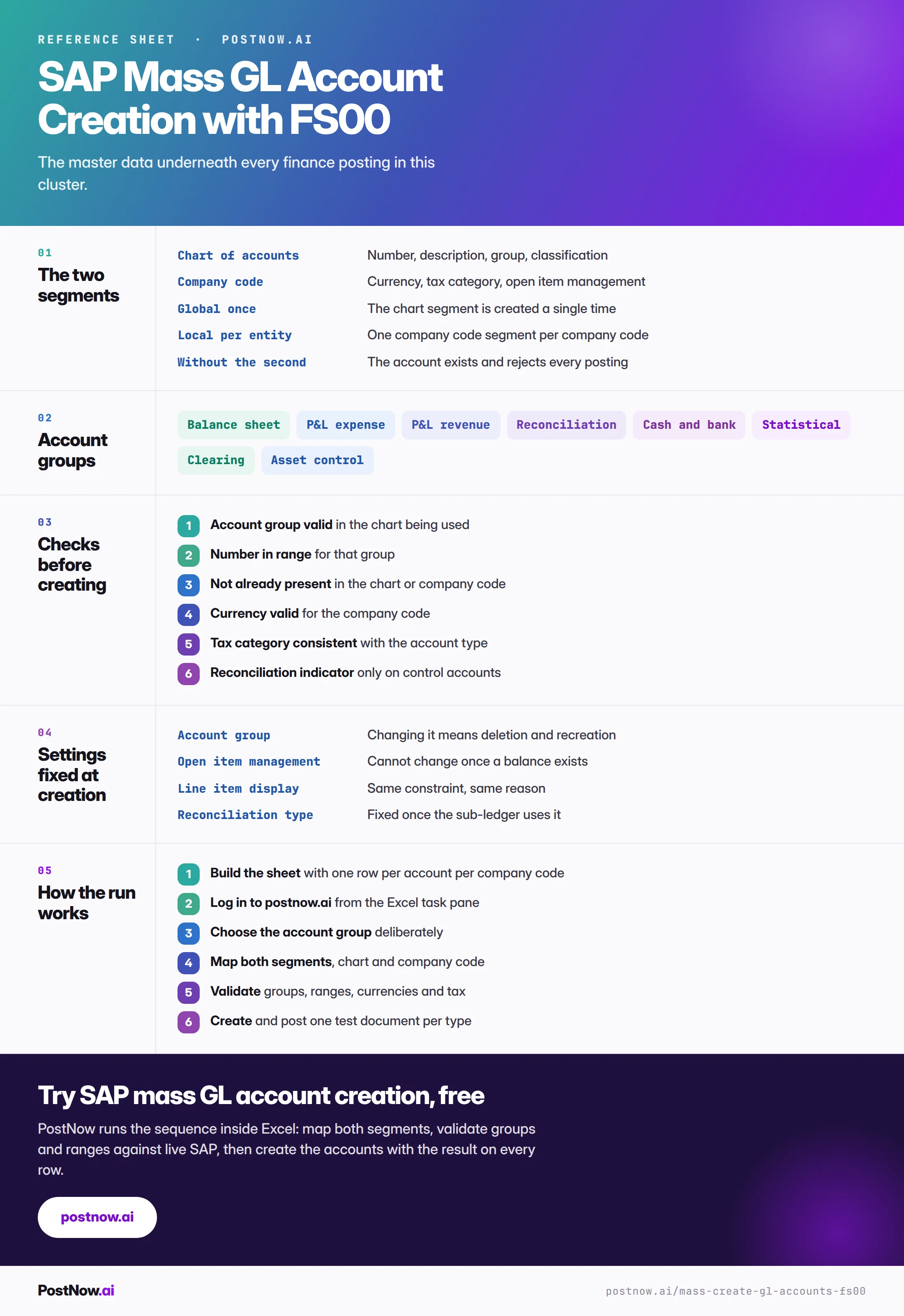
Go deeper
SAP FICO mass posting
The finance hub, and every transaction that posts to these accounts.
SAP master data mass upload
The three modes of create, change and extend, and the organisational level arithmetic.
SAP mass upload
The pillar guide covering validation, error handling and governance.
SAP GL account automation is only as safe as its account groups
SAP GL account automation is mostly a chart-of-accounts problem: get the account group right and the number range, field status and reconciliation behaviour follow from it. The load itself is simple — accounts mapped to their chart-of-accounts and company-code segments. The manual work sits earlier, in deciding which accounts belong in the chart and how they roll up in reporting, which no upload can decide for you.