SAP mass billing document creation turns many completed deliveries into billing documents in one run. A billing run in VF01 creates two documents from one action: the billing document itself and the accounting document that carries revenue into finance. The second can fail to post while the first looks successful, leaving invoices that exist but never reached the ledger. On top of that, whether an invoice reprices or simply carries the order's price is a configuration decision, not a given. This guide covers how billing behaves at volume, the release-to-accounting gap to watch for, and where VF04 fits against a file-driven run.
- Billing produces two documents. An SD billing document the customer receives, and an FI accounting document recognising revenue and creating a receivable.
- An unreleased billing document has invoiced without recognising revenue. Invisible in a creation count, and material at volume.
- Use VF04 for the routine run. A file is for month-end selections and populations chosen outside SAP.
- Billing blocks are decisions. Each was set because an invoice should not go out yet.
- Pricing normally carries from the order, but not always. Redetermination and expired conditions both change invoice values quietly.
Billing turns a due document into a posted invoice
SAP mass billing is the practice of creating many billing documents in one controlled run, turning delivered goods or completed services into invoices. It is the last step in the order-to-cash chain described on the SD bridge, and the one where two things happen that matter to different people.
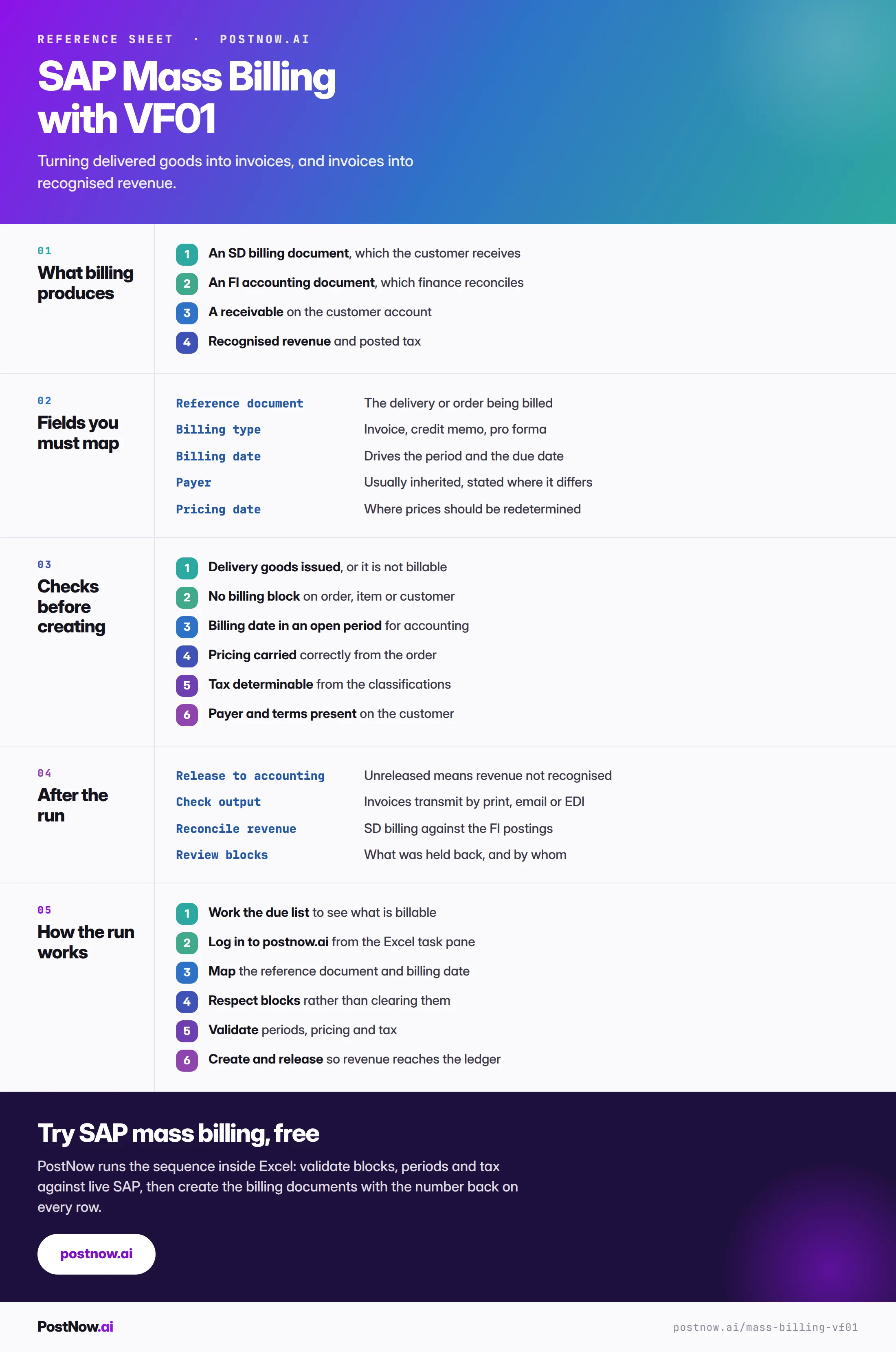
Billing produces two documents. An SD billing document, which the customer receives, and an FI accounting document, which recognises revenue and creates a receivable. One action, two records, and a mass run has to reconcile both.
It is also the point where the whole chain becomes externally visible. A wrong sales order is internal until it ships. A wrong invoice is in a customer's accounts payable department.
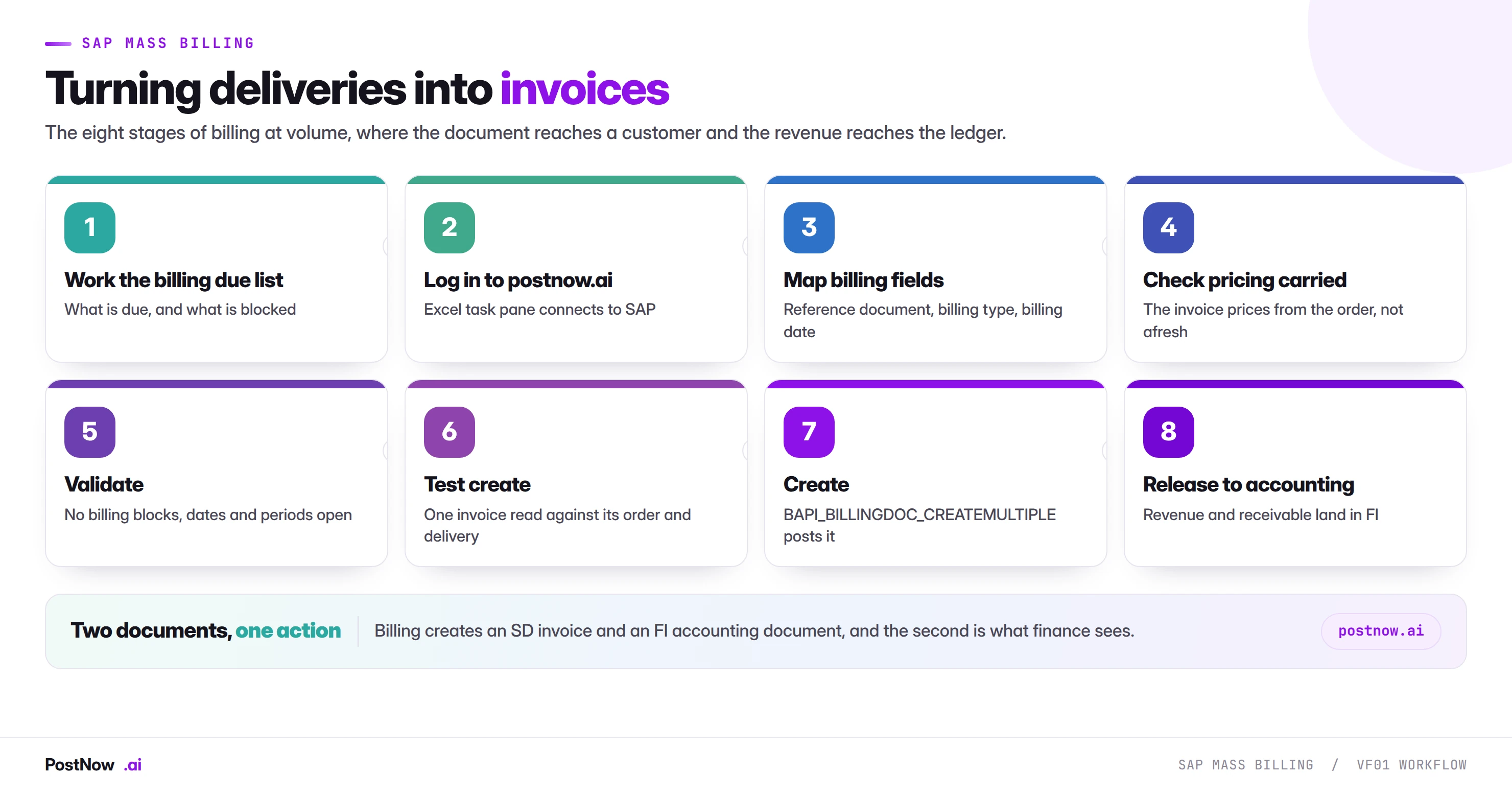
Two documents, one action
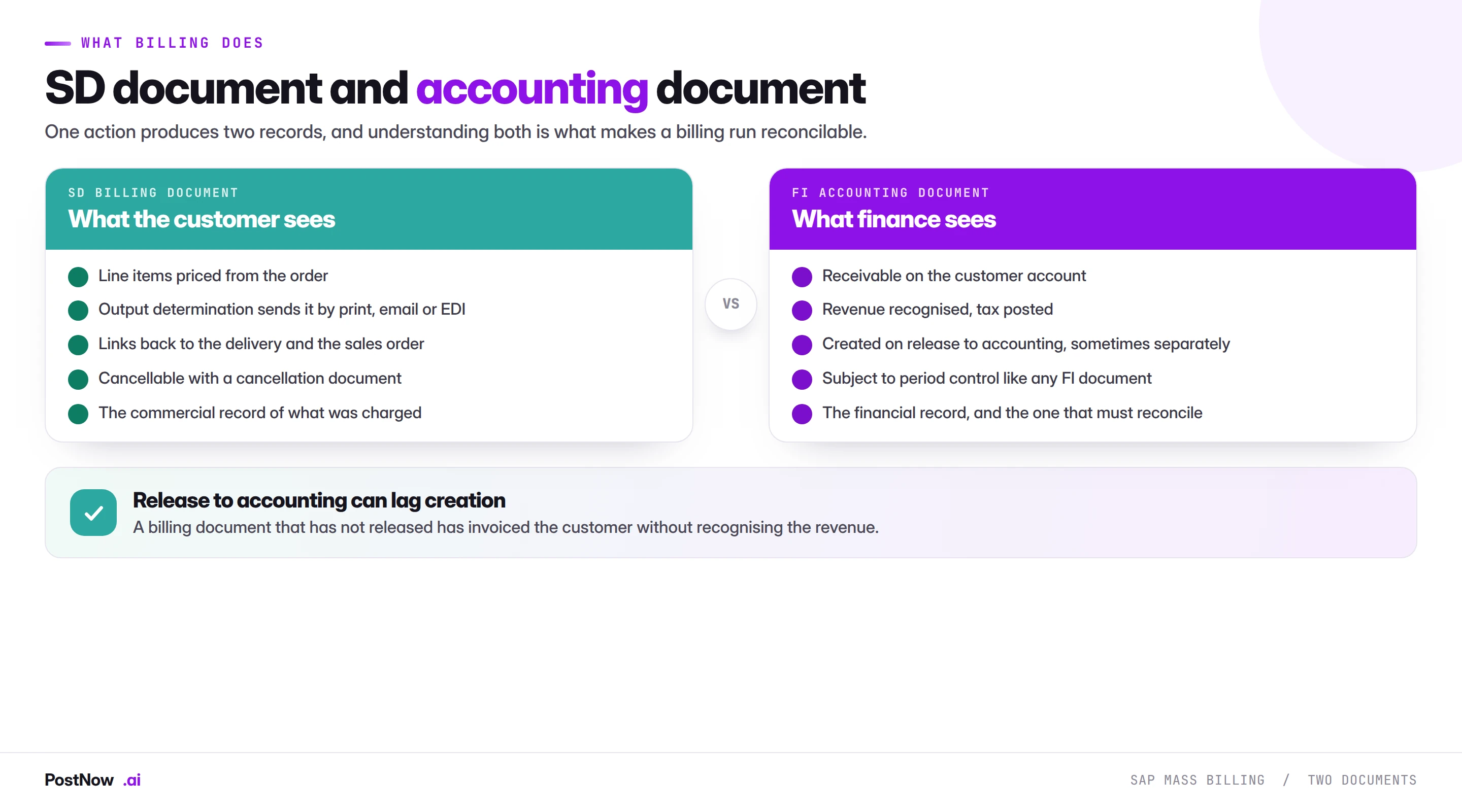
Understanding both halves is what makes a billing run reconcilable.
The SD billing document is the commercial record. Line items priced from the order, output determination sending it by print, email or EDI, and links back to the delivery and the sales order. It is cancellable through a cancellation document rather than deletion.
The FI accounting document is the financial record. A receivable on the customer account, revenue recognised, tax posted. It is subject to the same period control as any FI document, described on the FICO bridge.
The subtlety is that these can be separated in time. Depending on configuration, a billing document may be created and released to accounting immediately, or created and released later.
The billing due list (VF04) or a file for everything else
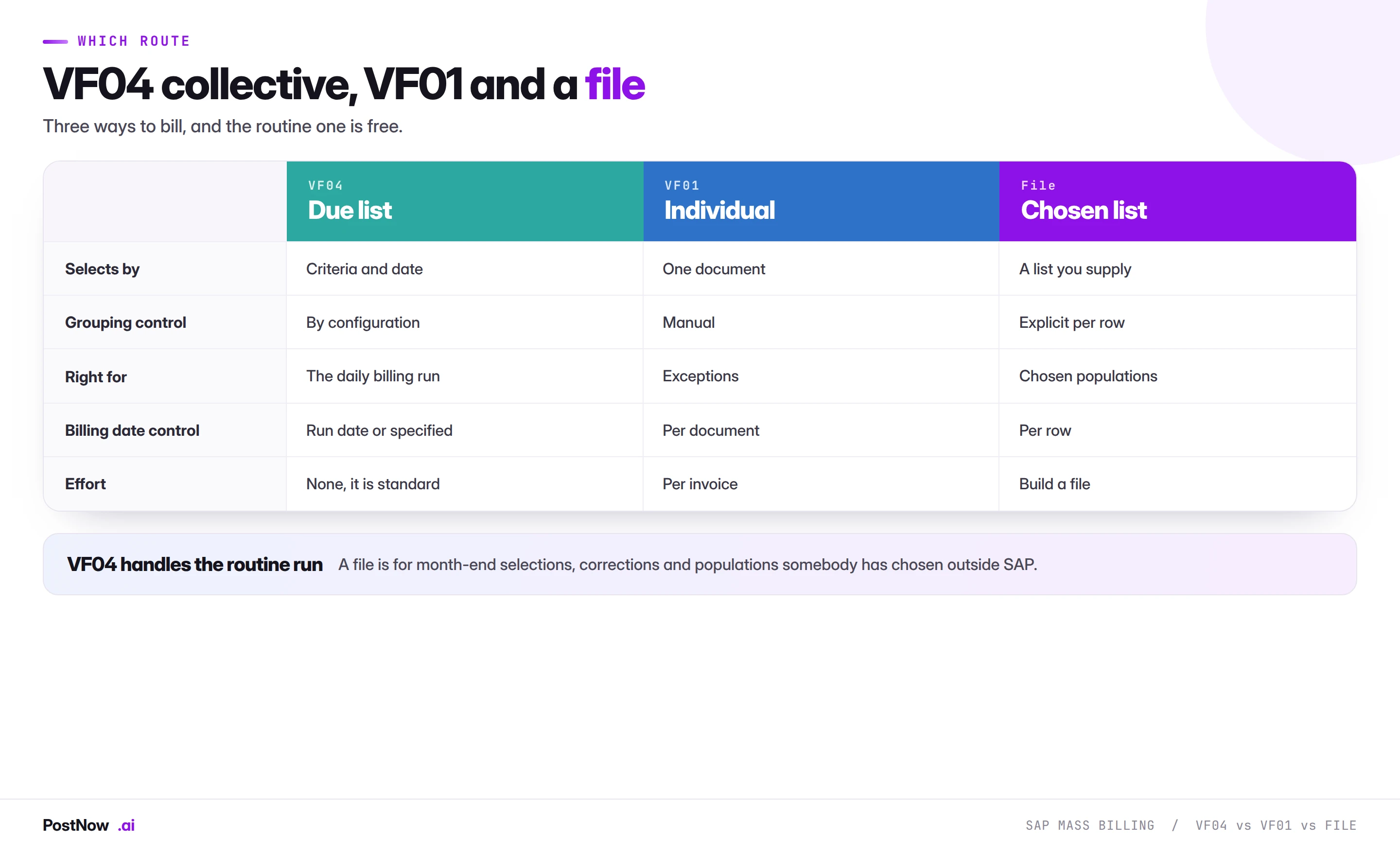
Three ways to bill, and the routine one is free.
VF04 handles the daily billing run. It works the billing due list, selects by criteria and date, and groups according to configuration. For standing billing this is the right tool and there is nothing to build.
VF01 handles individual exceptions. One document at a time, for corrections and special cases.
A file handles chosen populations. Month-end selections, a specific customer group, a set of documents somebody has identified outside SAP, or billing dates that need controlling per row rather than per run.
The pattern is the same as for deliveries: the standard collective transaction covers the routine, and a file covers the cases where a human has made a selection the transaction cannot express.
A blocked or incomplete document will not bill
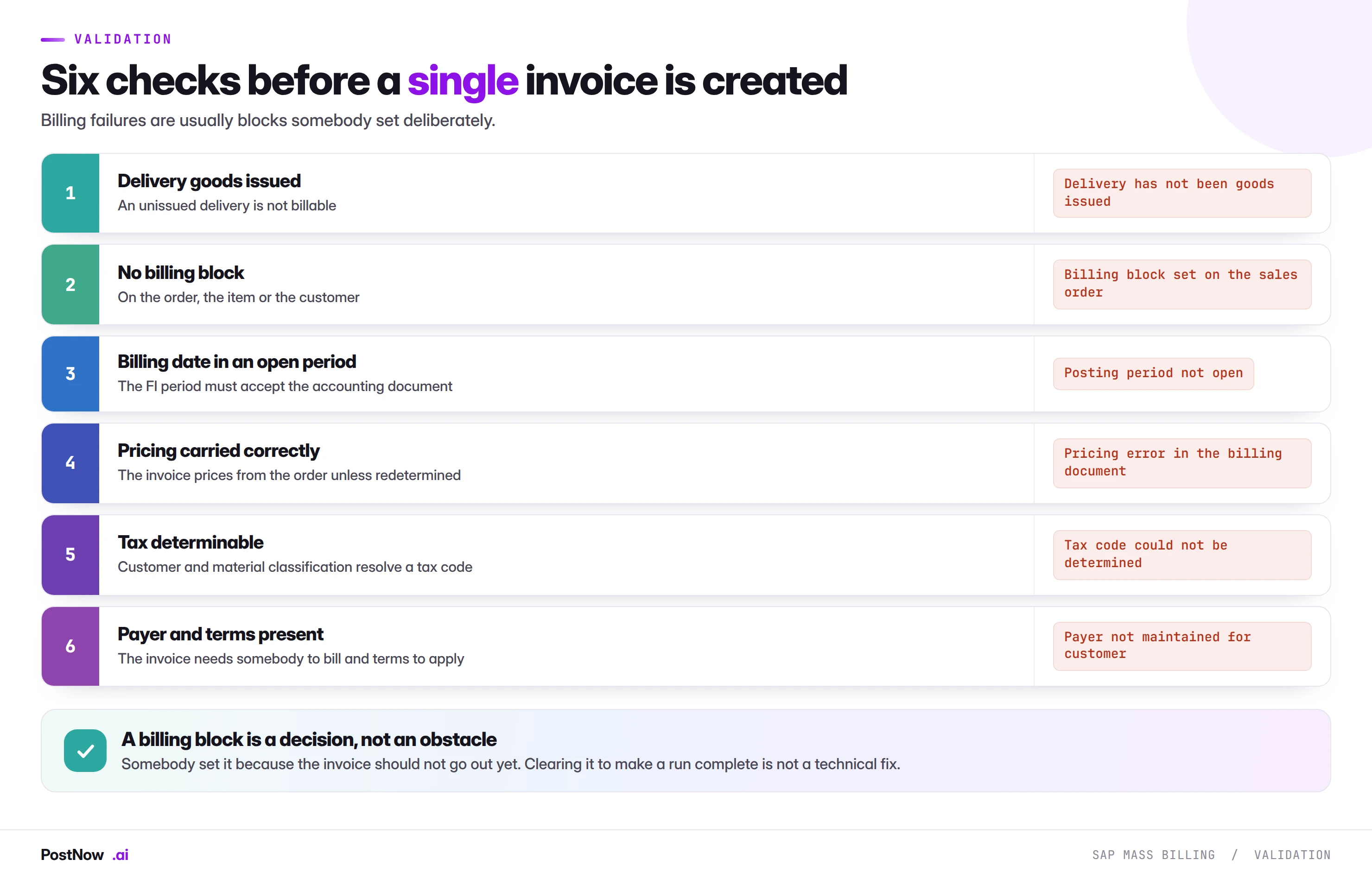
Billing failures are usually blocks somebody set deliberately, which makes them decisions rather than errors.
A billing block exists because an invoice should not go out yet: a dispute, a pending credit note, a delivery not yet confirmed by the customer, or a commercial hold. Clearing it to make a run complete sends an invoice somebody had decided to hold.
Goods issue not posted is the most common structural failure. A delivery that has been created but not goods issued is not billable, because nothing has actually left. On a run following a large delivery creation, this affects everything the warehouse has not yet processed.
The billing date drives the period. Which means the accounting document needs that period open, and a month-end run dated on the last day of a closed period fails on every row.
Copy control carries pricing forward, unless it does not
An invoice normally prices from the sales order rather than redetermining prices afresh. That is what makes the invoice match what the customer was quoted.
Two situations change it, and both surprise people at volume.
Redetermination on the billing date. Where configuration redetermines certain condition types at billing, a price change made since the order was taken applies to the invoice. That may be correct for freight or tax and is rarely correct for the base price.
Condition records that have expired. Where a mandatory condition existed at order time and its validity has since ended, billing can fail or reprice. This is the delayed consequence of the validity overlaps described in the pricing condition guide.
The practical check is to read one invoice against its order on any large run. If the values differ, something redetermined, and finding that on three documents is considerably better than finding it on four hundred customer queries.
Billing still runs SAP's own logic, document by document
PostNow turns each reference into a checked invoice
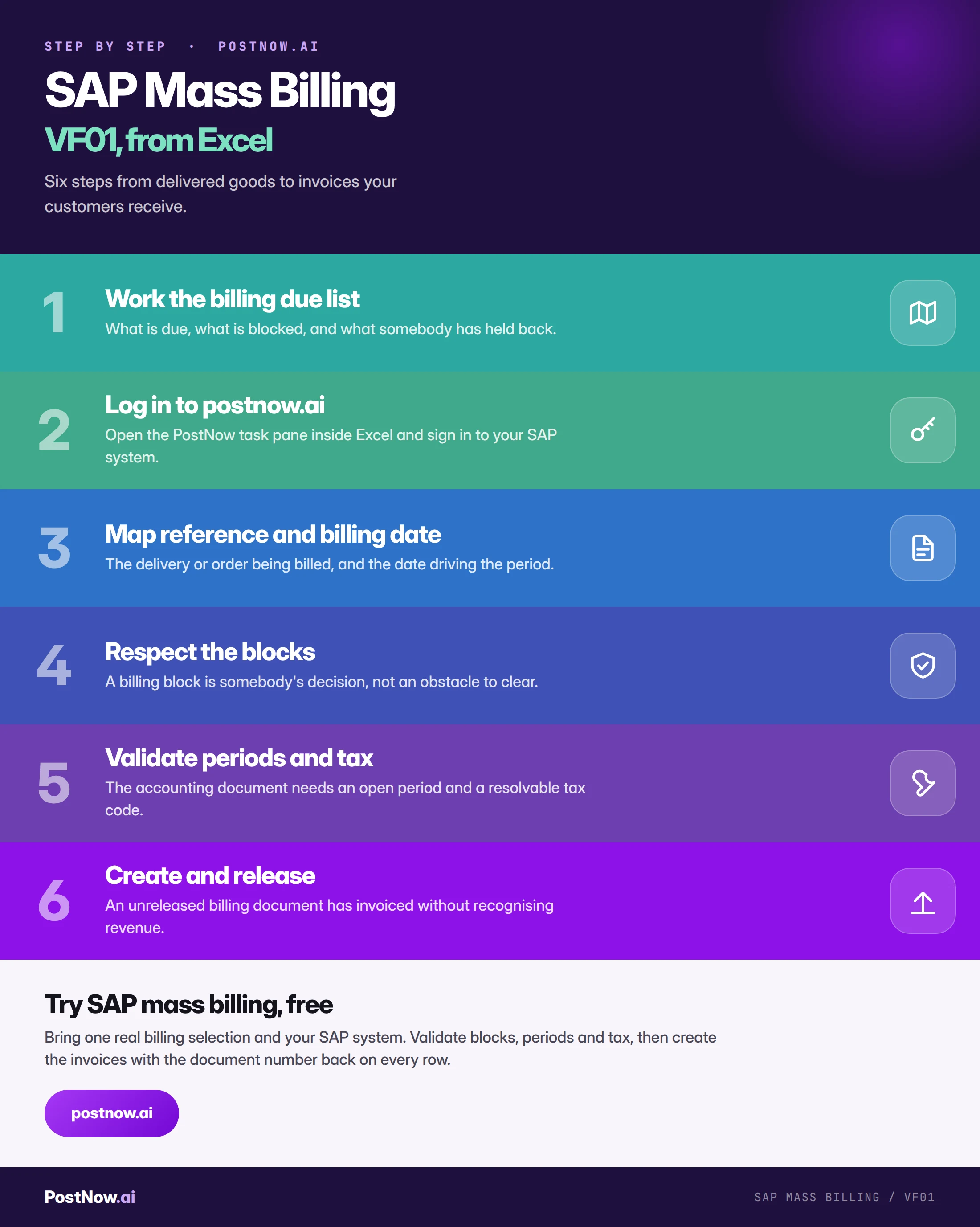
Month-end billing selections usually start as a spreadsheet. PostNow adds a task pane to Excel, connects with your own credentials, and creates the billing documents from the file where the selection was made.
Blocks, goods issue status and period checked before anything creates.
Billing date and type controlled per line rather than per run.
Billing and accounting document numbers written back.
Revenue posted compared against the selection billed.
What to reconcile after a billing run
Four checks, and the first two are the ones that matter to finance.
Confirm release to accounting. Every billing document should have an accounting document. Any that does not has invoiced without recognising revenue, and the gap is invisible in a creation count.
Reconcile revenue to the selection. Total billed value against what the file said should be billed. A difference means something repriced, something blocked, or something billed that should not have been.
Check output went out. Invoices transmit by print, email or EDI. Created and untransmitted means the customer has not been billed in any way that matters to them.
Review what was blocked. The list of documents that did not bill, and why. Each is somebody's decision and the list is the follow-up work.
Blocked documents leave invoices that never reach finance
- Counting created documents rather than released ones. An unreleased invoice has not recognised revenue.
- Clearing billing blocks to complete a run. Each was set because an invoice should not go out yet.
- Billing deliveries that have not been goods issued. Nothing has left, so nothing is billable.
- Assuming pricing carried forward. Redetermination and expired conditions both change invoice values silently.
- Using a file where VF04 would do. The due list handles the routine run for free.
- Ignoring the billing date period. A month-end date in a closed period fails on every row.
Billing at a glance: documents, blocks, accounting
SAP SD mass upload
The sales hub: orders, deliveries, pricing and the order-to-cash chain.
SAP FICO mass posting
Where the accounting document lands, and the period control it obeys.
SAP mass upload
The pillar guide covering validation, error handling and governance.