SAP VK11 pricing condition upload loads many sales pricing condition records in one controlled run. What makes mass pricing uploads different is that you are not filling one table — the key combination you choose sends each condition record into a specific condition table via the access sequence, and get it wrong and the price is stored where pricing will never look for it. Validity is the second trap: two records that overlap in time make the price ambiguous, and SAP resolves that in ways you did not intend. This guide covers how the key combination and access sequence work, why validity and scales turn one price into many rows, and how to load a price list without silent misses.
- The key combination decides which condition table holds the record. A record in the wrong table validates cleanly and is never read.
- A create does not close anything. Overlapping validity makes the price ambiguous, so close the outgoing record first.
- Promotions need an explicit end date. The default runs to 31.12.9999, so a campaign discount never expires.
- Rate, currency and unit must agree. Each is individually valid and collectively wrong by orders of magnitude.
- Prove it with a priced test order. A record count proves records exist, never that anything prices against them.
Pricing volume arrives with every annual list and promotion
- Annual price lists. The largest single case. A new list arrives from commercial, covering thousands of material and customer combinations, with a date it must take effect.
- Mid-year price increases. A cost pass-through applied across a category, which is a close-and-open exercise rather than a simple create.
- Customer-specific negotiations. A contract renewal producing hundreds of customer-material prices.
- Promotions and campaigns. Time-boxed discounts with a hard start and end, where the end date matters as much as the start.
- New market or channel launch. A complete price structure for a sales area that had none.
- Currency changes. Existing prices restated in a new currency, which is a full reload rather than an edit.
- Cost-plus recalculation. Prices derived from a costing run, arriving as a spreadsheet by definition.
In each case the pricing already exists in a commercial model. What is missing is its SAP representation, and the number of rows is a product of customers times materials, which grows faster than anyone expects.
The key combination decides which table your record lands in
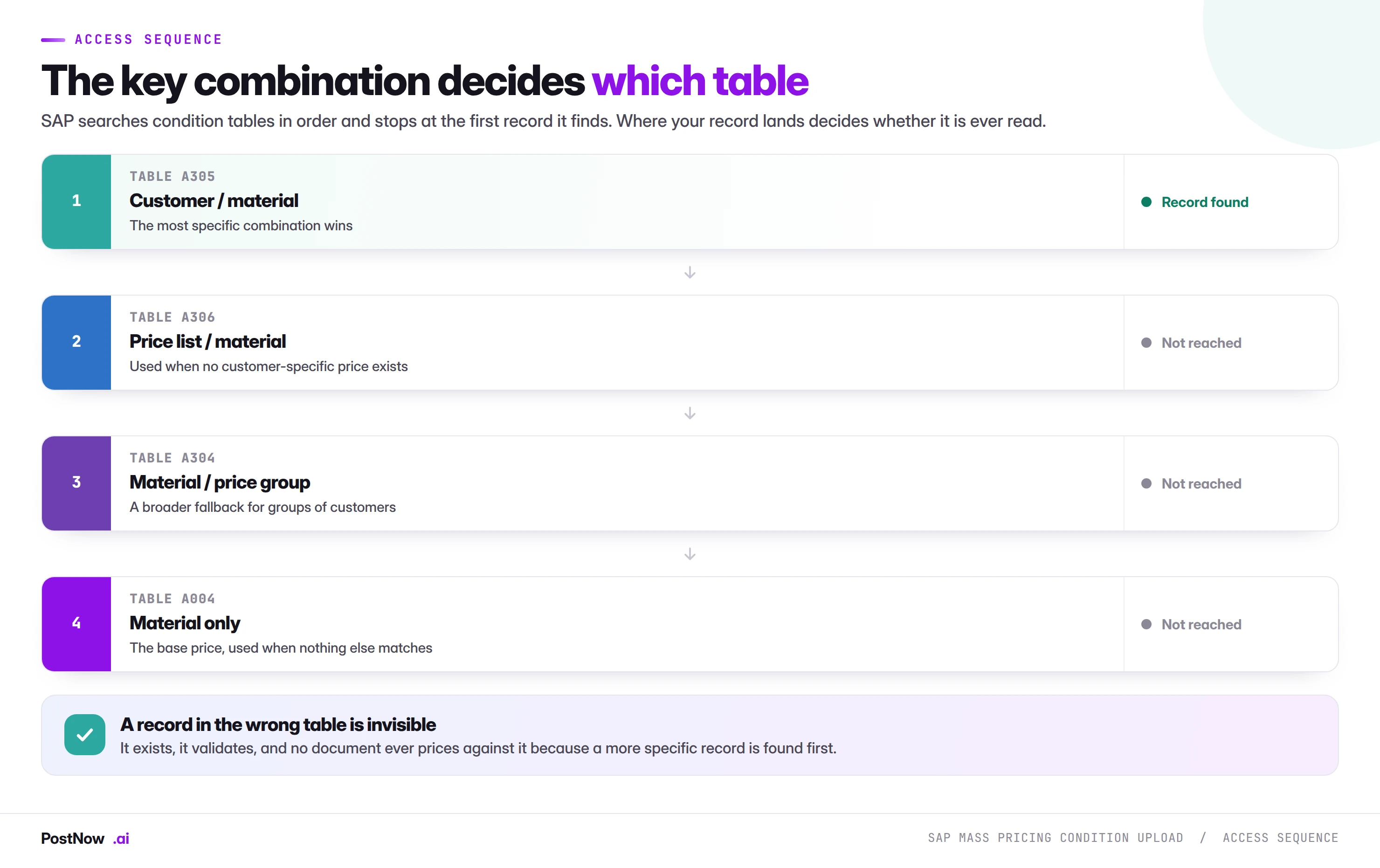
This is the concept that makes pricing different from every other mass load, and the one that causes the most expensive failures.
A condition record is not just a set of field values. It lives in a specific condition table, chosen by the key combination you pick when creating it. A price for a customer and material combination lives in one table; a price for a material alone lives in a different one.
When SAP prices a document, it works through an access sequence: an ordered list of condition tables, searched from most specific to most general. It stops at the first record it finds. A customer-specific price is found before a general material price, which is exactly the behaviour you want and exactly what makes a wrongly-placed record invisible.
Whichever access table the key combination points to, the record itself is stored as a header row in table KONH (the condition record header) and its rate as one or more rows in table KONP (the condition items); the access table is only the index that locates them by condition record number.
A condition record is one price, valid for a window
SAP mass pricing condition upload is the practice of loading many condition records in one controlled run from a structured file, instead of keying each price, discount or surcharge into VK11 individually. The price list is prepared in Excel, a key combination is chosen, validity periods are set so nothing overlaps, every row is validated against live configuration, and the records are written into their condition tables.
Every other object in the mass upload cluster produces something you can look at afterwards. A journal has a document number. A goods movement changes stock. A sales order confirms a quantity. A condition record does none of that.
A condition record does nothing until an order prices against it. The load succeeds, the records sit in a table, and the effect appears later, on documents somebody else creates. Which means the feedback loop that catches mistakes everywhere else is missing here, and the mistakes are correspondingly harder to find.
Choosing the combination deliberately
Before building a file, establish which key combination the business actually intends. The question to ask is not "what fields do we have" but "at what level should this price apply, and what should it override".
A price meant to apply to one customer regardless of anything else belongs in a customer-specific table. A list price that should apply unless a customer has a negotiated rate belongs further down the sequence. Loading the second as though it were the first produces prices that never appear; loading the first as though it were the second produces prices that override negotiations nobody meant to override.
Where the access sequence is unfamiliar, look at it before the load rather than after. It takes minutes and it is the difference between a load that works and one that silently does not.
Condition validity, and the overlap that makes prices ambiguous
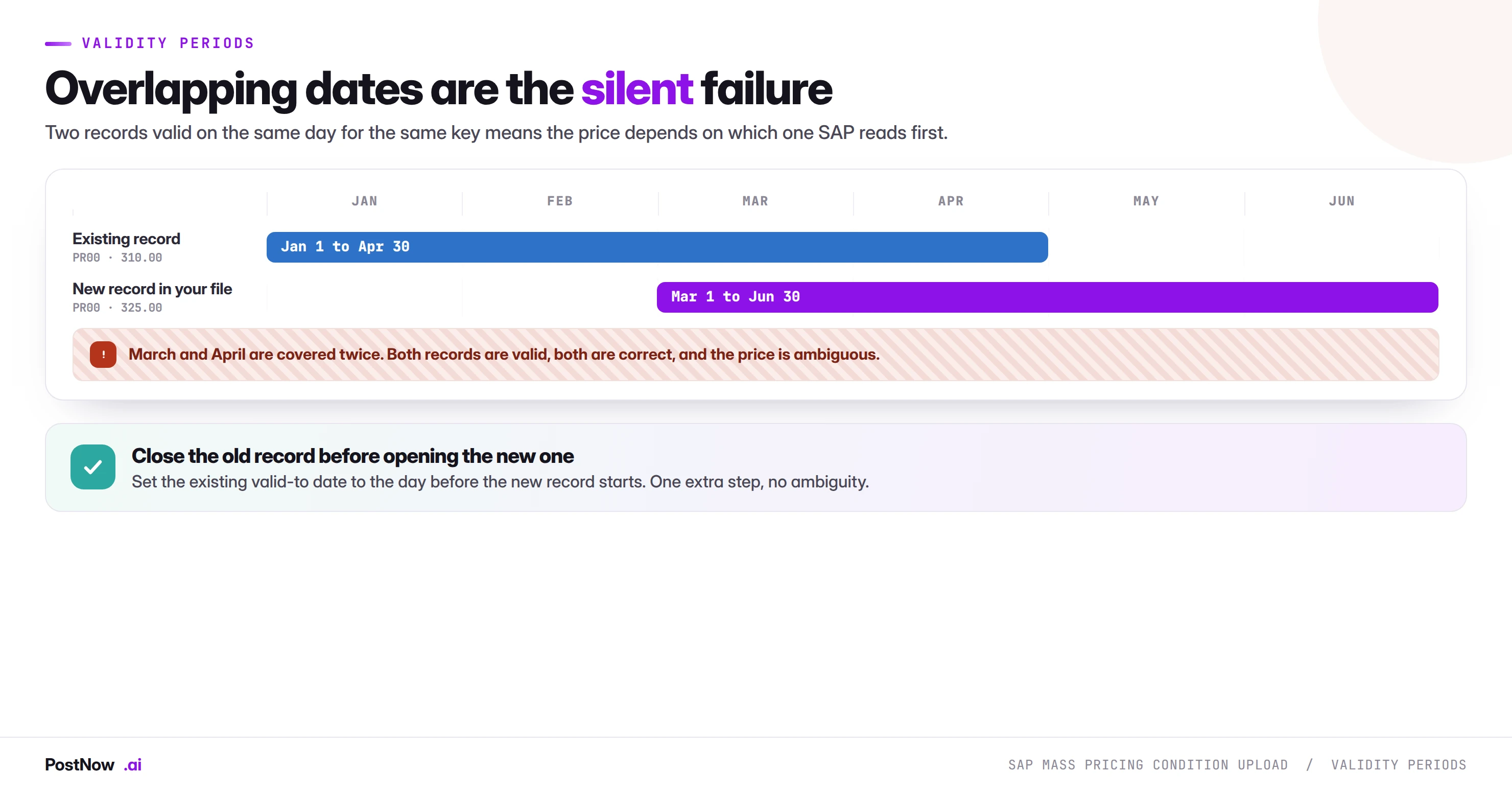
Every condition record carries a valid-from and a valid-to date, both inclusive. That sounds simple and produces the second major class of pricing failure.
The problem is that a create does not close anything. Loading a new price effective from the first of March does not end the existing record that runs to the thirtieth of April. Both records are then valid for March and April, both are correct, and which one prices a given order depends on internals nobody should have to reason about.
The fix is one extra step and it is not optional: close the outgoing record before opening the incoming one. Set the existing valid-to date to the day before the new record starts. A price change file therefore has two halves, a set of changes and a set of creates, and treating it as creates alone is how overlaps get introduced at scale.
The far-future default
Condition records default their valid-to date far into the future, commonly 31.12.9999. This is convenient for a permanent price and dangerous for a promotion. A campaign discount loaded without an end date does not expire; it simply keeps applying, and nobody notices until margin analysis asks why.
On any time-boxed pricing, treat the end date as a mandatory field in your template rather than an optional one.
Backdating
A record valid from a date in the past does not reprice documents already created. Orders priced yesterday keep yesterday's price. Backdating changes what future documents will use for past dates, which is occasionally what you want and frequently not. Where existing orders genuinely need repricing, that is a separate exercise on those documents.
Key values, rate and validity make a condition row
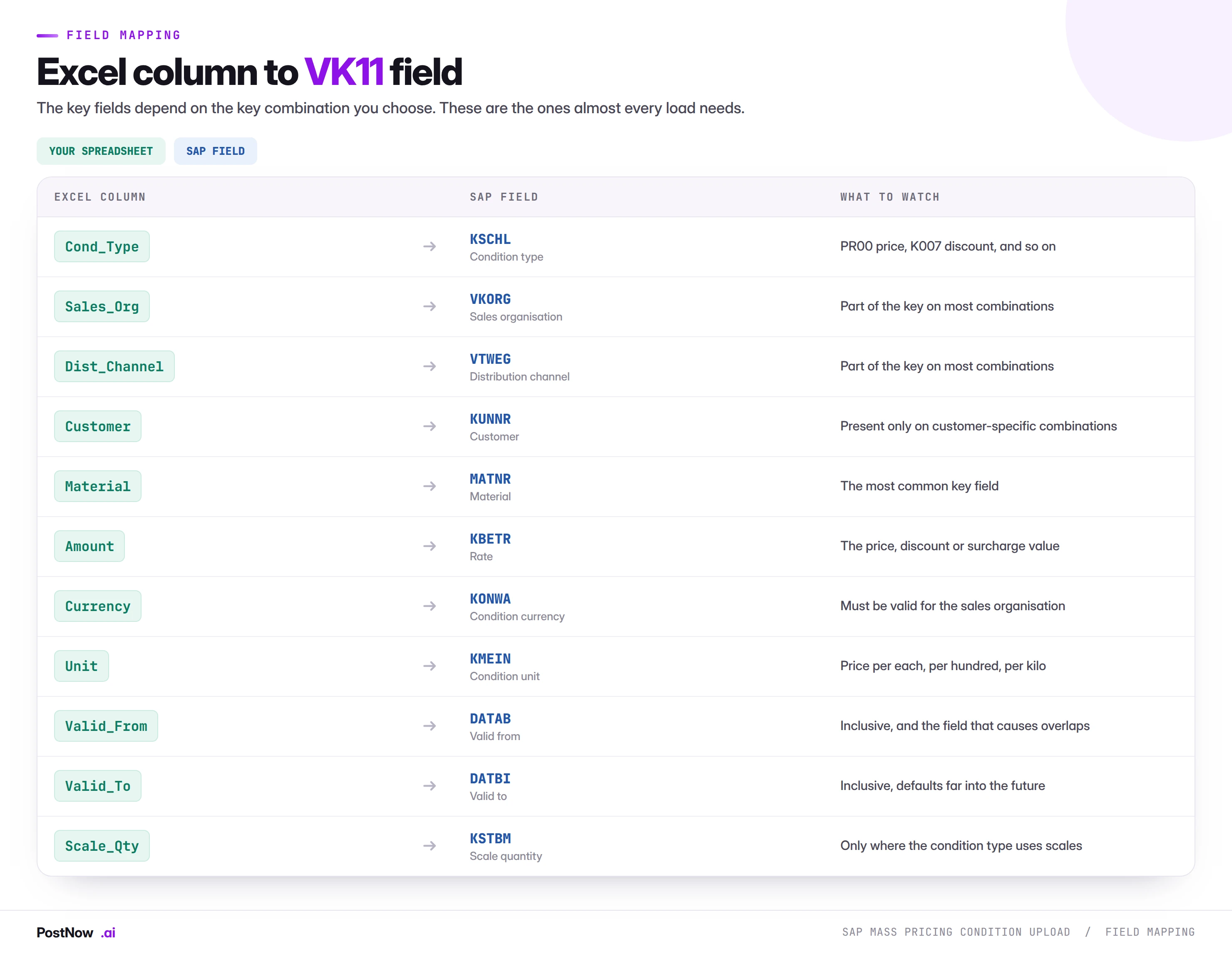
Condition type
The condition type identifies what kind of value this is: a base price, a percentage discount, a fixed surcharge, a freight charge. It also determines whether the record supports scales, whether the value is an amount or a percentage, and which access sequence applies.
A condition type not used by your pricing procedure will load and never be read, which is the same silent failure as a wrong table by a different route. Confirm the type appears in the procedure that will price the documents in question.
Rate, currency, and unit
Three fields that must agree with each other and with the material. A price of 310 is meaningless without knowing 310 of what, per how many, of which unit. A price stated per hundred loaded as per each is wrong by two orders of magnitude and passes every validation, because all three values are individually valid.
This is the most common source of catastrophic pricing errors at volume, and it is worth a specific check: pick three rows across different unit types and calculate what an order line would cost.
Scales
Where a condition type supports scales, one logical price becomes several rows: buy ten, pay this; buy a hundred, pay less. Scale quantities must ascend, and the base row must exist. A scale file has a parent-child shape that a flat template does not naturally express, so decide the layout before building rather than during.
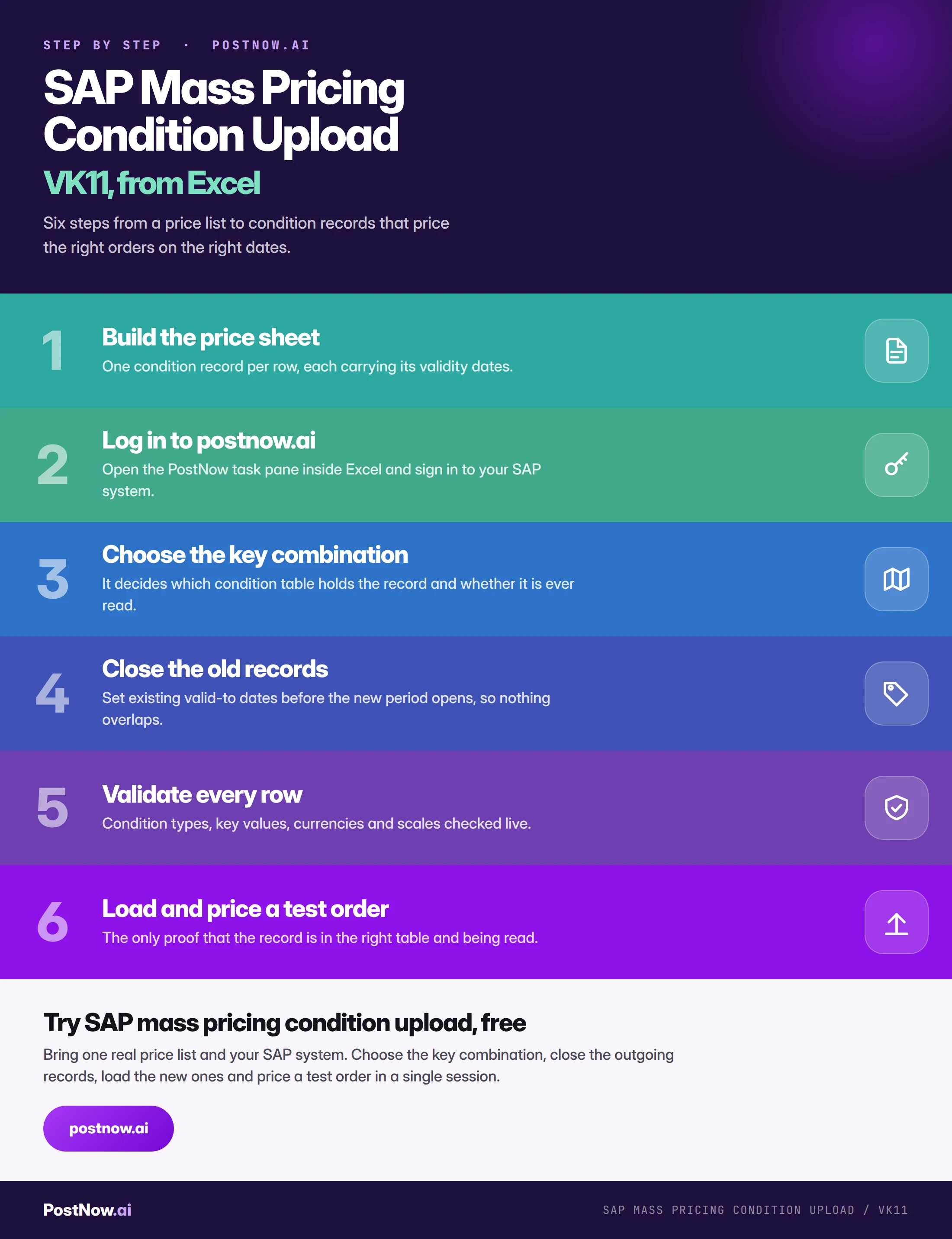
Close the outgoing record before you load the new one
Assemble the price list
One condition record per row, each carrying its key values, its rate, its currency and unit, and both validity dates. Include the end date explicitly even where it is far in the future.
Choose the key combination
Deliberately, against the access sequence, with the business intent stated: what level should this price apply at, and what should it override. This decision determines whether the load has any effect at all.
Close the outgoing records
Set existing valid-to dates to the day before the new period begins. This is a change run against existing records, and it belongs in the same file as the creates so the two cannot drift apart.
Validate keys against the access sequence
Condition types in the procedure, key values existing and extended, currencies and units valid, scales ascending, and crucially no remaining overlap after the closures.
Load into a quality client and price an order
This is the step that cannot be skipped. Create a sales order for a customer and material covered by the new records and read the pricing tab. Confirm the record being read is the one you loaded.
Load the records
Records are written through SAP's standard condition maintenance, so the same field checks and table determination apply as they would in VK11.
Price a real document to confirm
After the effective date, check a sample of live orders. The load is proven by documents pricing correctly, not by a count of records created.
The wrong key combination stores a price nothing reads
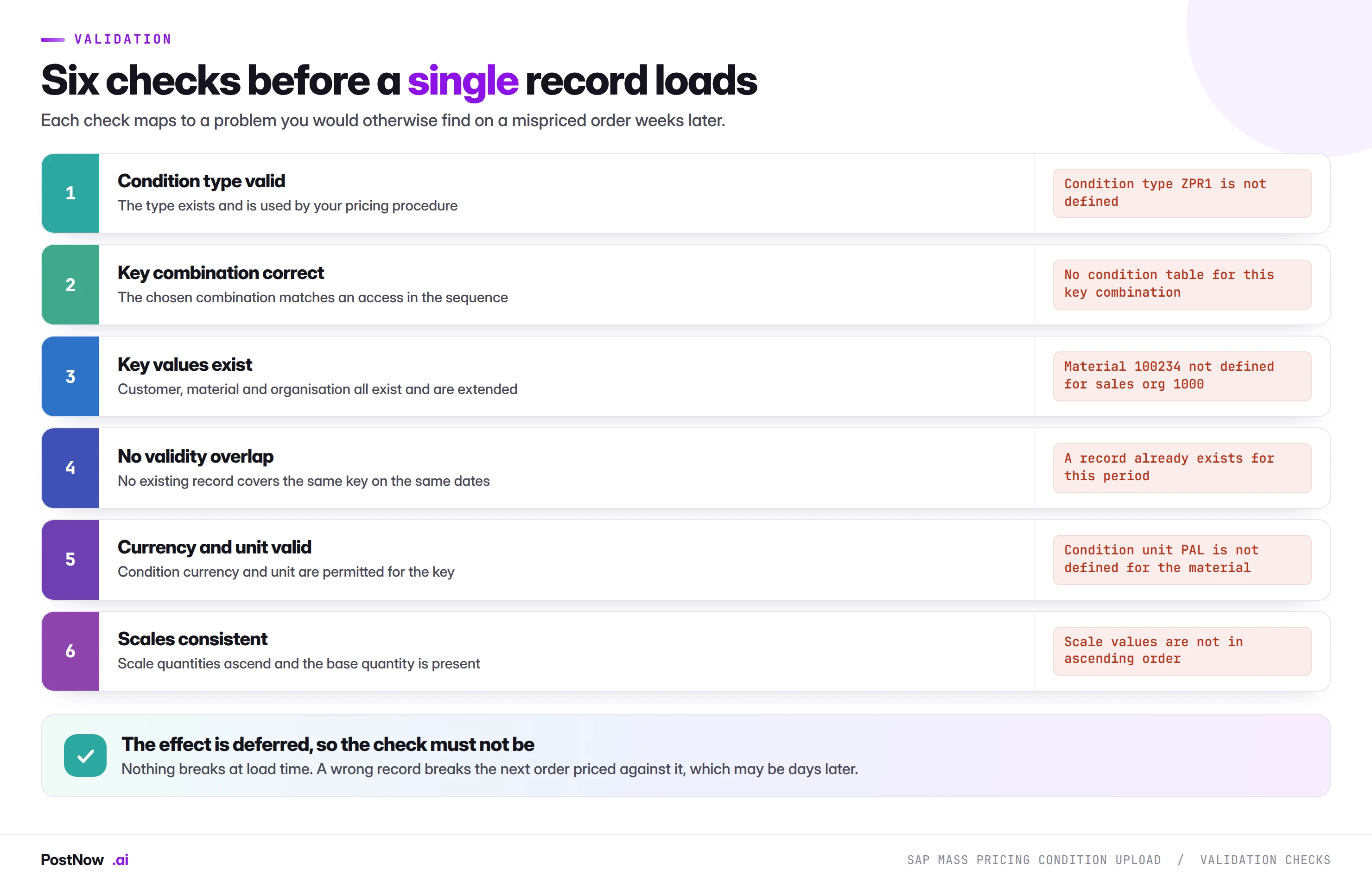
Notice how these differ from the checks on every other page in this cluster. Elsewhere, validation prevents a posting from failing. Here, validation prevents a load from succeeding incorrectly, which is a harder problem because nothing will tell you afterwards that it went wrong.
Two pricing errors fail silently, with no message at all
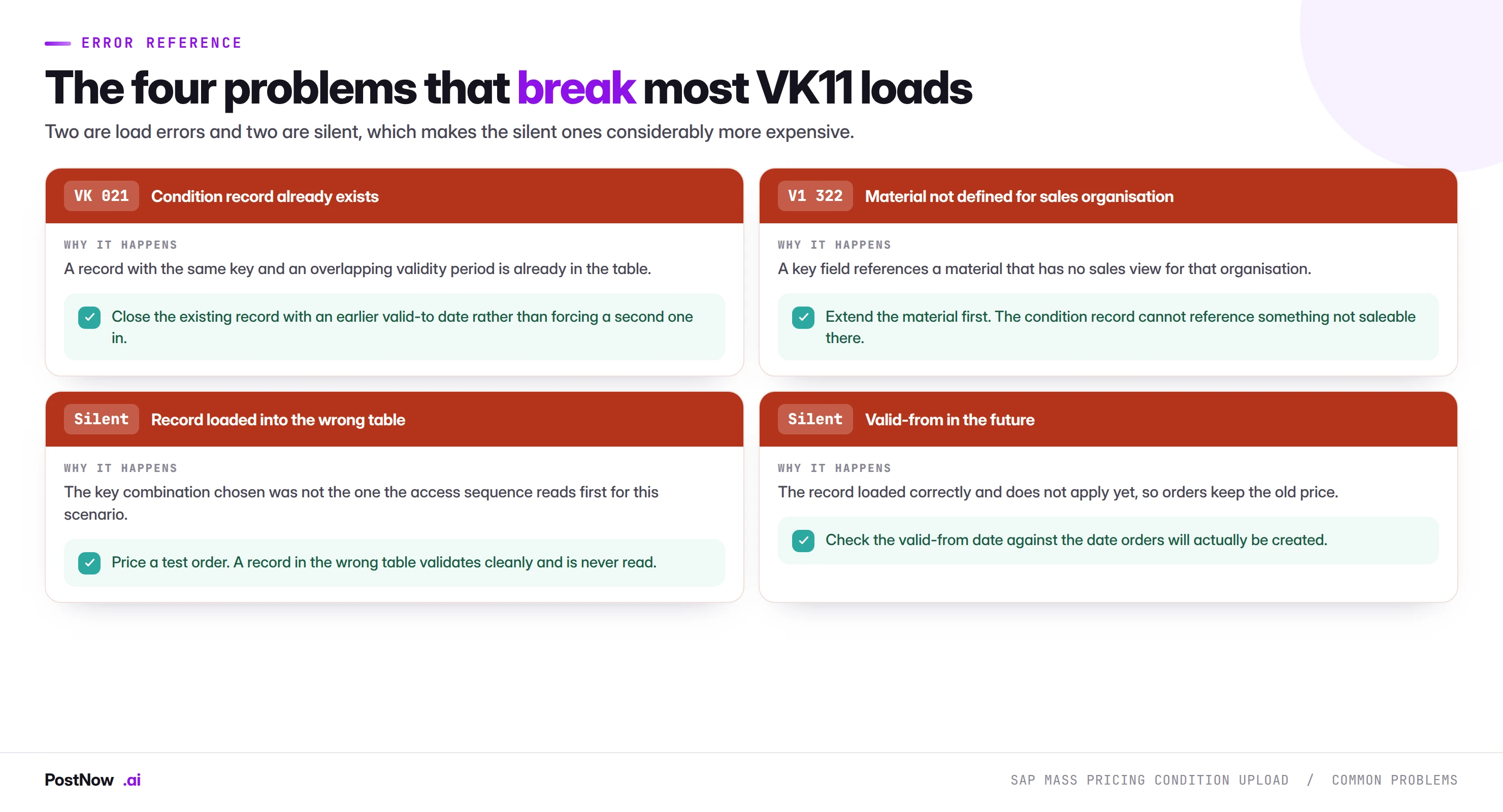
Two of these four produce messages. The other two produce nothing at all, and they are the reason the test order in stage six is mandatory rather than advisable.
Wrong table means every order prices on an older, more specific record. The load reports complete success. Nobody finds out until someone asks why the new prices are not being applied, which is typically after invoices have gone out at the old rate.
Valid-from in the future is the same failure with a clock attached. The records are in the right table, they are correct, and they do not apply yet. Where the date was set by copying a template from a previous load, this can put a whole price list a year out.
Records land in their correct condition table through SAP
Key values reach the right condition table via PostNow
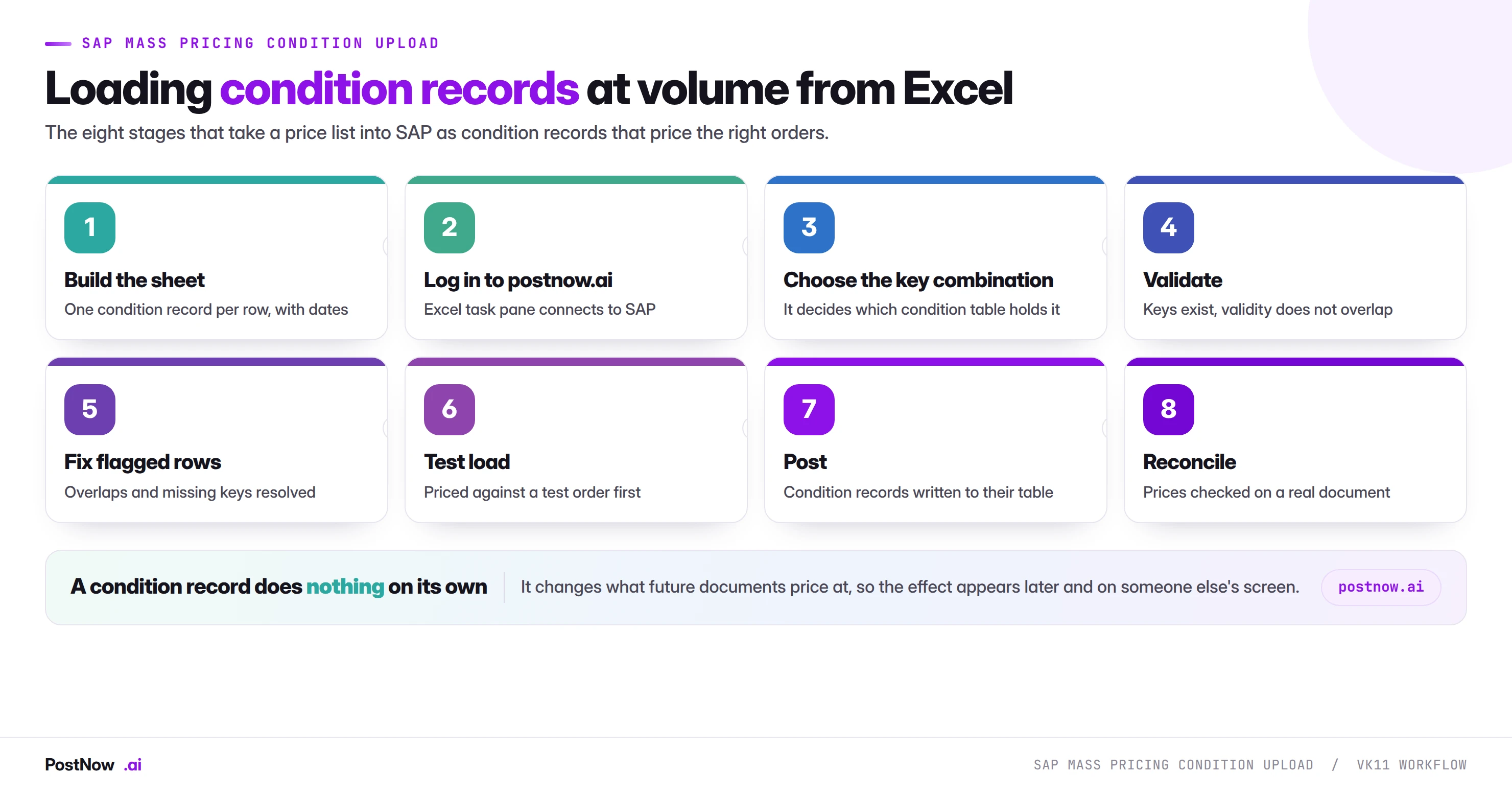
The eight stages above happen in the price list commercial already maintains. PostNow adds a task pane to Excel, connects to your SAP system with your own credentials, and takes the file through key selection, closure, validation and loading without leaving the sheet.
The key combination chosen explicitly, so records land in the right table.
Outgoing records ended before the new period opens, in the same run.
Keys, currencies, units and scales checked against live SAP.
The result read back from a priced document, not from a record count.
VK11, VK12, and mass maintenance
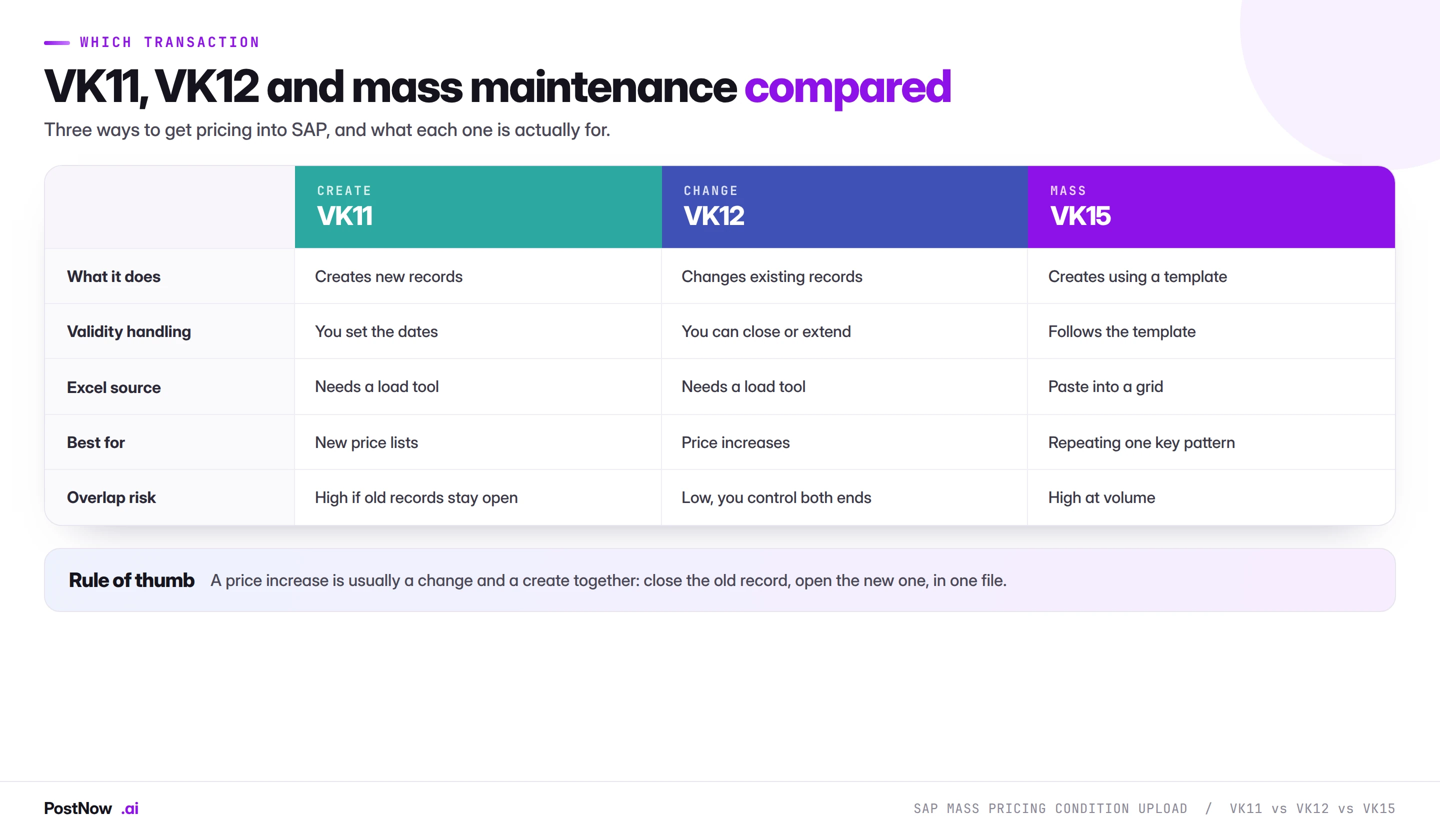
The practical insight here is that a price change is not a create. It is a change and a create together: close the old record, open the new one. Files built as pure creates are the origin of most overlap problems, and the fix is structural rather than a matter of care.
VK15 offers a fast route for repeating a single key pattern, and it is worth knowing about for simple cases. It becomes awkward when the population comes from a spreadsheet with varied keys, and it gives you nowhere to keep the before-and-after record.
The purchasing side: info records and MEK1
Everything above is written for sales pricing, which is where most condition volume sits. The purchasing side works the same way with different transactions and a different consequence.
Purchasing conditions live on info records and outline agreements, maintained through MEK1 and its relatives. They determine the price a purchase order picks up when no price is supplied in the file, and a gap in coverage shows up as error ME 083 during order creation.
The mechanics of key combinations and validity are identical. The difference is what a mistake costs: a wrong sales price under-charges customers, a wrong purchasing price means orders are raised at a value that will not match the supplier invoice, which surfaces as a variance block in invoice verification weeks later.
Scales, and one price becoming many rows
Scale pricing is where a flat spreadsheet stops matching the object it describes, and it catches out templates built for simple prices.
A scaled condition is one logical price expressed as several tiers: up to ninety-nine units at one rate, a hundred to four hundred ninety-nine at a lower rate, five hundred or more lower still. In SAP that is one condition record with several scale lines attached to it, not several independent records.
Three things follow for a file:
- The layout is parent and child. A header row carrying the key and validity, then scale rows carrying quantity and rate. A flat file expressing this needs a grouping column, in the same way an order file groups items into documents.
- Quantities must ascend. Scale lines out of order are rejected, and a spreadsheet sorted alphabetically rather than numerically produces exactly that.
- The scale basis matters. Quantity scales, value scales and gross weight scales all exist, and the basis is set on the condition type. A quantity supplied against a value-based scale is meaningless and will be interpreted rather than rejected.
Where a price list mixes scaled and unscaled conditions, split the file. The two shapes do not coexist comfortably in one template and the split costs nothing.
Removing prices, and why deletion is rarely right
Prices sometimes need to stop applying, and there are two ways to achieve that with very different consequences.
Closing the validity sets the valid-to date to the last day the price should apply. The record remains, its history remains, and documents created during the valid period still show which record priced them. This is almost always the right answer.
Deletion removes the record. Where a price was loaded in error and has never priced anything, this is clean. Where documents exist that priced against it, deletion removes the explanation for those prices, and anyone investigating an old invoice finds nothing.
The practical rule mirrors the one on goods movements: prefer the action that leaves a trail. Closing a record is reversible in effect and permanent in evidence; deletion is neither.
At volume this matters because a file of closures is a change run against existing records, and a file of deletions is not recoverable if the wrong rows were selected. Extract the current records before either, exactly as the material master guide recommends for any destructive change.
An overlap in validity makes the price SAP picks unpredictable
- Choosing the key combination by accident. Records land in a table nothing reads, the load reports success, and nothing changes.
- Creating without closing. Overlapping validity makes the price ambiguous, and the ambiguity is invisible until an order prices oddly.
- Leaving promotions open-ended. The default valid-to is far in the future, so a campaign discount runs for ever.
- Mismatching rate, currency and unit. Individually valid, collectively wrong by orders of magnitude.
- Trusting the record count. A successful load proves records exist, never that they price anything.
- Skipping the test order. The only check that catches the silent failures, and the one most often dropped under deadline pressure.
- Setting valid-from by copying a previous template. Puts a whole price list into the wrong period.
- Loading a condition type absent from the pricing procedure. Same silent outcome as the wrong table.
S/4HANA keeps VK11 but adds condition-table simplification
Pricing is one of the more stable areas across the conversion, which makes it a reasonable place to build mass capability early.
The condition technique is unchanged. Condition types, access sequences, condition tables and validity periods all work as they did. A file built for ECC maps to S/4HANA without redesign, and the concepts in this guide transfer directly.
Field lengths changed. Some pricing fields were extended, most visibly the material number. A file built against the shorter ECC field will not break, but one built against extended lengths will fail on an ECC system, so know which release you are pointed at.
Fiori apps sit alongside the transactions. Condition maintenance is available through apps as well as VK11 and VK12. This changes nothing for an interface-based load and breaks any screen recording built against the classic transactions, which is the same argument that appears on every page in this cluster.
Settlement management replaced some rebate processing. Where rebate agreements were previously handled through condition records, S/4HANA moves much of that into condition contract settlement. If your pricing population includes rebates, confirm which mechanism applies before assuming the old file shape still fits.
Why the row count explodes, and what to do about it
Pricing files grow in a way that surprises people who have run other mass loads, and planning for it prevents an unpleasant discovery halfway through preparation.
The arithmetic is multiplicative. A price list covering four hundred materials for fifty customers is twenty thousand records, not four hundred and fifty. Add three scale tiers and it is sixty thousand. Add a second sales organisation and it doubles again.
Three approaches keep this manageable, and choosing between them is a pricing design decision rather than a loading one:
- Price at the least specific level that works. A list price on the material, with customer-specific records only where a negotiation genuinely exists, produces a fraction of the records and is easier to maintain. Loading customer-specific prices for every customer because the spreadsheet had a column for it is the most common cause of an unmanageable condition population.
- Use price groups and material groups. Grouping customers or materials collapses many records into one. The access sequence already supports it; the file simply keys on the group instead of the individual.
- Split the load by pattern, not by size. Ten thousand records sharing one key combination is a simpler run than a thousand records spanning six combinations, because the validation and the verification are uniform.
A useful question before building any large pricing file: how many of these records will ever differ from the level above them? Records that merely restate a more general price add maintenance and change nothing.
Sales sets the price; the loader must not become the approver
Pricing sits across three functions and a mass load touches all of them, which makes ownership worth settling before the first run rather than during it.
Commercial owns the numbers. What the price should be, which customers get it, when it takes effect. This is not a technical decision and should never be inferred from a spreadsheet layout.
Whoever runs the load owns the structure. Which key combination, which condition type, how validity is closed. These are technical decisions with commercial consequences, and they are where the silent failures live.
Finance owns the consequence. Margin, revenue recognition and the aggregate impact of a price change. A load that shifts average selling price by three per cent is a finance event whether or not anyone told finance.
The handover that works is a template commercial fills in, a structure decision recorded by whoever loads it, and an aggregate summary shared with finance before the effective date. Where a pricing error reaches customers, the first question asked is always which of those three steps was skipped.
The pricing load, from key to scale
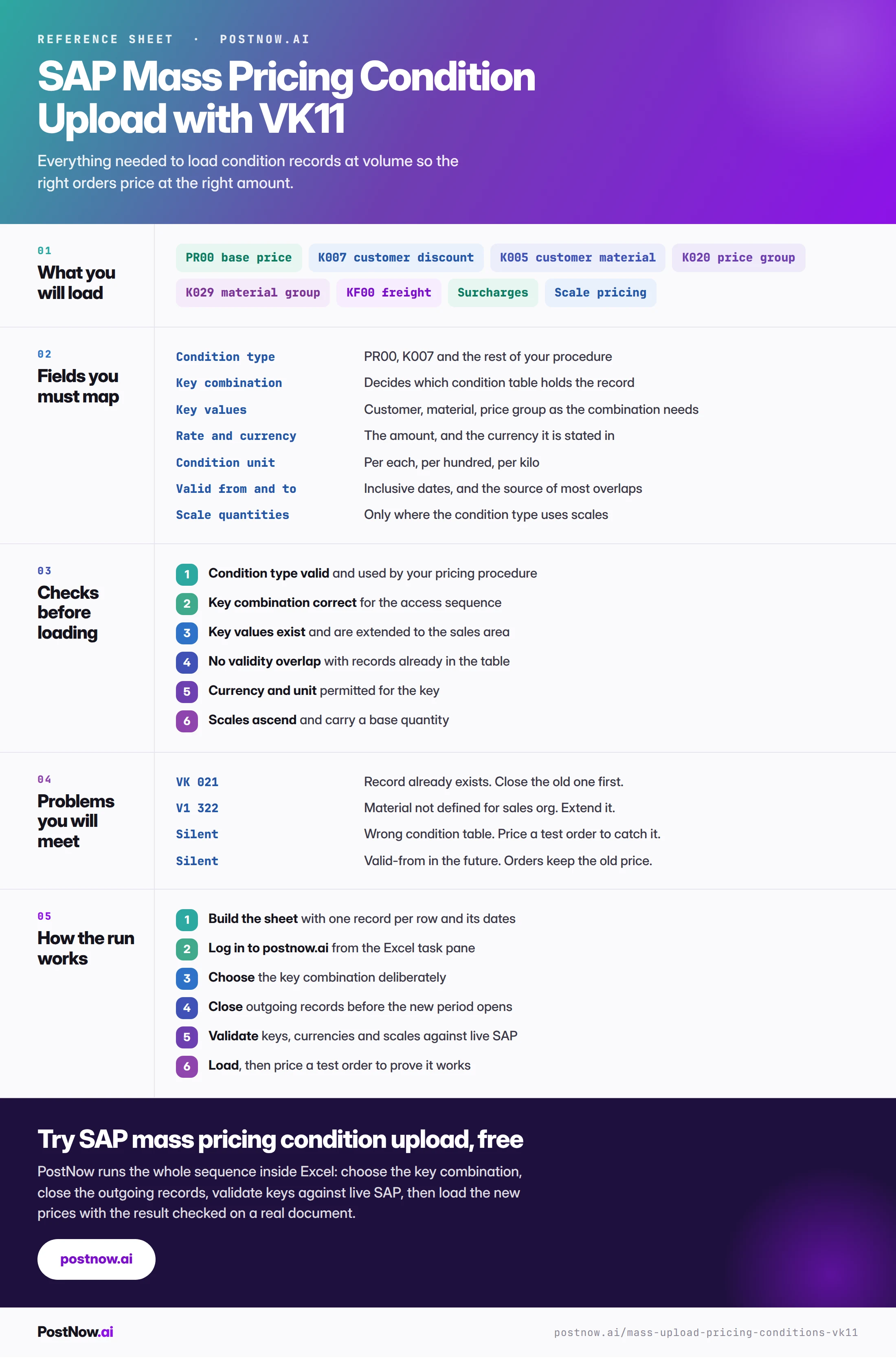
The reference sheet below collects everything above into one image you can share before a price list load.
Pricing loads that travel with a condition upload
SAP SD mass upload
The hub for sales at volume: orders, pricing conditions and the customers behind them.
SAP mass upload
The pillar guide covering methods, validation, error handling and governance across every transaction.
SAP MM mass upload
Purchasing conditions and info records work the same way, with different consequences.
SAP master data mass upload
The customers and materials these condition records key on have to exist first.