SAP MM Mass Upload
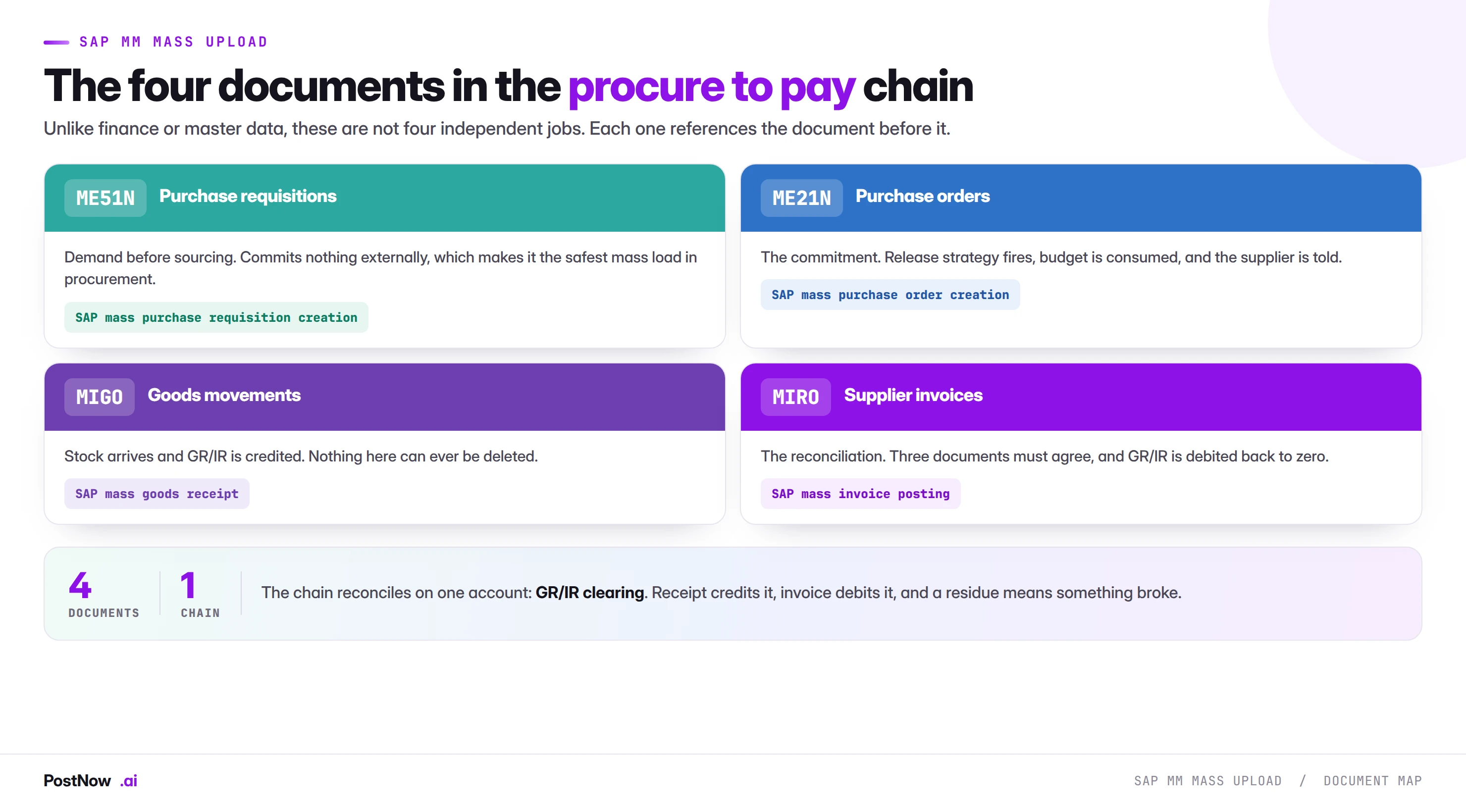
SAP MM mass upload means creating procurement documents at volume from files: requisitions through ME51N, purchase orders through ME21N, goods movements through MIGO and supplier invoices through MIRO. Unlike finance or master data, these are not independent jobs but four links in one chain, each referencing the document before it.
- Procurement is a chain. A receipt references a purchase order item; an invoice references both the order and the receipt.
- GR/IR clearing is where it reconciles. The receipt credits it, the invoice debits it, and a residue means something did not join up.
- Never skip a link. Using 501 instead of 101, or FB60 instead of MIRO, breaks three-way matching permanently.
- Master data comes first, always. Every block-level procurement failure traces back to a material or vendor that was not ready.
- Post receipts before invoices. Inverting the order creates a queue of blocks that correct sequencing avoids entirely.
What SAP MM mass upload means
SAP MM mass upload is the practice of creating procurement documents at volume from structured files: purchase requisitions through ME51N, purchase orders through ME21N, goods movements through MIGO and supplier invoices through MIRO. Unlike finance or master data, these are not four independent jobs. They are four links in one chain, and each document references the one before it.
This page is the hub for that work. It covers how the chain fits together, what every document in it needs from your file, why skipping a link causes damage that lasts, and where the whole thing reconciles. Each transaction then has its own guide with the field mappings, error codes and edge cases specific to it.
For the method-neutral foundation, the SAP mass upload pillar guide covers validation layers and governance across every module. For the master data that procurement depends on, the master data bridge covers materials and vendors.
Procurement is a chain, not a set of transactions
This is the property that makes MM different from the other bridges in this cluster. On the finance side, FB50 and FB60 are independent: you can run either without the other. In master data, materials and vendors are unrelated objects that happen to be loaded the same way.
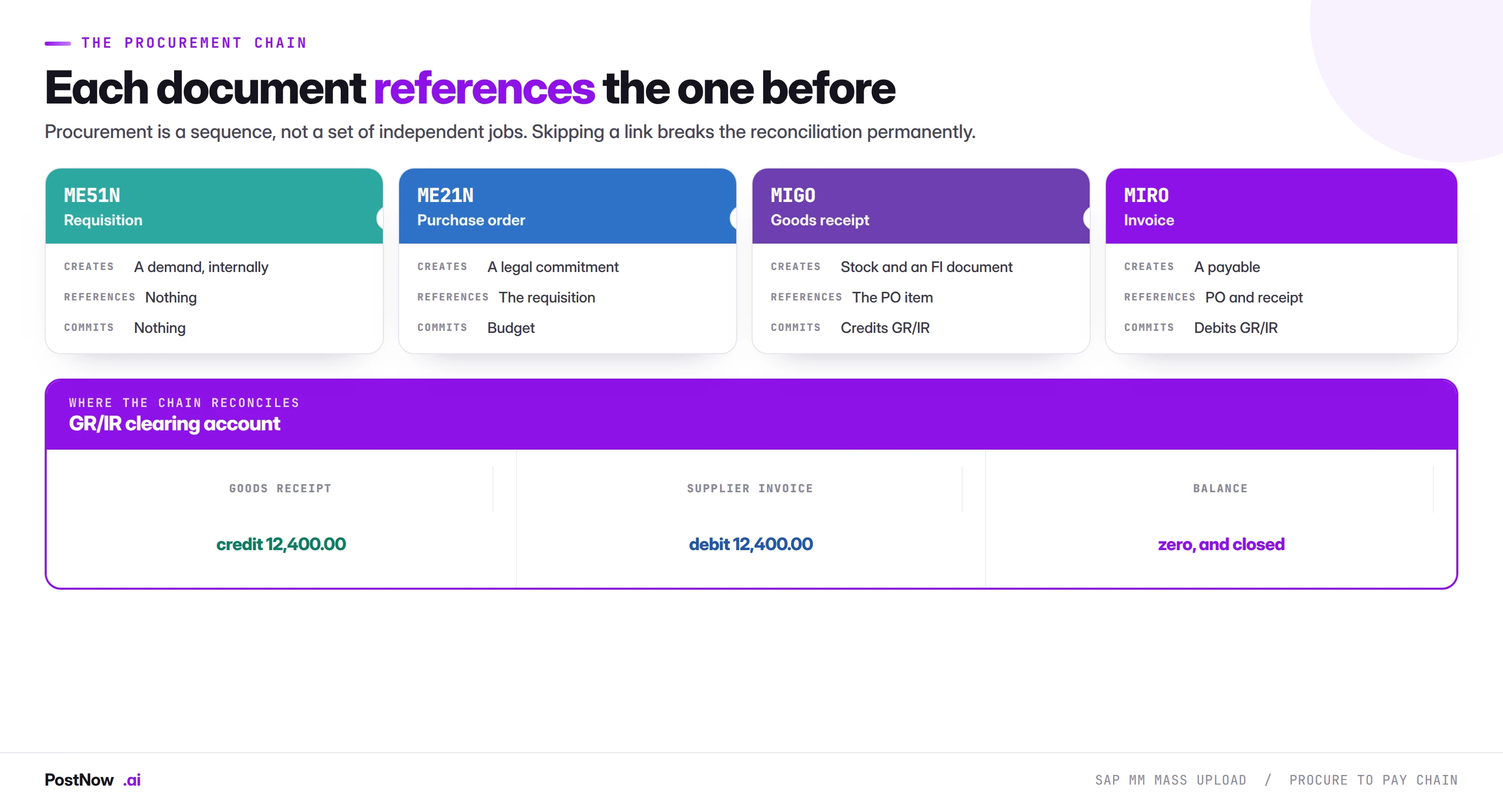
Procurement is different. A goods receipt references a purchase order item. An invoice references both the order and the receipt. Remove or corrupt any link and the documents downstream have nothing to point at.
The chain also has a single reconciliation point, which is unusually convenient: the GR/IR clearing account. A goods receipt credits it, an invoice debits it, and when both sides agree the line clears and the transaction is complete. A residue on that account is the system telling you something in the chain did not join up.
Commitment, then actual
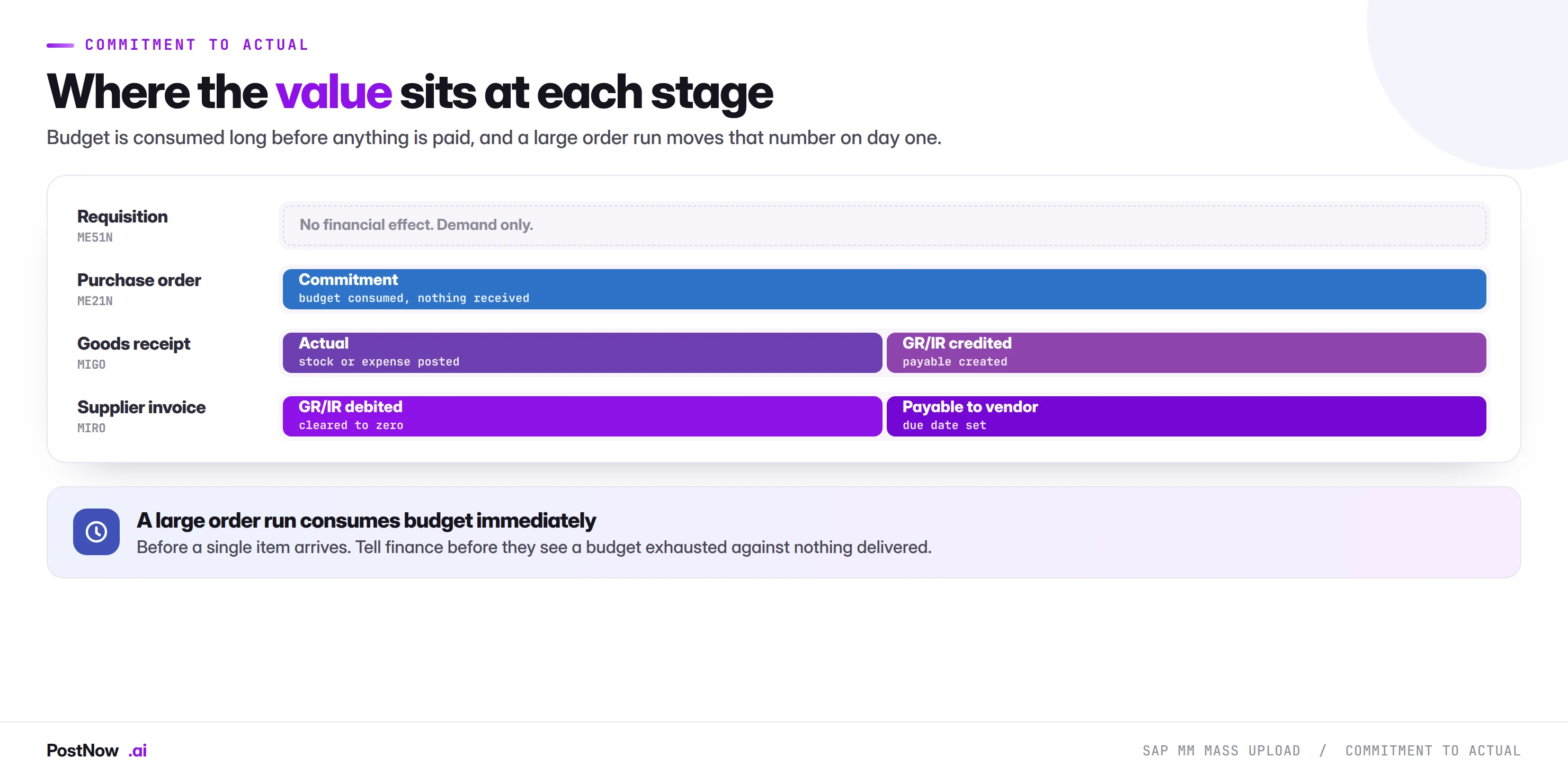
The chain also moves value through distinct stages, which matters for anyone watching a budget.
A requisition is demand with no financial effect. A purchase order is a commitment: where commitment accounting is active, budget is consumed the moment the order is raised, before anything has been received or paid. A goods receipt converts commitment into an actual, posting stock or expense and creating a payable in GR/IR. An invoice settles that payable against the supplier.
A large purchase order run therefore consumes budget immediately, before a single item arrives. Teams that mass-create orders without telling finance discover this when a budget shows as exhausted against nothing delivered.
What breaks when a link is skipped
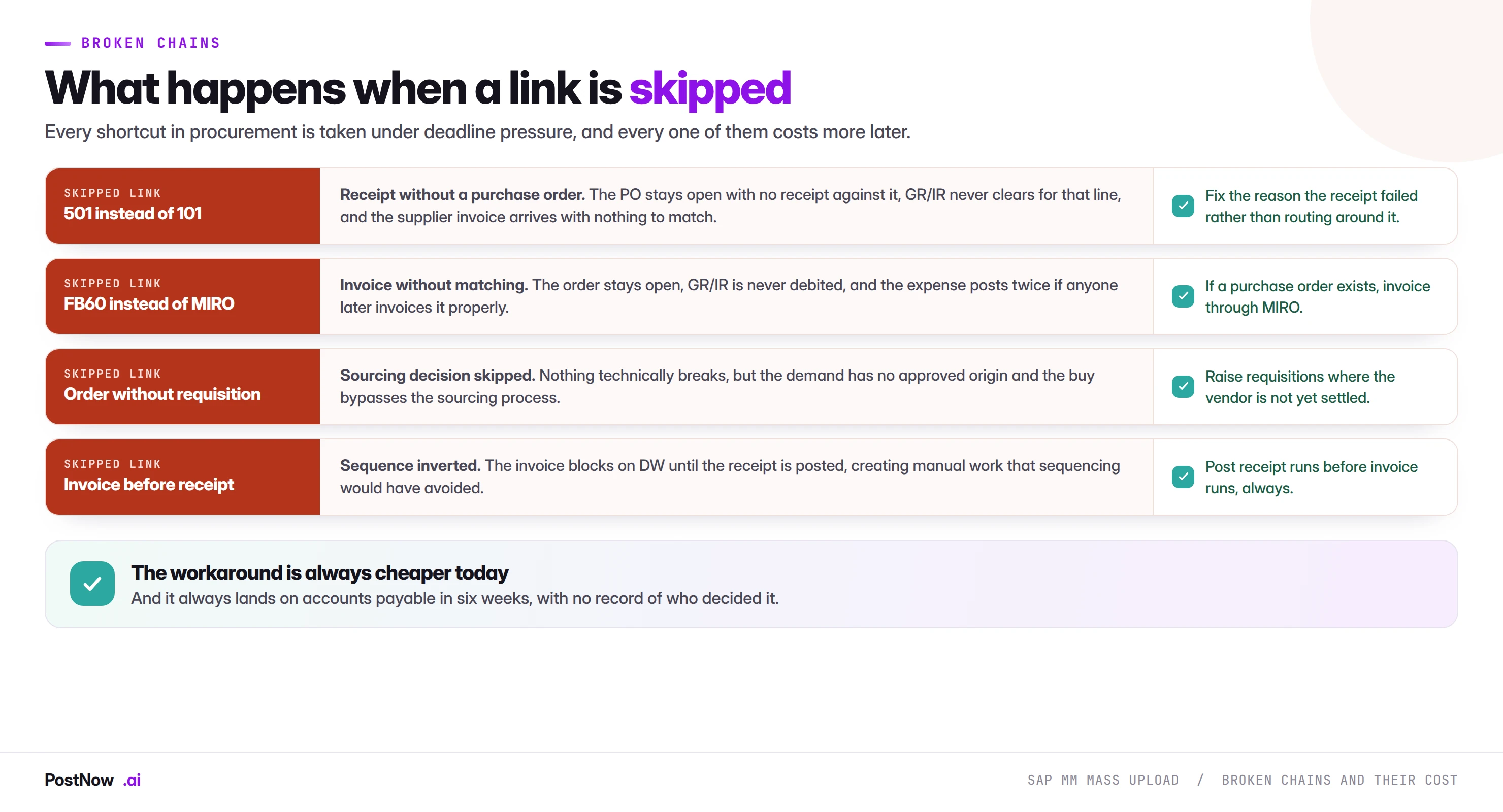
Every shortcut in this list gets taken for the same reason: something failed, a deadline is close, and there is a way to get the number into the system anyway. Each of them works today and costs more later.
Movement 501 instead of 101. A goods receipt without a purchase order reference, used when a receipt against the PO fails and stock is needed urgently. The order stays open with nothing received against it, GR/IR never clears for that line, and the supplier invoice arrives with nothing to match. The goods receipt guide covers the movement types in detail.
FB60 instead of MIRO. A vendor invoice posted directly to the general ledger, used when matching fails or the PO reference is unknown. The order stays open, GR/IR is never debited, and if anyone later invoices the line properly the expense posts twice. The invoice posting guide covers the distinction.
Order without requisition. Nothing technically breaks, and this is a legitimate pattern for call-offs against settled contracts. It becomes a problem when it is used to bypass sourcing: the demand has no approved origin and the buy has no record of why that vendor was chosen.
Invoice before receipt. Not a shortcut so much as a sequencing failure. The invoice blocks on DW until the receipt exists, which creates a work queue that correct sequencing would have avoided entirely.
Sequencing a procurement programme
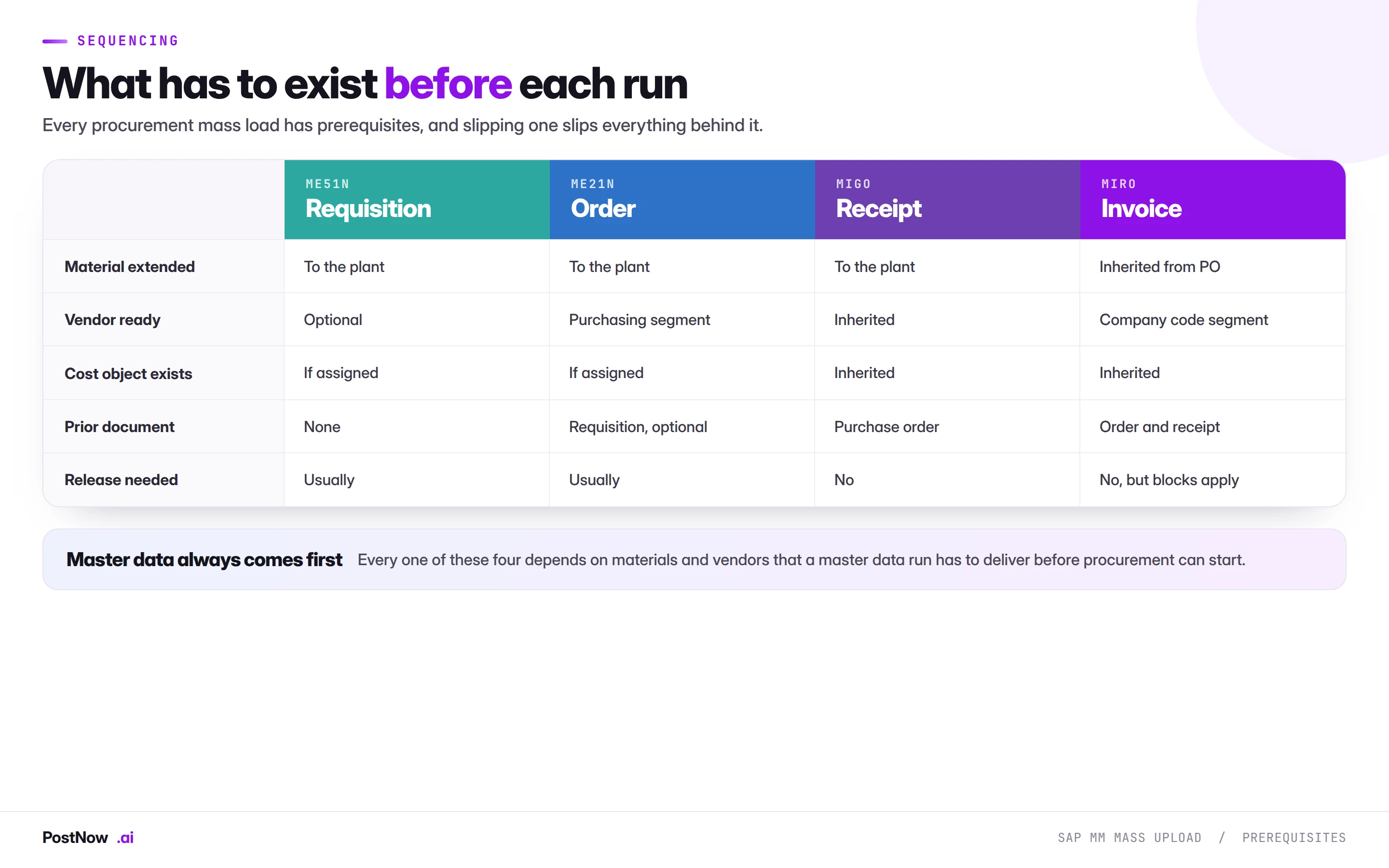
Because each document depends on the last, procurement mass work is almost never a single run. The order is fixed by the dependencies and slipping one link slips everything behind it.
- Master data first, always. Materials extended to the plants they will be ordered for, vendors with purchasing segments for the relevant organisations, cost centres for anything with account assignment K. Every procurement failure that hits a whole block of rows traces back to this.
- Requisitions before orders where sourcing is not settled. Where it is, go straight to orders.
- Orders before receipts, obviously, but with enough gap for release to happen. Unreleased orders cannot be receipted.
- Receipts before invoices. This one is routinely inverted because invoices arrive on the supplier's schedule rather than yours, and inverting it produces a queue of DW blocks.
- Reconcile between stages, not at the end. A GR/IR check after the receipt run is cheap. The same check after the invoice run has two possible causes to untangle instead of one.
Shared validation across the chain
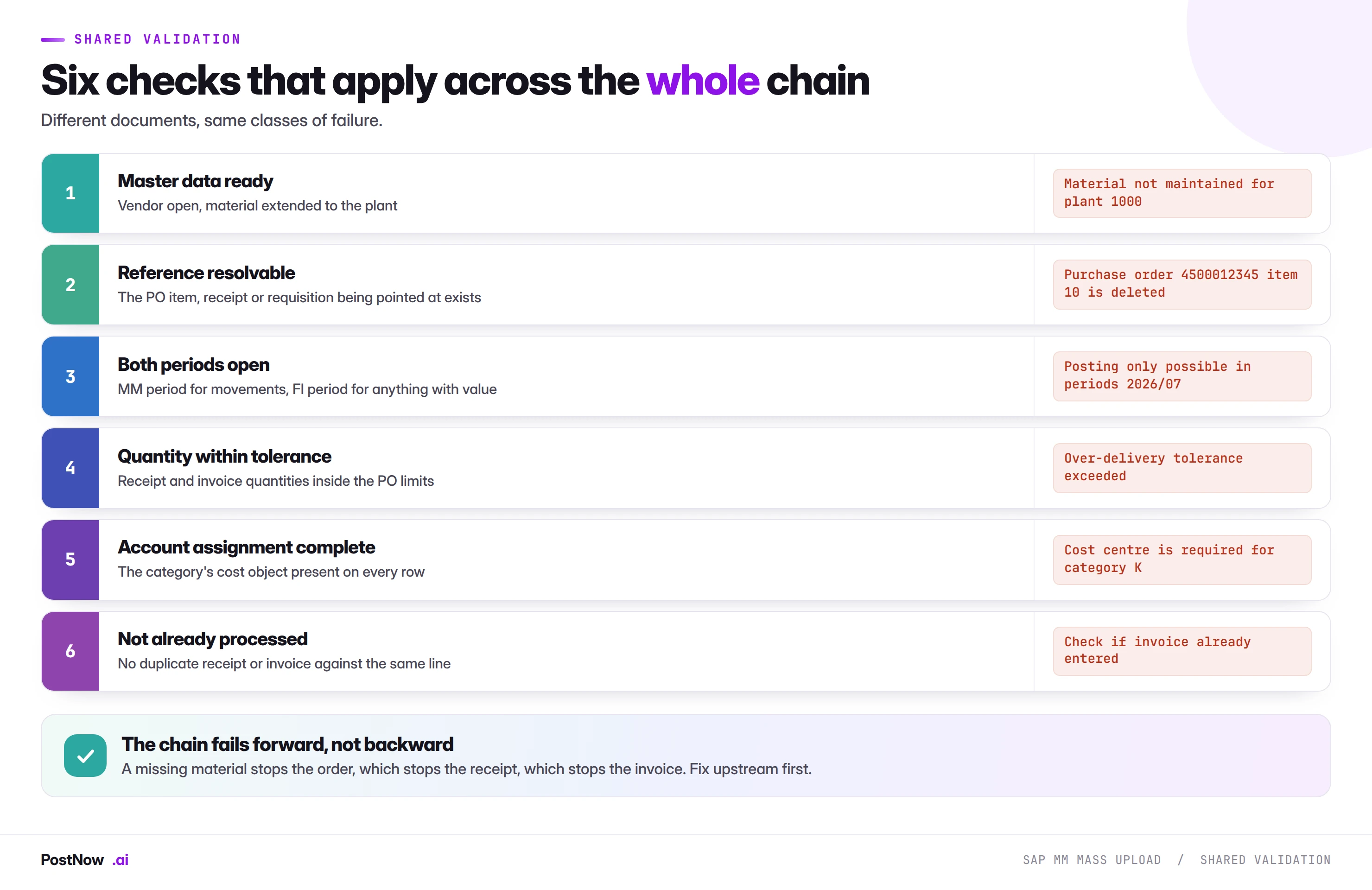
The documents differ; the classes of failure do not. Two are worth expanding because they behave differently from their equivalents elsewhere in this cluster.
Both periods open. Procurement is where the MM period and the FI period both matter, and they are maintained separately. A goods receipt needs both. This single issue stops more procurement mass runs than anything else, and it is a two-minute check in MMRV before the file is even built.
The chain fails forward. A missing material stops the order, which means there is no order to receipt, which means there is no receipt to invoice. This is genuinely helpful: procurement failures cluster at the earliest broken link, so fixing upstream usually resolves everything downstream at once. Diagnosing from the last failure backwards is slower than checking the prerequisites first.
Release strategies at two points in the chain
Requisitions and orders both commonly go through approval, and mass creation interacts with both in the same way: the strategy fires per document, so a run of four hundred generates up to four hundred approval events.
Three consequences worth planning for, and they apply equally to requisitions and orders:
- The approver needs warning. A queue that normally receives ten items a day receiving four hundred at once is a process failure even when the load worked perfectly.
- Grouping changes which strategy applies. Because strategies are usually value-driven, how items are grouped into documents determines the approval level each one hits. This is a governance question, not an optimisation, and engineering the grouping to stay under a threshold is the one shortcut that turns a process improvement into an audit finding.
- Unreleased documents do nothing. An unreleased order does not transmit to the supplier and cannot be receipted. A run that finishes with four hundred unreleased orders has not delivered what the business asked for.
Running the procurement chain from Excel
PostNow runs SAP MM mass upload from Excel
Whichever document in the chain you are creating, the sequence is the same and it happens in the file procurement or the warehouse already works from. PostNow adds a task pane to Excel, connects to your SAP system with your own credentials, and takes the file through referencing, validation and posting without leaving the sheet.
Every row matched to the document it points at before anything posts.
MM and FI period status verified for the posting date.
Tolerances, account assignment and master data checked against live SAP.
GR/IR movement compared against what the run should have matched.
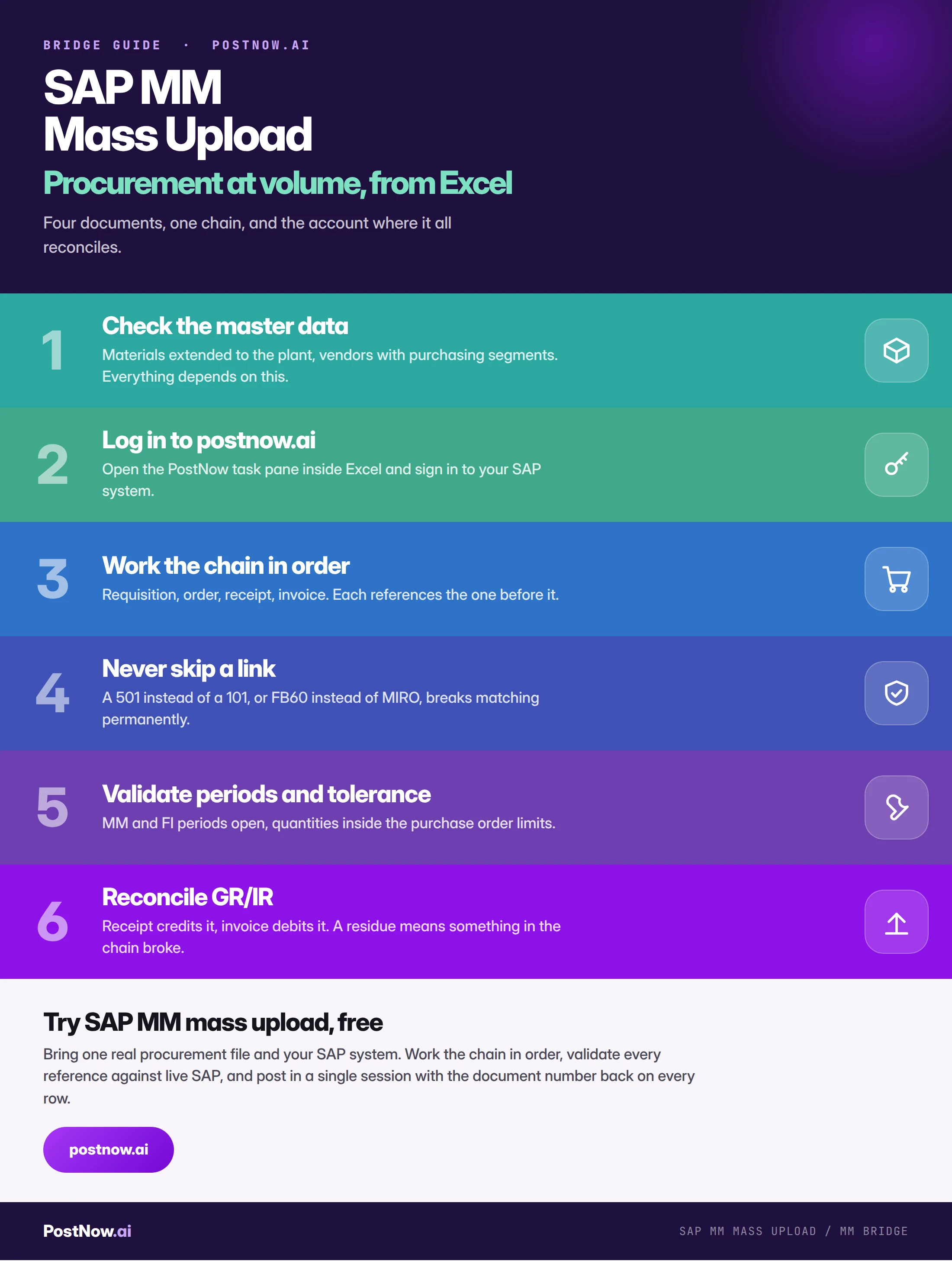
SAP MM mass upload, step by step
Tolerances, and the controls that exist to be respected
Purchase order items carry delivery and price tolerances, and both do real work at volume.
Over-delivery tolerance stops a receipt for more than the order permits. When a supplier over-ships, this is the control that catches it. Raising the tolerance to clear a run removes the only mechanism that would have flagged the problem, and it is the most common bad instinct in receipt processing.
Price variance tolerance decides whether an invoice clears, absorbs a small difference, or blocks. Suppliers apply price increases before purchase orders are updated, so a real invoice population always contains some of these. The block is the system asking a question, and the answer belongs to procurement rather than to whoever is running the file.
Under-delivery is usually permitted and produces a partially received item that stays open. This is normal on any real delivery file. What matters is that partial receipts are intended rather than accidental, and that the delivery-completed flag is set where a line will never receive its balance, so the remainder stops showing to planning as expected supply.
What procurement runs trigger elsewhere
- Planning. Orders appear as firm receipts and change what the next MRP run proposes. Raising orders that duplicate existing coverage produces excess supply nobody notices until stock arrives.
- Supplier communication. Released orders transmit by print, email or EDI. Four hundred at once is visible to your suppliers, and where one vendor receives many, their systems may throttle.
- Warehouse capacity. A large order run creates deliveries somebody has to receive, and a large receipt run creates putaway work.
- Accounts payable. Receipts create GR/IR balances that invoices will clear. A large receipting run usually precedes a large invoice run, and the second is easier when it is expected.
- Cash. Invoices posted create payables with due dates. A backlog cleared in one run can change a payment proposal materially.
- Budget. Where commitment accounting is active, orders consume budget on creation rather than on receipt.
None of this argues against mass procurement work. It argues for telling the people downstream that it is happening, which costs one message and prevents most of the friction.
Special procurement: subcontracting, consignment, third party
A real procurement population is not all straightforward buys, and the exceptions need different columns and different validation. Mixing them into one file is the most common structural mistake in MM mass work.
Subcontracting. You provide components, the vendor returns a finished item. The order carries a component list, and the receipt consumes those components from stock provided to the vendor in the same document. Two consequences at volume: the components must be at the vendor first through movement 541, and the component quantities are derived from the bill of material rather than supplied, so a receipt of the wrong quantity consumes the wrong components at a multiple of the visible error.
Consignment. Stock sits at your site owned by the vendor until it is consumed. There is no invoice on receipt, and settlement happens separately on a periodic run. A file mixing consignment and standard lines needs the distinction explicit, because the accounting behaves entirely differently.
Third party. The vendor ships directly to your customer, so the goods never reach your plant and the order links to a sales order rather than producing a delivery. These rows have consequences on the sales side that the person running a procurement file may not expect.
Text items. No material number, so the file must carry a description, a material group and an account assignment. These are the rows that fail when a template assumes a material is always present.
Services behave differently from goods
Service procurement uses the same four transactions and a different object model underneath, and files built on a goods template break against it.
A service purchase order carries a service specification rather than a material and a quantity. What gets receipted is a service entry sheet recording the services actually performed, and that sheet must be accepted before it can be invoiced. The invoice then matches against the accepted entry sheet rather than against a goods receipt.
- Acceptance is a prerequisite. An unaccepted entry sheet is not a valid basis for invoicing, and the invoice blocks or fails depending on configuration.
- The reference is the entry sheet. A file carrying only the purchase order line cannot identify which of several sheets is being invoiced.
- Quantities are often values. Service lines are frequently priced as lump sums rather than quantity times rate, which changes how variance is evaluated and how the invoice balance is calculated.
Where a population mixes goods and services, split it. The matching basis differs, the approval prerequisite differs, and a combined file produces failures that are hard to attribute to the right cause.
Governance across the chain
- Approve the file, and show the total. The aggregate value being committed or posted is the number that matters, and it is invisible when documents are created one at a time.
- Run as a named user. With that person's purchasing and inventory authorisations. Shared accounts remove the trail that makes the run defensible.
- Separate the requester from the operator. Procurement or the warehouse supplies the file, somebody else runs it.
- Never engineer grouping around approval thresholds. The temptation is real under deadline pressure and it is the clearest audit finding available.
- Keep the completed file. Requirements, document numbers and values in one artefact is the record of what was committed and why.
- Reconcile GR/IR after every receipt and invoice run. Nobody else will, and it gets harder the longer it is left.
Volume, timing, and contention
- Runtime tracks documents, not rows. Two thousand items forming four hundred orders makes four hundred calls. Consolidating items into fewer documents is faster.
- Avoid running during MRP. Orders and receipts posted mid-planning-run produce a supply picture that is briefly inconsistent, and diagnosing that wastes an afternoon.
- Avoid running against a physical inventory count. Movements posted while a count is open produce differences that are artefacts of timing.
- Batch by plant or vendor. Homogeneous failure modes and a batch you can describe in one sentence.
- Watch the period boundary. A long run that starts before a period closes and finishes after it will fail partway, confusingly, because the file was correct when it started.
- Expect lock contention on high-volume materials. Receipts and issues on the same material at once produce errors that resolve on a retry.
Templates for a recurring chain
- One template per document type. Requisitions, orders, receipts and invoices each get their own. A combined file cannot be reviewed.
- Give receipt templates to the warehouse or 3PL. Files arriving with PO number, PO item, quantity and unit already correct make posting a formality.
- Give invoice templates to the capture platform. Same principle from the other end of the chain.
- Encode the grouping rule. How items become documents is the decision that took the thinking, and it should not be rediscovered monthly.
- Encode the account assignment logic. Which buying type uses which category and which cost object column it needs.
- Name an owner. Document types, release strategies, tolerances and purchasing organisations all change.
Mistakes that recur across the whole chain
- Starting procurement before master data is ready. Every block-level failure in this bridge traces back here.
- Skipping a link under deadline pressure. 501 for a PO line, or FB60 for a PO invoice. Both break matching permanently.
- Inverting receipt and invoice order. Creates a queue of blocks that correct sequencing avoids entirely.
- Forgetting that release strategy will fire. Four hundred approvals landing unannounced is a process failure even when the load worked.
- Raising a tolerance to clear a run. Removes the control that just did its job.
- Forgetting the MM period is separate from the FI period. The most common single cause of a stopped receipt run.
- Treating a blocked invoice as a failed row. It posted. Re-running it creates a duplicate payment.
- Skipping the GR/IR reconciliation. Wrong references produce balances that hide until quarter end.
Where mass upload sits alongside EDI and interfaces
Procurement is the module most likely to already have automated document flow, so it is worth being clear about where a file-based load fits next to it.
EDI handles the steady state. Where a supplier relationship is high volume and stable, orders transmit and confirmations, despatch advices and invoices return automatically. Nothing on this page competes with that, and where EDI is working, adding a manual file for the same flow is a step backwards.
Mass upload handles everything EDI does not. The long tail of suppliers too small to justify an interface. The backlog when an interface fails and a week of documents has to be caught up. The one-off programmes: a site opening, a category onboarding, a migration cutover. And the corrections, which no interface produces.
The two meet at the same interfaces. An IDoc-based inbound invoice and a mass upload both end up calling the same published function underneath, applying the same validation and the same tolerance rules. That is the reason a file-based load is not a lesser mechanism: it posts through the identical path, with a person deciding what enters it.
The practical question for a team choosing between them is volume and stability. A flow that repeats hundreds of times a month with a stable partner justifies an interface. A flow that happens quarterly, or arrives as a spreadsheet from a team without SAP access, does not, and building an interface for it is usually more expensive than the manual work it replaces.
The procurement guides
- SAP mass purchase requisition creation (ME51N). Demand before sourcing, and the lowest-risk mass load in procurement.
- SAP mass purchase order creation (ME21N). Header and item structure, account assignment categories, release strategy and price determination.
- SAP mass goods receipt (MIGO). Movement types, the two period calendars, tolerances and why nothing can be deleted.
- SAP mass invoice posting (MIRO). Three-way matching, tolerance keys, duplicate prevention and GR/IR clearing.
Open procurement documents at cutover
Migration is the hardest version of procurement mass work, because the documents have to arrive in the new system looking like commitments made weeks ago rather than orders created today.
Open orders carry their remaining quantity. An order half received in the legacy system should arrive as the balance, not the original quantity. Loading the full quantity double-counts demand and double-receipts if nobody catches it.
Original dates, not load dates. The delivery date drives planning and the supplier expectation. A cutover file that stamps everything with the go-live date produces a supply picture that is fiction.
Prices as agreed. Cutover is one of the few cases where supplying the price explicitly is usually right, because the vendor was given a price that current info records may no longer reproduce.
GR/IR opening balances. Items received but not invoiced in the legacy system carry a GR/IR balance that has to exist in the new one, or the invoices arriving after go-live have nothing to clear against. This is the detail most often missed, and it surfaces as a wave of unmatched invoices in the first month.
Sequence the cutover the same way as any other procurement programme: master data, then open orders, then open receipts, then the balances. Compressing it because the go-live weekend is short is how open items end up unreconcilable.
Who owns a procurement run
The chain crosses more teams than any other object in this cluster, and each link has a different owner. Settling this before the first run prevents the finger-pointing during the third.
Procurement owns the sourcing decision. Which vendor, at what price, on what terms. A mass order run assumes that decision is already made, which is exactly why raising orders when sourcing is unsettled is the wrong instrument.
The warehouse owns the physical truth. What actually arrived, in what quantity, in what condition. A receipt file is a claim about the physical world, and the person posting it should not be the only person who has seen the delivery.
Accounts payable owns the match. Whether an invoice agrees with the order and the receipt, and what to do when it does not. Blocked invoices are their work queue, not the operator's.
Finance owns the period and the budget. Whether a backdated run is acceptable, and whether a commitment of that size was expected.
The failure mode when this is unclear is specific and recurring: the person running the file makes a judgement that belongs to somebody else, usually under time pressure, usually by taking a shortcut around a control. Raising a tolerance, clearing a block, or posting a 501 are all decisions with owners, and none of those owners is the operator.
After a procurement run
Four checks close the gap between documents existing and procurement working.
Reconcile GR/IR. The same day, while the trail is warm. This is the check that catches wrong references and nobody else in the process will do it.
Work the release queue. Unreleased orders do nothing at all. A run that finishes with four hundred unreleased documents has not delivered what was asked for.
Separate blocked from failed. On the invoice side especially. A blocked invoice posted; re-running it creates a duplicate payment, which is the most expensive error available in this bridge.
Tell the next team in the chain. A large order run creates deliveries the warehouse will receive. A large receipt run creates GR/IR balances accounts payable will clear. A large invoice run changes what treasury will pay. One message each, sent before rather than after.
The complete MM mass upload reference
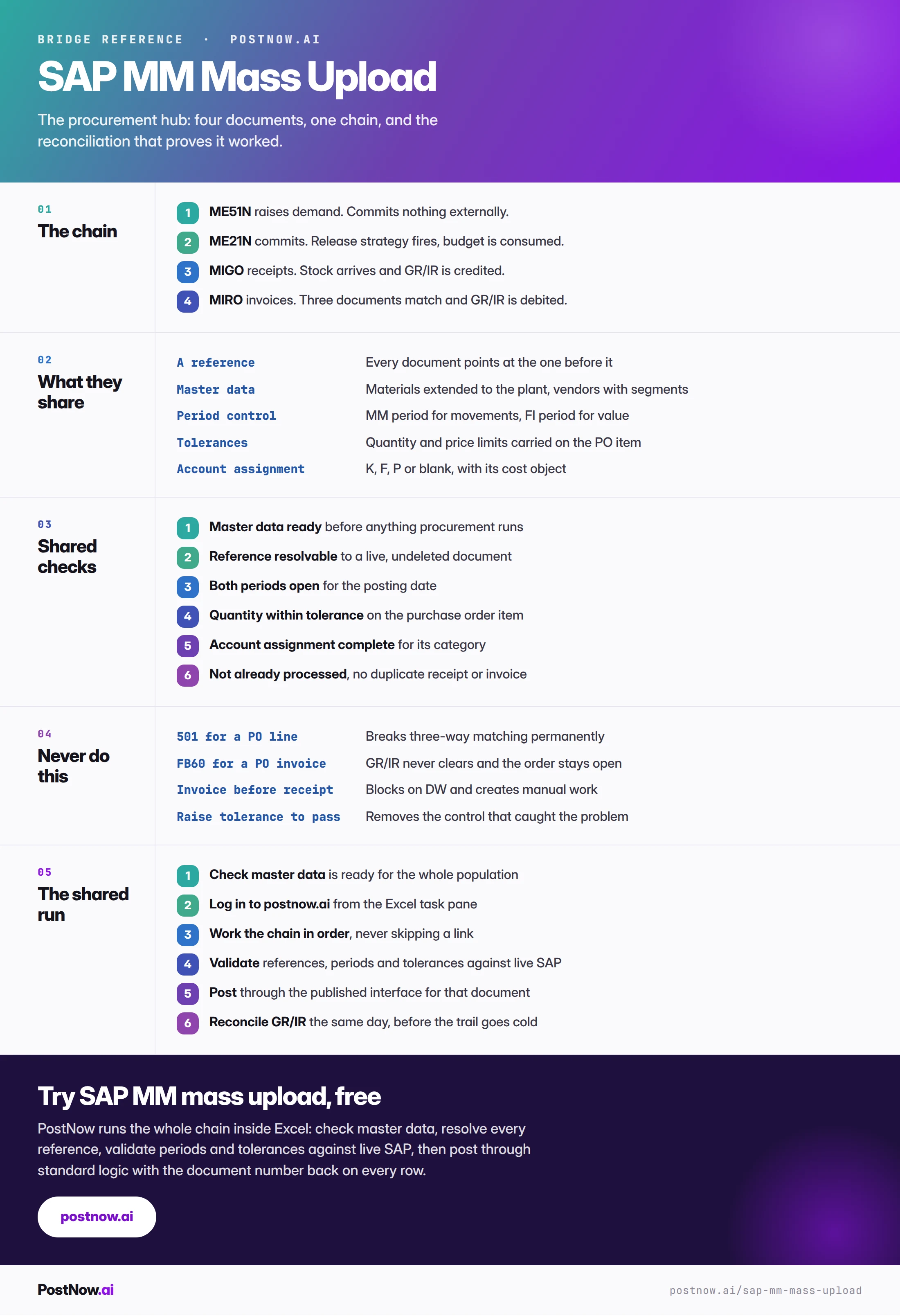
The reference sheet below collects everything above into one image you can share before a procurement programme.
Go deeper
SAP mass upload
The pillar guide covering methods, validation, error handling and governance across every module.
Methods and alternatives
How BAPI, screen recording and LSMW compare for procurement documents.