SAP FB60 mass upload means posting many non-PO vendor invoices in one controlled run. An FB60 invoice carries no purchase order and no goods receipt, so SAP has nothing to match it against — it posts whatever the row tells it to. That turns mass vendor invoice posting through FB60 into a controls problem before it is a data problem: every check MIRO gets for free from three-way matching has to be built into the file and signed off before the run. This guide covers the non-PO invoices that belong in FB60 — utilities, rent, professional fees and other indirect spend — and how to clear a backlog of them without turning a spreadsheet slip into a duplicate payment.
- Use MIRO whenever a purchase order exists. Routing a PO invoice through FB60 leaves the order open and GR/IR unclearable for ever.
- Control comes from approval, not matching. Approve the file with its total before the run, because there is no other control point.
- Treat the duplicate warning as a stop. F5 117 is a message a person considers; in a mass run nobody reads it, and a duplicate invoice becomes a duplicate payment.
- Account type K has its own period status. A period open for GL journals is not necessarily open for vendor invoices.
- Model the tax SAP calculates. Using the supplier's printed total is the most common cause of a balance error.
A non-PO invoice has nothing behind it to check
SAP mass vendor invoice posting is the practice of entering many supplier invoices in one controlled run through FB60, for invoices that have no purchase order behind them. Utilities, rent, professional fees, insurance and subscriptions all arrive as payables that procurement never touched, and there is nothing in SAP to match them against.
That absence is the whole subject of this guide. MIRO reconciles three documents and derives most of its control from doing so. FB60 has one document, supplied by you, and every check that MIRO gets from the purchase order and the goods receipt has to come from somewhere else.
Nothing validates that this spend was agreed. No order proves somebody approved it, no receipt proves anything arrived, and no tolerance rule compares the amount against an expectation. The only control is who approved the file, which is why approval sits before the run rather than in the system.
Use MIRO for PO invoices, FB60 only when there is none
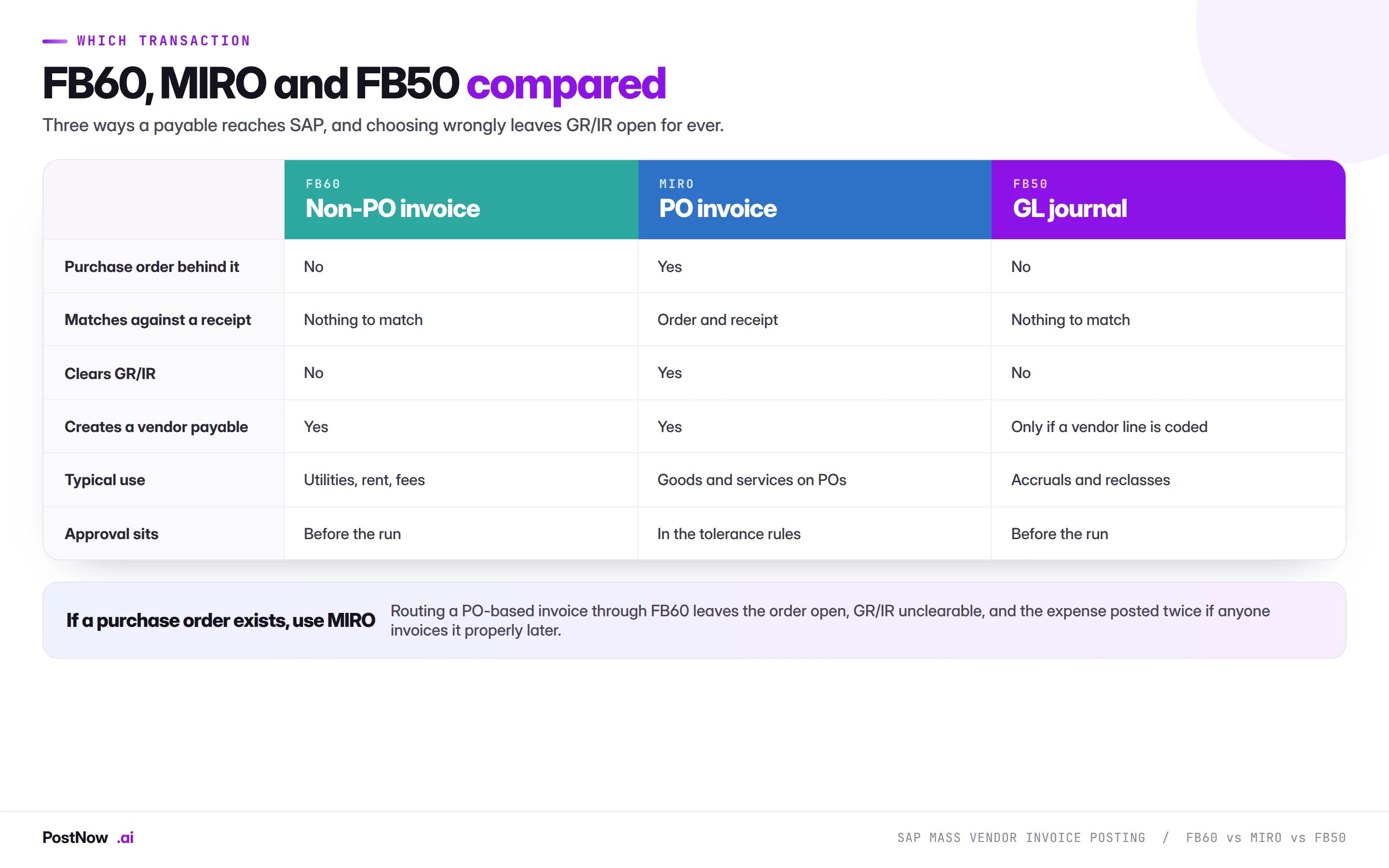
Choosing wrongly here is the most consequential decision on the page, and it is made under time pressure more often than on the merits.
Use MIRO whenever a purchase order exists. It matches against the order and the receipt, clears GR/IR, and applies tolerance rules automatically. Routing a PO-based invoice through FB60 leaves the order open with nothing invoiced against it, leaves GR/IR permanently unclearable for that line, and posts the expense a second time if anyone later invoices it properly. The procurement bridge covers why this breaks the chain.
Use FB60 where no purchase order was ever raised. That is the legitimate case and it covers a large share of indirect spend in most organisations.
Use FB50 where there is no vendor. Accruals, reclassifications and allocations are GL to GL and belong there.
Why the control has to live in the file
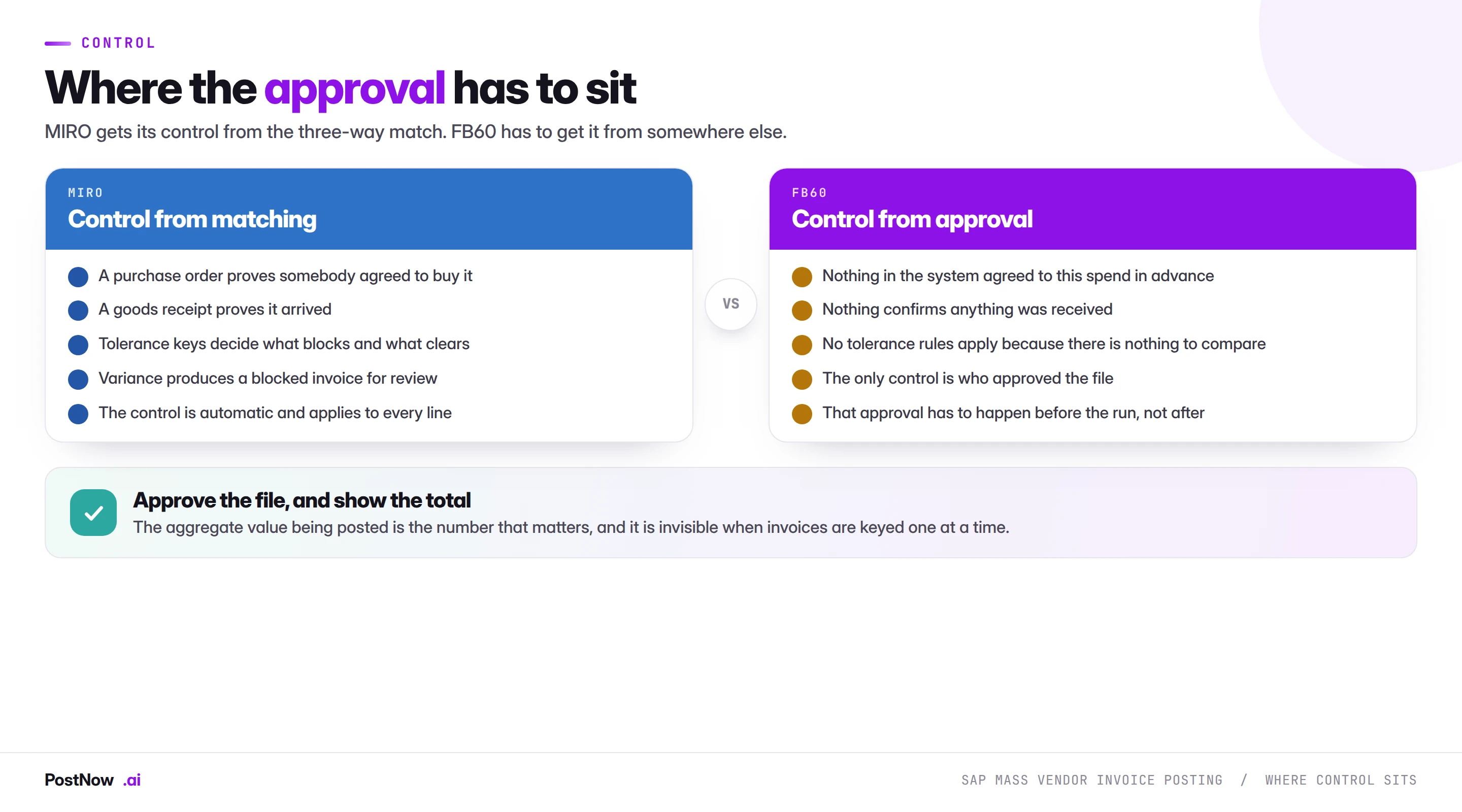
This is worth stating plainly because it changes how the run should be governed.
In MIRO, control is structural. The purchase order proves somebody agreed to buy something, the goods receipt proves it arrived, and tolerance keys decide what clears and what blocks. A person can run four hundred invoices and the system will still object to the ones that disagree with reality.
In FB60, none of that exists. The system will accept whatever the file says, post it, and create a payable. There is no second opinion available anywhere in the process.
The consequence is that approval must be of the file, before the run, and it must show the aggregate. Whoever signs off should see which vendors, which accounts, and what the total commits. That number is invisible when invoices are keyed one at a time, and it is the only meaningful control point in a non-PO invoice run.
Two supporting practices matter as much:
- Separate whoever prepares the file from whoever posts it. Standard segregation, and more important here than anywhere else in the cluster because nothing else is checking.
- Separate posting from payment release. The person running the file should not also be releasing the resulting payables.
The duplicate invoice check the warning does not enforce
SAP checks incoming invoices against existing ones using vendor, reference number, date and amount, and raises F5 117 when it finds a possible match. In manual entry that is a warning somebody reads and considers.
In a mass run, a warning nobody reads is not a control. The row either comes out of the file or it posts, and if the default is to post, the check has been removed rather than applied.
Three practices make it real, and they are the same ones the MIRO guide describes because the failure is identical:
- Treat F5 117 as a stop. The row leaves the run and goes to a person, rather than being acknowledged past.
- Screen the file against itself. Consolidated files frequently contain the same invoice twice, and a check that only queries SAP cannot see it because neither copy exists yet.
- Never blank the reference to clear a block. The reference is what makes the check work, so an invoice posted without one is invisible to every future check.
The reason this matters more than any other error on this page is that a duplicate invoice becomes a duplicate payment. It is also self-concealing: a duplicate looks exactly like a legitimate invoice, and the discovery mechanism is usually a supplier ringing to say they have been paid twice, or nobody at all.
Account, tax code and baseline date live in the row itself
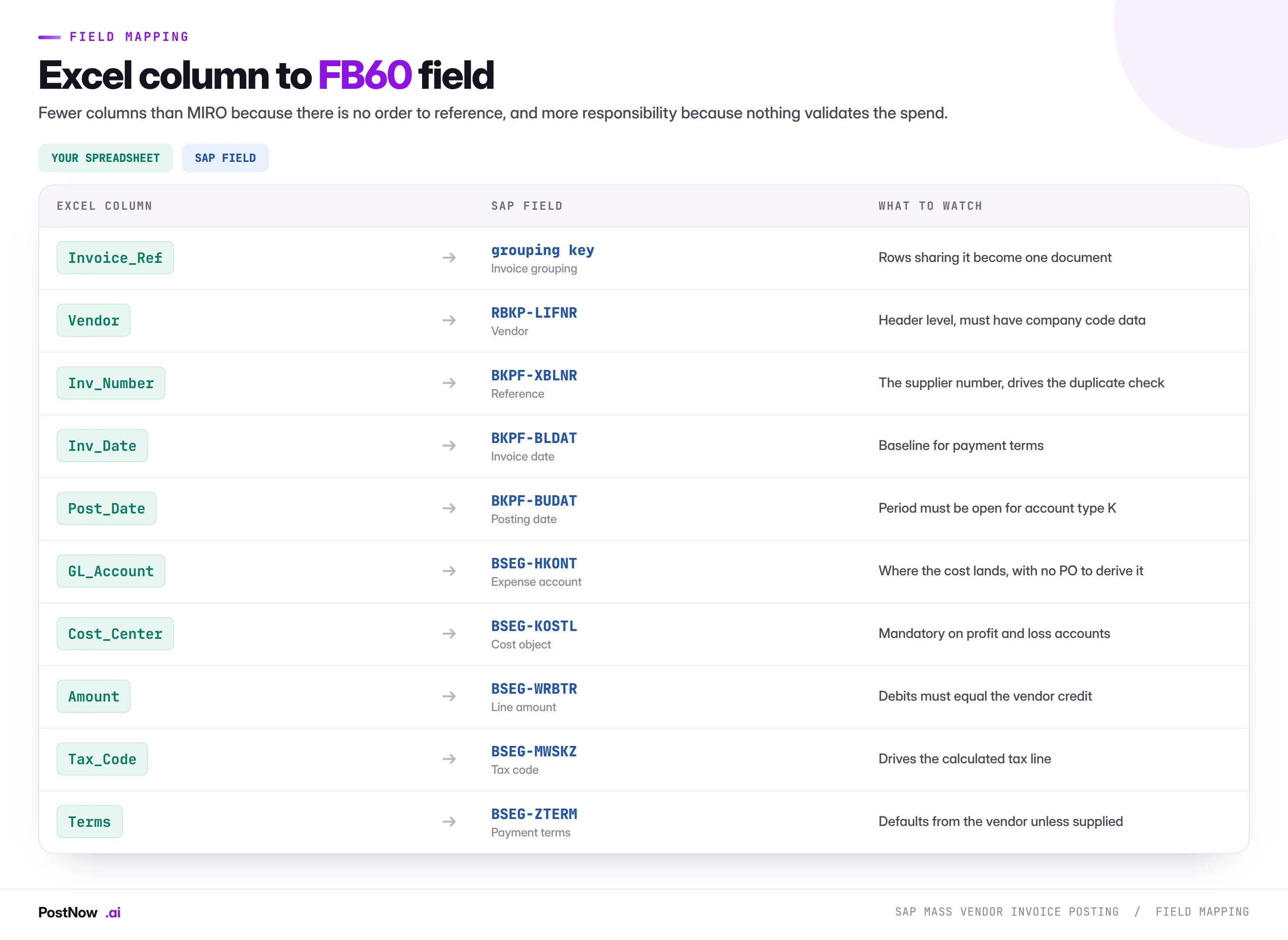
Fewer columns than a MIRO file, and more responsibility for each of them.
The expense account and cost object
With no purchase order, nothing derives where the cost lands. Your file states the account and the cost object directly, which means a miscoded row posts cleanly to the wrong place and nobody notices until a cost centre owner queries their report.
On a recurring file this is worth building into the template rather than deciding per run. Utilities to the utilities account and the site cost centre, rent to rent and the facilities centre. Where the coding is stable, it belongs in the template; where it varies, it belongs to whoever approves the file.
Payment terms and the baseline date
Terms default from the vendor master company code segment described in the vendor master guide, unless the file supplies them. The baseline date derives from the invoice date, and the due date follows from both.
This matters most on a backlog run. Two hundred invoices dated six weeks ago, posted today, may all become due immediately. That is a legitimate outcome and it is also a payment run nobody budgeted for. Work out the due date profile before posting and tell treasury.
Tax
The most common cause of a failed FB60 load, for the same reason as in MIRO: your file carries what the supplier billed, SAP calculates what it thinks the tax should be, and the gross amount has to equal the lines plus SAP's calculation rather than the printed total. Rounding, mixed rates across lines and reverse charge scenarios all produce small differences that break the balance.
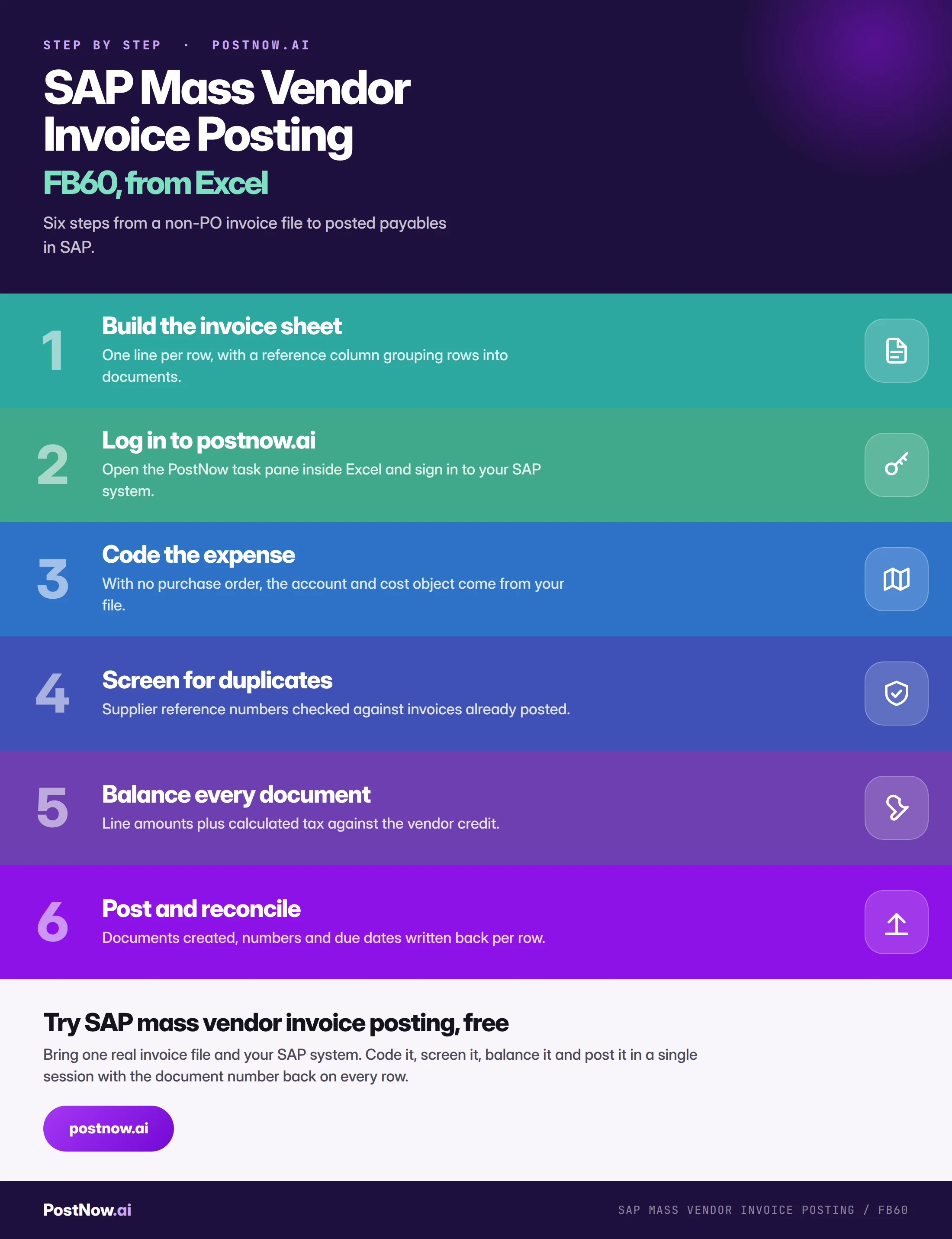
Build, approve, then post — never reorder those three
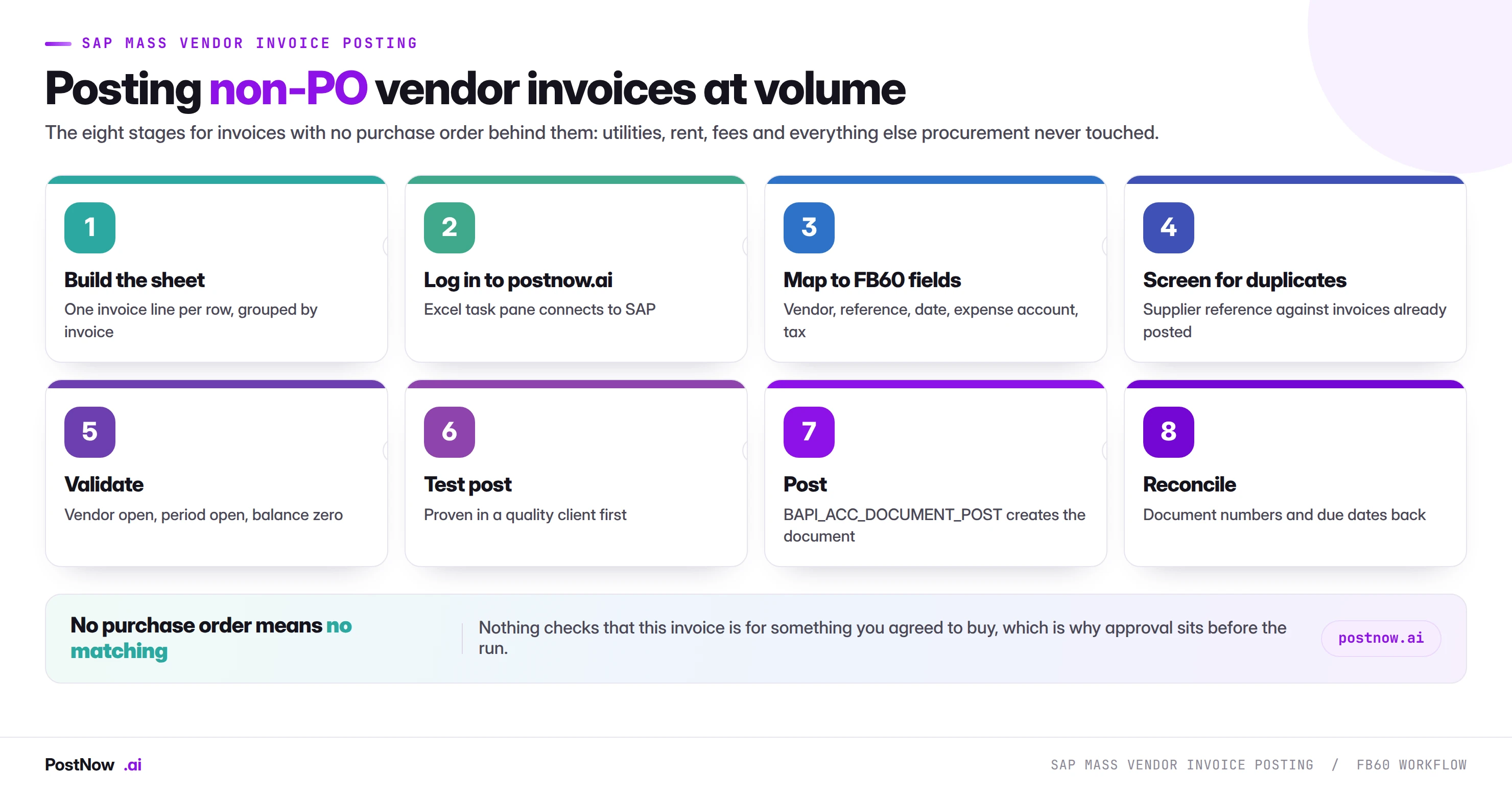
Build the invoice sheet
One line per row, header fields repeated across rows in the same document, and a reference column deciding the grouping. Carry the supplier's own invoice number on every row.
Code the expense
Account and cost object per row. Nothing derives these for you, so a template covering the recurring categories removes most of the judgement from the run itself.
Screen for duplicates
Vendor and reference against invoices already posted, and against the file itself. Suspected matches come out of the run rather than being acknowledged past.
Validate every row against SAP
Vendors open with company code data, period open for account type K, accounts valid and unblocked, and every document balancing against the tax SAP will calculate.
Test-post in a quality client
Post a subset and open one in FB03. Check the tax, the terms, the resulting due date and where the expense landed.
Post through standard FB60 logic
The run calls BAPI_ACC_DOCUMENT_POST, the same interface behind FB50 and every other FI document. Same validation, same change documents, same atomic behaviour.
Reconcile, then hand over
Document numbers written back per row, the total compared against what was approved, and the due date profile shared with treasury.
SAP will not check the total or the duplicates — you must
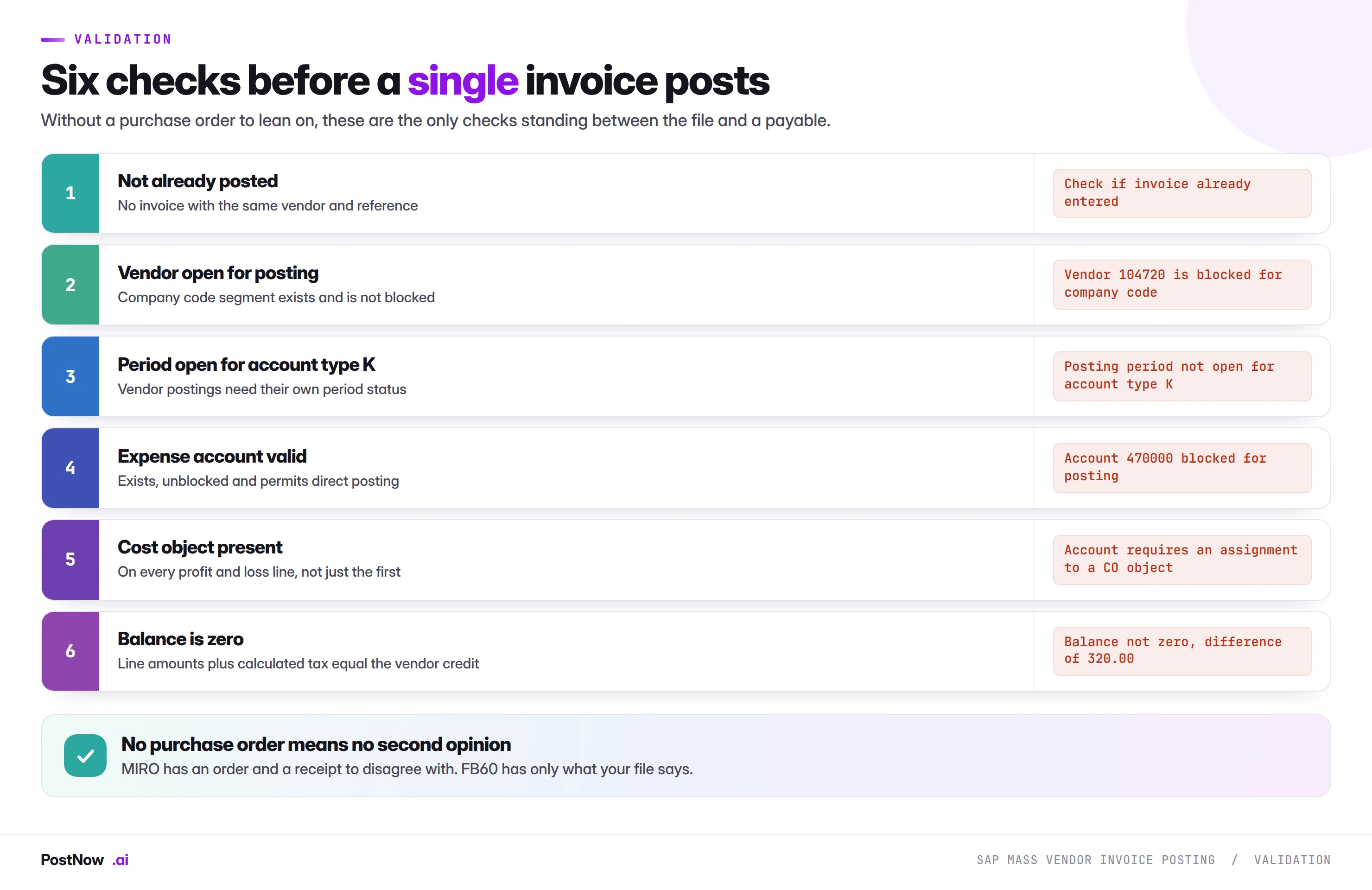
The period check deserves a specific note. Posting periods are maintained per account type, and vendor postings use account type K rather than the S used for GL documents. A period open for journals is not necessarily open for vendor invoices, which produces a confusing failure when an FB50 run succeeds on the same date that an FB60 run fails.
The F5 messages name the control you skipped
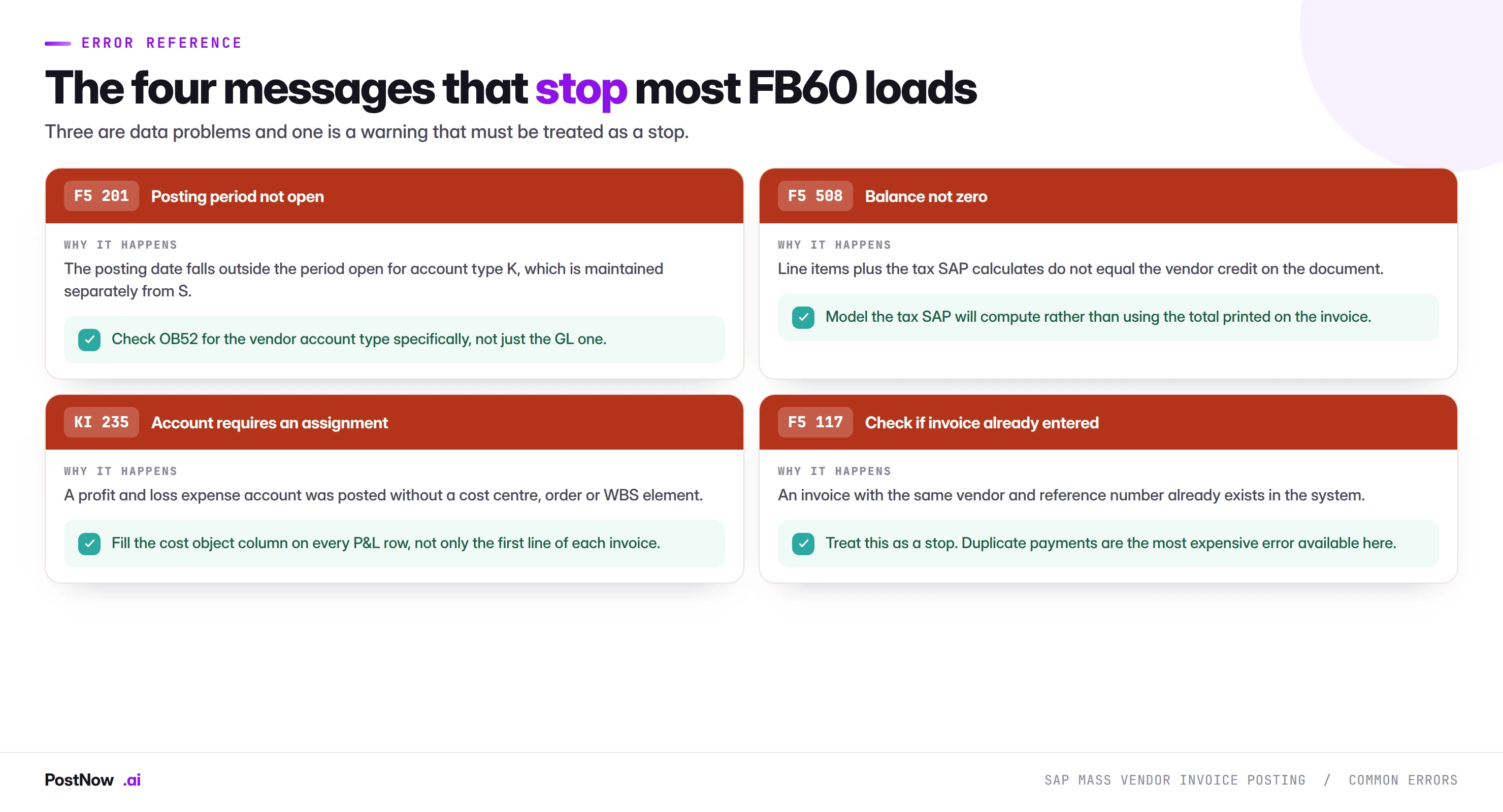
Three of these are data problems that a corrected file resolves. F5 117 is different: it is SAP telling you something true about your data, and the correct response is to stop and involve a person rather than to work around it.
FB60 batch input still posts through standard logic, not a back door
Map the columns once, then PostNow posts the batch
The eight stages happen in the file accounts payable already works from. PostNow adds a task pane to Excel, connects to your SAP system with your own credentials, and takes the file through coding, screening, validation and posting without leaving the sheet.
Expense account and cost object per row, from a saved template.
Supplier references checked against SAP and against the file itself.
Lines and calculated tax reconciled to the vendor credit.
The document number written back on the row that produced it.
Recurring invoices are the real opportunity
Non-PO spend is more repetitive than it looks. The same utilities arrive monthly from the same suppliers to the same accounts. Rent is quarterly and predictable. Subscriptions renew annually. Insurance instalments follow a schedule.
That regularity makes FB60 an unusually good candidate for templating, because most of the file is identical month to month and only the amounts change.
- Build one template per category. Utilities, rent, professional fees. Account, cost object and terms pre-filled, so the monthly work is amounts and references only.
- Keep the vendor and account coding out of the run. A decision made once in the template rather than repeatedly under time pressure.
- Watch for the ones that should be purchase orders. A recurring non-PO spend of any size is usually a candidate for a framework agreement, which moves it to MIRO and gives it the control this page says FB60 lacks.
- Consider recurring entries for the truly fixed ones. Where an amount never changes, SAP's own recurring document functionality may serve better than a monthly file.
The last two points matter commercially. If a category is stable enough to template, it is often stable enough to put under a purchase order or a contract, which is a better answer than automating the workaround.
What belongs in FB60, and what has drifted there
The legitimate scope for non-PO invoicing is narrower than what most systems actually contain, and reviewing the population is usually more valuable than optimising the load.
Genuinely belongs here. Utilities where consumption is metered and billed in arrears. Rent and rates under a lease rather than a purchase order. Statutory and regulatory fees. Bank charges. Insurance instalments. Anything where no ordering process exists because none would add value.
Has usually drifted here. Professional services that should sit under a contract. Recurring subscriptions large enough to warrant a framework agreement. Facilities and maintenance work that a purchase order would have controlled. Anything where somebody chose not to raise an order because it was quicker.
The test worth applying to a recurring file is whether anyone approved the spend before the invoice arrived. Where the answer is no, and the amounts are material, the invoice is not the problem: the missing purchase order is. Moving that category into purchase orders and MIRO gives it commitment accounting, three-way matching and tolerance control, none of which FB60 can offer.
One-time vendors and the accounts they hide in
Non-PO invoicing attracts one-time vendor postings, and they behave differently enough to plan for.
A one-time vendor account group holds the name and address on the document rather than on a master record, which is correct for a supplier you will never use again and a control weakness when it becomes the default. Two consequences for a mass run.
The file carries more. Address and bank details sit on the document, so the columns exist per row rather than being inherited from a master record. A template built for permanent vendors will not have them.
Duplicate screening is weaker. There is no master record to compare against, so the usual identity checks on tax number and bank details have less to work with. A one-time vendor population deserves more scrutiny rather than less, which is the opposite of how it is usually treated.
The pattern to watch for is a growing one-time vendor population, which usually means the vendor creation process is slow enough that people are routing around it. That is a vendor master problem wearing an invoice costume.
Most FB60 failures trace to tax and duplicate invoices
- Using FB60 for an invoice that has a purchase order. Leaves the order open and GR/IR unclearable for ever.
- Acknowledging past the duplicate warning. F5 117 is a stop in a mass run, not a message to click through.
- Blanking the reference to clear a block. Destroys the duplicate check for that invoice permanently.
- Using the supplier's printed tax rather than SAP's calculation. The most common cause of a balance error.
- Forgetting that account type K has its own period status. An open GL period does not mean an open vendor period.
- Missing cost objects on P&L lines. Every line, not just the first of each invoice.
- Posting a backlog without checking due dates. Old invoices posted today may all fall due immediately.
- Approving after the run rather than before. There is no other control point in this process.
Invoice approval workflow, and what mass posting does to it
Many organisations run non-PO invoices through an approval workflow before posting, and a mass run interacts with that in ways worth planning rather than discovering.
Parking, then posting. Where approval must precede the ledger entry, invoices are parked rather than posted, reviewed, and released. As a mass pattern this splits the run in two: the load creates parked documents, and a second step posts the approved ones. It is more work and it preserves the control, which is the right trade where the control matters.
Post and block. The alternative is posting immediately with a payment block, so the document exists in the ledger and cannot be paid until released. Cleaner for reporting, since the liability is recognised, and it depends on the payment block being respected downstream.
Workflow triggered per document. Whichever route you take, a run of four hundred generates up to four hundred approval items at once. The same warning applies as for purchase order release: a queue that normally receives ten a day receiving four hundred is a process failure even when the load worked perfectly. Tell the approver before, not after.
Approving the file can replace approving the documents. This is the argument worth making. Where a file has been reviewed and signed off with its total, vendor list and coding, approving four hundred resulting documents individually adds ceremony rather than control. Whether your framework accepts that is a conversation with audit, and it is a conversation worth having before the first run rather than during the third.
S/4HANA keeps FB60 but changes the ledger beneath it
Little changes for this transaction, which makes it a safe place to build capability ahead of a conversion.
The interface is unchanged. BAPI_ACC_DOCUMENT_POST works across both releases, so a mapping built on ECC carries forward with a remap rather than a rebuild.
The universal journal changes where entries land. Postings go to ACDOCA rather than separate FI and CO tables. Invisible during posting, noticeable afterwards because reconciliation reports read different structures.
Business Partner affects the vendor, not the invoice. The vendor is a Business Partner with a supplier role, as covered in the vendor master guide, and the invoice file still references the vendor number either way.
Fiori apps cover invoice entry and the approval queue. Which makes the review side of a large run more manageable than in the classic transaction, and which breaks any screen recording built against FB60.
The accrual relationship nobody plans for
Non-PO spend and month-end accruals are two halves of the same problem, and treating them separately produces double counting with impressive regularity.
The mechanism is simple. At period end, finance accrues for goods and services received but not invoiced. The utilities bill for the month has not arrived, so an accrual goes in through FB50. Next month the invoice arrives and posts through FB60. If the accrual was not reversed, the cost is now in the ledger twice.
Two patterns keep it straight, and the choice belongs to finance rather than to whoever runs the loads.
Reversing accruals. The accrual is posted with automatic reversal on the first day of the following period, so it unwinds before the invoice arrives. Clean, and it requires the reversal flag to be set at the point of accrual rather than remembered later.
Manual matching. The accrual stays until the specific invoice posts, then is reversed against it. More precise for large individual items, and it needs somebody tracking which accrual corresponds to which expected invoice.
The mass upload consequence is that an FB60 backlog run can collide with an accrual population. Posting three months of held invoices in one run, against accruals that were never reversed, produces a cost line that looks catastrophic for a month. Checking what has been accrued for the same categories before a large backlog run is a five-minute conversation that prevents an awkward variance explanation.
Foreign-currency invoices and the tax trap
Non-PO spend is frequently international, and currency handling has its own failure modes.
The document currency is the invoice currency. Balance is evaluated there, not in company code currency. Local amounts are derived, and small rounding differences in the derived values are normal and handled by SAP.
The exchange rate comes from the rate table by posting date, unless supplied. On a backlog run this matters: invoices dated across three months, posted today, will translate at whichever rate the configuration selects, which may not be the rate finance expected. Where the rate should follow the invoice date rather than the posting date, that has to be explicit.
Supplying rates explicitly is sometimes correct. Where a rate was contractually agreed, or where finance has fixed a rate for the period, the file supplies it. Where it does, it must supply it consistently across every line of a document, because a mixed-rate document is not one SAP will accept.
Tax on foreign currency invoices follows local rules. The tax amount is frequently required in local currency regardless of the document currency, and reverse charge scenarios add their own complications. This is the area where modelling the tax before the run pays for itself most clearly.
AP keys it, but finance owns the approved total
FB60 has the weakest structural control of any transaction in this cluster, so ownership carries more weight than usual.
The budget holder owns the spend. They approved it, or should have, before the invoice arrived. Where nobody did, that is the finding rather than anything about the load.
Accounts payable owns the coding and the duplicate check. Which account, which cost object, and whether this invoice has been seen before.
Whoever posts owns the file integrity. That it balances, that the periods are open, that nothing was silently dropped between approval and posting.
Treasury owns the consequence. The due dates created, and whether the next payment run can absorb them.
The failure mode is the operator making a coding decision because the file is incomplete and the deadline is close. That decision belongs to accounts payable, and the correct response to an uncoded row is to send it back rather than to guess.
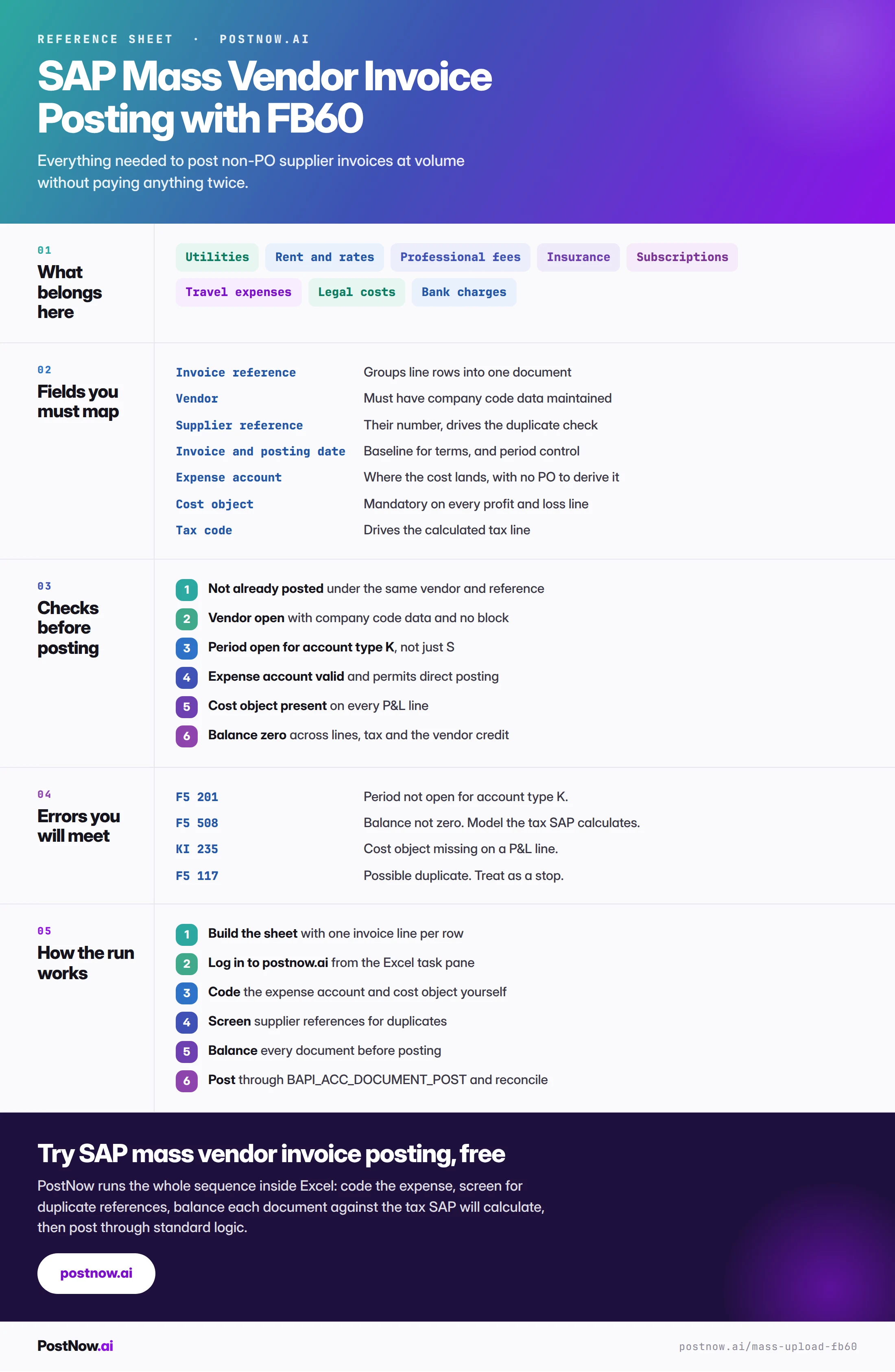
FB60 on one screen: fields, errors and controls
The reference sheet below collects everything above into one image you can share before an invoice run.
FB60 in the wider finance-load picture
SAP FICO mass posting
The finance hub: which transaction, the shared document model and period control.