SAP Mass Cost Center Creation with KS01
SAP mass cost center creation means creating many cost centres in one controlled run from a file rather than stepping through KS01. Cost centres live in controlling rather than finance, so the controlling area is the organisational key, and every centre must sit at a node in the standard hierarchy that already exists. SAP cost center automation pays off only once the hierarchy it fills has been designed.
- The hierarchy node is a hard prerequisite. Build nodes as a separate run first, top down, or every centre beneath a missing node fails.
- The controlling area is the key, not the company code. Almost every other field validates against it.
- Time dependency splits the record. Changing a field creates a second validity segment rather than overwriting the first.
- Validity dates must align fully. A profit centre valid from July cannot be referenced by a segment valid from January.
- Cost centres with postings cannot be deleted. Close the validity or set lock indicators instead.
Where the volume comes from
- Organisational restructuring. Departments merge, split or move, and the cost centre structure has to follow before the next period.
- New site or plant opening. A complete cost structure for a location that had none.
- Acquisitions. An acquired entity's cost structure mapped into your controlling area.
- Budget cycle preparation. New centres created for the coming year, often with a January validity date and a December deadline.
- Legal entity changes. Company codes added or reorganised, requiring cost centres to follow.
- S/4HANA migration. Cost centre structures harmonised across entities before conversion.
- Shared services setup. A service organisation needing its own cost centre hierarchy and allocation structure.
The recurring characteristic is that the structure has been designed by controlling in a spreadsheet, with a hierarchy already drawn, and the SAP entry is transcription against a deadline that is usually a period boundary.
The standard hierarchy, and why it comes first
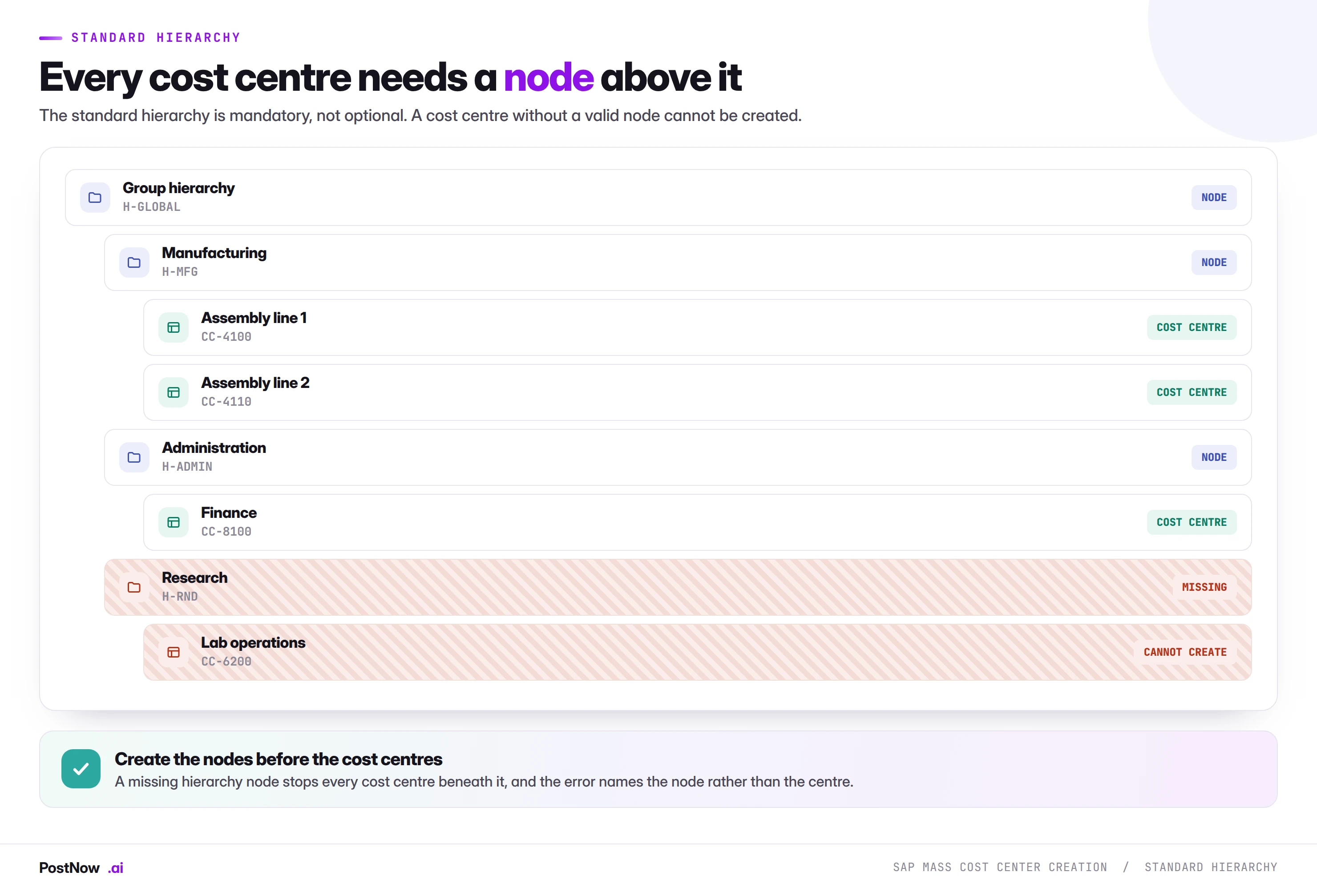
The standard hierarchy is the complete tree of cost centres in a controlling area. Every cost centre sits at a node, and no cost centre may exist outside it. This is what makes cost centre reporting work: the hierarchy is how costs roll up from an individual centre to a department, a function and a company.
For a mass load the consequence is a sequencing dependency stronger than anything else in this cluster. Nodes are a prerequisite run, not part of the load. A file of four hundred cost centres referencing twelve nodes, three of which do not exist, fails on every row beneath those three, and the error names the missing group rather than the cost centre, which sends people looking in the wrong place.
Two practices remove this entirely:
- Extract the hierarchy first. Pull the existing node structure and compare it against the nodes referenced in your file. The gap is the prerequisite run.
- Build nodes top down. A node cannot be created beneath a parent that does not exist either, so the same dependency applies within the hierarchy build itself.
What SAP mass cost center creation means
SAP mass cost center creation is the practice of creating many cost centres in one controlled run from a structured file, instead of stepping through KS01 one record at a time. The list is prepared in Excel, the standard hierarchy nodes are created first, every row is validated against the controlling area configuration, and the centres are created through SAP's standard cost centre interface with the result proven on a posted test document.
Two things separate this from the other master data pages in the mass upload cluster, and both catch people out.
Cost centres live in controlling, not finance. The organisational key is the controlling area, not the company code. A team that has loaded vendors or customers arrives expecting company code to be the anchor and finds it is a subordinate field.
The standard hierarchy is mandatory. Every cost centre belongs to a node, and the node has to exist first. This is not a completeness nicety like a missing sales area; it is a hard prerequisite. Without a node, the cost centre cannot be created at all.
Time dependency: a change splits the record
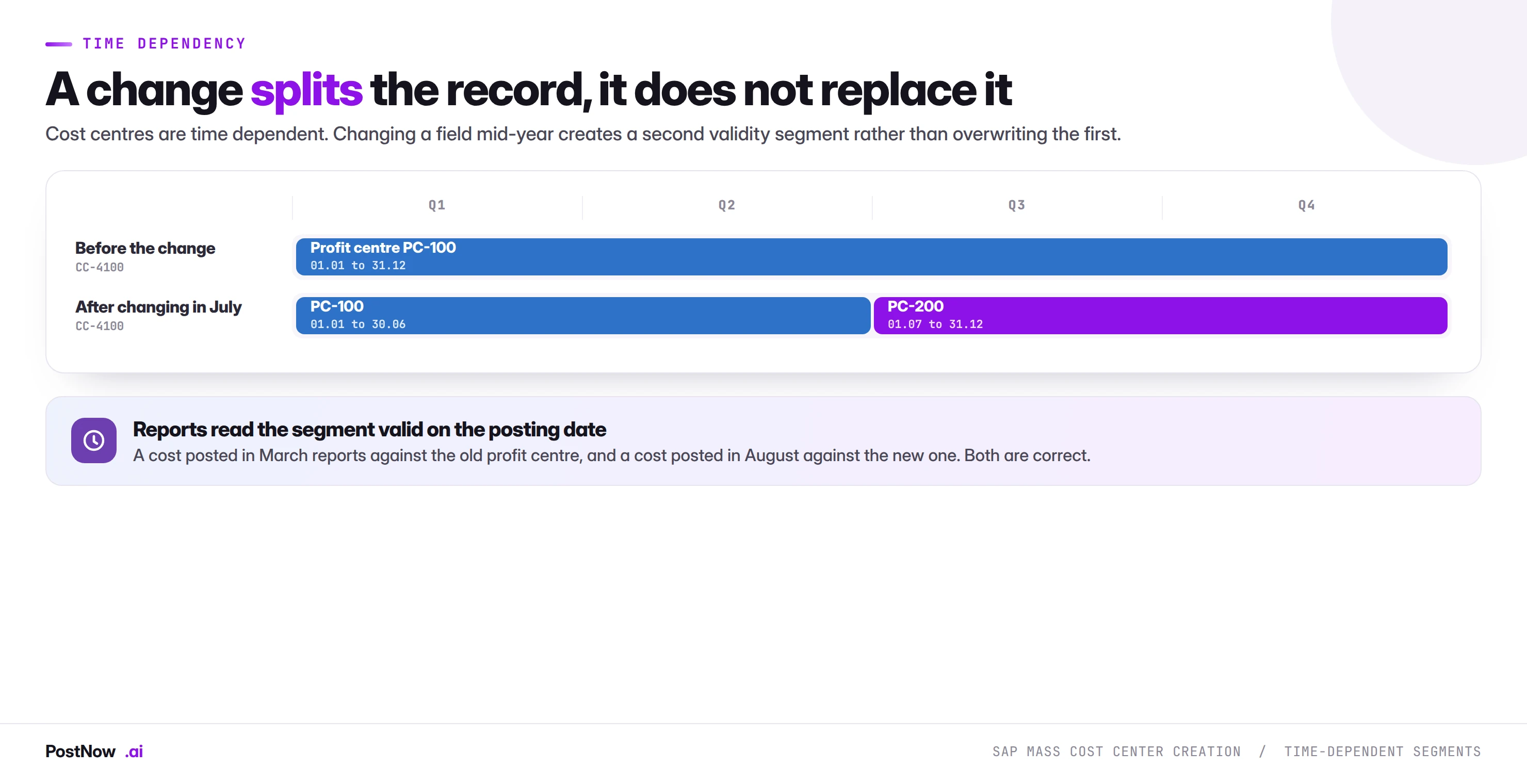
Cost centres are time-dependent master data, which behaves differently from the material master model most people meet first.
Changing a time-dependent field does not overwrite the previous value. It splits the record into validity segments: the old value applies up to the change date, the new value from it. Both segments coexist, both are correct, and reports read whichever segment is valid on the posting date of the cost being reported.
This is genuinely useful. A cost centre that moves to a different profit centre in July reports correctly for both halves of the year without anyone reconstructing history. It also means two things for a mass run:
Changes are not overwrites. A file intended to correct a wrong profit centre from the start of the year must set the validity from the start of the year, not from today. Setting it from today leaves the wrong value on the first half and nobody notices until a report is questioned.
Validity dates must align with what they reference. A profit centre valid from July cannot be referenced by a cost centre segment valid from January. The periods have to overlap fully, and getting this wrong produces error KM 700, which reads as though the profit centre does not exist.
The fields you have to map
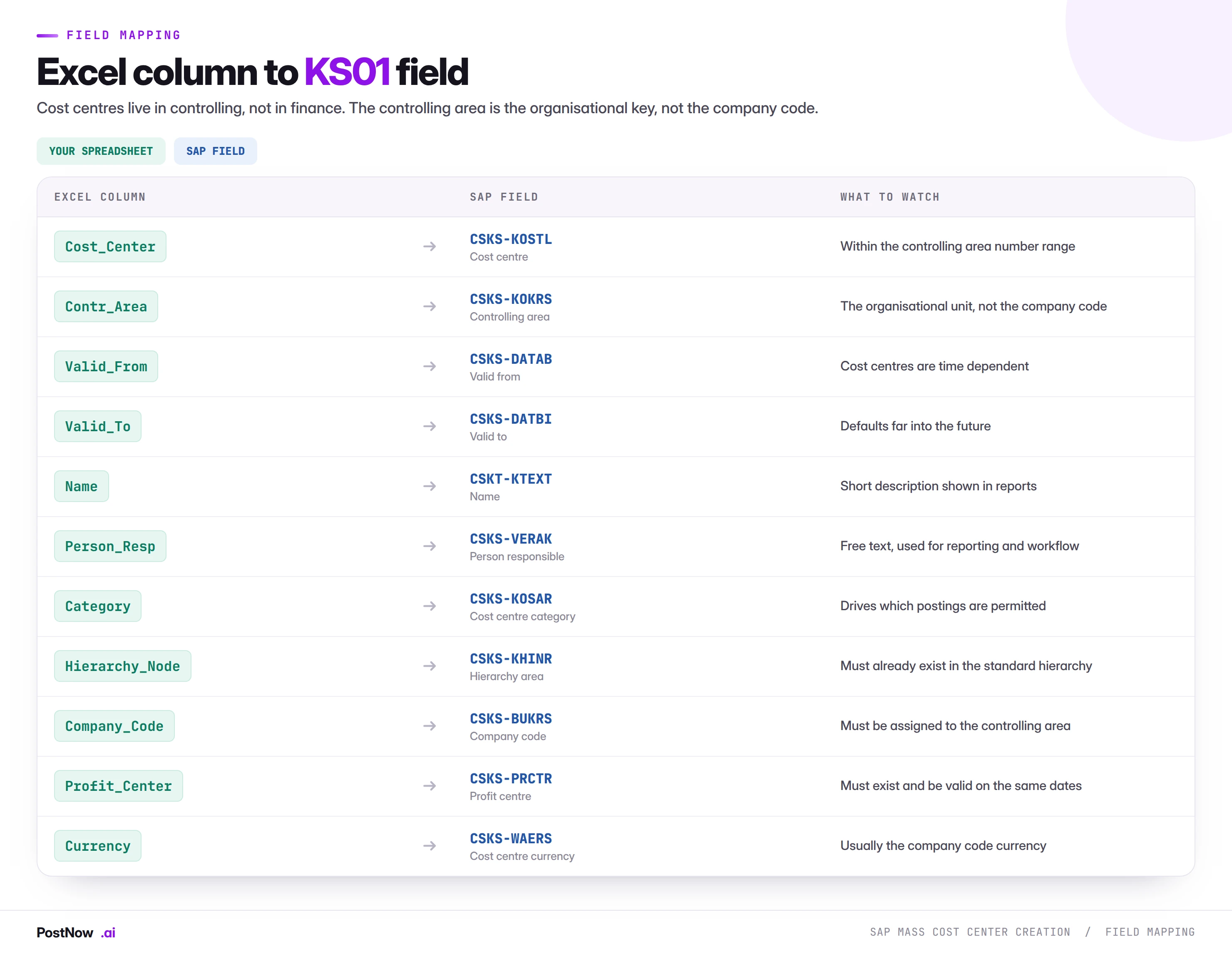
Controlling area
The anchor field. It determines the number ranges, the currency handling, the fiscal year variant and which company codes may be assigned. A file spanning two controlling areas is really two files, because almost every other field is validated against it.
Cost centre category
Category classifies the centre as production, service, administration, sales or similar, and it does real work: it controls which postings are permitted, whether the centre can be used in allocations, and which lock indicators default. A wrongly categorised centre is created successfully and rejects postings later, which surfaces as a puzzled accountant rather than a load error.
Profit centre
The link between controlling and profitability reporting. It must exist and, as above, be valid across the same period. On a large structural load, profit centres frequently need creating first as well, which makes the prerequisite chain three deep: profit centres, then hierarchy nodes, then cost centres.
Person responsible
Free text in most configurations, and worth populating properly rather than filling with a placeholder. It appears in reports and drives workflow in some setups, and a file of four hundred centres all responsible to "TBC" is a data quality problem created at birth.
Lock indicators
Cost centres carry locks for actual primary costs, actual secondary costs, plan costs, commitments and revenues. Creating centres with revenue postings locked is standard for cost centres that should never carry revenue, and getting the locks right at creation avoids a second maintenance pass. Where the file does not state them, defaults from the category apply, which is usually correct and worth confirming rather than assuming.
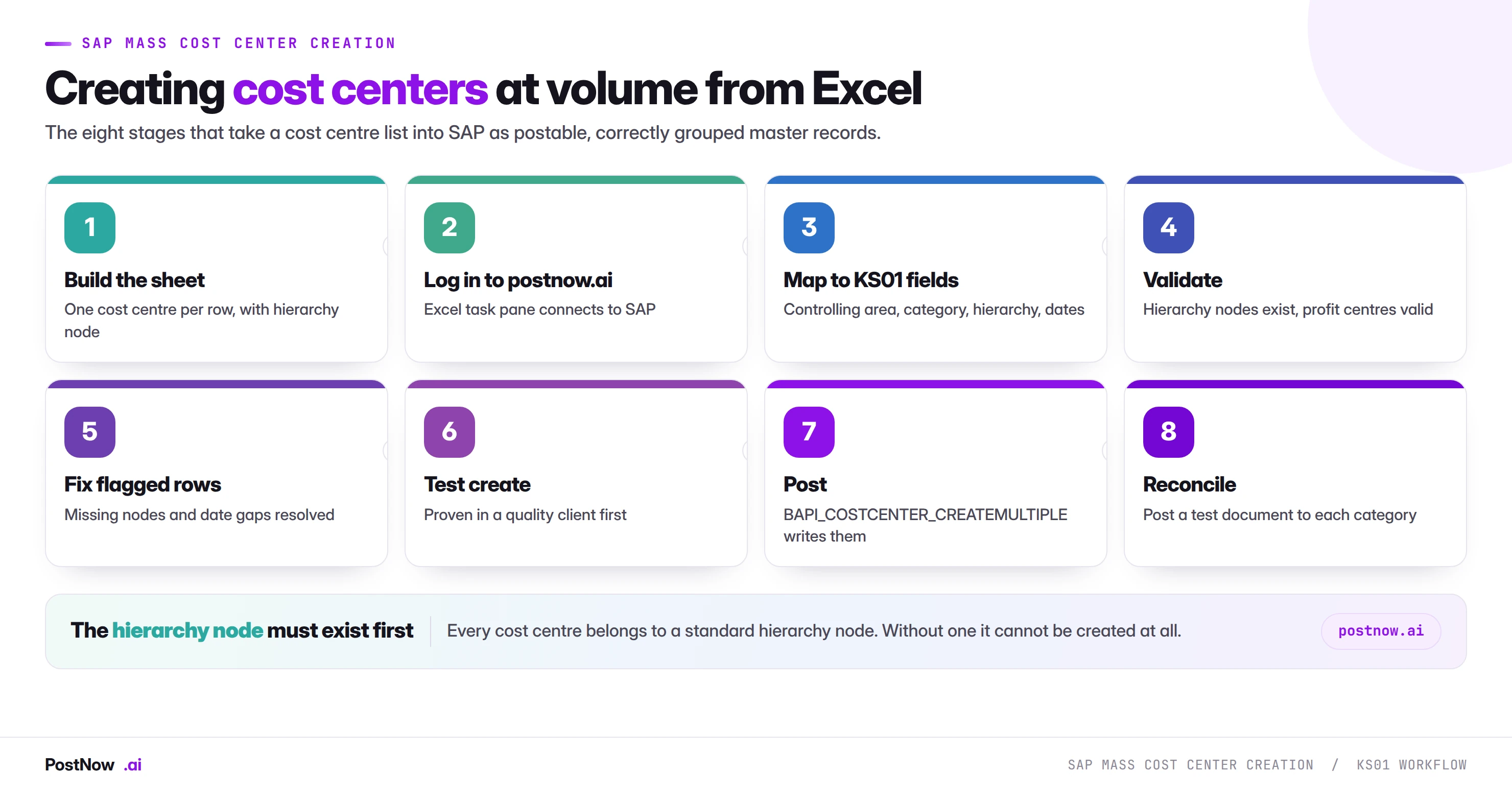
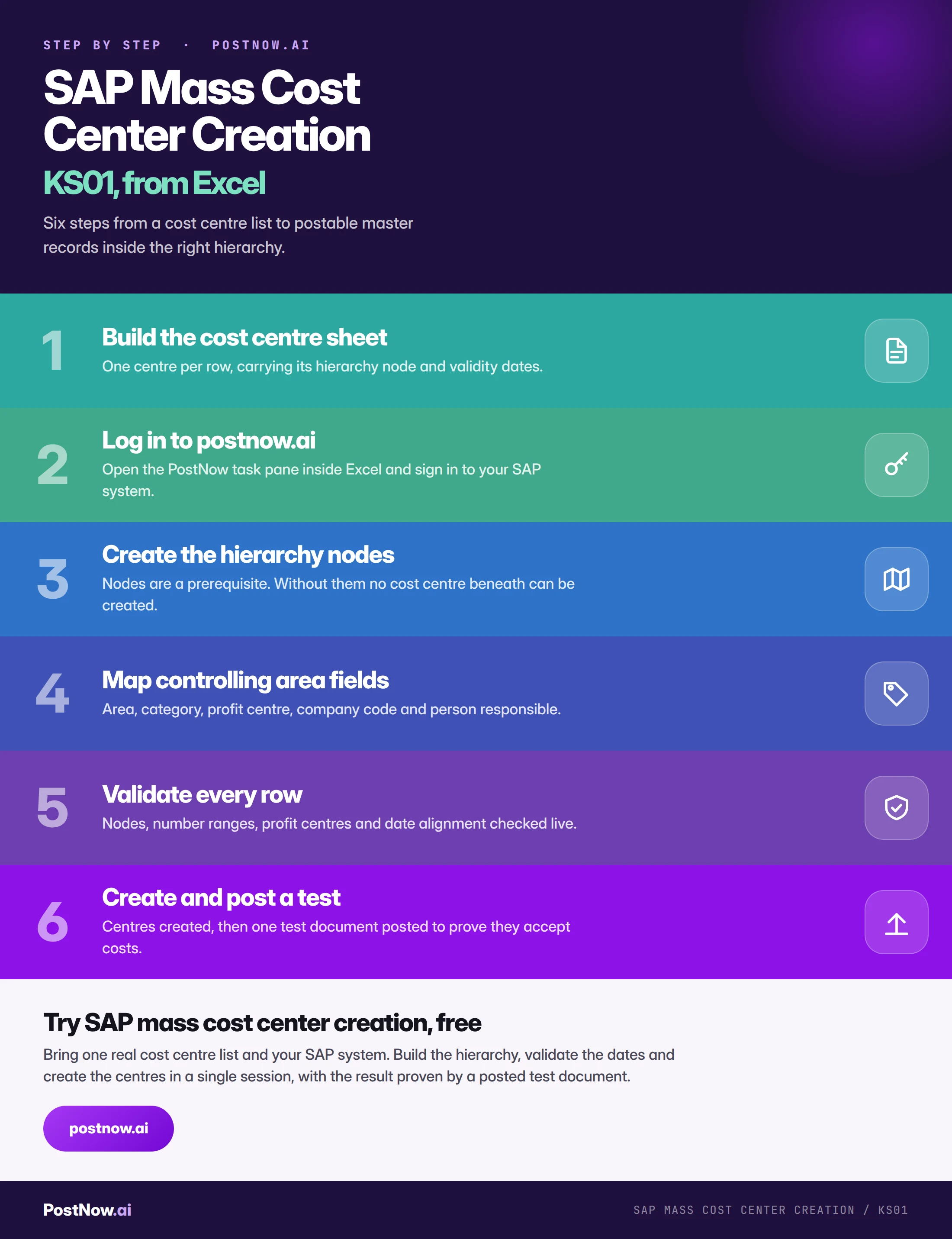
The eight stages of a controlled KS01 run
Build the cost centre sheet
One centre per row, carrying its controlling area, hierarchy node, category, profit centre and both validity dates. Get the hierarchy column from controlling rather than inventing it.
Log in to postnow.ai
Open the PostNow task pane inside Excel and sign in. The pane connects the workbook to your SAP system with your own credentials and controlling authorisations.
Create the hierarchy nodes
A separate prerequisite run, built top down so no node references a parent that does not exist. Only when the tree is complete can the cost centres be created into it.
Map the controlling area fields
Controlling area, category, profit centre, company code, currency, person responsible and lock indicators. Save the mapping, because restructures recur and the field set does not change.
Validate against live SAP
Nodes present, numbers inside their intervals, profit centres valid across the same dates, company codes assigned to the controlling area, categories defined.
Test create, then post to one
Create a subset in a quality client, then post a test document to one centre of each category. Creation proves the record exists; a posting proves it accepts costs, which is what the business actually needs.
Create through standard logic
The run calls BAPI_COSTCENTER_CREATEMULTIPLE, SAP's published interface for cost centre master data. Every check KS01 applies still applies.
Reconcile the hierarchy
Display the standard hierarchy and confirm the new centres appear where the design said they should. This is the check that catches nodes assigned correctly in the file and wrongly in the design.
Validation: six checks before a single cost centre is created
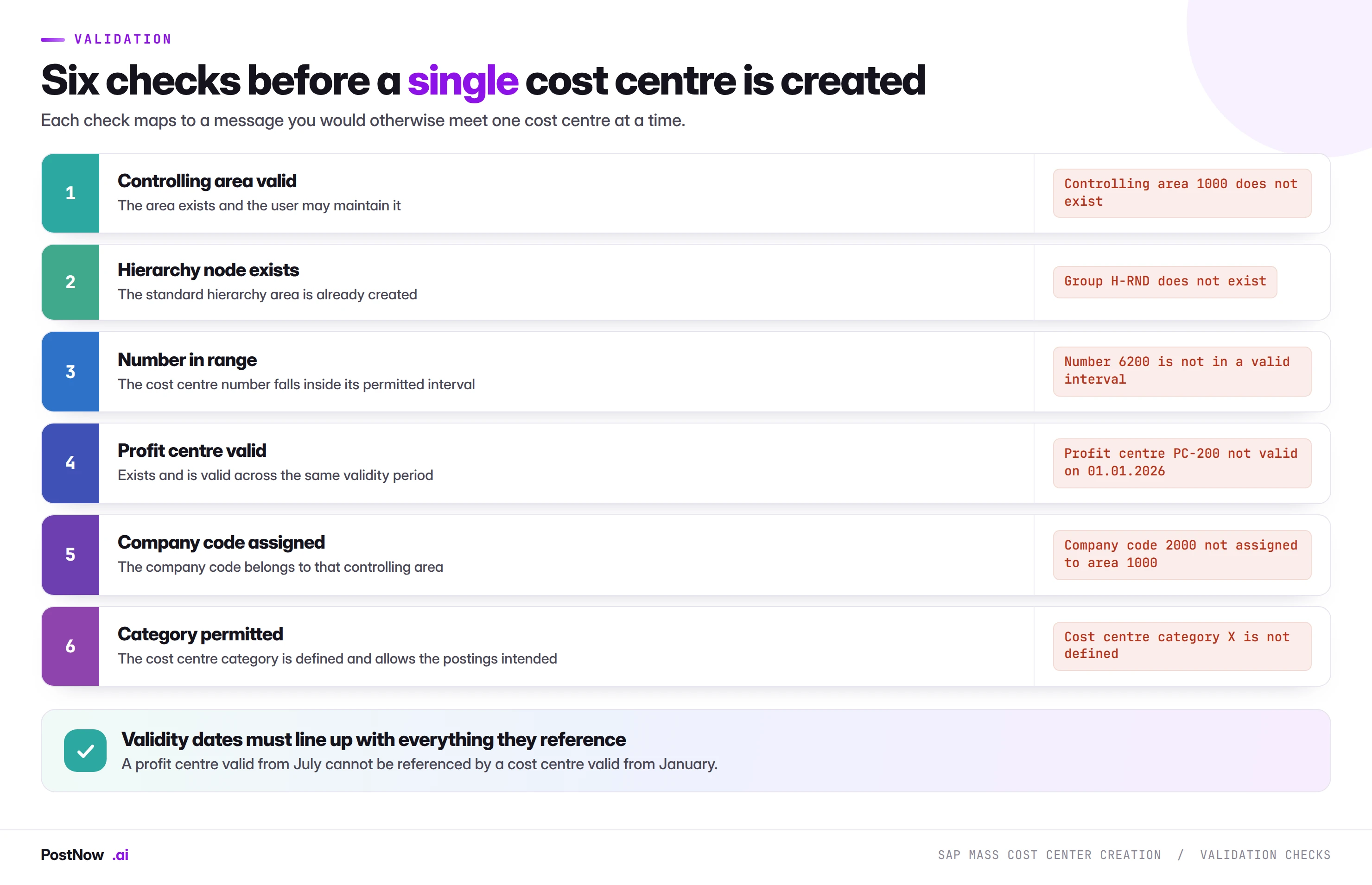
Date alignment deserves the most attention because it is the check people skip. Cost centres, profit centres and hierarchy nodes are all time dependent, and their validity periods must overlap fully rather than partially. A cost centre valid for the whole year referencing a profit centre valid from July is not a partial success; it fails.
Errors, and what they are telling you
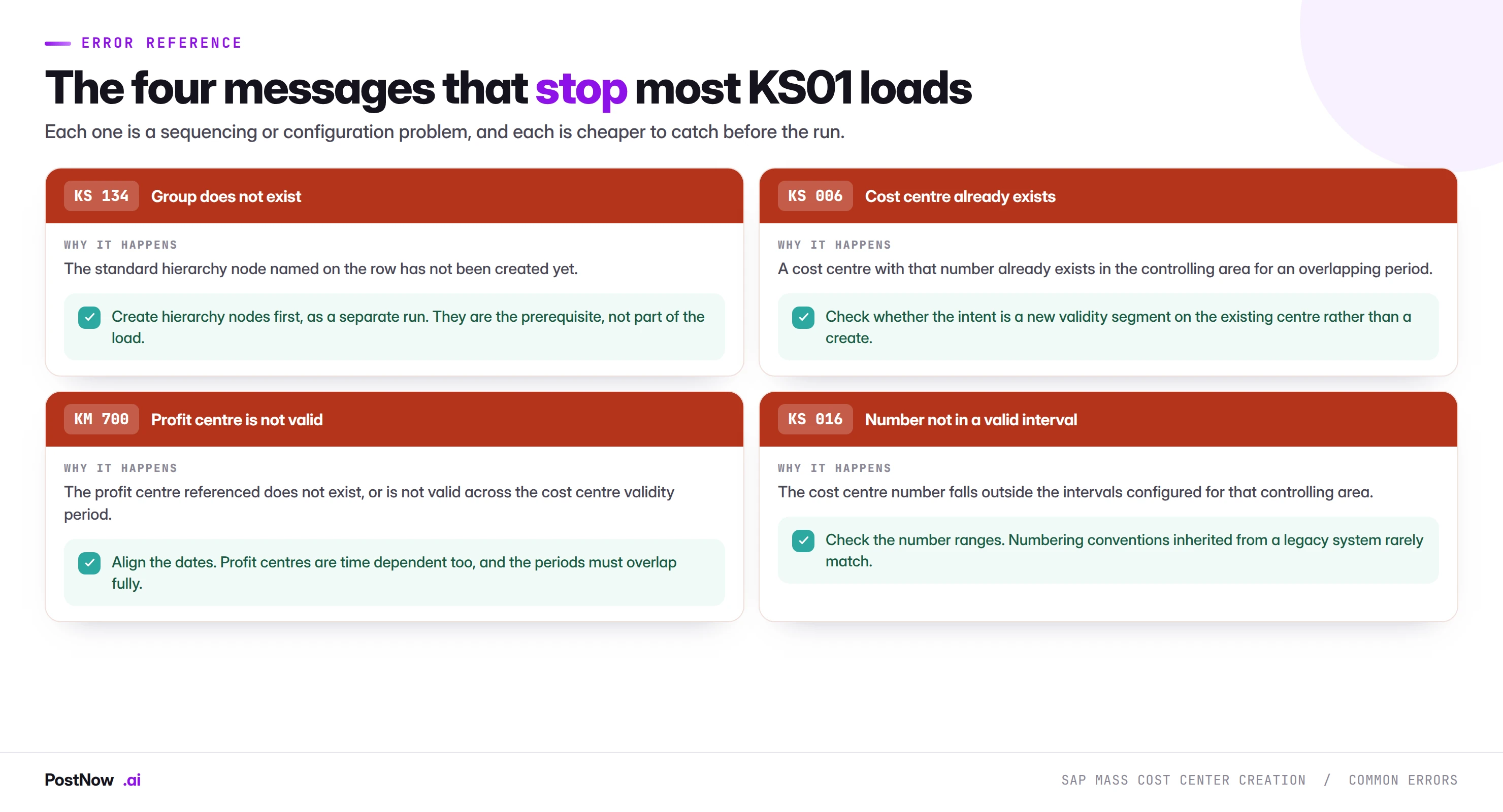
KS 134, group does not exist, is the sequencing error and will hit a whole block of rows at once. KS 006 is more interesting than it looks: a cost centre that already exists may mean the file is a duplicate, or it may mean the intent was a new validity segment on an existing centre rather than a create. Those are different jobs and the error does not distinguish them.
Running the whole sequence inside Excel
PostNow runs SAP mass cost center creation from Excel
The eight stages above happen in the structure spreadsheet controlling already maintains. PostNow adds a task pane to Excel, connects to your SAP system with your own credentials, and takes the file through hierarchy build, mapping, validation and creation without leaving the sheet.
Hierarchy nodes created before the centres that reference them.
Validity dates checked against profit centres and nodes.
Number ranges, categories and company code assignment checked live.
A test posting confirming the centre accepts costs.
KS01, KS02, and mass maintenance
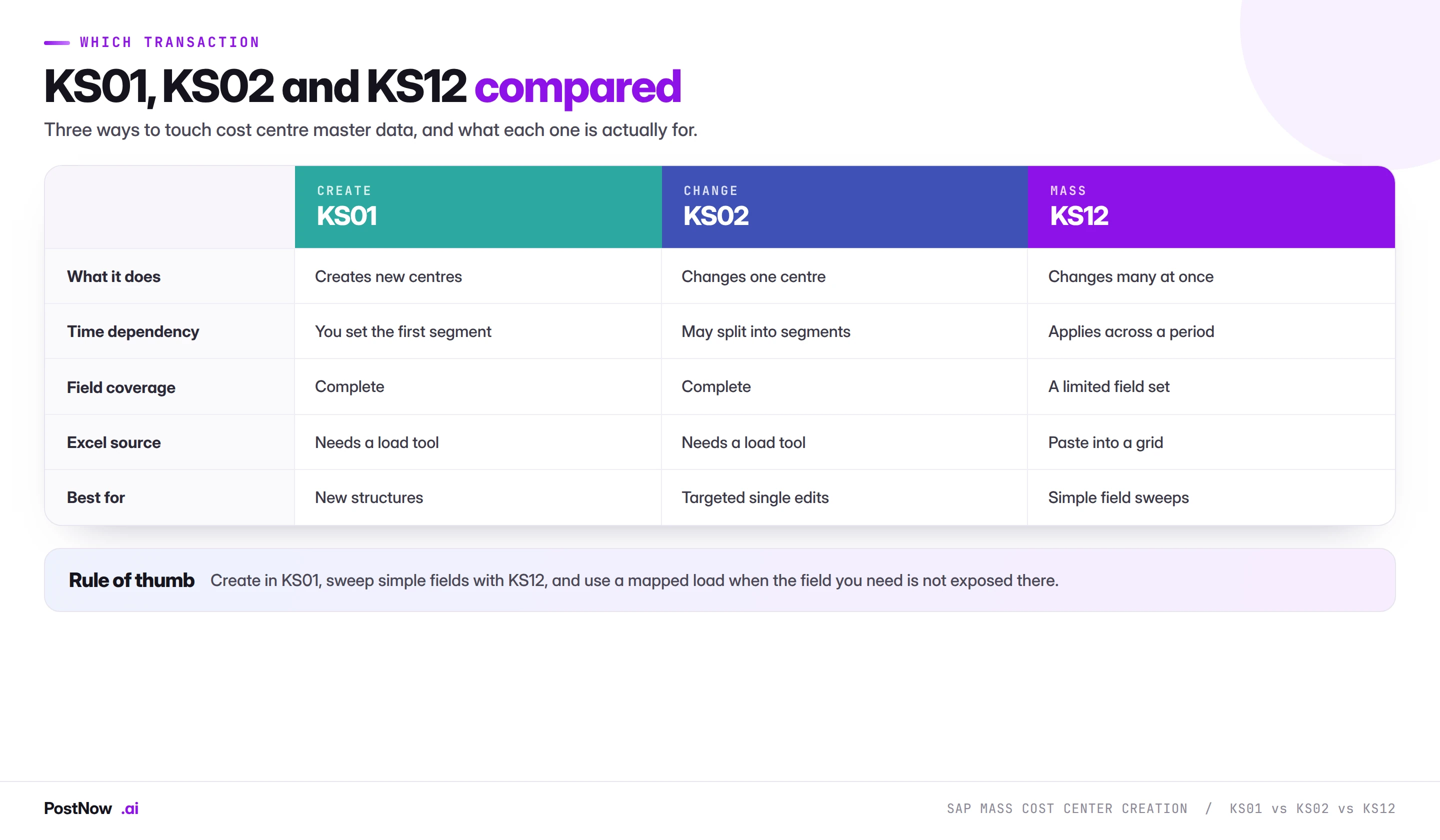
KS12 is SAP's own mass maintenance for cost centres and deserves the same fair hearing as MM17 gets in the material master guide. For sweeping a single field across a selection it works, it is free, and it should be tried first.
It becomes awkward when the population comes from a spreadsheet rather than a selection, when the field is not exposed, or when the change needs to produce specific validity segments rather than a blanket period. A mapped load covers those cases and keeps the before-and-after record.
Deleting cost centres, and why you usually cannot
A cost centre with postings against it cannot be deleted. This is correct behaviour and it surprises people who expect master data to be removable.
The options in practice:
- Close the validity. Set the valid-to date so the centre expires. History remains readable, reports for past periods still work, and nothing new can post to it after the date.
- Lock the postings. Set the lock indicators to block actual, plan and commitment postings. The centre remains open in structure but accepts nothing.
- Delete. Only possible where no postings, no plan data and no allocation references exist. In practice this covers centres created in error and nothing else.
For a mass run this means a decommissioning file is a validity-and-lock file rather than a deletion file. Extract the current state first, exactly as the material master guide recommends, because closing the wrong centres is disruptive and reopening them does not restore the postings that were rejected in the meantime.
What the cost centres are needed for
Cost centres exist so that other things can reference them, and a creation run is usually a dependency for something else with its own deadline.
- Journal postings. Every profit and loss line in a mass journal entry run needs a cost object, and a missing cost centre stops the journal rather than the master data.
- Purchase orders. Account assignment category K on a purchase order requires a cost centre that exists on the delivery date.
- Material master. Some plant-level fields reference cost centres, so a material master run can depend on this one.
- Planning and budgeting. Plan data is loaded per cost centre per period, and the centres must exist before planning opens.
- Allocations and assessments. Cycles reference sender and receiver centres, and a cycle referencing a centre that does not exist fails at execution rather than at definition.
The practical implication is that cost centre loads sit early in a sequence of dependent runs, and slipping this one slips everything behind it.
Cost centre categories, and what each one permits
Category is a single character field that quietly controls a great deal, and it is the field most often filled in by whoever built the spreadsheet rather than by whoever understands the consequences.
- Production. Centres that carry manufacturing cost and participate in activity rate calculation. They are expected to have activity types and to be senders in allocation cycles.
- Service. Internal service providers whose costs are allocated onward to consumers. The allocation relationship is the point of the centre existing.
- Administration. Overhead that is absorbed rather than allocated by activity. Usually a receiver rather than a sender.
- Sales. Commercial cost, frequently linked to profitability analysis rather than to product cost.
- Development. Project and research cost, often with its own capitalisation rules.
The category drives which lock indicators default, whether the centre may carry revenue, and how it behaves in allocation and settlement. A production centre miscategorised as administration is created successfully, accepts postings, and then behaves wrongly in the month-end allocation run, which is discovered by a controller reconciling a report rather than by anyone watching the load.
Activity types, rates, and what comes after the centres
For production and service centres, creating the cost centre is the first of several dependent loads rather than the end of the job.
Activity types describe what a centre produces: machine hours, labour hours, setup time. They are their own master data with their own creation transaction, and they are referenced by cost centre and activity type together.
Activity prices are planned or calculated rates per cost centre and activity type per period. These arrive as a large matrix, which makes them a natural mass load in their own right and one that cannot begin until the centres exist.
Allocation cycles define which centres send cost to which receivers and on what basis. A cycle referencing a centre that does not yet exist can often be defined but will fail at execution, which is a worse failure mode than failing at definition because it happens during month end.
The sequencing implication is worth stating plainly: a cost centre restructure is rarely one load. It is profit centres, hierarchy nodes, cost centres, activity types, activity prices and then cycles, each depending on the one before. Planning the restructure as a single event with a single deadline is how teams end up running the last three at midnight.
Governance, structure, and reporting integrity
Cost centre structure is how an organisation understands its own costs, so the governance concern here is less about fraud and more about reporting coherence.
- Controlling owns the design. Which centres exist, where they sit in the hierarchy, and what category they carry. This is not a technical decision.
- Approve the hierarchy, not just the list. The tree is what reporting consumes. A list of four hundred centres approved without their node assignments has approved half the design.
- Run as a named user. With controlling authorisations, and never a shared account.
- Keep the before-and-after hierarchy. A restructure is far easier to explain when both trees exist as artefacts.
- Reconcile the tree after the run. Display the hierarchy and compare it to the design. This is the only check that catches a correctly loaded but wrongly designed structure.
- Coordinate the effective date with the period. A structure valid from a mid-period date splits reporting in a way finance will have to explain.
Volume, sequencing, and period boundaries
- Sequence the prerequisite chain. Profit centres, then hierarchy nodes, then cost centres. Each is its own run with its own validation.
- Align validity with the fiscal year. A structure valid from the first day of a period is far easier to report on than one starting mid-month.
- Load before planning opens. Budget cycles depend on the structure existing, and a slipped cost centre run delays every planner.
- Batch by controlling area. Almost every field validates against it, so it is the natural boundary.
- Expect low throughput pressure. Cost centre creation is light work; the constraint is sequencing rather than speed.
From a restructure to a maintained template
- Give the template to controlling. With the hierarchy node as a mandatory column, so the design decision cannot be deferred.
- Encode the category rules. Which type of centre gets which category and which lock indicators.
- Include both validity dates explicitly. Defaults are how mid-year structures end up starting in January.
- Keep the hierarchy extract with the template. So the prerequisite check is a comparison rather than a guess.
- Name an owner. Controlling areas, number ranges and profit centre structures all change.
Common mistakes and how to avoid them
- Loading cost centres before the hierarchy nodes exist. Whole blocks fail, and the error names the group rather than the centre.
- Treating company code as the organisational key. It is the controlling area, and almost every field validates against it.
- Misaligning validity dates with profit centres. Periods must overlap fully, not partially.
- Setting a change to start today rather than from the correct date. Time dependency means the wrong value stays on the earlier segment.
- Filling person responsible with a placeholder. A data quality problem created deliberately at birth.
- Assuming cost centres can be deleted. Once postings exist they cannot. Close the validity or lock instead.
- Approving the list without the tree. The hierarchy is what reporting consumes.
- Proving success with a record count. Creation proves existence. Only a posting proves the centre accepts costs.
Cost centres in S/4HANA
Controlling changed substantially in S/4HANA, and two of those changes affect how a cost centre load should be thought about.
The universal journal merged FI and CO. Postings land in ACDOCA with both the financial and controlling views on the same line, rather than in separate documents reconciled afterwards. For the cost centre object itself nothing changes, and for the load nothing changes. What changes is that a wrongly assigned cost centre now affects a single record used by both finance and controlling reporting, so the blast radius of a structural mistake is wider than it was.
Profit centre and cost centre relationships tightened. The universal journal makes profit centre a first-class dimension on every line, which raises the importance of getting the cost centre to profit centre assignment right at creation. On ECC an incorrect assignment was a controlling problem; on S/4HANA it shows up in segment reporting as well.
The interface is unchanged. BAPI_COSTCENTER_CREATEMULTIPLE works across both releases, so a mapping built on ECC carries forward without redesign. Screen recordings built against KS01 do not survive the move to Fiori-based master data apps, which is the same argument that appears on every page in this cluster.
Fiori apps cover maintenance. Cost centre creation and change are available as apps alongside the classic transactions, and the hierarchy is easier to navigate visually than in the old maintenance screens. This makes the post-run hierarchy reconciliation described above considerably quicker.
After the cost centres exist
Four checks close the gap between records existing and controlling being able to work.
Display the hierarchy and compare it to the design. Not the list, the tree. This catches centres loaded with a valid node that was not the intended one, which no validation can detect because both nodes exist.
Post one test document per category. Production, service and administration centres behave differently, and a posting to each proves the locks and category settings are right.
Check the validity dates against the reporting calendar. A structure valid from the fifteenth of a month splits that period's reporting, which finance will need to explain.
Tell whoever is waiting. Planning, purchasing and the journal runs behind this one all depend on the centres existing. A short note that the structure is live is what unblocks them.
Numbering conventions, and the legacy structure you inherit
Cost centre numbers carry meaning in almost every organisation, and reconciling that meaning with SAP number ranges is a step teams routinely discover halfway through a load.
SAP validates a cost centre number against the intervals configured for the controlling area. Those intervals are usually structured so that a range of numbers belongs to a function: four thousands for manufacturing, eight thousands for administration, and so on. A number outside every interval produces error KS 016.
Three situations cause trouble at volume:
- Inherited numbering from an acquired entity. Their scheme almost never matches yours, so the load needs a mapping from old number to new, and that mapping has to be kept because every downstream reference uses it.
- Alphanumeric versus numeric conventions. A scheme mixing letters and digits behaves differently in ranges and sorts differently in reports. Decide before the load rather than discovering it in a hierarchy display.
- Ranges running out. A function that has grown beyond its allocated interval needs the interval extended, which is a configuration change and therefore somebody else's queue. Check capacity before building the file.
The practical step is to validate the number column against the configured intervals before anything else. It takes seconds, it catches a whole class of failure, and the fix is often a configuration request with a lead time you would rather discover early.
Plan data, and the load that follows this one
Cost centres exist to receive costs, and in most organisations they receive planned costs before they receive actual ones. That makes planning data the load immediately behind this one, and it is considerably larger.
The arithmetic is the same multiplication that catches out pricing loads. Four hundred cost centres times twenty cost elements times twelve periods is ninety-six thousand rows, from a structure that looked like four hundred records. Plan data files are routinely the largest mass upload an organisation runs.
Three things make that manageable:
- Load annual values where the distribution is standard. SAP can spread an annual figure across periods using a distribution key, which reduces the file by a factor of twelve for anything with an even profile.
- Separate primary and secondary planning. Primary cost planning and activity price planning have different shapes and different validation, and combining them makes a large file harder rather than smaller.
- Confirm the planning version and fiscal year. Plan data is version-specific, and a file loaded into the wrong version is invisible in the reports everyone is looking at while being perfectly present in one nobody opens.
The reason to mention it on this page is timing. A cost centre structure delivered on the day planning opens leaves no room for the planning load behind it, and the planning load is the one with the volume.
The complete KS01 mass creation reference
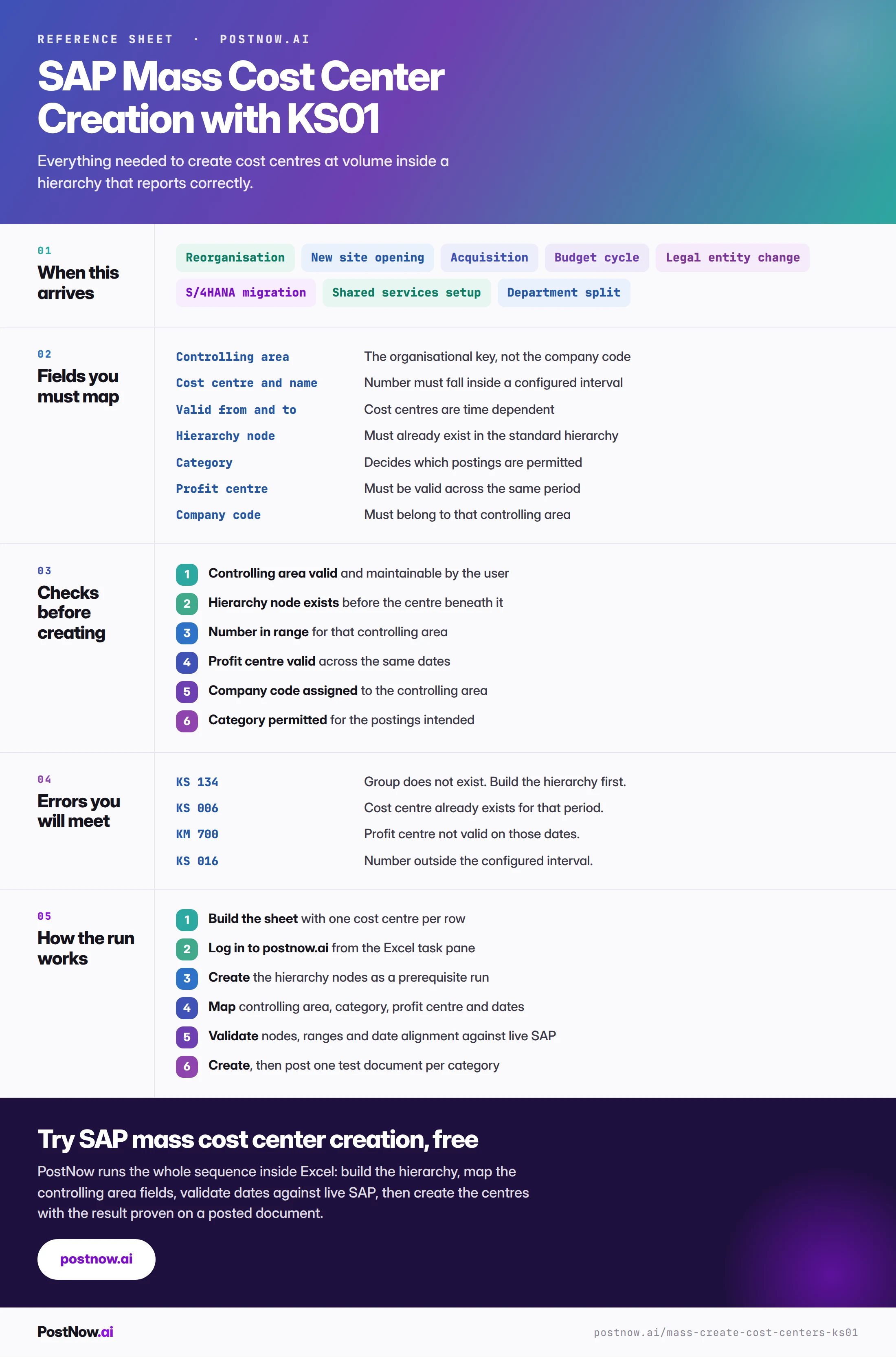
The reference sheet below collects everything above into one image you can share before a restructure.
Go deeper
SAP FICO mass posting
The hub for finance and controlling at volume: journals, invoices and cost objects.
SAP mass upload
The pillar guide covering methods, validation, error handling and governance across every transaction.
SAP master data mass upload
The wider master data picture, including materials, vendors and customers.
SAP MM mass upload
Purchase orders with account assignment K reference the cost centres created here.
The hierarchy is what SAP cost center automation cannot design for you
SAP cost center automation is straightforward once the design exists — centres mapped to their category, hierarchy node, company code and validity and created in one run. The design is the manual part: the standard hierarchy, the numbering convention and how costs will report cannot be inferred from a file. Build the structure deliberately, then let the load populate it.
Frequently asked questions
What is SAP mass cost center creation?
How do I mass create cost centres in SAP from Excel?
BAPI_COSTCENTER_CREATEMULTIPLE. The eight stages above set out the full sequence.