SAP Mass Journal Entry Upload with FB50
SAP mass journal entry upload means creating many GL documents in one controlled run from a file, instead of keying each into FB50 individually. Rows sharing a reference become the line items of a single journal, the document must balance within that group, and posting happens through BAPI_ACC_DOCUMENT_POST with a document number written back per row. That is the promise of SAP journal entry automation, as long as the review still happens.
- A document is a group, not a row. A reference column decides where one journal ends and the next begins.
- Debits must equal credits per document. Balance is checked in Excel before SAP is called.
- Four errors stop most loads. F5 201 closed period, F5 508 unbalanced, KI 235 missing cost object, F5 A 007 blocked account.
- Model the tax SAP will calculate. A sheet that balances can still fail when a tax code adds a line.
- Never let the posting date default to today. Hard-code it, or July's accrual posts into August.
Why FB50 becomes a bottleneck at month end
FB50 is a good transaction. The Enjoy screen puts the header and the line items on one surface, the account assignment blocks appear where you expect them, and a competent accountant can post a straightforward journal without touching the mouse. None of that is the problem.
The problem is arithmetic. A single accrual journal with twelve lines takes perhaps ninety seconds once the numbers are known. Thirty of them is forty-five minutes, which is an afternoon with interruptions. Three hundred of them is a week that does not exist in the close calendar. Finance teams do not hit this wall gradually; they hit it the first month a new entity, a new cost centre structure, or a new allocation model arrives, and then they hit it every month afterwards.
What follows is predictable. Someone builds the numbers in a spreadsheet because that is where the calculation lives anyway. Then someone re-types the spreadsheet into SAP. The re-typing adds nothing except the possibility of error, and it consumes exactly the hours the close cannot spare. The spreadsheet was already the source of truth. The keying is pure transcription cost.
There is a second cost that shows up later. When journals are keyed by hand, the link between the calculation and the posted document lives in someone's memory or in a filename. When the auditor asks which spreadsheet produced document 5100004412, the answer involves opening folders. A mass upload run that writes the document number back onto the source row removes that question permanently.
The recurring journals that generate the volume
Volume in FB50 rarely comes from one place. It accumulates from a handful of recurring patterns, each of which is individually reasonable:
- Month-end accruals. Goods received not invoiced, unbilled revenue, bonus and holiday pay provisions. These are calculated in a model and posted as a block.
- Cost allocations. Shared service recharges, IT cost distribution, facilities apportionment. One source cost centre becomes twenty receiving ones, every month.
- Reclassifications. Corrections found during review, misposted cost centres, wrong profit centres. These arrive late in the close and always in a hurry.
- Payroll journals. Where payroll runs outside SAP, the interface file often lands as a spreadsheet that has to become an FI document.
- Prepayment and provision releases. Schedules maintained in Excel that unwind a defined amount each period.
- Intercompany entries. Mirror postings across company codes, where the same numbers have to be entered twice with the signs reversed.
Each of these is a spreadsheet that already exists. Mass upload is not a new process for finance to learn. It is the removal of the transcription step between two things finance already does.
What FB50 actually posts
FB50 creates general ledger documents. In table terms it writes a header record to BKPF and one line item record to BSEG for every line on the entry, with the usual downstream updates to the index and totals tables that SAP maintains behind the transaction. On S/4HANA the line items land in the universal journal, ACDOCA, but the shape of what you are creating is unchanged.
Three characteristics of that document drive everything about how the spreadsheet has to be built.
A document is a group, not a row. One FB50 entry has one header and many lines. A spreadsheet is a flat list of rows. Something in the file has to tell the load where one document ends and the next begins, and that something is almost always a reference column.
A document must balance. Debits equal credits, within the document, in the document currency. SAP will refuse the entry otherwise, and it will refuse it at the point of posting rather than at the point of data entry, which is why unbalanced groups are the single most common reason a mass load stops halfway.
A document is atomic. It either posts completely or not at all. There is no such thing as a half-posted journal. This is helpful, because it means a failure leaves nothing to clean up at the document level, and it is also the reason the file has to be grouped correctly before the run starts.
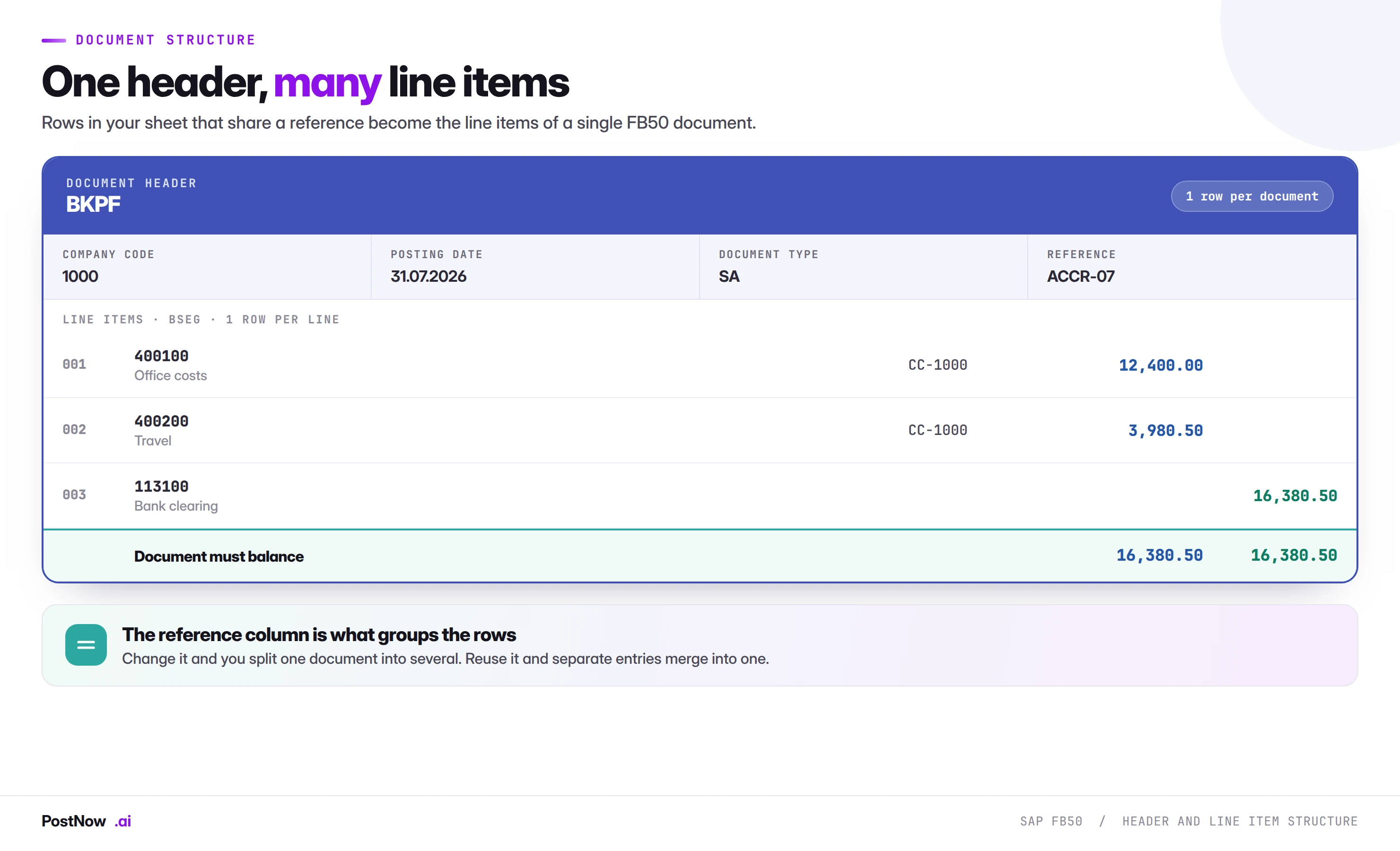
Header and line items: how the sheet maps to the document
The mental model that makes mass journal upload straightforward is this: your spreadsheet is a list of line items, and the header is derived from them. Every row carries both the line-level fields that make it unique and the header-level fields that it shares with its siblings.
That means header fields are repeated. If a journal has twelve lines, the company code, posting date, document type and reference appear twelve times, identically. This feels wasteful and is not. It is what allows a flat file to describe a hierarchical document, and it is what allows the load to work out which rows belong together.
The consequence is a rule worth writing on the wall: if header fields differ between rows that share a reference, the document is ambiguous and the load will either fail or produce something you did not intend. A common version of this is a file where the posting date has been changed on some rows during review but not others. The reference still groups them, the dates disagree, and the result is an error that reads as though the date is wrong when the real problem is that two dates were supplied for one header.
Choosing the grouping key
The reference field, BKPF-XBLNR, is the natural grouping key and the one most teams use. It is visible in the document, it is searchable, and it carries meaning back to the source. A reference like ACCR-2026-07-GRNI tells you what the document is without opening it.
Two habits make this work well. First, make the reference unique per document per run, not per month, so that a re-run cannot silently merge into an existing document. Second, encode the source in it. When someone finds the document in FB03 six months later, the reference should point at the file and the process that produced it.
What SAP mass journal entry upload means
SAP mass journal entry upload is the practice of creating many GL documents in one controlled run from a structured file, instead of keying each document into FB50 one screen at a time. The data is prepared in Excel, mapped to the fields FB50 expects, validated against the live system, and then posted through SAP's own accounting interface, with a document number written back against every source row.
The definition matters because two very different activities hide behind the same phrase. One is a genuine mass posting: a file of accrual lines, each destined to become a real FI document, run through standard logic with full validation. The other is a workaround: someone recording keystrokes, or worse, writing to tables, to get a month-end number in on time. The first is a repeatable finance process. The second is a liability that nobody wants to explain to an auditor.
This guide covers the first. It is written for the person who owns the month-end close, who knows FB50 well enough to key an entry in forty seconds, and who has worked out that four hundred of them is a different problem entirely.
The fields you have to map
A mass journal upload does not need every field FB50 exposes. It needs the fields that make the document valid, plus whatever your reporting depends on. Everything else can be left to configuration and defaults.
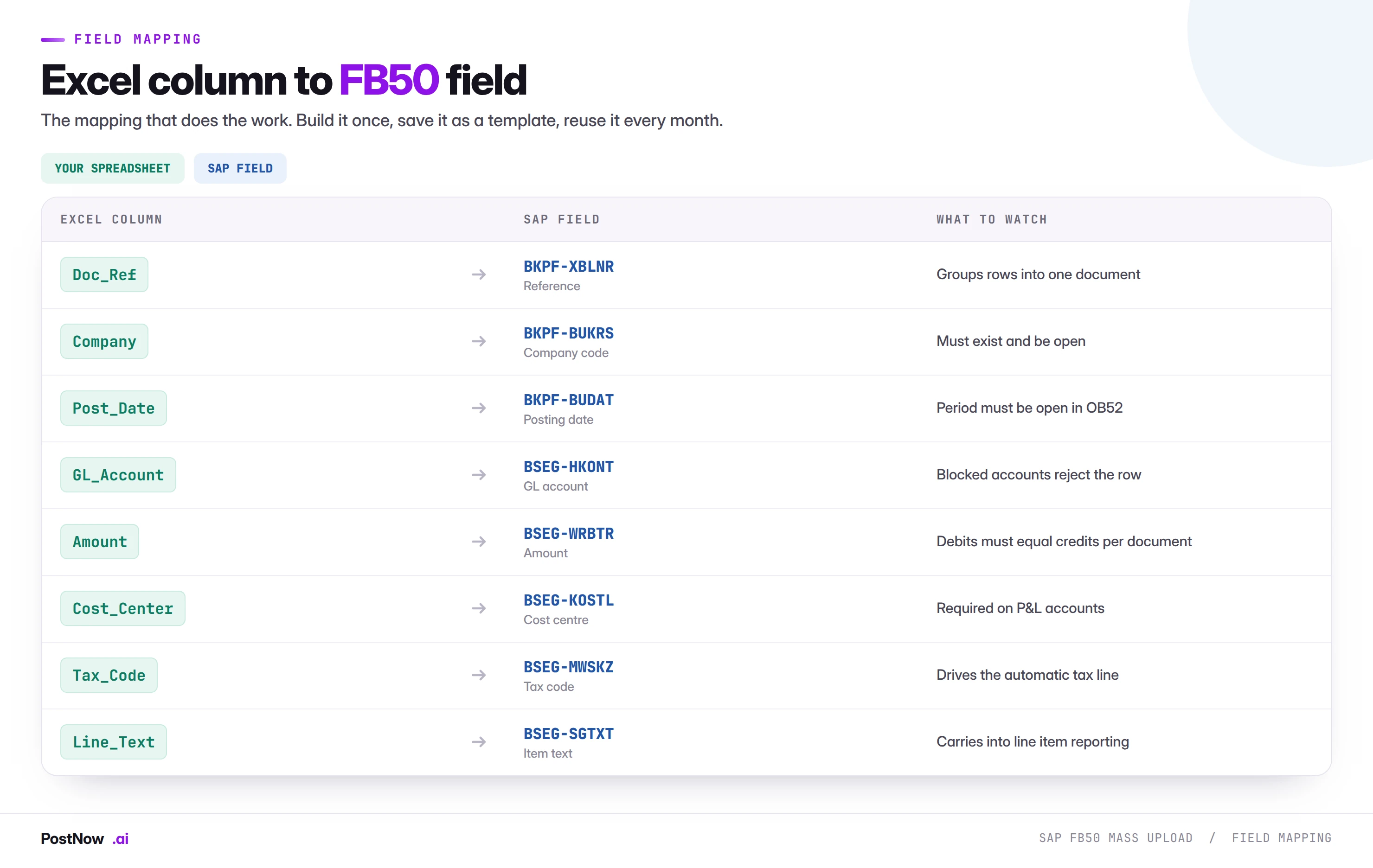
The mapping above is the working set. A few of those fields deserve more than a line.
Company code and posting date
These are header fields and the two most common causes of a stopped run. The company code must exist, and the user running the load must be authorised to post in it, which is not the same as being authorised to see it. The posting date must fall inside a period open for account type S, which is controlled in OB52 and which the close calendar changes constantly.
The date trap is subtle. A file built on the twenty-eighth for a period-end posting will often carry the build date rather than the intended posting date, because whoever built it typed =TODAY() and moved on. That posts a July accrual into July on the twenty-eighth and into August if the run slips two days. Hard-code the posting date, or derive it from the period, never from the clock.
GL account
The account must exist in the company code, not only in the chart of accounts. It must also not be blocked for posting, a state that gets set during account rationalisation projects and forgotten. Accounts that are marked as reconciliation accounts cannot be posted to directly at all, which surprises people who have inherited an allocation model built against an older chart.
Cost object
Profit and loss accounts almost always require a cost object: a cost centre, an internal order, a WBS element or a profitability segment. Which one is required, and whether more than one is allowed, is driven by the field status group on the account and the posting key. The practical effect for a mass load is that the cost object column cannot be optional in the file if any of the accounts are P&L accounts. Balance sheet lines will leave it empty and that is correct.
Amount and sign
How debits and credits are expressed in the sheet is a decision to make once and then never revisit. There are two workable conventions. Either two columns, debit and credit, with one populated per row; or one amount column with negative values for credits. Both work. What does not work is a file where both conventions appear because two people built different tabs.
Tax code
On a GL journal the tax code is often blank, and when it is populated it does real work: it drives an automatically generated tax line that you did not put in the spreadsheet. That line changes the balance of the document. If you are supplying tax codes, the balance check has to account for the tax SAP will add, or the document will fail with a balance error that looks inexplicable because the sheet balances perfectly.
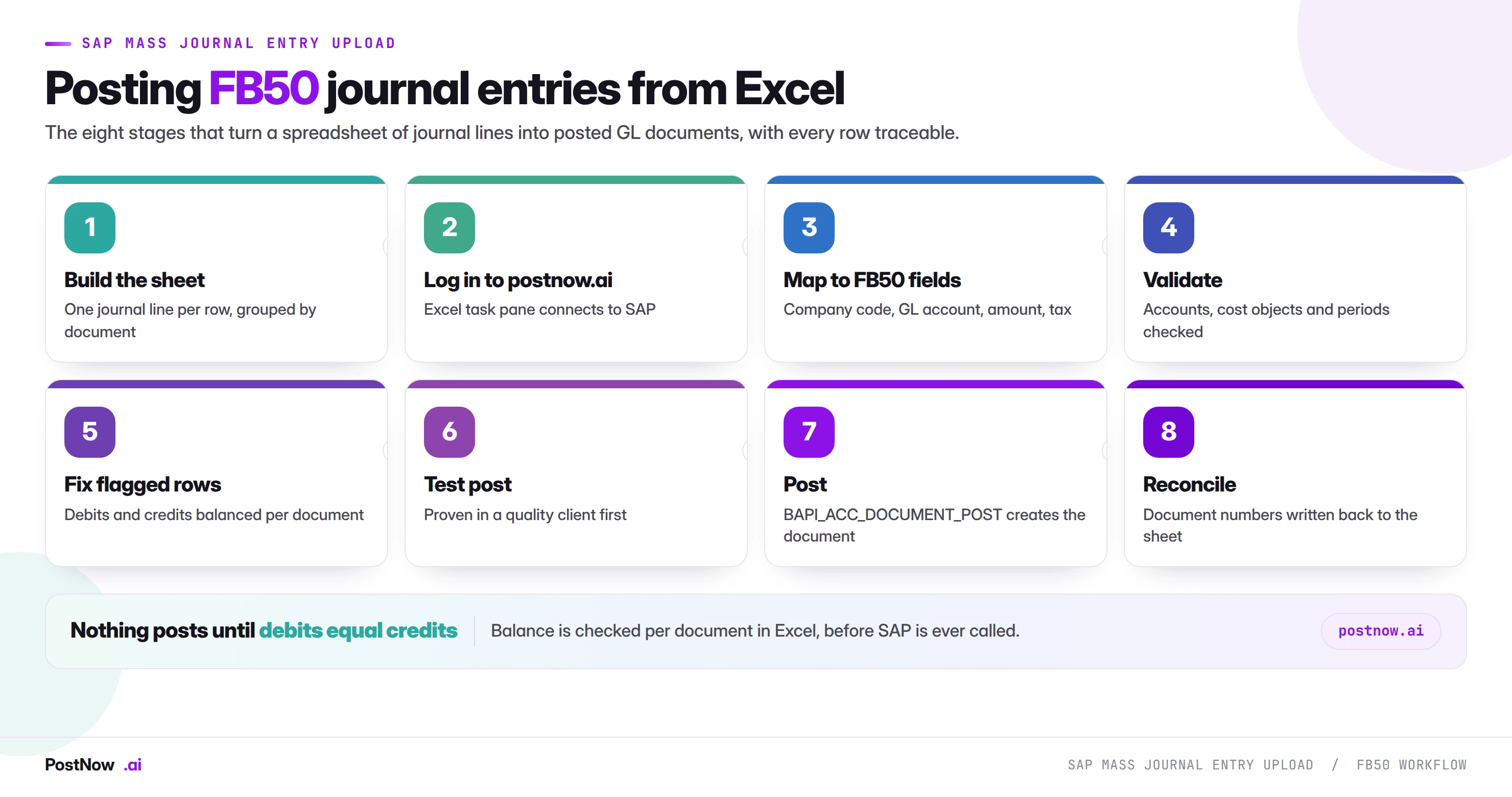
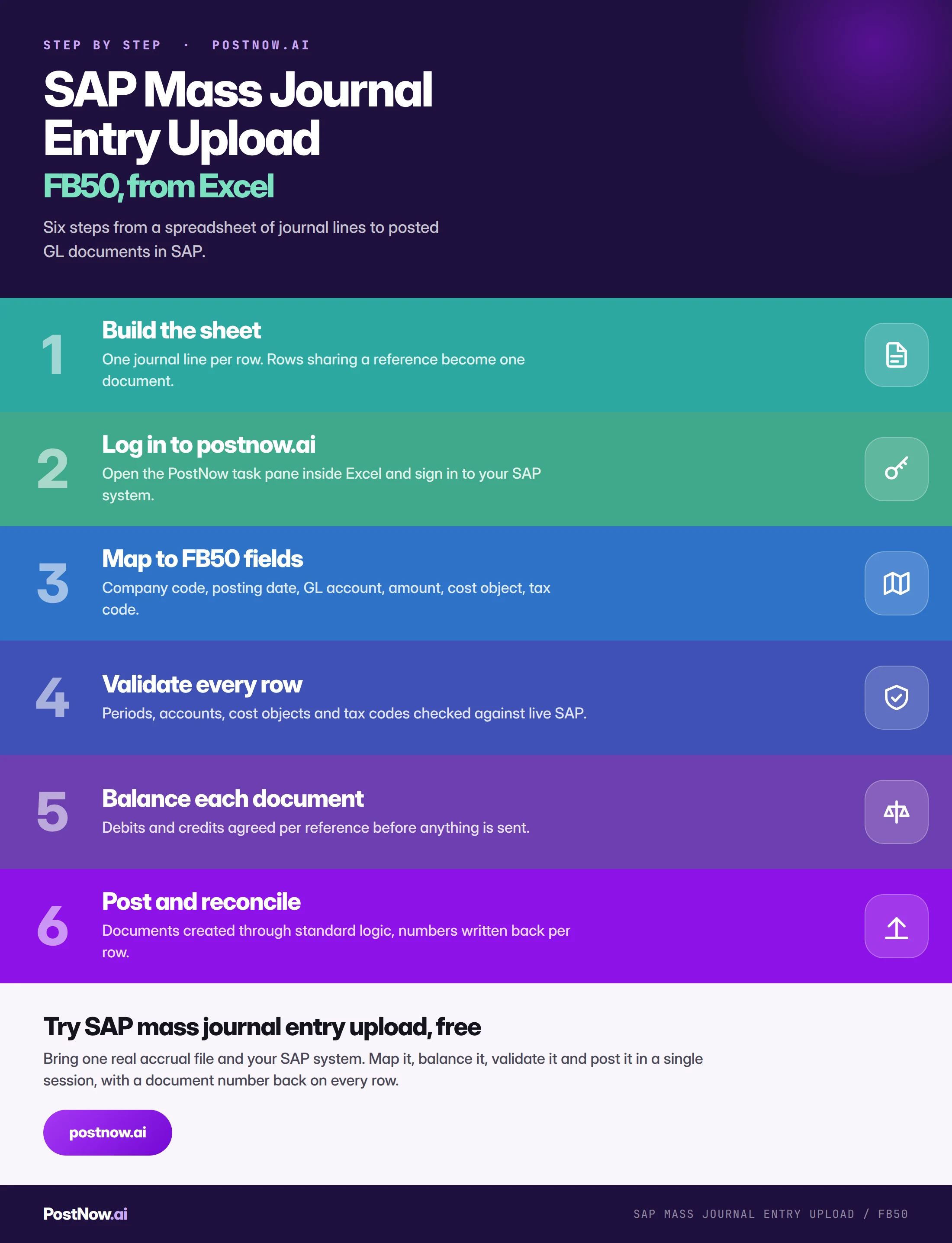
The eight stages of a controlled FB50 run
The sequence below is the same discipline described in the SAP mass upload pillar guide, tightened for journal entries. Every stage exists because skipping it produces a specific, recognisable failure.
Build the sheet
One journal line per row, with header fields repeated across the rows that belong to the same document. Clean headers, no merged cells, no blank rows breaking up the block, no totals row sitting at the bottom waiting to be read as data.
If the file comes out of an allocation model, build the extract as a separate tab rather than posting from the model itself. The model will change; the extract layout should not.
Log in to postnow.ai
Open the PostNow task pane inside Excel and sign in. The pane connects the workbook to your SAP system using your own credentials and your own authorisations, so the load can only post where you could already post manually.
This is the point at which a private spreadsheet becomes a controlled run. Everything after it is recorded against the user who ran it.
Map columns to FB50 fields
Match each column to the SAP field it feeds: company code, posting date, document type, reference, GL account, amount, cost object, tax code, item text. Save the mapping as a template the moment it works, because the same journal returns next month and rebuilding the mapping is where the hours go.
Validate against live SAP
Every row is checked against the system it is about to post into: does the company code exist, is the period open, does the account exist and is it unblocked, is the cost object valid on that date, is the tax code defined for that country. These are live lookups, not a static list, because the answers change between the build and the run.
Balance and fix flagged rows
Debits and credits are summed per reference group and compared. Rows that failed validation carry their message beside them. Both classes of problem are corrected in the same sheet, which is the point: the error and the data live in one place, so there is no log to cross-reference.
Test post in a quality client
Run the file into a non-production client that carries current configuration. This is not a formality. It is where you discover that the field status group changed, that an account was blocked last week, or that the new cost centre was created in development but never transported.
Post through standard logic
The run calls BAPI_ACC_DOCUMENT_POST, which is SAP's published interface for creating accounting documents. Every check FB50 would apply still applies, and every message SAP would show still comes back, one per row.
Reconcile and keep the log
Each posted row receives its document number. Totals are compared back to the source model, and the completed file becomes the audit record for the run: what was posted, by whom, when, and from which numbers.
Building the spreadsheet: the details that break loads
Most failed journal uploads fail on formatting rather than accounting. The numbers are right and the file is wrong. These are the specific problems worth designing out.
Amounts that are text
A column that arrives from a report or a copy-paste is frequently text that looks like a number. It right-aligns incorrectly, sums to zero, and passes visual inspection perfectly. The balance check then fails on a document that visibly balances. Force the column to a number type and confirm the sum in the status bar before doing anything else.
Thousands separators and decimal commas
A file built in a German locale and opened in a British one, or the reverse, can reinterpret 1.234,56 in ways that change the value by three orders of magnitude. This is not a theoretical risk on a multi-entity close. Standardise the extract format and validate a known total after every hand-off.
Account numbers losing leading zeros
GL accounts stored as numbers lose leading zeros, and SAP stores them padded. An account entered as 400100 may need to be 0000400100 internally. A load that handles this conversion is doing you a favour; one that does not will report accounts as not existing when they plainly do. Store account columns as text if you are building the file by hand.
Dates as serial numbers
Excel stores dates as numbers and displays them as dates. Depending on how the file moves between systems, a posting date can arrive as 46234. Fix the display format, and prefer an unambiguous text format such as 2026-07-31 when the file crosses a boundary.
Trailing spaces
A cost centre of CC-1000 is not CC-1000. Trailing whitespace survives copy-paste, is invisible on screen, and produces validation failures that read as though the master data is missing. Trim every key column as a matter of routine.
Hidden rows and filtered views
A filtered sheet shows a subset. If the load reads what is on screen rather than what is in the file, the run posts less than intended; if it reads the file rather than the view, it posts more. Neither surprise is welcome at month end. Clear filters before the run and confirm the row count.
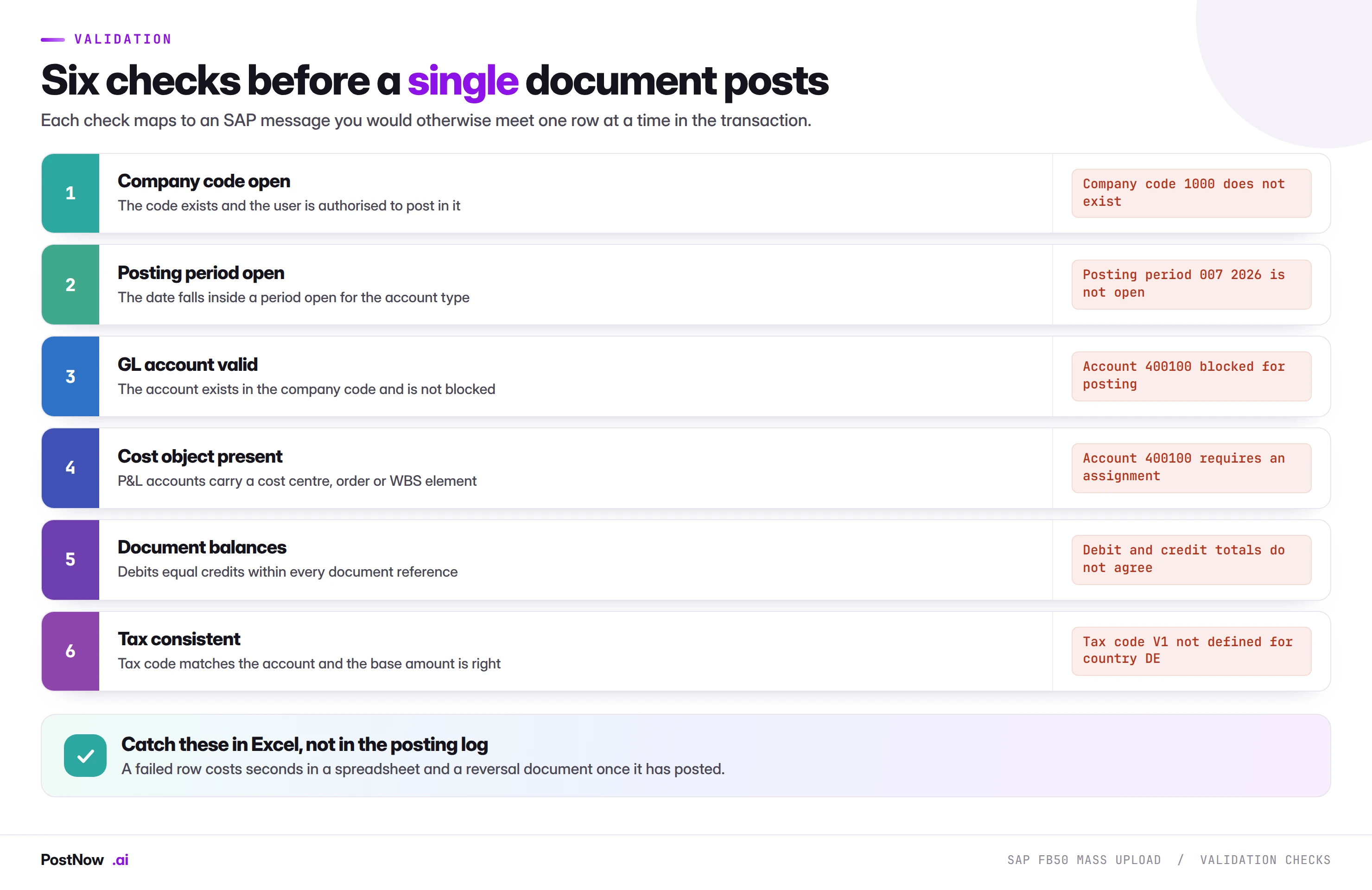
Validation: six checks before anything posts
Validation for journal entries has a specific shape because the document has to satisfy both master data rules and accounting rules. The six checks above map directly to the errors you would otherwise meet one at a time.
What makes validation useful is that it runs against live SAP rather than against a copy. A cost centre valid in May may be closed in July. An account unblocked when the template was built may be blocked now. A period open yesterday closes at the moment the close calendar says so, frequently while a load is being prepared. Checking against a static list gives false confidence; checking against the system gives an answer that is true at the moment of the run.
Why balance is checked separately
Balance is not a master data check. It is arithmetic across a group of rows, and it can only be evaluated once the grouping is known. This is why it deserves its own step rather than sitting inside general validation: a file can pass every field-level check and still be unpostable because one group is out by four cents.
Where tax codes are in play, the balance check has to model the tax line SAP will generate. A document that balances in the sheet and fails on balance in SAP is nearly always a tax line that was not accounted for.
Duplicate detection
The specific risk for journals is posting the same accrual twice, which is easy to do when a run is interrupted and restarted. Two defences work together. The reference should be unique per run, so a repeat becomes visible in FB03. And the file should carry a status column that records the document number returned for each row, so a row that already holds a number is never eligible to post again.
Errors, and what they are actually telling you
SAP's messages are precise but not always self-explanatory. The four below account for the large majority of stopped journal loads.
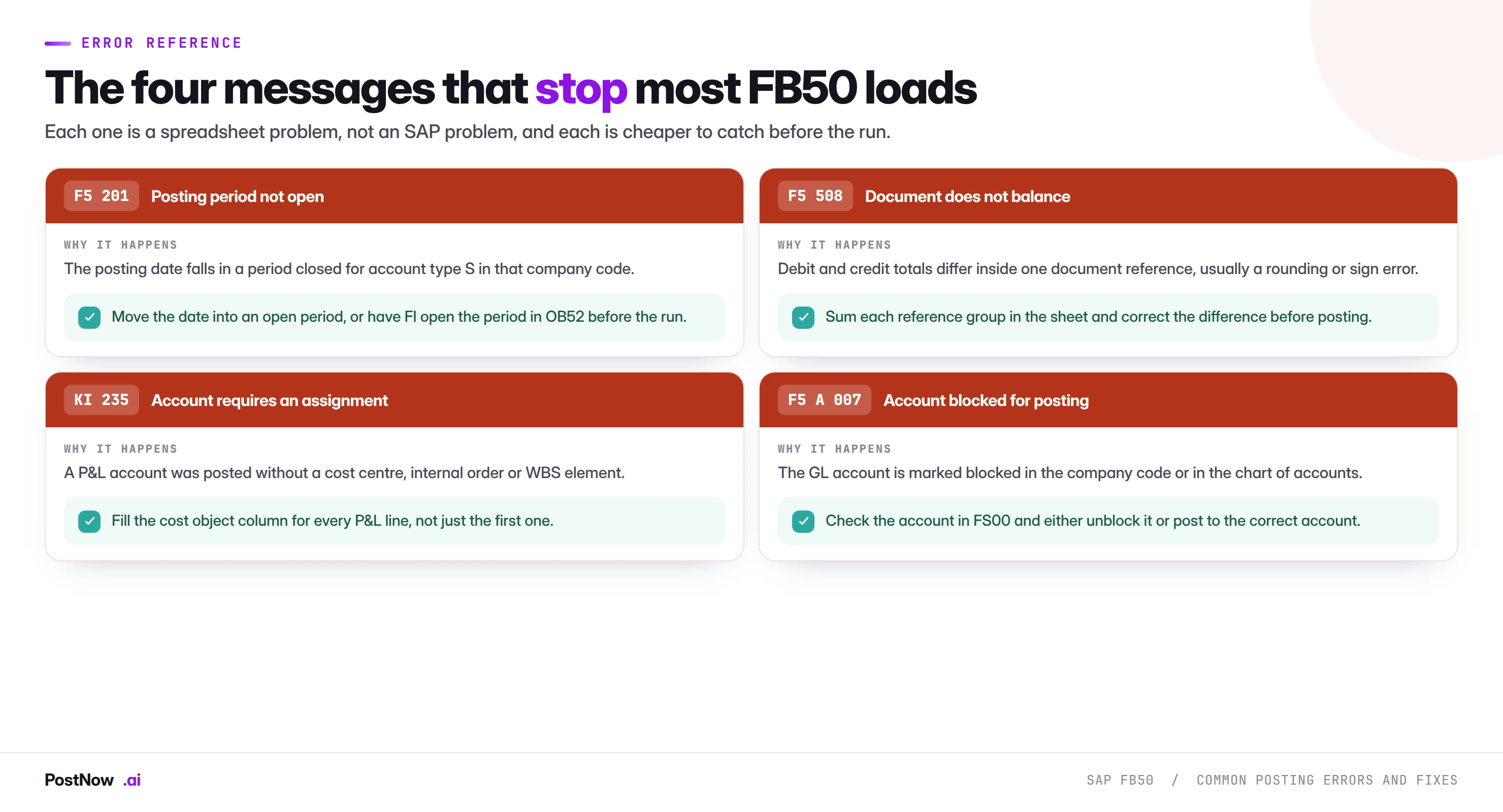
Reading a partial failure correctly
A run of four hundred documents where eleven fail is a normal outcome, not a broken process. The eleven will nearly always cluster: one closed period, one blocked account, one cost centre that was never transported. Fix the cluster and the eleven become zero.
What matters is that the run is restartable. The rows that succeeded hold their document numbers and are excluded from the retry. The rows that failed carry their messages and are corrected in place. Nothing posts twice, and there is no reconciliation exercise between two files.
Balancing, rounding, and allocation models
Allocation journals fail on balance more than any other type, and always for the same structural reason. A total is distributed across receivers by percentage, each receiver amount is rounded to two decimals, and the rounded amounts do not sum back to the original total.
There are three ways to handle this, and only two of them are any good.
- Plug the largest receiver. Calculate all receivers except the largest, then derive the largest as the total minus the others. The difference lands where it is least material and the document always balances.
- Post the difference to a rounding account. An explicit line to a designated rounding difference account. More visible, easier to explain, and it keeps the receiver amounts exactly as the model calculated them.
- Adjust manually every month. This is what teams do by default, and it is the one to design out. It puts a hand-edit into a run that was supposed to be automated, at the point in the close where there is least time.
Whichever you choose, build it into the model rather than the upload. The upload should receive a file that already balances.
Tax, currency, and the cases that need care
Tax codes on GL journals
Most GL journals carry no tax. When they do, the code drives an automatically calculated line, and whether SAP calculates the tax or expects you to supply it depends on configuration. Establish which behaviour applies in your system before building a template that assumes the other.
Foreign currency
A document posted in a currency other than the company code currency needs the transaction currency, and either an exchange rate or a translation date so SAP can find one. Balance is evaluated in the document currency. The local currency amounts are derived, and small differences there are normal and handled by SAP rather than by you.
Where a rate is supplied explicitly, it has to be supplied consistently across every line of the document. A mixed-rate document is not a document SAP will accept.
Intercompany journals
Cross-company postings generate documents in more than one company code and require the intercompany relationships to be configured. For a mass upload, the practical implication is that the file has to be built with the full picture, not one side of it, and the balance check applies per company code as well as overall.
Special GL and open item accounts
Accounts managed on an open item basis behave differently from ordinary GL accounts, and posting to them at volume without understanding the clearing consequences creates a reconciliation problem rather than solving one. If an account in your file is open-item managed, confirm what should happen to those items before the run, not after.
Running the whole sequence inside Excel
PostNow runs SAP mass journal entry upload from Excel
The eight stages above happen in the workbook your accrual model already lives in. PostNow adds a task pane to Excel, connects to your SAP system with your own credentials, and takes the file through mapping, balancing, validation and posting without leaving the sheet.
Rows sharing a reference become one FB50 document, exactly as SAP expects.
Debits and credits checked per document before anything is sent.
Periods, accounts and cost objects checked against live SAP values.
The SAP document number written back on the row that created it.
FB50, FB01 and FB60: choosing the right transaction
Three transactions create FI documents and all three are candidates for mass work. Choosing between them is mostly a question of what is on the line rather than how many lines there are.
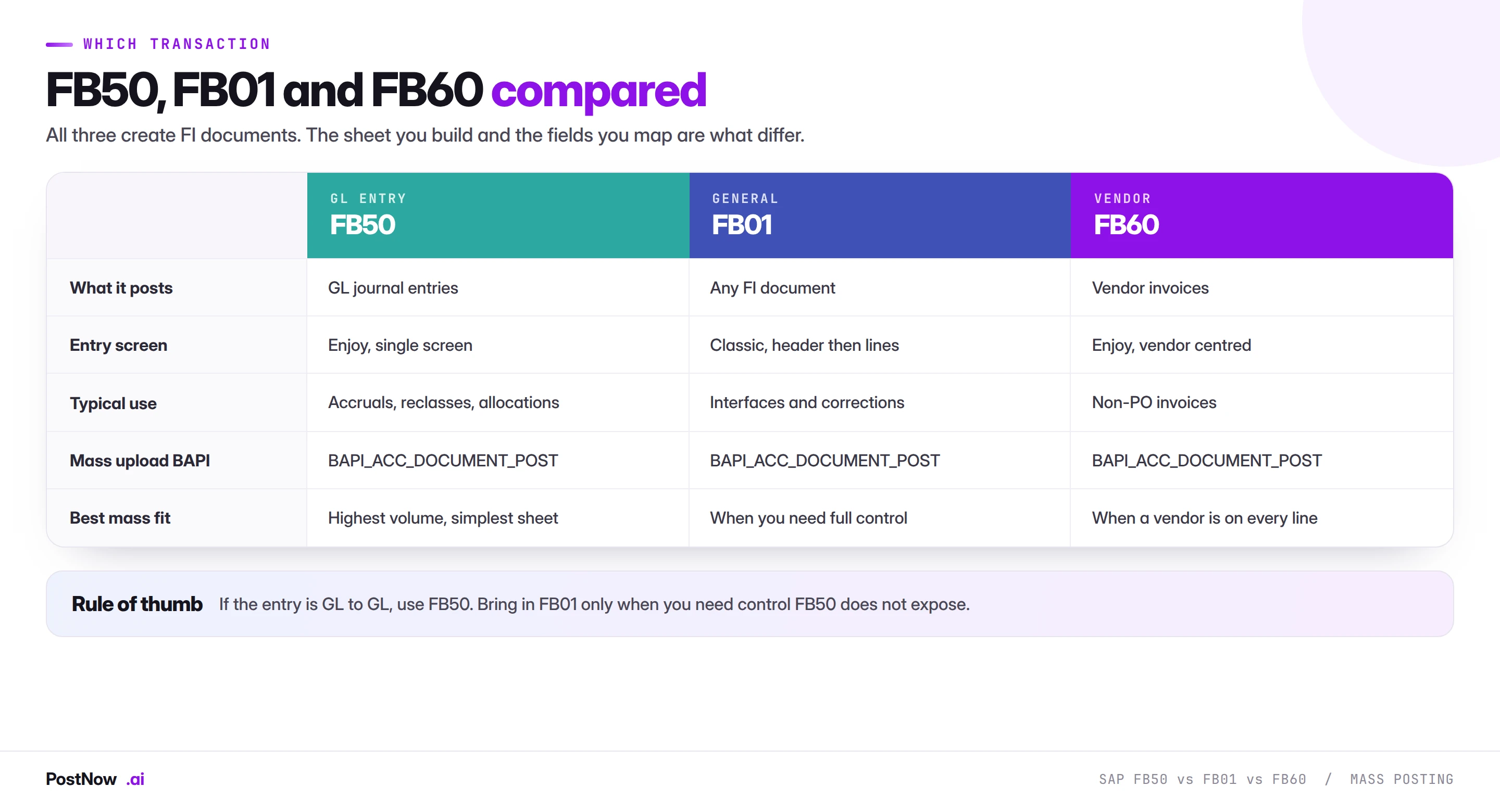
FB50 is the default for GL to GL entries. Accruals, reclassifications, allocations and provisions all fit it, and the sheet it needs is the simplest of the three because there is no sub-ledger partner to identify.
FB01 is the classic general posting transaction. It exposes control that FB50 hides, including explicit posting keys, and it will accept combinations that the Enjoy screen does not offer. For mass work this matters when you are loading documents produced by an external system that specifies posting keys directly. See the FB01 mass upload guide for that case.
FB60 posts vendor invoices. If a vendor appears on the entry, this is the transaction, and the sheet gains vendor, payment terms and baseline date columns. The FB60 mass upload guide covers the differences.
All three post through the same accounting interface, which is why a team that has built a working FB50 process finds the second and third transactions considerably easier than the first.
Reversals, corrections, and getting it wrong at volume
Posting four hundred documents in ninety seconds is a different risk profile from posting four hundred documents over three days. The upside is obvious. The downside is that a systematic error propagates at the same speed.
Three practices contain this.
Test with a subset first. Post ten documents into the quality client, open two of them in FB03, and read them. Not the log, the documents. A mapping error that produces valid but wrong entries is invisible in a success log and obvious the moment an accountant looks at the posted result.
Keep runs small enough to reverse. A run that would take an hour to reverse with FB08 is a run that should have been split. Batch by entity, by journal type, or by whatever boundary makes a reversal a contained exercise rather than a project.
Record the reference before you need it. Mass reversal is straightforward when every document from a run shares an identifiable reference, because FB08 and its mass equivalents can then find them as a set. It is painful when the documents can only be identified by opening them.
Governance, approval, and the audit trail
The moment journal entries are posted from a file, two questions arrive that did not exist when they were keyed: who approved the file, and can the posted documents be traced back to it. Both have straightforward answers, and both need answering before the first production run rather than during the first audit.
- Post as a named user. The run should carry the SAP identity of the person who ran it, with their authorisations. A shared service account defeats the purpose of the trail and is the finding auditors reach for first.
- Approve the file, not the run. The reviewable artefact is the spreadsheet: the numbers, the accounts, the totals. Whoever signs off a manual journal should sign off the file that replaces it, in the same way and against the same threshold.
- Keep the completed file. A file with document numbers written back against every row is the audit record. It shows the input, the output, and the link between them, in one artefact.
- Separate build from post. Where materiality justifies it, the person who builds the file should not be the person who posts it. This is standard segregation of duties applied to a new mechanism, not a new control.
- Reconcile every run. The sum of posted amounts should equal the total in the source model. A run is not finished when the last document posts; it is finished when that comparison is made and recorded.
None of this is heavy. It is the same governance a manual journal already carries, applied to a file instead of a screen. Teams that write it down once find that the audit conversation about mass posting becomes shorter than the one about manual journals, because the evidence is better.
Volume, batching, and what actually takes the time
There is no fixed limit on how many journal entries can be posted in a run. What varies is how long it takes and what happens when something goes wrong, and both are driven by document complexity more than row count.
A file of two thousand rows that forms four hundred five-line documents behaves very differently from two thousand rows forming forty fifty-line documents. The first makes four hundred posting calls, the second forty. Runtime tracks the number of documents, not the number of rows.
Practical batching guidance:
- Split by natural boundary. Company code, journal type or period. A batch that fails should be a batch you can describe in one sentence.
- Keep a batch reversible in minutes. If undoing it is an afternoon, it is too big.
- Schedule large runs outside close peaks. Not because the load is heavy, but because a system under load produces timeouts that look like data errors and waste an hour of diagnosis.
- Watch the period boundary. A long run that starts before a period closes and finishes after it will fail partway, and the failure will be confusing because the file was correct when it started.
From a one-off load to a monthly template
The first mass journal upload is a project. The second should be a task, and the difference is entirely in what gets saved.
The mapping is the asset. Working out that column F is the cost centre and that the reference groups the document takes real thought the first time and none at all afterwards, provided it was written down. Saved as a template, it turns a two-day exercise into a twenty-minute one.
- Save the mapping, not just the file. The column-to-field relationships are the intellectual work.
- Issue a blank template to the people who own the numbers. If the accrual model outputs the right columns in the right formats, most preparation disappears at source.
- Keep the validation rules with the template. The checks learned the hard way are the ones that matter next month.
- Record the configuration it was proven against. Which company codes, document types and account ranges, so nobody assumes it covers a case it has never seen.
- Name an owner. Templates rot when the chart of accounts changes and nobody is responsible for re-proving them.
The test is simple. Can a colleague who did not build it run next month's accrual, without calling you, and produce a result you would be comfortable defending? If not, the load was solved but the process was not.
Common mistakes and how to avoid them
- Posting straight into production on the first run. The quality client exists precisely so that a mapping error costs nothing. Ten test documents read properly will catch what a success log never shows.
- Letting the posting date default to today. A formula that seemed convenient during the build posts July's accrual into August when the run slips. Hard-code it.
- Rebuilding the mapping every month. The same journal returns. The mapping should not be rediscovered each time.
- Ignoring the rounding difference until the run fails. Allocation models produce it by design. Decide where it lands before the file is built.
- Running without a status column. Without a document number written back per row, a restart posts the successful rows a second time.
- Forgetting the tax line in the balance check. The sheet balances, SAP adds a tax line, the document does not. Model the tax before validating balance.
- Treating the run as finished when the last document posts. It is finished when the total is reconciled to the source model and recorded.
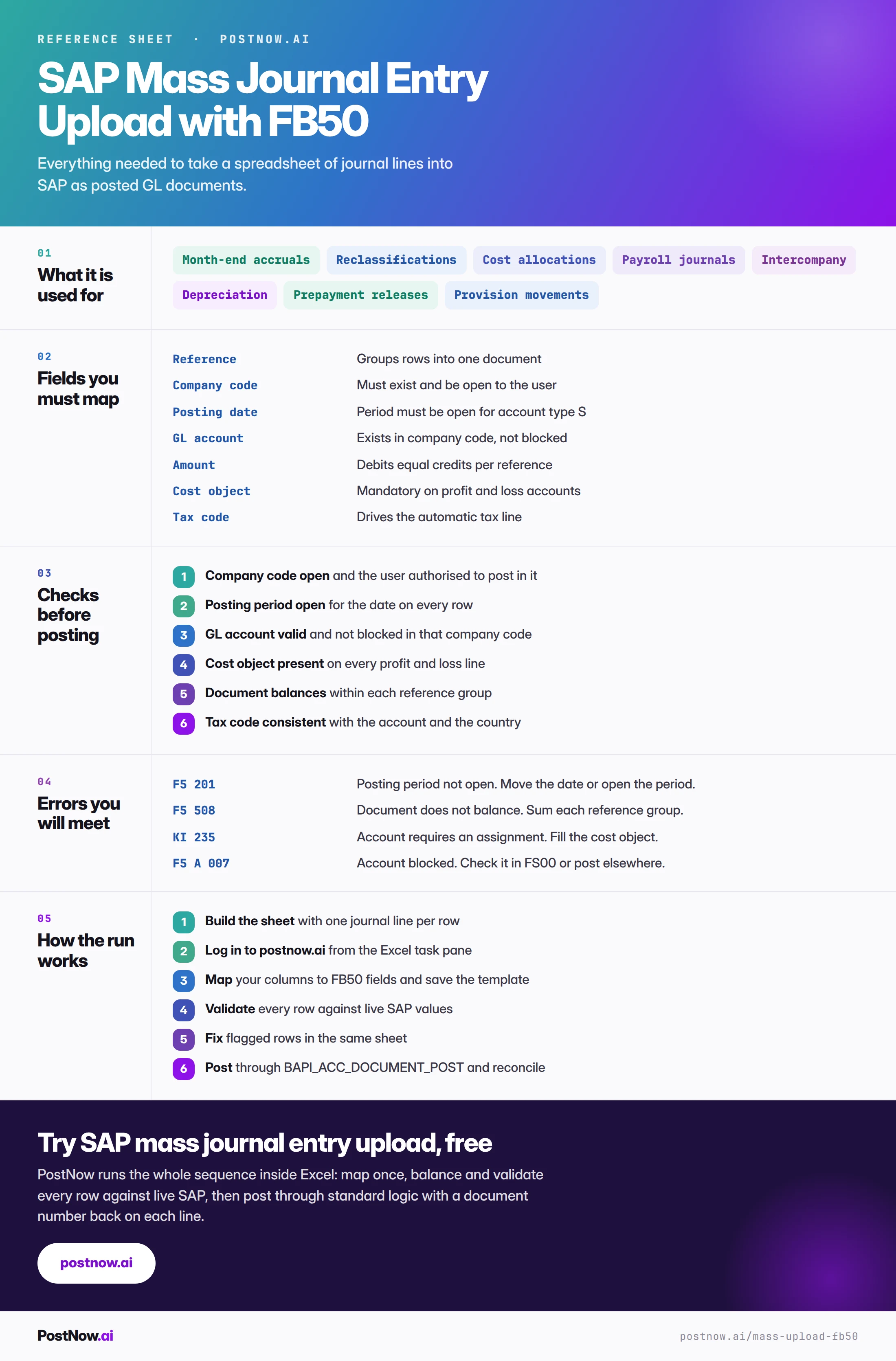
The complete FB50 mass upload reference
The reference sheet below collects everything above into one image you can share with a team before a close.
Go deeper
SAP FICO mass posting
The hub for finance mass posting: journals, vendor invoices, GL documents and cost centres.
SAP mass upload
The pillar guide covering methods, validation, error handling and governance across every transaction.
Methods and alternatives
How BAPI, screen recording and LSMW compare, and what to use where LSMW used to be the default.
Excel to SAP automation
The wider picture of driving SAP from a spreadsheet, including validation and reporting back.
SAP journal entry automation still needs a human on the balance
SAP journal entry automation removes the retyping at month end: a validated spreadsheet of headers and line items posts as documents in one run. What it does not remove is accountability for the numbers — the debits and credits must balance, the tax and cost object must be right, and someone still approves the batch before it reaches the ledger. Automate the posting, not the review.
Frequently asked questions
What is SAP mass journal entry upload?
How do I mass upload journal entries into SAP from Excel?
BAPI_ACC_DOCUMENT_POST. The eight stages above set out the full sequence.