SAP Mass Invoice Posting with MIRO
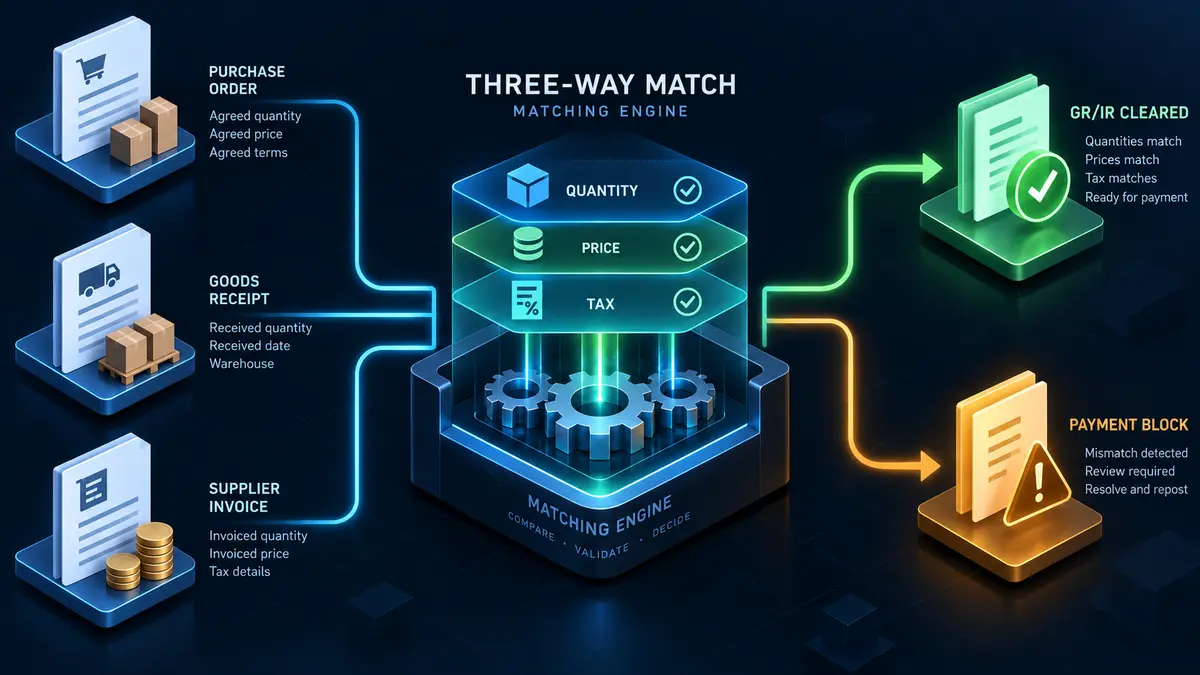
SAP mass invoice posting means entering many supplier invoices in one controlled run from a file rather than keying each into MIRO. The invoice does not create something new, it reconciles three documents: what was ordered, what arrived and what was billed. Your file supplies only one of those three sides.
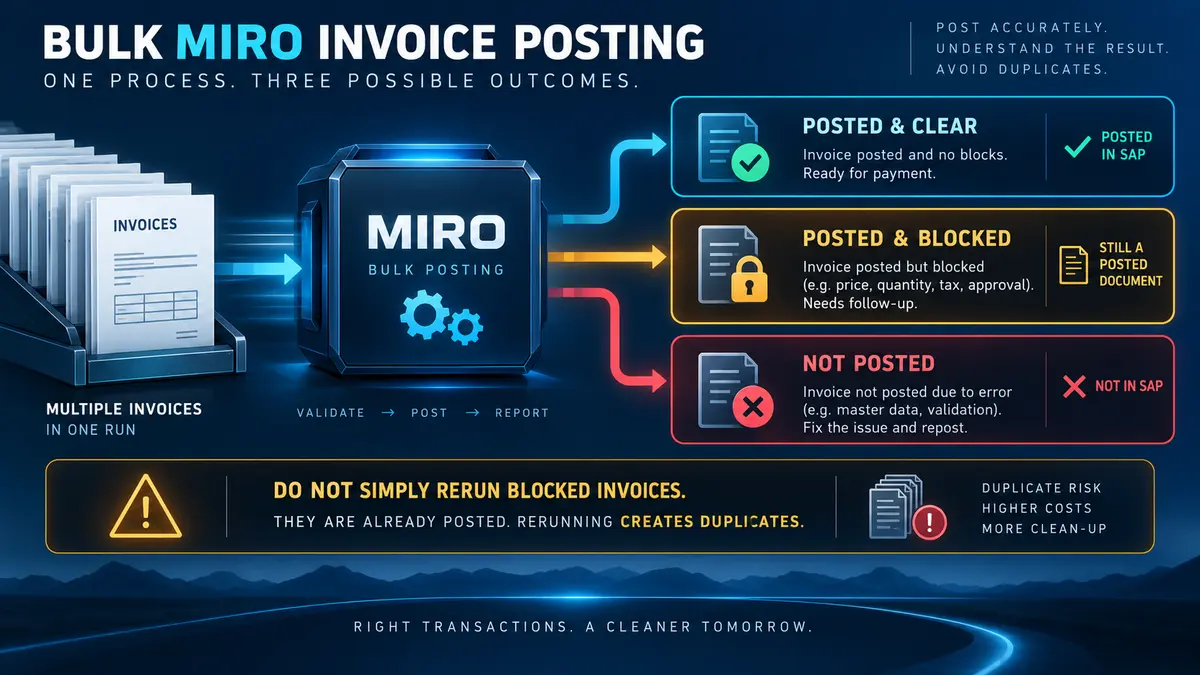
- Variance blocks, it does not fail. A blocked invoice has posted, has a document number, and is waiting for a decision.
- Split the run report three ways. Posted and clear, posted and blocked, failed. Conflating them creates duplicate payments.
- Treat the duplicate warning as a stop. M8 108 is a message a human considers; in a mass run nobody reads it.
- Model the tax SAP calculates. Using the supplier's printed total is the most common cause of a balance error.
- Post receipts before invoices. Sequencing removes an entire class of blocks that would otherwise need clearing by hand.
Where the volume comes from
- Month-end invoice runs. A supplier sends one consolidated file covering forty deliveries, and each line needs matching separately.
- Invoicing backlog. Accounts payable falls behind and a period of invoices has to post before close.
- Scanned invoice output. An OCR or capture platform produces structured data that has to become SAP documents.
- Freight and delivery cost settlement. A logistics provider bills hundreds of shipments in one statement.
- Service entry settlement. Approved service entry sheets that all need invoicing at period end.
- Subcontracting and consignment settlement. Periodic settlement runs producing large invoice populations.
- Migration cutover. Open supplier invoices carried into a new system with their original dates.
In all of these the invoice already exists as a document; what is missing is its SAP counterpart. The keying is transcription, and the accuracy that matters is whether the transcription matches the order and the receipt.
Three-way matching, and what your file is actually doing

When an invoice line references a purchase order item, SAP compares three things: the ordered quantity and price on the PO, the received quantity and value from the goods receipt, and the billed quantity and amount from your file.
The comparison produces one of three outcomes per line. The numbers agree and the line clears. The numbers differ inside tolerance and a small difference posts automatically. The numbers differ beyond tolerance and the invoice posts blocked.
What this means for a file is that you are supplying only one of the three sides. The purchase order and the goods receipt are already in the system. Your job is to state accurately what the supplier billed, and let SAP do the comparison. Files that try to force a match by adjusting quantities or amounts to make the numbers agree defeat the entire control.
The GR/IR account is the scoreboard
A goods receipt credits GR/IR clearing. An invoice debits it. When both sides agree, the account clears for that line and the transaction is complete. When they do not, a balance remains.
On a mass run this is the single most useful reconciliation available. After posting, the GR/IR movement should equal the value of the invoices matched against receipts. A residue tells you that lines were invoiced without receipts, or receipted without invoices, or matched against the wrong item. The MIGO guide covers the same account from the receipt side, and the two runs should be reconciled together.
Variance, tolerance keys, and blocked invoices

Tolerance keys decide what happens when the numbers disagree. They are configured per company code, and knowing which are active in your system is a prerequisite for a large invoice run rather than a detail.
PP, price variance. The billed price differs from the order price. Small differences absorb; larger ones block. This is the most common block on a real invoice population, because suppliers apply price increases before purchase orders are updated.
DQ, quantity variance. The invoiced quantity exceeds what has been receipted. This is the one to take seriously: you are being billed for goods your system has no record of receiving.
BD, small difference. Total variance under an absolute limit posts to a difference account with no block. Useful, and worth knowing the limit, because a run of hundreds of invoices each absorbing a small difference adds up to a number somebody will ask about.
DW, quantity yet to be delivered. The invoice arrived before the receipt was posted. This clears itself when the receipt is entered, which is why sequencing receipt runs before invoice runs matters.
What SAP mass invoice posting means
SAP mass invoice posting is the practice of entering many supplier invoices in one controlled run from a structured file, instead of keying each one into MIRO individually. The invoices are prepared in Excel, referenced to their purchase order items, checked against what was actually received, validated for balance and tax, and posted through SAP's standard invoice verification interface with the document number written back per row.
This is the one object in the mass upload cluster that does not really create anything. It reconciles. Three documents have to agree: what was ordered, what arrived, and what the supplier has billed. Everything difficult about mass invoice posting follows from that.
Variance blocks, it does not fail. An invoice that disagrees with the order or the receipt still posts. It lands in the ledger, it moves the GR/IR balance, and it sits blocked for payment waiting for a person to decide. Treating blocked rows as failures and re-running them is how duplicate invoices get created, and duplicate invoices are the most expensive mistake available in this entire guide.

Blocked for payment versus blocked for posting
These are different states and the distinction matters at volume. An invoice blocked for payment has posted and is waiting for release, typically through MRBR. An invoice that could not post at all produced an error and does not exist. The first needs a decision; the second needs a corrected file.
Duplicate invoices: the most expensive error available
Every other mistake in this guide produces a wrong record. This one produces a payment.
SAP checks incoming invoices against existing ones using the vendor, the reference number, the invoice date and the amount, depending on configuration. When it finds a possible match it raises M8 108, which in a manual entry is a warning a person reads and considers.
In a mass run, a warning that nobody reads is not a control. Three practices make duplicate prevention real:
- Treat M8 108 as a stop. Not a warning to acknowledge. A row that triggers it comes out of the run and goes to a person.
- Screen the file against itself. Consolidated supplier files frequently contain the same invoice twice, and a check that only compares against SAP will not see it because neither copy exists yet.
- Never blank the reference to clear a block. The reference number is what makes the check work. An invoice posted without one is invisible to every future duplicate check.
The reason this matters more here than anywhere else is that the error is self-concealing. A duplicate invoice looks exactly like a legitimate invoice, and the discovery mechanism is usually a supplier ringing to say they have been paid twice, or nobody at all.
The fields you have to map

The invoice reference and the balance
An invoice document has a header and lines, so the same grouping problem appears here as in purchase orders. Rows sharing an invoice reference become one document, and header fields must agree across them.
The specific complication is the balance. SAP requires that the gross amount you supply equals the sum of the line amounts plus the tax it calculates. Not the tax printed on the supplier's invoice, the tax SAP calculates from the tax code and the base amounts. Where those differ, the document will not post.
Tax, and why it causes so much trouble
Tax is the most common cause of M8 534, the balance error, and the reason is subtle. Your file carries what the supplier billed. SAP calculates what it thinks the tax should be. Rounding differences, mixed tax codes across lines, and reverse charge scenarios all produce small discrepancies that break the balance.
Two approaches work. Either supply the tax amount explicitly where configuration permits and let SAP accept it, or model the calculation before the run so the gross amount you supply is the one SAP will arrive at. What does not work is assuming the printed total is what SAP will compute.
Invoice date versus posting date
The invoice date drives the baseline date for payment terms and therefore when the invoice becomes due. The posting date drives which period the document lands in. On a backlog run these diverge substantially, and getting them the wrong way round either pays suppliers early or misstates the period.
The eight stages of a controlled MIRO run
Build the invoice sheet
One invoice line per row, header fields repeated across rows in the same document, and a reference column deciding the grouping. Carry the supplier's own invoice number on every row.
Log in to postnow.ai
Open the PostNow task pane inside Excel and sign in. The pane connects the workbook to your SAP system with your own credentials and invoice verification authorisations.
Reference each line to its PO item
Without the item number the line cannot find its receipt and cannot be matched. Where the source file carries only a material or a description, deriving the item is the real work of preparation.
Screen for duplicates
Supplier reference numbers checked against invoices already posted, and against the file itself. Suspected duplicates come out of the run rather than being acknowledged past.
Validate against live SAP
Receipts present for the quantities billed, prices inside tolerance, both periods open, tax codes valid, balance zero on every document.
Test post in a quality client
Post a subset, then open an invoice in MIR4 and read it against the purchase order. Check the tax, check which lines blocked, and check that GR/IR moved as expected.
Post through standard logic
The run calls BAPI_INCOMINGINVOICE_CREATE, SAP's published interface for logistics invoice verification. Matching, tolerance evaluation and blocking all behave exactly as they do in MIRO.
Reconcile GR/IR and review blocks
Document numbers written back per row, blocked lines listed separately from failures, and the GR/IR movement compared against the receipts these invoices matched.

Validation: six checks before a single invoice posts

The balance check is worth doing in the spreadsheet rather than discovering in SAP. A file where every document balances posts cleanly; a file where a third of them do not produces a long list of M8 534 errors that all need the same fix and all have to be found individually.
Errors, and what they are telling you

M8 081 deserves a specific note because the correct response is usually not to change the invoice. If a supplier has billed for forty units and thirty were receipted, either ten more arrived and were never posted, or the supplier has over-billed. Both are real situations with different answers, and neither is solved by reducing the invoiced quantity to make the error go away.
Running the whole sequence inside Excel
PostNow runs SAP mass invoice posting from Excel
The eight stages above happen in the invoice file accounts payable already works from. PostNow adds a task pane to Excel, connects to your SAP system with your own credentials, and takes the file through referencing, screening, validation and posting without leaving the sheet.
Each line referenced to its purchase order item and its receipt.
Supplier reference numbers checked for duplicates before posting.
Line amounts and calculated tax reconciled to the gross amount.
Blocked lines listed apart from failures, so nothing posts twice.
MIRO, FB60, and parking

MIRO is for invoices against purchase orders. It matches, it clears GR/IR, and it applies tolerance rules. This is where goods and services procured through purchasing belong.
FB60 posts a vendor invoice straight to the general ledger with no purchase order and no matching. Correct for utilities, rent, professional fees and anything else never ordered through MM. The FB60 guide covers that route. Routing a PO-based invoice through FB60 is a serious mistake at volume: the purchase order stays open, GR/IR never clears, and the expense posts twice if anyone later invoices it properly.
Parking holds an invoice without posting it, for review or approval before it hits the ledger. Useful as a mass pattern where approval must precede posting, and it changes the shape of the run: the load creates parked documents and a second step posts them.
Delivery costs, credit memos, and the other invoice types
A real invoice population is not all straightforward goods lines.
Planned delivery costs were specified on the purchase order and appear as their own lines to be invoiced, often from a different vendor than the goods. A freight invoice from a logistics provider settles against the delivery cost condition on someone else's purchase order, which is why the invoicing party and the PO vendor can legitimately differ.
Unplanned delivery costs were not on the order and arrive with the invoice. They are distributed across lines or posted to a separate account depending on configuration, and a mass file needs to say which.
Credit memos reverse value. They use the same mechanism with the opposite sign, and mixing them into a file of invoices without a clear indicator column produces documents posted in the wrong direction.
Subsequent debits and credits adjust the value of an already-invoiced item without changing quantity, typically for retrospective price corrections. These are their own document type and belong in their own run.
The practical guidance is one document type per file. A file mixing invoices, credit memos and subsequent debits is difficult to review and produces failures that are hard to attribute.
Evaluated receipt settlement, and invoices that never arrive
Some supplier relationships remove the invoice from the process entirely. Evaluated receipt settlement generates the invoice from the goods receipt, using the purchase order price, so there is nothing to key and nothing to match.
This is worth knowing about in a guide on mass invoice posting for a straightforward reason: the cheapest invoice run is the one you do not have to do. Where a supplier relationship is stable, prices are contractually fixed and receipts are reliable, settlement without an invoice removes the entire class of work described on this page along with every error in it.
It is not free. It demands that purchase order prices are genuinely correct, because there is no supplier invoice to catch a discrepancy. It demands accurate receipting, because the receipt becomes the billing document. And it needs supplier agreement, since they stop sending invoices and start receiving self-billing documents.
The practical read for a team facing a large recurring invoice population is to ask which suppliers could move to this model. A file that comes back every month for the same twenty suppliers is a candidate for removing the file rather than automating it.
Service invoices and entry sheets
Services behave differently from goods and catch out files built on a goods template.
A service purchase order carries a service specification rather than a material and quantity. What gets receipted is a service entry sheet, which records the services actually performed and is approved before it can be invoiced. The invoice then matches against the accepted entry sheet rather than against a goods receipt.
Three consequences for a mass run:
- The entry sheet must be accepted first. An unaccepted sheet is not a valid basis for invoicing, and the invoice will block or fail depending on configuration.
- The reference is the entry sheet, not just the PO item. A file that carries only the purchase order line cannot identify which of several entry sheets is being invoiced.
- Quantities are often values. Service lines are frequently priced as lump sums rather than quantity times rate, which changes how variance is evaluated and how the balance is calculated.
Where a population mixes goods and services, split the file. The matching basis is different, the approval prerequisite is different, and a combined file produces failures that are hard to attribute to the right cause.
Governance, payment risk, and segregation
Invoice posting sits closest to money of anything in this cluster, so the controls are correspondingly tighter.
- Post as a named user. With that person's invoice verification authorisations, and never a shared account.
- Separate posting from payment release. Whoever runs the file should not also release blocked invoices for payment. This is the segregation auditors look for first.
- Keep the duplicate screening evidence. What was checked, what matched, and what was decided.
- Approve the file, and show the total. The aggregate value being posted is the number that matters and is invisible when invoices are keyed one at a time.
- Never clear a block by amending the purchase order after the fact. If the price genuinely changed, amend the order deliberately as a decision, not as a workaround inside an invoice run.
- Reconcile GR/IR after every run. It is the only check that catches wrong references, and it gets harder the longer it is left.
Volume, sequencing, and period pressure
- Post receipts before invoices. Sequencing removes an entire class of DW blocks that would otherwise need manual clearing.
- Run well before period close. Invoice runs cluster at month end by nature, which is also when periods close and everyone else is competing for the same window.
- Batch by vendor. Failure modes are homogeneous, duplicate screening is more meaningful, and a supplier query maps to one batch.
- Watch the payment run. A large invoice population posted just before a payment proposal changes what gets paid. Treasury should know.
- Keep blocked volumes manageable. A run that blocks two hundred invoices has created two hundred decisions for a team that may have capacity for twenty.
From a backlog clearance to a standing intake
- Give the template to the capture platform or the supplier. Invoice files arriving with PO number, PO item, quantity, amount and tax code already correct make posting a formality.
- Fix one document type per template. Invoices, credit memos and subsequent debits each get their own.
- Encode the tax modelling. How the gross amount is derived, so the balance check passes by construction.
- Keep the duplicate rules with the template. Which fields are compared and what constitutes a match.
- Name an owner. Tolerance keys, tax codes and terms all change, and an unowned template fails quietly at the worst time.
Common mistakes and how to avoid them
- Treating blocked invoices as failed rows. They posted. Re-running them creates duplicates, which is the worst outcome available here.
- Acknowledging past the duplicate warning. M8 108 is a stop in a mass run, not a message to click through.
- Blanking the reference number to clear a block. Destroys the duplicate check for that invoice for ever.
- Using the supplier's printed tax rather than SAP's calculation. The most common cause of balance errors.
- Omitting the PO item. The line cannot find its receipt and cannot match.
- Routing PO-based invoices through FB60. Leaves the order open and GR/IR unclearable.
- Reducing an invoiced quantity to clear M8 081. Hides a real question about whether goods arrived or the supplier over-billed.
- Skipping the GR/IR reconciliation. Wrong references produce balances nobody sees until quarter end.
After the invoices are posted
Four things turn a completed run into a closed process.
Split the report three ways. Posted and clear, posted and blocked, failed. These need entirely different responses, and a single list conflating them is how duplicates happen. The blocked list is a work queue; the failed list is a file correction.
Reconcile GR/IR the same day. The movement on the clearing account should equal the value of the invoices that matched receipts. A residue means lines matched the wrong item, and the trail is far easier to follow while the run is recent.
Hand the blocked list to someone by name. Blocked invoices do not resolve themselves. A run that produces sixty blocks and no owner produces sixty aged items and a supplier chasing payment.
Tell treasury the total. A large invoice population posted before a payment proposal changes what will be paid and when. It is a cash flow event as much as an accounting one.
Invoice verification in S/4HANA
Logistics invoice verification survives the conversion largely intact, which makes it one of the safer areas to build mass capability before a migration.
The interface is unchanged. BAPI_INCOMINGINVOICE_CREATE works on both releases, so a mapping built on ECC carries forward. Recordings built against the MIRO screens do not survive the move to Fiori-based invoice apps, which is the usual argument for interface-based loads made concrete.
The universal journal changes where things land. Accounting entries post to ACDOCA rather than to separate ledger tables. For a mass invoice run this is invisible during posting and noticeable afterwards, because reconciliation reports read different tables. Reporting built on the old structures needs revisiting; the load itself does not.
Supplier invoice apps sit alongside the transaction. Fiori apps cover invoice entry and the blocked invoice work queue, which makes the review side of a large run more manageable than it was in the classic transaction. The blocked list produced by a mass run is easier to work through in the app than in MRBR.
Payment terms, baseline dates, and cash impact
An invoice run is a cash event as much as an accounting one, and the fields that decide when money leaves are easy to get wrong in bulk.
The baseline date drives the due date. It is usually derived from the invoice date rather than the posting date, and payment terms are counted from it. On a backlog run this matters enormously: two hundred invoices dated six weeks ago, posted today, may all become due immediately. That is a legitimate outcome and it is also a payment run nobody budgeted for.
Payment terms come from the vendor, unless overridden. The terms on the invoice document default from the vendor master company code segment described in the vendor master guide. Where a purchase order carries different terms, which prevails depends on configuration, and a mass run makes whichever it is happen consistently across the whole population.
Cash discount is decided at posting. Where terms offer early settlement discount, the discount base and the discount days are set on the document. An invoice posted late enough that the discount window has already passed simply loses the discount, silently, across the whole run.
Before a large backlog clearance, work out the due date profile of what you are about to post and tell treasury. The alternative is discovering it when the next payment proposal comes back three times larger than expected.
The complete MIRO mass posting reference
The reference sheet below collects everything above into one image you can share before an invoice run.

Go deeper
SAP MM mass upload
The hub for procurement at volume: orders, requisitions, goods movements and invoices.
SAP FICO mass posting
The finance side, including non-PO vendor invoices and the journals that adjust them.
SAP mass upload
The pillar guide covering methods, validation, error handling and governance across every transaction.
SAP master data mass upload
The vendors these invoices are posted against have to exist with company code data.
Frequently asked questions
What is SAP mass invoice posting?
How do I mass post supplier invoices in SAP from Excel?
BAPI_INCOMINGINVOICE_CREATE. The eight stages above set out the full sequence.