
What is SAP accounts payable automation?
SAP accounts payable automation reduces the manual work between a supplier invoice arriving and it being paid: capturing the invoice data, matching PO invoices against the purchase order and goods receipt, routing exceptions for approval, posting in MIRO (with a PO) or FB60 (without), paying through the F110 payment run, and reporting open items. SAP's tolerance checks and payment program stay in control.
Keying a month of vendor invoices into FB60 or MIRO one at a time is slow, and a wrong tax code or cost centre usually shows up only when SAP rejects the document. PostNow.ai posts the batch from Excel instead: every row is checked against the template rules and simulated in SAP, then posted through SAP BAPIs with the document number or SAP's message written beside it, so only the failed rows need fixing and re-running. For PDF invoices, the separately licensed Document AI module extracts the data for human review, checks for duplicates and routes approvals. Payment runs stay in F110.
SAP AP automation with PostNow.ai at a glance
- What it posts
- Non-PO vendor invoices and credit memos (
FB60,FB65), PO-based invoices (MIRO), G/L corrections and accruals (FB50), from rows in Excel - How it posts
BAPI_ACC_DOCUMENT_POSTor a recordedFB60/FB50;MIROonly throughBAPI_INCOMINGINVOICE_CREATE- Checked in Excel
- Required fields, types, lengths, date formats, allowed tax and company codes, optionally whether the vendor or cost centre exists in SAP
- Checked only by SAP
- Debit/credit balance and, for Excel uploads, duplicate invoice references, in Simulate or the real run
- After the run
- A document number or SAP's message on every row; Retry Failed re-posts only the errors
PostNow.ai posts vendor invoices into SAP in bulk from Excel: non-PO invoices as FB60 documents, PO invoices through BAPI_INCOMINGINVOICE_CREATE (the interface behind MIRO), and corrections as FB50 journal entries. Every row is checked in Excel and simulated against SAP before it posts under your own SAP login, and the document number or SAP's message is written back beside it. The same workbook then pulls AP open items, aging and payment history out of SAP.
How SAP accounts payable works, and where PostNow.ai fits
PostNow.ai covers some steps of the standard SAP AP flow and leaves others to SAP. The flow below is the same in SAP ECC and S/4HANA; in S/4HANA the vendor is a supplier maintained as a business partner (transaction BP).
| AP step | How SAP handles it | Where PostNow.ai fits |
|---|---|---|
| 1. Capture | Paper or PDF invoices are keyed in MIRO or FB60, or read by a capture/OCR or e-invoicing solution. | Document AI (separately licensed, web portal): AI document extraction (OCR) from PDF invoices, scans included, with a confidence score per field; low-confidence fields are highlighted for a reviewer; exact and likely-duplicate checks block a repeat before submission. Invoices that already exist as data go straight into the Excel add-in. |
| 2. Verification and 3-way match | MIRO proposes the PO items and compares the invoice with the purchase order and goods receipt. A variance above the tolerance limits blocks the invoice for payment until it is released (MRBR). SAP Help SAP Help: tolerances | Document AI: a 3-way match view reads the PO (EKKO/EKPO) and goods receipt history (EKBE) live from SAP, with price and quantity tolerances per company code. The verdict informs the reviewer; it does not block posting by itself, and SAP's own tolerance check still applies when the invoice posts. |
| 3. Approval | Depends on configuration: SAP workflow, release of blocked invoices, or approval outside SAP. | Document AI: approval matrix with multi-step approval and SLA dates; someone who edited the fields cannot be the sole or final approver. Excel add-in: approval policies tied to a fingerprint of the batch (below). |
| 4. Posting | MIRO for PO invoices and PO credit memos, FB60 for non-PO invoices, FB65 for non-PO credit memos; FB50 for G/L journal entries such as accruals. | Excel add-in: bulk posting with Validate, Simulate and a document number per row (the rest of this guide). Document AI: a reviewed invoice posts through the Document → SAP flow, PO invoices via BAPI_INCOMINGINVOICE_CREATE1 and non-PO invoices via BAPI_ACC_DOCUMENT_POST, simulated first. |
| 5. Payment | The automatic payment program F110: enter parameters, review the proposal, run the payment and create payment media. SAP Help | None: payment runs stay in SAP. PostNow.ai reports the open items before the run and the vendor payment history after it. |
| 6. Reporting | Vendor line items and open items (FBL1N), aging, GR/IR and blocked-invoice lists. | Excel add-in: Report Library AP reports in Excel (below). |
Document AI is a separate module in the PostNow.ai web portal, not part of the Excel add-in. It extracts data from PDF invoices, which are uploaded or sent through its API; it does not poll email inboxes, park invoices or post credit memos. For the background, see SAP invoice OCR, SAP invoice matching and tolerances and 3-way matching explained.
FB60 vs MIRO vs FB50: which transaction and posting method
PostNow.ai can post through a BAPI or through a recorded transaction, and the document type decides which of the two you may use. MIRO is the hard constraint: SAP does not support batch input for it, so PO-based invoices post only through BAPI_INCOMINGINVOICE_CREATE.
| PostNow.ai method and template | Document type | SAP transaction | How it is simulated | Several lines per invoice |
|---|---|---|---|---|
BAPI_ACC_DOCUMENT_POST, FB60 template | Non-PO vendor invoice: utilities, rent, services, intercompany charges | FB60 | The BAPI is called and always rolled back | Header row is the invoice, detail rows are the expense lines |
Recorded FB60 (batch input) | The same invoices, when you want the FB60 screens replayed exactly as a clerk keys them | FB60 | Built-in =BS simulate code: SAP's full document check, balance included | Loop band over the recorded line-item block |
BAPI_ACC_DOCUMENT_POST, FB65 template | Non-PO vendor credit memo | FB65 | BAPI called and rolled back | Header and detail rows |
BAPI_INCOMINGINVOICE_CREATE, MIRO template | Invoice or credit memo against a purchase order | MIRO (no batch input) | BAPI called and rolled back | Header row is the invoice, detail rows are the PO items |
BAPI_ACC_DOCUMENT_POST or recorded FB50, FB50 template | Accruals, reclassifications, G/L-only corrections | FB50 | BAPI rollback, or =BS for a recording | Header and detail rows, or flat rows with a split column |
For FB60 and FB50 the choice is about what you want checked. A recording replays the screens through CALL TRANSACTION, so SAP's screen validation applies exactly as for a clerk, and the =BS code lets Simulate run SAP's full document check before anything posts. For a PO credit memo, BAPI_INCOMINGINVOICE_CREATE is the same interface as the invoice, with the invoice indicator in the header left blank. The FB60 mass upload, MIRO mass invoice and FB50 journal entry upload pages cover each transaction's fields in depth.
Free Excel templates
Download the templates for these objects
Each workbook is mapped to its SAP BAPI, with required fields marked and an About, Field Guide and BAPI Mapping sheet. Free, no signup.
How PostNow.ai handles AP posting
PostNow.ai turns an AP batch into a workbook that a designer builds once and an AP clerk runs every month. These are the steps, in the order they happen.
- 1
Start from the template or the BAPI
Use the free finance and controlling templates, or search any function module by name in your live SAP system. Find with AI turns a plain-English need into ranked BAPI suggestions, for example
MIROtoBAPI_INCOMINGINVOICE_CREATE. Mapping AI matches the headers of a sample file to BAPI fields; it sees headers and field metadata, never the invoice rows.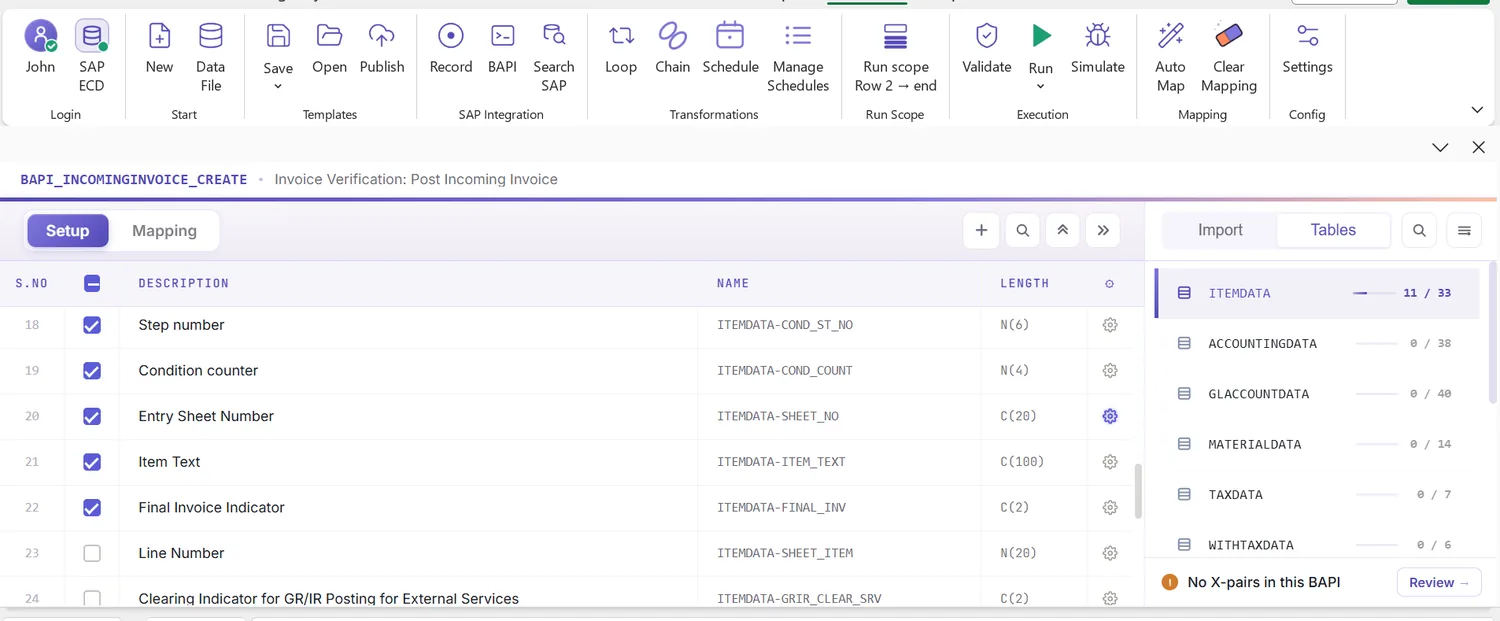
The MIRO interface in the PostNow.ai Mapping Designer: each invoice field is listed with its SAP name and length, ready to map to a column. - 2
Shape the data once, per field
Transformations run in a fixed order on each mapped value: trim, default value, leading zeros to a target length you set (vendor
100087becomes0000100087), then uppercase. Each date field gets its own format (YYYYMMDD, DD.MM.YYYY, MM/DD/YYYY, Excel serial and others), so a subsidiary's export does not need reformatting. Tax code and company code can carry a value list from SAP's check table or your own list; set it to Restrict and it becomes a hard allow-list. Required fields show*in the Excel header. - 3
Group lines into invoices
An invoice with several expense lines is one document. Either use an H/D marker column (one header row, then its detail rows) or keep flat rows and pick a split column, such as the invoice reference, that starts a new document on change, on a value or on a blank.
- 4
Publish for the AP team
The designer publishes a self-contained workbook that is run-only for everyone. AP clerks get an operator ribbon with no recording, mapping or logic, so the monthly run cannot drift from the design (approvals can sit on top).
- 5
Validate, then Simulate
Validate checks the file before SAP is touched and marks each bad cell in coral with a message in the Run Log column. Simulate then asks SAP. The next section lists exactly what each one catches.
- 6
Run, and read the result per row
The run sheet is locked while it posts. Each row gets success or
ERRORplus SAP's message in the Run Log, and the document number lands in the column you mapped it to. Failed rows are handled as described below.
What Validate, Simulate and SAP each catch
PostNow.ai checks a batch in layers, and knowing which layer catches which AP error tells you what to fix in the sheet and what only SAP can answer.
| Problem in the batch | Where it is caught |
|---|---|
| Vendor, amount or posting date missing | Validate: required fields |
| Vendor number without leading zeros | Fixed before Validate by the leading-zeros transformation |
| Text in an amount column, a value too long, too many decimals, invalid characters | Validate: type, length, decimal places, characters |
| Date in the wrong format | Validate: date format, against the field's setting |
| Tax code or company code not on your list | Validate, when the field's value list is set to Restrict |
| Vendor or cost centre that does not exist in SAP | Validate with the optional master-data existence check (check-table lookup) |
| Tax code not valid for that company code, posting period closed, vendor blocked | SAP's own checks, in Simulate or the run |
| Lines do not add up to the invoice total | SAP only: BAPI Simulate, =BS Simulate on a recording, or the run. Not checked offline |
| Same invoice reference already posted for the vendor | SAP only, where your configuration switches the duplicate invoice check on. SAP Help The Excel add-in has no duplicate check of its own |
A recording simulated without a simulate code checks only the screens, and the result says so: balance and duplicate checks then happen only on the real run. For duplicates, do not rely on configuration alone. Pull the AP vendor document detail report for the batch's vendors into the same workbook and flag repeated references with a COUNTIF column before you post. For a recording, Simulate's verdict has three states: would post, review (amber warnings, the row is not failed) and would not post.
Worked example: a 40-invoice monthly services batch
PostNow.ai is run here on a month-end batch: 40 recurring utilities and services invoices across three company codes, posted with the FB60 template through BAPI_ACC_DOCUMENT_POST.
Electricity, water, telecoms, cleaning and security for company codes 1100, 1200 and 1300: 37 invoices have one expense line, three cleaning invoices are split across cost centres. Flat rows with the invoice reference as split column make 40 invoices 45 rows.
| Co. code | Vendor | Reference | Invoice date | G/L | Cost centre | Amount | Tax |
|---|---|---|---|---|---|---|---|
| 1100 | 100087 | EL-0926-114 | 30.09.2026 | 640100 | 4140 | 1,284.60 | V1 |
| 1200 | 200415 | TEL-55871 | 28.09.2026 | 641300 | 5210 | 612.00 | V1 |
| 1200 | 200902 | CLN-2026-09 | 29.09.2026 | 643500 | 5210 | 1,950.00 | V1 |
| 1200 | 200902 | CLN-2026-09 | 29.09.2026 | 643500 | 5230 | 1,050.00 | V1 |
| 1300 | 300318 | SEC-0925-31 | 25.09.2026 | 643800 | 6120 | 2,400.00 | V1 |
- Set up once. The vendor field pads to 10 digits, so
100087posts as0000100087. The invoice date arrives from the utilities export as DD.MM.YYYY text, so that field's format is set to DD.MM.YYYY. Company code is restricted to 1100, 1200 and 1300, and tax code to the codes the team uses. - Validate. One cell fails: row 17 has cost centre 4410, a transposition of 4140. The existence check finds no such cost centre, the cell turns coral and the Run Log says why. Corrected in the sheet.
- Simulate. 39 invoices would post.
SEC-0925-31would not: SAP rejects tax code V1 for company code 1300. The allow-list could not catch this, because V1 is a valid code on the team's list; whether a tax code fits a company code's country is SAP's check. AI Review explains the message and points at the tax code field. The clerk replaces it with the input tax code the 1300 entity uses and simulates again: 40 of 40. - Approve and run. The controller approves the batch; the approval is tied to the data, so nobody can change an amount afterwards without voiding it. The clerk runs it, and 40 document numbers land beside their rows. Each document's outcome is also recorded in the central audit.
- Check. Clicking any document number opens
FB03pre-filled, display only. The AP open items report then shows the 40 new items for the payment run.
Had one CLN-2026-09 line been mistyped, the document would not balance, and that surfaces in Simulate, not Validate. A check column summing lines per reference is cheap insurance.

Pre-run checklist for an AP batch
PostNow.ai enforces some of these points for you; the rest are decisions to make before you press Run.
- Right template for the invoice type: PO invoices through the MIRO template, never a recording.
- Vendor padding: leading zeros on, target length matching your vendor number length.
- Dates: each date field's format matches the source; posting date in an open period.
- Allow-lists: company code and tax code set to Restrict.
- Grouping: H/D marker or split column chosen; a check column confirms lines sum to each invoice total.
- Duplicates: references compared with what is already posted for those vendors.
- Validate clean, with the master-data existence check on for vendor and cost centre.
- Simulate clean, amber warnings read, not ignored.
- Approval in place if a policy covers the template, and no edits after it.
- Write-back: the document number result mapped to a column; run scope start and end rows set if you post part of the sheet.
For the master data behind these checks, vendor duplicates and blocked vendors in particular, see SAP data quality best practices and SAP master data management with Excel.
When rows fail or a run is stopped
PostNow.ai leaves every row with either a document number or SAP's message, and that state decides the next step.
Rows failed. Read the message; if it is unclear, AI Review explains it in plain language from SAP's messages and the field structure, without sending cell values. Fix the cells and press Retry Failed. It re-posts only rows whose Run Log starts with ERROR, and it is protected against double clicks, so invoices that already posted are not posted twice.
Run stopped. Stop cancels the remaining rows, but invoices already posted stay in SAP; there is no rollback and PostNow.ai cannot undo a posting. Rows with a document number are done. Set the run's start row to the first row without one and run again. If a posted invoice was wrong, reverse it in SAP the normal way (FB08 for an FI document, MR8M for a MIRO invoice); the FB08 reversal template handles several at once.
Recording misbehaves. Debug replays a recorded FB60 in the foreground in SAP GUI (all screens or errors only), and values SAP silently dropped because a field was not on the screen are flagged.
Approvals, audit and the link back to FB03
PostNow.ai keeps the controls an auditor asks about inside the posting path, rather than in a log someone maintains by hand.
- Own login, standard interfaces. Every posting runs under the user's own SAP login through a standard BAPI or
CALL TRANSACTION, so SAP authorisations and change documents apply. Nothing writes to SAP tables directly. - Permissions. Per-user permissions from the admin portal decide who may post, simulate or debug.
- Approvals with a fingerprint. If a policy covers the template, Run is blocked until the batch is approved. The approval matches a fingerprint of the data, so a change after approval invalidates it, and the person who submitted cannot approve.
- Central audit. Every run's per-document outcome (transaction, template, SAP system, client and user, result, document number) is recorded centrally in the admin portal.
- FB03 links. A document number in the sheet opens
FB03pre-filled, display only, so a reviewer checks a posting in one click.
AP reporting in Excel
PostNow.ai's Report Library runs AP reports read-only under your own SAP authorisations, so the open-item view comes from the same Excel session that posted the batch. Operators can run them; they cannot author queries.
- AP open items and aging: what is open per vendor and how old it is. The aging buckets are derived from a key date you set in Excel, not computed by PostNow.ai.
- AP vendor document detail: every document for a vendor, the source for duplicate-reference checks.
- Vendor payment history: what was paid, when.
- Also in the library: parked and held documents, invoice receipts from
MIRO, GR/IR reconciliation, blocked invoices, foreign-currency vendor open items and withholding tax.
Designers build anything the library lacks with the SAP Query builder or AI Query Pilot.
Frequently asked questions
How do I post vendor invoices in SAP from Excel?
PostNow.ai posts them from an Excel add-in: fill the free FB60 template (non-PO) or MIRO template (PO-based), one row per invoice line, then Validate, Simulate and Run. Validate checks required fields, formats, dates and allowed codes in Excel; Simulate calls SAP and rolls back; Run posts through BAPI_ACC_DOCUMENT_POST or BAPI_INCOMINGINVOICE_CREATE under your own SAP login and writes the document number or SAP's message beside each row.
FB60 vs MIRO: which should I use for an upload?
Use FB60 for invoices with no purchase order, such as utilities, rent and services, and MIRO for invoices against a purchase order. FB60 uploads can go through BAPI_ACC_DOCUMENT_POST or a recorded FB60; MIRO uploads must use BAPI_INCOMINGINVOICE_CREATE, because SAP does not support batch input for MIRO.
Is there an SAP journal entry upload template for FB50?
Yes. The free FB50 template in the finance and controlling templates posts G/L journal entries through BAPI_ACC_DOCUMENT_POST, with a header row per document and detail rows per G/L line. A recorded FB50 is the alternative, with the =BS simulate code for SAP's full document check before posting.
Can one upload post invoices with several expense lines?
Yes. Use an H/D marker column, where one header row is followed by its detail rows, or flat rows with a split column such as the invoice reference, where a new document starts whenever the value changes. The lines must add up to the invoice total; that balance is checked by Simulate or the run, not offline.
Does the upload check for duplicate invoices?
Not by itself. The PostNow.ai Excel add-in has no duplicate-invoice check of its own; SAP's duplicate invoice check applies where your configuration switches it on. For a reliable pre-check, run the AP vendor document detail report for the batch's vendors and flag repeated references in Excel before posting. PDF invoices captured with the separately licensed Document AI module are checked for exact and likely duplicates before submission.
What happens to posted invoices if I stop a run?
They stay posted. Stop cancels the remaining rows but does not roll back, and there is no undo. Rows with a document number are done; restart from the first row without one, and reverse any wrong posting in SAP with FB08 or, for MIRO invoices, MR8M.
What does SAP AP automation cover, and where does an Excel upload fit?
AP automation spans capture, verification and matching, approval, posting, payment and reporting. The PostNow.ai Excel add-in covers posting invoices that already exist as data (recurring utilities, intercompany charges, legacy exports) and the AP reporting around it. PDF invoice capture, review, duplicate checks, approval and a 3-way match view come from the separately licensed PostNow.ai Document AI module. The payment run itself stays in SAP (F110).
Can PostNow.ai capture PDF invoices for SAP?
Yes, with the separately licensed Document AI module in the PostNow.ai web portal, not the Excel add-in. It reads PDF invoices, scans included, scores each extracted field, highlights low-confidence fields for review and checks for duplicates. Reviewed invoices post through the Document → SAP flow: PO invoices via BAPI_INCOMINGINVOICE_CREATE1, non-PO invoices via BAPI_ACC_DOCUMENT_POST, simulated first.
Does PostNow.ai calculate AP aging?
It brings the AP open items into Excel from the Report Library; the aging buckets are derived from a key date you set in the workbook, not computed by PostNow.ai.
Post and report AP from Excel
Vendor invoices checked row by row with Validate and Simulate, posted through SAP BAPIs or a recorded FB60, under your own login.