Mass PO creation is commitment creation
SAP mass purchase order creation turns approved requisitions or a spreadsheet into purchase orders in one run. A purchase order is a commercial obligation. In a bulk run, the real controls are how spreadsheet rows become documents, whether SAP derives the intended price and unit, and how many approvals the run creates. Approached well, SAP purchase order automation keeps that run fast without taking the buyer out of the decision.
- Count documents before posting. A row is usually a PO item, not a purchase order.
- Model all three levels. Header, item and schedule-line data cannot be treated as one flat record.
- Validate silent failures. A valid unit, price or supplier can still be commercially wrong.
- Forecast release workload. Every created PO is evaluated by the applicable release or workflow rules.
- Retry only confirmed failures. A lost response is not proof that SAP did not create the order.
The controlled seven-step process
The safest SAP PO upload follows a document-level sequence. The file is prepared in Excel, but SAP remains responsible for validating and creating each purchase order.
Prepare and group the workbook
Give every intended purchase order a stable source key. Keep its header values consistent across all item rows.
Map the SAP document structure
Map header, item, schedule and account-assignment columns to the corresponding SAP structures.
Validate prerequisites
Check suppliers, purchasing organizations, materials, plants, units, dates, prices and cost objects before creation.
Test representative documents
Use examples covering each document type and account-assignment category, then review the result in ME23N.
Create through standard SAP logic
Use BAPI_PO_CREATE1 or another approved interface rather than writing directly to purchasing tables.
Capture every SAP result
Return the PO number or complete error message to the source group in Excel.
Reconcile and retry selectively
Compare document, item, quantity and value totals. Correct and retry only confirmed failures.
| Source group | Excel item rows | Expected SAP result |
|---|---|---|
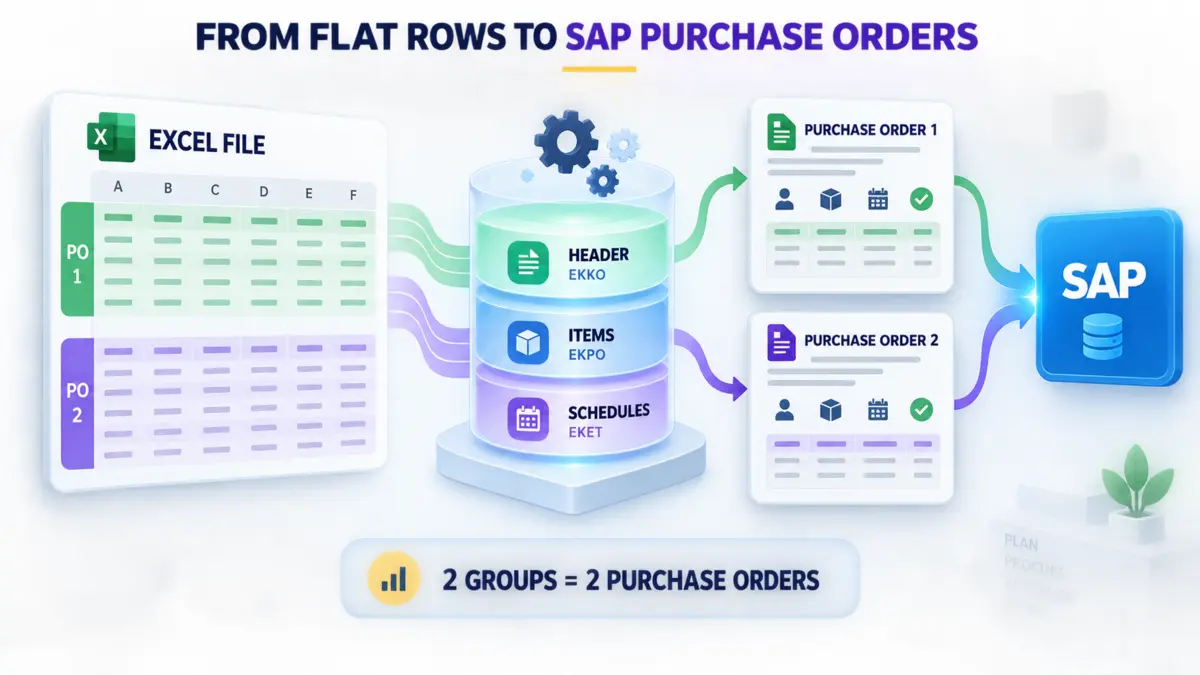
| PO-001 | Materials A, B and C | One PO with three items |
| PO-002 | Material D with two delivery dates | One PO, one item and two schedule lines |
Turn flat Excel rows into the right PO structure
A purchase order is hierarchical. Header information is represented in EKKO, item information in EKPO, and schedule lines in EKET. When using BAPI_PO_CREATE1, the same idea appears across structures such as POHEADER, POITEM and POSCHEDULE.
Your SAP PO upload needs a stable source document key. Rows sharing that key become one purchase order. Within the group, header-level fields—supplier, company code, purchasing organization, purchasing group, document type and currency—must agree. If two rows claim to belong to the same PO but have different currencies, the right response is to reject the group, not to let the first or last row win.
Schedule lines are not duplicate items
Suppose item 10 orders 100 units, with 40 due on October 1 and 60 due on October 15. That is one PO item with two schedule lines. If the file turns each delivery date into a separate item without an explicit design decision, reporting and downstream matching change. Worse, if each repeated row carries the full 100-unit quantity, the SAP PO bulk process may create a 200-unit commitment.
Before posting, calculate four control totals: expected purchase orders, expected items, total quantity and total value. Repeat the same totals from SAP after creation.
The fields that decide whether the PO is usable
| Level | Typical data | Failure to watch |
|---|---|---|
| Header | Supplier, company code, purchasing organization, purchasing group, document type, currency | Rows group together even though a header value differs. |
| Item | Material or description, plant, quantity, order unit, net price, tax code, item category | A valid unit or price produces the wrong commercial quantity or value. |
| Schedule | Item number, delivery date, schedule quantity | Multiple dates are mistaken for duplicate items or quantities are repeated. |
| Account assignment | Category, G/L account, cost center, asset, WBS element or internal order | The category and required cost object do not match. |
| Source control | External group key, requester reference, source line ID | A retry cannot distinguish already-created documents. |
Units and price units cause silent value errors
An order quantity of 120 “EA” is different from 120 cases of 12. Both units may be valid for the material, so SAP may not reject the wrong one. Price units are equally important: a net price of 50 per 100 units is not 50 per unit. For every high-value or unusual order, compare quantity, order unit, conversion, net price, price unit and currency as a single commercial statement.
Supplier data must exist at purchasing-organization level
A supplier can exist in general master data yet still be unusable for a purchasing organization. In S/4HANA, the Business Partner also needs the appropriate supplier role and organizational data. Validate the exact supplier/purchasing-organization combination, not merely the supplier number.
Know which PO scenarios need a different design
| Scenario | Can use the same basic file? | What changes |
|---|---|---|
| Standard material PO | Yes | Header, items and schedules form the normal baseline. |
| PO referencing a requisition | With additional references | Carry the purchase requisition and item so SAP updates the intended demand. |
| Service or limit PO | No | Service lines, limits and acceptance logic require additional structures. |
| Stock transport order | No | Supplying and receiving plants replace the normal external-supplier pattern. |
| Subcontracting or consignment | No | Item category and component or ownership rules change the document. |
| Change an existing PO | No | Use ME22N or a change interface such as BAPI_PO_CHANGE; creation logic must not be reused. |
Account assignment changes what each row must contain
Stock procurement and consumption procurement do not have the same data requirements. The account-assignment category (KNTTP) tells SAP which cost object to expect and changes the meaning of the line.
| Category | Business use | Data commonly required |
|---|---|---|
| K | Cost center | G/L account and a valid cost center |
| A | Asset | Main asset and, where applicable, subnumber |
| P | Project | WBS element open for the commitment |
| F | Internal order | Order with a status permitting postings/commitments |
Do not build one wide sheet full of optional columns and rely on SAP to explain every bad combination. Apply conditional validation before the upload: if category is K, the cost center must be present and valid; if category is P, a cost center should not accidentally drive the line instead of the intended WBS element.
Bulk creation can overwhelm the purchase order release strategy
Orders created through standard SAP purchasing logic are evaluated by the same approval controls as orders entered interactively. In ECC this may be a classic release strategy. In S/4HANA it may be flexible workflow. Either way, 400 orders can create hundreds of approval events within minutes.
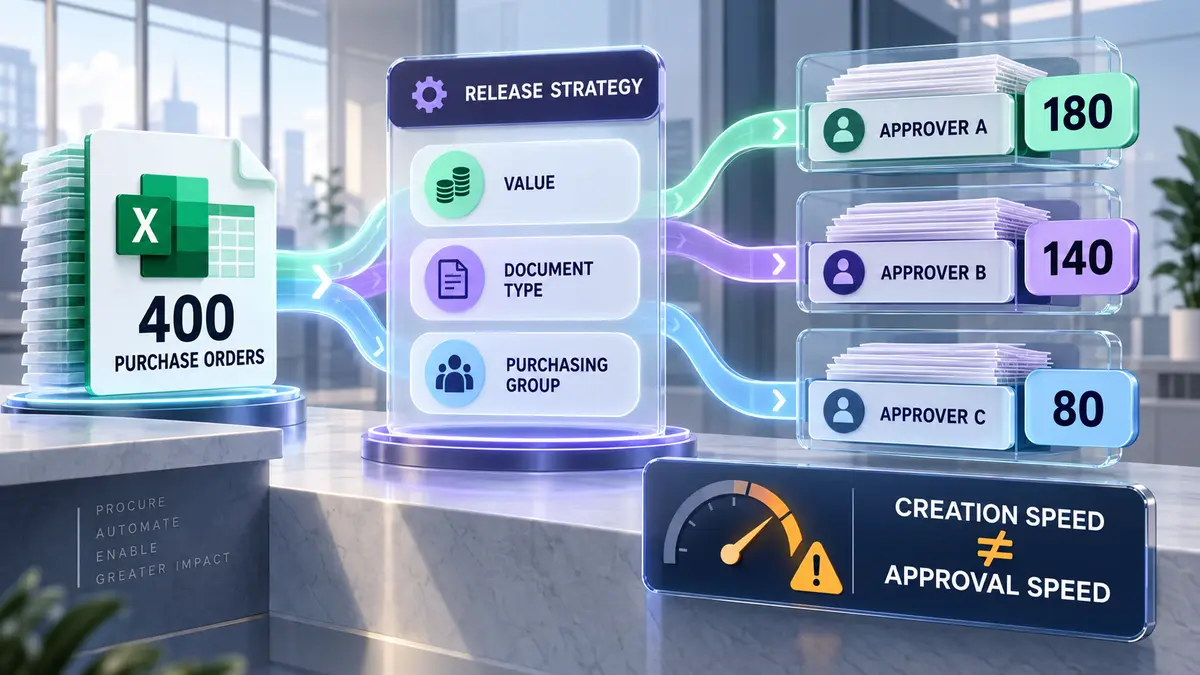
Before the run, forecast how many POs will enter each release path and who will receive them. If one approver can review 40 documents per day, creating 400 documents on Friday afternoon is not a completed process. It is a ten-day queue.
Later changes can also reset release, depending on configuration and the significance of the changed value. Correcting a price after approval may return the document to an unreleased state. Plan the correction route rather than treating a re-release as a software problem.
Read PO errors as missing prerequisites
Exact message numbers and severities can vary by release and configuration, so preserve the full SAP return message. More importantly, identify what the message means operationally.
- “Net price must be greater than 0”: pricing was not supplied, was mapped incorrectly or could not be derived. Do not insert a nominal price merely to make the document post.
- “Enter account assignment category”: SAP is treating the item as consumption while the file describes it like stock procurement.
- “Enter purchase order unit”: neither the file nor the purchasing master data provided a usable order unit.
- “Account assignment mandatory for material”: the item needs a real cost object. This is not a retry condition.
- Supplier or material not maintained for organization/plant: the general master exists, but the required organizational segment does not.
Separate persistent data/configuration errors from transient failures such as locks or connection problems. Repeating a permanent failure wastes time; retrying an entire file after a transient failure risks duplicates.
BAPI_PO_CREATE1 needs values and change indicators
Technical mappings usually pair business structures with their X structures: POHEADER with POHEADERX, POITEM with POITEMX, POSCHEDULE with POSCHEDULEX, and account data with POACCOUNTX. The value says what to send; the X field tells SAP that the field is intentionally supplied.
Read the complete RETURN table before committing. If it contains a hard error, roll back that document group and write the messages to Excel. Commit only a document that SAP has accepted, then preserve the returned PO number so a retry cannot create it again.
Validate commercial truth before BAPI_PO_CREATE1 runs
A useful preflight does more than check blanks. It proves that each proposed document is structurally complete and commercially believable.
- The source group produces the expected number of POs.
- Header values are consistent inside every group.
- Supplier, company code, purchasing organization and purchasing group form a usable combination.
- Material and plant data exist, or free-text item rules are intentionally used.
- Order unit, conversion, quantity, price unit, net price and currency agree.
- Delivery dates are possible and schedule quantities equal the item quantity.
- Account-assignment category and cost-object columns agree.
- The source reference has not already produced a PO.
- Total quantity and value fall within expected boundaries by supplier and company code.
Reconcile obligations instead of counting green rows
A strong result file keeps the source group key, created PO number, item mapping, status and complete SAP message. It should answer three questions: Did every intended source group receive exactly one outcome? Did SAP create the expected number of documents and items? Do the created obligations equal the approved quantities and values?
Sample across every meaningful variation—document type, company code, purchasing organization, account-assignment category and currency. Then compare aggregate totals. Two errors can offset each other in a grand total, so reconcile by supplier, currency and organizational unit as well.
Do not assume a timeout means failure
If SAP creates the PO but the connection drops before Excel receives the number, blindly retrying may create a duplicate. Search by the stable source reference or other unique business key first. A restartable SAP PO mass upload distinguishes “not processed” from “processed but response not received.”
From purchasing file to traceable SAP documents.
PostNow turns the workbook your buyers already use into a controlled SAP workspace—without hiding the document structure or the SAP response.
See it with your PO file →What changes for purchase orders in S/4HANA
The header/item/schedule structure remains recognizable, and BAPI_PO_CREATE1 continues to be used in many S/4HANA systems. What surrounds creation may change. Supplier maintenance is led by Business Partner, flexible workflow can replace classic release strategy, and Fiori apps may replace ME21N as the preferred interactive experience.
That makes interface-based automation more durable than a screen recording, but it does not eliminate target-system testing. Confirm BP supplier roles, custom fields, workflow start conditions, recipients, output management and any S/4HANA-specific validation in the actual system.
For the wider procurement context, see the SAP MM mass upload guide and SAP procurement automation. If the demand begins as a requisition, use the ME51N mass purchase requisition guide. After receipt and invoicing, the connected controls are covered in mass goods movement with MIGO, MIRO mass invoice posting and the SAP three-way matching guide.
Where SAP purchase order automation stops and judgement begins
SAP purchase order automation handles the mechanical half well — mapping a spreadsheet to header, item and schedule-line data and creating each document through a standard interface such as BAPI_PO_CREATE1. What it cannot settle is whether the commitment should exist: the price, the source of supply and the account assignment stay commercial judgements a buyer owns. Automate the keystrokes and keep the approval human.
Frequently asked questions
How do I create purchase orders in bulk in SAP?
BAPI_PO_CREATE1 or an approved transaction workflow, validate the data and return each PO number to Excel.Can ME21N create multiple purchase orders at once?
BAPI_PO_CREATE1 or a controlled Excel-to-SAP tool is usually more appropriate.Can I upload purchase orders from Excel to SAP?
Which BAPI creates purchase orders in SAP?
BAPI_PO_CREATE1 is widely used. It accepts purchase-order structures and returns the created document number plus SAP messages. See the SAP BAPI from Excel guide for the general mapping pattern.How should multiple PO items be represented in Excel?
Does mass PO creation bypass SAP release strategy?
How can duplicate purchase orders be prevented?
Why does a PO upload fail on account assignment?
Does BAPI_PO_CREATE1 work with SAP S/4HANA?
How do I validate an SAP PO mass upload?
Turn your next PO file into posted SAP documents.
Build the mapping once, validate every purchase order before posting, and return SAP PO numbers and messages directly to the workbook your team already uses.