SAP Mass Upload from Excel
SAP mass upload is the practice of creating or changing many SAP records in one controlled run from a spreadsheet, instead of keying them one at a time through a transaction screen. The data is prepared in Excel, mapped to the fields SAP expects, validated against the live system, and posted through SAP's own published interfaces, with a result written back against every source row.
- Use a BAPI where one exists. Fall back to a screen recording when it does not, and never write directly to SAP tables.
- Validate against live SAP, not a static list. Five layers catch structure, format, check tables, business rules and duplicates before anything posts.
- A partial failure is normal; double posting is not. A status column holding the document number makes a run safely restartable.
- Test outside production first. Ten documents read properly catch what a success log never shows.
- Works on ECC and S/4HANA. Interface-based loads survive a migration; screen recordings do not.
Why mass work leaves the SAP GUI
Nobody sets out to key thousands of records manually. It happens because the work arrives faster than the alternatives can be set up.
A pricing update lands two days before quarter end. A merger adds four thousand customers. A migration project needs every material extended to a new plant. In each case the data already exists in a spreadsheet, and the fastest path anyone can see is to open the transaction and start typing.
The costs of that path are well understood by anyone who has lived it.
Time that compounds
A record that takes two minutes to key becomes sixty-six hours across two thousand records, before any rework.
Errors that hide
Manual keying introduces transpositions and skipped fields that only surface later as blocked documents or wrong reports.
No trail
When one person keys a thousand changes, there is rarely a record of what the values were before, or who approved them.
A familiar shape: a business acquires a competitor and inherits three thousand customers. The data arrives as a spreadsheet from the other company's system. Someone maps it to the fields the sales team needs, and two contractors start keying XD01. Six weeks later the records exist, but a portion have the wrong sales area, several dozen are duplicates of existing customers under different spellings, and nobody can say which records were entered on which day or by whom. The keying was the visible cost. The reconciliation was the real one.
The same work, run as a validated upload, is a two-day exercise where the duplicates are caught before posting and every record carries a trace back to its source row.
There is a quieter cost too. Mass keying consumes exactly the people who understand the data best. A master data specialist spending a week on data entry is a week not spent on the quality rules, duplicate checks, and process fixes that would prevent the next backlog.
Moving the work into a governed, repeatable upload does not just save the hours. It converts a one-off scramble into a process that can be run again next quarter by someone else, with the same result.
Mass upload, mass change, and data migration
These three terms get used interchangeably, and the confusion causes real problems when scoping a project. They describe different work with different risk profiles.
| Term | What it does | Typical trigger | Main risk |
|---|---|---|---|
| Mass upload | Creates new records or posts new documents at volume | New plant, new price list, month-end posting run | Duplicates and incomplete records |
| Mass change | Updates fields on records that already exist | Reorganisation, terms change, reclassification | Overwriting live values with no way back |
| Data migration | Moves a full data set into a new system or landscape | ECC to S/4HANA, acquisition, consolidation | Scope gaps and cutover timing |
Mass change deserves particular respect. An upload that creates a wrong record leaves you with a wrong record you can block. A change that overwrites the payment terms on four hundred live vendors has destroyed the previous values unless you captured them first.
The good news is that the preparation, mapping, and validation discipline is identical across all three. Learn it once for uploads and it transfers directly to changes and migrations.
The methods for getting data into SAP at volume
There are five routes people actually use. They are not equally good, and the differences are worth understanding before you commit a project to one of them.
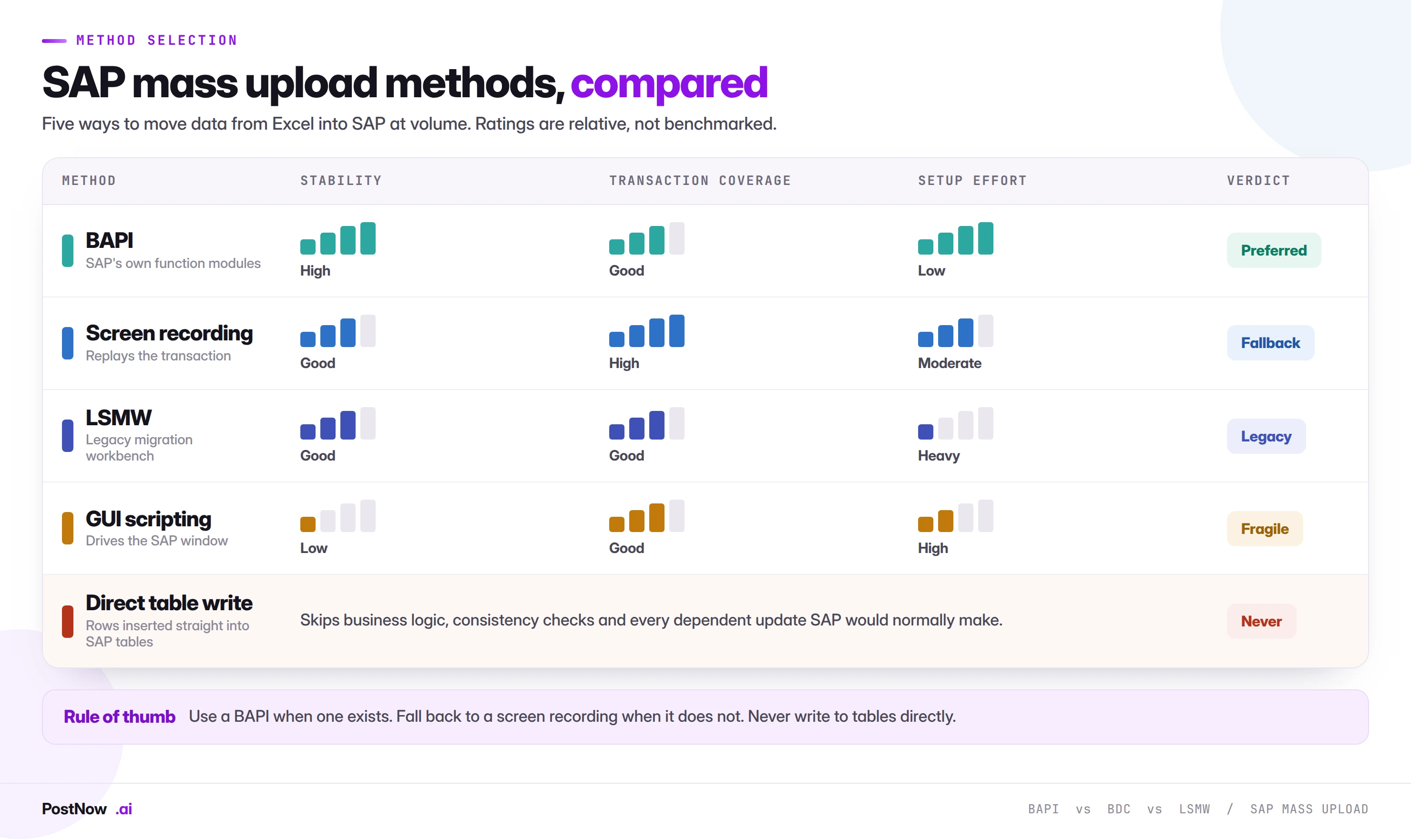
BAPI: the preferred route
A BAPI is a function module SAP publishes as a stable interface to a business object. Posting a vendor through the vendor BAPI runs the same validation, the same required-field logic, and the same updates that the transaction would run.
That is the whole point. You are not going around SAP, you are calling into it. When something is wrong, the BAPI returns a structured message telling you which field failed and why, which makes error handling far more precise than reading a screen.
Use a BAPI whenever SAP publishes one for the object you need. Most high-volume objects have one, including journal entries, materials, vendors, customers, purchase orders, sales orders, and goods movements.
Screen recording (BDC): the honest fallback
Not every transaction has a BAPI. When there is no published interface, the practical answer is to record the transaction once and replay it with different data.
A recording captures the screen sequence, the fields, and the keystrokes. Replayed against a file, it drives the transaction exactly as a person would, which means it inherits all the transaction's validation.
The trade-off is that a recording depends on the screen layout it was made against. Change the layout, add a field to the account group, or move to a different SAP version, and the recording may need to be made again. That is manageable when you know it, and painful when you do not. Our BDC recording guide covers the technique in detail, and BAPI versus BDC compares the two directly.
LSMW: powerful, ageing, heavy
The Legacy System Migration Workbench has loaded an enormous amount of SAP data over the years. It is genuinely capable and it is still present in many ECC systems.
The difficulties are practical. Each object needs its own project, structures, field mapping, and conversion rules, which is a meaningful setup effort for a load you may run once. The interface is unfamiliar to business users, so the work concentrates on a small number of technical people. And in S/4HANA it is no longer the recommended route, which makes it a poor foundation for anything built to last. See LSMW alternatives and mass upload without LSMW.
GUI scripting: brittle at volume
Recorded keystrokes played back through the SAP GUI can work for small, stable tasks. At volume the weaknesses show quickly. The script breaks on any screen variation, error handling is whatever the script author wrote, and there is rarely a usable log of what happened. It is also easy to leave running unattended in ways nobody can later explain to an auditor. Details in the GUI scripting alternative guide.
Direct table writes: never
Writing rows straight into SAP tables looks fast and solves nothing. It bypasses every piece of business logic, every consistency check, and every update that should have happened in related tables.
The practical choice comes down to how often the load repeats and who has to run it. LSMW and the Migration Cockpit suit one-time cutovers run by a project team. Recurring operational loads run by finance or master-data staff need something that works from the spreadsheet they already have, without a transport or a development request. PostNow is an Excel add-in built for that case, posting to SAP ECC and S/4HANA over standard BAPIs, falling back to BDC recordings where no BAPI exists, and validating every row before anything reaches SAP.
What SAP mass upload actually means
SAP mass upload is the practice of creating or changing many records in a single controlled run, instead of keying them one at a time through a transaction screen.
The idea is simple. Instead of a person opening XK01 two hundred times to create two hundred vendors, the two hundred vendors sit in a spreadsheet with one row each. That file is mapped to the fields SAP expects, checked against live SAP values, and then posted through SAP's own logic in one run.
What makes it a mass upload rather than a bulk paste is the control around it. A file of two hundred rows that posts without checks is not automation, it is two hundred potential corrections. A real mass upload validates every row first, holds back the ones that fail, posts the rest, and keeps a log that ties each posted document back to its source row.
That distinction matters more than the volume. Teams run mass uploads for twenty rows and for two hundred thousand. The size changes the batching strategy, not the discipline.
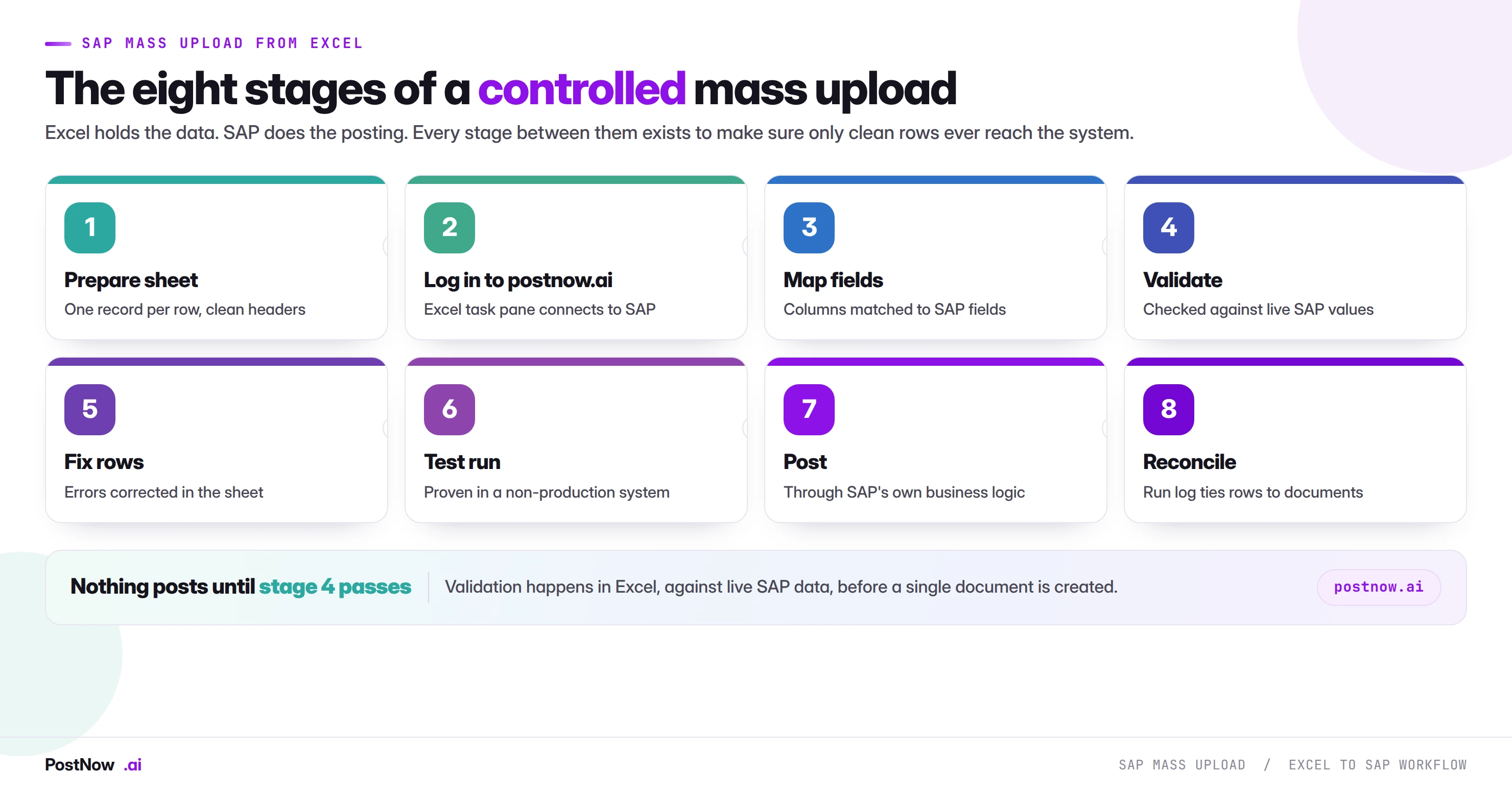
What you can mass upload in SAP
Almost anything that can be keyed can be loaded, but a small number of transactions account for most of the manual effort in a typical landscape.
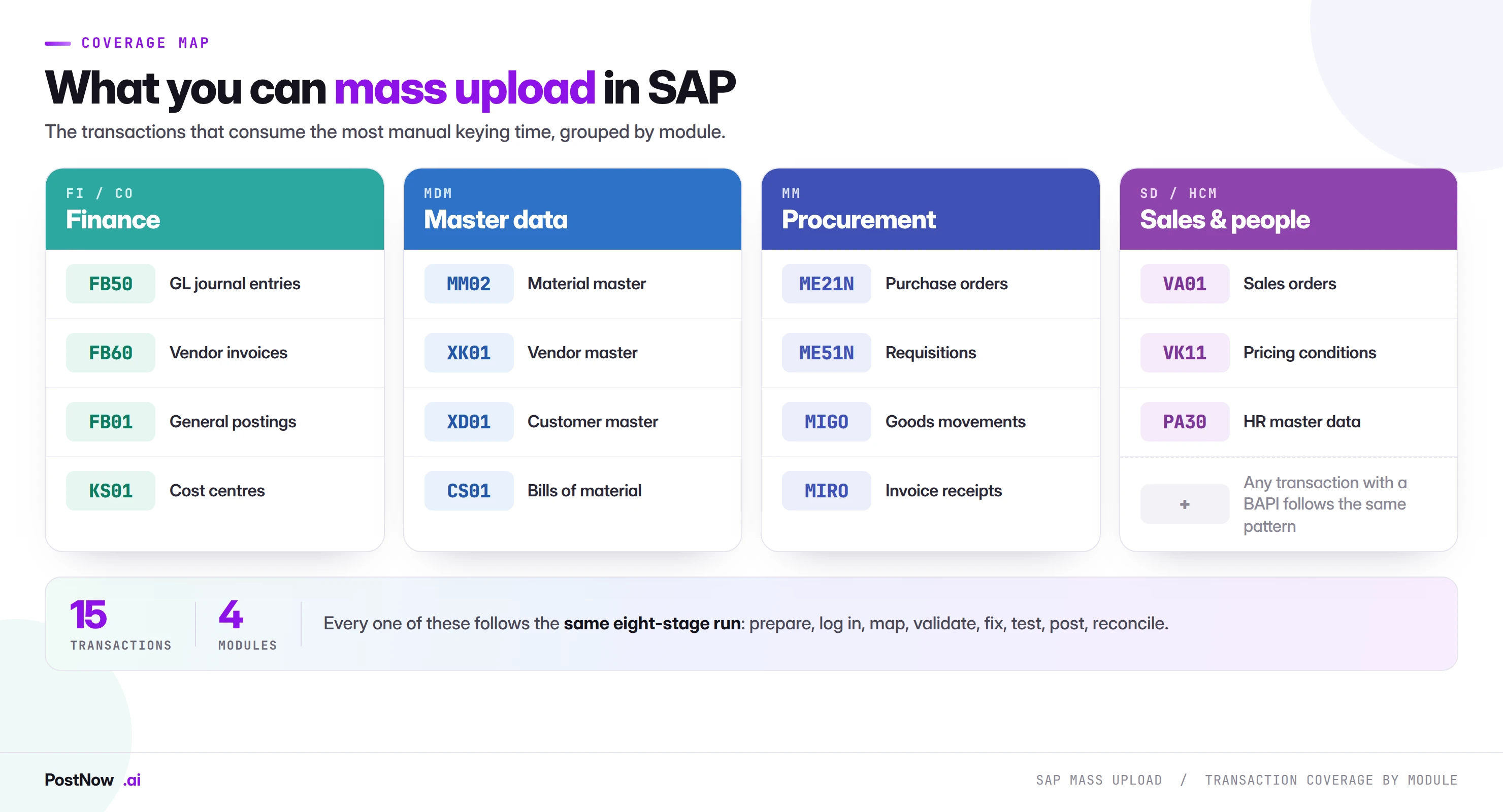
Each of these has its own dedicated guide with the fields, structures, and traps specific to that object.
| T-code | What you load | Module | Guide |
|---|---|---|---|
FB50 | GL journal entries | FI | Mass journal entry upload |
MM01 / MM02 | Material master create and change | MM | Mass material master update |
XK01 / XK02 | Vendor master create and change | FI / MM | Mass vendor master upload |
XD01 / XD02 | Customer master create and change | FI / SD | Mass customer master upload |
ME21N | Purchase orders | MM | Mass purchase order creation |
VA01 | Sales orders | SD | Mass sales order creation |
MIGO | Goods movements and receipts | MM | Mass goods movement |
MIRO | Logistics invoice verification | MM | Mass invoice posting |
VK11 | Pricing condition records | SD | Mass pricing condition upload |
KS01 / KS02 | Cost centers | CO | Mass cost center creation |
FB60 | Vendor invoices | FI | Mass vendor invoice posting |
ME51N | Purchase requisitions | MM | Mass requisition creation |
CS01 / CS02 | Bills of material | PP | Mass BOM upload |
PA30 | HR master data | HCM | Mass HR master upload |
The eight stages of a controlled mass upload
This is the sequence that separates a clean run from a cleanup project. It applies whether you are posting fifty journal entries or fifty thousand materials.
Prepare the sheet
One record per row, one field per column, clear headers, no merged cells, no subtotal rows, no blank rows in the middle of the data. Keys such as material numbers and company codes are formatted as text so leading zeros survive.
Log in to postnow.ai
Open the PostNow task pane inside Excel and sign in. The pane connects the workbook to your SAP system using your own credentials and your own authorisations, so the load can only touch what you are already allowed to touch.
This is the point at which the spreadsheet stops being a private file and becomes a controlled run. Everything after it is recorded.
Map columns to SAP fields
Each column is matched to the field the SAP object expects, including the structure it belongs to. This is where most of the thinking happens, because the same business concept can live in several structures depending on the view.
Validate against live SAP
Values are checked against the system that will receive them: does the company code exist, is the payment term valid, is the account group allowed, does the plant accept this material type. This is done before anything posts.
Review and fix flagged rows
Corrections happen in the spreadsheet, where they are cheap. A flagged row is not a failure, it is the process working. The rows that pass are unaffected.
Test in a non-production system
The same file runs against quality or development first. This catches configuration differences that no amount of spreadsheet review will reveal, such as a required field switched on for one account group.
Post through SAP's own logic
The run executes against production through the BAPI or the recording, in packets rather than one enormous transaction, so a problem affects a packet and not the whole file.
Reconcile and keep the log
Counts are matched: rows in, documents created, rows held back. The run log is stored with the source file so anyone can trace a document back to the row and the person who ran it.
PostNow runs SAP mass upload from Excel, end to end
Everything described in the eight stages above happens in the sheet you already work in. PostNow adds a task pane to Excel, connects to your SAP system, and takes the file through mapping, validation and posting without leaving the workbook.
Columns matched to SAP fields once, then saved as a reusable template.
Every row checked against live SAP values before a single document is created.
Standard BAPI or a recorded transaction, never a direct write to tables.
A document number written back on the row that produced it, ready for audit.
SAP mass upload from Excel, step by step
The eight stages above describe the discipline. This is what the same sequence looks like when you run it as a task rather than a project, from the file on your desktop to posted documents in SAP.
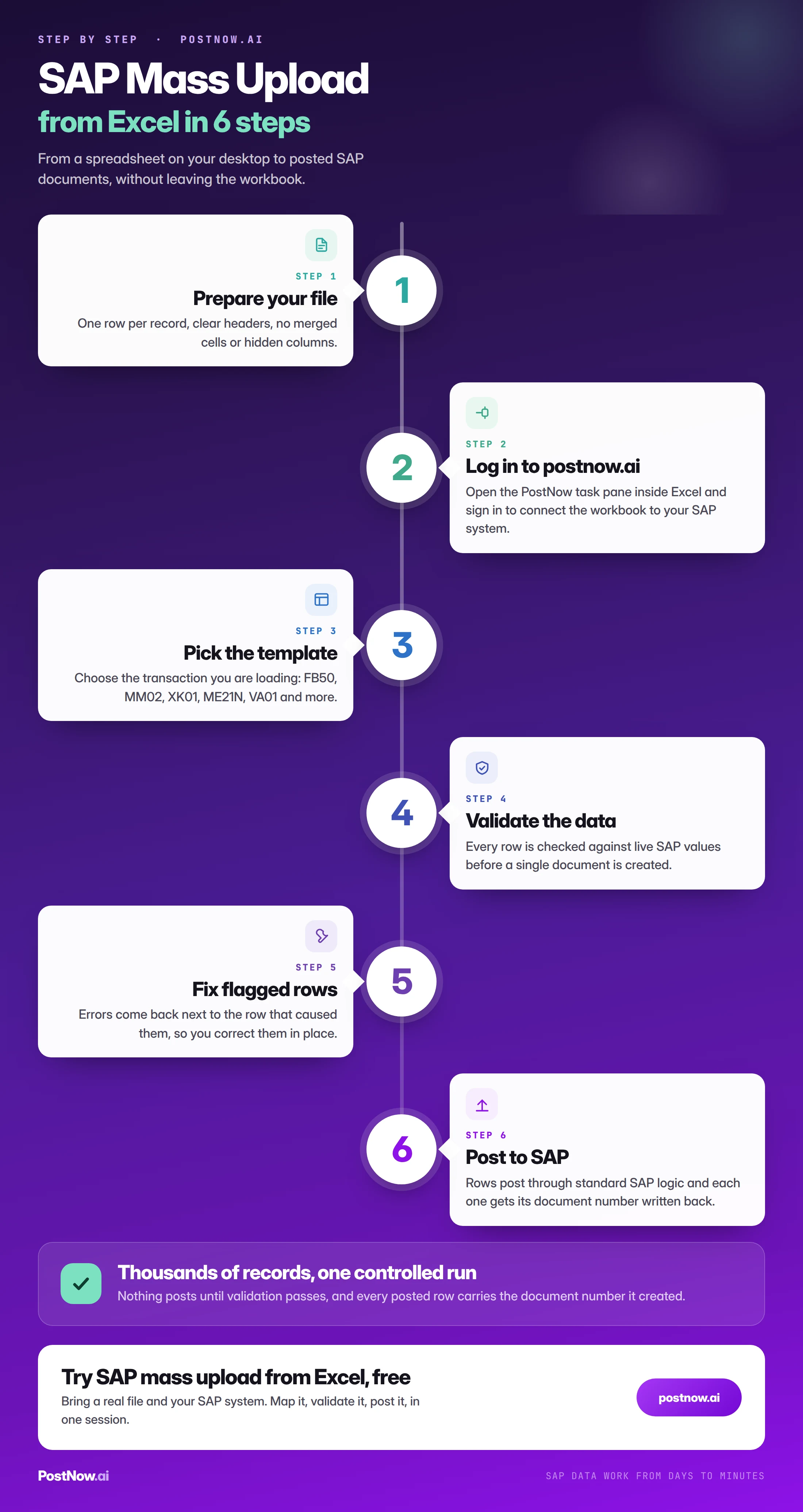
Preparing the spreadsheet: the details that break loads
More mass uploads fail on spreadsheet mechanics than on SAP configuration. Excel is helpful in ways that actively damage SAP data, and it does it silently.
The core problem is that Excel guesses what you meant. It sees 0012345 and decides you meant the number twelve thousand three hundred and forty-five. It sees 03/04 and decides you meant a date, in whichever regional format the machine happens to use. Neither decision is announced, and both are usually discovered after posting.
| What Excel does | What breaks | How to prevent it |
|---|---|---|
| Strips leading zeros | Material, vendor, customer, GL account and cost center keys no longer match SAP | Format the column as text before pasting, not after |
| Reinterprets dates | Posting dates land in the wrong period, or the wrong year entirely | Fix one explicit date format for the file and validate against it |
| Rounds or truncates decimals | Amounts and quantities post at the wrong value | Check decimal places against the field and the currency |
| Converts long numbers to scientific notation | Long document or reference numbers become unusable | Text formatting, and never widen a column to check, widen the format |
| Keeps trailing spaces and line breaks | Values fail check-table lookups that look identical on screen | Trim and strip non-printing characters during preparation |
| Auto-corrects text entries | Codes and abbreviations quietly change | Turn off autocorrect for the working file |
Beyond formatting, the layout itself matters. A file built for humans and a file built for loading are different objects. Merged cells, subtotal rows, colour-coded meaning, and two values stacked in one column all read perfectly to a person and not at all to a load.
The rule is one row per record, one field per column, one meaning per column. If a column holds a payment term for some rows and a note for others, split it before you go further.
One more habit saves a great deal of time: keep the source file and the load file separate. The source is whatever the business sent. The load file is the cleaned, formatted, mapped version. When something looks wrong three weeks later, you need both to explain what happened.
The five layers of validation
Validation is not one check, it is a stack. Each layer catches a different class of problem, and skipping any one of them tends to produce a characteristic type of failure.
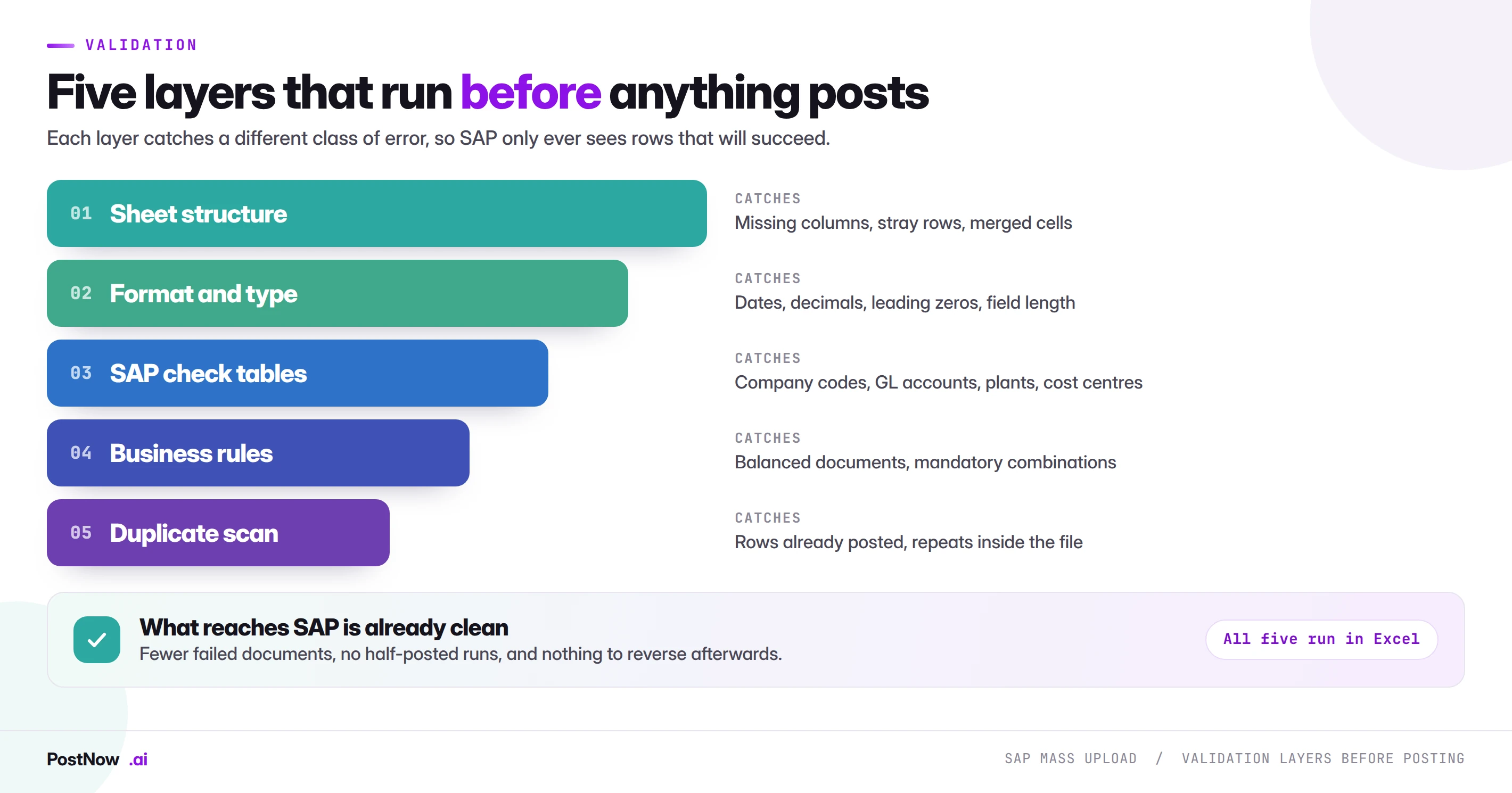
Layer one, sheet structure. Headers present and unique, no blank keys, no stray rows below the data, no merged cells. Structural problems are the cheapest to find and the most likely to be overlooked because the file looks fine to a human.
Layer two, format and type. This is where spreadsheets do the most damage. Excel will happily turn a material number into a number and drop the leading zeros, read a date as text, or round a decimal that mattered. Every key field should be treated as text, and every date and amount should be checked against the format the target field expects.
Layer three, SAP check tables. Does the company code exist, is the currency valid, is the payment term configured, does the cost center exist in this controlling area. These values must be checked against the live system that will receive the data, not against a list someone exported last quarter.
Layer four, business rules. Configuration decides which fields are required, and that varies by account group, material type, document type, and company code. A file that is valid for one account group can be incomplete for another in the same run.
Layer five, duplicates. Two checks, not one: nothing in the file already exists in SAP, and nothing appears twice within the file itself. The second is easy to forget and produces duplicate documents that are tedious to reverse.
Errors, restarts, and not double-posting
Partial failure is the normal outcome of a real mass upload, not an exception. Five thousand rows going in and a hundred coming back flagged is a healthy run. The question is what happens next.
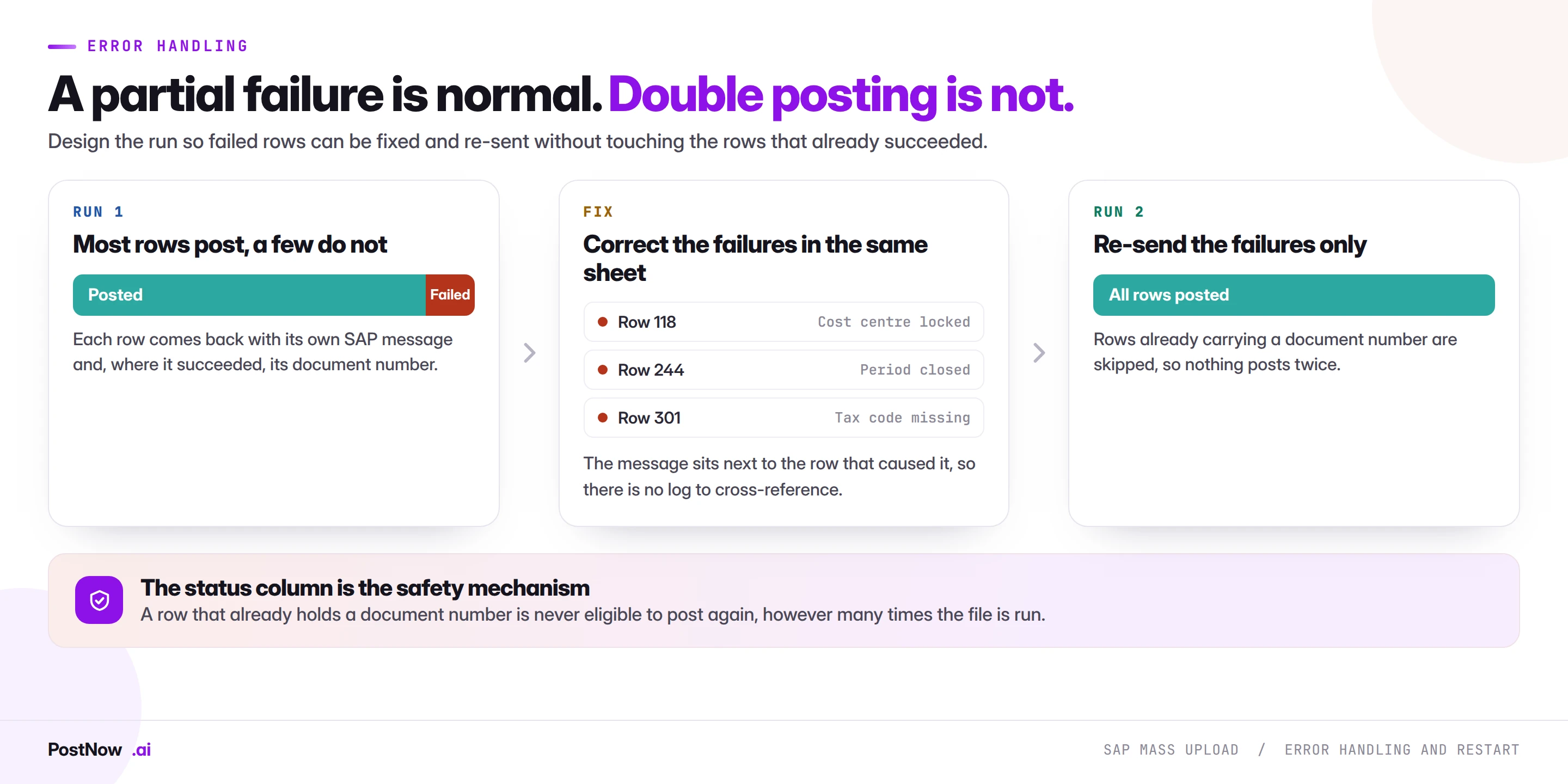
The critical rule is that you never re-run the whole file after a partial failure. The successful rows already created documents. Running them again creates a second set, and now you have a reversal exercise on top of the original problem.
A well-built run makes this structurally impossible rather than relying on the operator to remember. Each row carries its own status and its resulting document number. Re-running processes only the rows without one.
Error messages should be read as data, not as a screenshot. A BAPI returns the message type, the field, and the reason, which means failures can be grouped. Ninety rows failing for the same missing configuration value is one fix, not ninety.
Some failures are not data problems at all. Locked records, a period not open, a missing authorisation, or a number range exhausted will all stop rows that are otherwise perfect. These are worth recognising early because the fix is in the system, not the file.
Governance, approval, and audit
The moment one person can change thousands of live records from a spreadsheet, mass upload becomes a control question as much as a technical one.
Three things make the difference, and none of them are complicated.
- Separation of preparation and approval. The person who builds the file should not be the only person who releases it. This is the single most effective control and the one most often skipped under time pressure.
- A before-image for changes. Any mass change should be preceded by an extract of the current values for the fields being touched, stored with the run.
- A complete run log. Who ran it, when, from which file, which rows posted, which were held back, and what document numbers resulted.
An auditor's question is rarely "was this allowed". It is "show me what changed, who approved it, and what it was before". A run log answers that in minutes. A folder of spreadsheets named final_v3 does not.
This is also where the honest technical framing matters. In a well-designed setup, the SAP function modules that make posting possible are deployed once during implementation. From then on the people running loads are working from Excel with no ABAP to write or maintain day to day, which keeps the control conversation focused on data and approval rather than on code moving through transports.
Mass upload in ECC and S/4HANA
The principles do not change across the two, but several practical details do, and they matter most to teams planning a migration.
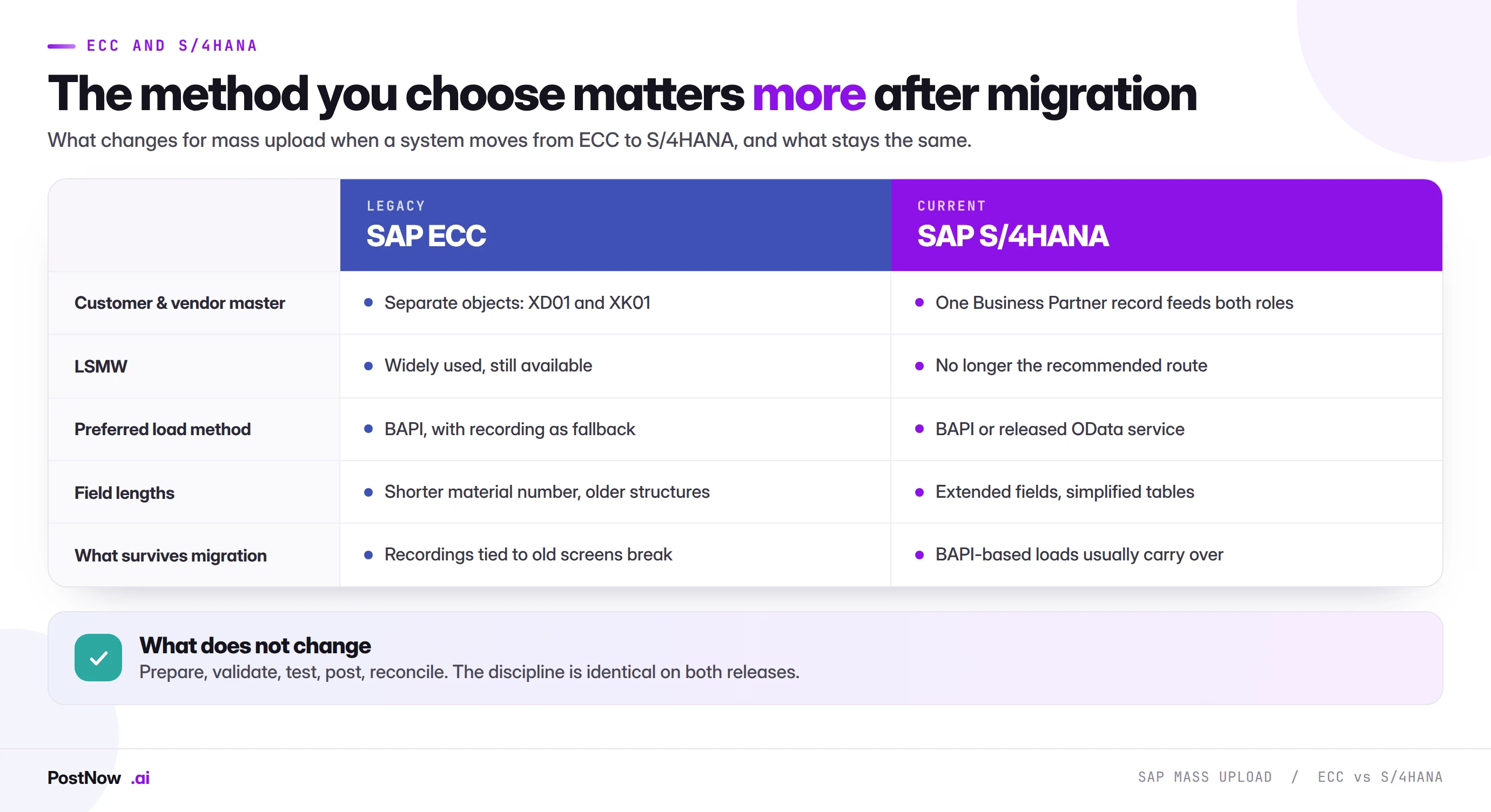
The largest structural change is the Business Partner model. In ECC, customers and vendors are separate objects with their own transactions. In S/4HANA they are unified under Business Partner with roles, so a load designed around the old separate objects needs rethinking rather than porting.
The second change is LSMW's status. It has not vanished from every system, but it is no longer the recommended route in S/4HANA, and building new processes on it means building on something with a limited future.
The third is subtler. Fiori applications are updated more frequently than the classic screens were, which makes screen recordings more fragile over time. That raises the value of BAPI-based loads, which are insulated from screen changes by design.
Volume, batching, and performance
There is no universal record limit for a mass upload. What exists is a set of practical constraints worth planning around.
Batch in packets. Splitting a large file into packets means a failure affects one packet rather than the entire run, and it gives you natural checkpoints. The right packet size depends on how heavy the document is: simple master data records tolerate much larger packets than multi-line documents with complex determination.
Watch document complexity, not row count. Ten thousand cost centers and ten thousand sales orders with twenty lines each are entirely different workloads. Row count is a poor predictor of runtime.
Mind number ranges and locks. High-volume posting against a single number range can serialise, and concurrent runs touching the same master records will produce lock errors that look like data errors but are not.
Schedule around the business. Large loads run better outside peak hours, and more importantly, the errors get proper attention when someone is available to read them.
Common mistakes and how to avoid them
The same failures recur across organisations, industries, and SAP versions.
- Posting straight to production with no test run. Configuration differences between systems are exactly what a test run exists to find.
- Re-running an entire file after a partial failure. This is the fastest way to turn a small problem into a reversal project.
- Letting Excel reformat key fields. Lost leading zeros and reinterpreted dates are the most common data defects in the whole discipline.
- Validating after posting instead of before. By then the cost of the error has already been paid.
- One person preparing, approving, and running the load. Convenient, and indefensible in an audit.
- Assuming one file fits all account groups or document types. Required fields vary with configuration, and a file valid for one group can be incomplete for another.
- Keeping no run log. Without it, nothing that happened can be explained later.
Every one of these is procedural rather than technical, which is encouraging. They are fixed by how the run is structured, not by buying anything.
Choosing a method: a short decision path
Four questions settle the choice in most cases.
The last question is the one that quietly decides project success. A technically excellent load that only one person can execute becomes a bottleneck the moment that person is unavailable.
From a one-off load to a repeatable template
Most teams meet mass upload as an emergency. The work arrives, someone solves it, and the knowledge leaves with them. The organisations that get real value treat the first load as the build of an asset rather than the fix of a problem.
The difference is small in effort and large in outcome. Once a mapping between spreadsheet columns and SAP fields has been worked out and proven, that mapping is worth more than the load it was built for. Saved as a template, it turns the next run from a project into a task.
- Save the mapping, not just the file. The column-to-field relationships are the intellectual work. Rebuilding them each time is where the hours go.
- Ship a blank template to the business. If the people who own the data fill in a sheet with the right columns and formats, most preparation work disappears at source.
- Keep the validation rules with the template. The checks you learned the hard way are the ones that will matter next time.
- Write down the configuration dependencies. Which account groups, document types, and plants this template was proven against, so nobody assumes it covers a case it does not.
- Name an owner. Templates rot quietly when configuration changes and nobody is responsible for re-proving them.
The test of a good template is simple: can a colleague who did not build it run the load next quarter, without calling you, and get a result you would be comfortable defending? If the answer is no, the load was solved but the process was not.
This is also the point at which mass upload stops being a technical capability and becomes an operational one. The teams that reach it stop treating volume as an event to survive and start treating it as routine work with a known shape.
The complete SAP mass upload picture
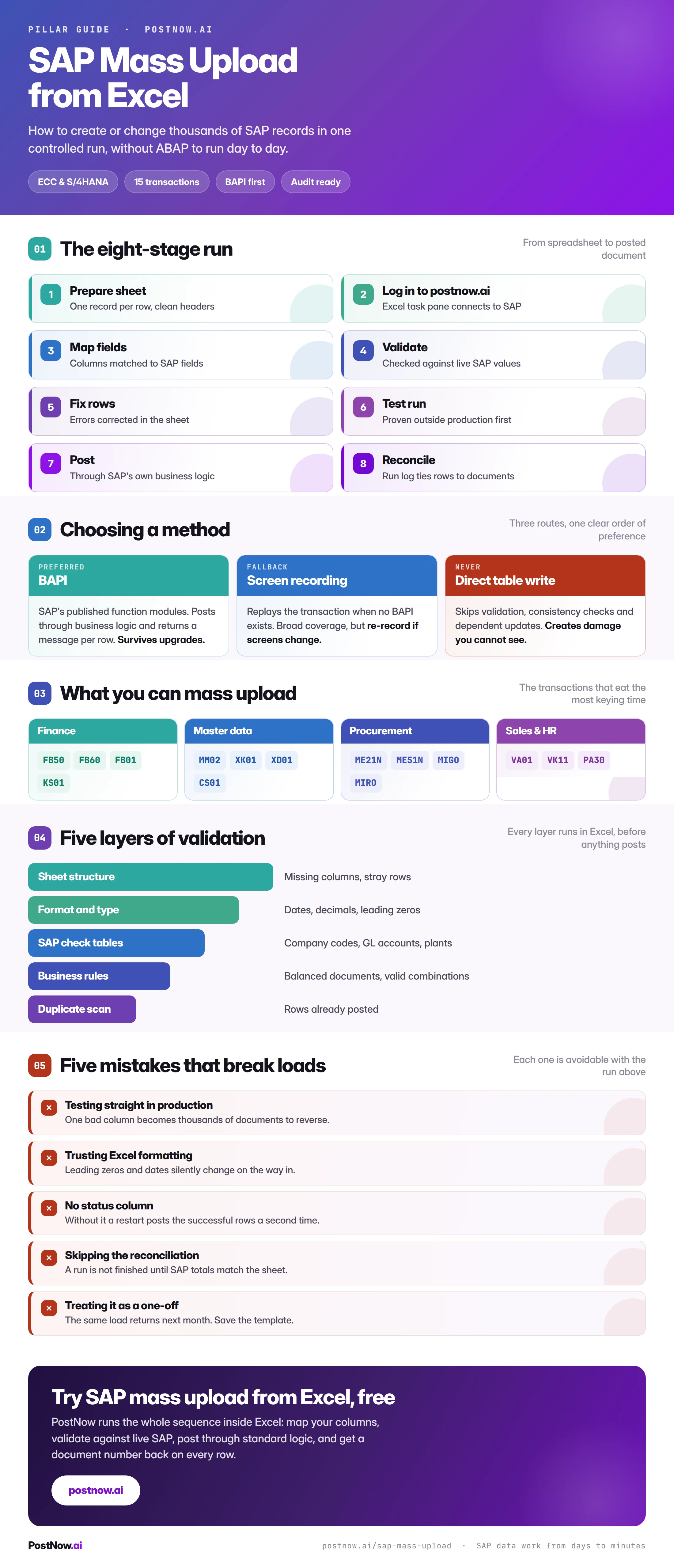
The infographic below summarises everything above in one reference you can share with a team before a load.
Go deeper by module
Each hub below collects the detailed guides for its area, with the fields, structures, and traps specific to those objects.
SAP FICO mass posting
Journal entries, vendor invoices, GL documents, and cost centers, including period and balance checks.
SAP master data mass upload
Materials, vendors, customers, bills of material, and HR master, including view completeness and duplicates.
SAP MM mass upload
Purchase orders, requisitions, goods movements, and logistics invoices across the procure-to-pay flow.
SAP SD mass upload
Sales orders and pricing condition records, including partner determination and condition key combinations.
Methods and alternatives
How the underlying techniques compare, and what to use where LSMW or GUI scripting used to be the default.
Excel to SAP automation
The wider picture of driving SAP from a spreadsheet, including validation, approval, and reporting back.