SAP SD Mass Upload
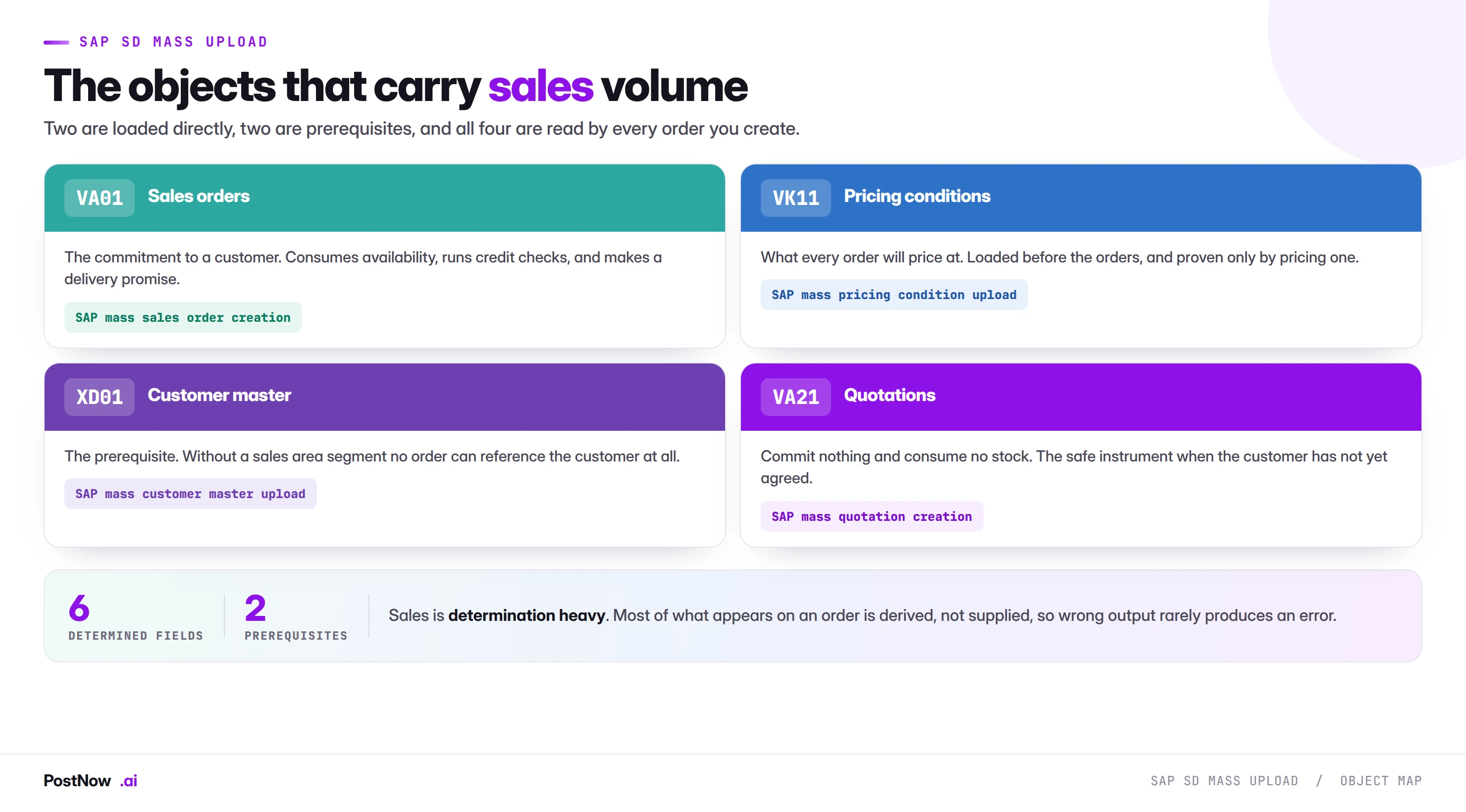
SAP SD mass upload means creating sales documents and their supporting data at volume from files: sales orders through VA01, pricing conditions through VK11, and the customer master both depend on through XD01. Sales is determination heavy, so your file supplies five fields and SAP derives the rest from configuration and master data.
- Determination does not fail, it gives a different answer. A wrong pricing group selects a valid procedure and produces a valid but wrong price with nothing erroring.
- Four failures are silent. Wrong pricing procedure, wrong plant, ship-to defaulting, and wrong tax classification all complete cleanly and reach a customer.
- Reading a created order is the only reliable check. A success log proves orders exist, never that they are the orders you meant.
- Orders in one run compete for stock. Availability is consumed as the run proceeds, so the sort order of the file is an allocation policy.
- Condition records are the prerequisite that fails quietly. Missing customers and materials error loudly; wrong pricing just produces wrong orders.
What SAP SD mass upload means
SAP SD mass upload is the practice of creating sales documents and their supporting data at volume from structured files: sales orders through VA01, pricing conditions through VK11, and the customer master records both depend on through XD01. It is the same discipline as the rest of this cluster applied to a module with one distinguishing property.
Sales is determination heavy. In finance you supply the values and SAP validates them. In sales you supply five things and SAP derives the rest from configuration, master data and condition records. That single difference shapes everything: SD mass loads fail silently more than any other module, because a run can complete successfully and produce entirely wrong documents with nothing to indicate a problem.
This page is the hub for that work. For the method-neutral foundation, the SAP mass upload pillar guide covers validation layers and governance across every module. For the customer master that sales depends on, the master data bridge covers the prerequisite side.
What you supply, and what SAP works out
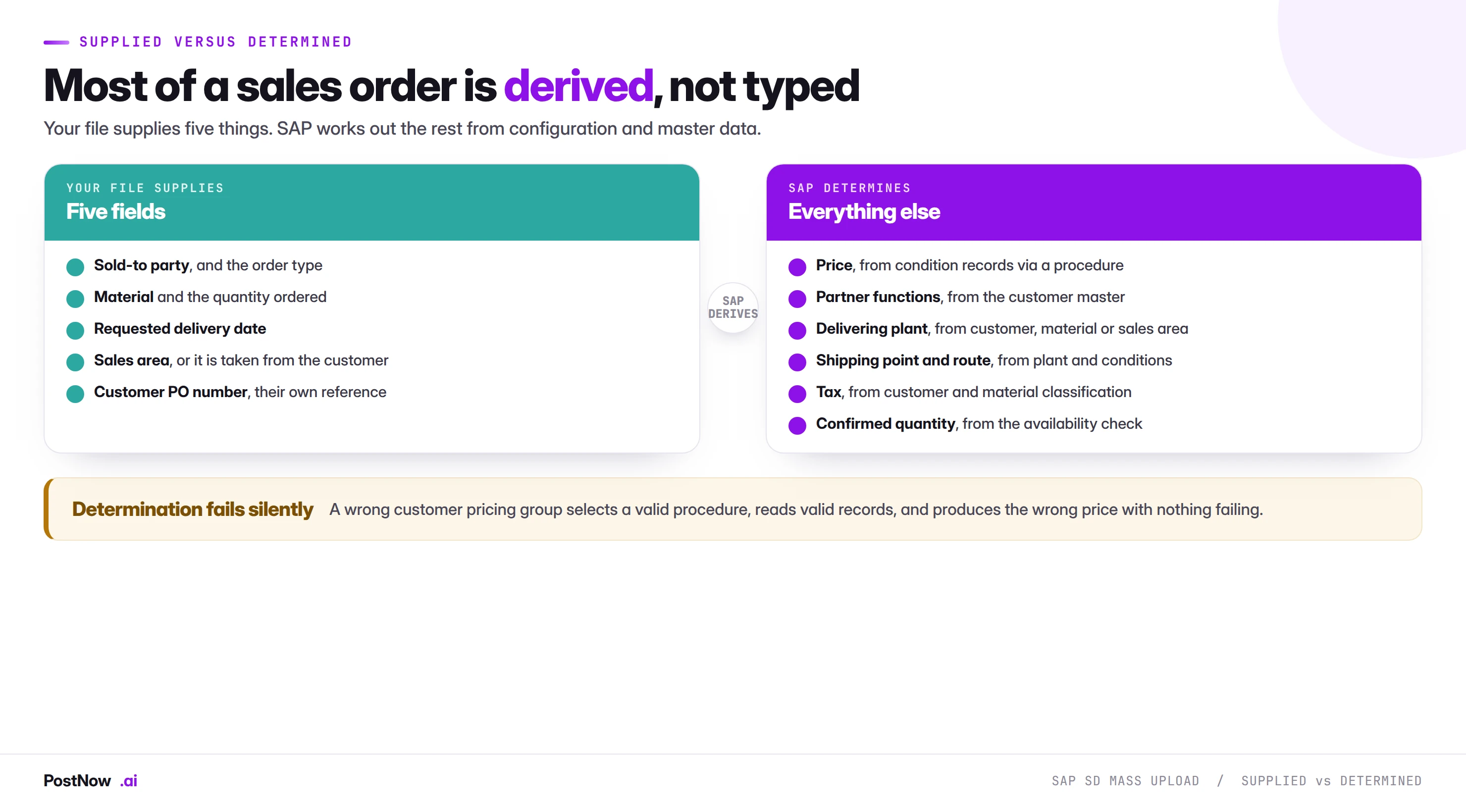
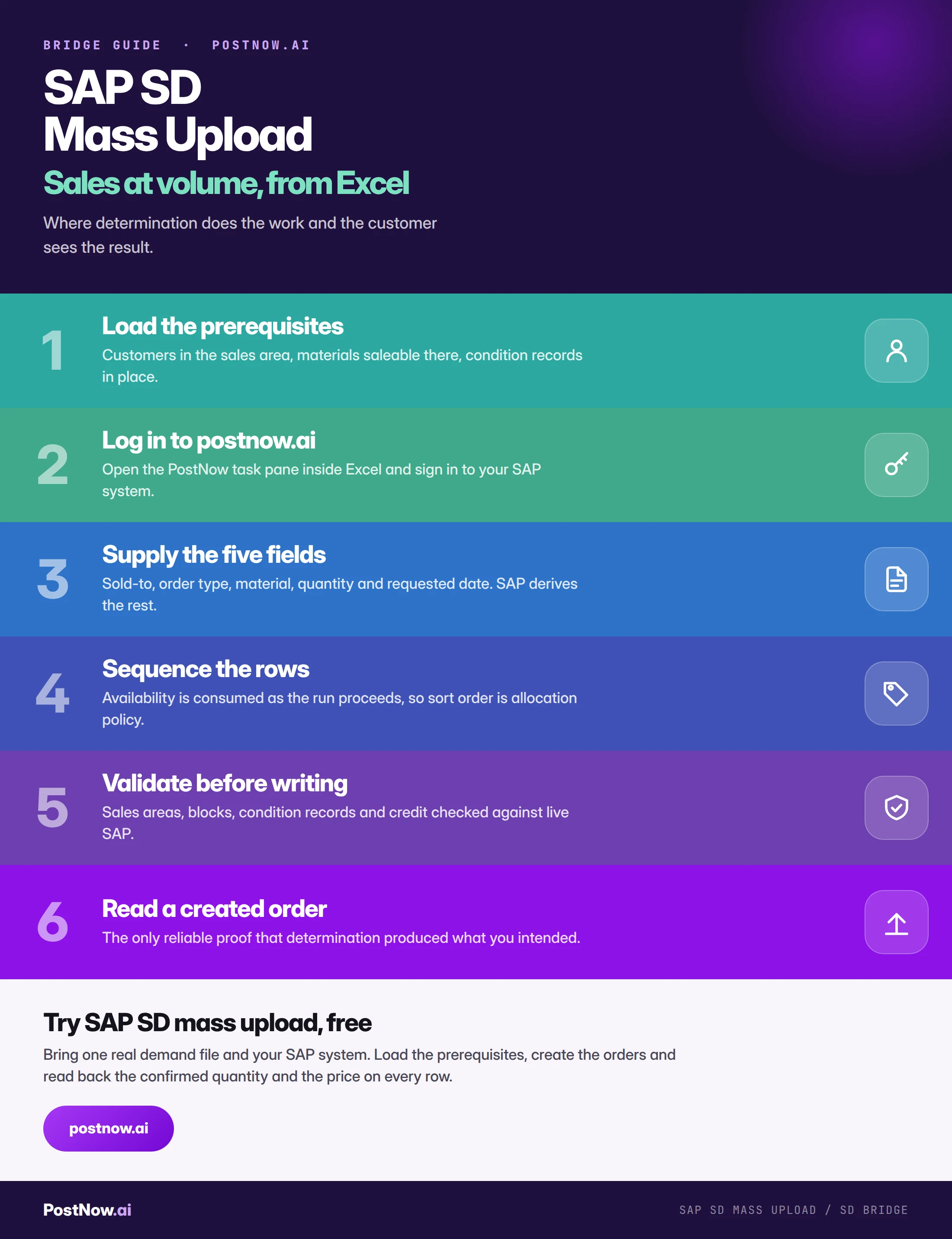
A sales order file is short. Sold-to party, order type, material, quantity and requested delivery date, plus the customer's own reference number if you want it carried through to the invoice. That is most of what a well-formed file contains.
Everything else on the resulting order is derived. The price comes from condition records through a pricing procedure selected by the sales area, the customer's pricing key and the document type. Partner functions come from the customer master. The delivering plant comes from the customer, the material or the sales area depending on configuration. Shipping point and route follow from the plant. Tax follows from customer and material classification. The confirmed quantity comes from the availability check.
This is good design. It means an order created by a customer service agent, an EDI message and a mass upload all price and behave identically, because they all run the same determination. It also means the failure mode is unusual.
The four silent failures
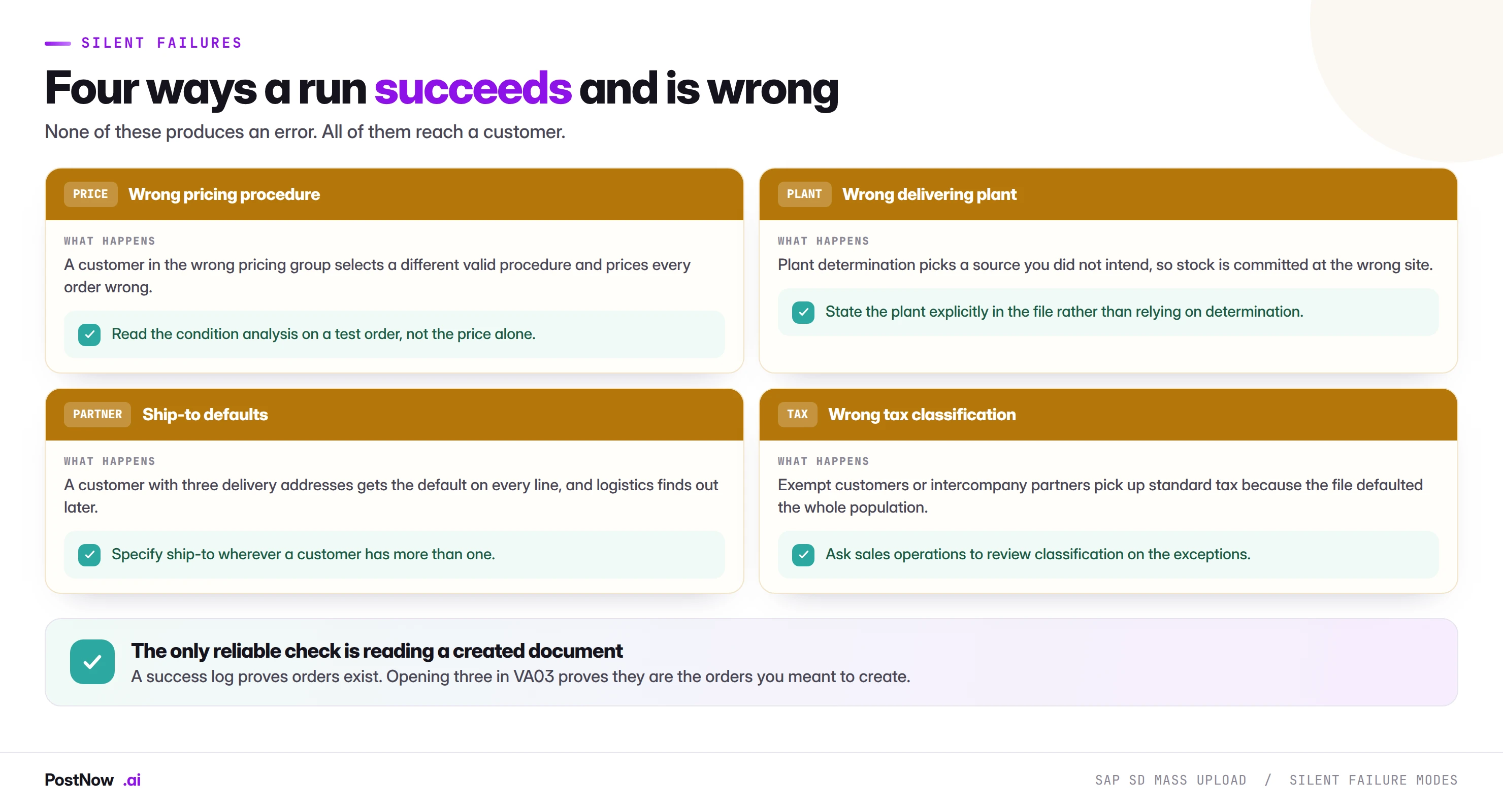
Each of these completes without error and reaches somebody outside your organisation. They are the reason the verification step on every SD page in this cluster is "read a created document" rather than "check the log".
Wrong pricing procedure. The most consequential, because it affects every line of every order for the affected customers. The condition analysis on a created order shows which procedure was selected and which record was read, which is the only way to see it.
Wrong delivering plant. Determination picks a source you did not intend, so availability is checked and stock committed at the wrong site. The order looks correct; the warehouse that has to ship it disagrees. Stating the plant explicitly in the file removes this entirely and costs one column.
Ship-to defaults. Where a customer has one delivery address this is correct behaviour. Where they have three, every line goes to the default and logistics discovers it when a shipment arrives at the wrong site.
Wrong tax classification. Exempt entities, intercompany partners and customers in special regimes all carry classifications that differ from the standard. A file that defaults the whole population picks up standard tax on the exceptions, which is a compliance issue rather than an inconvenience.
Prerequisites, and the one that fails silently
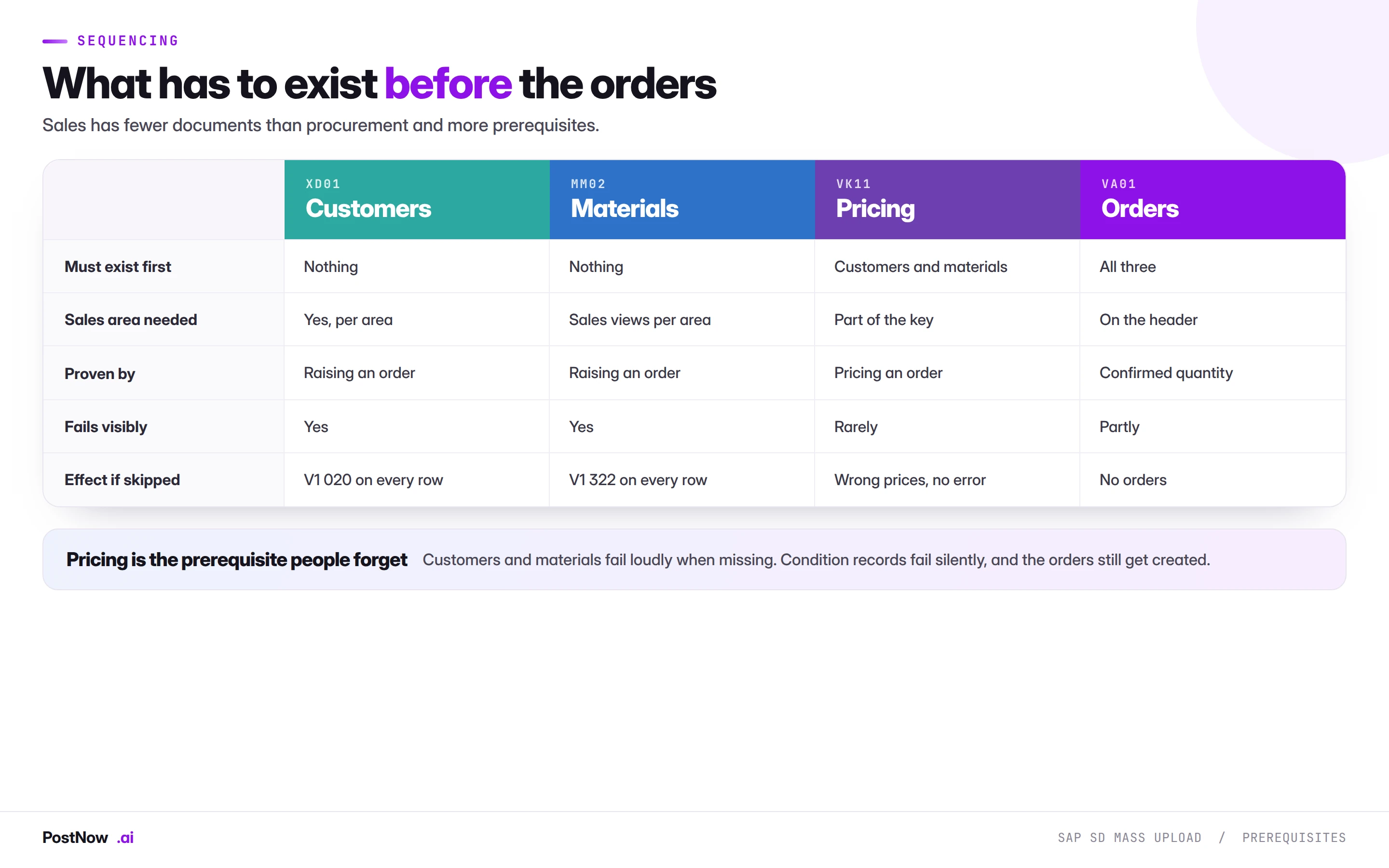
Sales has fewer document types than procurement and more prerequisites, because determination depends on data being in place before the orders arrive.
Customers must be extended to the sales area. Not merely created. The customer master guide covers this in detail, and it is the single most common cause of a sales order run failing on every row. When it does fail, the error names the sales area, which at least points somewhere useful.
Materials must be saleable in that sales area. Sales views maintained for the organisation and channel, and the material extended to the delivering plant. Same failure shape: loud, and pointing at the right thing.
Condition records must exist. This is the prerequisite people forget, and it is the one that does not fail loudly. Where a mandatory condition is missing you get an error. Where the records exist but the wrong ones are found, you get orders at the wrong price and no indication at all. The pricing condition guide covers why a record in the wrong condition table validates cleanly and is never read.
The sequence is therefore: customers, materials, condition records, then orders. Compressing it, or assuming pricing is already right because nobody complained, is how a large order run ends up needing repricing.
Availability, and orders competing with each other
This is specific to sales and has no equivalent elsewhere in the cluster. When a sales order is created, SAP checks availability and confirms what it can. Each order consumes availability as it is created, so the second order in a file checks against a position the first has already reduced.
Two consequences that matter at volume:
The sort order of your file is an allocation policy. Whoever decides which rows come first decides which customers get confirmed when stock is short. That is a commercial decision, and it should be made deliberately rather than inherited from however the file was exported. Sorting by customer priority, contract status or original order date are all defensible. Alphabetical is a policy too, just not one anyone chose.
The output that matters is the confirmed quantity, not the order count. A run of four hundred orders where sixty are partially confirmed is a normal outcome and a list of sixty conversations somebody now needs to have. Writing the confirmed quantity back onto the source row is what turns that into a work list rather than a series of customer complaints.
The sales order guide covers the mechanics, including what happens to unconfirmed quantities under different backorder configurations.
Sales documents are seen by people outside your company
Worth stating plainly because it changes the risk calculation. A wrong journal is an internal problem. A wrong material master is an internal problem that produces external symptoms later. A wrong sales order is immediately visible to a customer.
- Order confirmations transmit. Released orders send confirmations by email or EDI. Four hundred at once is visible to your customers, and it should be intended rather than a side effect.
- Confirmed dates become promises. A date SAP confirms is a date the customer will plan around, and a date they will chase.
- Prices reach invoices. A pricing error found internally is an embarrassment. The same error found by a customer's accounts payable team is a commercial conversation.
- Deliveries arrive somewhere. A wrong ship-to means goods physically go to the wrong place, at your cost.
None of this is an argument against mass creation. It is an argument for the sample check, which takes ten minutes and is the difference between finding a determination error internally and having a customer find it.
Shared validation across sales
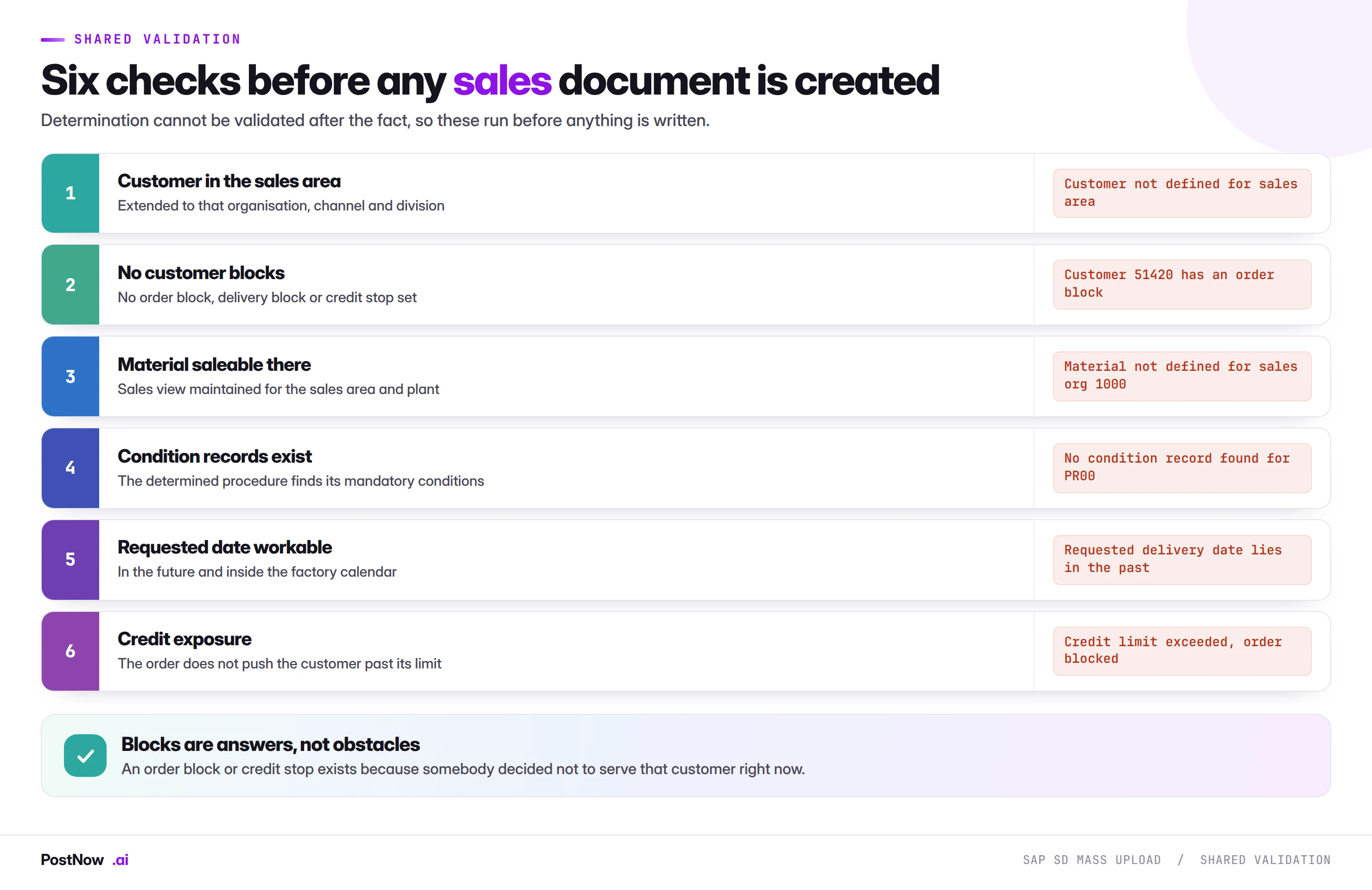
The block check deserves particular attention in sales. Customers carry order blocks, delivery blocks and credit stops, and each exists because somebody made a commercial decision not to serve that customer right now: a dispute, a compliance hold, an overdue account.
A mass run that ignores blocks creates orders for customers the organisation has deliberately decided to stop serving. The answer when a block appears is almost always to remove the row from the run rather than to remove the block, and that is a decision for whoever set it.
Credit blocks work differently again. An order breaching the credit limit is created and blocked rather than rejected. It exists, it has a document number, and it is waiting for a release decision. Treating those as failures and re-running them creates duplicate orders, which is the same trap the invoice posting guide describes on the payables side.
Running sales loads from Excel
PostNow runs SAP SD mass upload from Excel
The demand file customer service already works from becomes the run. PostNow adds a task pane to Excel, connects to your SAP system with your own credentials, and creates the documents through standard logic so determination behaves exactly as it does in the transaction.
Sales areas, blocks and condition records verified before anything is written.
Rows processed in the order you choose, so allocation is deliberate.
Through the published interface, so pricing and partners determine normally.
Order number, confirmed quantity and price returned onto every row.
SAP SD mass upload, step by step
Quotations: the instrument people forget
Where the customer has not committed, a quotation does everything an order does except the parts that carry risk.
A quotation runs pricing, so it proves your condition records work. It references the customer and material, so it proves the master data is right. It does not consume availability, does not run a credit check, and makes no delivery promise. It converts to an order when the customer accepts.
That makes bulk quotation loading genuinely useful in three situations. Seasonal offers where hundreds of customers receive priced proposals. Tender responses at volume. And as a rehearsal: loading a demand file as quotations first exercises pricing and master data with none of the allocation consequences, then the same file loads as orders once the output has been checked.
Order to cash: where a mass order run lands
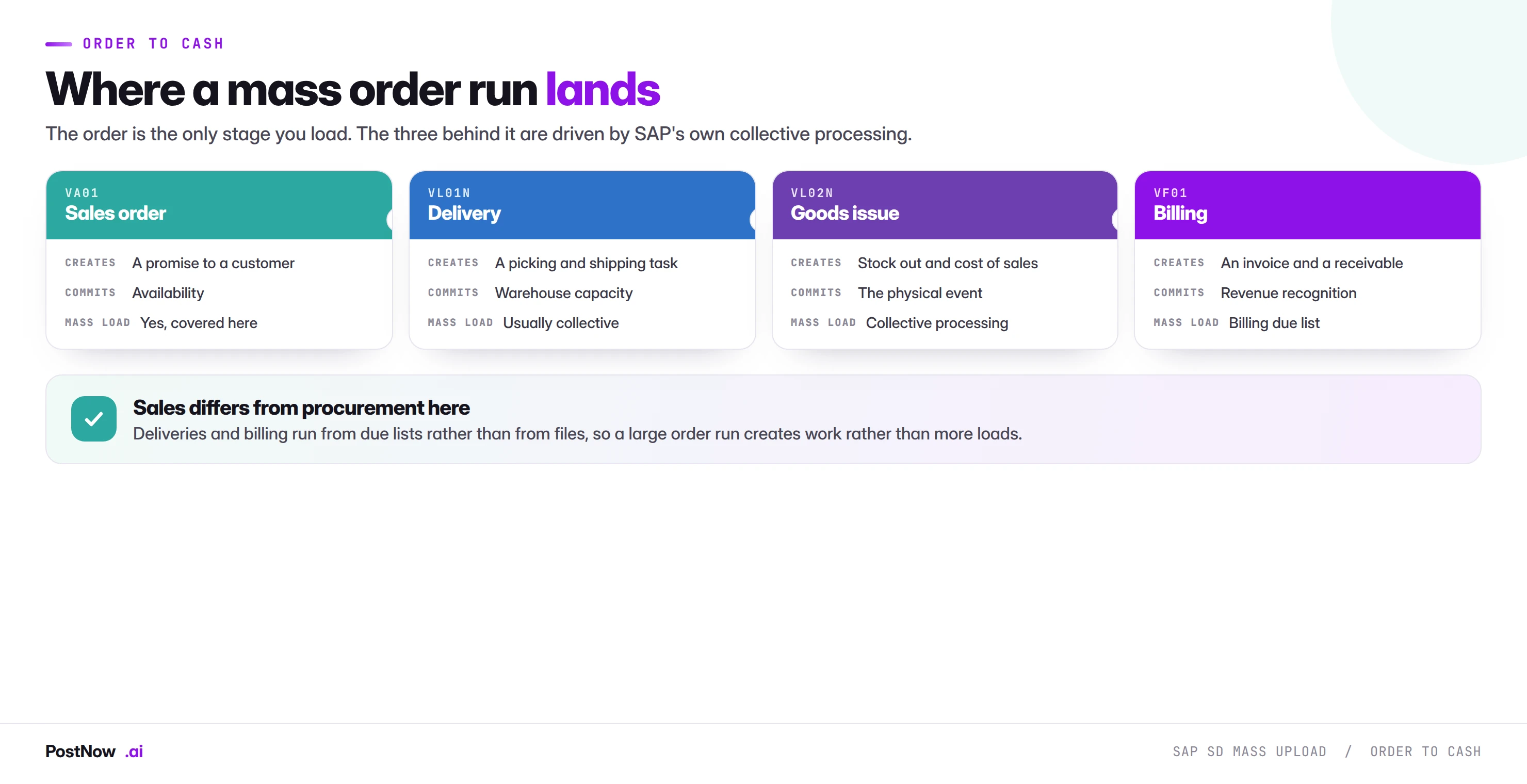
Procurement is four documents you load. Sales is one document you load and three that follow from it, which is a meaningful structural difference.
A sales order becomes a delivery, the delivery becomes a goods issue, and the goods issue becomes a billing document. All three of those stages run from SAP's own collective processing: the delivery due list, the picking and goods issue steps behind it, and the billing due list. They are not file-driven, and they should not be.
The consequence for anyone running a large order load is that you are not creating three more loads, you are creating work. Four hundred confirmed orders become a delivery due list somebody has to process, a picking day the warehouse has to staff, and a billing run that produces four hundred invoices going to customers.
This is why the coordination note matters more in sales than elsewhere. A procurement run lands on internal teams. A sales run lands on the warehouse, then on your customers, on a timeline set by the confirmed dates in the orders you just created.
What a sales run triggers
- Availability commitment. Immediate, and the reason row sequence matters.
- Credit blocks. Landing in credit control's queue at whatever rate the file dictates.
- Demand for planning. Confirmed orders become requirements MRP sees, changing what the next run proposes and potentially triggering procurement.
- Delivery creation. Due deliveries appear in the delivery due list, and a large run can fill a warehouse picking day.
- Customer communication. Order confirmations transmit by email or EDI.
- Revenue expectation. Where forecasting reads order backlog, a large load moves that number materially and finance should hear it from you first.
Returns, credit memos, and documents that run backwards
Not every sales document creates revenue, and the ones that reverse it need separating from the ones that do not.
Returns orders bring goods back and use their own order type. Mixing returns rows into a standard order file is a common and confusing mistake, because the document type drives entirely different behaviour: stock comes in rather than going out, and the availability check is irrelevant.
Credit memo requests reverse value without moving goods, typically for pricing corrections, goodwill or quality claims. They usually carry a billing block by design, so they are created and then released by somebody with authority, which is exactly the control you want on a document that reduces revenue.
Debit memo requests do the opposite, correcting an undercharge.
Three practical points for mass work. Split by document type, always, because a file mixing orders and credit memos posts documents in opposite directions. Expect billing blocks on credit memos and treat them as correct rather than as failures. And be aware that a mass credit memo run reduces recognised revenue, which makes it a finance conversation as much as a sales one.
Rebates and settlement
Where rebate agreements are in place, sales orders accrue rebate amounts as they are billed, and those accruals settle periodically. This matters for mass work in two ways.
First, a large order run generates a correspondingly large accrual, which appears in finance without anyone having posted it directly. Second, the rebate condition records themselves are a pricing load with the same key combination and validity concerns as any other, and a rebate record in the wrong condition table accrues nothing at all.
In S/4HANA much of this moves into condition contract settlement rather than the classic rebate agreements, which changes where the data lives and not the principle. If your pricing population includes rebates, confirm which mechanism applies before assuming an ECC-shaped file still fits.
Governance, allocation, and pricing authority
- Approve the demand file. Customers, materials, quantities and dates reviewed before the run, rather than four hundred orders reviewed after it.
- Record the allocation decision. How the file was sorted and why. This is the question asked when a customer complains they were not confirmed while a smaller account was.
- Pricing authority sits with commercial. Whoever runs a condition record load is not the person who decides what a price should be, and the separation should be explicit.
- Separate created-and-blocked from failed. They need different responses and conflating them creates duplicates.
- Run as a named user. With that person's sales authorisations.
- Keep the completed file. Requested against confirmed, with order numbers, is the record of what was promised to whom.
Volume, timing, and the availability picture
- Runtime tracks documents, not rows. Consolidating items into fewer orders is faster and produces larger documents.
- Avoid running during MRP or backorder processing. Both move the availability picture underneath the run, producing confirmations that are correct at the moment and stale minutes later.
- Do not split a constrained material carelessly across batches. If the same scarce material appears in several batches, allocation between them depends on run order rather than on policy.
- Load pricing before the effective date, not on it. Records with a future valid-from can be loaded and verified in advance, which turns a deadline into a checkpoint.
- Watch the delivery due list. A large confirmed run creates a picking day somebody has to staff.
Templates for a standing sales intake
- Give the template to customer service. Distributor and EDI backlog files arriving with sold-to, sales area, material, quantity and date already correct make the run a formality.
- Include ship-to explicitly. Defaults are fine until a customer has three delivery addresses, and adding the column costs nothing.
- State the plant. One column removes an entire class of silent failure.
- Encode the sort policy. Allocation should be part of the template rather than improvised per run.
- Keep the verification recipe attached. Which customer and material to check after each run, so proving determination is a step rather than a decision.
- Name an owner. Order types, sales areas and pricing procedures all change.
Mistakes that recur across sales
- Trusting the success log. It proves orders exist, never that determination produced what you intended.
- Loading orders before condition records are proven. The one prerequisite that fails without an error.
- Letting plant determination decide. One column removes the ambiguity and makes availability predictable.
- Ignoring that ATP is consumed as the run proceeds. Sort order decides who gets confirmed.
- Treating a credit block as a failure. The order exists; re-running it duplicates.
- Ignoring order and delivery blocks. They exist because somebody decided not to serve that customer.
- Defaulting tax classification across the population. Exempt and intercompany customers are the exceptions that matter.
- Raising orders when the customer has not committed. Quotations exist for that and consume no availability.
Who owns a sales run
Sales mass work touches commercial decisions more directly than any other module in this cluster, and the ownership boundaries are worth stating before the first run.
Commercial owns the prices. What a customer pays is a negotiated position, not a technical value. Whoever loads condition records is executing a decision made elsewhere, and the separation should be explicit enough that nobody is tempted to adjust a rate to make a file work.
Sales operations owns the allocation. When stock is short, who gets confirmed is a commercial judgement. The person running the file should not be inventing that policy at the point of sorting a spreadsheet.
Credit control owns the blocks. Blocked orders are their work queue and their decision. Releasing one to make a run look clean is not a technical shortcut, it is overriding a credit judgement.
Customer service owns the promise. A confirmed date is something a customer will plan around, and the conversation when it slips belongs to whoever owns that relationship.
The failure mode when this is unclear is consistent: the operator makes a commercial decision under time pressure because the alternative is a run that does not complete. Every one of the shortcuts on this page has that shape.
After a sales run
Four checks, in order of how quickly they need doing.
Read three created orders. Different customers, different materials. Check the condition analysis, the plant, the ship-to and the confirmed quantity. This is the only check that catches determination errors and it takes ten minutes.
Work the confirmation gap. Every partially confirmed line is a customer who asked for something they are not getting in full. That list needs an owner named before the run rather than discovered after it.
Clear the credit queue. Blocked orders do nothing until released, so a run leaving sixty blocked has not delivered what the business asked for.
Warn the warehouse. The delivery due list is about to grow, and a picking day that arrives unannounced is a bad first impression for a process that is meant to save time.
The sales guides
- SAP mass sales order creation (VA01). Availability at volume, pricing determination, credit blocks and the confirmed quantity gap.
- SAP mass pricing condition upload (VK11). Key combinations, condition tables, validity overlaps and the silent failures.
- SAP mass customer master upload (XD01). Sales areas, partner functions, credit data and why created is not usable.
Where mass upload sits next to EDI
Sales is the module most likely to already receive orders electronically, so it is worth being clear about the boundary.
EDI handles the steady state. High-volume customers send orders as messages, confirmations return automatically, and nothing on this page competes with that. Where EDI works, adding a file for the same flow is a step backwards.
Mass upload handles what EDI does not. The backlog when an interface fails and a week of orders has to be caught up. Customers too small to justify a connection. Distributor and dealer files that arrive as spreadsheets from teams without SAP access. Seasonal pre-books collected commercially. Migration cutover. And corrections, which no interface produces.
Both end at the same interface. An inbound EDI order and a mass upload both call the same published function underneath, applying identical determination, availability and credit logic. That is why a file-based load is not a lesser mechanism: it takes the same path, with a person deciding what enters it.
The choice between them is volume and stability. A flow repeating hundreds of times a month with a stable partner justifies an interface. A flow that happens quarterly, or arrives as a spreadsheet, does not, and building an interface for it usually costs more than the manual work it would replace.
Intercompany and cross-company sales
Where one company code sells and another delivers, a single sales order produces documents on both sides, and mass loading that flow needs the relationship configured before anything runs.
The order is placed against the selling organisation, the delivering plant belongs to another company code, and SAP generates an intercompany billing document alongside the customer invoice. Two revenue streams, two sets of pricing, one order.
Three things matter for a mass run. Intercompany pricing is its own condition set, so a file that prices correctly to the customer can still price wrongly between entities, and it fails as silently as everything else in this module. The plant determination question becomes critical, because the plant decides which company code delivers and therefore whether the transaction is intercompany at all. And both company codes need their periods open, which is the same two-calendar problem the procurement bridge describes, with entities instead of modules.
If a population mixes domestic and intercompany rows, split it. The pricing differs, the validation differs, and a combined file produces failures that are hard to attribute.
The complete SD mass upload reference
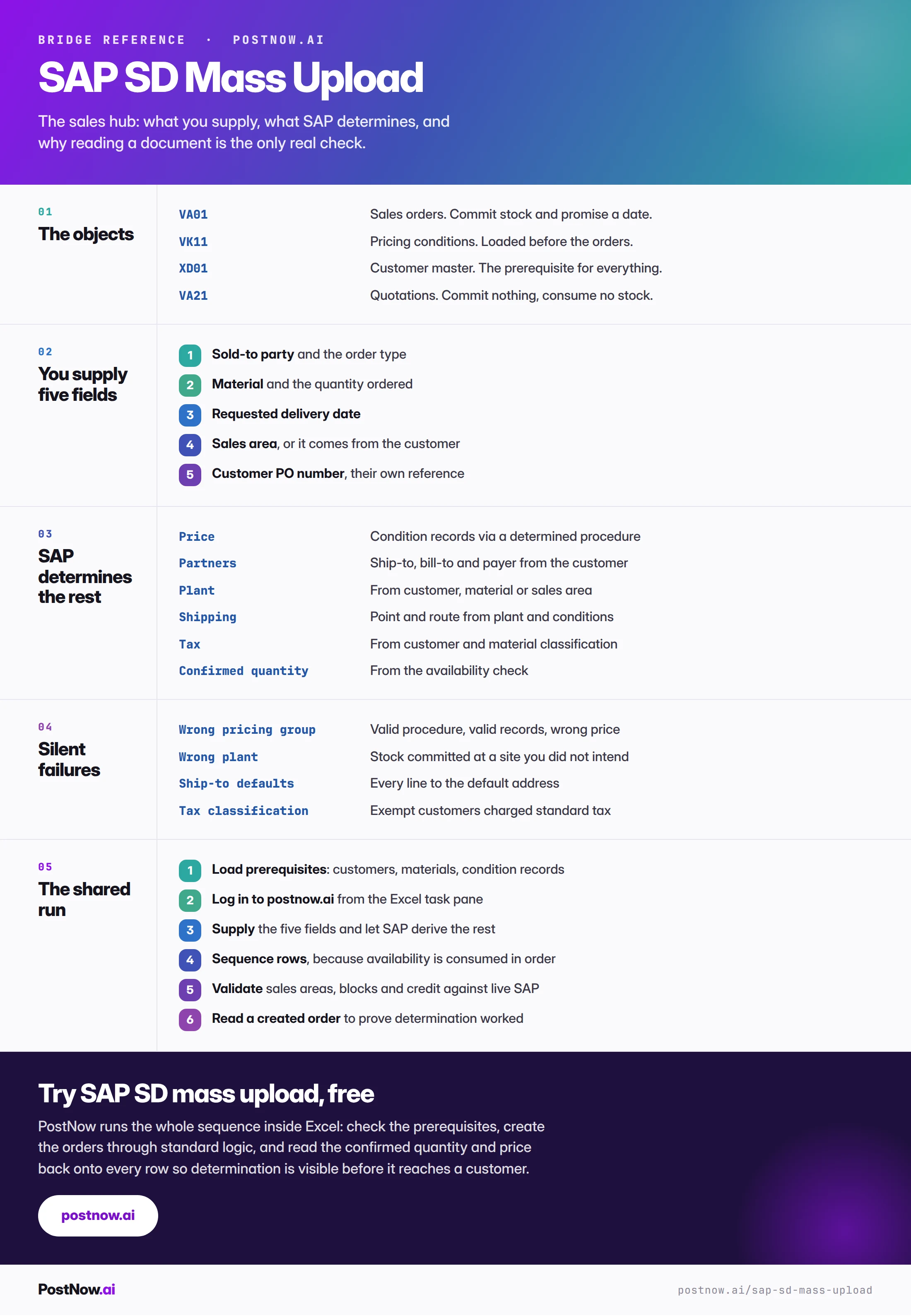
The reference sheet below collects everything above into one image you can share before a sales programme.
Go deeper
SAP mass upload
The pillar guide covering methods, validation, error handling and governance across every module.
SAP MM mass upload
The procurement side, where the same header and item shape appears against suppliers.
Methods and alternatives
How BAPI, screen recording and LSMW compare, and what survives an S/4HANA conversion.