SAP Master Data Mass Upload
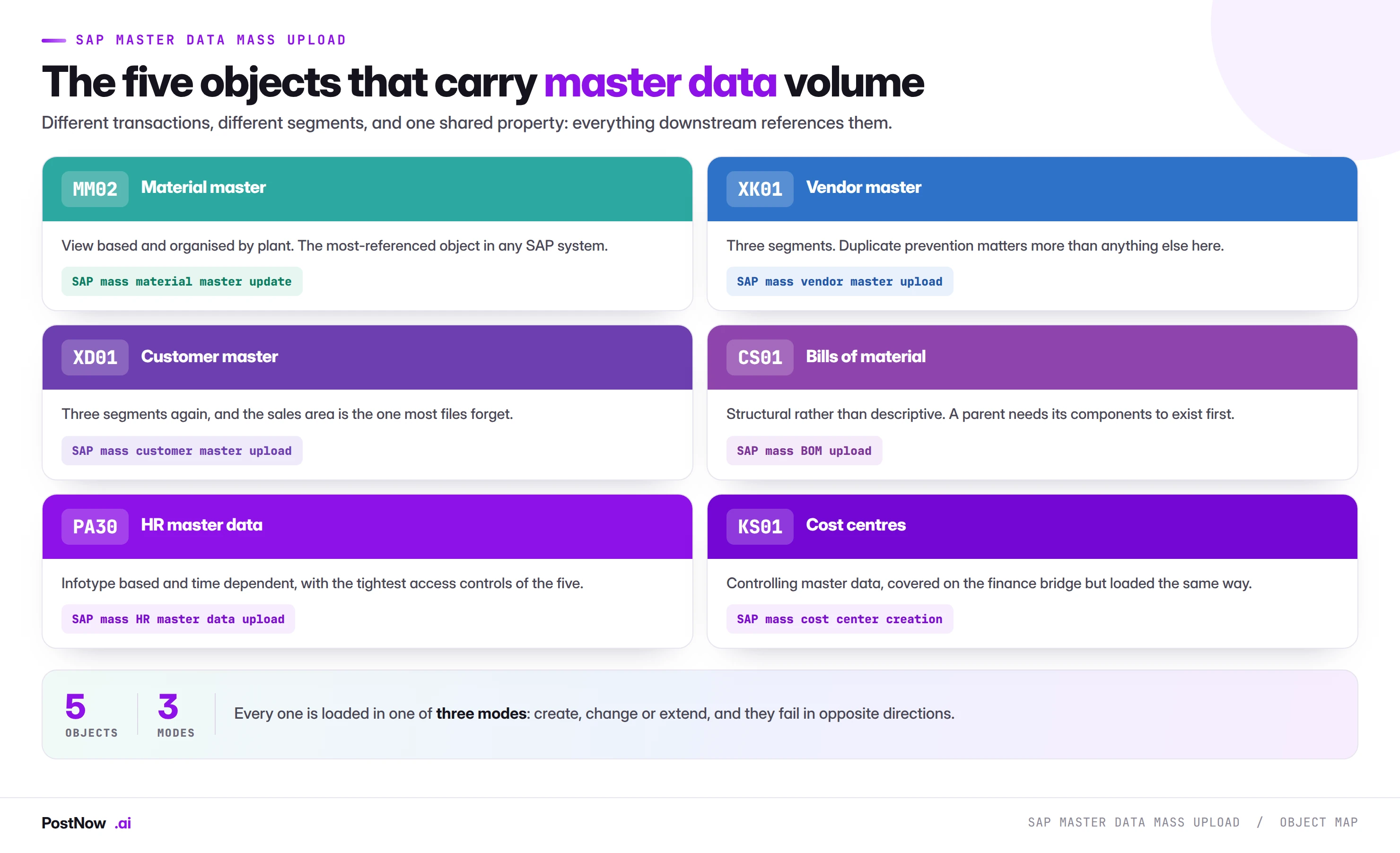
SAP master data mass upload means creating, changing or extending many master records in one controlled run from a file, rather than maintaining each through its transaction. It covers materials, vendors, customers, bills of material and HR master data, and the discipline is shared even though the transactions are not.
- Master data errors compound. A wrong record keeps producing wrong documents until somebody corrects it, unlike a transaction which sits still.
- Every job is create, change or extend. They fail in opposite directions, so never mix them in one file.
- There is no reversal document. For any change, the extract of current values is the only rollback that exists.
- The organisational level decides your row count. Client-level fields need one row per record; plant-level fields need one per record per plant.
- Screen duplicates on identity, not name. Tax number, bank details and external references identify an organisation; names do not.
What SAP master data mass upload means
SAP master data mass upload is the practice of creating, changing or extending many master records in one controlled run from a structured file, rather than maintaining each through its transaction screen. It covers materials, vendors, customers, bills of material and HR master data, and it is the same discipline applied to five objects that share more than their transaction codes suggest.
This page is the hub for that work. It covers what the objects have in common, the three modes every master data job falls into, the checks that apply across all of them, and why getting master data wrong costs more than getting a transaction wrong. Each object then has its own guide with the field mappings, error codes and edge cases specific to it.
If you are looking for the method-neutral foundation rather than the master data view, the SAP mass upload pillar guide covers validation layers, method selection and governance across every module. For the finance side, the FICO mass posting bridge covers documents rather than records.
Why master data is a different problem
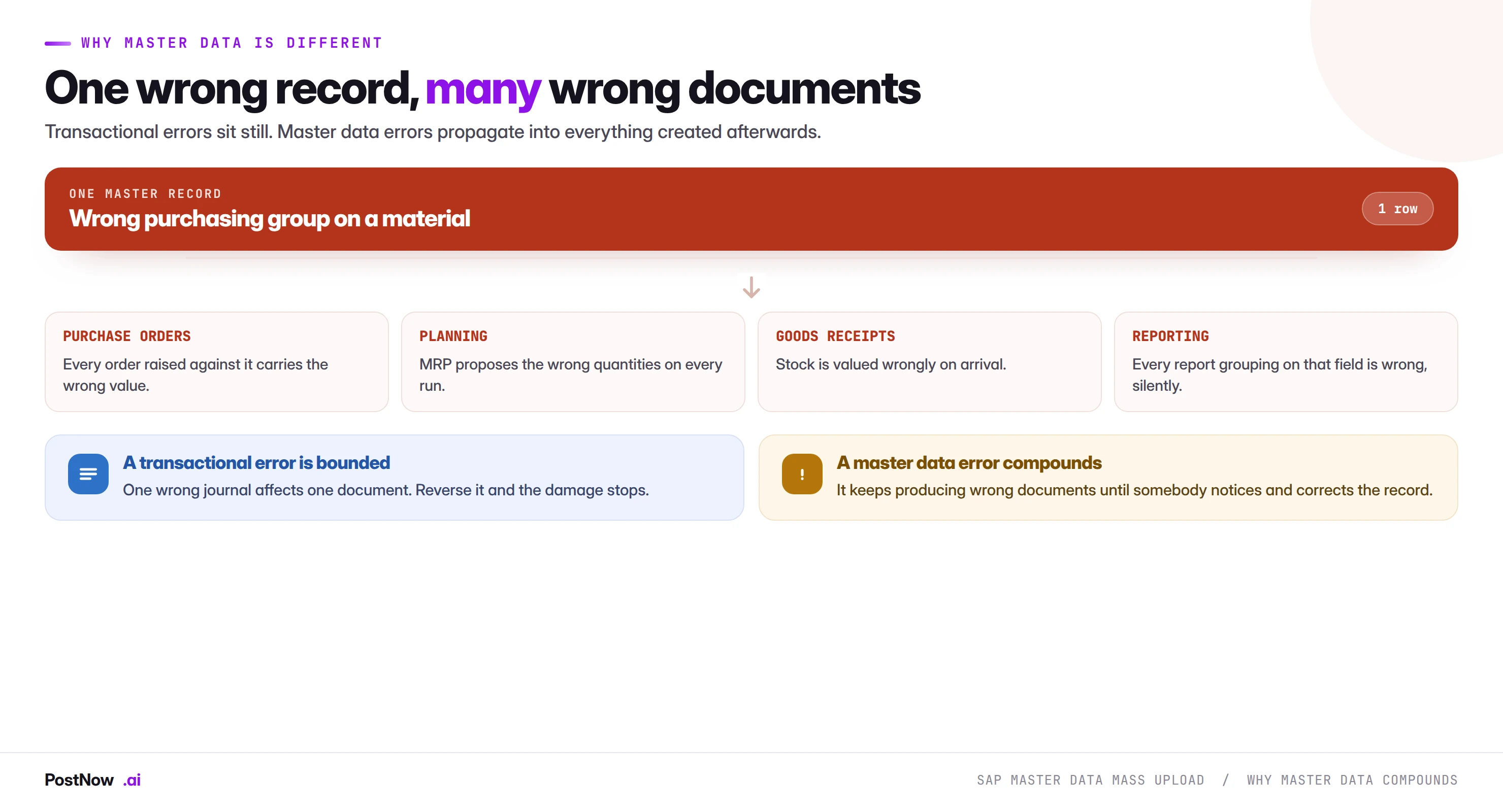
Everything else in this cluster produces documents. A journal, a purchase order, a goods movement, an invoice. Those are records of things that happened, and a mistake in one is bounded: reverse it and the damage stops.
Master data is referenced, not consumed. A material master record is read by every purchase order, every goods movement, every planning run and every report that touches that material, for as long as the record exists. A wrong purchasing group on one material does not sit still; it keeps producing wrong orders until somebody notices and corrects the record.
Three consequences follow, and they shape everything on this page.
Errors compound rather than accumulate. Ten wrong journals is ten problems. One wrong material master is an unknown number of problems that grows until the record is fixed.
There is no reversal document. Financial documents have FB08. Goods movements have their reversal movement types. Master data has neither. The only route back is writing the previous value, which only exists if somebody kept it.
Detection is delayed and indirect. A wrong journal shows up in a reconciliation. A wrong master record shows up as a buyer asking why an order went to the wrong vendor, six weeks later, with no obvious link back to the load that caused it.
The three modes: create, change, extend
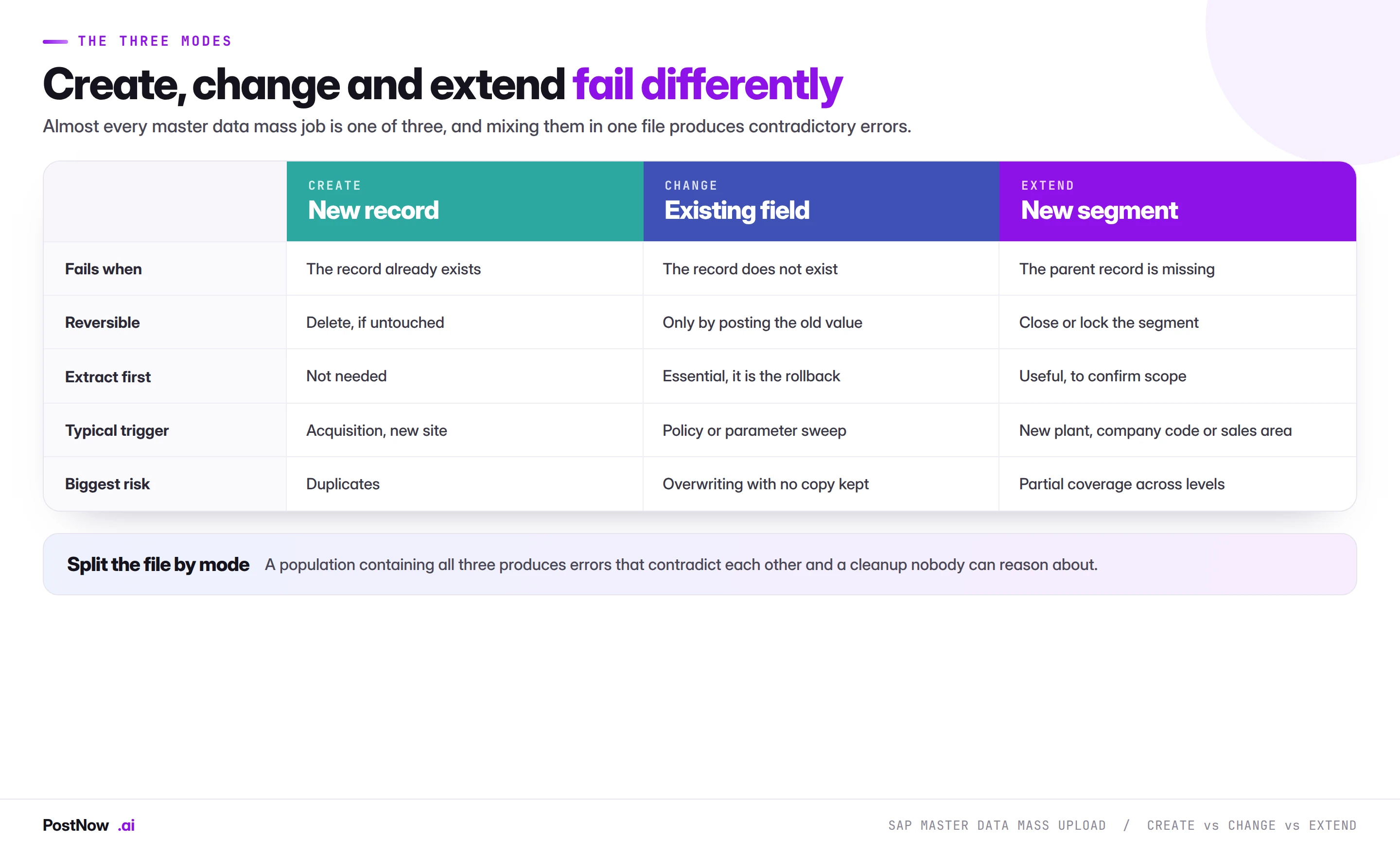
Almost every master data mass job is one of three things, and knowing which one you are doing determines the shape of the file, the validation, and what happens when it goes wrong.
Create
A new record where none existed. Fails when the record already exists. The characteristic risk is duplicates, which for partner objects like vendors and customers is the most expensive failure available, because a duplicate is a valid record that quietly splits spend, revenue and credit exposure.
Creates are the most forgiving mode in one respect: if the run fails entirely, nothing existed before and nothing exists now. There is no half-state to reconcile.
Change
An existing field gets a new value. Fails when the record does not exist. The characteristic risk is overwriting something nobody kept a copy of, which is why the material master guide puts extraction as stage one rather than as good practice.
Changes are the least forgiving mode. A successful but wrong change looks identical to a successful and correct one, and the previous state is gone.
Extend
An existing record gains a new organisational segment: a material extended to a new plant, a vendor to a new company code, a customer to a new sales area. Fails when the parent record is missing. The characteristic risk is partial coverage, where the extension lands in some organisational units and not others and the inconsistency is invisible until behaviour differs by site.
Extensions are common and routinely misfiled as creates, because from the requester's point of view "we need this material in the new plant" sounds like creating something.
Never mix modes in one file
This is the single most useful structural rule in master data work. A create fails because the record exists; a change fails because it does not. A file containing both produces a population where roughly half the rows error, the errors contradict each other, and nobody can tell at a glance which failures are real problems and which are just the wrong mode.
Screening the population first tells you which rows belong in which run at no extra cost, because the same lookup that checks for duplicates also tells you what already exists.
Organisational levels decide your row count
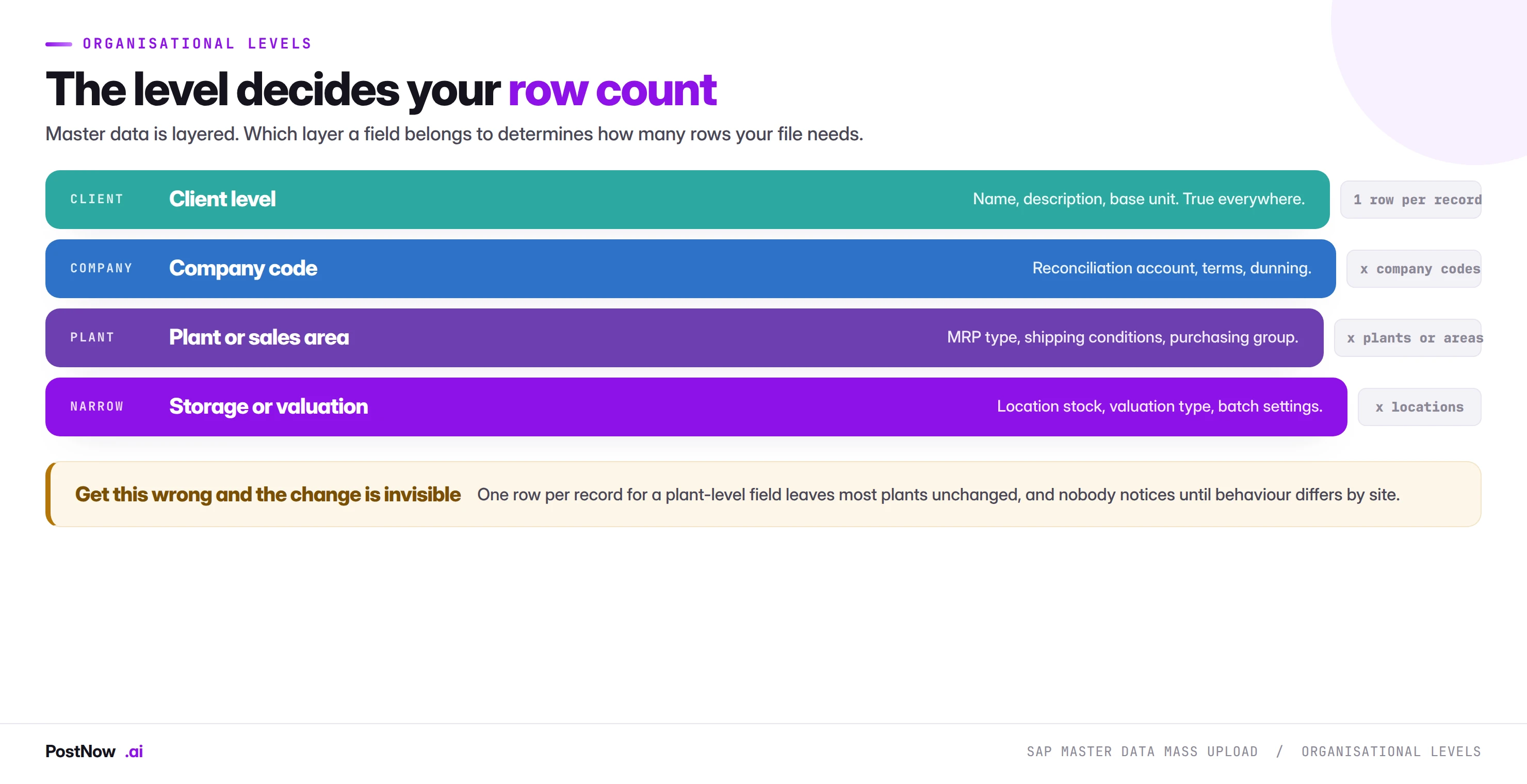
Master data is layered, and the layer a field belongs to determines how many rows your file needs. This is the arithmetic that catches people out, and it catches them out silently.
- Client level. True for the record everywhere. One row per record. Material description, vendor name, customer address.
- Company code level. One row per record per company code. Reconciliation accounts, payment terms, dunning procedures.
- Plant or sales area level. One row per record per organisational unit. MRP type, purchasing group, shipping conditions, pricing procedure.
- Storage location or valuation level. Narrower still, and relevant when the change touches stock or valuation.
A file of four thousand materials changing a material group needs four thousand rows. The same four thousand materials changing an MRP type across six plants needs twenty-four thousand. Getting this wrong does not produce an error. It produces a change that landed in one plant and not the others, which nobody sees until planning behaves differently at different sites.
Segments must exist before fields inside them can change
Related and equally common. A change updates a field inside a segment, view or infotype. It never creates the segment. A material with no MRP view for a plant cannot have its MRP type changed there, and the error reads as though the material is missing rather than as though a view is.
Where part of a population needs the segment created rather than a field updated, that is an extend run and it happens first. This is the same sequencing dependency in every object: views for materials, company code segments for vendors, sales areas for customers, hierarchy nodes for cost centres.
Shared validation across all five objects
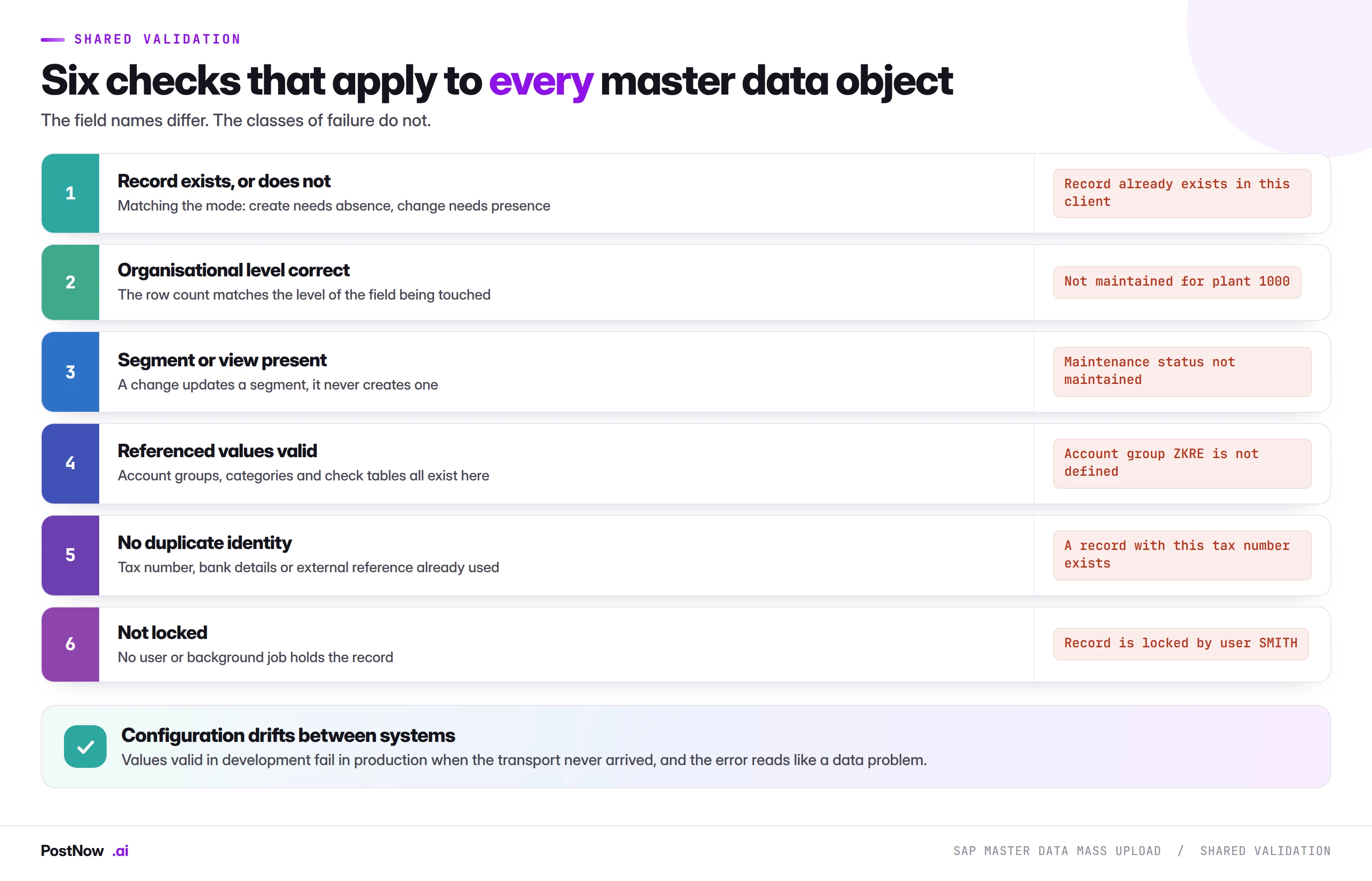
Field names differ between objects. The classes of failure do not, and a team that has built validation for one object has most of what it needs for the next.
The check most often skipped is the fourth: referenced values valid in the target client. Account groups, material types, cost centre categories, payment terms and every other configured value must exist where you are loading, not where the file was prepared. A file built against a development or sandbox system will carry values that were never transported, and the resulting error looks like bad data rather than a missing transport. On a large run this hits whole blocks of rows at once, which makes it look catastrophic and makes it a five-minute fix by the right person.
Locks are timing, not data
Worth separating from the others because the response is different. A record held open by a user or a background job produces a lock error that resolves itself. Fix nothing, wait, re-send the failed rows. Runs scheduled outside working hours meet far fewer of them, and a run designed for a second pass treats them as routine rather than as failures.
Duplicate prevention on partner objects
Materials and BOMs are identified by a number that is either supplied or assigned, so duplicates are structurally unlikely. Vendors and customers are identified by who they are in the real world, and that is a much harder problem.
The rule that holds across both: screen on identity, not on name. The same company legitimately appears as several name variants, while two genuinely different subsidiaries can share a name. The fields that actually identify an organisation are:
- Tax registration number. The strongest single signal where it is captured.
- Bank account details. Catches organisations that have been renamed or acquired, and the field fraud controls care about anyway.
- Company registration number. As reliable as the tax number where present.
- External reference from the source system. Often the most reliable key where the population comes from a CRM or procurement platform, and worth storing on the SAP record so the link survives.
Screen the file against itself as well as against SAP. Consolidated lists routinely contain the same organisation twice under different spellings, and a check that only queries SAP cannot see them because neither copy exists yet.
Running master data loads from Excel
PostNow runs SAP master data mass upload from Excel
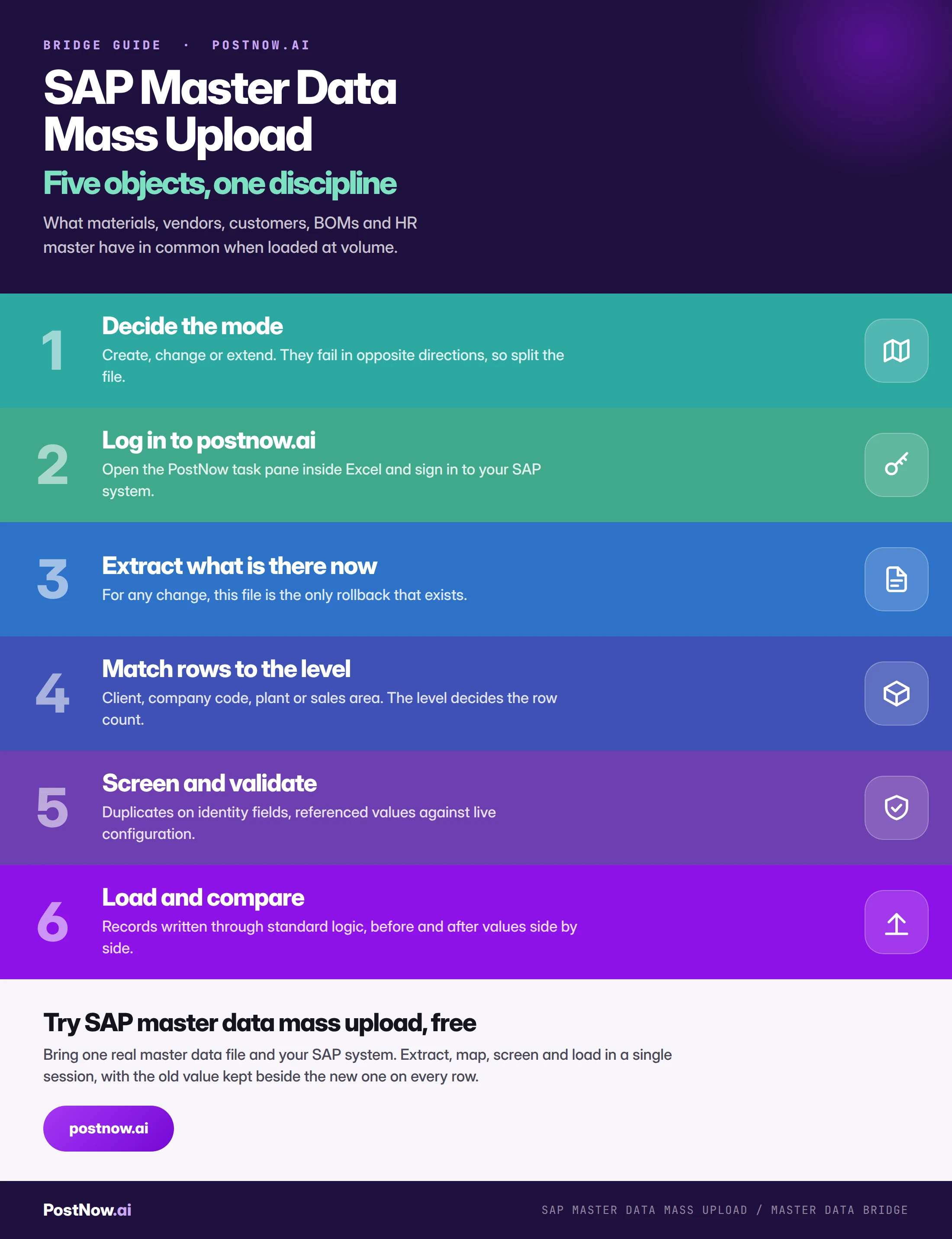
Whichever object you are loading, the sequence is the same and it happens in the workbook the business already maintains. PostNow adds a task pane to Excel, connects to your SAP system with your own credentials, and takes the file through extraction, mapping, screening and loading without leaving the sheet.
Current values pulled into the sheet before anything is overwritten.
Identity fields checked against existing records and the file itself.
Segments, levels and configured values checked against live SAP.
Old and new values side by side on every row, ready for audit.
SAP master data mass upload, step by step
What S/4HANA changes, and what it does not
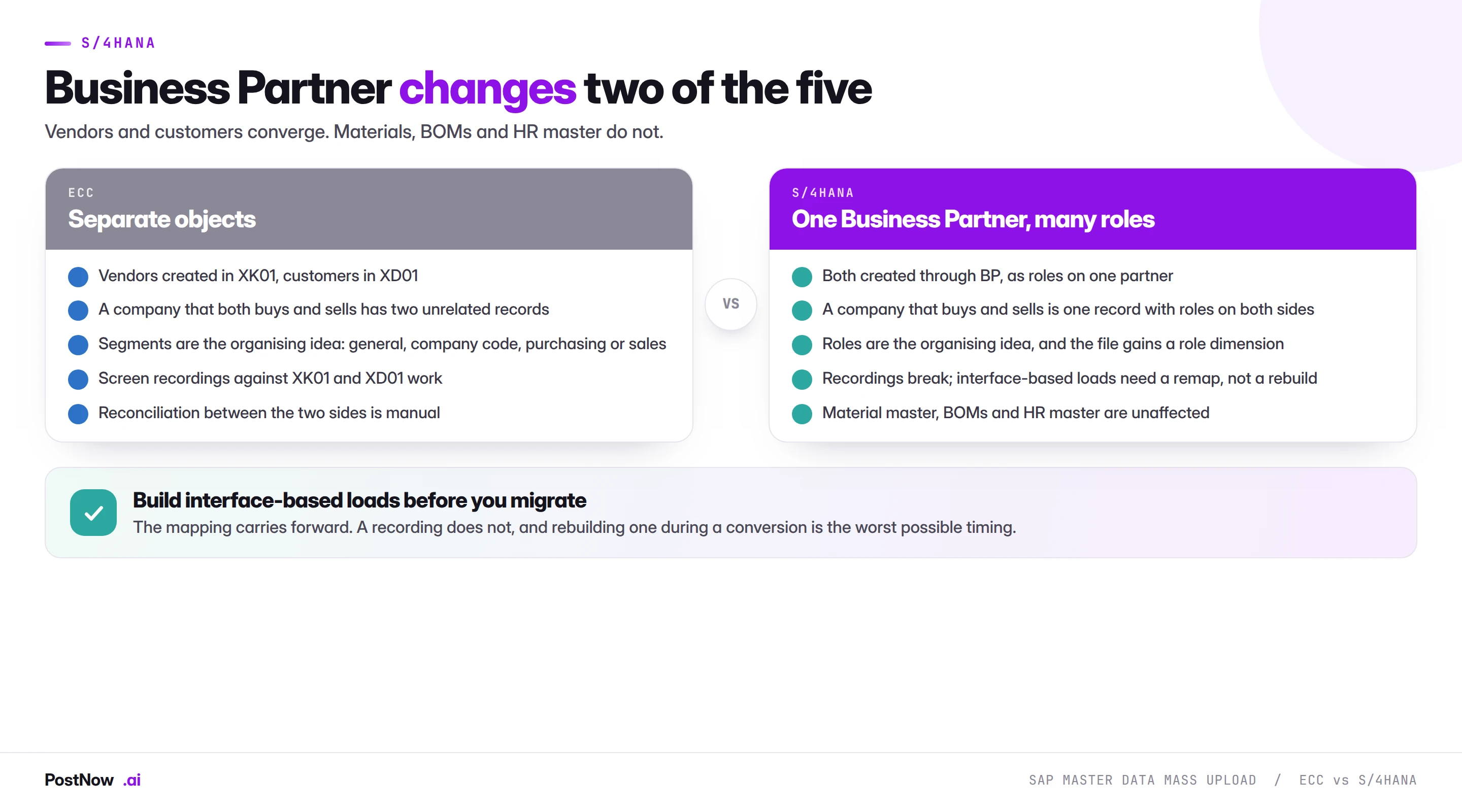
The headline master data change in S/4HANA is the Business Partner consolidation, and it affects exactly two of the five objects on this page.
Vendors and customers converge. Both become roles carried by a Business Partner rather than separate objects with separate transactions. A company that both buys from you and sells to you becomes one record with roles on both sides, which is a genuine improvement and worth planning for rather than migrating around. Files built for XK01 and XD01 contain the right data and map to roles instead of segments.
Material master, BOMs and HR master are structurally unchanged. Field lengths extend, most visibly the material number, and the aggregate tables behind stock are simplified. The segment model a mass load relies on works as it did.
The interfaces survive; recordings do not. This is the practical argument that appears on every page in this cluster, and it is sharpest here. A mapped load through a published interface needs a remap after conversion. A screen recording built against the classic transactions needs rebuilding, and rebuilding it during a conversion is the worst possible timing. If a migration is on your roadmap, building master data loads through interfaces now is preparation rather than overhead.
Identifiers, and the formatting that silently breaks loads
Every master data object is found by a key, and the way spreadsheets treat those keys causes a disproportionate share of failures across all five objects.
Leading zeros. SAP stores numeric identifiers padded: a material displayed as 100234 may be 000000000000100234 internally, and the same applies to vendors, customers and cost centres. A spreadsheet column formatted as a number destroys the padding silently, and the error says the record does not exist. Store identifier columns as text and verify a known value before every run.
Trailing whitespace. A cost centre of "CC-1000 " is not "CC-1000". Whitespace survives copy-paste, is invisible on screen, and produces validation failures that read as missing master data. Trim every key column as routine rather than as troubleshooting.
Case sensitivity. Alphanumeric identifier schemes are usually case sensitive, so a file that has passed through a system which upper-cased everything will fail against records created in mixed case.
Locale and separators. A file built in one regional setting and opened in another can reinterpret numbers and dates in ways that change values by orders of magnitude. This matters most on multi-entity programmes where files cross borders between preparation and loading.
Mass upload as a data quality instrument
There is a use for these techniques that has nothing to do with loading, and it is worth knowing because it is often the easiest way to start.
A validation pass run against an existing population, with no intention of writing anything, produces a coverage report. Materials not extended where they should be, vendors missing purchasing data, customers without sales areas, records referencing configuration that no longer exists. All of it surfaces in bulk rather than one complaint at a time.
Three things make this valuable beyond the obvious:
- It is risk free. Nothing is written, so it needs no approval and can be run against production without ceremony.
- It quantifies a problem that is usually anecdotal. "Our vendor data is messy" becomes "eleven per cent of active vendors have no purchasing segment", which is a number somebody can act on.
- It builds the mapping you will need anyway. The work of matching columns to fields is the same whether you are reading or writing, so a quality assessment is most of a load already built.
Teams that are nervous about mass loading into production frequently find this is the acceptable first step. It demonstrates the mapping is correct, produces something useful immediately, and turns the eventual write into a much smaller conversation.
Governance: why master data is scrutinised more
Master data usually carries the tightest approval regime of anything in an SAP system, and mass loading touches a control framework designed around individual maintenance.
- Change documents still happen. A record written through a standard interface produces the same change documents as manual maintenance. Mass upload does not create a blind spot, and saying so early usually shortens the governance conversation considerably.
- Approve the file, not the records. A spreadsheet showing which records, which field, from what to what is a better review object than four thousand individual approvals, and it is reviewable in minutes.
- Run as a named user. With that person's authorisations, so the load can only touch what they could already maintain. Shared accounts remove the trail that makes the run defensible.
- Separate the requester from the operator. The business supplies the file, somebody else runs it. Easier to evidence with one artefact than with manual entry.
- Keep the before extract. It is simultaneously the rollback and the evidence, and it costs one step to produce.
- Reconcile afterwards. A fresh extract compared to the intended state, confirming that what changed is what was meant to change and nothing else moved.
Teams often expect resistance from data governance on mass master data work and meet the opposite, because the evidence is better than the process it replaces. Four thousand manual changes leave four thousand change documents to inspect one at a time. One file leaves a reviewable artefact showing input, output and the link between them.
Sequencing a master data programme
Master data objects depend on each other, and a restructure is almost never one load. The dependency chain determines the order and slipping one link slips everything behind it.
- Configuration before data. Account groups, material types, categories and number ranges are transports, not loads, and they have their own lead time.
- Parents before children. Profit centres before cost centres, hierarchy nodes before the records that sit in them, components before the BOMs that consume them.
- Client level before organisational level. A material must exist before it can be extended to a plant; a vendor before it gains a company code segment.
- Creates before extends before changes. The record exists, then it reaches the right organisational units, then its fields are tuned.
- Master data before transactions. Purchase orders reference materials and vendors; sales orders reference customers. Every transactional load in this cluster has a master data prerequisite.
Drawing this chain before the first run is what turns a restructure from a series of surprises into a plan. It also produces the honest timeline, which is usually longer than the one in the project schedule.
Volume, throughput, and where the time actually goes
Master data loads are light work per record. The constraints are almost never throughput.
- Screening is the slow stage. Comparing a large population against an existing base takes longer than writing the records, and it should. Run it once across the full file before splitting into batches.
- Lock contention drives the failure rate. Schedule around users and background jobs rather than fighting them, and design for a second pass.
- Row counts multiply. Records times organisational units times segments grows quickly, and a list that looked like four hundred records can be twenty thousand rows.
- Batch by organisational unit. Plant, company code or sales area. Homogeneous failure modes and a batch describable in one sentence.
- Number range capacity. Internal ranges have finite intervals, and a range with sixty numbers left fails partway through a four hundred record run.
Templates are worth more here than anywhere else
Master data requests recur more predictably than transactional ones, because the triggers are structural: a new site, a new entity, an onboarding process, a policy sweep. That makes the template the asset rather than the individual run.
- Give the template to the requester. If the business submits the file in the right shape with the right values, most of the preparation disappears at source.
- One template per object per mode. A create template and a change template for the same object are different documents and should not be one.
- Make the old value column mandatory on change templates. So nobody has to remember to add it.
- Encode the configured value rules. Which business type maps to which account group, which function to which category.
- Record what configuration it was proven against. Which plants, company codes and organisational units, so nobody assumes coverage the template has never had.
- Name an owner. Configuration drifts, and an unowned template fails quietly six months later.
Mistakes that recur across every master data object
- Mixing create, change and extend in one file. Half the rows fail with errors that contradict each other.
- Running a change without extracting first. The only mistake on this list that cannot be undone.
- Mismatching row count to organisational level. Produces a change that landed in some units and not others, invisibly.
- Assuming a segment exists. A change updates a segment and never creates one.
- Screening duplicates on name. Names are typed inconsistently by design.
- Preparing against development configuration. Values valid in a sandbox fail in production when the transport never arrived.
- Treating lock errors as data errors. Wait and re-send rather than investigating.
- Loading master data after the transactions that need it. Every transactional run in this cluster has a master data prerequisite.
The master data guides
Each object has its own guide covering field mappings, error codes and the edge cases specific to it.
- SAP mass material master update (MM02). View-based structure, why the extract comes first, and matching row counts to plant-level fields.
- SAP mass vendor master upload (XK01). Three segments, duplicate screening on tax number and bank details, and the account group decision.
- SAP mass customer master upload (XD01). Sales areas, partner functions, credit limits, and why created is not the same as usable.
- SAP mass BOM upload (CS01). Structural data where components must exist before the parent that consumes them.
- SAP mass HR master data upload (PA30). Infotypes, time dependency, and the tightest access controls of the five.
- SAP mass cost center creation (KS01). Controlling master data, covered on the finance bridge but loaded the same way.
Who owns master data
Master data ownership is contested in most organisations in a way transactional ownership is not, and a mass load surfaces the ambiguity immediately.
The business function owns the meaning. What a material group signifies, which supplier belongs in which account group, what a cost centre represents. This is domain knowledge and cannot be inferred from a spreadsheet layout.
Data governance owns the standard. Naming conventions, mandatory fields, approval thresholds and what constitutes an acceptable duplicate check. Where this function exists, involve it in the first run rather than the third.
The operator owns the mechanics. Mode, organisational level, mapping and validation. These are technical decisions with business consequences.
Everyone downstream owns the complaint. Which is the problem: the people who discover a master data error are rarely the people who made it, and the gap between cause and symptom is usually weeks. This is precisely why the before-and-after file matters so much. It is the only artefact that connects a change to its consequence.
The handover that works is a template the business fills in, a screening and validation pass whose results go back to them before anything is written, and a completed file with old and new values retained. Three steps, each with a name against it.
The complete master data mass upload reference
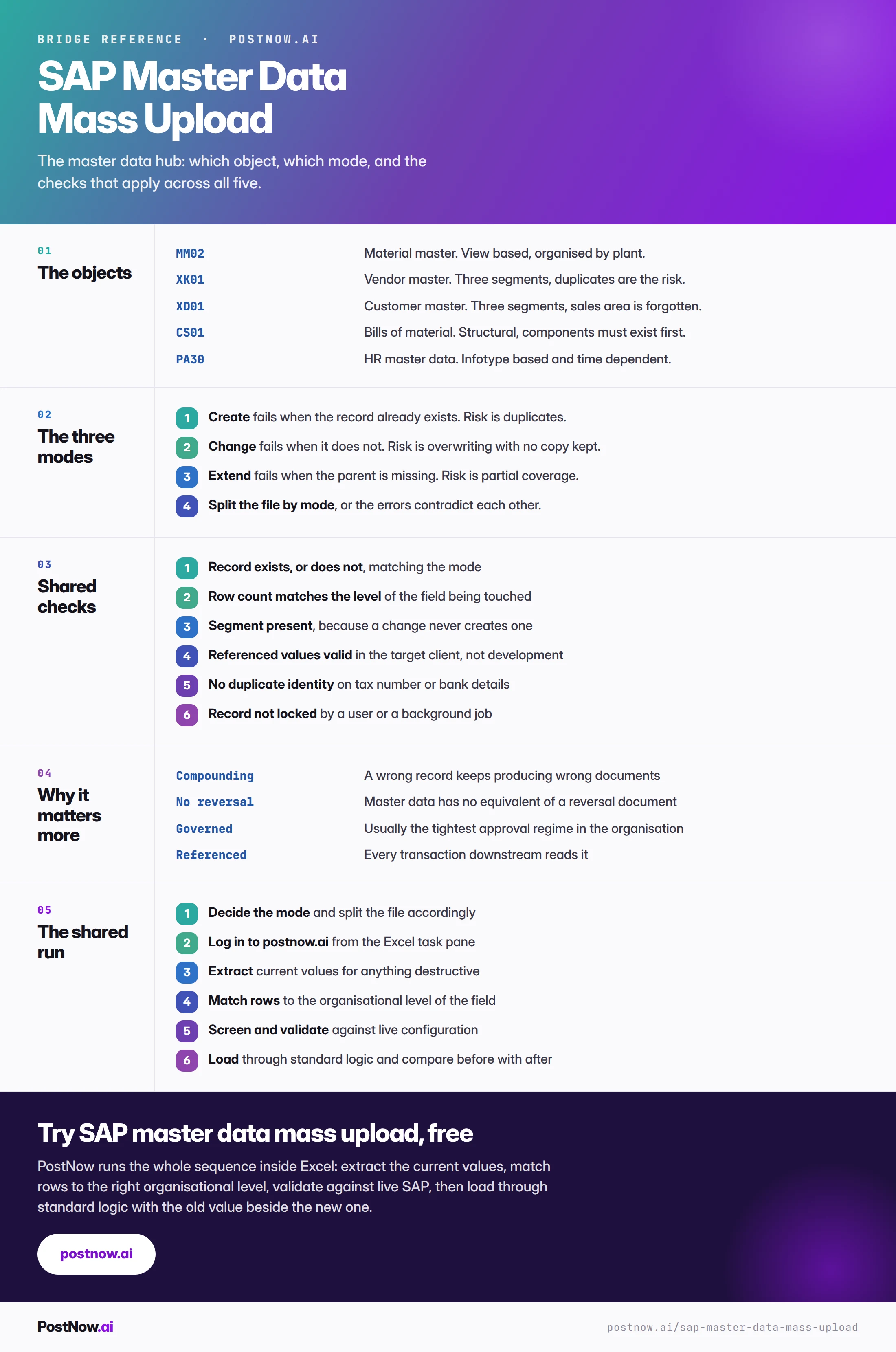
The reference sheet below collects everything above into one image you can share before a master data programme.
Go deeper
SAP mass upload
The pillar guide covering methods, validation, error handling and governance across every module.
Material and vendor guides
The two highest-volume master data objects, with their field mappings and error codes.
Customer and structural data
Customers, bills of material and HR master, where the segment models differ most.
Methods and alternatives
How BAPI, screen recording and LSMW compare, and what survives an S/4HANA conversion.