SAP HR master data upload writes many employee infotype records into SAP in one controlled run. Loading HR master data through PA30 is not like loading a material or a customer: infotypes are time-sliced, and each one has a time constraint that governs whether two records may coexist, must abut, or replace one another as their validity dates meet. So a mass load is really about placing records on a timeline, not inserting rows — and a backdated change can trigger a payroll recalculation for periods already run. Add the obligations that come with personal data, and the discipline matters. This guide covers time constraints, delimiting, retroactivity and how to load a population of infotypes without corrupting anyone's history.
- Check the time constraint first. It decides whether records may overlap and what happens to the one already there.
- Delimiting is silent. On constraints 1 and 2, a new record ends the previous one without erroring, so a wrong date destroys a period you meant to keep.
- Dates are the key, not attributes. Map validity periods before values, because a correct value in the wrong period is still wrong.
- Backdated records trigger retroactive payroll. A large file dated in closed periods can recalculate hundreds of employees.
- The file is a personal data extract. Access, storage and retention are governed from the moment it exists.
Writing an infotype places a record on a timeline
SAP mass HR master data upload is the practice of creating or changing many infotype records in one controlled run from a structured file, instead of maintaining each employee through PA30. Infotypes hold everything SAP knows about a person: organisational assignment, personal details, addresses, basic pay, bank details and recurring payments, each stored as a record with a validity period.
Two things make this different from every other object in the master data cluster, and both need understanding before a file is built.
Every record is time dependent by design. Not optionally, like cost centres, but structurally. An infotype record is identified by employee, infotype, subtype and validity period together, so the dates are part of the key rather than attributes of it.
The data is personal. Which changes the access controls, the retention obligations, and how the file itself should be treated from the moment it is extracted.
Time constraints decide what may coexist
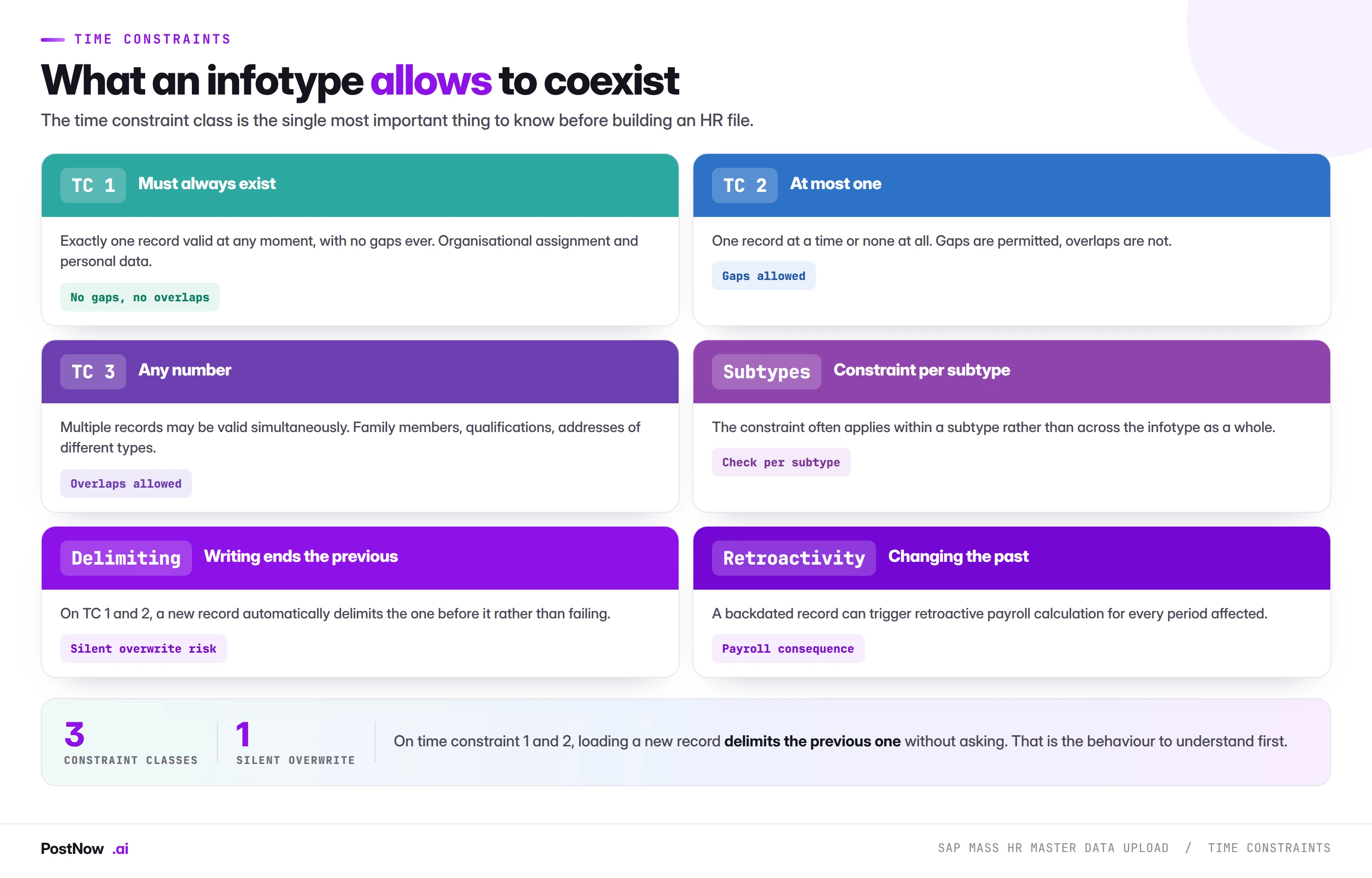
The time constraint class is the single most important thing to know about an infotype before building a file for it, and it is the thing most often skipped.
Time constraint 1: must always exist. Exactly one record valid at any moment, with no gaps ever. Organisational assignment and personal data work this way, because an employee cannot meaningfully exist without them. A gap is not permitted, so SAP will not let you create one.
Time constraint 2: at most one. One record at a time or none at all. Gaps are permitted, overlaps are not. Many optional infotypes work this way.
Time constraint 3: any number. Multiple records may be valid simultaneously. Family members, qualifications, and addresses of different types all need this, because an employee legitimately has several at once.
The constraint frequently applies within a subtype rather than across the infotype as a whole. An employee may have a permanent address and a temporary address simultaneously because they are different subtypes, while having two permanent addresses at once is not permitted.
Delimiting: the behaviour that catches everyone
On time constraints 1 and 2, writing a new record does not fail when one already exists. It delimits the previous record, setting its valid-to date to the day before the new one begins.
That is correct behaviour and it is exactly what you want when recording a genuine change: an employee moves cost centre on the first of July, so the old assignment ends on the thirtieth of June. It becomes a problem in a mass run because it happens silently. A file with a wrong valid-from date does not error; it ends a record that should have continued.
Dates key an infotype row; the values come second
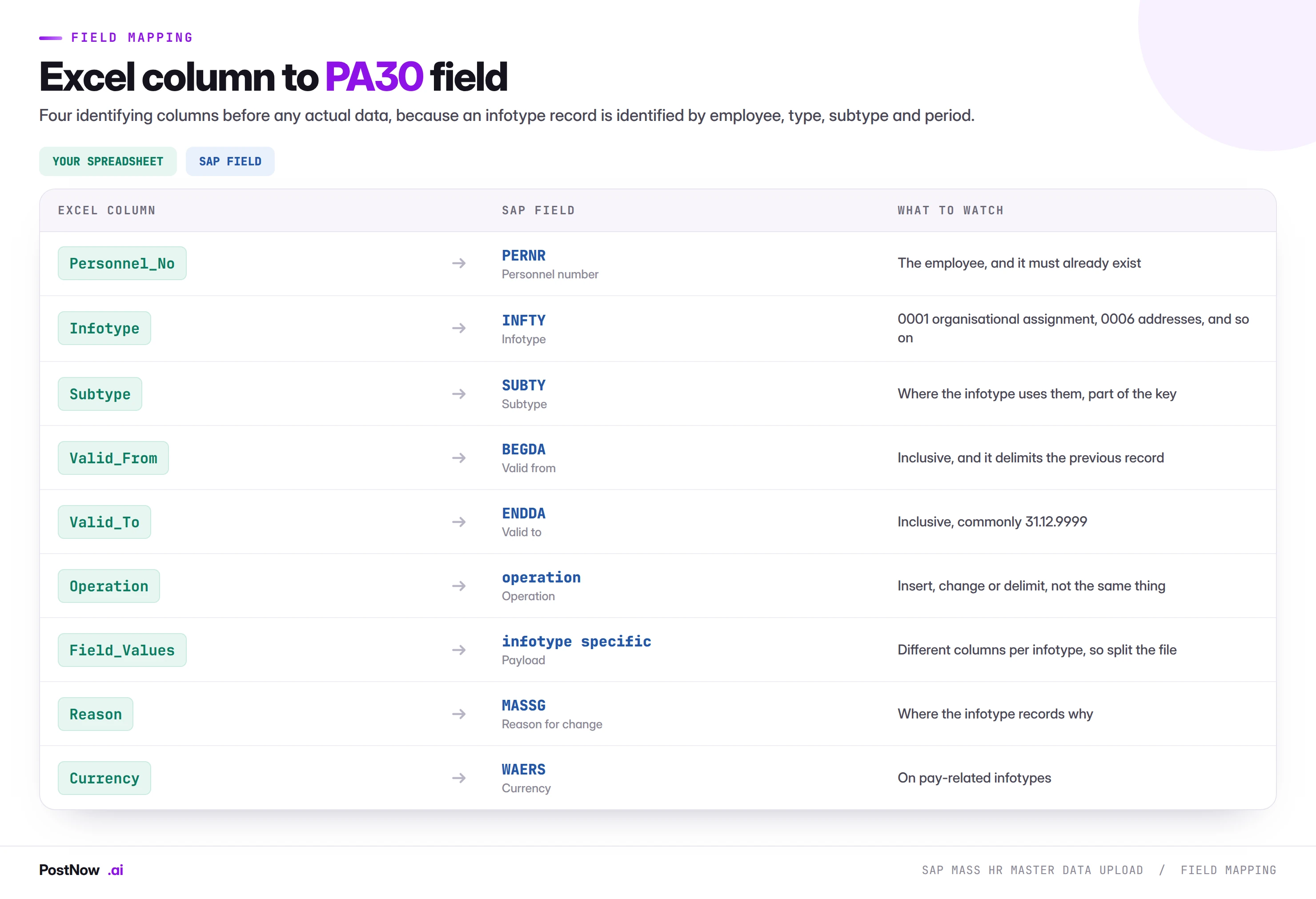
Four identifying columns before any actual data, because an infotype record is identified by the combination rather than by a single key.
One file per infotype
Different infotypes carry entirely different fields. Basic pay has wage types and amounts, addresses have street and postcode, bank details have account numbers and sort codes. A file attempting to serve several infotypes is mostly empty columns and impossible to review.
Split by infotype, always. Where several infotypes must be loaded for the same population, that is several runs in a defined order, not one file.
Operation is not implied
Insert, change and delimit are different operations with different effects, and the file should state which. An insert creates a new record. A change modifies an existing one in place. A delimit ends a record without creating anything.
Assuming insert for everything is how a correction becomes a new validity segment rather than a fix to the existing one, which leaves the wrong value visible for the earlier period.
Dates are the key, not attributes
Worth repeating because it drives file design. Valid-from and valid-to are not two more columns to populate. They determine which record you are creating and what happens to the records around it. A file where the dates were filled in last, after the values, has usually got them wrong.
Retroactivity and payroll
This is the consequence that makes HR loads different from everything else in this cluster.
Where payroll has already run for a period, changing an infotype record valid in that period triggers retroactive accounting. Payroll recalculates the affected periods and produces differences that flow into the next payroll run.
That is correct behaviour: a backdated pay change should produce back pay. It is also a consequence that a mass load can produce at scale without anybody intending it.
- A backdated file can trigger recalculation for hundreds of employees. Which payroll will process, and which will appear as differences in the next run.
- The earliest retroactive accounting date limits how far back changes reach. Records dated before it may be rejected or handled differently depending on configuration.
- Payroll and HR administration need to know before the run, not after. A large retroactive population landing unannounced in a payroll cycle is a genuine problem for the team running it.
The practical rule is that any file containing dates in closed payroll periods deserves a conversation with payroll before it runs, regardless of how routine the change looks.
Personal data changes the obligations
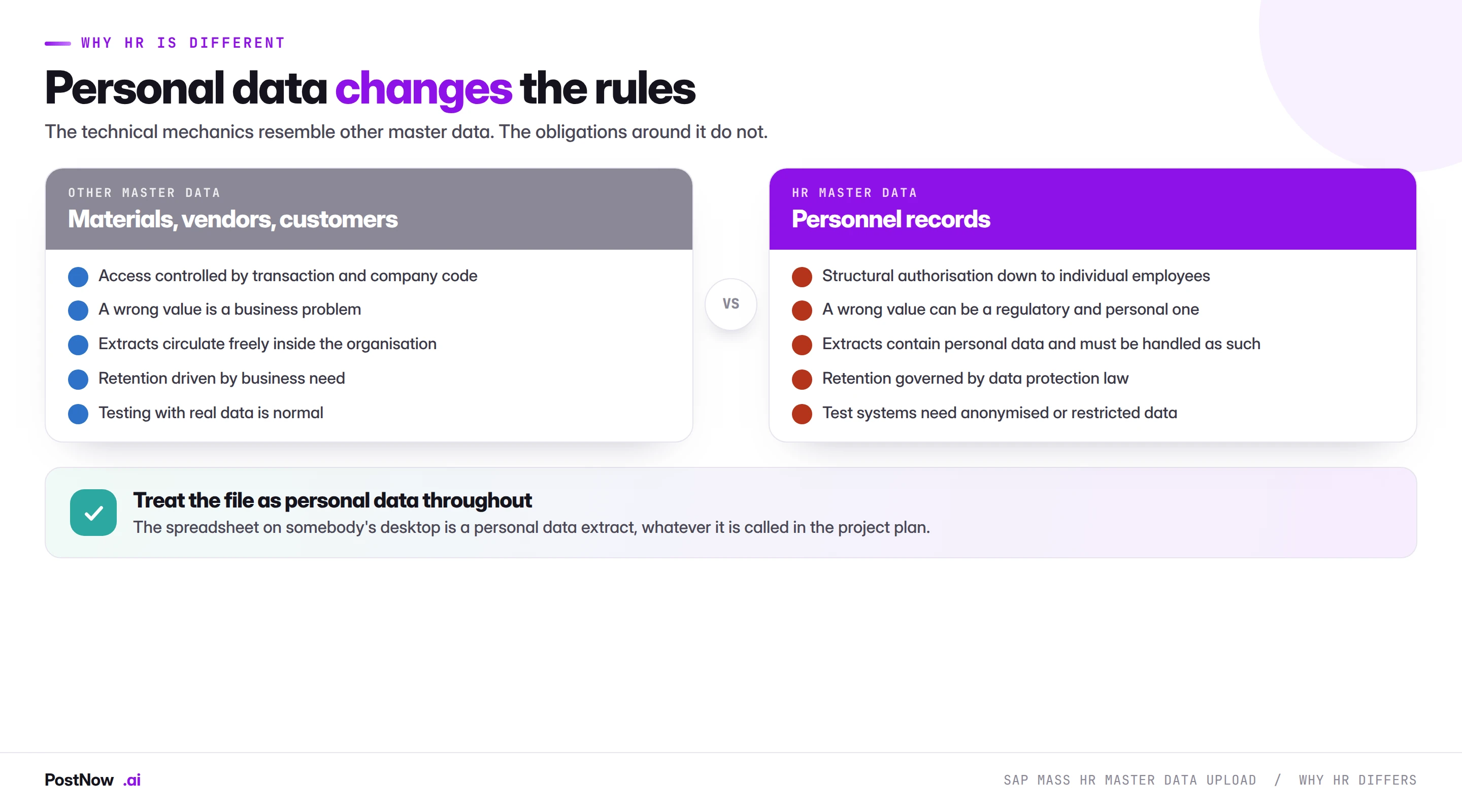
The technical mechanics of an HR load resemble any other master data load. The obligations around the file do not, and treating an HR extract like a material master extract is the mistake that matters most here.
Authorisation is structural. HR uses authorisation concepts that go beyond transaction and organisational unit, controlling access down to individual employees through personnel area, employee group and organisational structure. A load runs under the operator's authorisations, which means a file covering employees they cannot see will partially fail, and that is the control working correctly.
The file is a personal data extract. Whatever the project plan calls it. It contains names, addresses, pay and bank details, sitting on somebody's desktop or in a shared folder. Where it is stored, who can open it, and when it is deleted are all governed rather than matters of convenience.
Test data needs thought. Copying production HR data into a test system is a data transfer that most data protection frameworks have something to say about. Anonymised or synthetic data is the usual answer, and it needs preparing rather than assuming.
Retention applies to the file as well as the system. The completed load file is evidence and it is also personal data, which means it has a retention period rather than living indefinitely in a project folder.
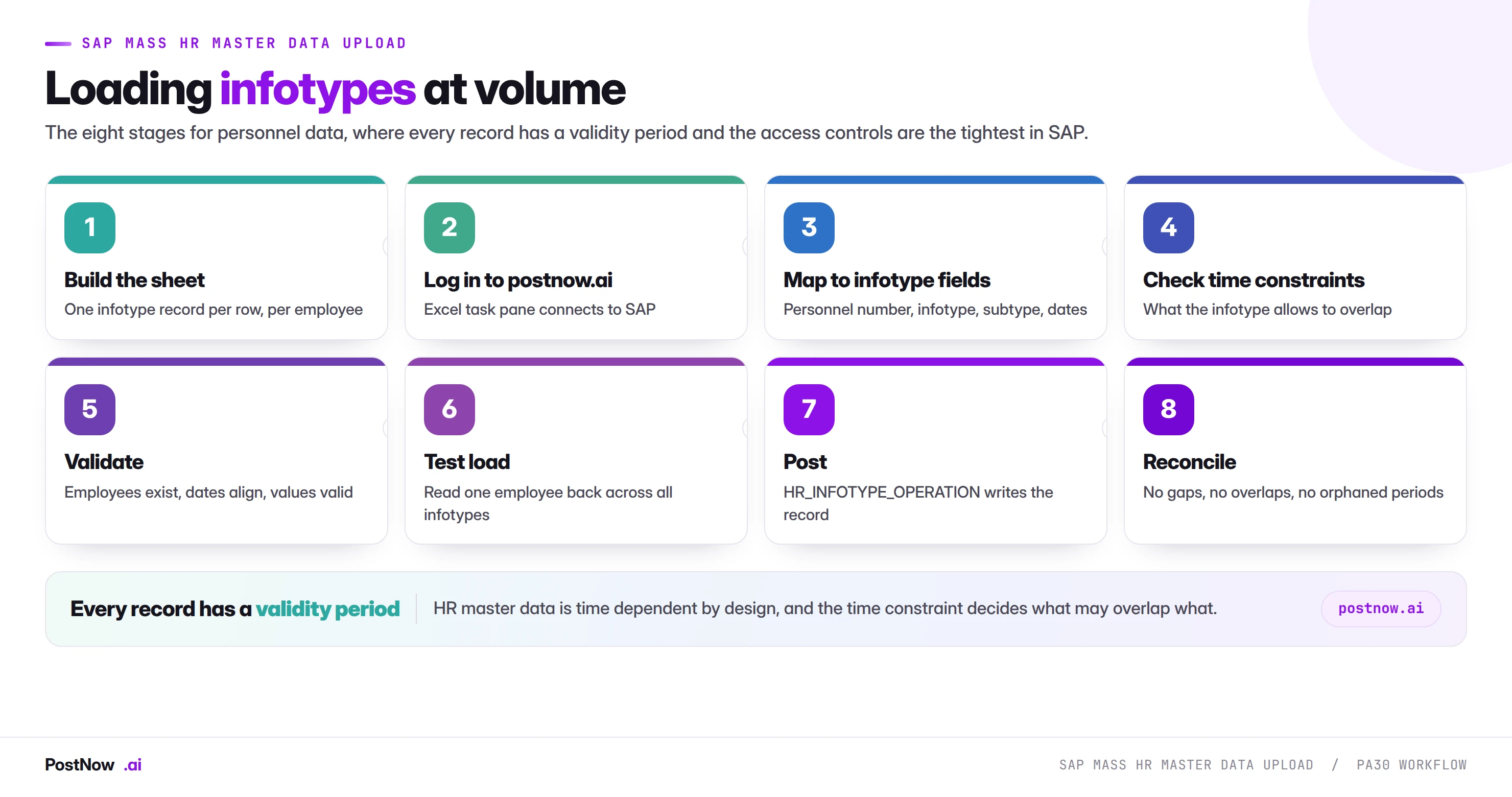
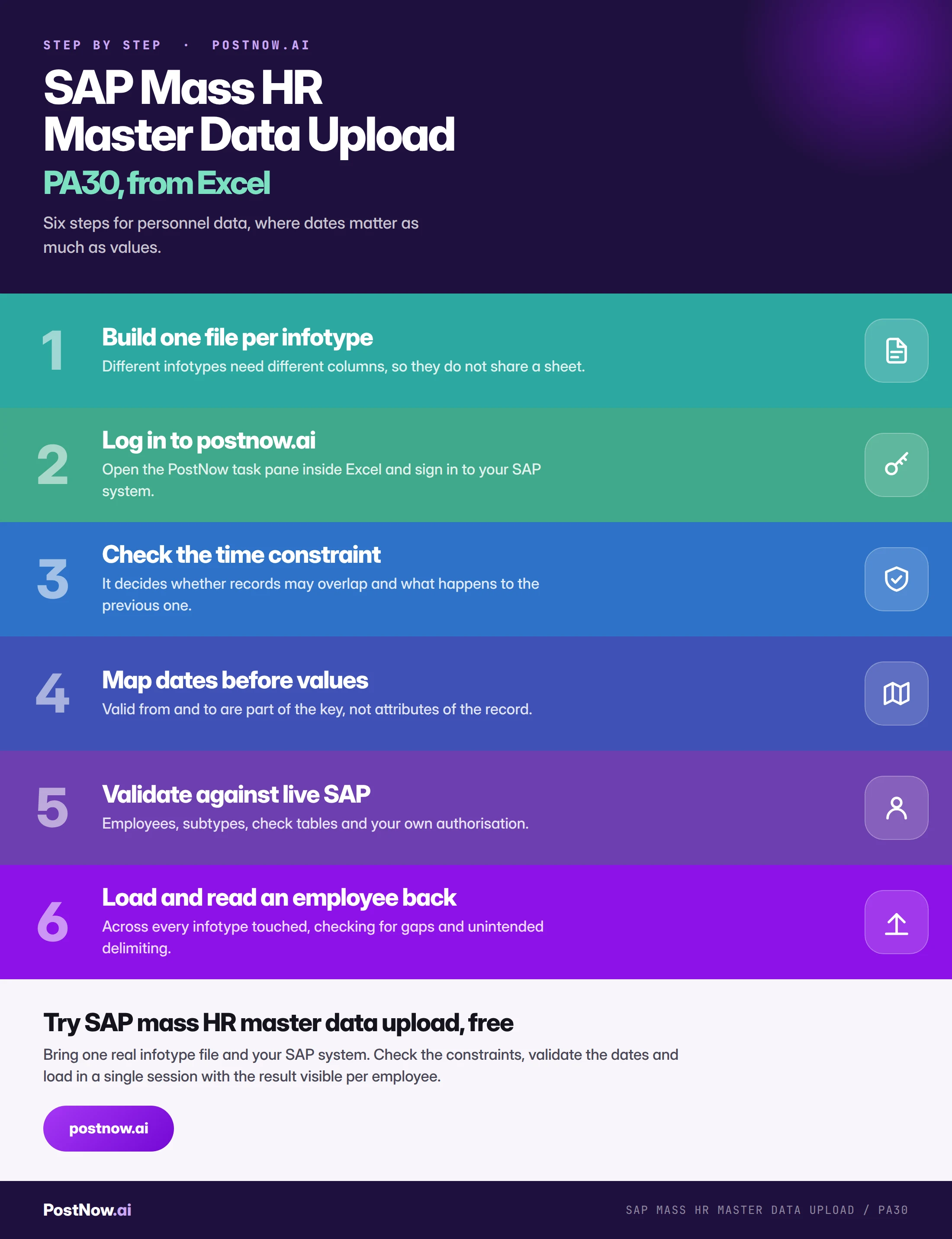
Load dates before values, one infotype file at a time
Build one file per infotype
Personnel number, infotype, subtype, validity dates and the fields that infotype carries. Never a combined sheet, because different infotypes share almost no columns.
Extract the current records
For anything that will delimit or change an existing record. This is the same discipline the mass change pillar describes, and it matters more here because delimiting is silent.
Map dates before values
Valid-from and valid-to are part of the key. Get them right first, then the payload, because a correct value in the wrong period is still wrong.
Validate infotypes against the timeline
Employees exist and are hired by the date, subtypes are configured, values exist in their check tables, the time constraint is respected, and your authorisation covers the whole population.
Test load and read an employee back
Not a log. Open one employee in PA20 and look across every infotype the run touched, checking for gaps, unintended delimiting and periods that do not join up.
Write through standard logic
The run calls HR_INFOTYPE_OPERATION, SAP's published interface for infotype maintenance. Every check PA30 applies still applies, including time constraint enforcement and authorisation.
Read the timeline back
Compare a fresh extract against the intended state. The question is not only whether values are right but whether the periods form a continuous, non-overlapping timeline where the constraint requires one.
A time-constraint clash stays silent until payroll runs
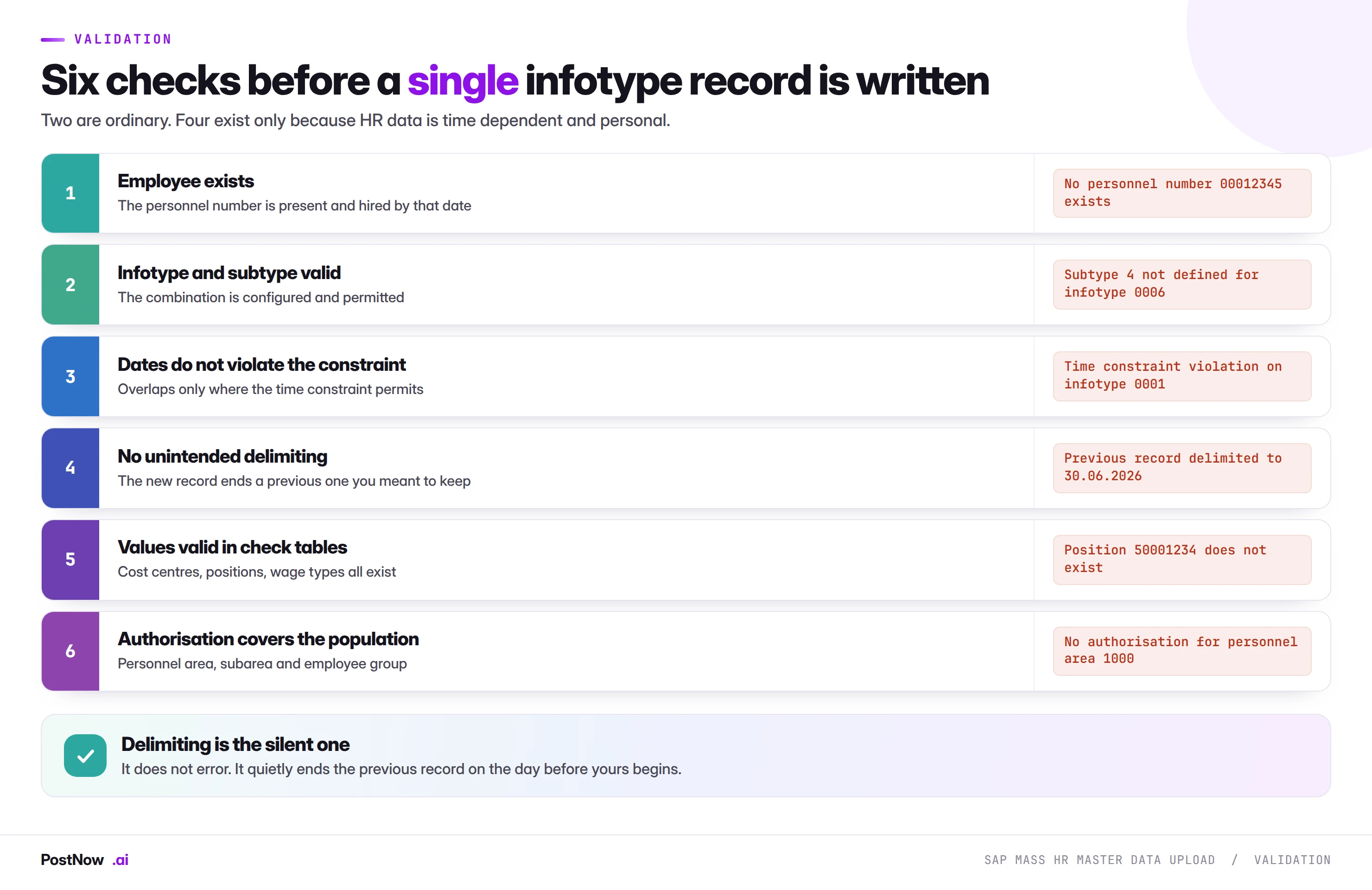
Two deserve expanding.
Employee hired by that date. A record cannot be valid before the employee exists. On a file loading historical data for a population with varying hire dates, this fails for the subset hired later, which looks random and is entirely systematic.
Authorisation covers the population. HR authorisation is finer-grained than most, and a file spanning personnel areas the operator cannot maintain will partially succeed. Partial success on an HR load is worse than outright failure, because the result is an inconsistent population that looks complete.
Infotypes go in through PA30's own validation
PostNow writes infotype columns as dated records
HR data arrives from payroll providers, benefits platforms and acquisitions as spreadsheets. PostNow adds a task pane to Excel, connects with your own credentials and HR authorisations, and validates dates and constraints before anything is written.
Time constraint checked before a record can delimit another.
Validity periods validated as keys rather than as values.
Runs under your own HR authorisations, employee by employee.
The result written back per row, per employee.
HR volume spikes at hire waves, reorganisations and year-end
- Annual pay review. Basic pay records for a whole population, effective on one date, prepared in a spreadsheet by reward.
- Reorganisation. Organisational assignment changes when departments merge, split or move, affecting cost centre and position on every employee involved.
- Acquisition and TUPE transfers. An acquired population loaded across many infotypes, usually against a fixed transfer date.
- Benefits enrolment. Recurring payments and deductions from a benefits platform, refreshed periodically.
- Bank detail refreshes. Where a banking change affects a population rather than an individual.
- Data cleansing. The output of an audit, arriving as a list of corrections across mixed infotypes.
- System migration. Historical infotype records carried into SAP, which is the largest and most date-sensitive case of all.
What these share is that the data originates outside SAP, with reward, HR operations or a third-party provider, and arrives as a file because that is what those teams work in.
Personnel actions versus individual infotypes
There is a second way to change HR data, and choosing wrongly between them produces incomplete records that look fine.
A personnel action is a defined sequence of infotypes maintained together for a business event: hiring, leaving, promotion, transfer. The action guides the user through every infotype that event requires, in order, and records why the change happened.
Maintaining individual infotypes touches one at a time, which is right for a correction and wrong for an event.
The distinction matters for mass loading because business events rarely affect one infotype. A reorganisation changes organisational assignment, and depending on configuration it may also need position, cost centre and possibly pay. Loading only the organisational assignment leaves an employee whose record is internally inconsistent, and nothing errors because each individual record is valid.
- Ask which infotypes the event should touch. HR operations knows; the file usually only carries one.
- Load them as a sequence, in the order the action would. Some infotypes depend on others, so the order is not arbitrary.
- Carry the action reason where the infotype records it. It is what makes reporting on why people moved possible later.
- Consider whether a mass load is right at all. For a genuine hiring or leaving population, the action exists because it enforces completeness, and bypassing it to load faster removes that.
The honest position is that infotype-level loading suits corrections, refreshes and bulk parameter changes. Life-cycle events are better served by the action, and where volume makes that impractical the file has to reproduce what the action would have covered.
Organisational management sits underneath
Infotype 0001, organisational assignment, references objects that live in a different part of SAP, and those objects have to exist first.
Positions, jobs and organisational units are organisational management objects with their own maintenance, their own validity periods and their own relationships. An employee is assigned to a position, the position belongs to an organisational unit, and the unit sits in a hierarchy.
Three consequences for a mass load:
The prerequisite chain is real. A reorganisation file assigning employees to new positions fails if those positions do not exist yet, and creating them is a separate exercise in a different transaction. This is the same sequencing dependency the cost centre guide describes for hierarchy nodes.
Validity has to align. Positions are time dependent, so assigning an employee to a position from a date before that position exists fails in a way that reads as though the position is missing entirely.
Relationships carry defaults. Cost centre and organisational unit frequently derive from the position rather than being stated per employee. A file supplying them explicitly may conflict with what the position implies, and which wins depends on configuration.
Before any reorganisation load, the question worth asking is whether the target structure exists in organisational management. If it does not, the HR file is the second run rather than the first.
The wrong operation overwrites history instead of adding to it
- Not knowing the time constraint before building the file. It determines whether records may overlap and what happens to the previous one.
- Unintended delimiting. A wrong valid-from date silently ends a record that should have continued.
- Combining infotypes in one file. Different infotypes share almost no columns, so the sheet is mostly empty and unreviewable.
- Treating dates as attributes. They are part of the key and should be mapped first.
- Assuming insert for every row. Insert, change and delimit are different operations with different effects.
- Loading records before the employee is hired. Fails for the subset hired later, which looks random.
- Triggering retroactive payroll without warning anyone. A backdated file can recalculate hundreds of employees.
- Treating the extract as an ordinary spreadsheet. It is a personal data extract from the moment it is created.
HR master data LSMW handles historical and migration loads
The largest and most date-sensitive HR load is a migration, and it has rules the routine cases do not.
How much history to carry is a decision, not a default. Loading every historical infotype record from a legacy system reproduces a complete timeline and multiplies the volume enormously. Loading only current records is far smaller and loses the history that reporting, seniority calculation and legal obligations may depend on. That choice belongs to HR and legal rather than to the project.
Time constraint 1 infotypes must be continuous from the hire date. Which means historical records have to join up exactly, with no gaps anywhere between hire and today. A partial history for these infotypes is not a smaller version of a full one; it is an invalid one.
Load chronologically per employee. Because each record delimits the one before it, loading out of order produces a timeline that is repeatedly rewritten and may not end where intended.
Suppress retroactivity deliberately. A migration loading years of history would otherwise trigger retroactive payroll for every period. The earliest retroactive accounting date is what controls this, and setting it correctly before the load is the difference between a clean migration and a payroll run nobody can reconcile.
Reconcile per employee, not in aggregate. A count of records loaded proves nothing about whether any individual timeline is continuous. Reading a sample of employees end to end is the only check that does.
PA30 infotypes, constraints and dates together
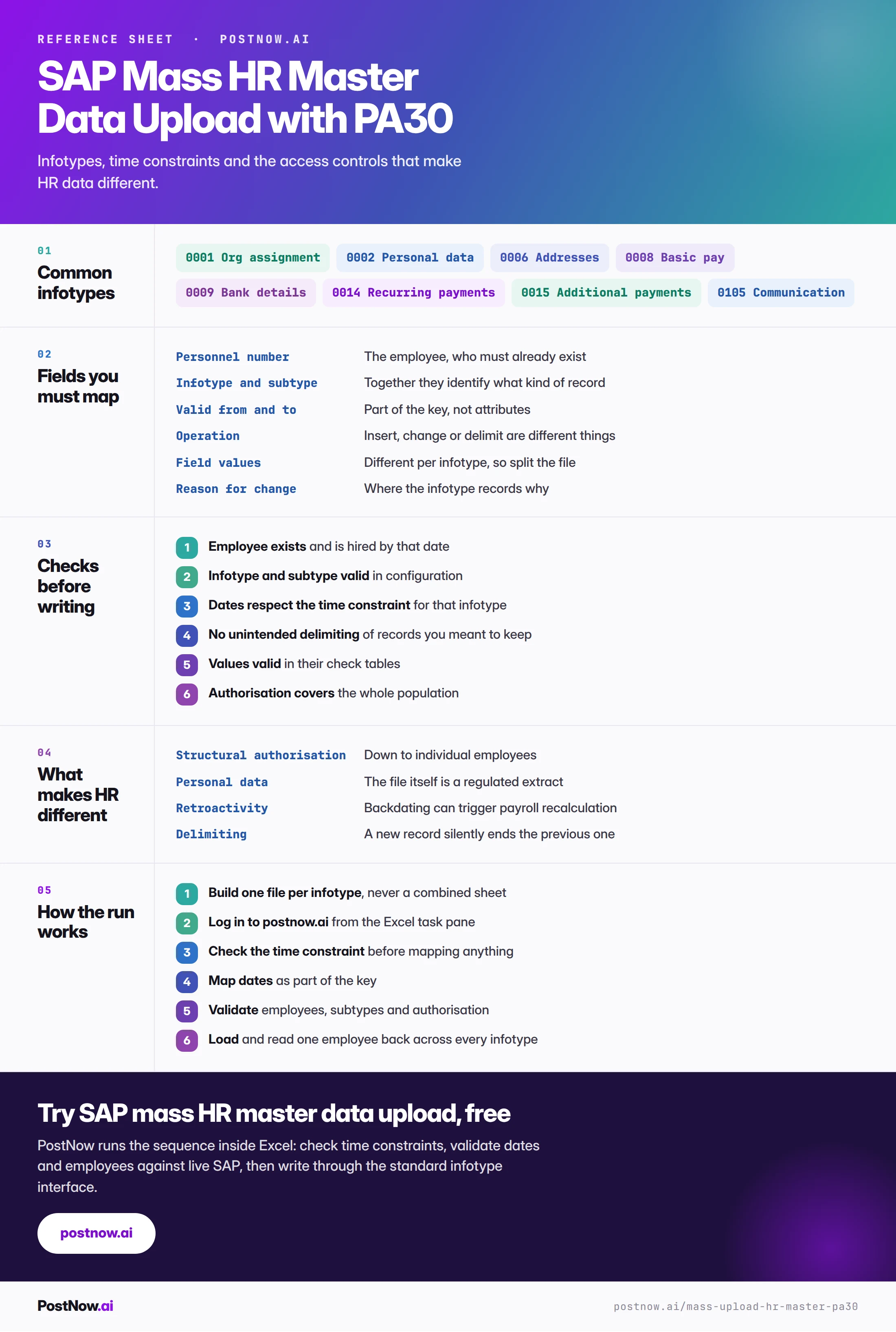
The reference sheet below collects everything above into one image you can share before an HR load.
HR uploads that usually run together
SAP master data mass upload
The hub covering create, change and extend across every master data object.
SAP mass change
Why extraction comes first for anything that overwrites, including delimiting.
SAP mass upload
The pillar guide covering validation, error handling and governance.