In short

SAP Mass Material Master Update with MM02

SAP mass material master update means changing fields on many existing materials in one controlled run from a file, instead of editing each record in MM02. Because a change overwrites a value somebody relies on and there is no reversal transaction, the current values are extracted first and the changes are written through BAPI_MATERIAL_SAVEDATA.

  • Extract before you change. There is no undo for material master, so the extract is the only rollback that exists.
  • Match file granularity to the field level. Client-level fields need one row per material; plant-level fields need one row per material per plant.
  • A change updates a view, it never creates one. Materials needing a view extended are a separate MM01 run that happens first.
  • Store material numbers as text. Leading zeros vanish silently in a numeric column and the error says the material does not exist.
  • Lock errors are timing, not data. Re-send the failed rows once the lock clears.
Diagram The eight stages that take a spreadsheet of material changes into SAP, starting with an extract.

Why material master changes arrive in bulk

Material master is the most widely referenced object in an SAP system. Purchasing reads it, planning reads it, warehousing reads it, costing reads it, and every one of those functions occasionally needs a field changed across a population rather than on one record.

The requests have a recognisable shape. Planning wants MRP types changed for a product family after a policy review. Purchasing wants purchasing groups reassigned because someone left. Finance wants valuation classes corrected after an account determination change. Logistics wants storage conditions set for a temperature-controlled range. None of these is unusual and none of them involves ten materials.

What makes them painful is the shape of MM02 itself. The transaction is organised by view, and views are organised by organisational level. Changing one field means selecting the material, selecting the right view, selecting the right plant, changing the field, saving, and starting again. It is perhaps forty seconds when everything is known. Four thousand materials is a month of somebody's life.

The requests that generate the volume

  • Planning parameter sweeps. MRP type, lot size, safety stock, reorder point and planned delivery time, changed across a product family after a supply review.
  • Purchasing reorganisation. Purchasing groups reassigned when responsibilities move between buyers.
  • Material group corrections. Reporting hierarchies that were set up wrong or have been restructured.
  • Valuation class changes. Driven by account determination redesign, and usually urgent because a period is closing.
  • Plant extension follow-ups. A new plant goes live and thousands of materials need plant-level fields populated.
  • Data quality remediation. The output of a governance review, arriving as a spreadsheet of exceptions.
  • S/4HANA migration preparation. Field harmonisation before a conversion, where the deadline is fixed and external.

Every one of these already exists as a spreadsheet before anyone opens SAP. The re-keying step adds no information. It only adds hours and the chance of a typo.

Views and organisational levels: why the sheet is more complex than it looks

Material master is not a flat record. It is a set of segments, each valid at a different organisational level, and understanding that structure is the difference between a mass change that works and one that fails on most rows.

The three levels that matter for almost all mass changes:

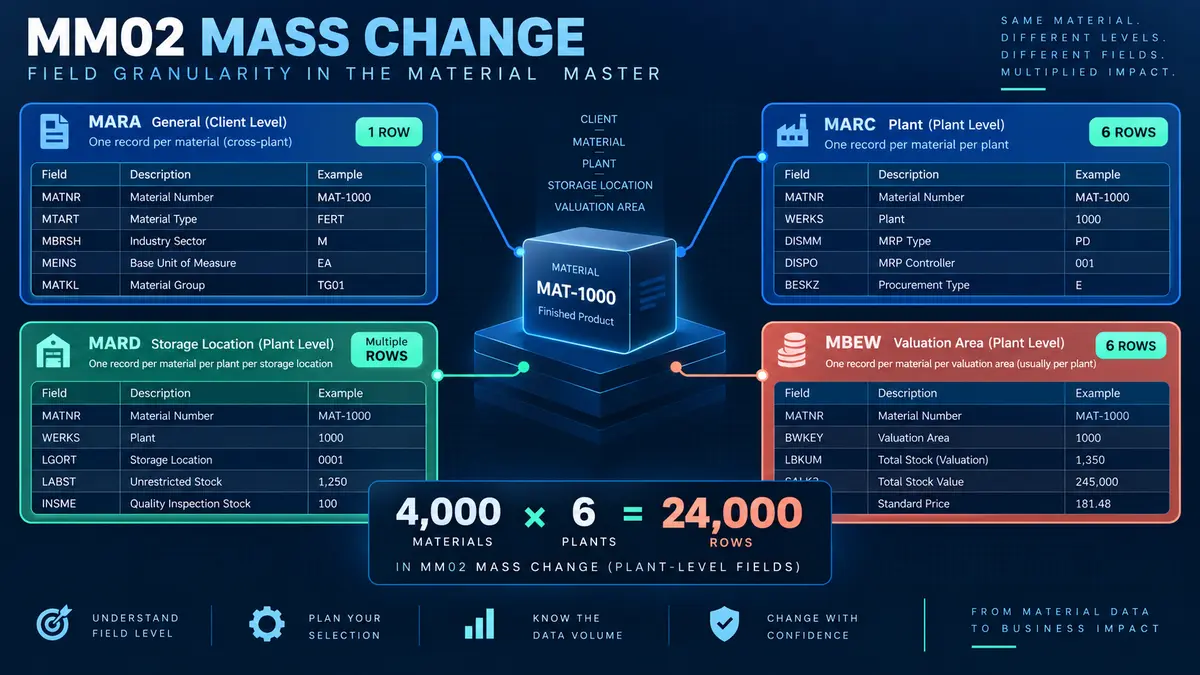
  • Client level. Fields true for the material everywhere: material number, description, base unit of measure, material group. Stored in MARA. One row per material.
  • Plant level. Fields that differ by plant: MRP type, reorder point, purchasing group, planned delivery time. Stored in MARC. One row per material per plant.
  • Storage location and valuation level. Narrower still, and relevant when the change touches stock management or valuation.

The practical consequence is that the granularity of your spreadsheet has to match the granularity of the field you are changing. A file of four thousand materials changing a material group needs four thousand rows. The same four thousand materials changing an MRP type across six plants needs twenty-four thousand rows, because the field exists once per material per plant.

Getting this wrong produces one of two failures. Too few rows and the change lands in some plants and not others, which is worse than not running it at all because the inconsistency is invisible until planning behaves oddly. Too many rows, with the same client-level field repeated per plant, and the change is applied repeatedly with the last one winning, which is harmless but signals that whoever built the file did not understand the object.

The view must already exist

This is the single most common cause of a failed material master mass change, and it surprises people every time. A mass change updates fields inside a view. It does not create the view. If a material has never had its MRP view maintained for a plant, a change to the MRP type on that plant will fail, and the message will read as though the material is missing when it plainly is not.

Extend first, then change. If part of your population needs a view created rather than updated, that is a different run using MM01 logic, and it has to happen first. Trying to do both in one file produces a partial result that is hard to reason about afterwards.

What SAP mass material master update means

SAP mass material master update is the practice of changing fields on many existing materials in one controlled run from a structured file, instead of opening MM02 and editing each record individually. The current values are extracted first, the new values are prepared in Excel, every row is validated against the live system, and the changes are written through SAP's own material master interface with a result recorded per material.

The word that matters in that definition is existing. Creating materials and changing materials look similar from a distance and behave very differently in practice. A create starts from nothing: if it fails, nothing happened. A change starts from a value someone relies on, and if it succeeds incorrectly, the old value is gone. That asymmetry drives every recommendation in this guide.

This is written for the person who has been handed a spreadsheet of four thousand materials and told that the MRP type needs to change before the next planning run.

The eight stages of an SAP mass material master update with MM02: extract current values, log in to postnow.ai, map to MM02 fields, validate, fix flagged rows, test change, post through BAPI, and reconcile.

The fields you have to map

A material master change file needs less than people expect. It needs enough to identify the record uniquely, enough to say which segment the change belongs to, and the new value.

Mapping of Excel columns to SAP MM02 fields for mass material master update: material to MATNR, plant to WERKS, MRP type to DISMM, reorder point to MINBE, purchasing group to EKGRP and material group to MATKL.
Diagram Material master is view based, so the sheet needs the view as well as the field.

Three of those columns deserve more attention.

The material number

Material numbers are stored internally with leading zeros for numeric ranges. A material displayed as 100234 may be 000000000000100234 in the table. A spreadsheet that stores the column as a number destroys the leading zeros silently, and the resulting error says the material does not exist. Store material columns as text, and check a known value before the run rather than after it.

Systems configured with alphanumeric material numbers avoid this problem and introduce a different one: case sensitivity and trailing spaces both matter, and both are invisible on screen.

The plant column

Plant is required for plant-level fields and meaningless for client-level ones. A file that carries plant on every row when the change is client level will still work, but it will apply the same change once per plant row, which inflates the run and the log for no benefit. Split the file by level when the change touches both.

The old value

This column is not required by SAP and is the most important one in the file. Carrying the current value beside the new value gives you three things at once: a validation check, because a row whose old value is unexpected is a row worth pausing on; an audit record showing exactly what changed; and a rollback file, because reversing the run means posting the old column back.

Extract before you change

A mass change is destructive. There is no undo, no reversal document, and no equivalent of FB08. Once the new value is written, the old one exists only where you kept it.

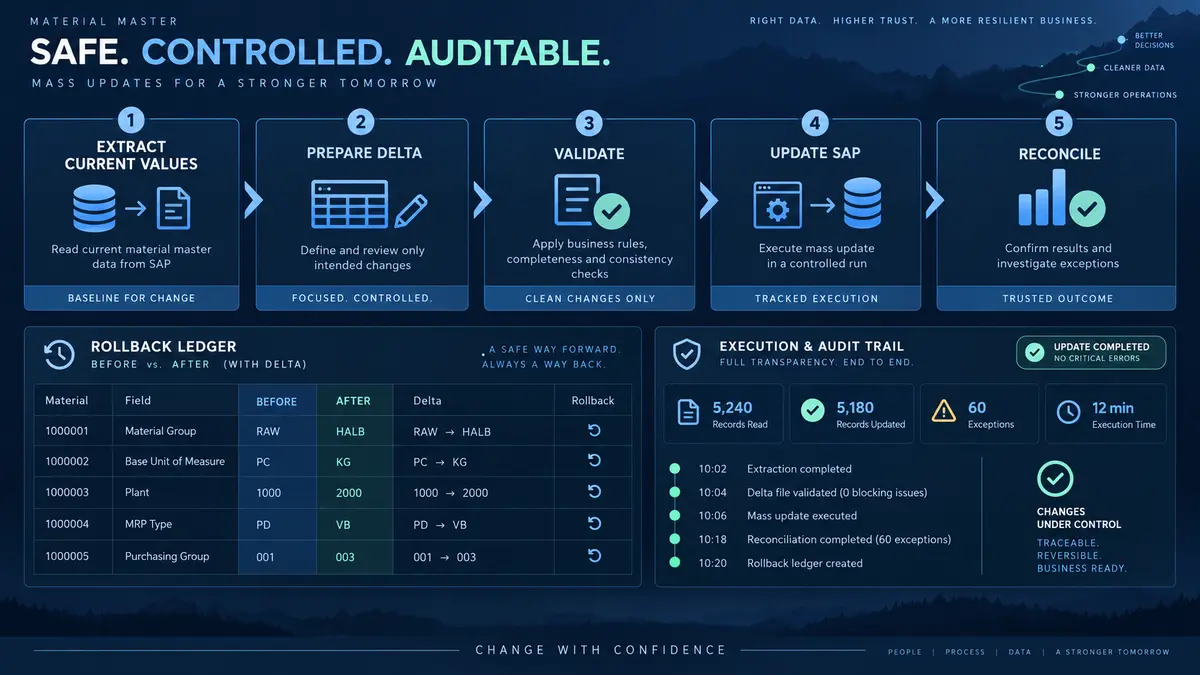
This is why the first stage of a material master mass change is not building the change file. It is extracting the current state. Pull the material, the plant, the view and the current value of every field you intend to touch, for every record in scope, and keep that file untouched.

The extract does four jobs:

  • It is the rollback. If the change was wrong, the extract posted back restores the previous state. Without it, restoration means reconstructing values from memory or from a backup nobody wants to restore.
  • It validates scope. If the extract returns three thousand nine hundred rows and the request said four thousand materials, the difference is worth understanding before the change rather than after.
  • It reveals the unexpected. Materials whose current value is already the target value, materials whose view is missing, materials with values nobody expected. All of this shows up in the extract and all of it is cheaper to handle before the run.
  • It is the audit evidence. Before and after, in one file, produced by the person who ran the change.
💡
Extract into the same workbook. Keep the current value as a column beside the new value rather than in a separate file. One artefact, two states, no version confusion at the point where confusion is most expensive.

The eight stages of a controlled MM02 run

The sequence below follows the discipline in the SAP mass upload pillar guide, adjusted for the fact that a change overwrites rather than creates.

Extract the current values

Pull material, plant, view and current value for every field in scope. This file is the rollback and the audit record, and it costs one step now to avoid an unrecoverable position later.

Check: the extract row count matches the population you were asked to change.

Log in to postnow.ai

Open the PostNow task pane inside Excel and sign in. The pane connects the workbook to your SAP system with your own credentials and authorisations, so the change can only touch materials you could already maintain manually.

Map columns to MM02 fields

Material, plant, view, and each field being changed. Save the mapping as a template, because material master sweeps recur and the mapping is the part that took the thinking.

Check: the file granularity matches the level of the field being changed.

Validate against live SAP

Every row checked: does the material exist, is it extended to that plant, is the view maintained, is the new value valid in its check table, is the record free of locks. These are live lookups, because materials get blocked, extended and locked while a file is being prepared.

Fix flagged rows

Missing views become a separate extension run. Invalid values get corrected. Rows whose current value already equals the target get removed, because changing a field to the value it already holds still writes a change document and still adds noise to the audit trail.

Test in a quality client

Run a subset into a client with current configuration and then open two or three materials in MM03 and read them. Not the log. The record. A mapping error that writes a valid but wrong value looks like success in a log and is obvious to anyone who looks at the material.

Check: the changed field shows the new value and nothing else moved.

Write through standard logic

The run calls BAPI_MATERIAL_SAVEDATA, SAP's published interface for material master maintenance. Every check MM02 applies still applies, and change documents are written exactly as they would be for a manual edit.

Reconcile before and after

Compare the extract against a fresh extract taken after the run. Every row should show the intended change and nothing else. The completed file, with both states side by side, is the record of what happened.

Check: no material shows a change to a field that was not in scope.
Step by step infographic for SAP mass material master update with MM02: extract what is there now, log in to postnow.ai, map to MM02 fields, validate every row, fix flagged rows, then post and compare before and after values.
Infographic SAP mass material master update in six steps, starting with the extract that makes it reversible.

Validation: six checks before a single material changes

Six validation checks before an SAP MM02 mass update writes: material exists, plant extended, view maintained, field is changeable, value is valid, and record not locked, each with the SAP error it prevents.
Diagram Each check maps to a message you would otherwise meet one material at a time.

The checks above are ordered by how early they fail. Existence and extension problems are structural and affect whole groups of rows. Lock problems are transient and affect individual rows at random. Knowing which class a failure belongs to tells you whether to fix the file or simply re-run.

Why the value check matters more than it seems

Most material master fields are checked against configuration tables. A purchasing group has to exist in the purchasing group table. An MRP type has to be defined. A material group has to be in the material group hierarchy. These are exactly the values that get typed into a spreadsheet by someone who knows what they mean but not how they are coded.

The failure mode is subtle: a value that is valid in one system and not another. A file prepared against development configuration will fail in production if the configuration was never transported, and the error will look like a data problem when it is a transport problem.

Rows that are already correct

In almost every real population, some materials already hold the target value. There is no error in changing a field to the value it already has, and there is also no benefit. It writes a change document, adds a row to the log, and makes the audit trail harder to read. Filter them out during validation and note the count, because a large number of already-correct rows usually means the scope was drawn too wide.

Errors, and what they are telling you

Common SAP MM02 mass update errors and their fixes: M3 305 material not maintained for plant, M3 062 maintenance status not maintained, M3 897 field cannot be changed, and MM 326 material locked by another user.
Diagram The four messages that stop most MM02 mass changes, and what each one is really telling you.

Locks behave differently from the other three

Three of the four errors above are file problems: fix the data and the row will post. Lock errors are timing problems. A material is locked because someone has it open in MM02, or because a background job is touching it, and the fix is to wait rather than to change anything.

This matters for how you run large changes. A run started at ten in the morning will hit locks from users working normally. The same run at seven in the evening will not. Where a population is large enough that lock collisions are likely, schedule around the people rather than fighting them, and design the run so failed rows can simply be re-sent.

📝
A partial failure on locks is not a broken run. Post the file, let the locked rows fail, wait, re-send only the failures. Nothing about that sequence risks a double change, because a change is idempotent: writing the same new value twice produces the same result.

Running the whole sequence inside Excel

Try this in your own system

PostNow runs SAP mass material master update from Excel

The eight stages above happen in one workbook. PostNow adds a task pane to Excel, connects to your SAP system with your own credentials, and takes the file through extraction, mapping, validation and writing without leaving the sheet.

Extract

Current values pulled into the sheet before anything changes.

Map

Material, plant and view matched once, then saved as a template.

Validate

Views, check tables and locks verified against live SAP.

Compare

Old and new values side by side on every row, ready for audit.

Start free trial 14-day trial · writes through BAPI_MATERIAL_SAVEDATA, never to tables

MM01, MM02 and MM17: choosing the right route

Comparison of SAP MM01, MM02 and MM17 for mass material master work, covering what each transaction does, view handling, field coverage, whether it accepts an Excel source, and the best use for each.
Diagram MM17 handles simple sweeps. When the field is not exposed there, a mapped load is the route.

MM17 is SAP's own mass maintenance transaction and it deserves a fair hearing. For a simple sweep across a field it exposes, it is free, it is standard, and it works. Teams should try it first.

Its limits appear quickly. The field set it exposes is a subset, the selection screen makes it awkward to drive from an external list of materials, and there is no natural place to keep the before-and-after record. When the field you need is not there, or when the population comes from a spreadsheet rather than a selection, a mapped load through MM02 logic is the route.

MM01 creates. If part of your population needs views extended rather than fields changed, that is an MM01 job and it runs first. Mixing the two in one file is the most common structural mistake in material master work.

What changes when the run replaces the keying

Side by side comparison of manual SAP MM02 keying and a mapped mass update run from Excel across rollback, validation, error handling and audit evidence.
Diagram The manual route costs more hours and produces weaker evidence.

The comparison above understates one thing. The manual route does not just cost more hours; it produces a different quality of evidence. When four thousand materials are changed by hand over three weeks, the record of what changed is the change documents in SAP, read one material at a time. When the same change runs from a file, the record is the file: every material, its old value, its new value, and the result, in one artefact that a reviewer can read in a minute.

Material master in ECC and S/4HANA

The object survives the conversion largely intact, which is one reason material master mass work is a good place to build capability before a migration rather than after it. The differences that matter for a mass change are few but sharp.

The material number field is longer. S/4HANA extends MATNR to forty characters. Systems that have switched on the extended length will accept material numbers a file built against ECC would truncate, and files built against the extended length will fail on an ECC system. Know which you are pointed at.

MARD and MARC still exist. The simplification programme removed several aggregate and index tables, but the segment structure a mass change relies on is unchanged. A mapping built for ECC generally works on S/4HANA without redesign, which is not true of a screen recording built against the old MM02 screens.

Fiori apps sit alongside the transaction. S/4HANA offers app-based material maintenance, and some organisations lock the classic transaction. This does not affect a load that posts through the published interface, because the interface is the same underneath. It does affect a recording, which is another reason recordings are a poor choice for master data at volume.

Business partner does not apply here. The customer and vendor consolidation into Business Partner is the headline master data change in S/4HANA, and it leaves material master alone. If you are planning both, treat them as separate exercises with separate files. The vendor master guide covers what changes on that side.

The fields people actually sweep, and what each one breaks

Some fields are routine to change at volume. Others carry consequences that are not obvious from the field name. This is the practical division.

Usually safe to sweep

  • Purchasing group. Reporting and workflow routing. Changing it does not disturb existing documents.
  • Material group. Reporting hierarchy. Confirm downstream reports before a large sweep, but the change itself is contained.
  • Planned delivery time. Feeds future planning runs. No effect on existing orders.
  • Reorder point and safety stock. Planning parameters that take effect on the next run.
  • Storage conditions and handling indicators. Warehousing attributes with narrow blast radius.

Change with the business in the room

  • MRP type. Switching between reorder point, forecast and MRP planning changes how the material is planned entirely. A sweep across a product family will change what the next planning run proposes, sometimes dramatically.
  • Lot size procedure. Interacts with MRP type and can produce order proposals nobody expected.
  • Valuation class. Drives account determination. Changing it with stock on hand has accounting consequences that finance must agree in advance.
  • Procurement type. Moving a material between in-house production and external procurement changes which documents the system will create.

Frequently not changeable at all

  • Base unit of measure. Locked once stock or documents exist. This is the field behind most M3 897 errors.
  • Material type. Requires a dedicated conversion path, not a field change.
  • Price control. Constrained by stock and period status.

The pattern is consistent: fields that describe the material are easy, fields that drive behaviour need agreement, and fields that anchor accounting or stock are often locked by design. Sorting your sweep into those three buckets before building the file saves a round of failed rows and an awkward conversation.

Governance, approval, and change documents

Material master is master data, which means it is usually governed, which means a mass change touches a control framework that was designed around individual edits.

  • Change documents still happen. A change written through standard logic produces the same change documents as a manual edit, visible in MM04 and the standard change display. Mass upload does not create a blind spot.
  • Approve the file. The reviewable artefact is the spreadsheet: which materials, which field, from what to what. That is a better review object than four thousand individual approvals.
  • Run as a named user. The change should carry the identity and authorisations of the person who ran it. Shared accounts remove the trail that makes the run defensible.
  • Keep the before extract. It is both the rollback and the evidence. Store it with the change request.
  • Reconcile after. A fresh extract compared to the intended state, confirming that what changed is what was meant to change and nothing else moved.

Where a data governance function exists, involve it in the first run rather than the third. The conversation is short when the evidence is good, and the evidence here is better than the manual process it replaces.

Volume, batching, and lock contention

Material master changes are usually faster than document postings because the work per record is smaller. The constraint is rarely throughput; it is contention.

  • Batch by plant or product family. A batch that fails should be describable in one sentence, and plant is usually the natural boundary.
  • Run outside working hours for large populations. Not for system load, but to avoid users holding materials open.
  • Expect a lock tail. A small percentage of rows will fail on locks. Design for a second pass rather than treating it as an exception.
  • Avoid running during planning jobs. MRP runs and other batch jobs hold materials, and a change colliding with them fails in ways that look mysterious.
  • Split client-level and plant-level changes. Different granularity, different row counts, different failure modes. One file each is clearer than one file doing both.

From a one-off sweep to a maintained template

Material master changes recur more than any other mass task, because the fields that need sweeping are the fields the business tunes. The same MRP parameter change comes back every time supply strategy shifts.

  • Save the mapping with the view logic. Which fields sit at which level is the part that takes the thinking.
  • Ship a template to the requesters. If planning submits its changes in a sheet with material, plant, field and new value already in the right shape, most of the preparation disappears.
  • Keep the validation rules attached. The check tables that caught you once will catch you again.
  • Record what configuration it was proven against. Which plants, which material types, which views.
  • Always include the old value column. Make it part of the template so nobody has to remember to add it.

Common mistakes and how to avoid them

  • Running without extracting first. A wrong mass change with no before file is genuinely unrecoverable. This is the only mistake on this list that cannot be fixed afterwards.
  • Mismatching granularity to the field level. One row per material when the field is plant level leaves most plants unchanged and the inconsistency invisible.
  • Assuming the view exists. A change updates a view. It never creates one. Extend first, in a separate run.
  • Letting material numbers lose their leading zeros. Store the column as text and verify a known value before the run.
  • Preparing against development configuration. Values valid in a sandbox fail in production when the configuration was never transported.
  • Changing fields that are already correct. Harmless individually, but it fills the change log with noise and hides the changes that mattered.
  • Treating a lock failure as a data error. It is a timing problem. Wait and re-send the failed rows.

The complete MM02 mass update reference

The reference sheet below collects everything above into one image you can share with a team before a sweep.

SAP mass material master update reference infographic for MM02 covering what gets changed, the fields to map, checks before writing, the errors you will meet, and how the run works from extract to reconciliation.
Infographic The complete MM02 reference: fields, checks, errors, and the run itself.

Go deeper

SAP master data mass upload

The hub for master data at volume: materials, vendors, customers, BOMs and HR master.

SAP mass upload

The pillar guide covering methods, validation, error handling and governance across every transaction.

Methods and alternatives

How BAPI, screen recording and LSMW compare, and what to use where LSMW used to be the default.

SAP MM mass upload

Procurement documents that reference the materials you have just changed.

Frequently asked questions

What is SAP mass material master update?
SAP mass material master update is the practice of changing fields on many existing materials in one controlled run from a structured file, instead of editing each record individually in MM02. The current values are extracted first, the new values are prepared in Excel, every row is validated against the live system, and the changes are written through SAP's material master interface.
How do I mass update material master data from Excel?
Extract the current values first, then build a file with material, plant, view and the new value for each field. Map the columns to their SAP fields, validate every row against live SAP, and write through BAPI_MATERIAL_SAVEDATA. The eight stages above set out the full sequence, and the extract is what makes the run reversible.
Can I undo an SAP mass material master update?
There is no reversal transaction for a material master change, unlike a financial document. The only route back is posting the previous values, which is why extracting the current state before the run is the first stage rather than an optional one. Without that extract, a wrong mass change is effectively unrecoverable.
Why does my MM02 mass update fail with error M3 305?
M3 305 means the material is not maintained for the plant on that row. The material exists at client level but was never extended to that plant. A mass change updates existing segments and cannot create them, so the material has to be extended with MM01 logic first, in a separate run.
What is the difference between MM17 and a mass upload for material master?
MM17 is SAP's standard mass maintenance transaction and works well for simple sweeps across the fields it exposes. Its limits are the restricted field set, an awkward selection screen when the population comes from an external list, and no natural place to keep the before and after record. A mapped load through MM02 logic covers fields MM17 does not expose and keeps the audit file.
How many rows should my material master change file have?
It depends on the level of the field being changed. Client-level fields such as material group need one row per material. Plant-level fields such as MRP type or reorder point need one row per material per plant, so four thousand materials across six plants is twenty-four thousand rows. Mismatching this leaves some plants unchanged and the inconsistency is invisible until planning behaves oddly.
Why do material numbers fail validation when they clearly exist?
Material numbers are stored internally with leading zeros for numeric ranges, so a material displayed as 100234 may be stored as 000000000000100234. A spreadsheet column formatted as a number destroys those leading zeros silently, and the resulting error says the material does not exist. Store material columns as text and verify a known value before running.
What does error MM 326, material locked by another user, mean?
Someone has the material open in MM02, or a background job such as an MRP run is holding it. Unlike the other common errors this is a timing problem rather than a data problem, so the fix is to re-send the failed rows once the lock clears. Large runs scheduled outside working hours meet far fewer of them.
Does a mass material master update still create change documents?
Yes. A change written through standard SAP logic produces the same change documents as a manual edit, visible in the standard change display. Mass upload does not create a blind spot in the audit trail, which is one reason to insist that the run posts through the published interface rather than writing to tables.
Which material master fields cannot be changed at volume?
Base unit of measure is locked once stock or documents exist, and it is behind most M3 897 errors. Material type needs a dedicated conversion path rather than a field change. Price control is constrained by stock and period status. Fields that describe the material are generally easy, fields that drive planning behaviour need business agreement, and fields anchoring accounting or stock are often locked by design.
Start with a real file

Run your next sap mass material master update from Excel

Map your columns once, validate every row against live SAP, and post through standard logic. Each row comes back with the document number it created.

Start free trial
  • 14-day free trial
  • Works with ECC and S/4HANA
  • Your data stays in your systems