SAP Mass GL Document Upload with FB01
SAP mass GL document upload through FB01 is the practice of posting many accounting documents in one run where each line carries its own posting key. FB01 exposes control the Enjoy screens hide: explicit debit and credit instructions, mixed account types on one document, and special general ledger indicators.
- Use FB50 unless you need what FB01 exposes. Most journal work is GL to GL and needs a simpler sheet with less to get wrong.
- The posting key is the instruction. It fixes debit or credit, which account type is valid, and which fields the line accepts.
- Amounts are always positive. The sign lives in the key column, so summing the amount column tells you nothing about balance.
- A wrong key posts the opposite sign without erroring. The document balances, the trial balance moves the wrong way, and nothing fails.
- Read one document back line by line. It is the only check that catches a swapped key, and a success log never will.
What SAP mass GL document upload means
SAP mass GL document upload through FB01 is the practice of posting many accounting documents in one controlled run where each line carries its own posting key. FB01 is the classic general posting transaction, and it exposes control that the Enjoy screens deliberately hide: explicit debit and credit instructions, mixed account types on one document, and special general ledger indicators.
The honest opening position is that most journal work does not need it. If the entry is GL to GL, FB50 produces the same document from a simpler sheet with less to get wrong. If a vendor is on the line, FB60 does the same. FB01 earns its place when you need to say something those transactions will not let you express.
All three post through the same interface and produce the same accounting document, described on the FICO bridge. What differs is how much of the instruction you write yourself.
When FB01 is the right answer
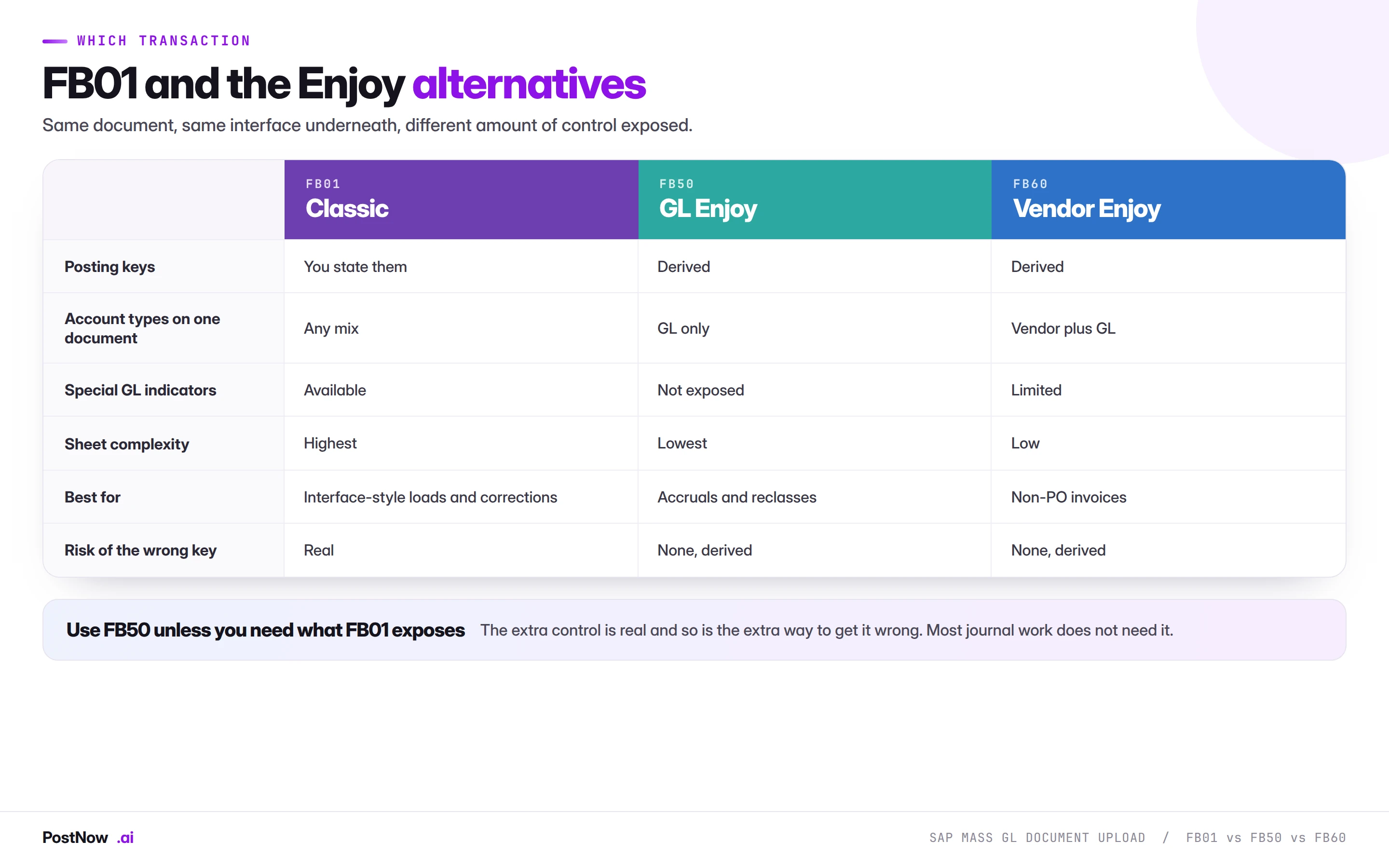
Four situations genuinely call for it, and outside them the extra control is extra risk.
Interface-style loads. Data arriving from another system that already specifies posting keys, because it was built against SAP's own model. Translating those keys into an Enjoy transaction means discarding information the source system took care to provide.
Mixed account types on one document. A single document touching GL, vendor and customer lines. FB50 is GL only and FB60 assumes a vendor is the counterpart, so a document that needs all three has to be FB01.
Special general ledger postings. Down payments, bills of exchange and guarantees use special GL indicators that the Enjoy screens do not expose.
Corrections requiring exact keys. Where a reversal or adjustment must mirror an original document line for line, stating the keys directly is the only way to guarantee the shape.
The posting key is the instruction
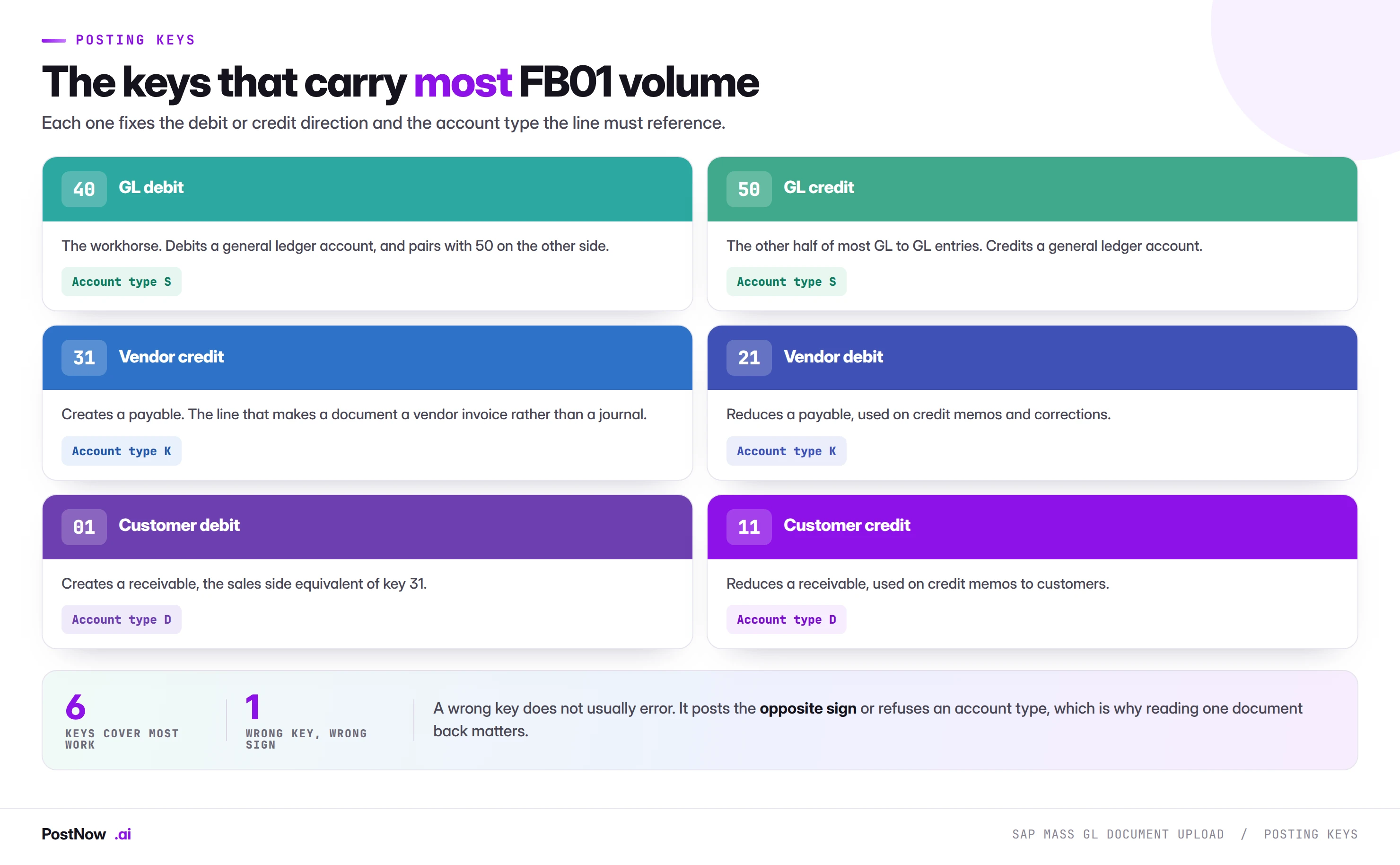
This is the concept the whole transaction turns on, and it is why an FB01 file behaves differently from every other finance file in this cluster.
In FB50 you supply an account and an amount, and SAP derives the posting key from context. In FB01 the key comes first and everything else follows from it. It fixes three things simultaneously:
- Debit or credit. The amount column is always positive. The key decides the direction, which means the sign lives in a different column from the number.
- Which account type is valid. Key 40 requires a general ledger account, key 31 requires a vendor, key 01 requires a customer. The key and the account must agree or the line is rejected.
- Which fields the line accepts. Field status is driven partly by the key, so a line may require or suppress fields depending on which key it carries.
Six keys cover most of what a mass file will contain: 40 and 50 for GL debits and credits, 31 and 21 for vendor credits and debits, 01 and 11 for customers. Beyond those, special GL and asset postings bring their own.
Why a wrong key is worse than a wrong amount
A wrong amount usually produces a balance error and stops the document. A wrong key frequently does not.
Swap 40 for 50 on a line and the document may still balance, because another line compensates, while the entry now debits what it should credit. The document posts. The trial balance moves in the wrong direction. Nothing errors.
This is the specific reason the verification step for FB01 is reading one document back line by line rather than checking a success log. It is the only way to see that the signs are what you meant.
The fields you have to map
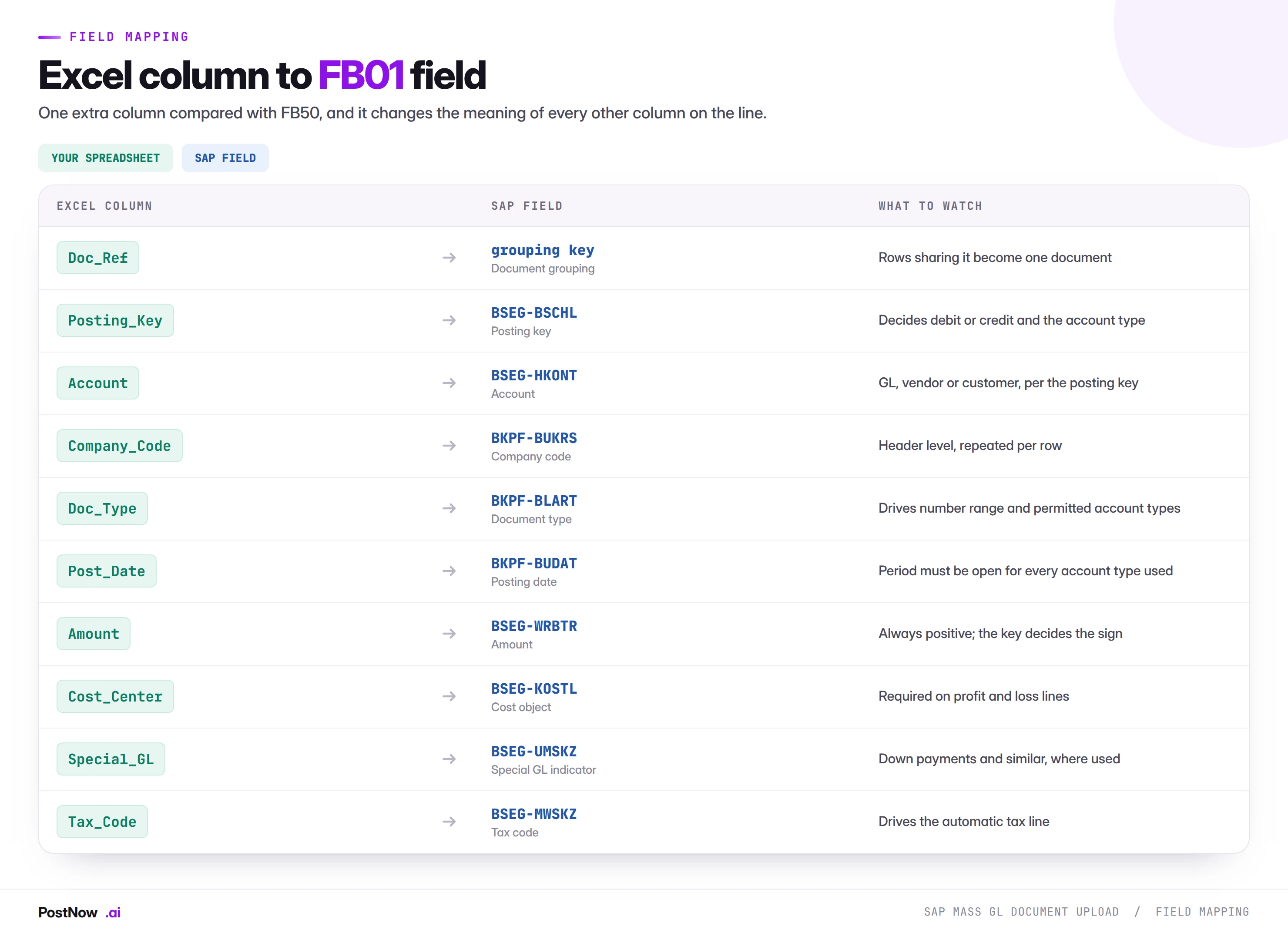
Compared with an FB50 file, there is one extra column, and it changes the meaning of every other column on the line.
The amount column has no sign
Worth stating explicitly because it catches out anyone converting a file built for another transaction. In FB01 amounts are always positive and direction comes from the key. A file carrying negative amounts for credits, which is a perfectly good convention elsewhere, will either fail or post something unintended.
The practical consequence for balancing is that summing the amount column tells you nothing. You have to sum by key: debits from 40, 01 and their relatives against credits from 50, 31 and theirs. A validation that ignores the key and sums the amounts will pass a file that does not balance.
Document type restricts account types
Document types carry configuration limiting which account types may appear. SA is commonly restricted to GL accounts only, which means an SA document containing a vendor line is rejected regardless of whether the keys are internally consistent. On a file mixing account types, the document type has to permit all of them.
Special GL indicators
Where a line is a down payment, a bill of exchange or a guarantee rather than a normal payable or receivable, the special GL indicator redirects it to an alternative reconciliation account. It is valid only with certain keys and certain account types, and it is the field most likely to be absent from a template built for ordinary postings.
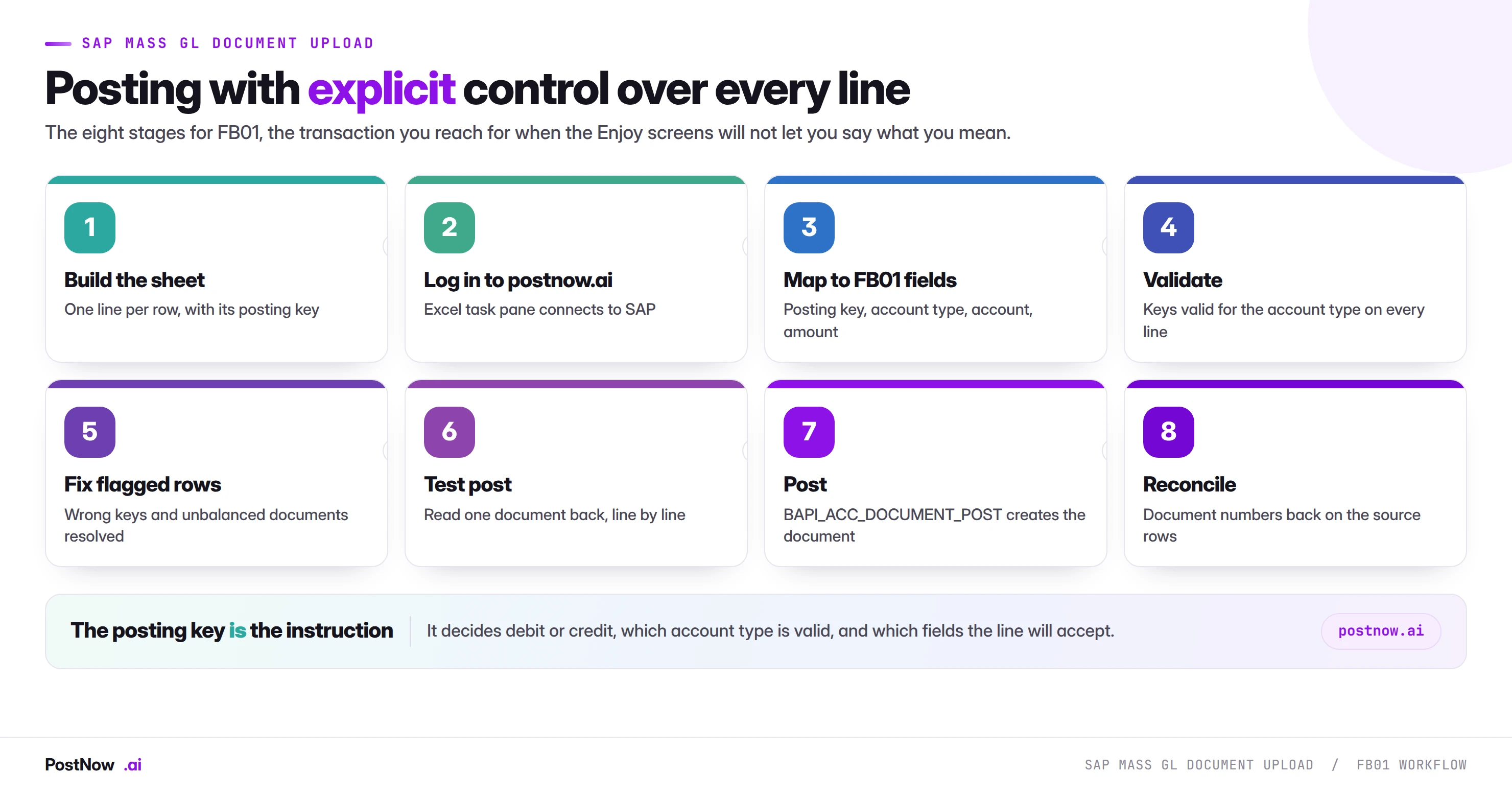
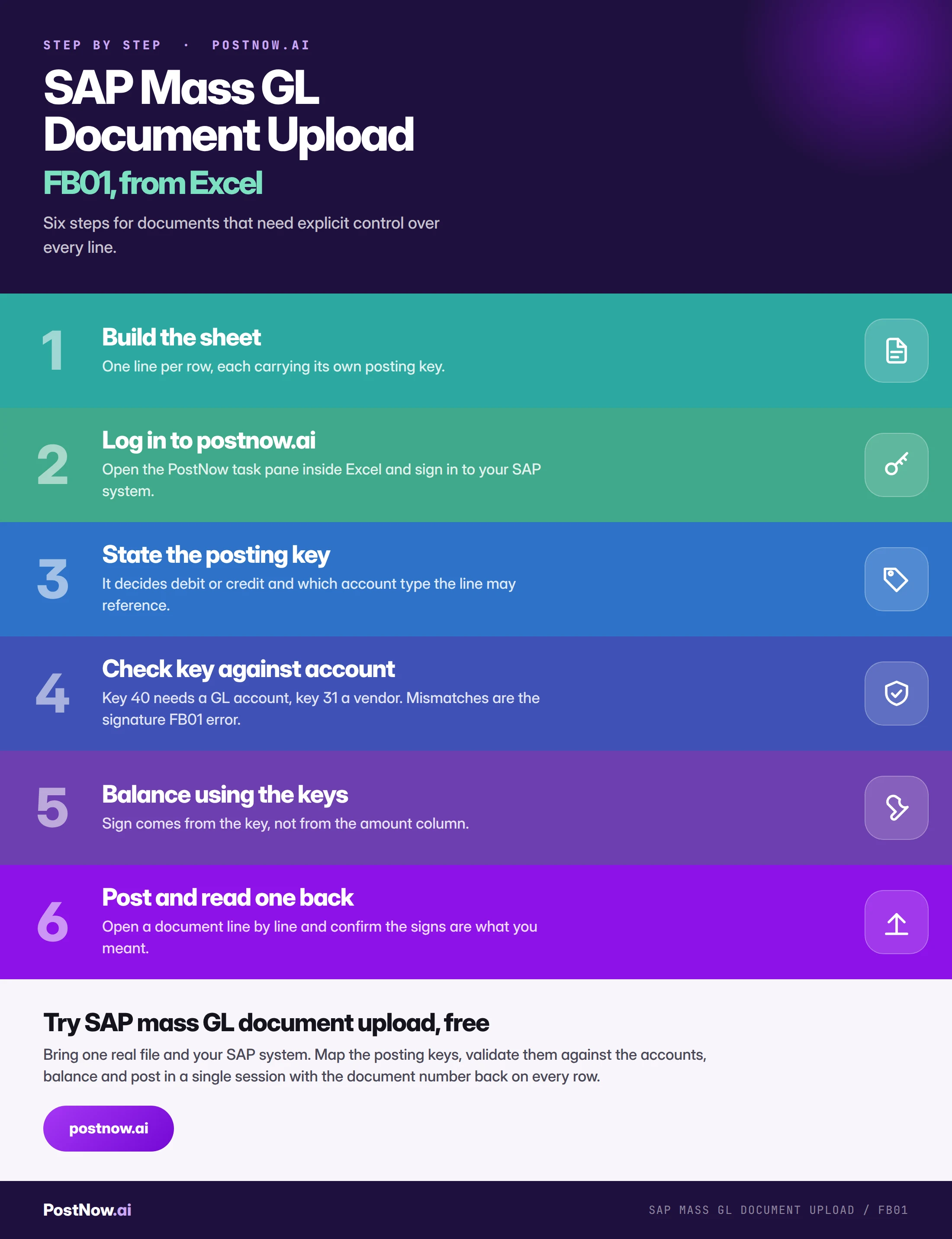
The eight stages of a controlled FB01 run
Build the sheet
One line per row, each carrying its posting key, with header fields repeated across rows sharing a document reference. Amounts positive throughout.
Log in to postnow.ai
Open the PostNow task pane inside Excel and sign in. The pane connects the workbook to your SAP system with your own credentials and posting authorisations.
Map the posting keys
Key, account, amount and cost object per line. Where the source system supplied keys, map them directly rather than deriving your own.
Validate keys against accounts
The check that does not exist for FB50. Key 40 against a GL account, 31 against a vendor, 01 against a customer, and the document type permitting all of them.
Balance using key-derived signs
Sum by key rather than by amount. A file that balances on the amount column may not balance at all once direction is applied.
Test post and read a document back
Open one in FB03 and read it line by line. Confirm each line landed on the side you intended. This is the step that catches a swapped key, and nothing else will.
Post through standard logic
The run calls BAPI_ACC_DOCUMENT_POST, the same interface behind FB50 and FB60. Same validation, same change documents, same atomic behaviour.
Reconcile
Document numbers written back per row, and the totals compared against the source. On an interface-style load, reconcile against the sending system rather than against the file.
Validation: six checks before a single document posts
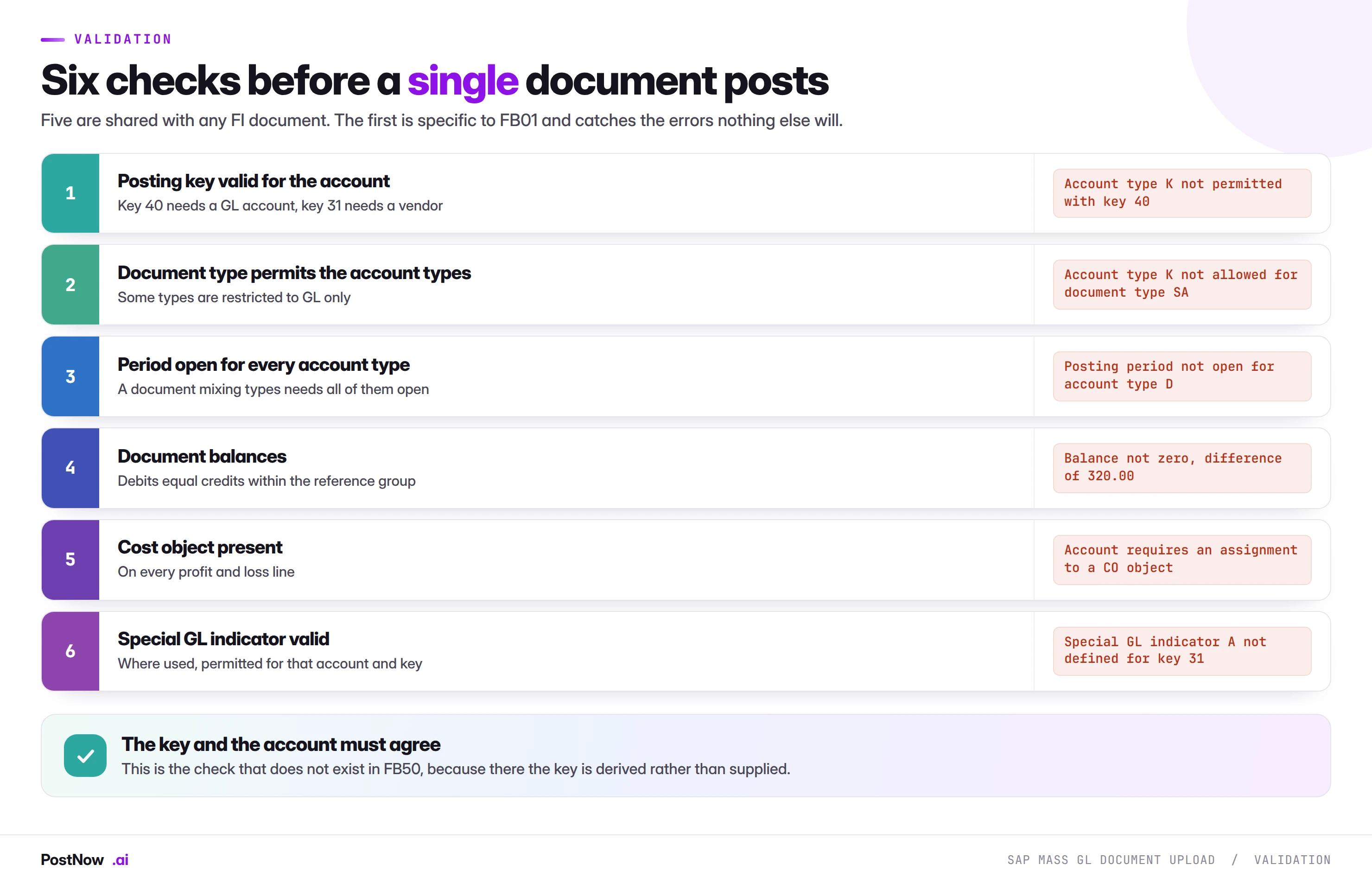
Five of these are shared with any FI document and covered on the FICO bridge. The first is specific to FB01, and it is the one that earns the transaction its reputation for being unforgiving.
The period check has a wrinkle worth noting too. A document mixing account types needs the period open for every type it touches. A file containing GL and vendor lines can fail because the vendor period is closed while the GL period is open, and the error names the account type rather than explaining the mix.
Errors, and what they are telling you
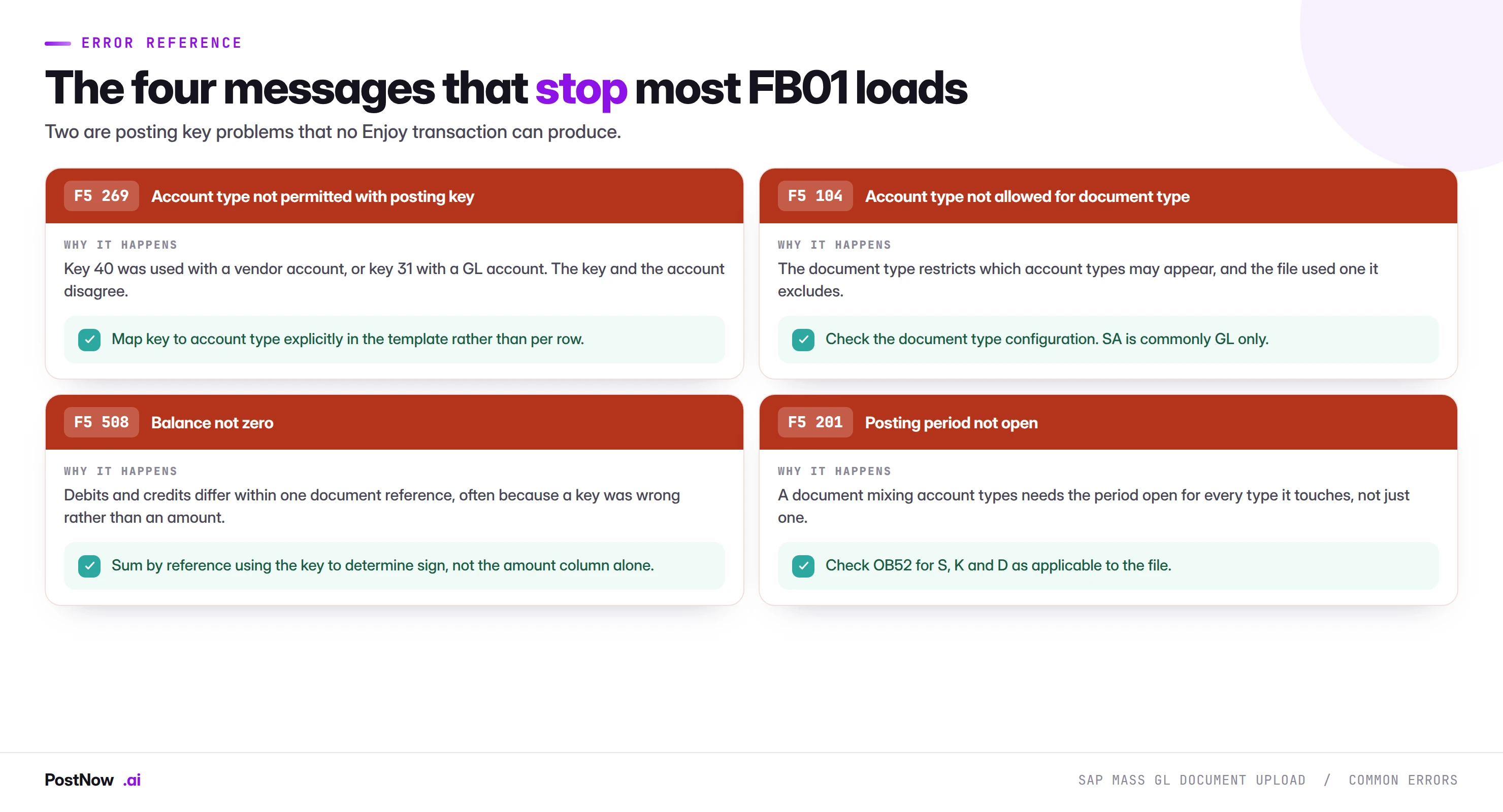
F5 269 and F5 104 are the signature FB01 errors and neither can occur in an Enjoy transaction, because there the key is derived and the account type is implied. Both hit in blocks rather than randomly: if the key-to-account mapping is wrong in the template, it is wrong on every row using that key, which makes the failure look larger than it is and the fix quicker than it appears.
Running the whole sequence inside Excel
PostNow runs SAP mass GL document upload from Excel
Posting keys, account types and balancing all happen in the workbook. PostNow adds a task pane to Excel, connects to your SAP system with your own credentials, and validates the key against the account before anything is sent.
Validated against the account type on every line.
Balance computed from the keys, not from the amount column.
Checked for every account type the document touches.
The document number written back on the rows that made it.
Interface-style loads, where FB01 belongs
The clearest case for FB01 is data arriving from another system that already speaks SAP's language.
Payroll systems, treasury platforms, billing engines and acquired-entity ledgers frequently produce output specifying posting keys, because whoever built the interface worked against SAP's model. That output is more precise than an Enjoy transaction can accept, and translating it means throwing information away and then re-deriving it, which introduces error rather than removing it.
Three practices make these loads work:
- Map keys directly, do not derive them. If the source says 31, post 31. Second-guessing a source system that was built against the target model is how sign errors appear.
- Reconcile against the sending system, not the file. The file is an intermediate artefact. The control total that matters belongs to whichever system produced the data.
- Expect the shape to be stable. Interface output does not vary the way a hand-built spreadsheet does, which makes these the best candidates for a saved template that runs untouched for years.
Where an interface exists and is reliable, a file-based load is the fallback for when it fails, the backlog when it has been down, and the corrections it cannot produce. The methods guide covers where that boundary sits.
Reversals and mirrored corrections
FB01 is disproportionately used for corrections, and the reason is precision: when a wrong document has to be undone in a specific shape rather than by a standard reversal, you need to state the keys.
Standard reversal comes first. FB08 reverses a document properly, creating a reversal document linked to the original with the reason recorded. Where it applies, use it. It is cleaner than a manual mirror and the link between the two documents is explicit.
Manual mirroring is for what FB08 cannot do. Partial reversals, reversals into a different period where the original period is closed, and corrections that change the shape rather than simply undoing it. These need line-by-line control, which means FB01.
Mirror the keys, not just the amounts. A correction reversing a line posted with key 40 uses key 50 on the same account. Reversing by negating the amount rather than flipping the key produces a document that may balance and does not mirror the original.
Reference the original. A manual correction with no link to what it corrects leaves two documents that only a person can associate. Carrying the original document number in the reference or item text costs nothing and saves an investigation later.
At volume this matters because a correction run is usually urgent and usually happens under scrutiny. A mass correction that itself needs correcting is a considerably worse position than the original error.
Where FB01 stops and other transactions start
FB01 accepts more than it should be used for, and knowing the boundaries prevents a class of avoidable problems.
Asset postings. Acquisitions, retirements and transfers have their own transactions and their own posting keys, and they update the asset sub-ledger as well as the general ledger. Posting an asset movement through FB01 without the asset-specific transaction risks a general ledger that no longer agrees with the asset register.
Anything with a purchase order behind it. Belongs in MIRO, for the reasons the procurement bridge sets out. FB01 will accept a vendor line happily and leave GR/IR permanently unclearable.
Goods movements. Stock changes belong in MIGO, which posts the material document and the accounting document together. Posting only the accounting side leaves stock and ledger disagreeing.
Recurring identical entries. Where an entry repeats unchanged, SAP's recurring document functionality is designed for it and produces a cleaner audit trail than a monthly file.
The pattern is consistent: FB01 posts accounting documents, and where a transaction exists that posts an accounting document plus something else, that transaction is the right one. Using FB01 gets the ledger right and leaves the sub-ledger behind.
Governance
- Approve the file, and show the totals by account type. Not just the value but which side of the ledger it lands on, since that is what a wrong key changes.
- Run as a named user. With their own posting authorisations, never a shared account.
- Keep the key mapping in the template. A key decided per row under time pressure is the error this transaction is most prone to.
- Read a document back after every run, not just the first. Configuration changes and template drift both produce sign errors that only a document reveals.
- Restrict who can use FB01 at volume. The control it exposes is real, and so is the ability to post combinations no Enjoy transaction would permit.
Common mistakes and how to avoid them
- Using FB01 where FB50 would do. Extra control means extra ways to be wrong across four hundred rows.
- Carrying negative amounts. The key sets direction; amounts are always positive.
- Balancing on the amount column. A file that sums to zero may not balance once keys are applied.
- Pairing a key with the wrong account type. The signature FB01 error, and it hits every row using that key.
- Ignoring document type restrictions. SA is commonly GL only, whatever the keys say.
- Checking one period only. A mixed document needs every account type's period open.
- Deriving keys instead of mapping supplied ones. On an interface load, the source already knew.
- Trusting the success log. A swapped key posts cleanly. Only reading the document shows it.
Volume, testing, and template discipline
- Runtime tracks documents, not lines. A file of two thousand lines forming four hundred documents makes four hundred posting calls.
- Test the key mapping, not the file. Errors here are systematic rather than random. If one row using key 31 is wrong, every row using key 31 is wrong, so a small test covering each distinct key is worth more than a large random sample.
- Keep one template per source. An interface producing keys, a correction template and a special GL template are three different things and should not share a file.
- Re-verify after configuration changes. Document type restrictions and field status groups both change, and both produce FB01 failures that look like data problems.
- Batch by document type. Homogeneous validation and a batch you can describe in one sentence.
- Watch the period boundary on long runs. A run spanning a period close will fail partway, confusingly, because the file was correct when it started.
After an FB01 run
Three checks, and the first is not optional for this transaction.
Read a document line by line. Every run, not just the first. Confirm each line landed on the side you intended, that the account types are what you expected, and that any special GL indicators applied. This is the only check that catches a swapped key.
Compare totals by side, not just in aggregate. Total debits and total credits separately, against the source. A document set that balances overall can still have individual entries on the wrong side, and only splitting the comparison reveals it.
Reconcile against the sending system on interface loads. The file is an intermediate artefact. The control total that matters belongs to whichever system produced the data, and reconciling to the file only proves the file was loaded faithfully.
Field status: why the same account behaves differently
A recurring FB01 puzzle is a line failing on a required field that a similar line accepted without complaint. The answer is field status, and it is determined by two things at once.
The posting key carries a field status group. So does the general ledger account. SAP combines them, and the stricter of the two wins: a field required by either is required, a field suppressed by either is suppressed.
The practical consequences at volume are three.
- The same account can require different fields depending on the key. Which is why a template built around accounts, without considering keys, produces inconsistent failures.
- A suppressed field cannot be populated at all. Not left blank, suppressed. Supplying a value for it is an error rather than an ignored column, and this surprises people who expect extra data to be harmless.
- Field status changes are configuration. A template that worked last quarter can fail after a change nobody told you about, which is why re-verifying after configuration changes appears in the checklist on this page.
The diagnostic when a field error appears is to check both sides: the account's field status group and the posting key's. Looking at only one is how these get misdiagnosed as data problems.
Item text, assignment, and the fields that survive into reporting
Three optional fields on an FB01 line are worth populating deliberately, because they are what somebody reads six months later when a balance is questioned.
Item text. Free text per line, carried into line item reporting. On a mass run this is the difference between four hundred lines that all say the same thing and four hundred that explain themselves. Where the source data has a description, map it.
Assignment. A sortable field used for grouping and clearing. On open item managed accounts it drives how items are matched, so populating it consistently makes subsequent clearing far easier. Left blank on a mass run, it makes the resulting items harder to clear than manually entered ones.
Reference and document header text. Header level rather than line level, and the natural place to record what produced the document: the source system, the run date, the file. On an interface-style load this is what connects an SAP document back to the system that generated it.
None of these affects whether the document posts. All of them affect whether anyone can explain it afterwards, and a mass run is precisely the case where nobody will remember. Populating them costs one mapping decision and repays it every time somebody investigates a balance.
FB01 in S/4HANA
The transaction survives and two things around it change.
The universal journal merges FI and CO. Entries land in ACDOCA with both views on one line rather than in separate documents reconciled afterwards. For posting this is invisible; for reconciliation it means reports read different structures than they did on ECC.
The interface is unchanged. BAPI_ACC_DOCUMENT_POST works across both releases, so a mapping built on ECC carries forward with a remap. A screen recording against the classic FB01 screens does not survive a move to Fiori-based posting apps, which is the argument the methods guide makes in general and which applies with force here because FB01 loads tend to be long-lived interface processes.
Posting keys are unchanged. The concept, the key numbers and the account type relationships all work as they did, which makes an FB01 mapping one of the more durable things in this cluster.
Extended field lengths apply. Most visibly on account and reference fields, so a file built against ECC lengths may truncate on a system using the extended ones.
Who should run FB01 loads
Worth being explicit, because this transaction gives more rope than the alternatives.
FB01 can post combinations no Enjoy transaction would offer: mixed account types, special GL indicators, keys that put entries on either side of the ledger. That flexibility is the reason to use it and the reason to restrict who uses it at volume.
Restrict the authorisation. Not everyone who can run an FB50 load should be able to run an FB01 one, and the authorisation design should reflect the difference in what each can express.
Keep the key mapping out of the operator role. Where an interface supplies keys, the operator maps them. Where a human is choosing keys per row, that is an accounting decision wearing technical clothes.
Require the document read-back. Make it a step in the process rather than a suggestion, because it is the only control that catches the error this transaction is uniquely prone to.
Special GL postings, and the sub-ledger they redirect
Special general ledger indicators are the capability most often cited as the reason to use FB01, and they are worth understanding before a file relies on them.
Ordinarily a vendor line posts to the reconciliation account on the vendor master. A special GL indicator redirects it to a different account, so the item is visibly separate in the general ledger while remaining on the vendor's account in the sub-ledger. Down payments are the common case: money paid to a supplier before delivery is not a normal payable and finance wants it visible as such.
Three things a mass file needs to get right:
- The indicator is valid only with certain keys and account types. A down payment indicator with a GL posting key is rejected, and the error names the indicator rather than the combination.
- The alternative reconciliation account must be configured. Where it is not, the posting fails for a configuration reason that reads like a data problem, and it fails on every row using that indicator.
- Clearing behaves differently. A down payment is later cleared against the eventual invoice rather than paid independently, so a mass run creating them should be followed by a plan for how they clear.
Where a population mixes normal and special GL lines, split the file. The validation differs, the failure modes differ, and a combined file makes a partial failure hard to attribute.
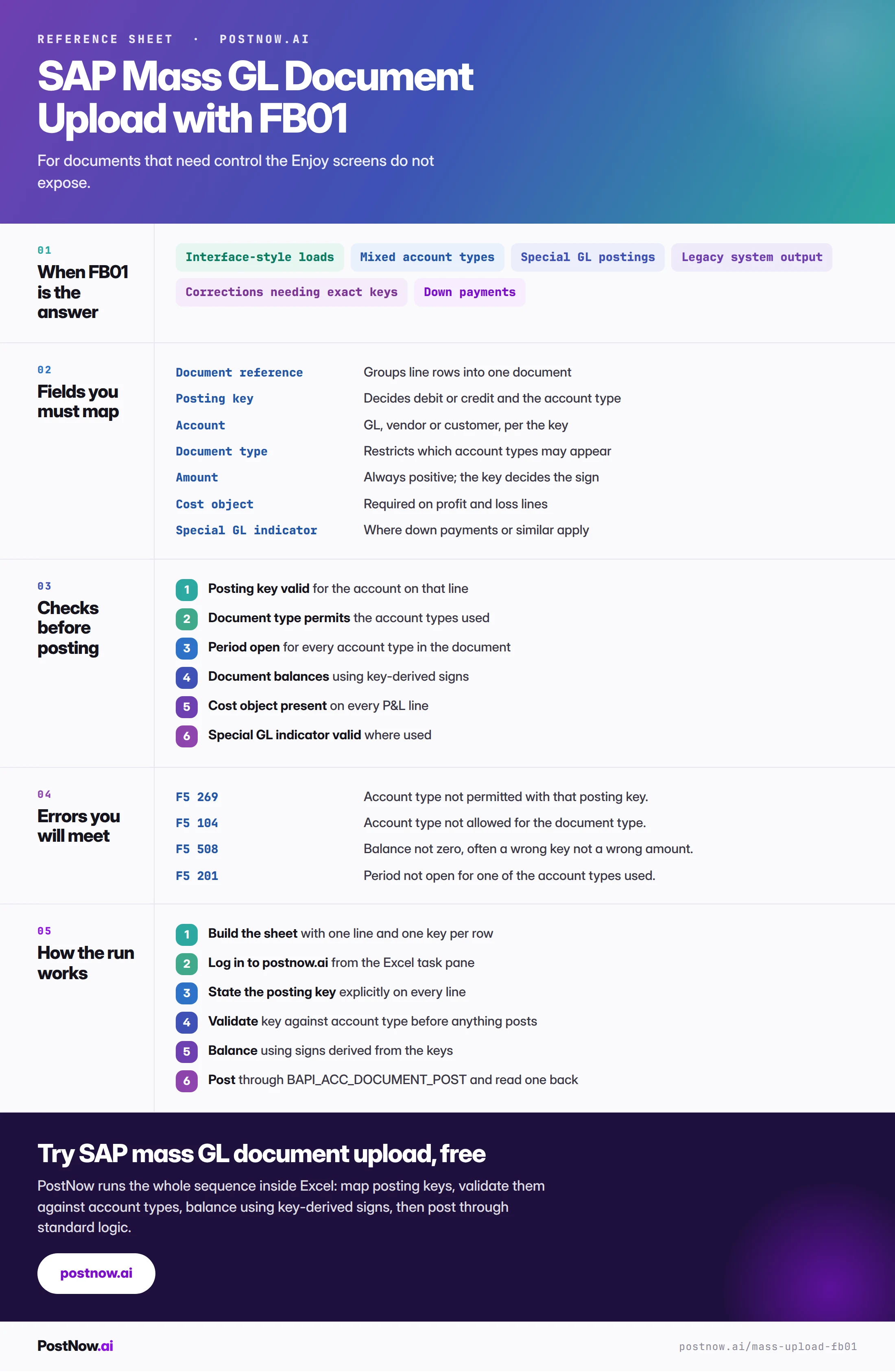
The complete FB01 mass upload reference
The reference sheet below collects everything above into one image you can share before a run.
Go deeper
SAP FICO mass posting
The finance hub: which transaction, the shared document model and period control.
Excel automation
The wider framing, including which of five patterns you actually have.