SAP FICO Mass Posting
SAP FICO mass posting covers creating finance and controlling documents at volume from a file: GL journals through FB50, vendor invoices through FB60, general postings through FB01, and the cost centres those postings reference through KS01. All four produce the same accounting document and are governed by the same period control.
- Four questions route any finance file. Purchase order behind it, vendor on the line, explicit posting keys needed, cost object exists.
- One document model. Header plus line items, must balance in document currency, posts atomically.
- Period control is the shared gate. The FI period must be open for the account type, and the MM period too wherever materials are involved.
- Nothing can be deleted. A wrong document is corrected by a reversal, and both stay visible for ever.
- Skills transfer completely. A working FB50 process is most of an FB60 one.
Which transaction for which job
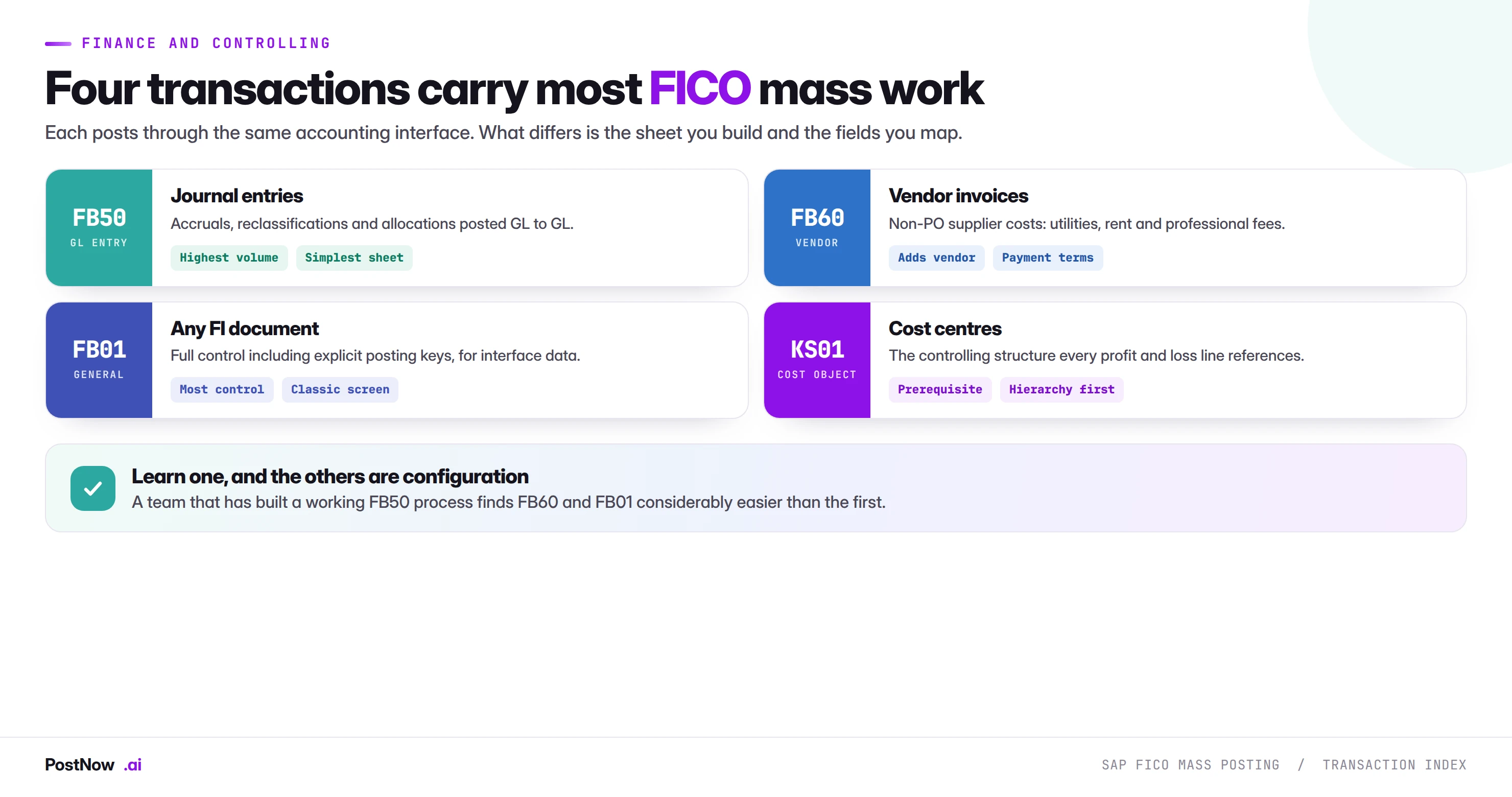
Four transactions carry the large majority of FICO mass work, and choosing between them is usually a question of what appears on the line rather than how many lines there are.
FB50, GL journal entries
The default for anything posting general ledger to general ledger. Month-end accruals, reclassifications, cost allocations, payroll journals and provision movements all fit it, and the sheet it needs is the simplest of the four because there is no sub-ledger partner to identify.
This is where most teams start, and it is the right place to start. A working FB50 process teaches document grouping, balance checking and cost object assignment, all of which transfer directly to the others. Full detail in the SAP mass journal entry upload guide.
FB60, vendor invoices without a purchase order
Utilities, rent, professional fees, insurance, subscriptions. Anything where a supplier bills you for something that was never ordered through purchasing. The sheet gains vendor, payment terms and baseline date columns, and the posting creates an open item in accounts payable rather than a pure GL entry.
The distinction that matters: if a purchase order exists, the invoice belongs in MIRO, not here. Routing a PO-based invoice through FB60 leaves the order open and the GR/IR account unclearable. See the FB60 guide.
FB01, general posting with full control
The classic transaction, which exposes control the Enjoy screens hide, including explicit posting keys. For mass work this matters when loading documents produced by an external system that specifies posting keys directly, or when a combination is needed that FB50 does not offer.
It is not a better FB50. It is a lower-level route to the same accounting interface, useful precisely when you need the control and unnecessary otherwise. Covered in the FB01 guide.
KS01, cost centres
Not a posting transaction at all, and included here because it is a prerequisite for the others. Every profit and loss line in an FB50 or FB60 run needs a cost object, and a missing cost centre stops the journal rather than the master data.
Cost centres also behave differently from the posting transactions: they live in controlling rather than finance, they are time dependent, and they require a standard hierarchy node to exist first. The KS01 guide covers that whole prerequisite chain.
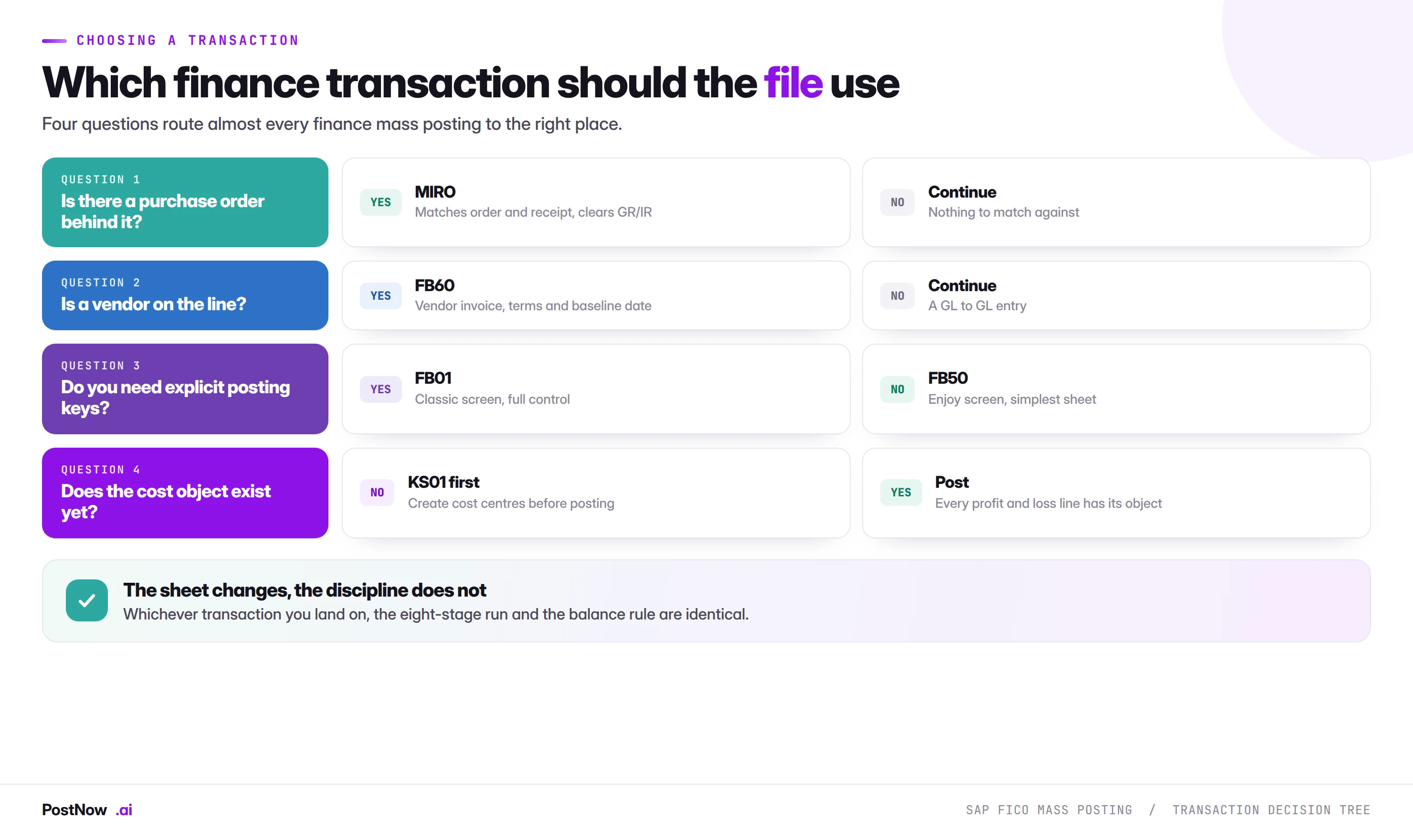
Routing a file in four questions
Most finance mass postings resolve in under a minute with the questions above, and the order matters. Purchase order first, because a PO-based invoice belongs in MIRO regardless of anything else and routing it elsewhere leaves GR/IR permanently open. Vendor second, because the presence of a trading partner changes the sheet more than any other single factor. Posting keys third, because needing them is the only real reason to prefer the classic screen. Cost object last, because it is a prerequisite question rather than a routing one.
The question people skip is the fourth. A journal file referencing cost centres that do not exist fails on every profit and loss line, and the error names the cost object rather than the journal. That is a cost centre run that should have happened first, and discovering it during a close is expensive.
What all finance mass postings have in common
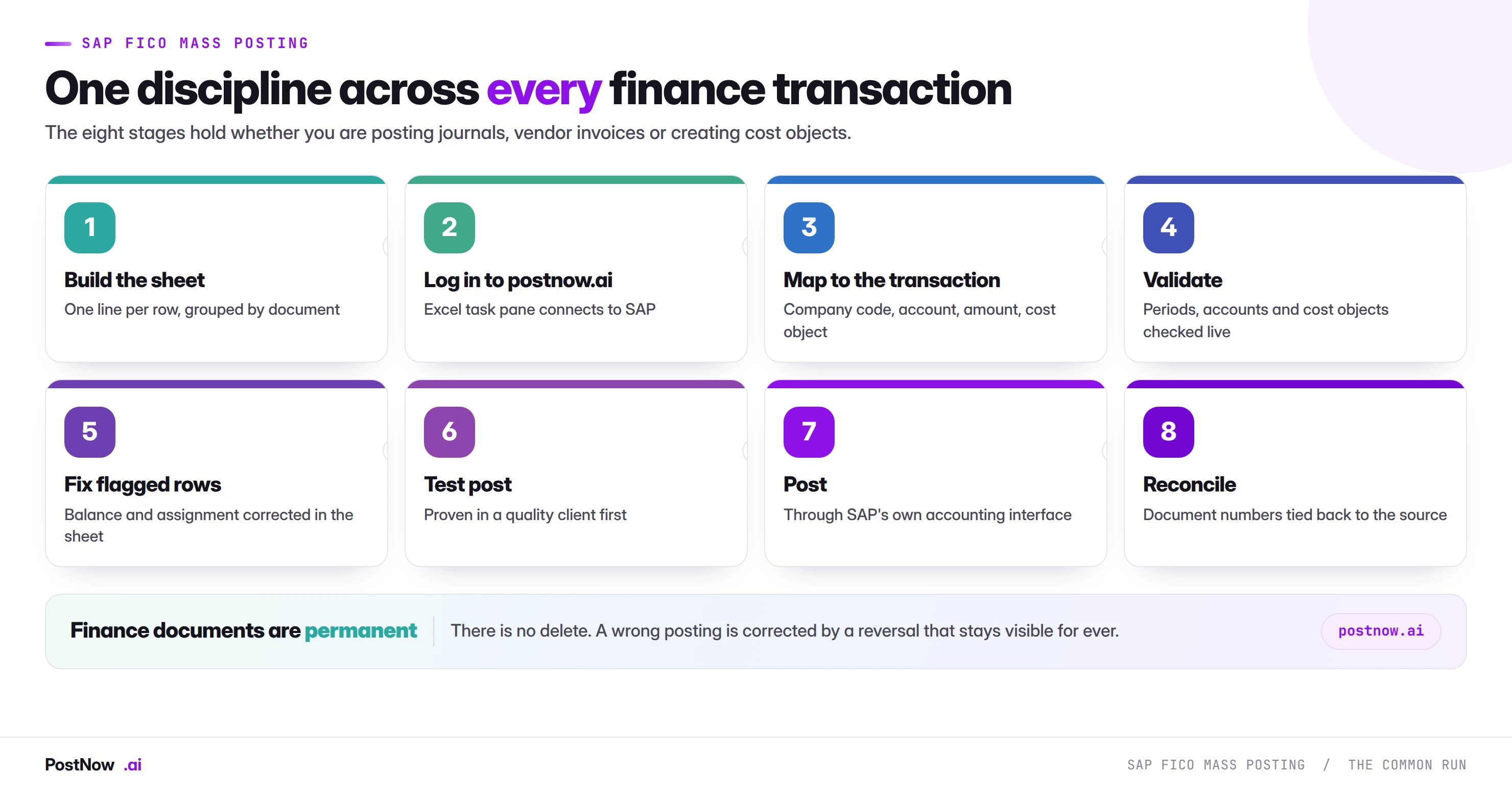
The eight-stage run is the same across every transaction on this page, and the reasons are structural rather than conventional.
A document is a group, not a row
Every FI document has one header and many line items. A spreadsheet is flat. Something has to tell the load where one document ends and the next begins, and that something is a reference column. Header fields repeat across the rows belonging to one document, and if they disagree within a group the document is ambiguous.
This single concept accounts for more confusion in finance mass posting than anything else, and it applies identically to FB50, FB60 and FB01.
Documents must balance
Debits equal credits, within the document, in the document currency. SAP refuses the entry otherwise, and it refuses at the point of posting rather than at data entry, which is why unbalanced groups are the most common reason a run stops partway.
Where tax codes are involved, the balance check has to account for the tax line SAP will generate, which the spreadsheet does not contain. A document that balances perfectly in Excel and fails on balance in SAP is nearly always this.
Documents are atomic
A document either posts completely or not at all. There is no half-posted journal. This is helpful, because a failure leaves nothing to clean up at document level, and it is why the file has to be grouped correctly before the run starts rather than corrected afterwards.
Nothing can be deleted
This is the characteristic that most distinguishes finance from master data work. A wrong material master value can be changed. A wrong journal cannot be deleted, only reversed, and the reversal is itself a document that stays visible for ever.
The practical consequence is that testing matters more here than almost anywhere else in the mass upload cluster. Ten test documents read properly in a quality client cost minutes; four hundred wrong documents in production cost a reversal run and an explanation.
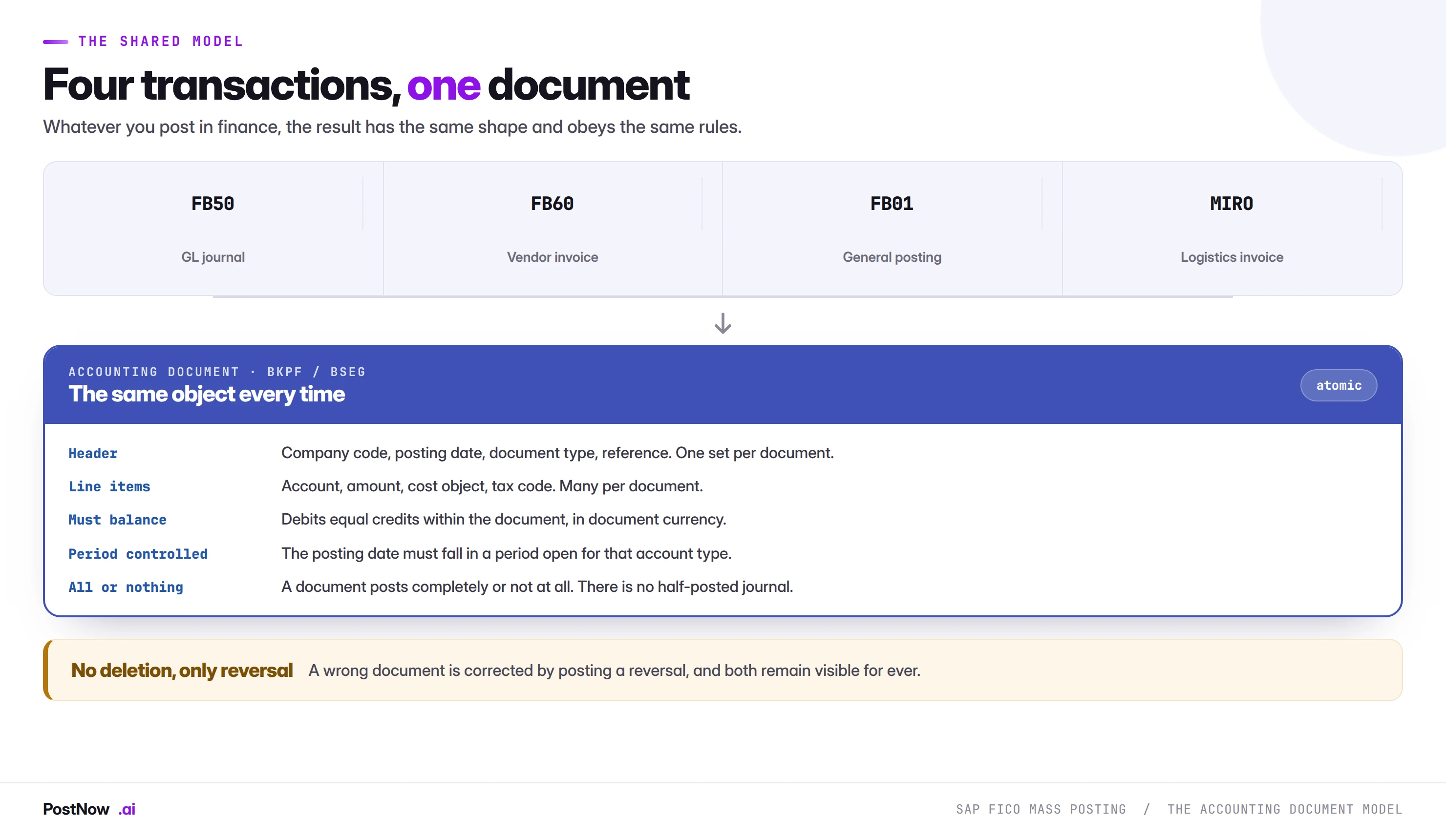
Why the shared model matters for a mass run
The practical value of understanding this is that skills transfer completely. A team that has built a working FB50 process already knows how to build an FB60 one: the grouping logic, the balance check, the period check and the reconciliation are identical, and only the partner column and a handful of field mappings differ.
It also sets the failure expectations. Because the document is atomic, a failed row leaves nothing to clean up at document level, which makes finance mass posting more forgiving than goods movements where a partial physical event can strand stock. And because nothing can be deleted, the cost of a wrong posting is a reversal document that stays visible, which makes it less forgiving than master data where a wrong value can simply be corrected.
That combination, forgiving at row level and unforgiving at record level, is what drives the emphasis on testing. Ten documents read properly in FB03 costs ten minutes. Four hundred reversal documents costs a conversation with your auditor.
Period control, and the calendar people forget
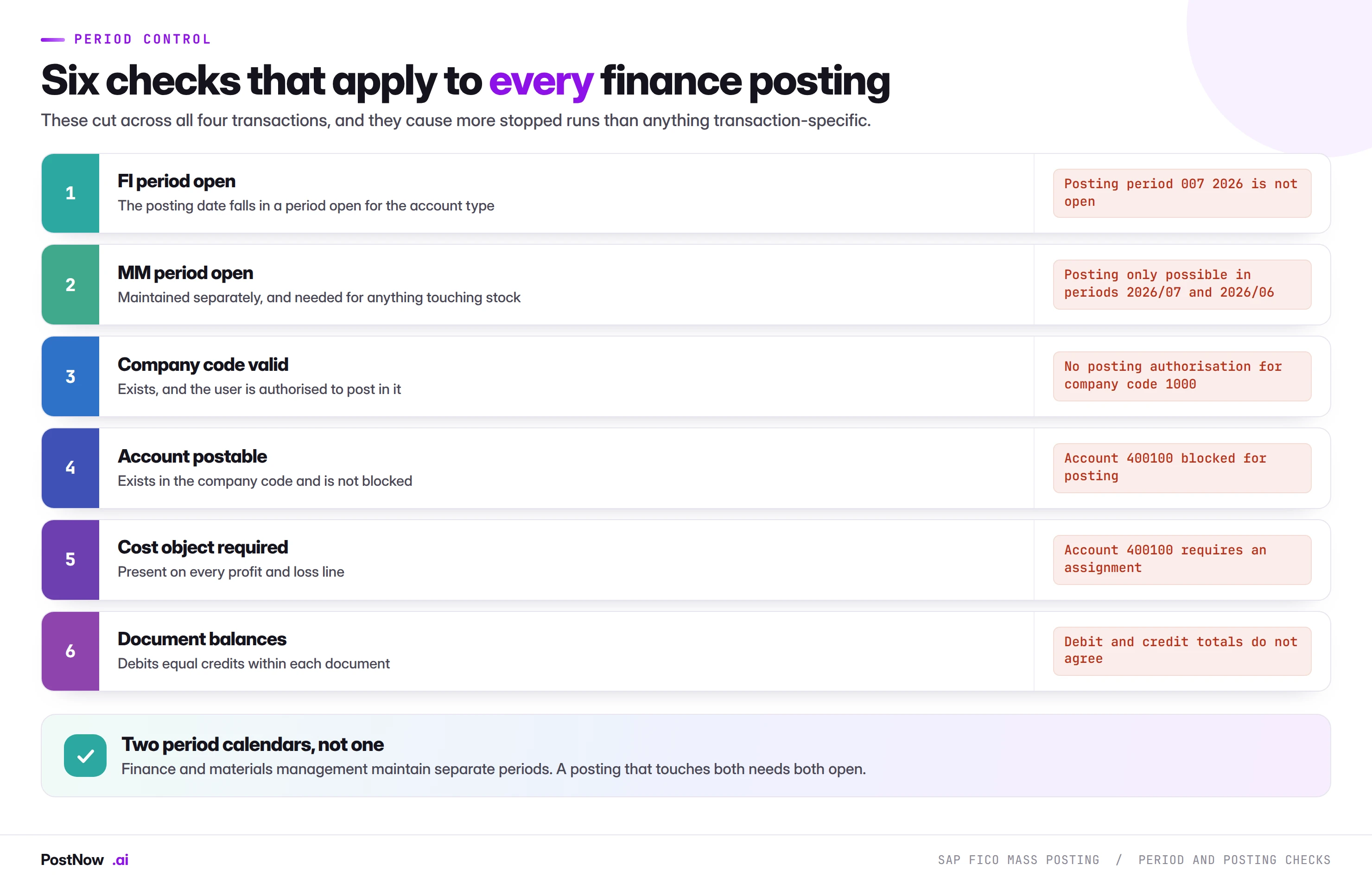
Period status stops more finance mass runs than any data problem, and the reason is that there are two calendars rather than one.
The FI period is controlled through OB52, per company code and per account type. Finance opens and closes it around the close calendar, and it is frequently open for one account type and not another.
The MM period is maintained separately in materials management, visible through MMRV. It rolls forward monthly and typically allows the current and previous period only.
A pure GL journal needs the FI period. Anything touching stock, including the goods movements and invoices on the procurement side, needs both. The failure that catches teams is a file prepared in early August for July postings: finance may still have July open for accruals while materials management has already rolled forward.
What SAP FICO mass posting means
SAP FICO mass posting is the practice of creating many finance and controlling documents in one controlled run from a structured file, rather than keying each one through its transaction. It covers GL journals, vendor invoices, general FI documents and the cost objects those postings reference, and it is the same discipline applied to four different objects.
This page is the hub for that work. It covers what the transactions have in common, which one to use for which job, the checks that apply to all of them, and how corrections work when something goes wrong. Each transaction then has its own guide with the field mappings, error codes and edge cases specific to it.
If you are looking for the method-neutral foundation rather than the finance-specific view, the SAP mass upload pillar guide covers validation layers, method selection and governance across every module.
The posting date is a decision, not a default
The single most common date error in finance mass posting is letting the posting date default to today. A formula that seemed convenient during the build posts July's accrual into August the moment the run slips two days. Hard-code the posting date, or derive it from the period, never from the clock.
Cost objects, and where the controlling side bites
Profit and loss accounts almost always require a cost object: a cost centre, an internal order, a WBS element or a profitability segment. Which one, and whether more than one is permitted, is driven by the field status group on the account and the posting key.
For a mass run the practical effects are three:
- The cost object column cannot be optional if any account in the file is a P&L account. Balance sheet lines leave it empty and that is correct, which makes the column look inconsistent to a reviewer.
- The object must be valid on the posting date. Cost centres are time dependent, so a centre valid from July cannot receive a June posting.
- The object must exist before the run. Which is why cost centre creation sequences ahead of journal posting on any restructure.
Error KI 235, account requires an assignment, is the visible form of this and usually appears on a subset of rows rather than all of them, because it tracks which accounts are P&L rather than anything about the file structure.
When a run goes wrong: reversal, adjustment, compensation
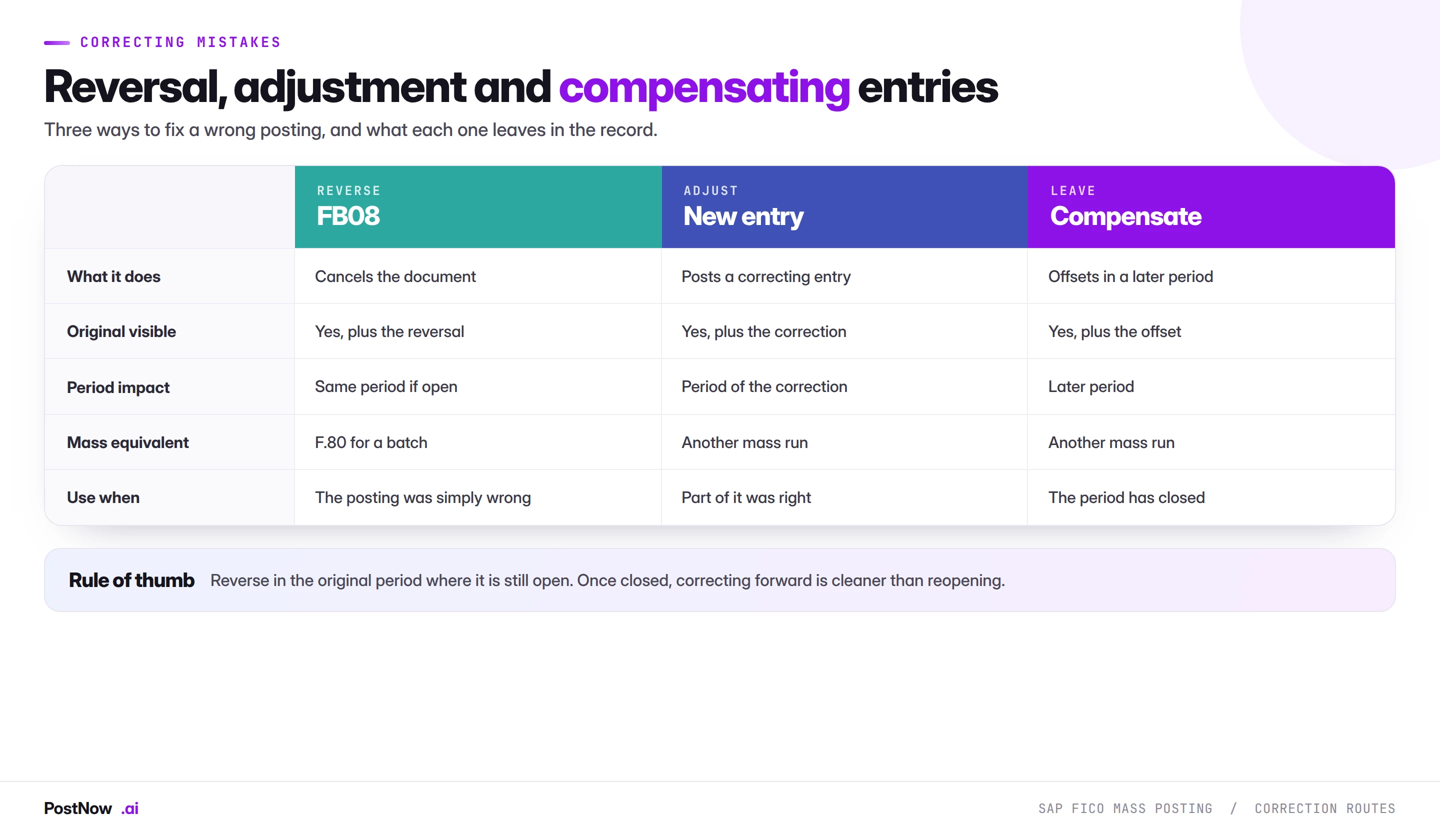
Because finance documents cannot be deleted, correction is always a further posting, and choosing which kind is a finance decision rather than a technical one.
Reversal cancels the document. FB08 handles one; F.80 handles a batch, which is what a mass run needs. It is the cleanest option when the posting was simply wrong and the original period is still open. Reversing into a later period moves value between periods, which finance will notice.
Adjustment posts a correcting entry rather than cancelling. Right when part of the original was correct and only some lines need changing, and it produces a smaller footprint than reversing and re-posting four hundred documents.
Compensation leaves the original and offsets it in a later period. Usually the only option once the original period has closed, and often preferable to reopening a closed period, which has its own governance implications.
Keep runs small enough to reverse
A run that would take an afternoon to reverse is a run that should have been split. Batch by entity, by journal type, or by whatever boundary makes a reversal a contained exercise. And make the reference identifiable per run, because mass reversal is straightforward when every document from a run shares a reference and painful when they can only be found by opening them.
Running finance postings from Excel
PostNow runs SAP FICO mass posting from Excel
Journals, vendor invoices and cost objects all run from the workbook the calculation already lives in. PostNow adds a task pane to Excel, connects to your SAP system with your own credentials, and takes the file through mapping, balancing, validation and posting without leaving the sheet.
Rows sharing a reference become one document, as SAP expects.
Debits and credits checked per document before anything is sent.
Periods, accounts and cost objects checked against live SAP.
The document number written back on the row that created it.
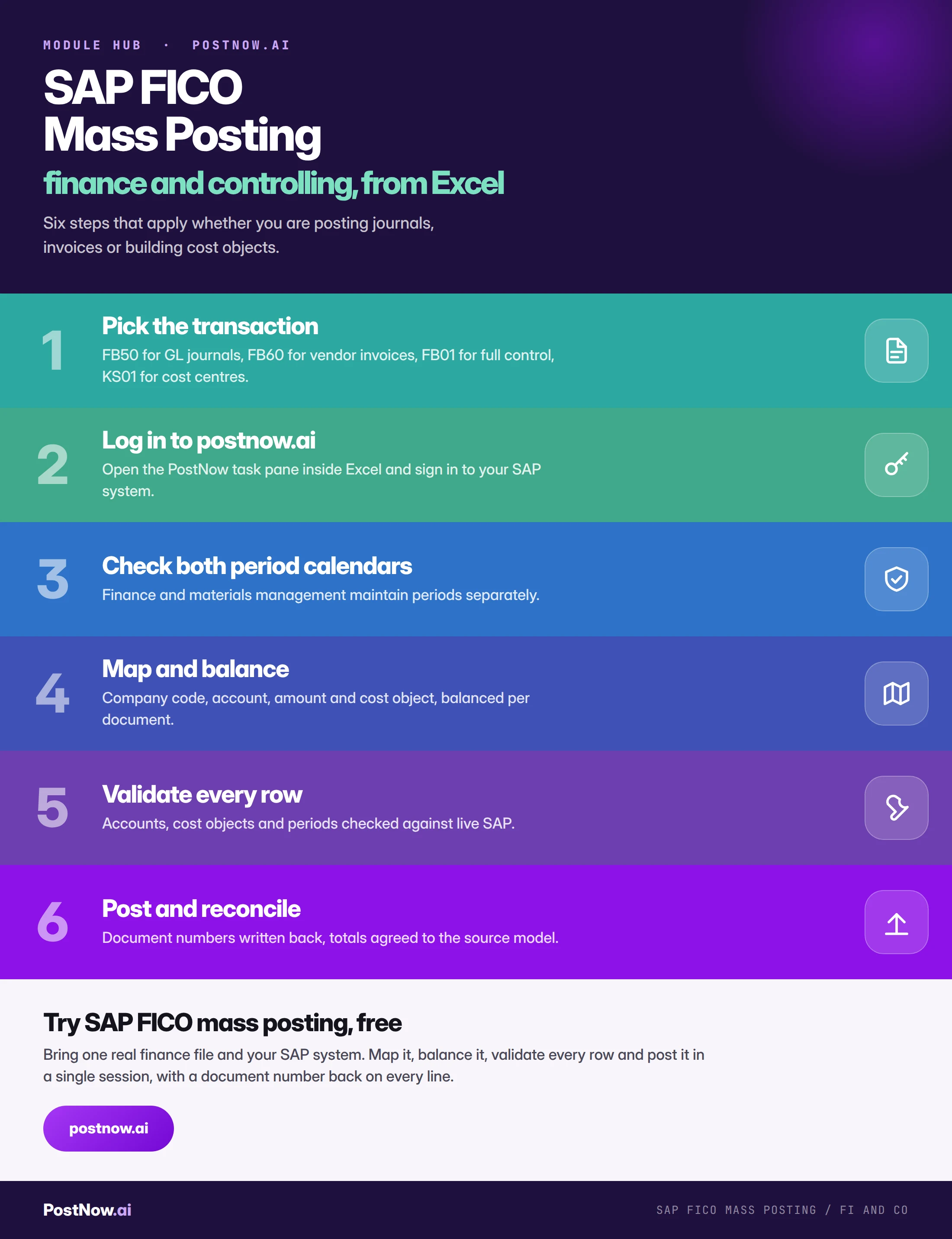
SAP FICO mass posting, step by step
The eight stages above describe the discipline. This is what the same sequence looks like as a task rather than a project, whichever transaction you are running.
Tax, currency, and the fields that break balance
Three things routinely break the balance check on a file that looks perfectly correct in Excel.
The tax line SAP adds
Where a tax code is supplied, SAP generates an automatic tax line that is not in your spreadsheet. That line changes the document balance. A file that balances to the cent and fails on balance in SAP is almost always this, and the fix is to model the tax SAP will calculate rather than the tax printed on the source document.
Foreign currency
A document in a currency other than the company code currency needs the transaction currency and either an exchange rate or a translation date. Balance is evaluated in the document currency; local currency amounts are derived, and small differences there are normal and handled by SAP. Where a rate is supplied explicitly it must be consistent across every line of the document, because a mixed-rate document is not one SAP will accept.
Rounding in allocation models
Allocation journals fail on balance more than any other type, and always structurally: a total distributed by percentage, each receiver rounded to two decimals, and the rounded amounts not summing back. Decide in advance whether the difference plugs to the largest receiver or posts to a designated rounding account, and build it into the model rather than the upload. The upload should receive a file that already balances.
Turning finance runs into monthly templates
Almost all FICO mass work recurs. The same accrual returns next month, the same allocation runs every period, the same utility invoices arrive on the same cycle. The first run is a project and the second should be a task, and the difference is entirely in what gets saved.
- Save the mapping, not just the file. Working out which column feeds which SAP field is the intellectual work, and it does not change between periods.
- Issue blank templates to the people who own the numbers. If the accrual model outputs the right columns in the right formats, most preparation disappears at source.
- Keep the validation rules with the template. The checks learned the hard way are the ones that matter next month.
- Record the configuration it was proven against. Which company codes, document types and account ranges, so nobody assumes it covers a case it has never seen.
- Name an owner. Templates rot when the chart of accounts changes and nobody is responsible for re-proving them.
The test is whether a colleague who did not build it can run next month's close task without calling you, and produce a result you would be comfortable defending.
Governance: why the evidence improves
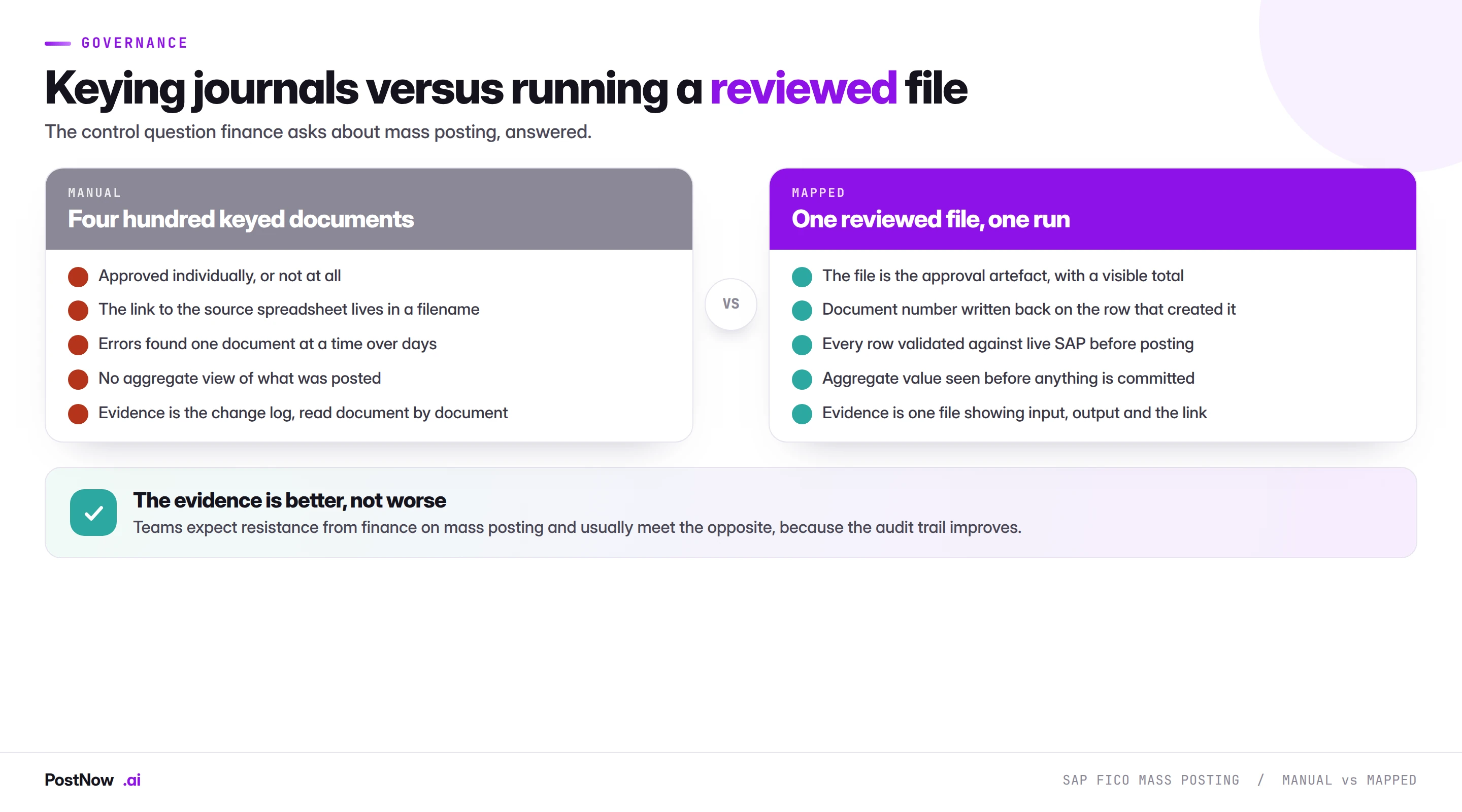
Teams approaching finance about mass posting usually expect resistance and meet the opposite, once the control model is explained properly.
The reason is that a mass run produces better evidence than manual keying, not worse. Four hundred journals keyed by hand are approved individually or not at all, the link between calculation and posted document lives in a filename, and the audit trail is the change log read one document at a time. One reviewed file produces a visible aggregate total, a document number written back against every source row, and a single artefact showing input, output and the link between them.
The controls worth writing down once:
- Post as a named user, with their own authorisations. A shared service account defeats the trail and is the finding auditors reach for first.
- Approve the file, not the run. The reviewable artefact is the spreadsheet: the numbers, the accounts, the totals. Whoever signs off a manual journal signs off the file that replaces it.
- Show the aggregate. The total being posted is the number that matters and is invisible when documents are keyed one at a time.
- Separate build from post where materiality justifies it. Standard segregation applied to a new mechanism, not a new control.
- Keep the completed file. With document numbers written back, it is the audit record.
- Reconcile every run. Posted totals against the source model. A run is not finished until that comparison is made and recorded.
Sequencing a finance mass programme
Finance mass work rarely happens in isolation. Most of it depends on something else existing first, and getting the order wrong turns one deadline into three.
- Cost objects. Cost centres, internal orders and WBS elements. Nothing with a P&L line can post until these exist and are valid on the posting date.
- Master data. Vendors for FB60 and MIRO postings, with their company code segment complete or the invoice cannot post.
- Journals and invoices. The posting runs themselves, in whatever order the close calendar dictates.
- Reconciliation. Totals compared, GR/IR reviewed where procurement postings are involved, and blocked items assigned an owner.
The recurring mistake is treating step one as part of step three. A journal run that fails because four cost centres do not exist has not found a data problem; it has found a sequencing problem, and the fix belongs upstream.
Volume, timing, and close pressure
- Runtime tracks documents, not rows. Two thousand rows forming four hundred five-line documents makes four hundred posting calls. Consolidating lines into fewer documents is faster.
- Watch the period boundary. A long run that starts before a period closes and finishes after it fails partway, and the failure is confusing because the file was correct when it started.
- Run before the close peak, not during it. Not for system load, but because a run competing with everything else finance is doing produces timeouts that look like data errors.
- Batch to a reversible size. If undoing it takes an afternoon, it is too big.
- Coordinate with procurement runs. Receipts and invoices hit the same period calendars and the same GR/IR account.
What S/4HANA changes for finance mass posting
The universal journal is the headline change and it affects how you think about a mass run more than how you build one.
FI and CO merged. Postings land in ACDOCA with the financial and controlling views on the same line, rather than in separate documents reconciled afterwards. For the load itself nothing changes. What changes is blast radius: a wrong cost object now affects a single record used by both finance and controlling reporting, so a structural mistake propagates further than it did on ECC.
Profit centre became a first-class dimension. Every line carries it, which raises the importance of cost centre to profit centre assignment being right at creation rather than corrected later.
The interfaces are stable. BAPI_ACC_DOCUMENT_POST and BAPI_COSTCENTER_CREATEMULTIPLE both work across releases, so a mapping built on ECC carries forward with a remap rather than a rebuild. A screen recording built against the FB50 or KS01 screens does not survive the move to Fiori-based apps, which is the practical argument for choosing an interface-based method before a migration rather than after it.
Reporting reads different tables. Reconciliation reports built on the old ledger structures need revisiting. The posting run does not.
Mistakes that recur across every finance transaction
- Letting the posting date default to today. A convenient formula posts July into August the moment the run slips. Hard-code it or derive it from the period.
- Checking one period calendar. FI and MM are separate, and anything touching stock needs both.
- Header fields disagreeing inside a document group. Two posting dates under one reference makes the document ambiguous, and the error names the date rather than the grouping.
- Forgetting the tax line in the balance check. The sheet balances, SAP adds a line, the document does not.
- Running without a status column. Without a document number written back per row, a restart posts the successful rows a second time.
- Treating missing cost objects as a data problem. It is a sequencing problem, and the fix belongs upstream in the cost object run.
- Testing in production because the deadline is close. Nothing here can be deleted, so this is the one shortcut that cannot be undone.
- Calling the run finished when the last document posts. It is finished when totals are reconciled to the source and recorded.
The FICO mass posting guides
Each transaction has its own guide covering field mappings, error codes, edge cases and the checks specific to it.
SAP mass journal entry upload (FB50)
GL journals from Excel: how documents group, why balance is checked separately, and the four errors that stop most runs.
SAP mass vendor invoice posting (FB60)
Non-PO supplier invoices: vendor selection, payment terms, baseline dates and where FB60 ends and MIRO begins.
SAP mass GL document upload (FB01)
General posting with explicit posting keys, for interface data and combinations the Enjoy screens do not offer.
SAP mass cost center creation (KS01)
The controlling prerequisite: standard hierarchy nodes, time-dependent validity segments and profit centre alignment.
Where mass posting fits in the close calendar
Most FICO mass work is close work, which means it competes for the same narrow window as everything else finance does at period end. Placing it deliberately in the calendar is worth more than making the run itself faster.
Before the close, not during it. Anything that can post early should. Recurring accruals with known values, standing allocations and prepayment releases do not need to wait for the final day, and moving them earlier removes them from the crush.
Cost objects in the previous period. New cost centres for the coming period should exist before that period opens, not on the day someone needs to post to them. This is the dependency that most often turns a two-hour task into a two-day one.
Reconciliation the same day as the run. Comparing posted totals to the source model while the run is fresh takes minutes. Doing it a week later, after other postings have landed on the same accounts, is a different and much harder exercise.
Leave room for the correction. A run posted on the last possible day leaves no window to reverse and re-post if the test sample reveals a problem. Where a run is material, schedule it early enough that a correction is still possible inside the same period.
Who owns a finance mass run
Finance mass posting crosses more functional boundaries than any other object in this cluster, and settling ownership before the first run prevents the awkward conversation during the second.
The business owns the numbers. Whoever built the accrual model, the allocation, or the invoice population owns whether the figures are right. This is not something the person running the load can verify and should not be asked to.
The operator owns the structure. Which transaction, how rows group into documents, which posting date, how the balance is achieved. These are technical decisions with accounting consequences.
Financial control owns the period. Whether a period opens, when it closes, and whether a backdated run is acceptable. A mass posting programme that assumes it can reopen periods on request will eventually be told no at the worst moment.
Audit owns the evidence standard. What has to be retained, what approval looks like, and whether the file plus run log is sufficient. Establishing this early is what turns mass posting from a finding into a control improvement.
The handover that works in practice is a template the business fills in, a structure decision recorded by whoever runs it, a period confirmation from control before the run, and the completed file with document numbers retained as the evidence artefact. Four steps, each with a name against it.
The complete FICO mass posting reference
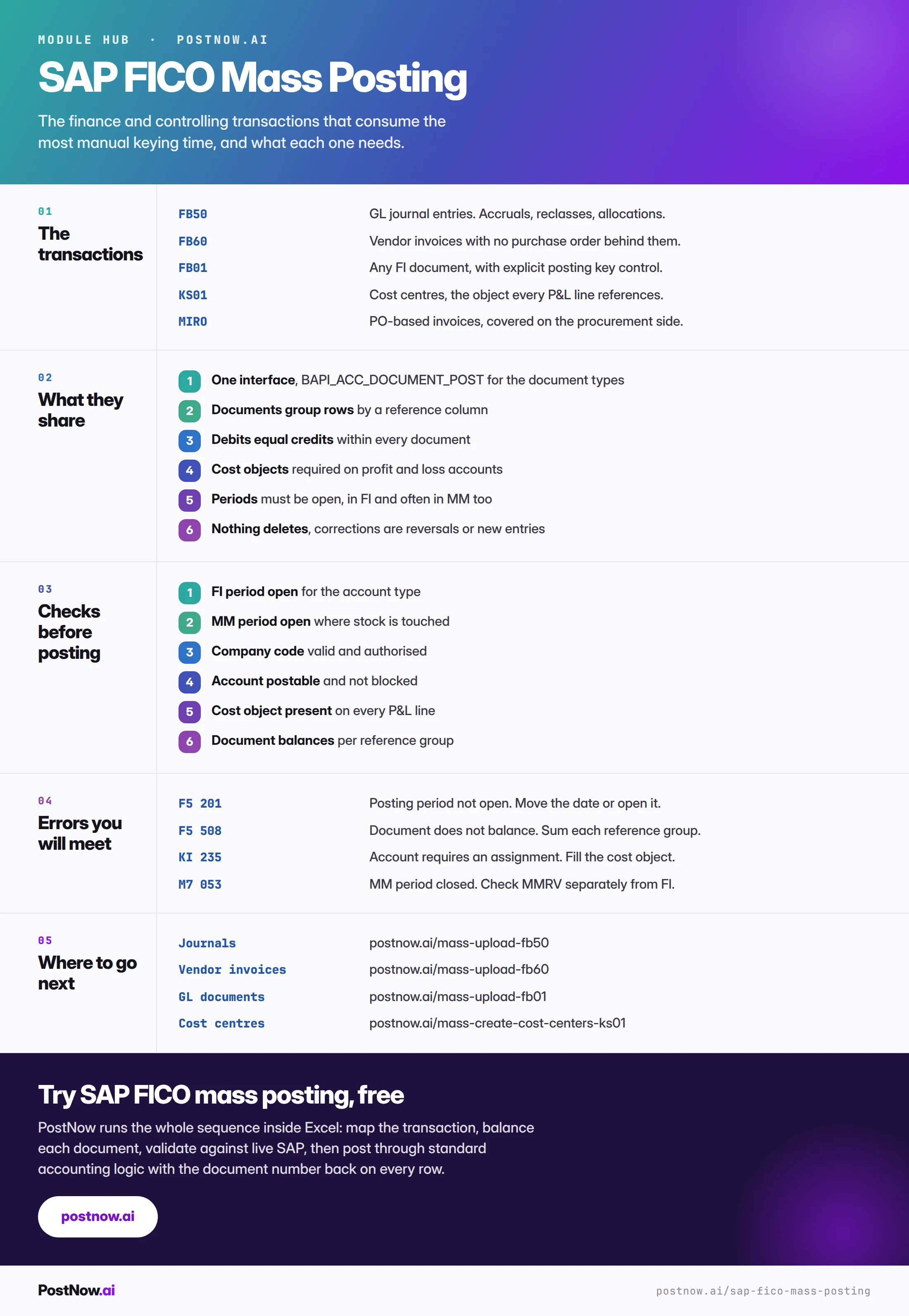
The reference sheet below collects the transactions, the shared checks and the errors into one image you can share before a close.
Go deeper
SAP mass upload
The pillar guide covering methods, validation, error handling and governance across every module.
SAP master data mass upload
The vendors and cost objects finance postings reference have to exist first.
SAP MM mass upload
Procurement postings that hit the same period calendars and the same GR/IR account.
Methods and alternatives
How BAPI, screen recording and LSMW compare for finance documents.