SAP MIGO goods movement upload means posting many stock movements — receipts, issues and transfers — in one controlled run. A goods movement in MIGO is never just a stock change: one posting writes an inventory record and an accounting document together, and the movement type in the row — not the transaction — decides quantity direction, valuation and which accounts move. That makes mass goods movement a discipline problem before it is a data-entry one. This guide covers receipts, issues, transfers and reversals at volume, the two periods that both have to be open, and how to clear a backlog without creating stock and value entries you then unwind one by one.
- Two periods must be open, not one. MM and FI periods are maintained separately, and this stops more receipt runs than anything else.
- The movement type decides everything. Direction, what the file references, and which accounts are posted.
- Never use 501 where a purchase order exists. It breaks three-way matching permanently and GR/IR never clears.
- Nothing can be deleted. A wrong receipt is corrected by posting the reversal, and both documents stay visible.
- Reconcile GR/IR the same day. Wrong references produce balances that hide until quarter end.
The movement type decides everything
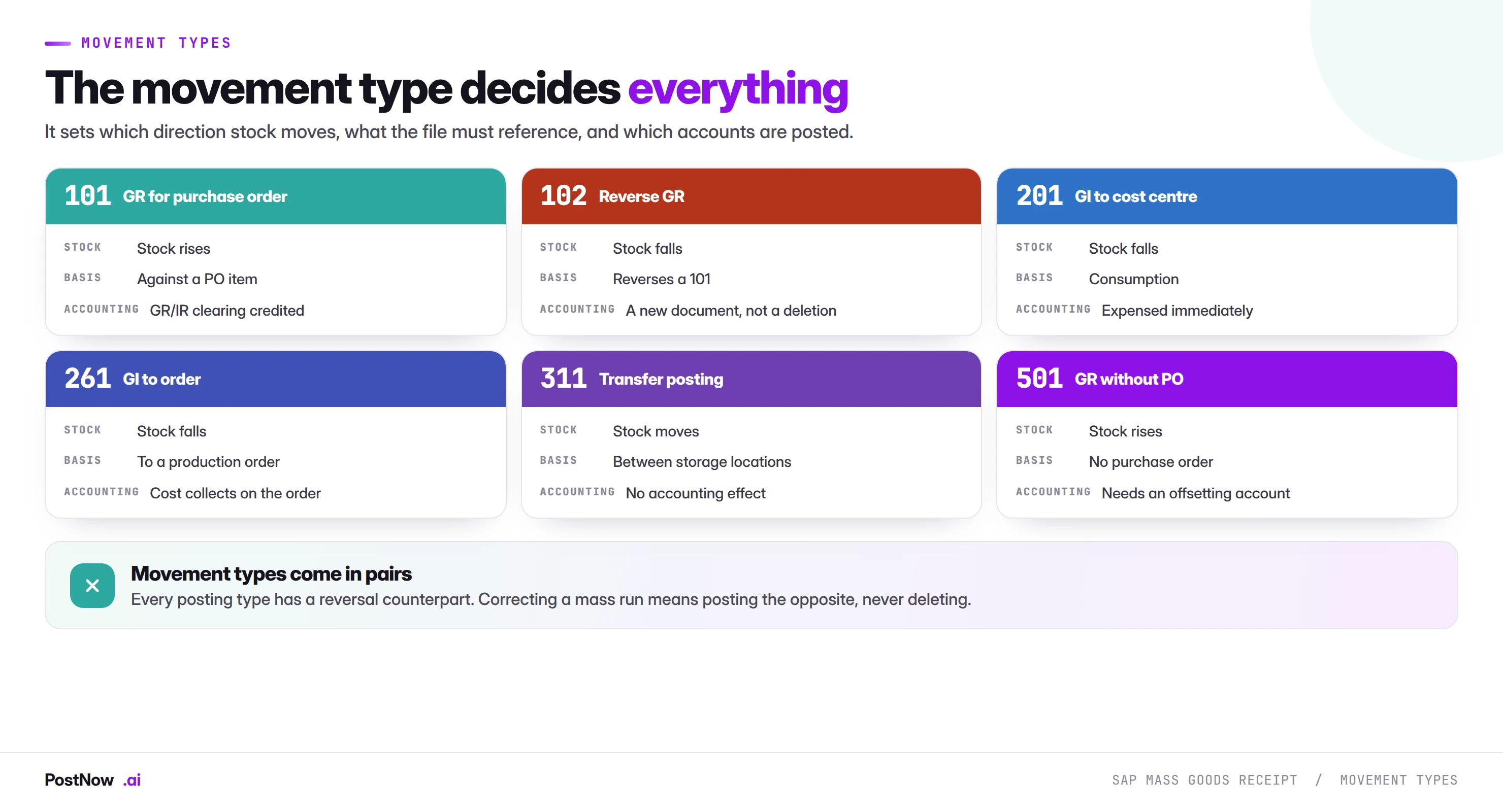
Movement type is the most important field in a goods movement file, and it is not merely a classification. It determines the direction stock moves, what the file must reference, which accounts are posted, and which additional fields become mandatory.
A file with the wrong movement type does not usually fail. It posts a valid document doing something other than what you intended, which is the worst category of error because nothing stops.
Movement types come in pairs
Every posting movement has a reversal counterpart: 101 and 102, 201 and 202, 261 and 262, 311 and 312. This pairing is how corrections work. There is no undo; there is only the opposite movement.
For a mass run this has a practical consequence worth planning for. If four hundred receipts post wrongly, the correction is four hundred reversals, which is itself a mass run and which doubles the number of documents in the audit trail. Getting the first run right is cheaper than any recovery.
The 501 trap
Movement 501, goods receipt without a purchase order, exists for genuine cases: free samples, returns from customers into stock, corrections. It is also the movement people reach for when a receipt against a PO fails and they need stock in the system quickly.
Doing that breaks three-way matching permanently. The PO remains open with no receipt against it, the GR/IR account never clears for that line, and the supplier invoice arrives with nothing to match. Somebody in accounts payable will spend a day on it in six weeks. If a receipt against a PO fails, fix the reason rather than routing around it.
- Bulk deliveries. A supplier ships against forty purchase orders on one truck, and the receipting is forty transactions.
- Third-party logistics reconciliation. A warehouse provider sends a receipt file that has to become material documents.
- Backlog catch-up. Receipting fell behind, and now a month of deliveries has to post before period close.
- Physical inventory adjustments. A count produces a list of differences that become movements.
- Production consumption. Component issues against production orders, particularly where backflushing is not configured.
- Site reorganisation. Stock moved between storage locations or plants after a layout change.
- Subcontracting flows. Components issued to and finished goods received from subcontractors.
- Cutover. Opening stock balances loaded before go-live.
The pattern is that the physical event has already happened. The goods arrived, the stock moved, the components were consumed. What is outstanding is telling SAP, and that backlog is exactly what mass posting is for.
One posting, two permanent records
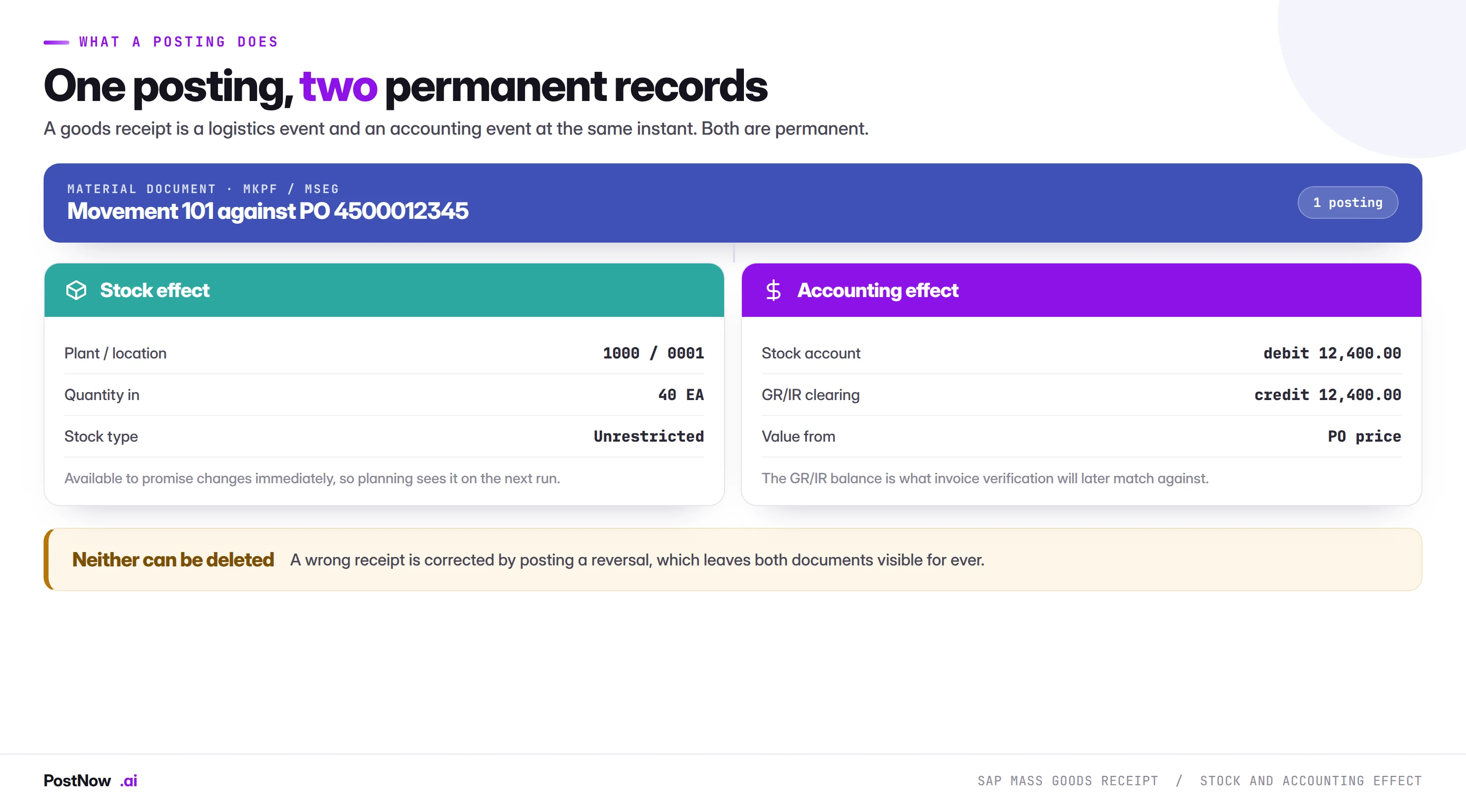
A goods receipt posts a material document and, where the movement is value-relevant, an accounting document at the same moment. Understanding both halves is what separates a mass run that works from one that quietly damages the balance sheet.
The stock effect is immediate. Quantity appears in the plant, storage location and stock type on the row, and it changes availability for planning and for sales orders on the next check. A large receipt run visibly moves the availability picture, which is why coordinating with sales order runs matters when stock is tight.
The accounting effect for a standard receipt debits stock and credits GR/IR clearing, at the purchase order price. The GR/IR balance is what invoice verification matches against later. A receipt posted at the wrong quantity or against the wrong PO item leaves a GR/IR balance that will not clear, and those balances accumulate silently until someone runs an ageing report.
A goods movement is a stock change and a posting at once
SAP mass goods receipt is the practice of posting many goods movements in one controlled run from a structured file, instead of stepping through MIGO one delivery at a time. The movements are prepared in Excel, referenced to their purchase order items, validated against live stock and period status, and posted through SAP's standard goods movement interface with the material document number written back per row.
Everything else in the mass upload cluster creates or changes a record. This one moves physical inventory and writes an accounting entry in the same instant, and both are permanent.
A goods movement cannot be deleted. Not blocked, not flagged, not reversed in place. A wrong receipt is corrected by posting an opposite movement, which means the mistake and the correction both sit in the record permanently. That is a feature rather than a defect, and it sets the standard for how carefully a mass run should be prepared.
Movements with no accounting effect
Transfer postings between storage locations move stock without changing its value, so no accounting document is created. This makes them lower risk and also means they are invisible to finance, which occasionally surprises people who expect a paper trail in FI.
Two periods must be open, not one
This single issue stops more mass receipt runs than anything else in this guide, and it is trivially avoidable once you know about it.
SAP maintains an MM period separately from the FI period. Materials management allows postings in the current period and, depending on configuration, the previous one. Finance controls its own periods through OB52. A goods receipt needs both open for its posting date.
The practical failure is a run prepared on the second of the month for deliveries dated the twenty-eighth of the previous month. Finance may still have the old period open for accruals; materials management has almost certainly rolled forward. The receipts fail with M7 053, and the message is about periods rather than about anything in your data, which sends people looking in the wrong place.
Movement type, reference and quantity define the row
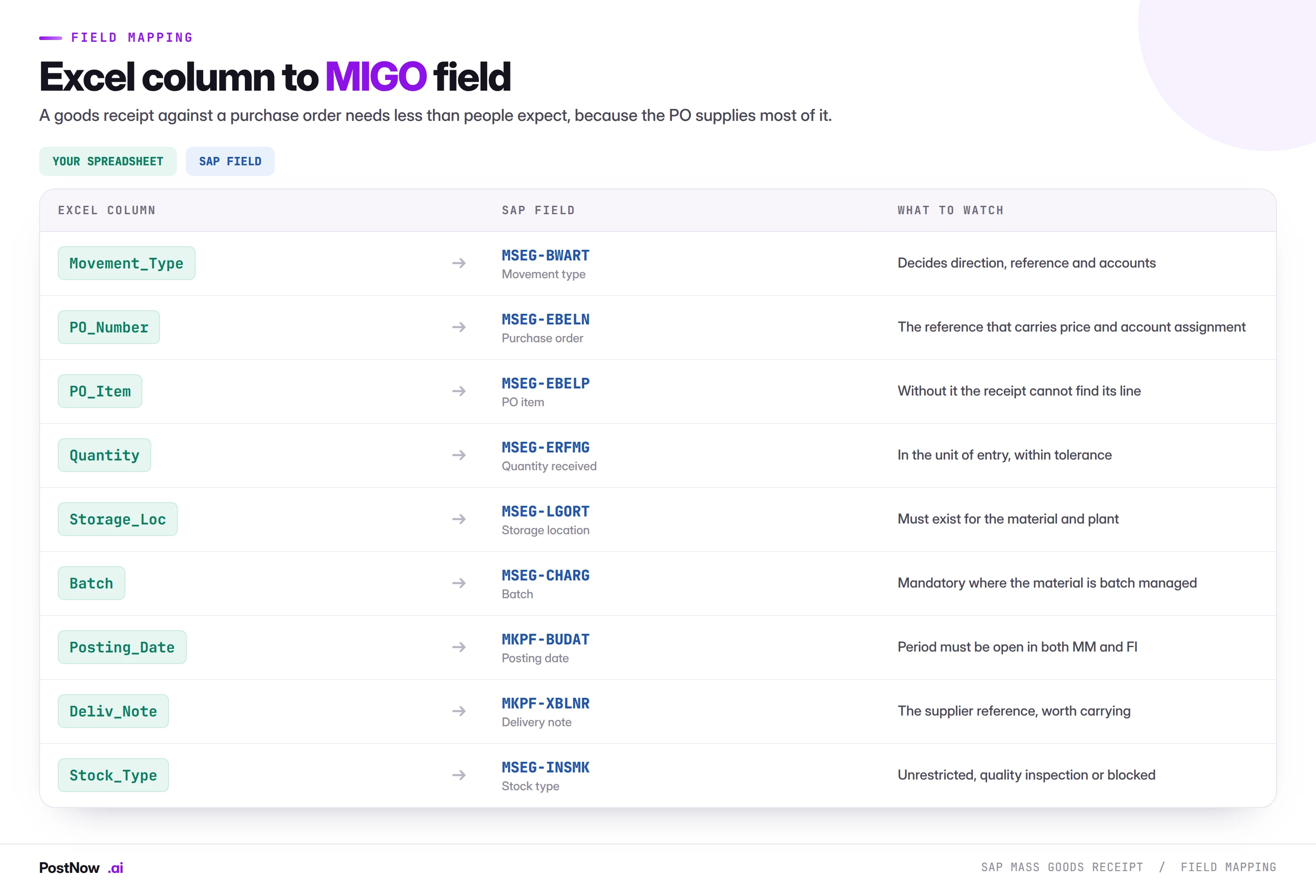
Purchase order number and item
For a receipt against a purchase order, this reference does most of the work. It supplies the material, the plant, the price, the account assignment and the tolerance rules. Your file supplies the quantity and the movement type; the PO supplies the context.
The item number is not optional. A purchase order with twelve lines needs to know which line the receipt is against, and a file that carries only the PO number cannot post. Where a delivery file comes from a supplier or a warehouse system, the PO item is frequently the missing column and has to be derived from the material.
Quantity and unit
Quantity is entered in the unit of entry, which may not be the order unit or the base unit. A receipt of two pallets against an order in each is a common source of quantity errors that pass validation, because the number is valid and the unit is wrong. State the unit explicitly rather than relying on defaults.
Storage location and stock type
Storage location must exist for the material and plant. Stock type decides whether the received quantity is available immediately or held. Material received into quality inspection is not unrestricted stock, cannot be issued, and will not confirm a sales order. Where quality inspection is configured, a receipt run puts stock into inspection whether or not the person running it expected that.
Batch
Where a material is batch managed, the batch is mandatory. It can be supplied in the file, or determined by SAP where batch determination is configured. On a receipt file spanning batch-managed and non-managed materials, the batch column is populated on some rows and empty on others, which is correct and looks like an error to anyone reviewing the sheet.
Delivery tolerances and partial receipts
Purchase order items carry over-delivery and under-delivery tolerances, and a receipt outside them is rejected. This is a control rather than an obstacle, and at volume it does useful work.
Over-delivery beyond tolerance produces M7 093. The correct responses are to amend the purchase order if the extra quantity is genuinely accepted, or to receipt only the ordered quantity and handle the excess separately. Raising the tolerance to clear a run defeats the control that exists precisely to catch suppliers over-shipping.
Under-delivery is usually permitted, and produces a partially received PO item that stays open for the remainder. On a mass run this is normal: a delivery file rarely matches order quantities exactly. What matters is that partial receipts are intended rather than accidental, because a wrong quantity on a partial receipt is harder to spot than a wrong quantity on a full one.
Delivery completed is the flag that closes a PO item that will not receive its full quantity. Where a mass run is receipting final deliveries against a batch of orders, setting this flag is what stops the remainder showing as expected supply to planning for ever.
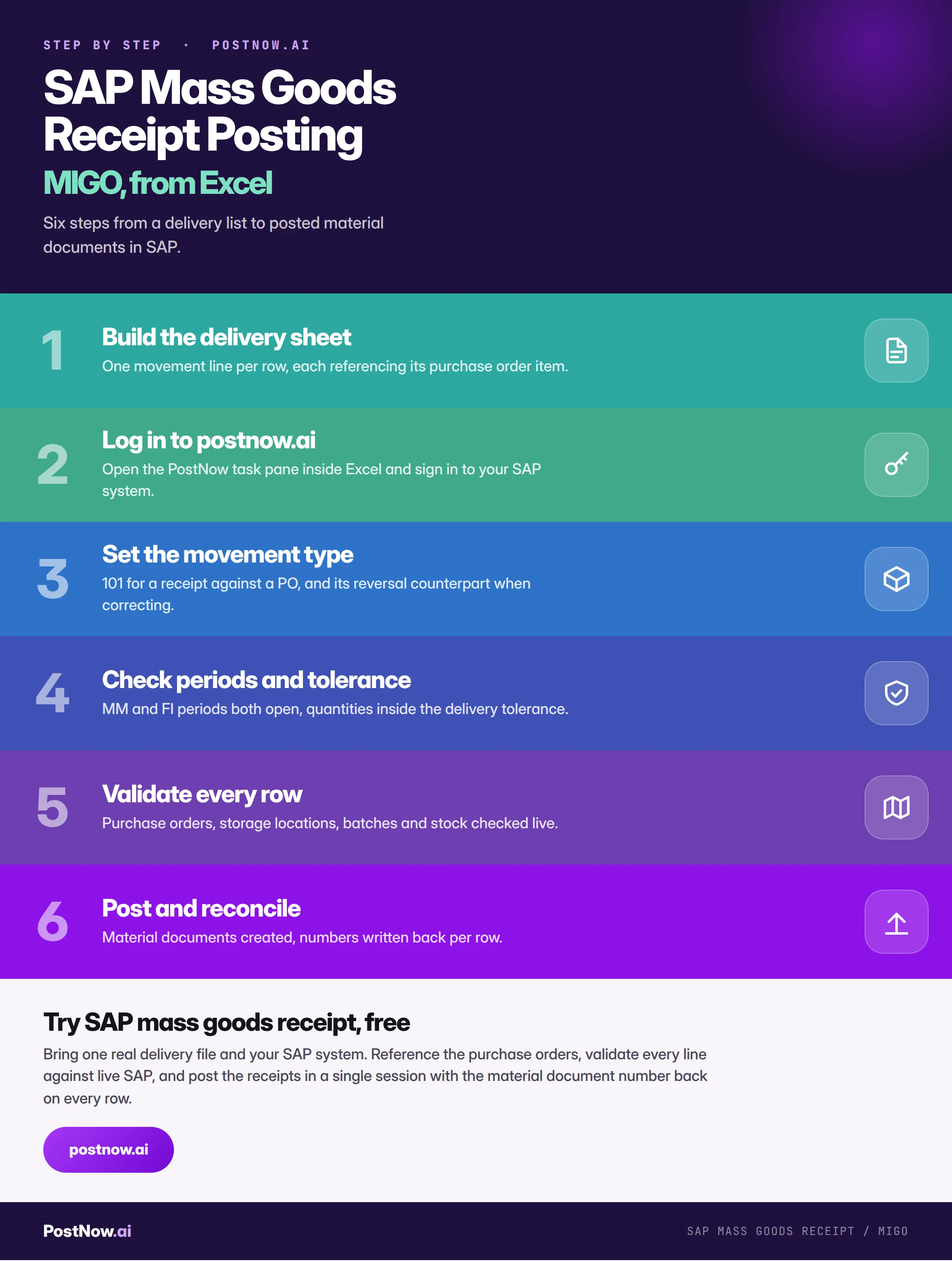
Map the movement type before anything else in the run
Start from the movement list
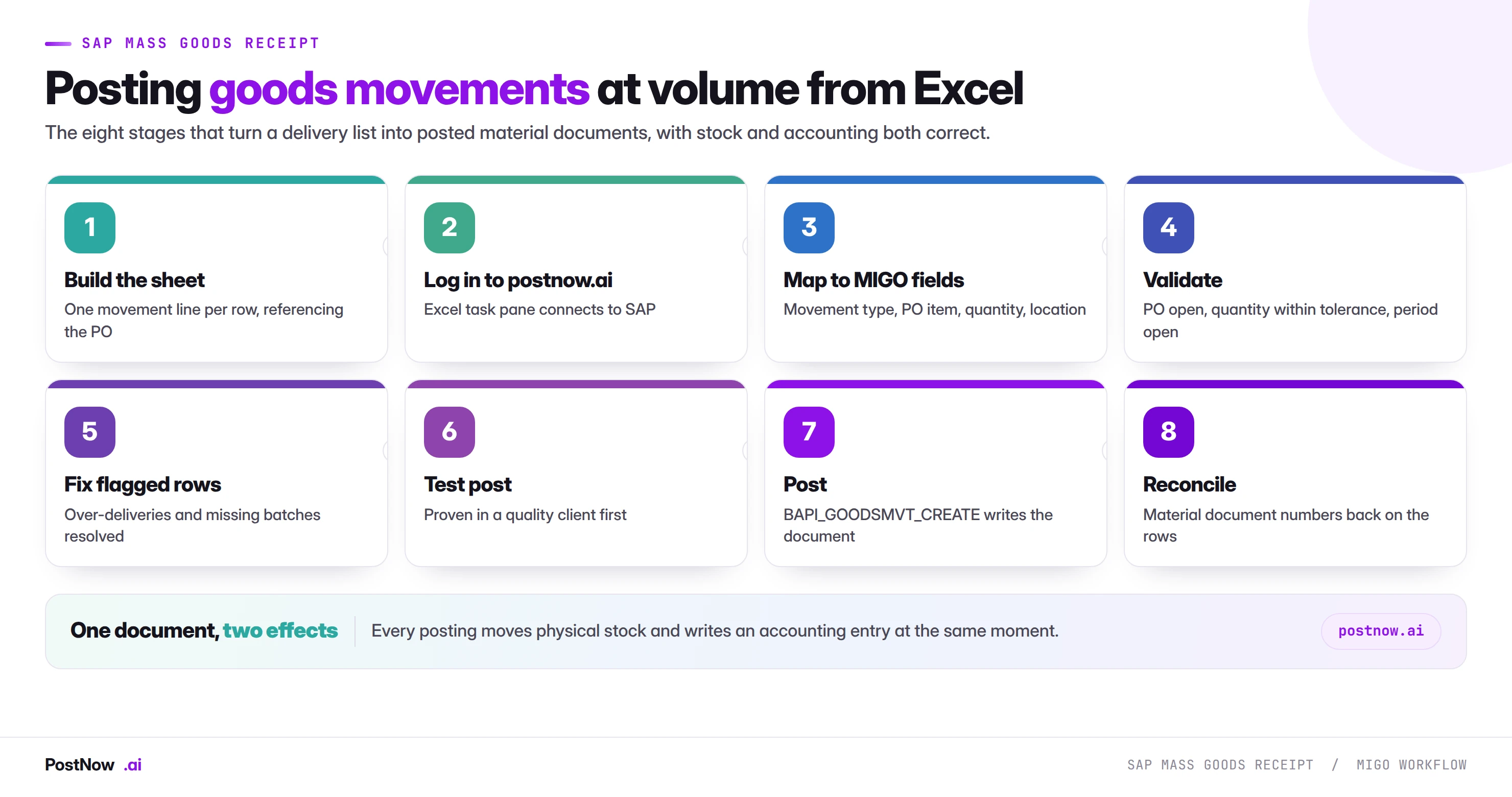
One movement line per row, each carrying its movement type and its purchase order item. Derive the PO item where the source file only has the material, and confirm the unit of entry.
Map movement type and reference
Movement type, PO number and item, quantity, unit, storage location, batch and posting date. The movement type decides which of the remaining columns are mandatory.
Validate movements against live stock
Purchase orders open and items not deleted, quantities inside tolerance, both periods open, storage locations valid, and for issues, sufficient stock of the right type.
Fix flagged rows
Over-deliveries need a decision rather than an override. Closed periods need finance. Missing batches need either data or configuration. None of these should be worked around with a 501.
Dry-run in a quality client
Post a subset, then open a material document in MB03 and its accounting document alongside it. Check that the value is what you expect and that GR/IR moved correctly.
Post each movement through SAP
The run calls BAPI_GOODSMVT_CREATE, SAP's published interface for goods movements. Every check MIGO applies still applies, and the same material and accounting documents are produced.
Clear stock and GR/IR
Material document numbers are written back per row. Compare received quantities against the purchase orders touched, and confirm that the GR/IR movement matches the value expected.
Both periods must be open, or the movement fails
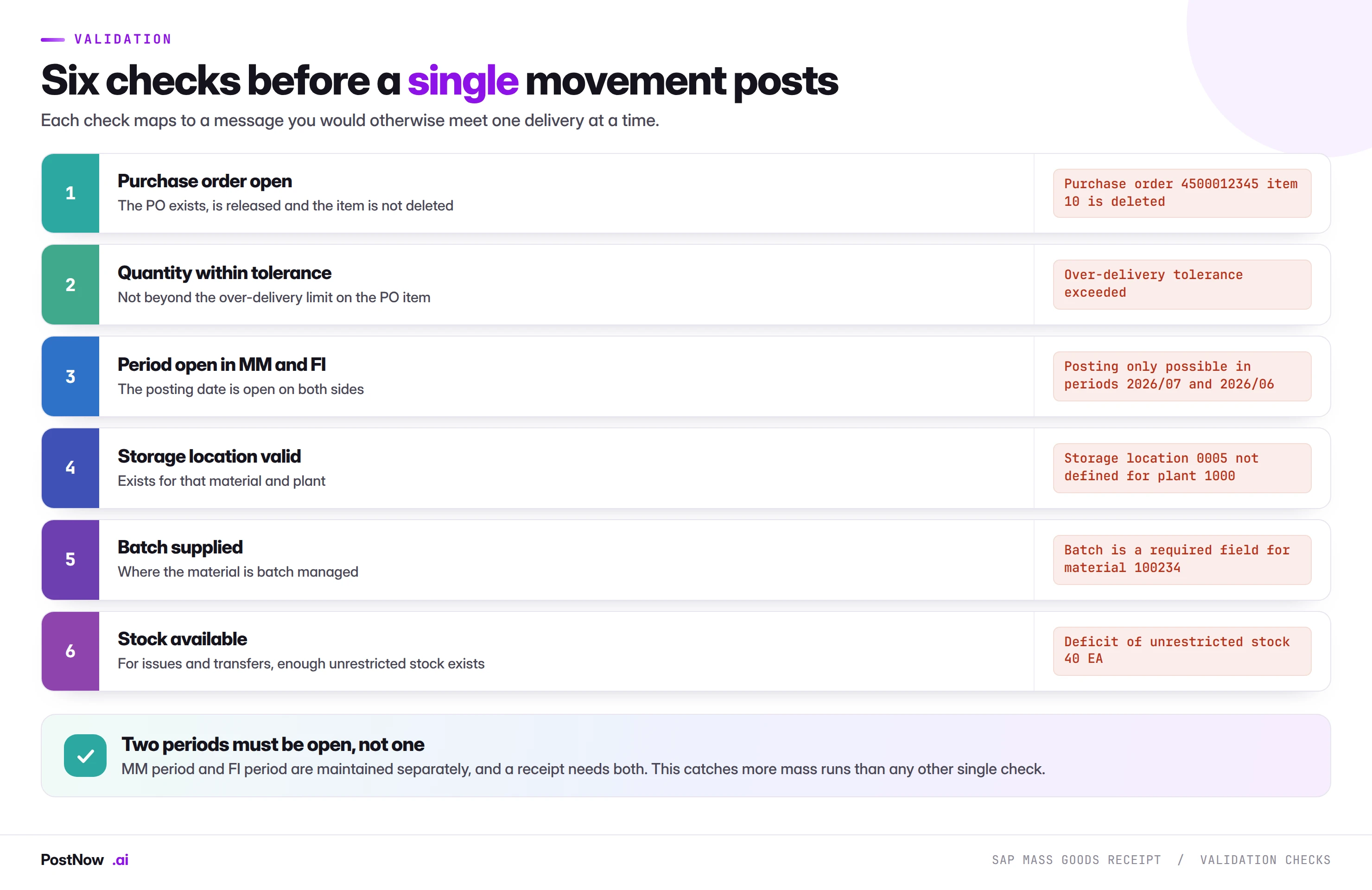
The stock availability check applies to issues and transfers rather than receipts, and it has a subtlety worth knowing. Stock exists in types: unrestricted, quality inspection, blocked. A material with plenty of stock in inspection and none unrestricted will fail an issue with a deficit message that looks wrong to anyone reading a stock overview without noticing the stock type column.
The M7 messages point straight at the cause
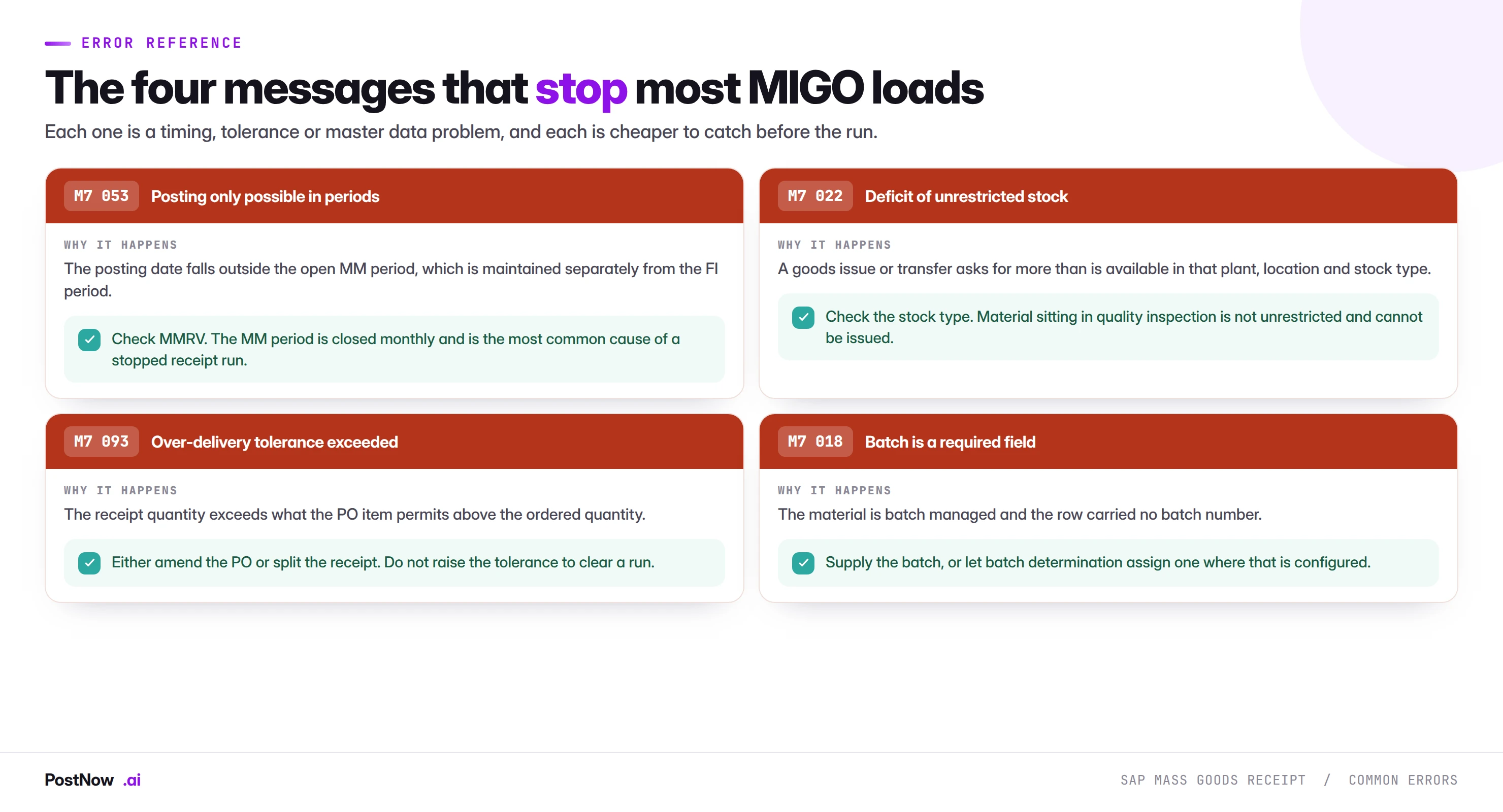
M7 053 is the period error and will hit every row on a backdated file, which makes it look catastrophic and makes it a two-minute fix. M7 022 and M7 093 are per-row and represent genuine physical or commercial questions. M7 018 is a data gap that is usually systematic: either the file has no batch column at all, or a subset of materials became batch managed after the template was built.
Every row runs through BAPI_GOODSMVT_CREATE, the engine SAP uses
PostNow reads each row's movement type and posts it
The eight stages above happen in the delivery file the warehouse already works from. PostNow adds a task pane to Excel, connects to your SAP system with your own credentials, and takes the file through referencing, validation and posting without leaving the sheet.
Each row matched to its purchase order item before anything posts.
MM and FI period status verified for the posting date.
Tolerances, storage locations, batches and stock checked live.
The material document number written back on the row that made it.
Against a PO, without a PO, and transfers
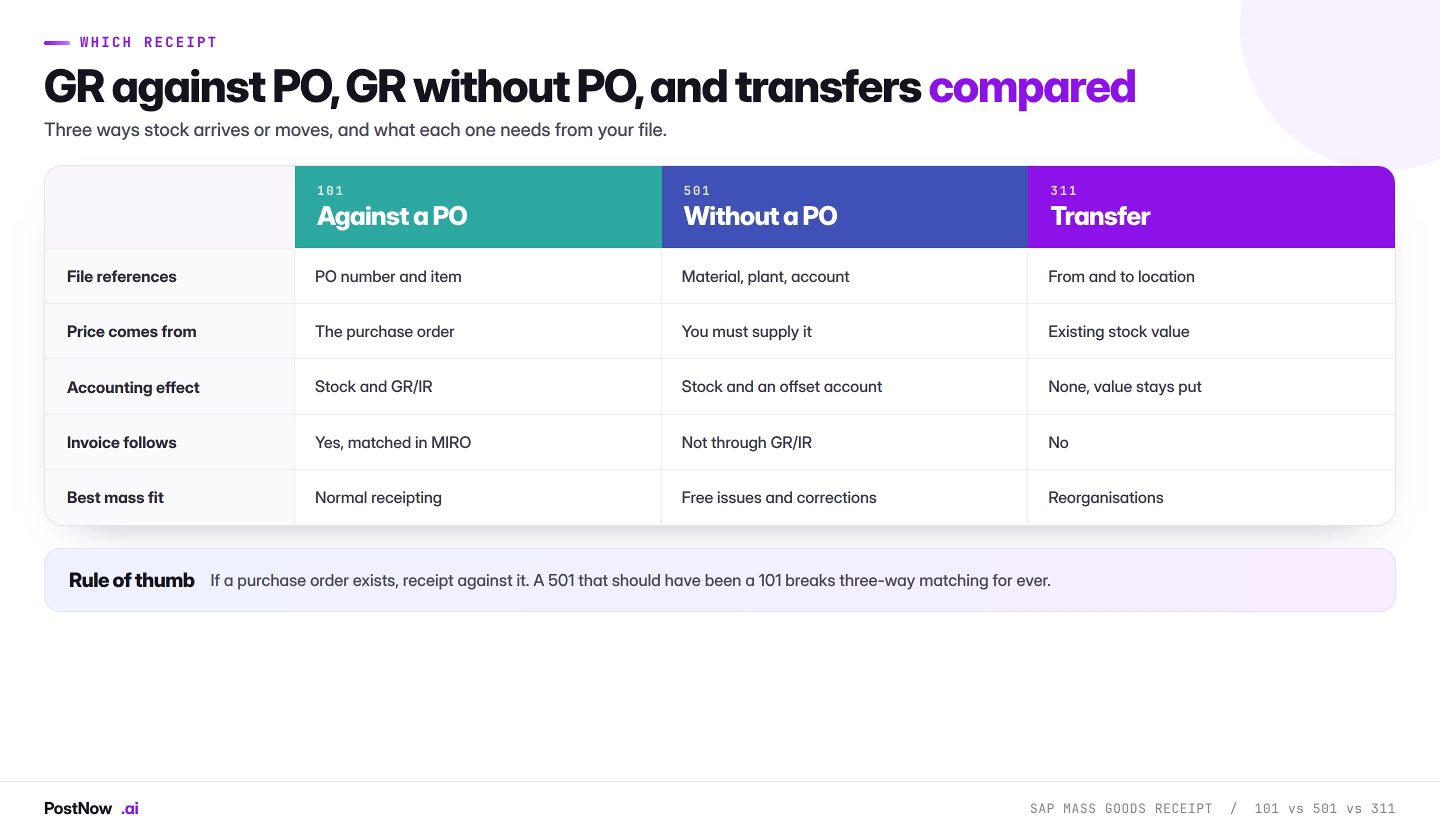
The choice is usually obvious and occasionally tempting to get wrong under time pressure. Receipt against the purchase order whenever one exists. Use 501 only where there genuinely is no order. Use transfers for movements that change location without changing ownership or value.
Reversing at volume
Because deletion is impossible, correction is its own mass run, and it deserves the same care as the original.
Reversal is a movement, not an undo. Posting 102 against a 101 creates a second material document and a second accounting document. Both remain visible. The stock returns and the GR/IR entry reverses, which is the correct outcome, but the trail shows both events.
Reference the original document. A reversal that references the material document it corrects is cleaner than a free-standing opposite movement, because the link is explicit and reporting can pair them.
Watch the period. A reversal posted in a later period than the original moves value between periods, which finance will notice. Where the original period is still open, reverse into it.
Check what happened downstream. If an invoice has already been posted against the receipt, reversing the goods receipt alone leaves the invoice unmatched. Sequence the corrections, or the cleanup gets worse rather than better.
Subcontracting, and movements that come in pairs
Subcontracting is where mass goods movement work gets structurally harder, because a single receipt is really two movements happening together.
When a subcontracted item is received, SAP posts the receipt of the finished item and the consumption of the components that were provided, in one document. The component consumption is derived from the bill of material on the purchase order item, and it draws from stock provided to the vendor rather than from your own plant stock.
Three things follow for a mass run:
- Components must be at the vendor first. Movement 541 transfers stock to vendor-provided status. A receipt against a subcontracting order fails if the components are not there, and the message points at the component rather than at the receipt.
- Component quantities are calculated, not supplied. Your file states the finished quantity; SAP derives the components. A receipt of a quantity you did not intend consumes components you did not intend, at multiple times the visible error.
- Under-consumption needs handling. Where the vendor used fewer components than the BOM assumes, the difference stays as provided stock and has to be reconciled separately.
The practical advice is to run subcontracting receipts as their own file rather than mixed into standard receipting. The failure modes are different, the validation is different, and mixing them makes a partial failure much harder to interpret.
Loading opening stock at cutover
Initial stock upload is a specific version of this job with its own rules, and it is often the first mass goods movement an organisation attempts.
Movement 561 exists for initial entry of stock balances. It posts stock in against an offsetting account rather than against a purchase order, which is correct at cutover and wrong at any other time.
Values matter as much as quantities. For materials under standard price the value follows the standard. For moving average materials the value comes from what you supply, and getting it wrong sets an average that follows the material for months.
Batches and valuation types first. Where materials are batch managed or split valuated, those structures have to exist before stock can be posted into them. This is a sequencing dependency that catches teams who plan stock loading before batch master loading.
Reconcile to the legacy balance sheet. Total stock value posted should agree with the closing inventory value being migrated. A quantity reconciliation alone will not catch a valuation error, and valuation errors at cutover are expensive to unwind.
One wrong movement type forces a reversal you then chase
- Forgetting the MM period is separate from the FI period. The single most common cause of a stopped receipt run, and a two-minute check in MMRV.
- Using 501 when a purchase order exists. Breaks three-way matching permanently and leaves GR/IR unclearable.
- Omitting the PO item number. The receipt cannot find its line, and deriving the item afterwards is slower than carrying it.
- Confusing unit of entry with order unit. A valid number in the wrong unit passes every check.
- Raising a tolerance to clear a run. Removes the control that exists to catch over-shipping.
- Ignoring stock type. Material in quality inspection is not available, and a deficit error on visible stock is usually this.
- Assuming a wrong receipt can be deleted. It cannot. Only reversed, and both documents stay.
- Skipping the GR/IR reconciliation. Wrong references produce balances that hide until quarter end.
S/4HANA merges the inventory tables MIGO used to write
Inventory management is one of the more heavily simplified areas in S/4HANA, and two changes matter for mass posting.
The aggregate tables are gone. MARD, MARC stock fields and the other aggregation tables were replaced by MATDOC, with stock quantities derived on the fly rather than stored. For a mass load this is invisible, because the interface is unchanged, and it is another reason to post through the published interface rather than anything that reads or writes tables directly. Code that touched the old aggregate tables does not work; an interface-based load does.
Performance improved for high-volume posting. The single-document-table design removes the lock contention that used to make parallel goods movements on the same material slow. Large receipting runs behave better on S/4HANA than they did on ECC, which is one of the few cases where a conversion makes a mass upload job easier rather than harder.
BAPI_GOODSMVT_CREATE continues to work across both releases, which means a mapping built on ECC carries forward. A screen recording against the MIGO screens does not.
Physical inventory differences
A stock count produces a list of differences, and posting those differences is a mass goods movement job with one important distinction: the movements are corrections to reality rather than records of an event.
Counts are handled through their own documents rather than through plain movements, and the difference posting happens when the count is cleared. Where a count list arrives as a spreadsheet, the work is entering counted quantities against count items rather than posting free movements against materials.
Two traps recur:
Do not post plain movements to fix a count. Movements 701 and 702 exist for inventory differences and route the value correctly to an inventory difference account that finance monitors. Using a generic issue or receipt to adjust stock puts the value somewhere nobody is watching and defeats the reason the count was done.
Freeze the stock during counting. Movements posted while a count is open produce differences that reflect timing rather than physical reality, and reconciling those afterwards is considerably harder than blocking the material for the duration.
The value of the differences is usually the number finance cares about most, so reconciling total difference value before and after the posting run is worth doing as a matter of routine.
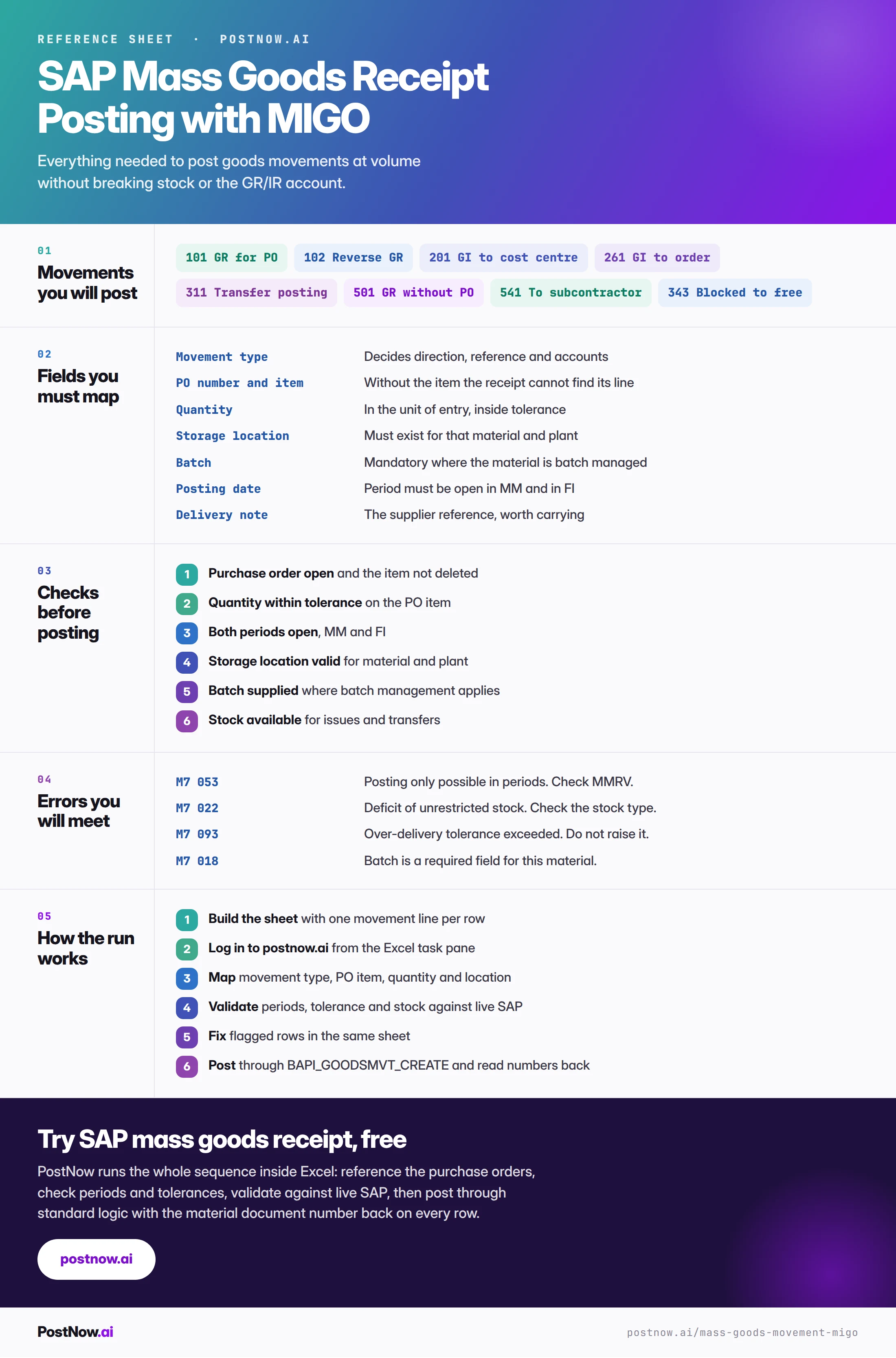
The MIGO reference card: movement types and periods
The reference sheet below collects everything above into one image you can share before a receipting run.
SAP MM mass upload
The hub for procurement at volume: orders, requisitions, goods movements and invoices.
SAP mass upload
The pillar guide covering methods, validation, error handling and governance across every transaction.
SAP master data mass upload
The materials these movements reference have to be extended to the plant first.