SAP Mass Purchase Requisition Creation with ME51N
SAP mass purchase requisition creation is the practice of raising many purchase requisitions in one controlled run from a file, instead of stepping through ME51N one line at a time. A requisition records internal demand and is the only link in the procurement chain that commits nothing outside your organisation. SAP purchase requisition automation is strongest where the demand is known and the sourcing is not yet in question.
- A requisition commits nothing externally. No supplier is told, no budget is consumed, and a wrong line is deleted rather than reversed.
- Raise requisitions when sourcing is not settled. Mass order creation assumes a vendor and price decision that may not have been made.
- The desired vendor is a suggestion, not an instruction. Requesters routinely believe otherwise, and the gap surfaces at conversion.
- The estimated price drives release strategy. An optimistic estimate can route real spend through a low approval threshold.
- Material extension to the plant is the usual block-level failure. On a new site file it affects nearly every row.
What SAP mass purchase requisition creation means
SAP mass purchase requisition creation is the practice of raising many purchase requisitions in one controlled run from a structured file, instead of stepping through ME51N one line at a time. A requisition records internal demand: somebody needs something, at a plant, by a date, charged to a cost object. It is the first link in the procurement chain and the only one that commits nothing outside your organisation.
That last point is why this guide reads differently from the rest of the procurement set. A purchase order is a legal commitment, a goods movement cannot be deleted, and an invoice creates a payable. A requisition does none of that. No supplier is told, no budget is consumed in most configurations, and a wrong line is deleted rather than reversed.
That makes it the right place to start. Not just the safest procurement load, but the one that proves your mapping, your validation and your process with almost no downside if it goes wrong.
Where requisition volume comes from
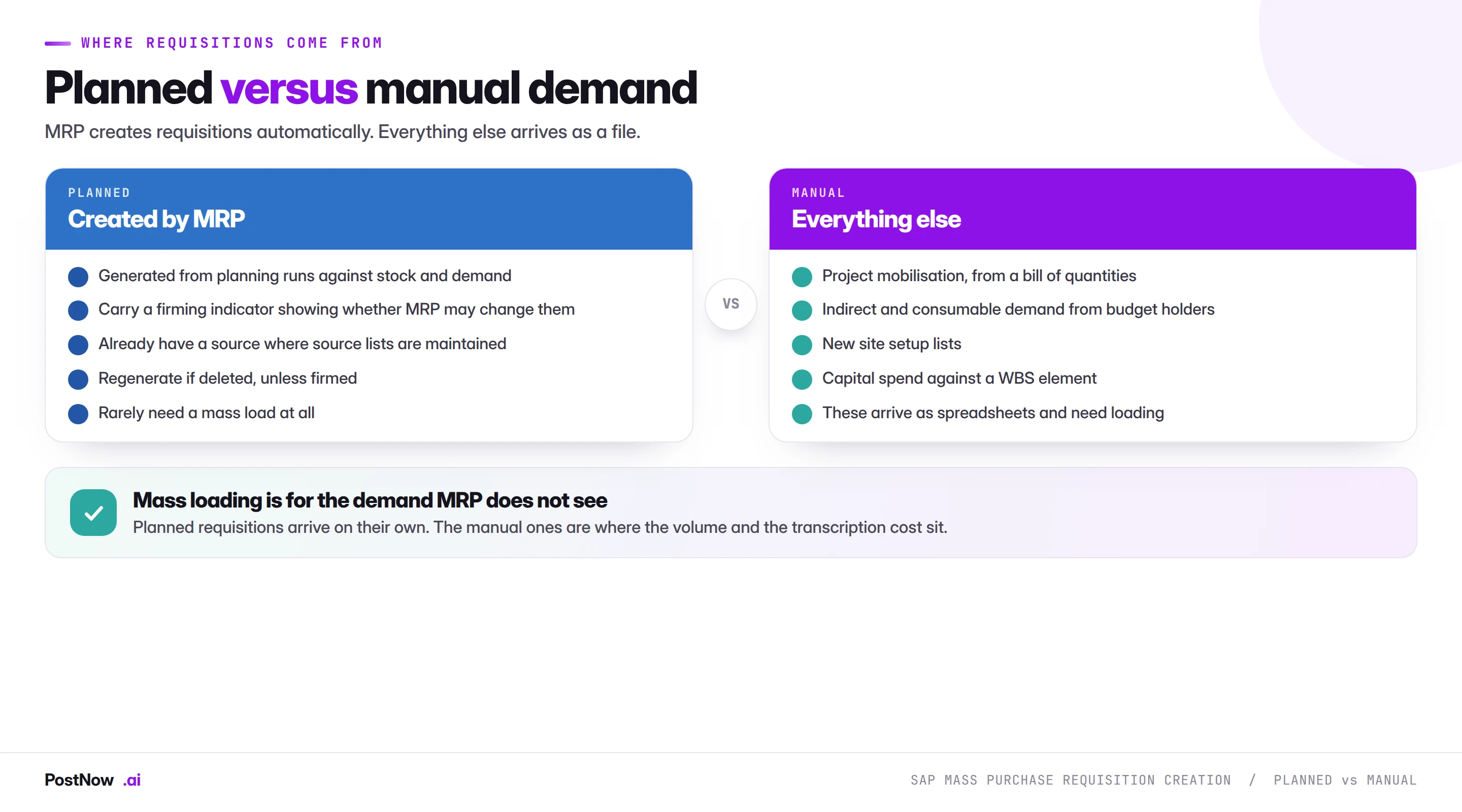
Most requisitions in a working SAP system are created automatically. MRP runs, compares demand against stock and planned receipts, and raises requisitions for what it cannot cover. Those arrive on their own and rarely need a mass load.
The requisitions that arrive as spreadsheets are the ones MRP cannot see, and they cluster into a handful of recognisable cases.
- Project mobilisation. A capital project starts and its bill of quantities becomes hundreds of requisitions against WBS elements.
- Site or plant setup. A new location needs its initial equipment, consumables and services, listed by whoever is opening it.
- Indirect and consumable demand. Budget holders requesting things no planning run will ever propose: furniture, tools, subscriptions, services.
- Maintenance work packages. A shutdown or overhaul with a defined parts list, planned months ahead.
- Budget cycle commitments. Approved spend that needs to enter the system as demand before sourcing begins.
- Catalogue and front-end output. A procurement portal holding approved requests that have to become SAP requisitions.
What these share is that the demand originates outside SAP, with people who often have no SAP access, and arrives in a spreadsheet because that is the only tool everyone has.
Requisition or purchase order
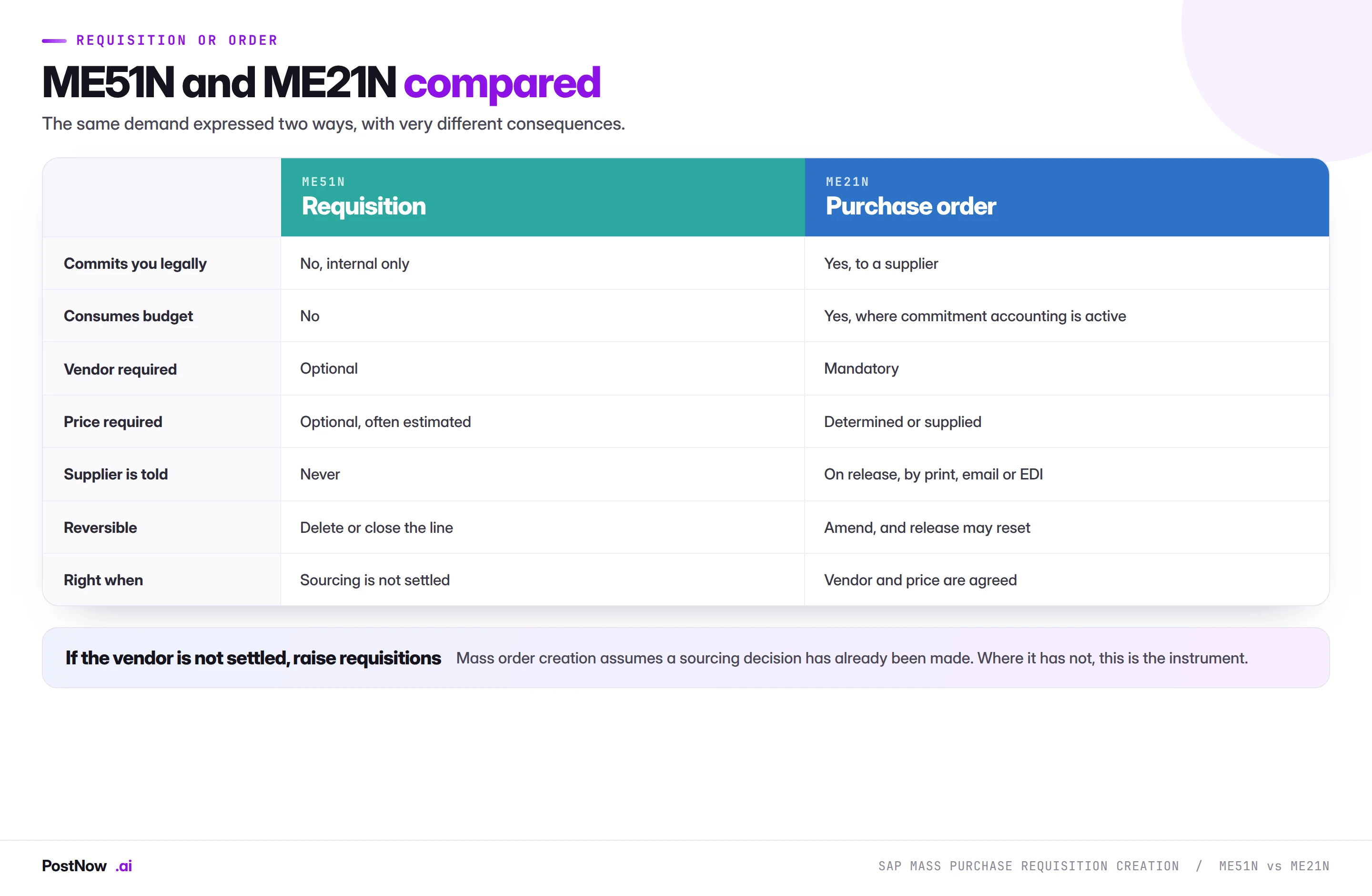
This is the decision that matters most, and it gets made wrongly in both directions.
Raise requisitions when sourcing is not settled. If the vendor has not been chosen, or the price has not been agreed, a requisition expresses the demand without pretending the decision has been made. Sourcing then converts it, and the buyer owns the vendor and price choice, which is where that decision belongs.
Raise orders when it is settled. Call-offs against contracts, seasonal buys at negotiated prices, and planning output that has already been sourced all go straight to ME21N. Routing them through requisitions first adds a conversion step with no benefit.
The failure in one direction is mass-creating orders when nobody has sourced them, which commits the organisation to vendors and prices that were inferred from a spreadsheet rather than negotiated. The failure in the other is raising requisitions for everything, which floods sourcing with conversions for buys that were already decided.
The fields you have to map
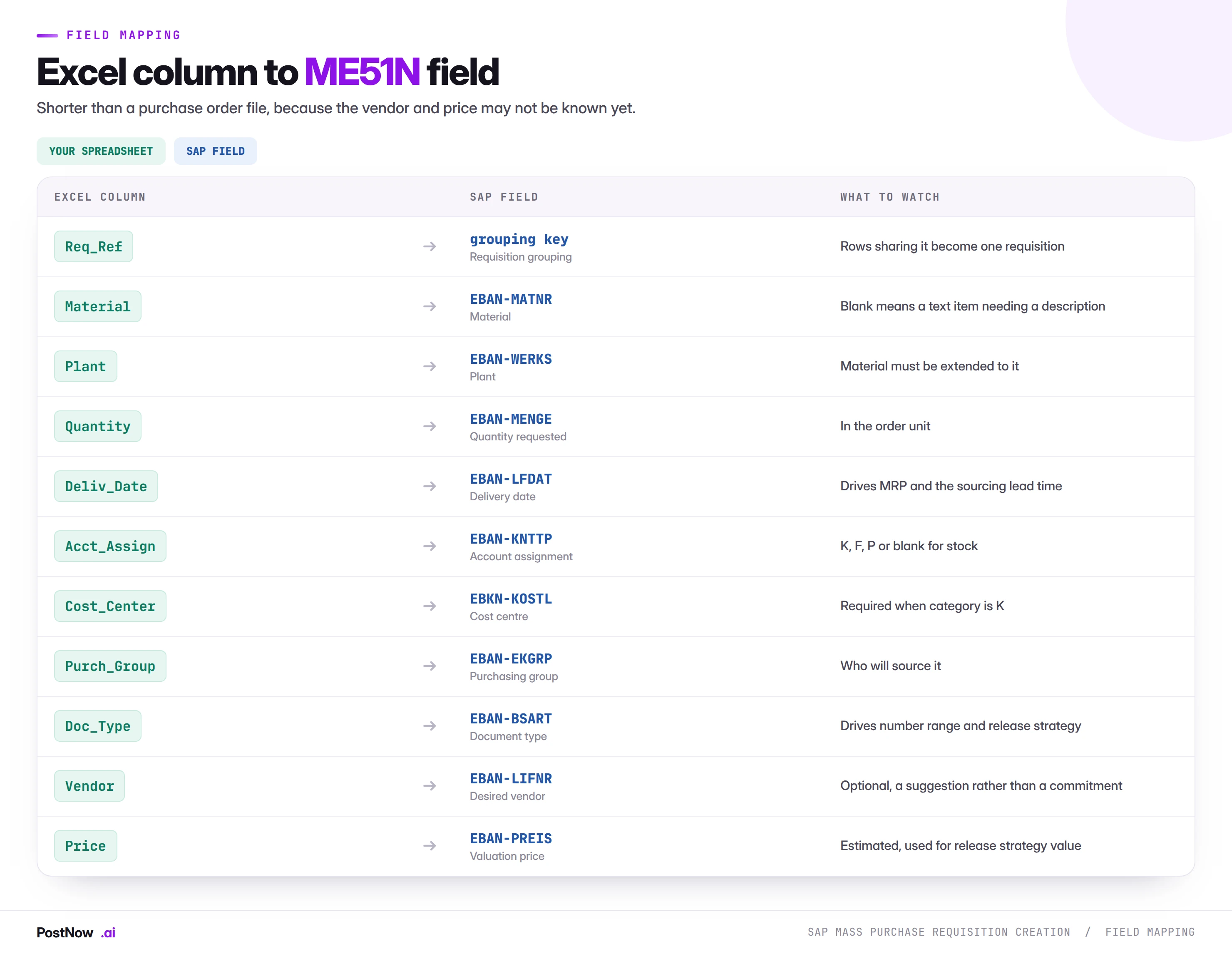
Shorter than a purchase order file, and three columns deserve comment.
Account assignment, same as a purchase order
The category and its cost object work exactly as described in the purchase order guide: K needs a cost centre, F an internal order, P a WBS element, and blank means stock. The requisition carries the assignment forward to the order it becomes, which means an error here propagates rather than being caught at conversion.
The one difference is timing. A cost object must be valid on the delivery date, and project mobilisation files frequently reference WBS elements that are created as part of the same project setup. Sequencing the project structure before the requisitions avoids a whole-file failure.
The desired vendor is a suggestion
ME51N accepts a desired vendor and it means something quite specific: a preference, not an instruction. Sourcing may honour it or may not. Where source lists or contracts exist, SAP may assign a source automatically regardless.
This is worth explaining to whoever supplies the file, because requesters routinely believe that naming a vendor secures it. It does not, and the gap between that expectation and what happens at conversion produces friction that a sentence of explanation prevents.
The valuation price drives release strategy
Requisitions carry an estimated price, and where release strategy is value-driven, that estimate decides which approval level applies. An optimistic estimate can route a large purchase through a low approval threshold, which is a control problem rather than an inaccuracy.
On a mass file, this means the price column deserves the same review as the quantities, even though nothing is being committed yet.
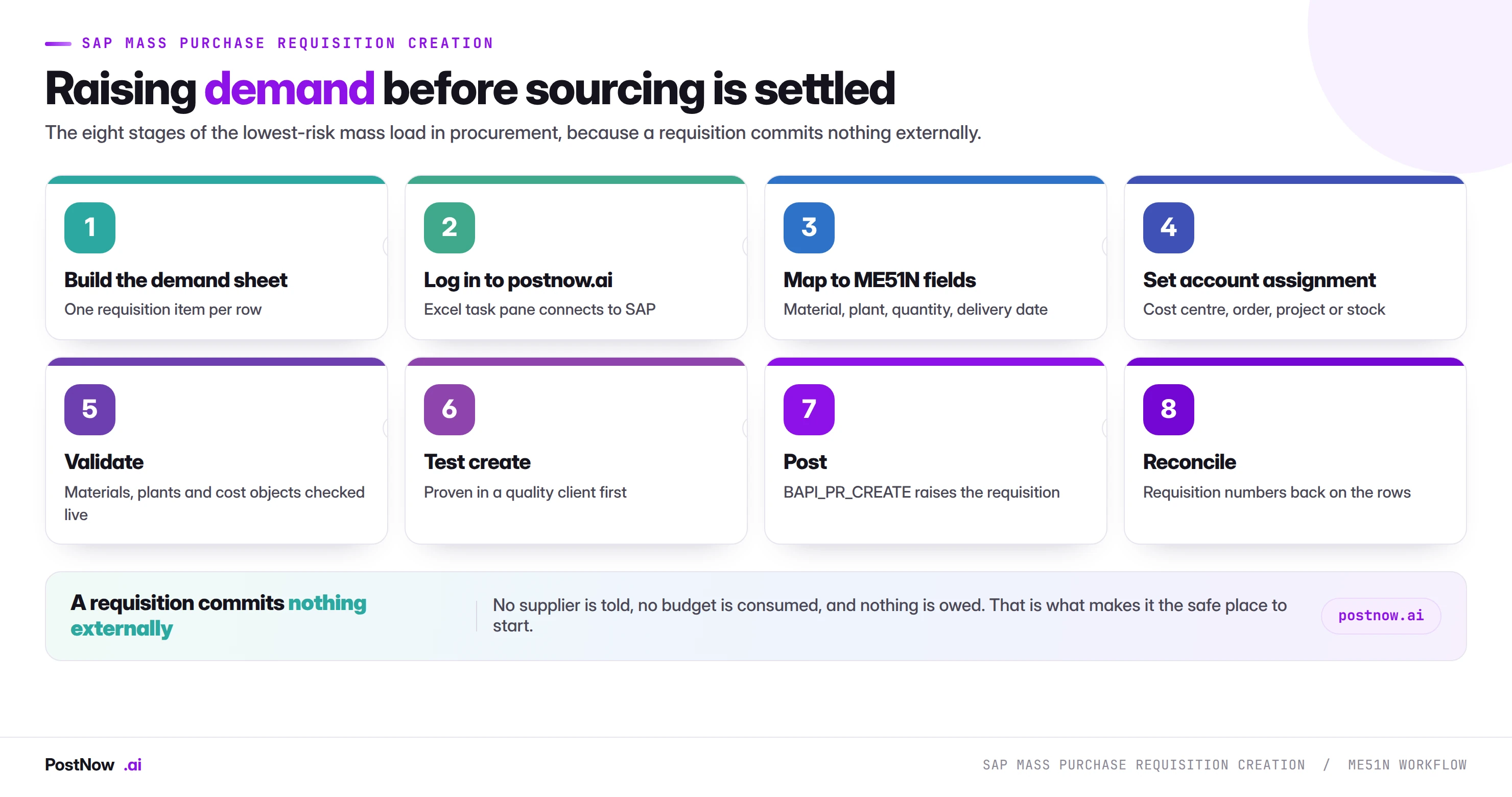
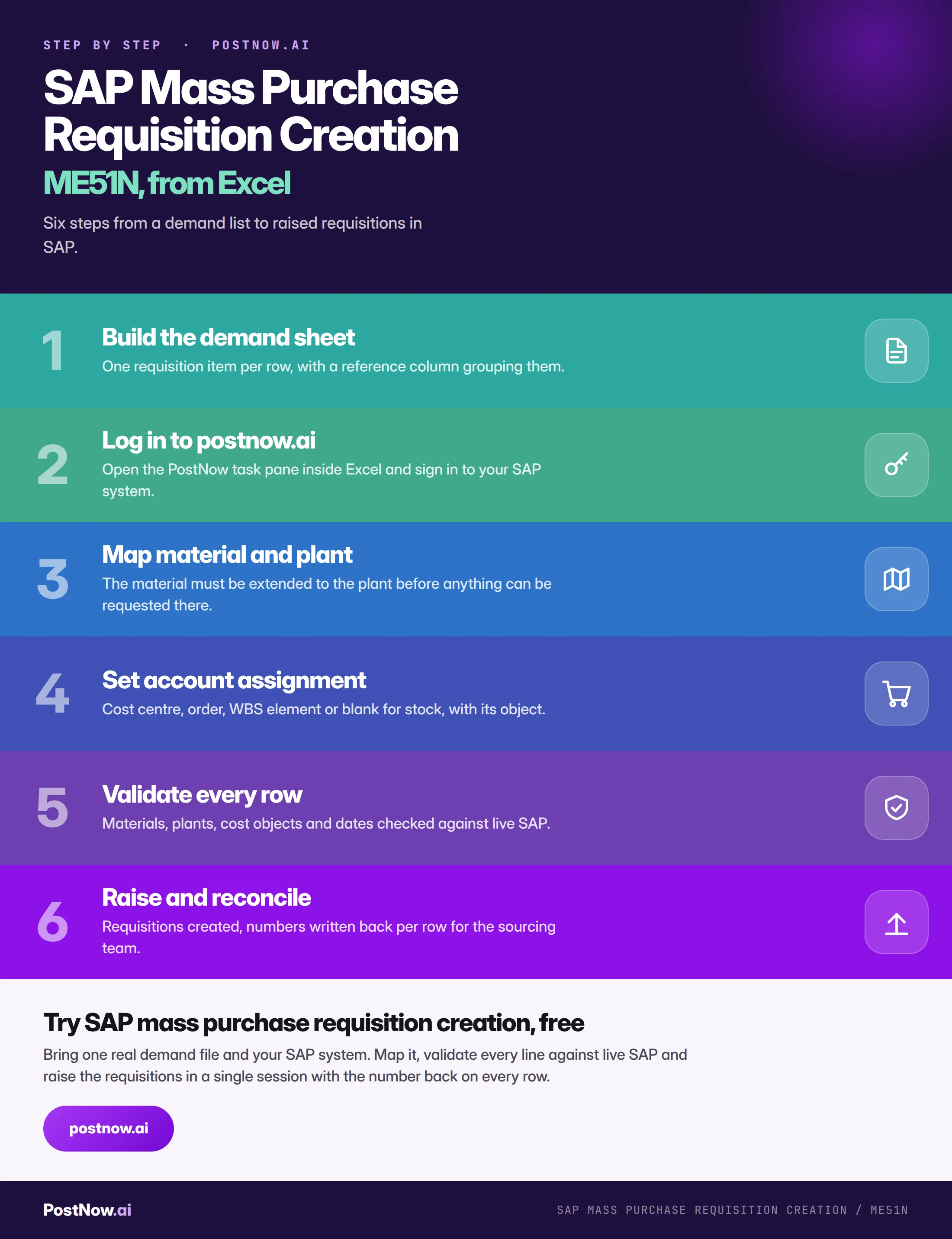
The eight stages of a controlled ME51N run
Build the demand sheet
One requisition item per row, with a reference column deciding which rows group into one document. Agree the grouping with the sourcing team, since a requisition with forty unrelated lines is harder to work than four with ten.
Log in to postnow.ai
Open the PostNow task pane inside Excel and sign in. The pane connects the workbook to your SAP system with your own credentials and purchasing authorisations.
Map material, plant and quantity
The material must be extended to the plant, which is the same prerequisite the material master guide describes from the other side. On a new site file this will hit most rows.
Set account assignment
Category per row, with its cost object. Where the file spans categories, every category's column must be present and populated only on the rows that use it.
Validate against live SAP
Materials extended, plants valid for the company code, cost objects valid on the delivery date, purchasing groups configured, dates inside the factory calendar.
Test create in a quality client
Raise a subset and open two in ME53N. Check the account assignment, the purchasing group and which release strategy was determined.
Raise through standard logic
The run calls BAPI_PR_CREATE, SAP's published interface for purchase requisitions. Every check ME51N applies still applies, including release strategy determination.
Hand the numbers to sourcing
Requisition numbers written back per row, so the requester can track them and the buyer has a work list. The run is finished when sourcing knows it has arrived.
Validation: six checks before a single requisition is raised
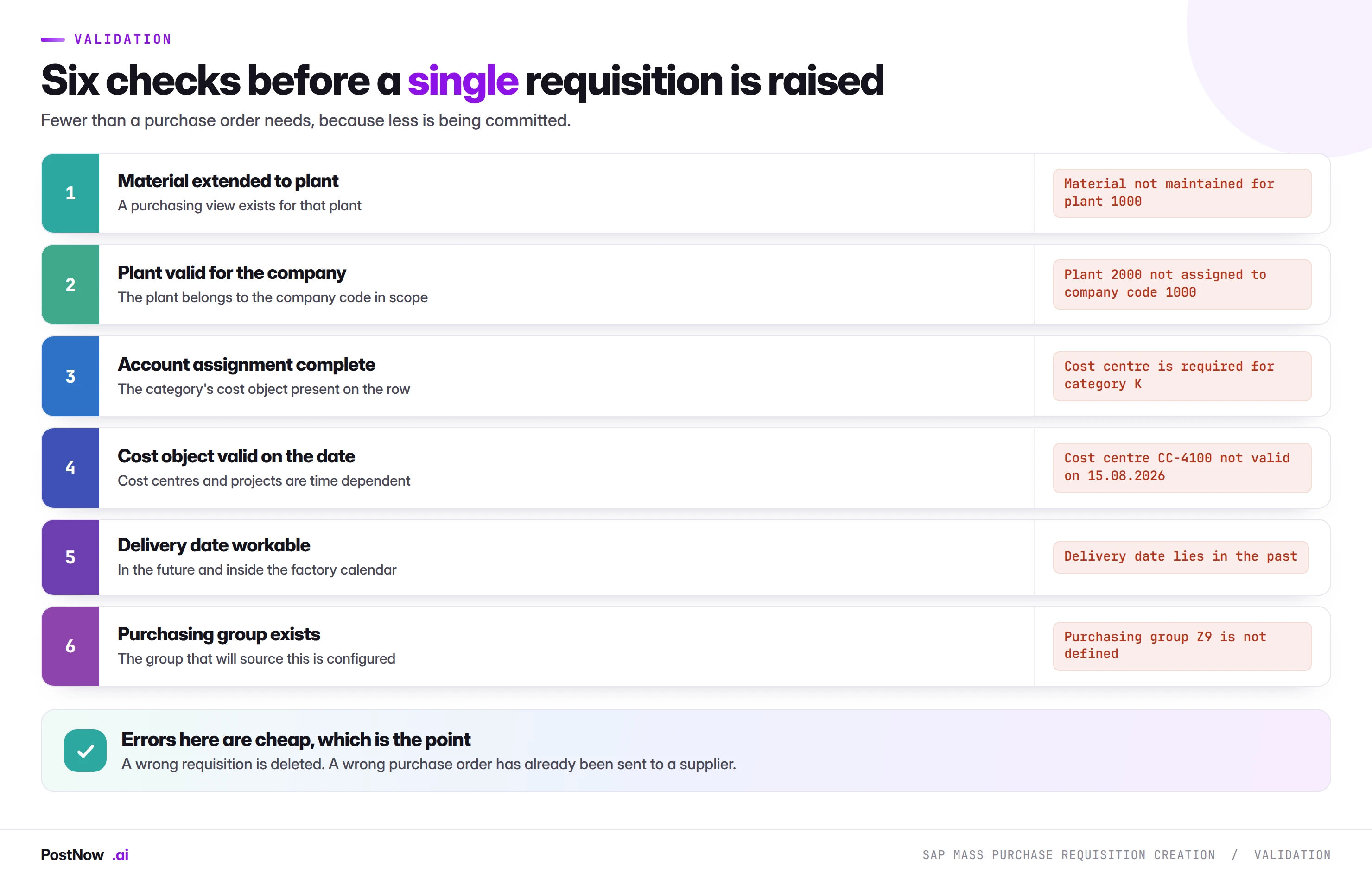
Two of these are worth expanding.
Material extended to plant is the single most common block-level failure, and on a new site file it affects nearly every row. The fix is a material extension run that has to happen first, which is why the procurement bridge puts master data ahead of everything else in the sequence.
Cost object valid on the delivery date catches a problem specific to project work. WBS elements and internal orders are time-dependent, and a requisition with a delivery date beyond the project's validity fails in a way that reads as though the element does not exist. On mobilisation files where the project structure is being created in parallel, this is worth checking explicitly rather than assuming.
Release strategy on requisitions
Requisitions go through approval in most organisations, and the mechanics are the same as for purchase orders with one useful difference: the consequence of a delay is smaller, because nothing external is waiting.
Three points carry over unchanged.
- The strategy fires per document. A run of four hundred generates up to four hundred approval items, landing at once in a queue that normally sees a handful a day. Warn the approver before, not after.
- Grouping decides which strategy applies. Because strategies are usually value-driven, how items group into requisitions determines the approval level each one hits. Engineering the grouping to stay under a threshold is the clearest audit finding available, and it is no more acceptable here than on orders.
- Unreleased requisitions cannot be converted. A run finishing with four hundred unreleased documents has produced demand that sourcing cannot act on.
Some organisations release requisitions at line level rather than document level, which changes the arithmetic considerably: four hundred lines in ten documents is ten approvals or four hundred depending on configuration. Worth knowing which applies before promising the approver a number.
Running the whole sequence inside Excel
PostNow runs SAP mass purchase requisition creation from Excel
The demand file the project or the budget holder already maintains becomes the run. PostNow adds a task pane to Excel, connects to your SAP system with your own credentials, and takes the file through mapping, validation and creation without leaving the sheet.
Material, plant, quantity and delivery date from the requester's own file.
Account assignment resolved per row, with its cost object checked.
Extensions, plants and cost object validity against live SAP.
The requisition number written back for the requester and the buyer.
What happens at conversion
A requisition exists to become a purchase order, and understanding that handover shapes how the file should be built.
Conversion carries the assignment forward. Account assignment category, cost object, plant, quantity and delivery date all pass into the order. An error in the requisition becomes an error in the order, and catching it at conversion means a buyer noticing rather than a validation rule.
The buyer supplies what the requisition did not. Vendor, price and terms. This is the sourcing work, and it is why a requisition file legitimately has blanks where an order file cannot.
Conversion can be individual or collective. ME57 and its relatives convert requisitions in bulk where a source is already assigned. Where sourcing is genuinely needed, conversion is a buyer working through a list.
Source determination may pre-assign a vendor. Where source lists, quota arrangements or contracts exist, SAP can assign a source at requisition creation, which makes collective conversion possible and removes most of the manual sourcing step.
The practical implication for a mass run is that a requisition file with good data converts almost automatically, and one with gaps generates work for a buyer. That is not a reason to add speculative vendors, but it is a reason to get plant, quantity, date and account assignment right.
Text items, services and demand with no material number
A large share of requisition volume has no material master behind it, and a template built around material numbers falls over on it.
Text items carry a free-text description instead of a material. They need a short text, a material group, an account assignment and a unit of measure, because none of that can be derived from a master record. Project and indirect demand is largely text items, so on a mobilisation file they may be the majority rather than the exception.
Service requisitions go further: the item carries a service specification with lines of its own, priced by rate or as a lump sum. The document is structurally deeper than a goods requisition and a flat file expressing it needs a grouping column for the service lines beneath each item.
Limit items cover recurring low-value consumption against a ceiling rather than a specific quantity, common for maintenance and small works. They need a value limit and a validity period rather than a quantity and a date.
The practical guidance is to split by item type rather than mixing. Each needs different columns populated, and a file where three quarters of the columns are blank on any given row is difficult for anyone to review. It also makes a partial failure easier to attribute, because the failure modes differ.
Why requisitions are a good place to prove a process
Worth making explicit, because it is the strongest practical argument for this transaction beyond its own use case.
A requisition file exercises almost everything a purchase order file does. The same material and plant validation, the same account assignment categories and cost objects, the same delivery date logic, the same release strategy mechanics, the same grouping decision about how lines become documents.
What it does not carry is the consequence. Nothing transmits to a supplier, nothing consumes budget, and a wrong document is deleted rather than amended through an approval cycle.
That combination makes it the natural first procurement load for a team building capability. Three specific benefits:
- The mapping transfers. Most of a requisition mapping is a purchase order mapping, so the work is not thrown away when you move up the chain.
- The validation transfers. The checks that catch problems here catch the same problems there, at higher stakes.
- The governance conversation happens early. Approval, named users and evidence are easier to agree over documents that commit nothing, and the agreement carries forward.
Teams that start with orders because that is where the pain is often find themselves negotiating governance and debugging mappings simultaneously, under a deadline, with real money involved. Starting one link earlier separates those problems.
Governance
- Approve the demand, not the documents. The file listing what is being requested, for which cost objects, at what estimated value, reviewed before the run.
- Show the estimated total. Even though nothing is committed, the aggregate is what the budget holder needs to see and what release strategy will act on.
- Run as a named user. With their purchasing authorisations, so the run can only raise demand where they already could.
- Never engineer grouping around approval thresholds. The same rule as for orders, and the same finding if it happens.
- Tell the buyer before, not after. Four hundred requisitions arriving unannounced is a workload surprise even though nothing is wrong.
- Keep the completed file. Requested demand, requisition numbers and estimated values in one artefact.
Volume, timing and sequencing
- Runtime tracks documents, not lines. Consolidating lines into fewer requisitions is faster and produces documents a buyer can work as a unit.
- Master data first, always. Material extensions and project structures before the requisitions that reference them.
- Avoid running during MRP. Requisitions created mid-planning-run produce a demand picture that is briefly inconsistent.
- Batch by project or plant. Homogeneous failure modes and a batch describable in one sentence.
- Watch delivery dates against the calendar. A file built with dates that ignore factory closures produces requisitions that reschedule on conversion.
Templates for recurring demand
- Give the template to the requester. Project teams and budget holders submitting demand in the right shape removes most of the preparation at source.
- Encode the account assignment rules. Which demand type maps to which category and cost object column.
- Make the delivery date mandatory. Blank dates default in ways nobody intends, and the date drives both planning and sourcing lead time.
- Explain the vendor column. A note in the template saying the desired vendor is a suggestion prevents the expectation gap described above.
- Name an owner. Purchasing groups, document types and release strategies all change.
Common mistakes and how to avoid them
- Raising orders when sourcing is not settled. Commits the organisation to a vendor and price inferred from a spreadsheet.
- Raising requisitions for buys already decided. Adds a conversion step and floods sourcing with work that has no decision in it.
- Starting before material extensions are done. Block-level failure on new site files, every time.
- Ignoring cost object validity dates. Project structures are time-dependent and mobilisation files reference them before they are ready.
- Treating the desired vendor as an instruction. It is a preference, and requesters routinely believe otherwise.
- Leaving the estimated price unreviewed. It drives release strategy, so an optimistic estimate routes real spend through a low threshold.
- Forgetting release strategy will fire. Four hundred approvals landing unannounced is a process failure even when the load worked.
- Treating the run as finished at creation. Unreleased requisitions cannot be converted, so sourcing has nothing to act on.
After the requisitions are raised
Three things close the gap between requisitions existing and procurement acting on them.
Hand the numbers back with context. The requester needs their requisition numbers to track progress, and the buyer needs to know what has landed and why. A list of four hundred numbers with no explanation is a worse handover than a short note plus the list.
Confirm the release queue has been worked. Unreleased requisitions are invisible to sourcing, so a run that finishes with everything pending has produced nothing usable.
Check what source determination assigned. Where source lists and contracts exist, SAP may have assigned vendors automatically. Reviewing that before conversion catches quota arrangements distributing demand in ways nobody intended, which is easier to correct at requisition stage than after orders exist.
Requisitions in S/4HANA
Little changes structurally, which makes this a safe capability to build before a conversion.
The interface is unchanged. BAPI_PR_CREATE works across both releases, so a mapping built on ECC carries forward with a remap rather than a rebuild.
Fiori apps cover creation and approval. Self-service requisitioning and the approval inbox are app-based, which makes the release side of a large run considerably easier to work than the classic transaction. It also breaks any screen recording built against ME51N, which is the argument the methods guide makes throughout.
Material field lengths extend. A file built against ECC lengths may truncate on a system using the extended material number.
Situation handling can surface overdue requisitions. Where configured, S/4HANA can flag requisitions sitting unconverted, which is useful after a large run because it turns a silent backlog into a visible one.
Who owns a requisition run
Requisitions sit at the boundary between the people who need things and the people who buy them, which makes ownership unusually clear once stated.
The requester owns the demand. What is needed, how much, by when, and against which cost object. This is the content of the file and it should arrive from them rather than being inferred.
The budget holder owns the spend. Whether this demand should exist at all, which is what the release strategy is expressing.
The buyer owns the source. Vendor, price and terms, supplied at conversion. A requisition file that pre-empts this by filling in vendors confidently has moved a decision out of the buyer's hands without telling them.
Whoever runs the file owns its integrity. That the rows validate, that nothing was silently dropped, that the numbers get back to the requester.
The failure mode is the operator filling in blanks to make a file load. A missing cost object, a guessed delivery date or an invented purchasing group all make the run complete and push a decision downstream disguised as data. Sending the row back is slower and correct.
Grouping: how lines become documents
The grouping decision is more consequential here than it looks, because it shapes the work a buyer receives.
One requisition per requester per date keeps documents small and traceable back to whoever asked. Good for indirect demand where accountability matters.
One requisition per project or cost object groups related demand so a buyer can source it as a package. Good for mobilisation, where forty items belong to one activity.
One line per requisition maximises flexibility and floods approval and sourcing queues with volume. Occasionally correct, rarely helpful.
One giant requisition is easy to raise and painful to work, because a buyer cannot part-convert it cleanly and any release covers everything.
The grouping also determines release strategy, since strategies are usually value-driven and the document total is what they evaluate. This is worth agreeing with sourcing before the first run rather than discovering when four hundred single-line requisitions arrive in someone's inbox.
Source determination and what it does to a large run
SAP can assign a source of supply to a requisition automatically, and on a mass run that automation behaves in ways worth anticipating.
Source lists name which vendors may supply a material at a plant, and can mark one as fixed. Where a fixed source exists, requisitions get it assigned at creation and convert almost without buyer involvement.
Outline agreements work similarly: where a contract covers the material, the requisition can be assigned against it, which is usually the intended behaviour and occasionally not when several agreements overlap.
Quota arrangements distribute demand across several vendors by percentage. This is the one that surprises people at volume, because the quota is consumed as the run proceeds: the first hundred requisitions may all go to one vendor and the next hundred to another, in a pattern determined by row order rather than by anything commercial. The same allocation effect appears in sales order availability, for the same structural reason.
Three practical points:
- Check what got assigned before converting. A quick review of the source assigned across the population catches quota distributions nobody intended.
- Sequence deliberately where quotas are active. Row order is allocation policy, exactly as it is for sales orders.
- Do not suppress determination to make a file simpler. Where source lists exist they encode real sourcing decisions, and bypassing them puts those decisions back on a buyer working through four hundred lines.
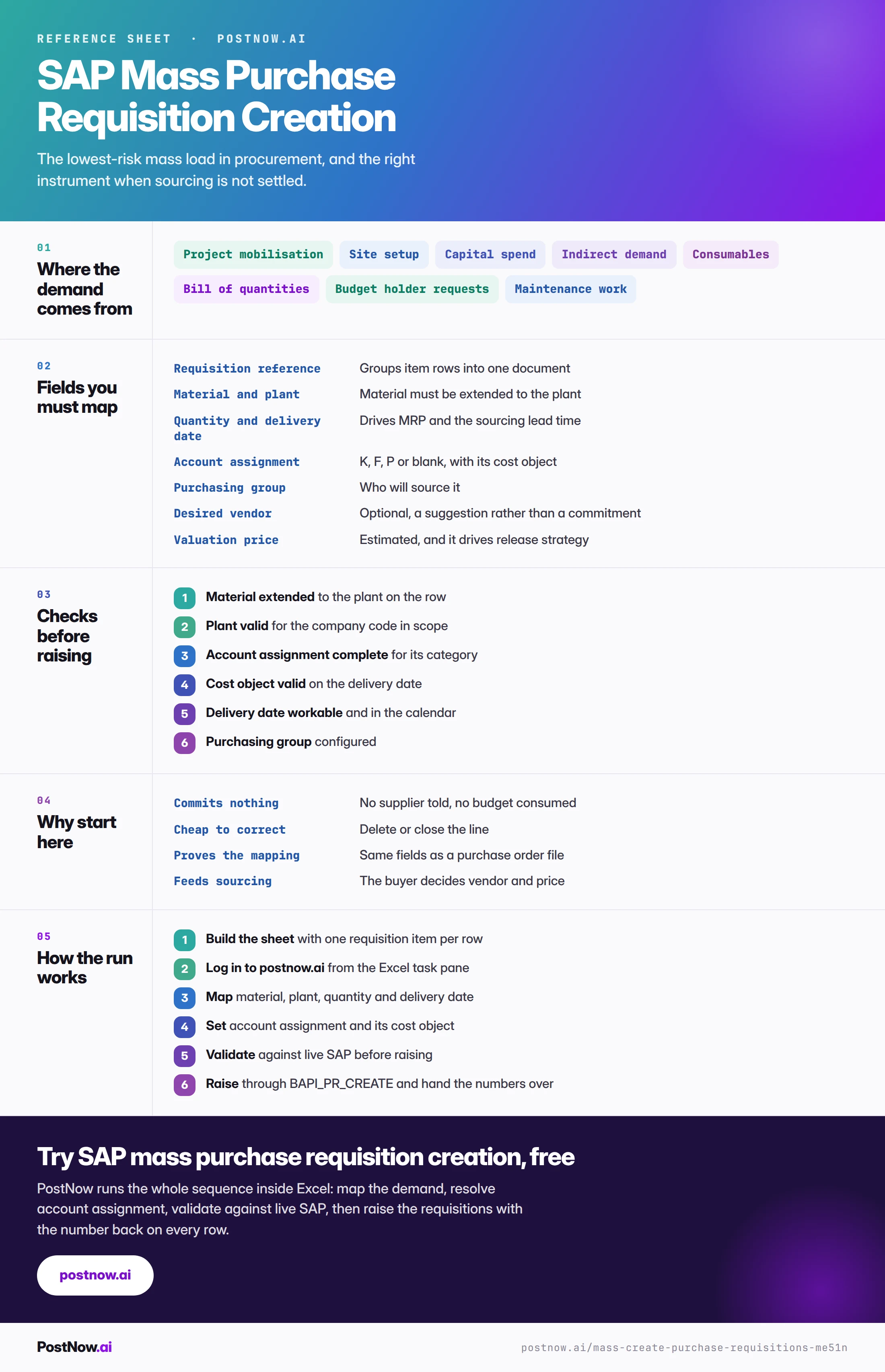
The complete ME51N mass creation reference
The reference sheet below collects everything above into one image you can share before a demand run.
Go deeper
SAP master data mass upload
The materials these requisitions reference must be extended first.
SAP purchase requisition automation moves demand, not the sourcing call
SAP purchase requisition automation suits demand that already exists — requirements mapped to material, quantity, plant and delivery date and raised in one controlled run. The sourcing decision is what does not automate: which supplier, which contract, and whether a requisition should become a purchase order at all remain procurement calls. The file moves the demand; people still own the source.