SAP Mass Sales Order Creation with VA01
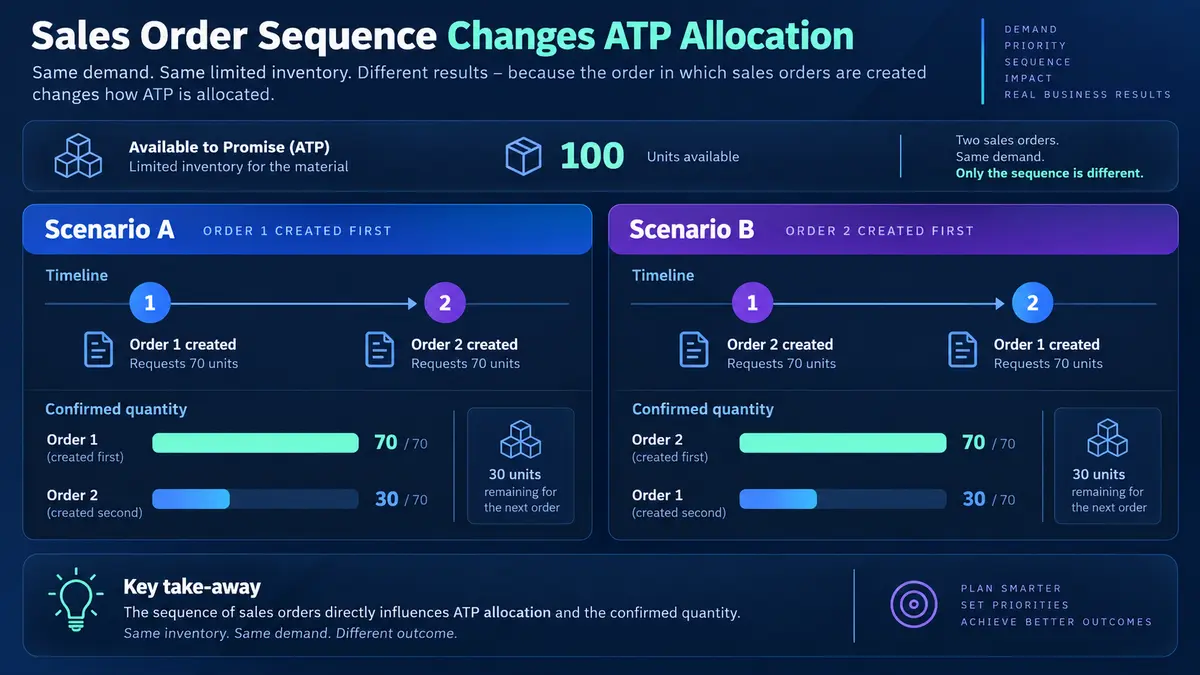
SAP mass sales order creation means raising many sales orders in one controlled run from a demand file rather than stepping through VA01. The output that matters is not the order count but the confirmed quantity, because availability is consumed as the run proceeds and orders in the same file compete for the same stock.
- Orders in one run compete for stock. The sort order of your spreadsheet is an allocation policy, so choose it deliberately.
- Confirmed is not the same as ordered. Write the confirmed quantity back per row; the gap is a list of customer conversations.
- Pricing is determined, not supplied. A wrong customer pricing group produces a valid procedure and the wrong price, with nothing failing.
- A credit block is a successful row. The order exists; re-running it creates a duplicate.
- Carry the original requested date. Defaulting it to today produces same-day demands nobody promised.
Where the volume comes from
- EDI backlog. An interface fails or a partner sends a batch, and orders arrive as a file rather than as messages.
- Distributor and dealer call-offs. Channel partners submit periodic order files against agreed terms.
- Seasonal pre-books. A whole season's demand is collected commercially and has to become orders before production planning runs.
- Campaign and promotion orders. A promotion closes and the resulting demand lands at once.
- Contract releases. Framework agreements exist and the call-offs are volume work.
- Marketplace or e-commerce integration. A front end holds orders that SAP has to mirror.
- Migration and cutover. Open orders from a legacy system have to exist in SAP before go-live, with their original dates and quantities.
In most of these the commercial commitment has already been made. The order in SAP is a record of a decision taken elsewhere, which is exactly the case mass creation suits. Where the customer has not yet committed, quotations are the safer instrument.
Availability: orders in one run compete with each other
This is the section to read if you read nothing else.

When a sales order is created, SAP runs an availability check against the stock and planned receipts for that material, plant and date. It confirms what it can and schedules or rejects the rest. That behaviour is familiar from single-order entry and produces a consequence at volume that surprises people the first time.
Each order consumes availability as it is created. The second order in your file checks against a position the first one has already reduced. By the fiftieth order the stock picture is materially different from the one you saw when you built the sheet. Orders later in the file get confirmed quantities that reflect what earlier rows left behind.
Which means the sort order of your spreadsheet is an allocation policy. Whoever decides which rows come first decides which customers get confirmed when stock is short. That is a commercial decision, and it should be made deliberately rather than inherited from however the file happened to be exported.
What SAP mass sales order creation means
SAP mass sales order creation is the practice of raising many sales orders in one controlled run from a structured file, instead of stepping through VA01 one order at a time. Customer demand is prepared in Excel, grouped into orders, mapped to the header and item fields a sales order needs, validated against live master data, and created through SAP's standard sales interface with the order number and the confirmed quantity written back per row.
That last phrase carries the whole difference between this and every other object in the mass upload cluster. Everywhere else, a successful row means the record was created as specified. Here, a successful row means the order exists, and the quantity SAP confirmed may be less than the quantity requested, or zero.
A sales order is a promise. Creating one commits inventory and gives a customer a date. Creating four hundred makes four hundred promises faster than anyone can read them, against a stock position that changes as the run proceeds. Availability is the thing that makes mass sales order creation genuinely different, and it is where this guide spends most of its attention.

Reading confirmed quantities back
Because confirmation is the real output, a mass sales order run is not finished when the orders exist. It is finished when someone has compared requested against confirmed and decided what to do about the gap.
A run of four hundred orders where sixty are partially confirmed is a completely normal outcome and a list of sixty conversations somebody now needs to have. Writing the confirmed quantity back onto the source row is what makes that list exist instead of being discovered one customer call at a time.
Backorders and rescheduling
Depending on configuration, an unconfirmed quantity may be rejected, scheduled to a later date, or held as a backorder. Each behaves differently downstream, and a mass run makes whichever it is happen at scale. Confirm which applies in your system before the first production run, because "the orders were created" and "the customers were promised what they asked for" are different statements.
Header and items in a flat file
The shape problem is the same as for purchase orders. A sales order has one header and many items; a spreadsheet is a flat list. Header fields repeat across the rows belonging to one order, and a reference column decides the grouping.
- Header (VBAK). Sold-to party, order type, sales area, requested delivery date, customer PO number, payment terms.
- Item (VBAP). Material, quantity, delivering plant, item category, and any item-level date that differs from the header.
- Schedule line (VBEP). The confirmed quantity and date, mostly written by SAP rather than supplied by you.
The sales-specific wrinkle is that the schedule line is largely an output rather than an input. On a purchase order you state the delivery date and SAP accepts it. On a sales order you state a requested date and SAP tells you what it can actually confirm. Building a file as though schedule lines are supplied leads to confusion when the created order does not match the sheet.
The fields you have to map

Sold-to party and sales area
The sold-to party must be extended to the exact sales area on the row. This is the same completeness problem described in the customer master guide, met from the other side: a customer created with general data only will fail here, and division is the part of the sales area most often wrong.
The sold-to party also determines the other partner functions. Ship-to, bill-to and payer default from the customer master unless the file overrides them. Where a customer has multiple ship-to addresses, the file must say which one, or every order goes to the default and somebody in logistics finds out later.
Order type
Order type drives the number range, the field selection, the pricing procedure key and whether the document is a standard order, a rush order, a returns order or a credit memo request. Using the wrong type produces valid orders with the wrong behaviour, which is worse than an error because nothing stops.
Requested delivery date
This drives availability, backward scheduling and the delivery date SAP eventually confirms. A file that defaults it to today produces orders demanding same-day shipment, which the availability check will either reject or reschedule, and either way the confirmations will not match what the customer was told.
On a migration or backlog load, carry the original requested date from the source rather than the load date. The order should look like the commitment that was actually made.
Delivering plant
Plant can be determined from the customer, the material or the sales area. Determination works well where it is configured and produces surprises where it is not, particularly in multi-plant networks. Stating the plant explicitly costs one column and removes an entire class of ambiguity, and it also makes the availability picture predictable because you know which stock is being checked.
Pricing is determined, not supplied

This is the second thing that separates sales orders from most mass upload work. You do not generally put a price in the file. SAP determines it from condition records, using a pricing procedure selected by the sales area, the customer's pricing procedure key and the document type's key.
The consequence is that pricing errors are not usually errors. A customer assigned to the wrong pricing group picks up a valid procedure that reads valid condition records and produces the wrong price. Nothing fails. The orders are created, the deliveries go out, and the problem appears on an invoice.
Three practical defences:
- Check prices on a sample, not on the log. Open three orders across different customers and read the pricing tab. A success log tells you an order exists, never that it priced correctly.
- Compare totals against the commercial expectation. Whoever supplied the demand file knows roughly what it should be worth. A ten per cent variance is worth investigating before deliveries move.
- Treat V1 555 as informative. A missing mandatory condition record is the visible version of a problem that is usually invisible. Where it appears, look at whether the pricing group is right rather than just creating the missing record.
Credit checks, and why blocked is not failed
Where credit management is active, order creation triggers a credit check, and an order that breaches the customer's limit is created and blocked rather than rejected.
This distinction matters enormously for a mass run. A blocked order is a successful row: it exists, it is visible, and it is waiting for a decision. Treating blocks as failures leads people to re-run rows that already posted, which creates duplicates.
Two things follow. First, the run report needs to separate created-and-blocked from failed, because they need different responses. Second, credit control needs warning, for the same reason purchasing approvers do: a queue that normally handles a handful of blocks a day receiving sixty at once is a process problem even though the load worked.
The eight stages of a controlled VA01 run
Build the demand sheet
One order item per row, header fields repeated across rows belonging together, and a reference column deciding the grouping. Carry the original requested delivery date, not the load date.
Log in to postnow.ai
Open the PostNow task pane inside Excel and sign in. The pane connects the workbook to your SAP system with your own credentials and sales authorisations.
Map header and item fields
Sold-to, order type, sales area and requested date at header level; material, quantity and plant per item. State the plant rather than relying on determination.
Sequence the rows deliberately
Availability is consumed in the order the file is processed. Sort by whatever your commercial allocation policy actually is, and record that you did.
Validate against live SAP
Customers extended to the sales area, materials saleable there, no order or delivery blocks, condition records present, requested dates workable.
Test create, then read the order
Create a subset in a quality client and open two or three in VA03. Check the price, the confirmed quantity, the ship-to and the delivering plant. This is the step that catches determination problems a log cannot show.
Create through standard logic
The run calls BAPI_SALESORDER_CREATEFROMDAT2, SAP's published interface for sales order creation. Availability, pricing, credit and partner determination all behave exactly as they do in VA01.
Reconcile requested against confirmed
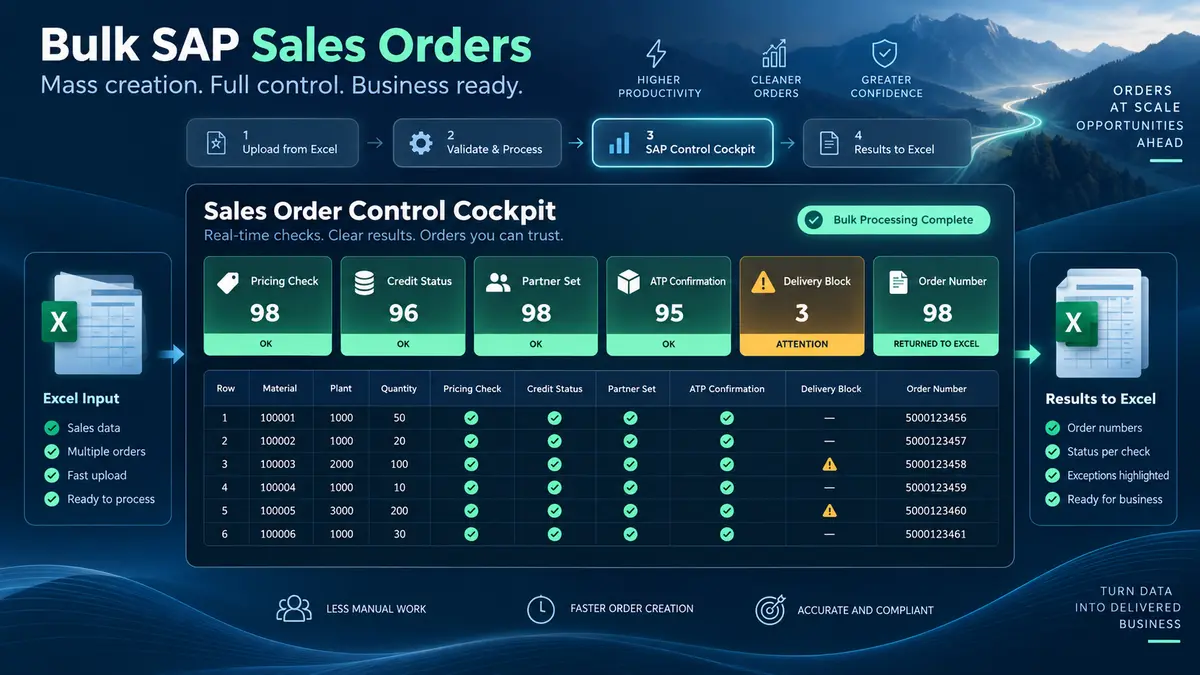
Order numbers and confirmed quantities are written back per row. The gap between requested and confirmed is the output that matters, and it is the list of customers who need a conversation.

Validation: six checks before a single order is created

The block check deserves emphasis. Customers carry order blocks and delivery blocks for commercial reasons: disputes, compliance holds, credit stops. A mass run that ignores them creates orders for customers your organisation has deliberately decided not to serve right now. Validation should surface them before the run, and the answer is usually to remove the row rather than the block.
Errors, and what they are telling you

V1 020 and V1 322 are the same shape of problem from two directions: something is not extended to the sales area on the row. Both hit in blocks rather than randomly, because sales area problems affect whole populations. If most of your file fails on one of these, the sales area on the file is probably wrong rather than the master data.
Running the whole sequence inside Excel
PostNow runs SAP mass sales order creation from Excel
The eight stages above happen in the demand file customer service already works from. PostNow adds a task pane to Excel, connects to your SAP system with your own credentials, and takes the file through grouping, validation and creation without leaving the sheet.
Item rows sharing a reference become one sales order.
Rows processed in the order you choose, so allocation is deliberate.
Customers, sales areas, materials and pricing checked against live SAP.
Order number and confirmed quantity written back on every row.
Orders, quotations, and contracts

The choice depends on how firm the customer commitment is.
Orders consume availability and make delivery promises. Right when the customer has committed, wrong when you are still negotiating.
Quotations commit nothing, run no availability check, and convert to orders when accepted. Loading quotations in bulk is a genuinely useful pattern for seasonal offers and tender responses, and it carries none of the allocation risk described above.
Contracts fix terms without fixing quantity. Releases against them become the recurring volume work.
What the orders trigger downstream
- Availability commitment. Immediate, and the reason sequence matters.
- Credit blocks. Landing in credit control's queue at whatever rate your file dictates.
- Demand for planning. Confirmed orders become requirements that MRP sees, changing what the next run proposes.
- Delivery creation. Due deliveries appear in the delivery due list, and a large run can flood a warehouse's picking schedule for a day.
- Output to customers. Order confirmations transmit by email or EDI. Four hundred confirmations at once is visible to your customers, so it should be intended.
- Revenue expectations. Where forecasting reads order backlog, a large load moves the number materially and finance should know before they see it.
Amending, rejecting, and cancelling
Sales orders are amendable until they are delivered, which makes them more forgiving than financial documents.
An item can be rejected with a reason code, which removes it from the delivery due list and from planning while leaving it visible for reporting. This is the standard route for a wrongly created line and is preferable to deletion because it keeps the audit trail.
Deletion is possible where no subsequent document exists. Once a delivery is created the options narrow, and once billing has occurred the correction moves into credit memo territory, which is finance work rather than sales work.
For a mass run the rule is the same as everywhere else in this cluster: find mistakes before deliveries are created. That window is usually hours rather than days, which argues for reviewing a sample immediately after the run rather than the next morning.
Item categories and free goods
Item category decides what kind of line each row actually is, and it is determined from the order type, the material's item category group, and the usage. Most rows come out as standard items and need no thought. The exceptions need columns a standard template does not carry.
- Standard item. Sold, delivered, invoiced. The default for almost everything.
- Free of charge item. Delivered but not billed. Samples, replacements and goodwill. The pricing is deliberately zero, which means a zero price on these rows is correct rather than an error, and a validation rule that flags zero prices will produce noise.
- Text item. No material, no delivery, no billing. Carries information onto the document.
- Third-party item. The vendor ships directly to the customer, creating a purchase requisition rather than a delivery. These rows have procurement consequences the sales team may not expect.
- Returns item. Belongs to a returns order type rather than a standard one. Mixing returns into a standard order file is a common and confusing mistake.
Free goods deserve a specific note. Where free goods determination is configured, ordering a qualifying quantity automatically adds a free line. On a mass run this quietly creates additional items nobody put in the file, consuming additional stock. The orders are correct; the availability arithmetic in your planning was not, because it counted only the rows you supplied.
Loading open order backlog during a migration
Cutover loads are the hardest version of this job, because the orders have to arrive in SAP looking like commitments that were made weeks ago rather than orders created today.
Four things need deliberate handling:
Original dates. The requested delivery date must come from the legacy order, not the load date. Anything else misstates the promise and misleads planning.
Partially delivered orders. An order that is half shipped in the legacy system should arrive in SAP as the remaining quantity, not the original. Loading the full quantity double-counts demand and double-ships if nobody catches it.
Prices as agreed. Cutover is the one case where supplying the price explicitly is usually right, because the customer was quoted a price that current condition records may no longer reproduce. Determining prices afresh at cutover changes what customers owe, which is not a technical decision.
Availability at cutover. Loading a large backlog against an opening stock position produces a wave of confirmations and rejections that reflect the load sequence rather than any commercial priority. Sequence the backlog by original order date so the earliest commitments are confirmed first, which is both defensible and what customers expect.
Governance, approval, and allocation
- Approve the demand file. Customers, materials, quantities and dates, reviewed before the run rather than four hundred orders reviewed after it.
- Record the allocation decision. How the file was sorted, and why. This is the question that gets asked when a customer complains they were not confirmed.
- Run as a named user. The orders carry the identity and sales authorisations of whoever ran them.
- Separate created-and-blocked from failed. They need different responses and conflating them causes duplicates.
- Warn credit control and the warehouse. Both receive the consequences of the run and neither will have seen the file.
- Keep the completed file. Requested, confirmed and order number in one artefact is the record of what was promised.
Volume, timing, and the availability picture
- Runtime tracks orders, not rows. Consolidating items into fewer orders is faster and produces larger documents.
- Avoid running during MRP or backorder processing. Both move the availability picture underneath the run, producing confirmations that are correct at the moment and wrong minutes later.
- Batch by sales area or customer group. Homogeneous failure modes and a batch you can describe in one sentence.
- Do not split a scarce material across batches carelessly. If the same constrained material appears in several batches, the allocation across them depends on run order rather than on policy.
- Watch the delivery due list. A large confirmed run creates a picking day somebody has to staff.
From a one-off load to a standing intake
- Give the template to customer service. If distributor files arrive with sold-to, sales area, material, quantity and date already correct, the run is a formality.
- Save the mapping with the grouping rule. How rows become orders is the decision that took thought.
- Encode the sort policy. Allocation should be part of the template, not improvised per run.
- Include ship-to explicitly. Defaults are fine until a customer has three delivery addresses.
- Name an owner. Order types, sales areas and pricing procedures all change.
Common mistakes and how to avoid them
- Ignoring that ATP is consumed as the run proceeds. The sort order of the file decides which customers get confirmed. Choose it.
- Treating a credit block as a failure. The order exists. Re-running it creates a duplicate.
- Defaulting the requested date to today. Produces same-day demands and confirmations nobody promised.
- Assuming pricing is right because nothing failed. Pricing is determined and fails silently. Read a sample.
- Letting plant determination decide for you. One column removes an entire class of ambiguity and makes availability predictable.
- Ignoring order and delivery blocks. They exist because someone decided not to serve that customer right now.
- Raising orders when the customer has not committed. Quotations exist for that and consume no availability.
- Calling the run finished at creation. It is finished when requested and confirmed have been compared and the gap has an owner.
After the orders exist
Four things turn a completed run into a working order book.
Work the confirmation gap. The list of partially confirmed and unconfirmed lines is the real output. Every one is a customer who asked for something they are not getting in full, and somebody has to decide whether to expedite, substitute, split the delivery or tell them. That list needs an owner before the run, not after.
Clear the credit queue. Blocked orders do nothing until released. A run that leaves sixty orders blocked has not delivered what the business asked for.
Check a sample of prices. Three orders across three different customers, read properly. This is the only reliable defence against silent pricing determination errors.
Tell the warehouse what is coming. Confirmed orders become deliveries, and a large run creates a picking day that has to be staffed. Advance notice turns that into a plan rather than a surprise.
Sales orders in S/4HANA
Sales order creation survives the conversion better than master data does, but three differences affect a mass run.
Advanced ATP. S/4HANA replaces the classic availability check with Advanced ATP, which adds backorder processing rules, product allocation and release-for-delivery as first-class capabilities. The behaviour described earlier still holds, and the tools for deciding who gets confirmed when stock is short are considerably better. Where product allocation is active, it constrains confirmation independently of stock, so a run can produce unconfirmed lines even when inventory exists.
Business Partner. The sold-to party is a Business Partner carrying a customer role, as covered in the customer master guide. The sales order file itself is unchanged, because it references the customer number either way.
The interface is stable. BAPI_SALESORDER_CREATEFROMDAT2 continues to work, which is the practical argument for building sales order loads through it rather than through a recording. A recording against the VA01 screens does not survive a move to the Fiori-based order entry apps; an interface-based load does.
The complete VA01 mass creation reference
The reference sheet below collects everything above into one image you can share before an order intake run.

Go deeper
SAP SD mass upload
The hub for sales at volume: orders, pricing conditions and the documents that follow them.
SAP mass upload
The pillar guide covering methods, validation, error handling and governance across every transaction.
SAP master data mass upload
The customers and materials these orders reference have to exist in the sales area first.
SAP MM mass upload
The procurement side, where the same header and item shape appears against suppliers.
Frequently asked questions
What is SAP mass sales order creation?
How do I mass create sales orders in SAP from Excel?
BAPI_SALESORDER_CREATEFROMDAT2. The eight stages above set out the full sequence.