SAP mass outbound delivery creation turns many confirmed sales orders into outbound deliveries in one run. Creating a delivery with VL01N looks like a document step, but it does two things that matter at volume: it rechecks availability against current stock — which may no longer match what the order promised — and it commits that stock to the delivery. Run hundreds at once and they compete for the same inventory, so the sequence of the file and the capacity of the warehouse decide what actually ships. This guide covers how delivery creation behaves in bulk, why the availability answer can change between order and delivery, and where VL10 fits against a file.
- Availability is rechecked at delivery creation. An order confirmed three weeks ago may find less available today, so partial deliveries are normal.
- Deliveries in one run compete for stock. Row order decides who ships when stock is short, which is an allocation decision.
- Use VL10 for the routine run. A file is for exceptions, partial quantities and populations somebody has chosen.
- Delivery blocks are decisions. Each was set by somebody for a reason, and clearing one to complete a run overrides them.
- The warehouse is the constraint. Four hundred deliveries is a picking day for people who need to know it is coming.
Creating a delivery commits stock and rechecks it
SAP mass delivery creation is the practice of turning many confirmed sales orders into outbound deliveries in one controlled run, instead of creating each through VL01N. A delivery is the shipping document: it says which order items ship now, in what quantity, from which shipping point, and it becomes the instruction the warehouse works from.
It sits between the sales order and the invoice in the order-to-cash chain described on the SD bridge, and it has a property neither of those has.
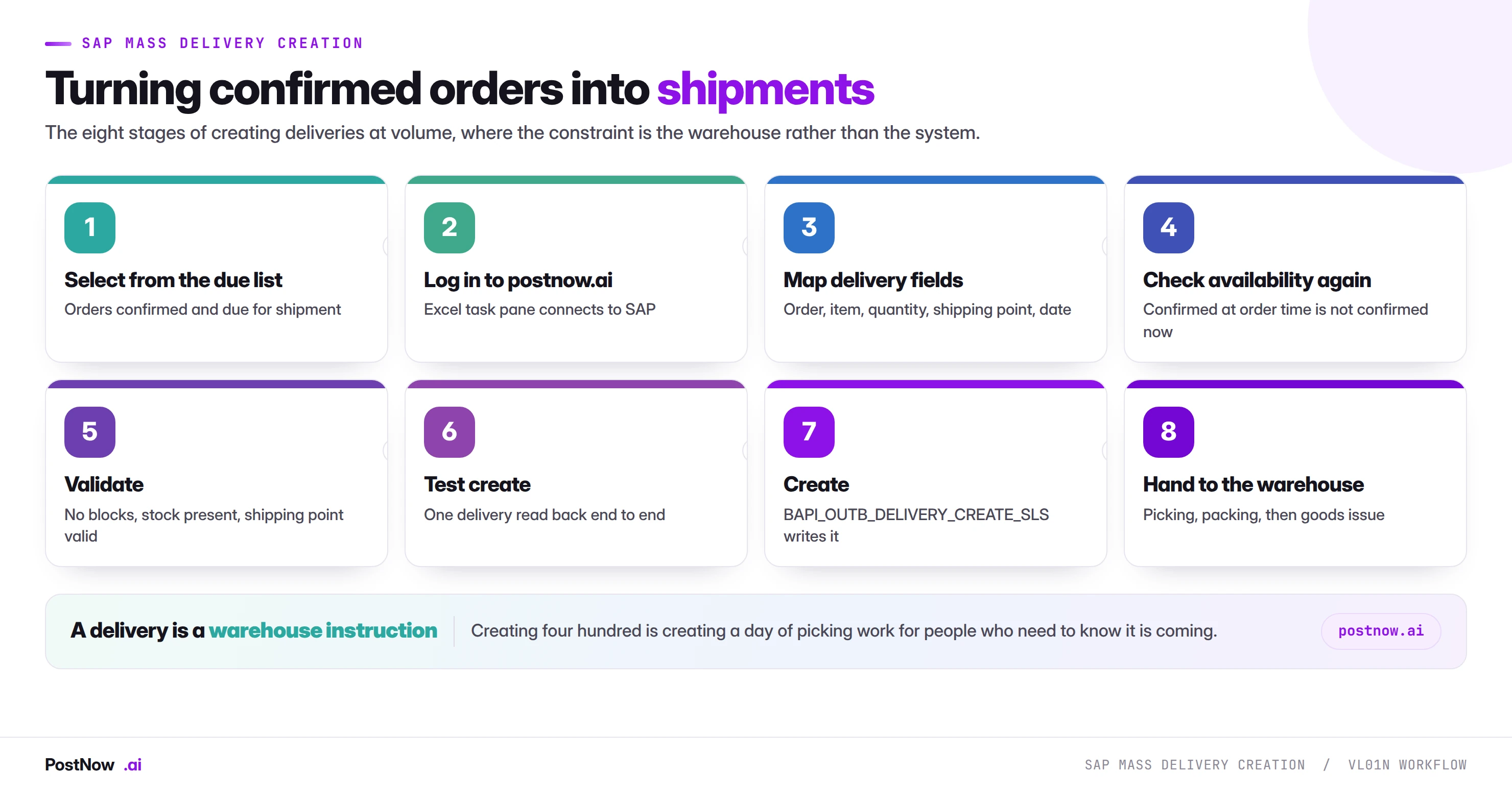
A delivery is a warehouse instruction. Creating four hundred of them is creating a day of picking work for people who are not in the room. The system constraint is trivial; the physical constraint is the whole problem.
The delivery chain
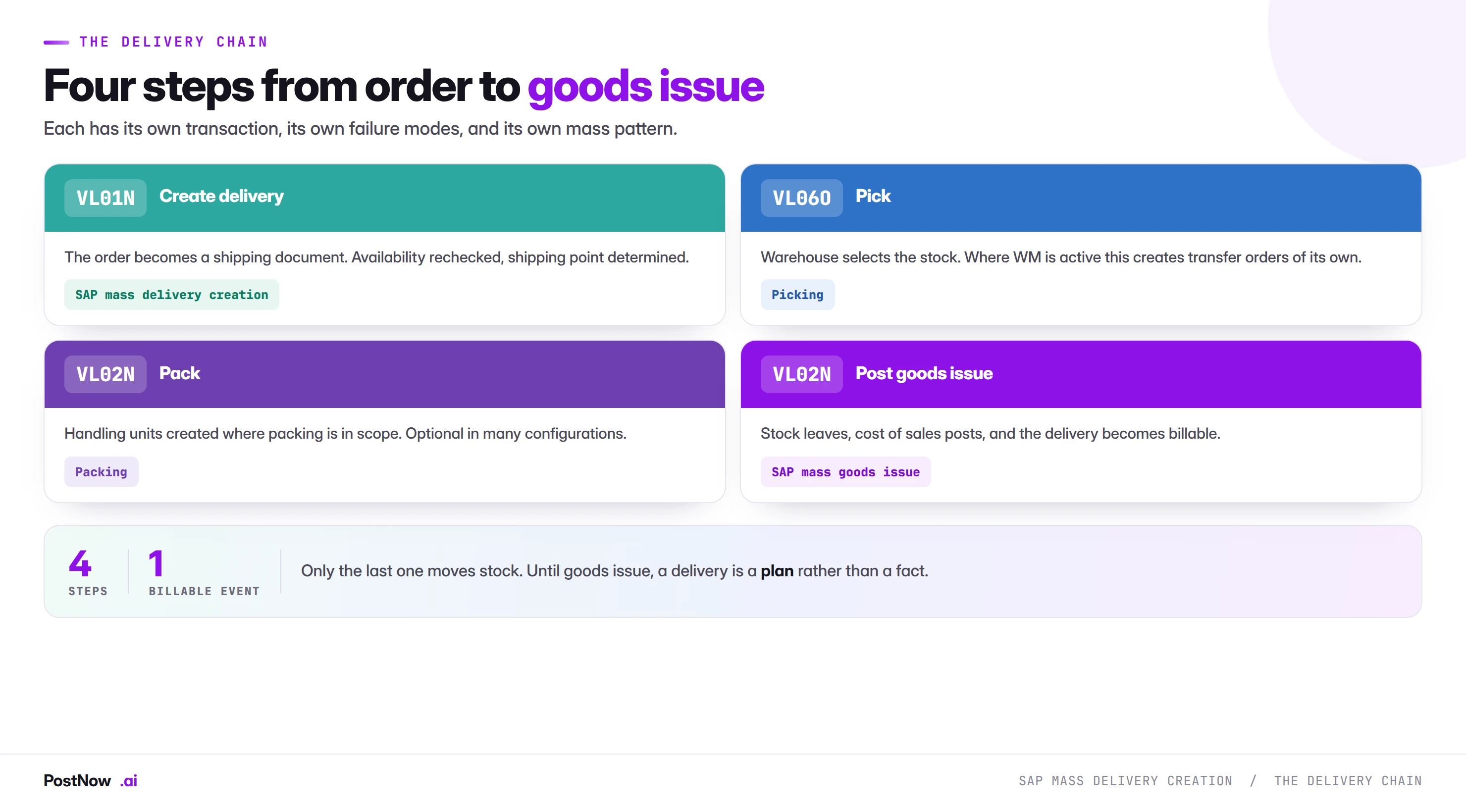
Four steps, and only the last one moves anything.
Create the delivery. Availability is rechecked, the shipping point is determined or supplied, and dates are scheduled backwards from the requested delivery date.
Pick. The warehouse selects the stock. Where warehouse management is active this generates transfer orders with their own mass patterns.
Pack. Handling units created where packing is in scope, which is optional in many configurations.
Post goods issue. Stock leaves, cost of sales posts, and the delivery becomes billable.
Until goods issue, a delivery is a plan rather than a fact. Nothing has left, nothing has posted to accounting, and cancelling costs nothing. That makes the creation step considerably more forgiving than the goods movement at the end of it, which is covered by the same permanence rules as any goods movement.
A delivery with order reference rechecks availability, and the answer may differ
The most important thing to understand about creating deliveries at volume.
When a sales order was taken, availability was checked and a quantity confirmed. That confirmation reserved nothing permanent. Between then and now, other orders were taken, stock moved, deliveries went out, and a physical count may have adjusted the position.
Delivery creation checks again, against today. An order confirmed for four hundred units three weeks ago may find two hundred available now, and the delivery is created for what exists rather than what was promised.
Three consequences for a mass run:
- Partial deliveries are normal. A file that assumes full quantities will produce deliveries that do not match, and the difference is a conversation with a customer.
- Deliveries in one run compete for stock. The same effect the sales order guide describes: each delivery consumes availability as it is created, so row order decides who ships when stock is short.
- Sort deliberately. By customer priority, order date, or whatever the commercial policy is. This is an allocation decision and it should be made rather than inherited from an export.
VL10 for the routine run, a file for the exceptions
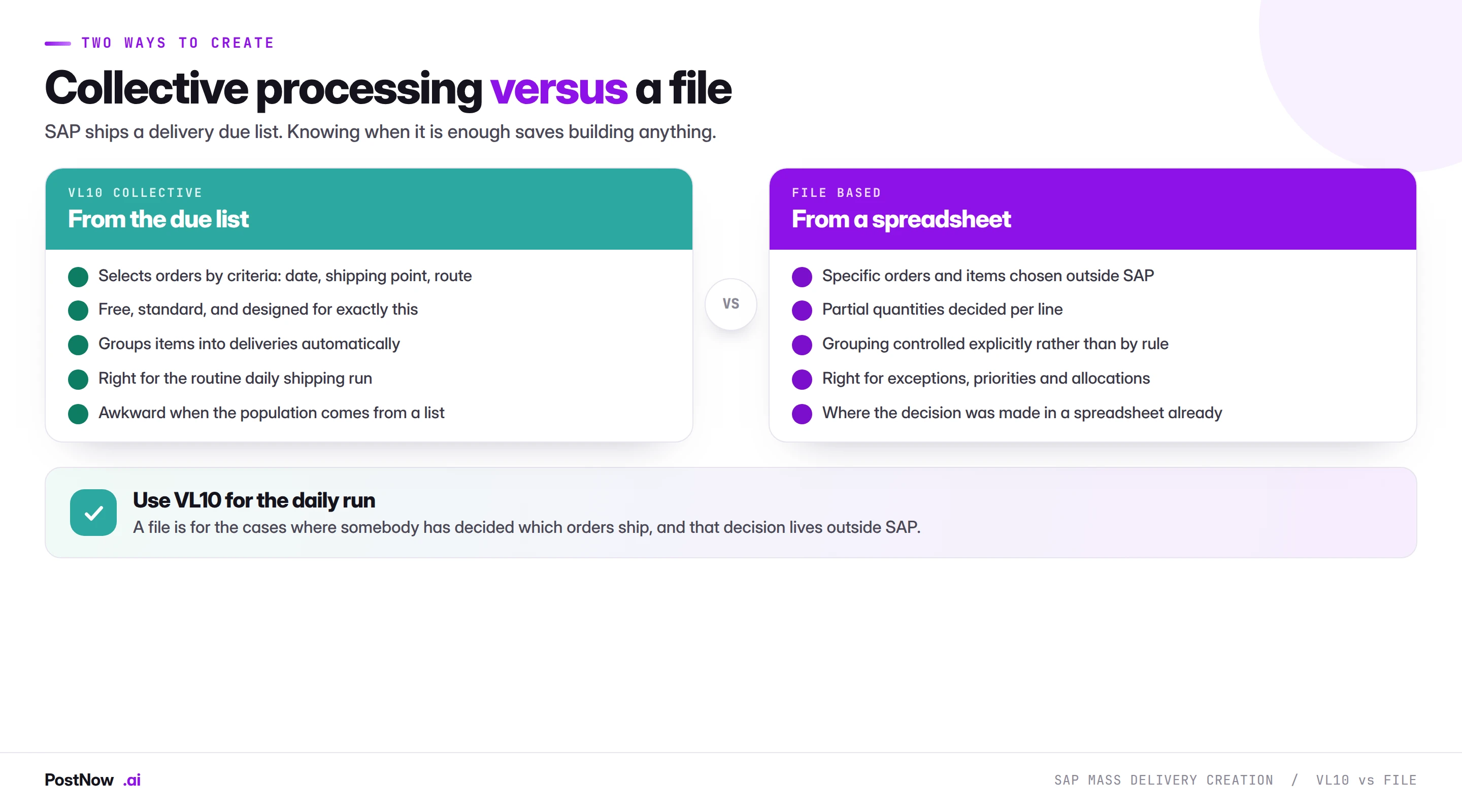
SAP ships a delivery due list, and knowing when it is sufficient saves building anything.
VL10 handles the routine daily run. It selects orders by criteria, groups items into deliveries automatically, and is designed for exactly this. Where shipping is a standing process against a date and a shipping point, it is the right tool and it is free.
A file handles the exceptions. Specific orders chosen outside SAP, partial quantities decided per line, grouping controlled explicitly, and allocation when stock is short. These are cases where a human has made a decision that a selection screen cannot express.
Most organisations need both: VL10 for the daily run, a file for month-end pushes, priority allocations and corrections.
Stock that is promised is not stock that is there
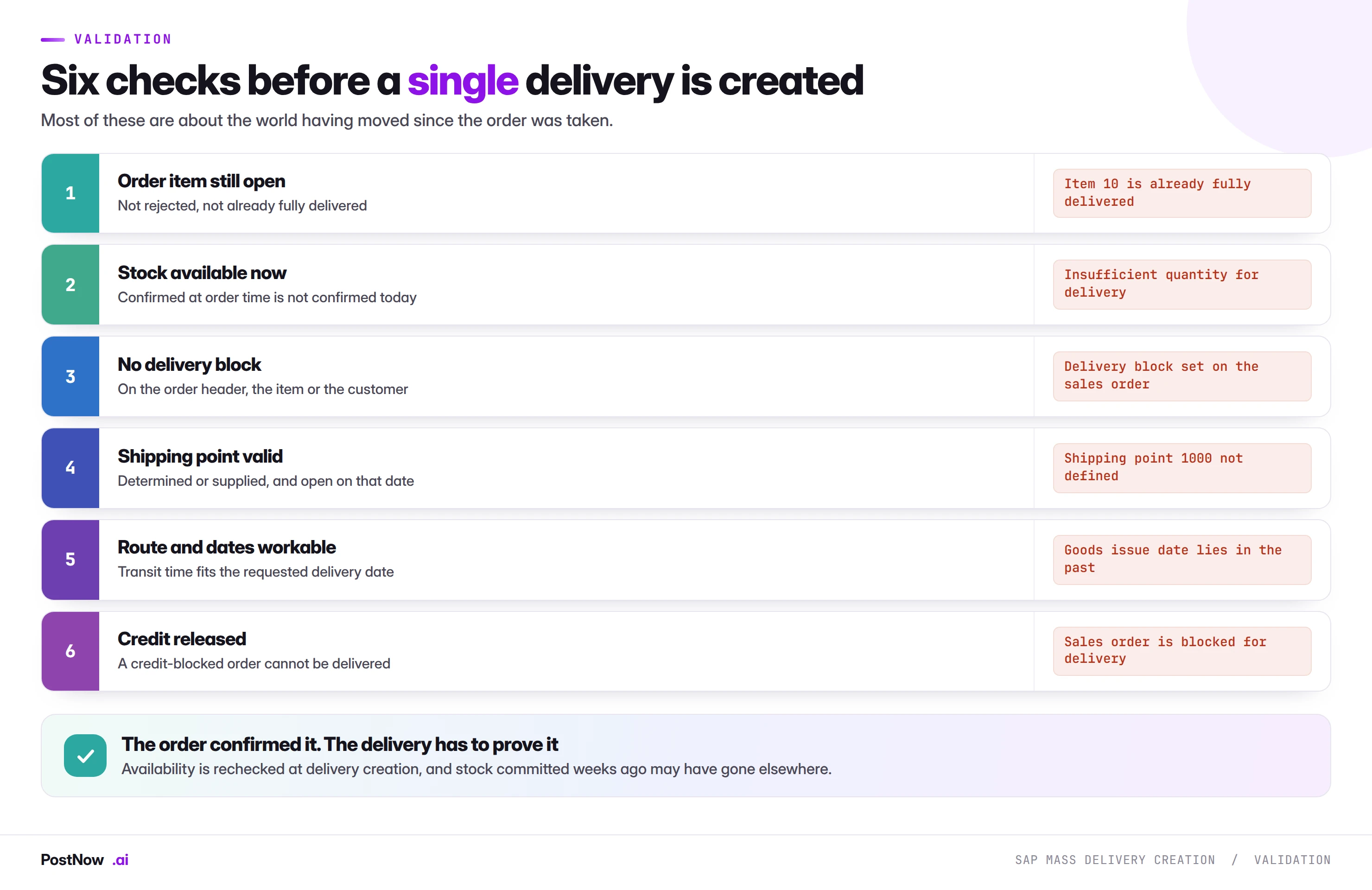
Most of these are about the world having moved since the order was taken.
Delivery blocks deserve particular attention. They exist on the order header, the item and the customer, and each was set by somebody for a reason: a credit hold, a dispute, a compliance check, an incomplete address. A mass run that clears blocks to complete is overriding decisions made by people who are not in the room.
Credit released is a specific case of the same thing. A credit-blocked order cannot be delivered, and that block belongs to credit control rather than to whoever is running the shipping file.
The file drives VL01N, so availability is still rechecked per line
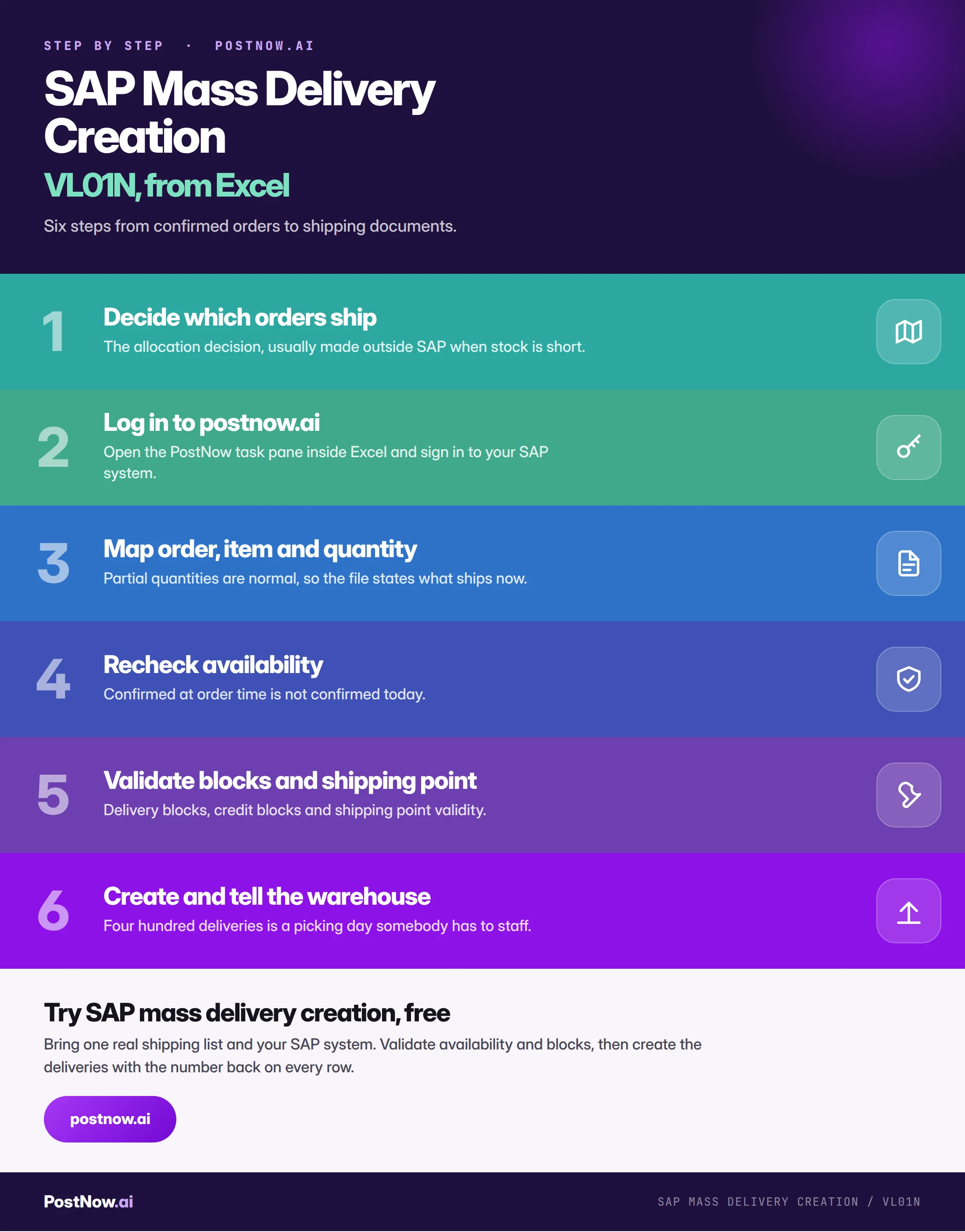
From list to deliveries in PostNow, stock permitting
The allocation decision usually lives in a spreadsheet already. PostNow adds a task pane to Excel, connects to your SAP system with your own credentials, and creates the deliveries from the file where the decision was made.
Availability validated against today rather than order date.
Rows processed in the order you choose, so allocation is deliberate.
Delivery and credit blocks surfaced rather than bypassed.
The delivery number written back on the row that made it.
Create against confirmed stock, in the order you decide
The shipping point and warehouse are the real constraint
Worth stating separately, because it is the part a technical guide usually omits and the part that determines whether the run helps.
Four hundred deliveries created in ninety seconds becomes four hundred picks, an unknown number of handling units, and a goods issue run that somebody has to perform. The system produced them instantly; the warehouse cannot.
- Tell them before, not after. A picking day that arrives unannounced is a bad outcome from a process meant to save time.
- Match volume to capacity. Creating more deliveries than can be picked produces a backlog that ages and blocks stock.
- Watch the shipping point. A file spreading deliveries across shipping points spreads the work; concentrating them concentrates it.
- Consider the transport. Deliveries feed shipment planning where it is in use, and a large creation run lands there too.
Over-delivery and missing stock stop most delivery runs
- Assuming order quantities are still available. Availability is rechecked at delivery creation and the answer may differ.
- Ignoring that deliveries compete for stock. Row order decides who ships when stock is short.
- Clearing delivery blocks to complete a run. Each was set by somebody for a reason.
- Using a file where VL10 would do. The due list handles the routine run for free.
- Creating more than the warehouse can pick. Produces an ageing backlog that blocks stock.
- Forgetting goods issue is a separate step. Until then nothing has moved and nothing is billable.
Delivery creation, summarised
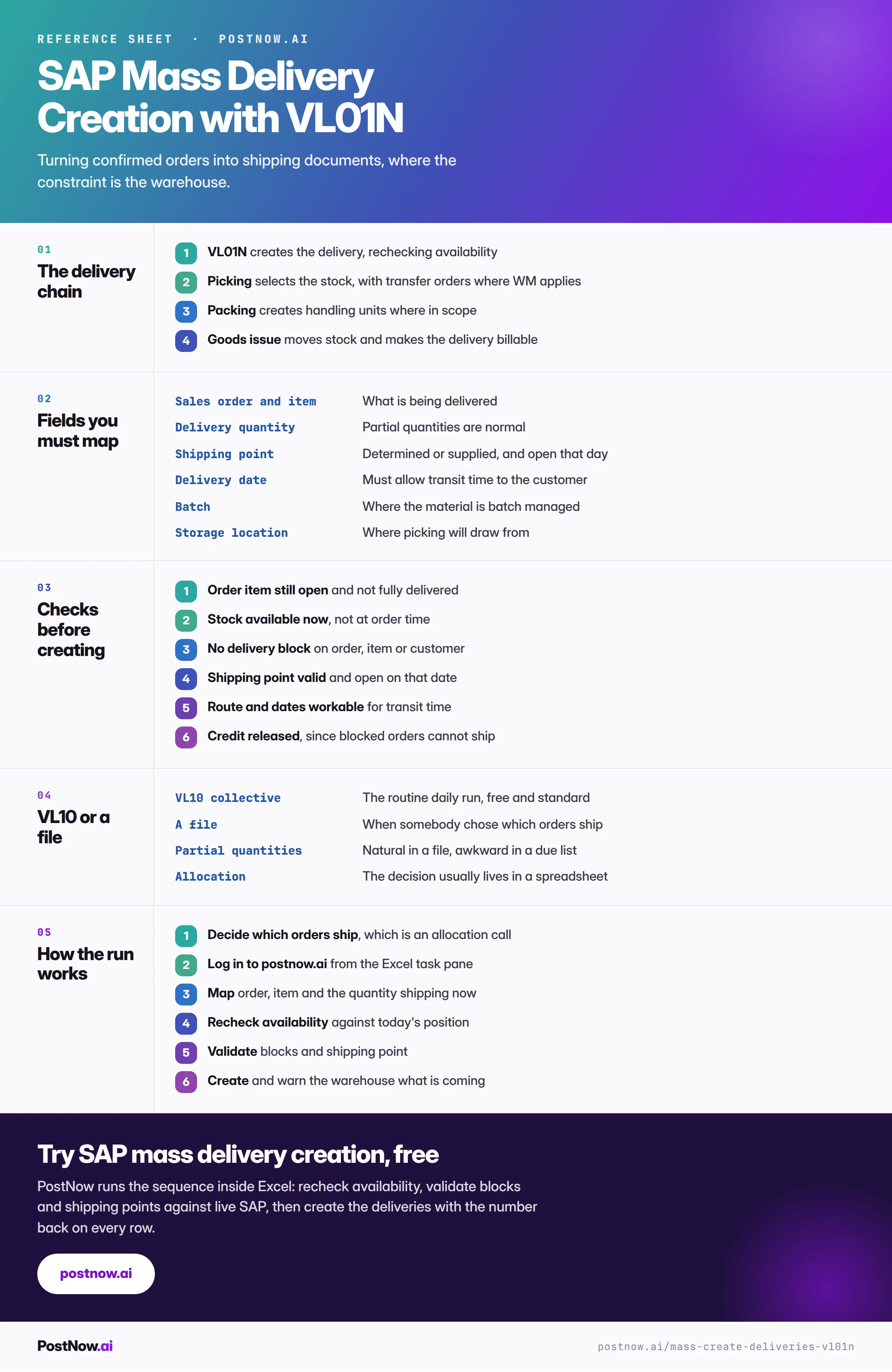
Deliveries connect to orders upstream and billing downstream
SAP mass upload
The pillar guide covering validation, error handling and governance.