SAP Mass Customer Master Upload with XD01
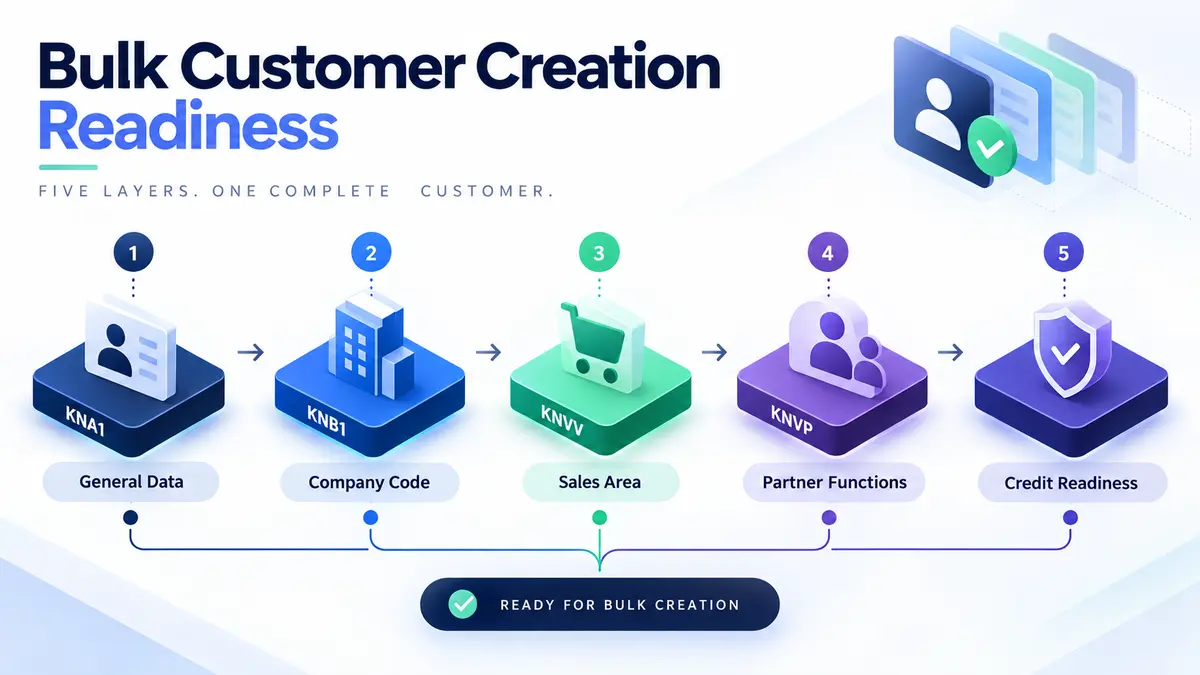
SAP mass customer master upload means creating many customer records in one controlled run from a file rather than stepping through XD01. The test that matters is not whether the records exist but whether sales can raise an order against them, which depends on the sales area, partner functions and credit data being complete at creation.
- Created is not the same as usable. A customer with general data only passes every check and cannot take an order.
- The sales area is a three-part key. Sales organisation, distribution channel and division, and division is the part commercial systems never carry.
- Partner functions must resolve. Sold-to, ship-to, bill-to and payer, and any referenced customer has to exist first.
- Customers without credit limits trade with none. Silent commercial exposure rather than a technical error.
- Prove it with a sales order, not a search. Field validation proves form; only an order proves function.
Why customer creation arrives in bulk
Like vendor work, customer creation is almost never planned as a project. It arrives attached to something commercial, with a date already fixed by someone outside IT.
- Acquisitions and mergers. An acquired customer base has to exist before the first order can be taken under the new entity.
- New sales organisation or channel. Existing customers need extending to a new sales area, which is a mass change wearing the clothes of a mass create.
- New market entry. A country launch brings a customer list that has to be loaded before go-live, not after.
- CRM or e-commerce integration. A front-end system holds the authoritative customer list and SAP has to match it.
- Distributor and dealer onboarding. Channel programmes that add hundreds of trading partners at once.
- S/4HANA migration. Customers become Business Partners, and the conversion surfaces every incomplete record.
What these share is that the deadline belongs to sales, and sales measures success by whether an order can be taken. That is the standard a customer load has to meet, and it is higher than "the records exist".
The three segments, and the sales area that gets forgotten
- General data (KNA1). Name, address, country, tax numbers, communication. Valid across the whole client. One record per customer.
- Company code data (KNB1). Reconciliation account, payment terms, dunning procedure. One record per customer per company code. This is what finance needs to invoice and collect.
- Sales area data (KNVV). Shipping conditions, pricing procedure, incoterms, customer group. One record per customer per sales area. This is what sales needs to take an order.
The sales area is three fields working as one key: sales organisation, distribution channel and division. All three must be populated, and the combination must exist in configuration. A customer belonging to two divisions needs two sales area records, not one.
This produces the same file-shape decision as vendor master, with an extra dimension. A customer trading in two company codes and three sales areas is one general record, two company code records and three sales area records. A flat file with one row per customer cannot express that, and a file that tries produces customers that work in one area and fail in the others.

Created is not the same as usable
This is the distinction worth holding onto through the whole exercise. A customer created with general data alone passes every validation, appears in every search, and is useless. The failure surfaces when a sales user tries to raise an order, which is usually weeks later and always at a bad moment.
What SAP mass customer master upload means
SAP mass customer master upload is the practice of creating many customer records in one controlled run from a structured file, instead of stepping through XD01 one customer at a time. The data is prepared in Excel, mapped across the three segments a customer record needs, screened against customers that already exist, validated against live configuration, and created through SAP's standard customer logic with the new customer number written back per row.
Customer master shares its structure with vendor master, and in S/4HANA the two converge into Business Partner. That similarity is genuinely useful: a team that has run one has learned most of what the other needs. But three things are specific to the customer side, and they are where mass loads go wrong.
The sales area. A customer is assigned to a sales organisation, a distribution channel and a division, together forming a sales area. Without one, no sales order can be created. This is the single most common omission in customer files, because the customer list procurement or sales hands over rarely contains it.
Partner functions. Every customer needs a sold-to, ship-to, bill-to and payer. They frequently all point at the customer itself, which is why people forget they exist until a record fails to take an order.
Credit management. A customer without a credit limit is not blocked from trading; it is trading with no credit control at all, which is a commercial exposure rather than a technical error.

The fields you have to map

Account group
As with vendors, the account group is the field with the longest shadow. It fixes the number range, the field status, and which partner functions are mandatory. It also determines whether the customer is a one-time account, which changes posting behaviour entirely.
The customer-specific wrinkle is that account groups often encode the commercial relationship: direct customer, distributor, intercompany, one-time. Getting the mapping between commercial type and account group right is a sales decision, not a technical one, and it should be settled in the template rather than in the file.
Reconciliation account
Customer reconciliation accounts carry account type D, and they are defined per company code. An account that is valid for vendors will not work here, which is a common error on files built by copying a vendor template.
Partner functions
Four functions matter for most configurations: sold-to (SP), ship-to (SH), bill-to (BP) and payer (PY). In the simple case all four are the customer itself, and SAP will default them if the account group permits. In real customer bases they diverge: a head office that pays, a branch that receives goods, a shared services centre that receives invoices.
Where they diverge, the referenced customers have to exist before the record that references them. That sequencing constraint is the reason customer loads are often split into two runs: independent customers first, then the ones whose partner functions point at them.
Credit data
Where credit management is active, the credit limit and risk category live alongside the customer and are frequently maintained separately. A load that creates customers without credit data produces records that trade with no limit, which nobody notices until exposure is already sitting on the books. Decide with finance whether credit data is in scope for the run or handled immediately after it, and do not let it be neither.
Duplicate screening on the customer side
The principle is the same as for vendors: screen on identity fields rather than names, because names are typed inconsistently and legitimate variants abound. The fields differ slightly.
- Tax registration number. Still the strongest signal where it is captured. Consumer-facing customer bases often do not capture it, which weakens this considerably.
- Address plus normalised name. Carries more weight for customers than for vendors, because a delivery address is a real-world constraint.
- External reference from the source system. Where the customer list comes from CRM or e-commerce, the source identifier is often the most reliable key, and it should be stored on the SAP record so the link survives.
The consequence of a customer duplicate is different from a vendor duplicate too. Split spend becomes split revenue and split credit exposure: two records, two credit limits, one real customer that can now exceed its intended exposure without triggering a block. That is a commercial risk, not a reporting inconvenience.
The eight stages of a controlled XD01 run
The sequence follows the discipline in the SAP mass upload pillar guide, with sales area completeness as the specific thing this object gets wrong.
Build the customer sheet
One row per customer for the simple case, carrying general, company code and sales area data together. Where a customer spans several sales areas, use one row per assignment and carry the general data on each.
Log in to postnow.ai
Open the PostNow task pane inside Excel and sign in. The pane connects the workbook to your SAP system with your own credentials and authorisations.
Map all three segments
General, company code and sales area fields mapped in one pass, plus partner functions. A customer completed later by someone else is a customer that blocks an order in the meantime.
Screen for duplicates
Match tax numbers, addresses and source-system references against existing customers, and check the file against itself. Flag suspected matches for sales to decide.
Validate against live SAP
Account groups, sales area combinations, reconciliation accounts, payment terms and partner functions checked against the client you are loading into.
Test create, then raise an order
Create a subset in a quality client, then raise a sales order against one of them. This is the test that matters. Field validation proves the record is well formed; an order proves it is usable.
Create through standard logic
Customers are created through SAP's standard customer maintenance interface, so every field status rule and partner determination check still applies.
Reconcile and hand back
New customer numbers are written back against each source row, which is what CRM or the requesting team needs to close the loop.

Validation: six checks before a single customer is created

The sales area check is the one that saves the most time. A sales area is a three-part key, and an invalid combination is rejected as a whole, so the error does not tell you which of the three parts is wrong. Validating each part separately before the run turns a vague rejection into a specific one.
Division is the usual culprit. Customer lists come from commercial systems that have no concept of division, so it gets filled in by whoever prepares the file, often with a plausible-looking default that is not configured.
Errors, and what they are telling you

Three of these four are configuration problems that hit whole blocks of rows and are fixed once by the right person. V4 219, the missing partner function, is different: it is a completeness problem in your file, it may affect only some account groups, and it tends to appear on the subset of customers whose commercial relationship is more complicated than the default.
Running the whole sequence inside Excel
PostNow runs SAP mass customer master upload from Excel
The eight stages above happen in the customer list sales already maintains. PostNow adds a task pane to Excel, connects to your SAP system with your own credentials, and takes the file through mapping, screening, validation and creation without leaving the sheet.
All three segments plus partner functions, in one pass.
Tax numbers, addresses and source references matched before creation.
Sales areas and account groups checked against live configuration.
New customer numbers written onto the row sales sent you.
XD01, VD01 and FD01: which transaction reaches which segment

XD01 is central creation and reaches all three segments. It is the right default for a mass load, because a complete record is almost always what the business actually needs.
VD01 creates general and sales area data but no company code segment. The customer can take an order and cannot be invoiced in FI. This is occasionally correct, for example where invoicing happens in another system, and is more often an accident.
FD01 creates general and company code data but no sales area. The customer can be invoiced in finance and cannot take a sales order. Useful for one-time receivables, wrong for anything commercial.
The practical advice is to use XD01 unless someone can state clearly why the customer will only ever be used on one side. Partial records are cheap to create and expensive to complete later, because completing them means a second run against records that already have history.
Customer master in S/4HANA: the Business Partner change
The same conversion described in the vendor master guide applies here, from the other direction. In S/4HANA, XD01 is no longer the route. Customers are Business Partners carrying customer roles, and loads go through the Business Partner interface.
Four practical consequences:
- Roles replace transactions. Instead of choosing between XD01, VD01 and FD01, you state which roles the partner carries: FI customer, sales customer, or both. The same completeness decision, expressed differently.
- One partner, both sides. A company that is both customer and supplier becomes a single Business Partner with roles on both sides, rather than two unrelated records. For organisations where that overlap is common, this is a genuine improvement and worth planning for rather than migrating around.
- Number range synchronisation. Business Partner and customer numbers can be aligned or independent, and which one your file supplies depends on that configuration.
- Recordings do not survive. A screen recording built against XD01 is worthless after conversion. A mapped load through the published interface needs a remap, not a rebuild.
Extending to a new sales area is a different run
A large share of customer work is extension rather than creation: the customer exists, and it needs a new sales area or company code segment. This happens whenever a sales organisation is added, a division is introduced, or a customer starts buying a new product line.
Creates and extensions fail in opposite directions, so mixing them in one file produces contradictory errors across the population. Screen first, split the file, and run them separately. The screening step identifies which rows are which at no extra cost.
Extensions are also lower risk than creates, because the general data already exists and has been used. That makes them a good first mass customer run for a team building confidence with the process.
Credit limits and the exposure nobody meant to create
Credit management deserves its own attention because the failure mode is silent and commercial rather than technical.
A customer created without credit data is not blocked. Depending on configuration it either trades with no limit or falls back to a default that may be far higher than anyone would have approved. Four hundred customers created this way represent an exposure that finance did not sign off and does not know about.
- Decide scope explicitly. Either credit data is in the file, or there is a named follow-up run with a date. Not neither.
- Default conservatively. Where limits are unknown, a low default that forces a review is safer than a high one that never gets questioned.
- Carry the risk category. It drives which checks apply, and it is easy to populate at creation and tedious to add later.
- Tell credit control what was loaded. A short handover listing the population and the limits applied turns a surprise into a process.
In S/4HANA credit management moves into FSCM, which changes where the data lives but not the principle: a customer trading without a reviewed limit is an exposure regardless of which table holds it.
Pricing, tax classification, and the fields that decide what a customer pays
Customer master carries several fields that look like classification and behave like pricing. Getting them wrong does not stop a load; it produces orders at the wrong price, which is worse.
Customer pricing procedure
This field, combined with the document pricing procedure and the sales area, determines which pricing procedure applies to the customer's orders. A wrong value does not error. It quietly selects a different procedure, and the first symptom is an order that prices unexpectedly. On a load of four hundred customers, that symptom arrives four hundred times.
Customer group and price group
Both are commonly used as keys in condition records. A customer assigned to the wrong price group picks up the wrong discounts. Because condition records are maintained separately, the error looks like a pricing problem rather than a master data one, and diagnosis goes to the wrong team first.
Tax classification
Tax classification on the customer, combined with the material's classification, determines the tax rate applied. Customers in the same country can legitimately carry different classifications, for example exempt entities or intercompany partners. Defaulting the whole file to the standard value is quick and produces incorrect tax on the exceptions.
Incoterms and shipping conditions
These drive delivery scheduling and freight determination. They rarely block an order and they routinely produce the wrong route or the wrong delivering plant, which surfaces in logistics rather than in the load.
One-time customers and when not to create a record at all
Not every customer in a list deserves a master record. One-time customer account groups exist precisely for the case where a party will transact once and never return, holding the address on the document rather than on a permanent record.
This matters for mass loads because customer lists handed over by commercial teams frequently include long tails of parties who bought once. Creating permanent records for all of them inflates the customer base, degrades duplicate screening for everyone else, and creates maintenance obligations nobody will meet.
Before a large load, split the population by expected future activity. Recurring customers get full records. Genuine one-time parties either get a one-time account group or no record at all. That decision belongs to sales operations, and asking the question is usually enough to reduce the load by a meaningful fraction.
Customer hierarchies and group structures
Large customers are rarely single entities. A retail group has a buying centre, regional offices and hundreds of stores; a manufacturer has a head office that negotiates and plants that receive. SAP models this with customer hierarchies, and a mass load that ignores them produces a flat customer base that cannot support group-level pricing or reporting.
Two decisions matter before the file is built.
Which level gets a customer record. Not every node in a commercial hierarchy needs one. Stores that never receive an invoice directly may only need ship-to records. Creating full customers for every node inflates the base and complicates credit management.
Whether hierarchy assignment is in scope. Hierarchy nodes and assignments are maintained separately from the customer record itself. A load can create the customers and leave the hierarchy empty, which is a valid staging approach provided the follow-up is scheduled rather than assumed.
Where group-level pricing or rebates depend on the hierarchy, the hierarchy is not optional and the load is not finished without it. Confirm which applies with sales operations before building the file, because retrofitting a hierarchy across four hundred customers is considerably more work than including it.
Governance, approval, and audit
- Run as a named user. The creation carries the identity and authorisations of the person who ran it.
- Separate requester from operator. Sales supplies the file, someone else runs it. Easier to evidence with one file than with four hundred manual creations.
- Keep the screening result. Evidence that duplicates were checked for, and what was decided about suspected matches.
- Record the credit position. What limits were applied, or that limits were deliberately deferred and to when.
- Hand the numbers back. The completed file with customer numbers closes the loop with CRM or the requesting team.
Volume, sequencing, and number ranges
Customer creation is light work per record, so the constraints are sequencing and configuration rather than throughput.
- Sequence partner references. Customers referenced as ship-to or payer must exist before the customers that reference them. Split into two runs where the file contains both.
- Check number range capacity. An internal range that runs out midway produces a partial load and a confusing error.
- Batch by sales area or account group. Both give a batch describable in one sentence with homogeneous failure modes.
- Screen once, create in batches. Duplicate screening should run across the full population before any splitting.
From a one-off load to a customer onboarding template
- Give the template to sales operations. If the customer list arrives with sales areas and account groups already correct, the load is a formality.
- Encode the account group rules. Which commercial type maps to which group is business logic that should be decided once.
- Include partner function defaults. Most customers point all four at themselves; make that the template default and let exceptions be explicit.
- Keep credit fields in the template. Present but requiring a value is better than absent and forgotten.
- Name an owner. Sales areas get added and account groups change; an unowned template fails quietly.
Common mistakes and how to avoid them
- Creating general data only. The customers exist, look correct, and cannot take an order. The most common customer master failure by a wide margin.
- Leaving division blank or guessed. Sales areas are a three-part key and division is the part commercial systems do not carry.
- Copying a vendor template. Customer reconciliation accounts are type D, not K, and the partner function requirements are entirely different.
- Ignoring partner functions until they fail. They default in simple cases and not in the interesting ones.
- Loading without credit limits and calling it done. Silent commercial exposure, not a technical error.
- Referencing customers that do not exist yet. Sequence the runs so payers and ship-tos are created first.
- Testing with a search instead of an order. Field validation proves form. Only an order proves function.
- Mixing creates and extensions. Contradictory errors across the population and a confusing cleanup.
What happens after the customers exist
A customer load is finished when sales can trade, not when the records are created. Four things close that gap.
Raise one real order per account group. Not per customer, per group. Account groups differ in field status and partner determination, so one successful order in each group proves the configuration held across the population. This is a ten minute exercise that catches problems worth days.
Confirm pricing on that order. Check that the price, discounts and tax are what sales expects. This is where the pricing fields described above prove themselves, and it is far cheaper to find a wrong price group now than after invoicing.
Hand the numbers back. CRM, the e-commerce platform or whichever system supplied the list needs the SAP customer numbers written against its own records. The file that arrived is the file that goes back, with one column added.
Brief credit control and sales operations. A short note listing what was loaded, which limits were applied, and which rows were held back as suspected duplicates turns a bulk change into a handover. Teams that skip this step spend the following fortnight answering the same question repeatedly.
The complete XD01 mass upload reference
The reference sheet below collects everything above into one image you can share before an onboarding run.

Go deeper
SAP master data mass upload
The hub for master data at volume: materials, vendors, customers, BOMs and HR master.
SAP mass upload
The pillar guide covering methods, validation, error handling and governance across every transaction.
Methods and alternatives
How BAPI, screen recording and LSMW compare, and what survives an S/4HANA conversion.