SAP Mass Vendor Master Upload with XK01
SAP mass vendor master upload means creating many supplier records in one controlled run from a file rather than stepping through XK01. A vendor is three segments, not one record, and the population must be screened against existing vendors before creation because a duplicate is a valid record that silently splits your spend data.
- A vendor is three records. General, company code and purchasing data. Missing one leaves a supplier that cannot be paid or ordered from.
- Screen on tax number and bank details, not name. Names are typed inconsistently by design; identity fields are not.
- Screen the file against itself too. Consolidated lists often contain the same supplier twice, invisible to a check that only queries SAP.
- The account group is the decision with the longest shadow. It fixes the number range and field status, and correcting it means deletion and recreation.
- XK01 does not exist in S/4HANA. Vendors become Business Partner roles, and the file is built around roles instead of segments.
Why vendor creation arrives in bulk
Nobody plans to create four hundred vendors. The work arrives attached to something else, and it arrives with a date already fixed.
- Acquisitions. A company is bought and its supplier base has to exist in your system before the first invoice arrives.
- New entity or plant go-live. Existing suppliers need extending to a new company code or purchasing organisation, which is a mass change wearing the clothes of a mass create.
- Migration to S/4HANA. Vendors become Business Partners, and the conversion exposes every incomplete record you have.
- Procurement system replacement. A new sourcing platform holds the authoritative supplier list and SAP has to match it.
- Category onboarding. A tail-spend programme brings hundreds of small suppliers into scope at once.
- Data cleansing remediation. A governance review produces a file of records to create, merge or correct.
In each case the supplier list already exists in a spreadsheet, usually maintained by procurement rather than by anyone with SAP access. The keying step is a translation between two systems of record, and it adds nothing except the delay and the typos.
The three segments, and why partial vendors are the real risk
The structure of vendor master is the thing to understand before building any file.
- General data (LFA1). Name, address, country, tax numbers, bank details. Valid across the whole client. One record per vendor.
- Company code data (LFB1). Reconciliation account, payment terms, payment methods, dunning. One record per vendor per company code. This is what finance needs to pay the supplier.
- Purchasing data (LFM1). Order currency, purchasing group, terms of delivery. One record per vendor per purchasing organisation. This is what procurement needs to raise an order.
The failure that follows from ignoring this is specific and common. A file is built with general data because that is what the supplier list contains. The vendors are created. Everyone declares the load successful. Three weeks later a buyer tries to raise a purchase order and cannot, or an invoice arrives and cannot be posted, and the diagnosis takes longer than the original load.
The rule is simple. Decide what the vendor will be used for, then make the file complete for that use. A vendor that only ever receives payments needs general and company code data. A vendor that will be ordered from needs purchasing data too. A vendor extended to three company codes and two purchasing organisations needs a row structure that reflects that, not one flat row.
File shape for multi-segment records
There are two workable layouts and one that causes trouble.
Wide layout. One row per vendor, with columns for every segment. Works when each vendor belongs to exactly one company code and one purchasing organisation, which covers most files.
Long layout. One row per vendor per organisational assignment, with a segment indicator. Necessary when vendors span multiple company codes or purchasing organisations.
Mixed layout. Some vendors wide, some long, because the file was assembled from two sources. This is the one to avoid. It produces a load that works for part of the population and silently under-creates for the rest.
The fields you have to map
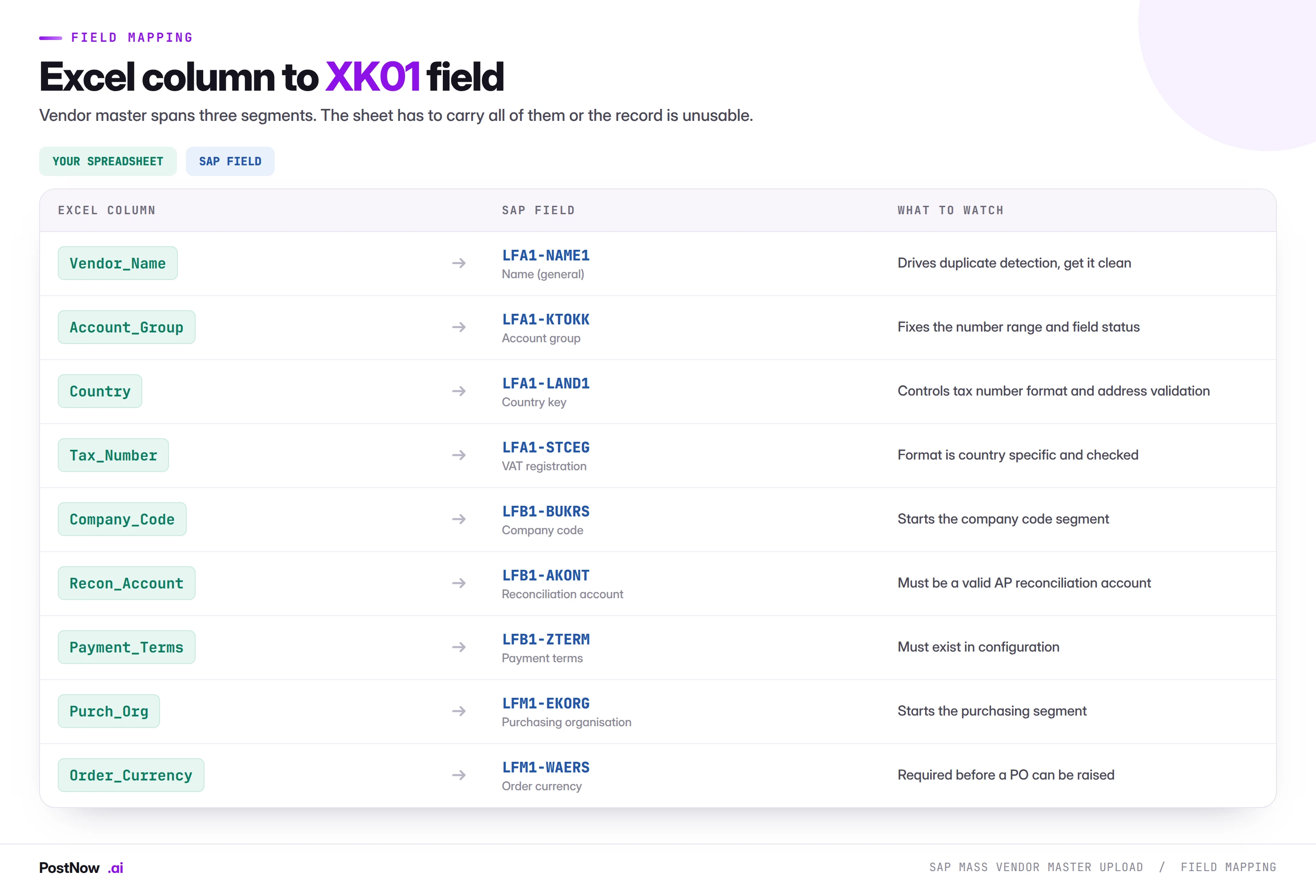
Three of those columns carry more weight than the rest.
Account group
The account group is the most consequential field in the file and the easiest to get wrong. It determines the number range, whether numbers are internal or external, which fields are mandatory, optional or suppressed, and in some configurations whether the vendor is one-time or permanent.
Get it wrong and the symptom is rarely a clean error. More often the vendor is created in the wrong number range, with a field status that suppresses something procurement needs, and the fix is deletion and recreation rather than a change. Confirm the account group in the target client before building the file, not from a specification document written two years ago.
Reconciliation account
This links the vendor to the general ledger, and it has to be an account flagged as a reconciliation account with account type K for vendors. Accounts that look right and are not flagged produce error F2 099, which reads as though the account does not exist.
The subtlety is that reconciliation accounts are per company code. A file spanning several company codes cannot carry one reconciliation account column applied to all of them unless the chart of accounts genuinely is that uniform, which is worth verifying rather than assuming.
Tax number
Tax registration numbers are format-checked against the country key, and the check is strict. A VAT number that is valid but formatted with spaces or a country prefix where the system expects none will be rejected. Worse, it will be rejected inconsistently across a file assembled from several sources.
Normalise tax numbers before the run: strip spaces, decide whether the country prefix is included, and apply the same rule to every row. This one step removes a large share of the failures on any international supplier file.
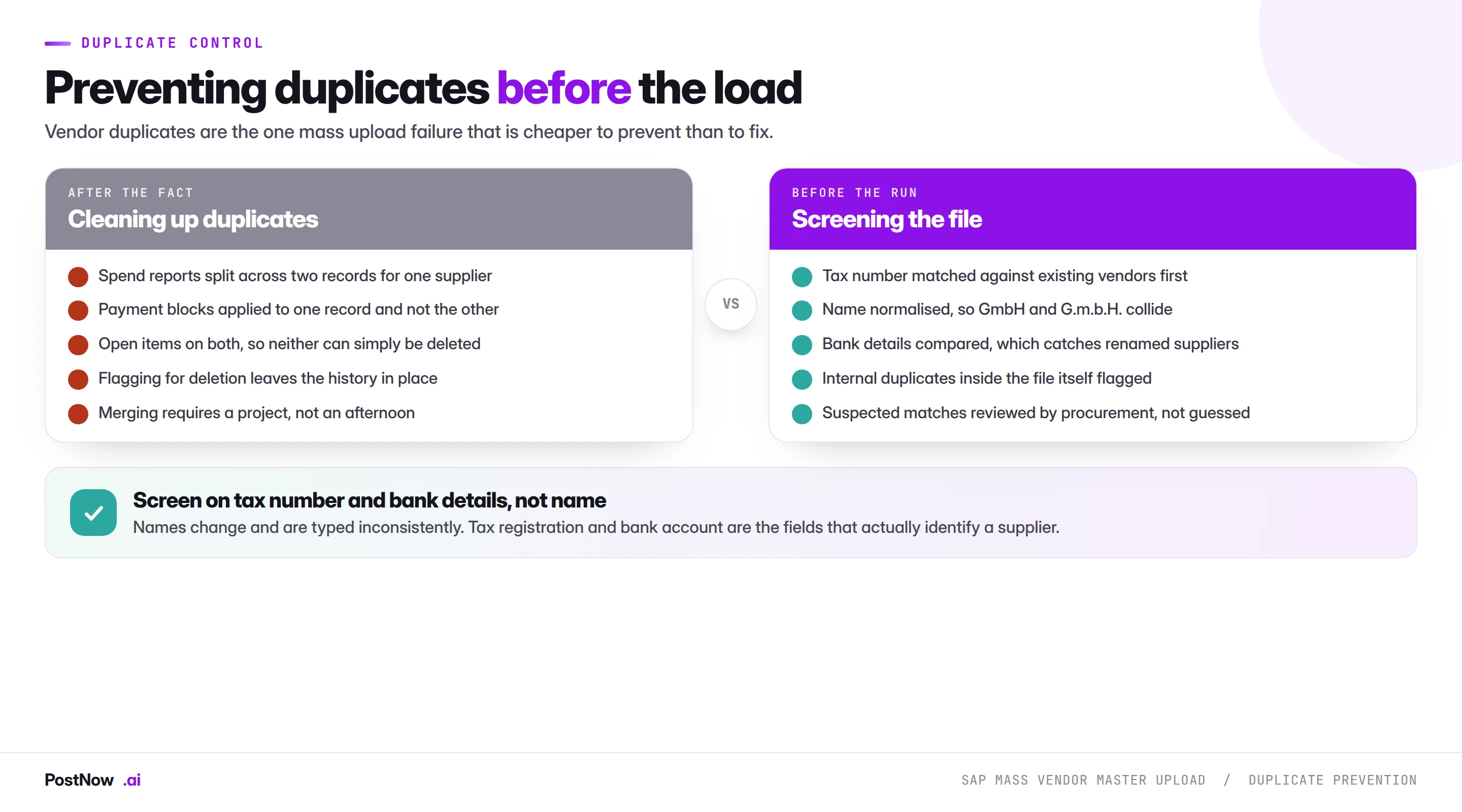
Duplicate prevention: the part that matters most
Everything else in this guide is about making a load work. This section is about making it not cause harm.
A duplicate vendor is a fully valid record. SAP will create it happily, because from the system's point of view nothing is wrong. The damage appears downstream: spend for one supplier reported under two records, so category analysis understates concentration. A payment block applied to one record and not the other. Payment terms negotiated centrally and applied to only half the transactions. Two open item accounts for one relationship, neither of which can be closed.
Removing a duplicate after it has history is genuinely hard. Deletion is blocked by open items and documents. Flagging for deletion stops future use but leaves the history split. Merging is a project. Prevention costs one screening step.
Screen on identity, not on name
Name matching alone is close to useless for supplier data. The same company appears as Acme GmbH, Acme G.m.b.H., ACME Gmbh and Acme Gesellschaft mit beschraenkter Haftung, all legitimately. Meanwhile two genuinely different subsidiaries share a name.
The fields that actually identify a supplier are:
- Tax registration number. The strongest single signal. Two records with the same VAT number in the same country are almost always the same legal entity.
- Bank account details. Catches suppliers that have been renamed or acquired. Also the field fraud controls care about, so a match here deserves human review regardless.
- Company registration number. Where captured, as reliable as the tax number.
- Normalised name plus postcode. Useful as a secondary signal, never as the primary one.
Screen the file against itself
Files assembled from several sources contain internal duplicates: the same supplier appearing twice under slightly different names. These are invisible to a check that only compares each row against SAP, because neither row exists yet. Compare the file against itself as well as against the system.
What SAP mass vendor master upload means
SAP mass vendor master upload is the practice of creating many supplier records in one controlled run from a structured file, instead of stepping through XK01 one vendor at a time. The supplier data is prepared in Excel, mapped across the three segments a vendor record needs, screened against the vendors that already exist, validated against live configuration, and created through SAP's standard vendor logic with the new vendor number written back per row.
Two things make vendor master different from most mass upload work, and both shape everything that follows.
The first is that a vendor is not one record. It is a general segment, a company code segment and a purchasing segment, each owned by a different function and each capable of being complete while the others are not. A vendor with general data only exists, looks fine in a search, and cannot be paid.
The second is duplicates. In most master data work a mistake is an error you fix. A duplicate vendor is not an error; it is a valid record that quietly splits your spend reporting, defeats payment blocks, and becomes progressively harder to remove as it accumulates history. Prevention is the whole game.
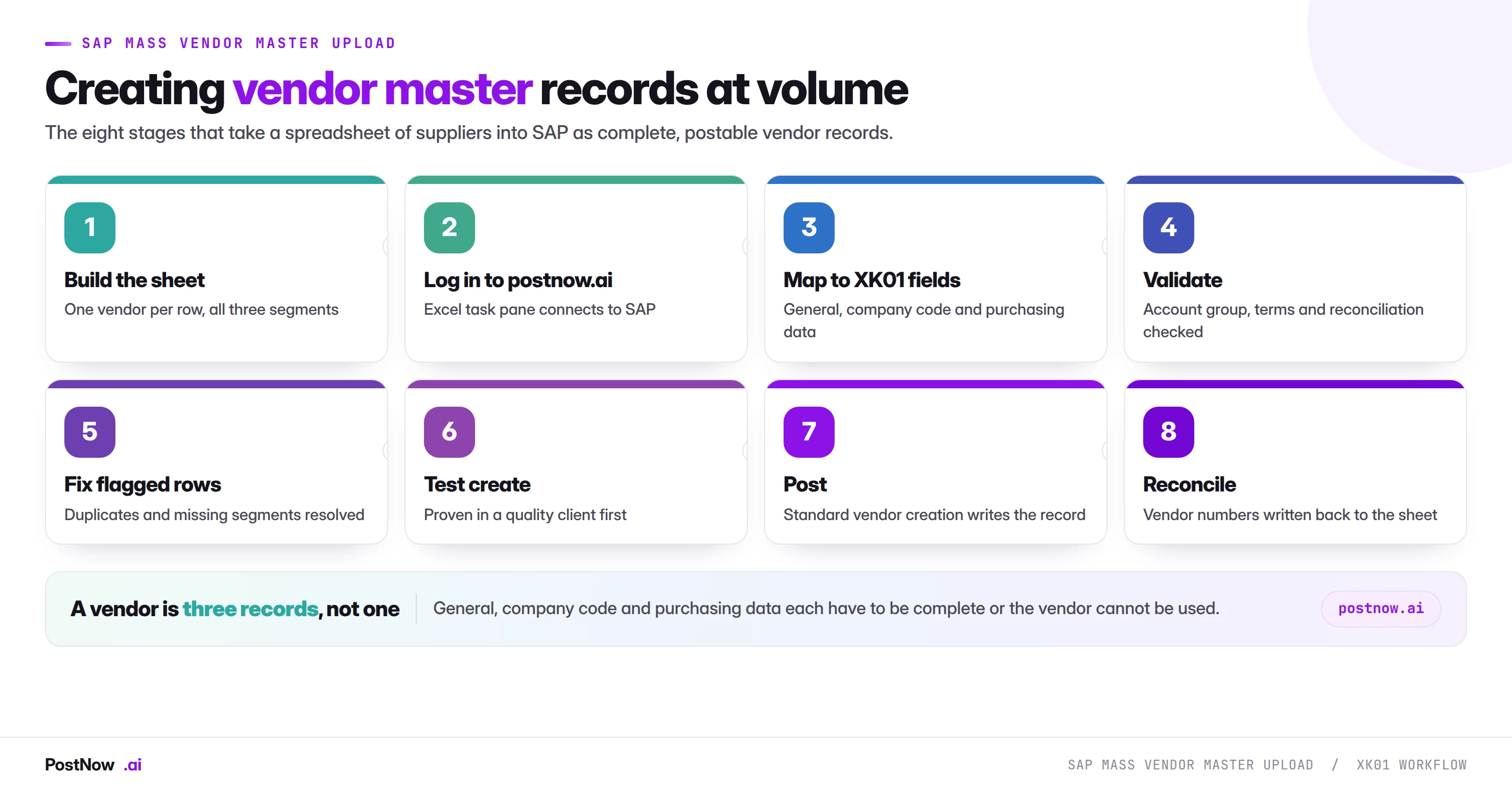
The eight stages of a controlled XK01 run
The sequence follows the discipline in the SAP mass upload pillar guide, with duplicate screening added as a first-class stage.
Build the supplier sheet
One vendor per row for the common case, carrying general, company code and purchasing data together. Decide the layout before the data arrives, and normalise tax numbers and country keys at source.
Log in to postnow.ai
Open the PostNow task pane inside Excel and sign in. The pane connects the workbook to your SAP system with your own credentials and authorisations.
Map all three segments
General, company code and purchasing fields mapped in one pass, so the vendor is complete when it is created rather than completed later by someone else.
Screen for duplicates
Match tax numbers and bank details against existing vendors, and check the file against itself. Flag suspected matches for procurement to decide rather than resolving them automatically.
Validate against live SAP
Account groups, reconciliation accounts, payment terms, country keys and tax number formats checked against the client you are about to load into.
Test create in a quality client
Create a subset, then open two or three vendors in XK03 and read them. Confirm the number range is what you expected and that the purchasing view is genuinely complete.
Create through standard logic
Vendors are created through SAP's standard vendor maintenance interface, so every field status rule and check the transaction applies still applies.
Reconcile and hand back
New vendor numbers are written back against each source row, which is what procurement needs to update its own system. The completed file is the record of the run.
Validation: six checks before a single vendor is created
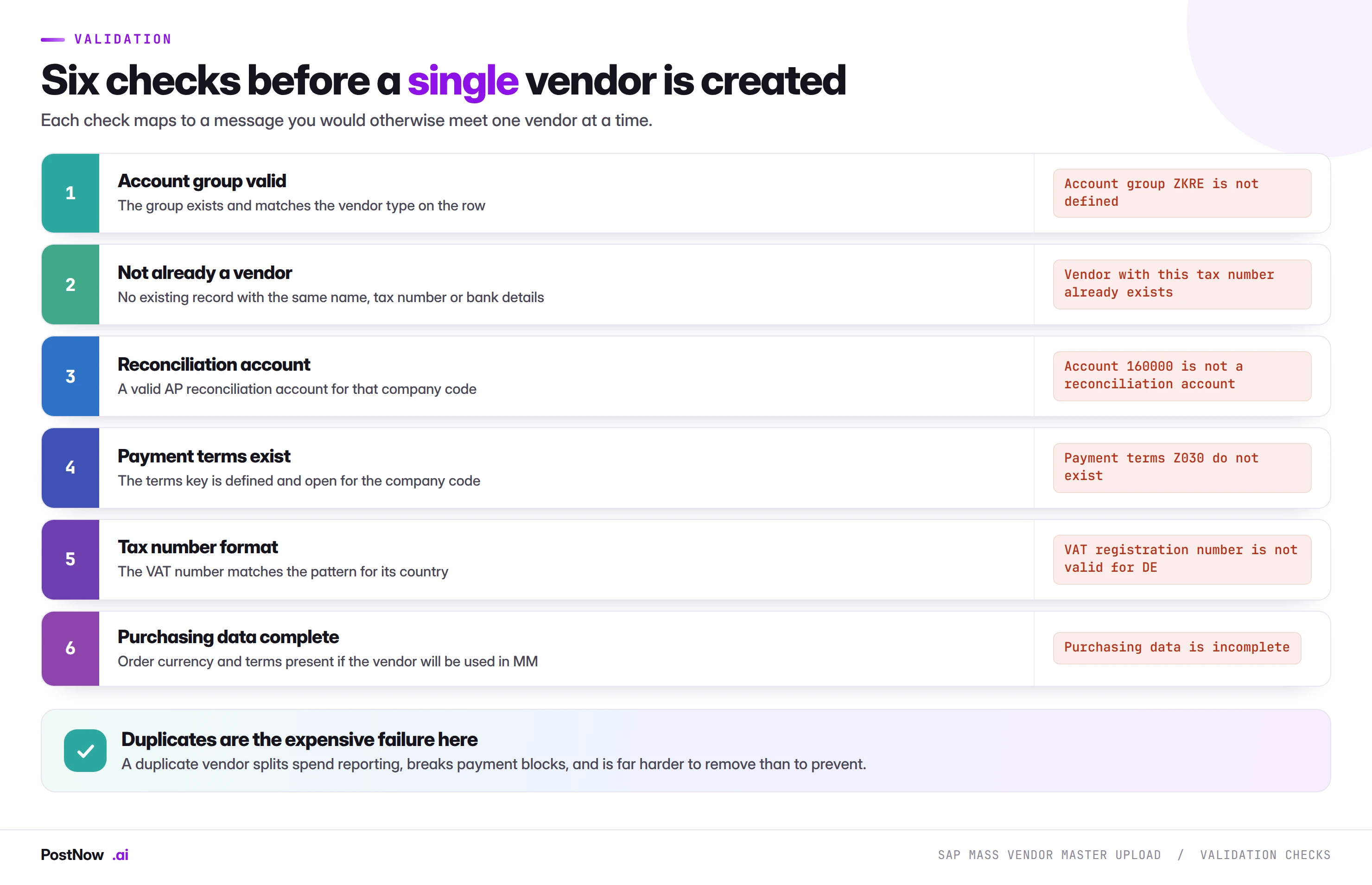
Two of these deserve a note.
Account group validity fails most often because of transport rather than data. A group defined in development and never moved to production produces error F2 003 on every row, which looks catastrophic and is a five-minute fix by the right person.
Payment terms can exist for customers and not for vendors, or be defined but not permitted for the company code. A terms key that a colleague confirms exists may still fail, because they checked the wrong side.
Errors, and what they are telling you
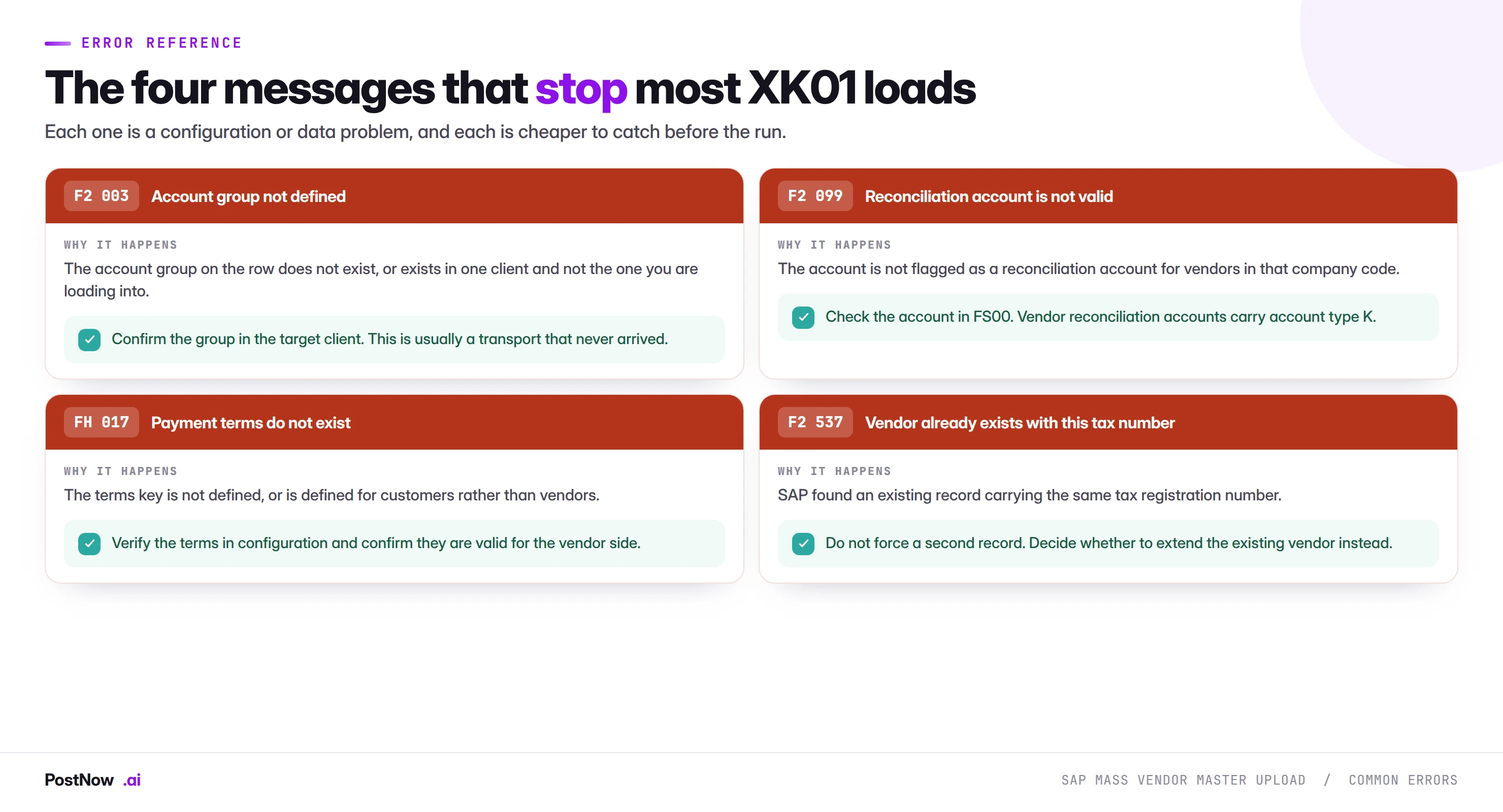
Three of these four are configuration problems that affect whole blocks of rows and are fixed once. The fourth, the duplicate tax number, is different: it is SAP telling you something true about your data, and the correct response is usually to stop and involve procurement rather than to work around it.
Running the whole sequence inside Excel
PostNow runs SAP mass vendor master upload from Excel
The eight stages above happen in the supplier list procurement already maintains. PostNow adds a task pane to Excel, connects to your SAP system with your own credentials, and takes the file through mapping, screening, validation and creation without leaving the sheet.
All three segments mapped in one pass, so vendors are complete on creation.
Tax numbers and bank details matched against existing vendors and the file itself.
Account groups, reconciliation accounts and terms checked against live SAP.
New vendor numbers written onto the row procurement sent you.
Vendor master in S/4HANA: the Business Partner change
This is the largest structural change in SAP master data in a decade, and it lands squarely on vendor uploads.
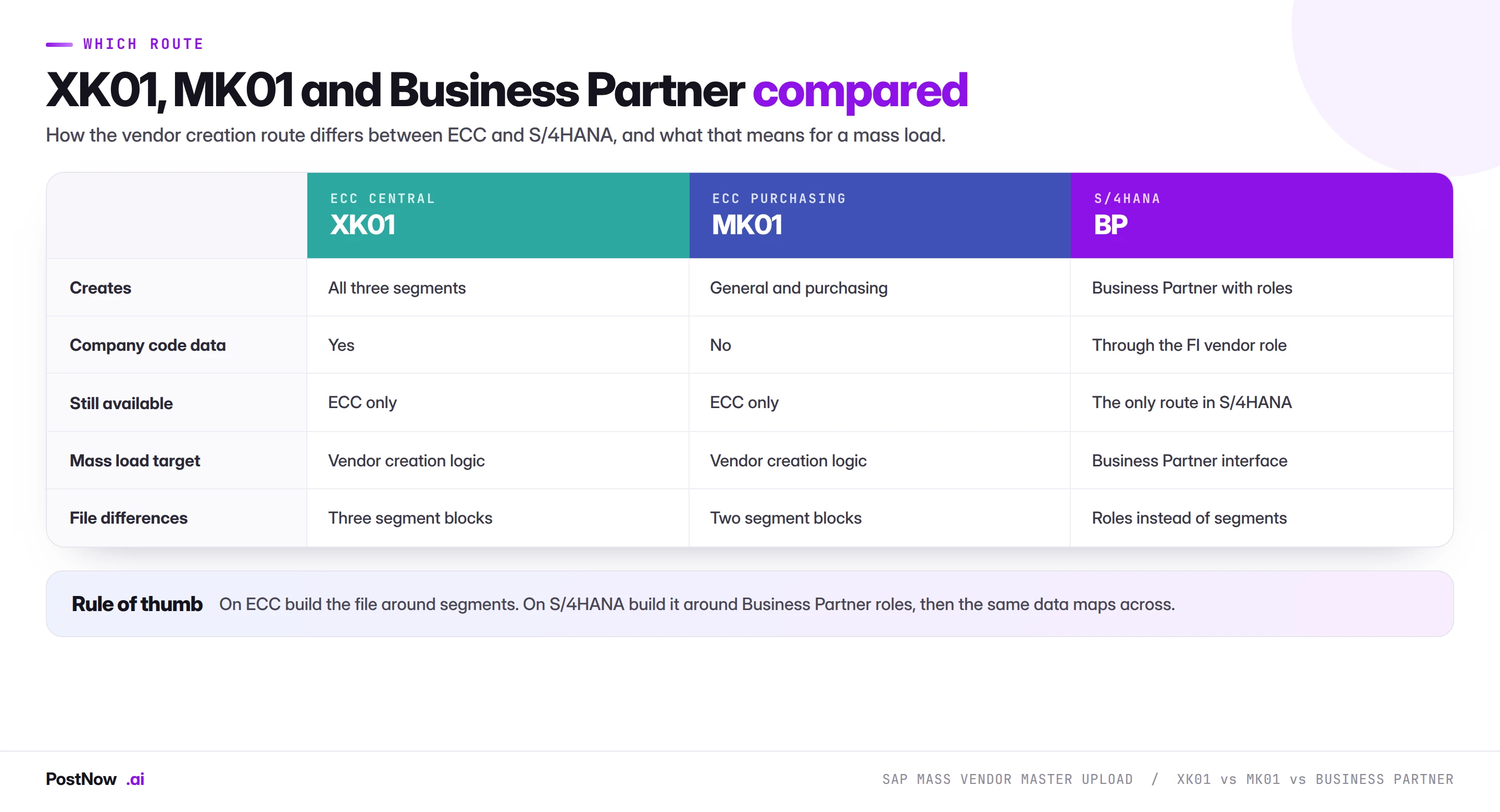
In ECC, vendors and customers are separate objects with separate transactions. In S/4HANA both are Business Partners, and the vendor is a role that a Business Partner carries. A supplier that is also a customer, which is common, is one Business Partner with two roles rather than two unrelated records.
For a mass load, four consequences matter.
- XK01 is not the target. The transaction is BP, and the load goes through the Business Partner interface. A file built around XK01 segments still contains the right data, but it maps to roles rather than to segments.
- The file gains a role dimension. Every record needs its roles stated: FI vendor, purchasing vendor, or both, plus any customer roles if the partner is also a customer.
- Number ranges are shared. Business Partner numbering and the vendor number can be synchronised or separate depending on configuration, and which one your file supplies matters.
- Screen recordings do not survive. A recording built against XK01 is worthless after conversion. A mapped load through the published interface carries across with a remap rather than a rebuild, which is the practical argument for choosing that method before a migration rather than after.
If a conversion is on your roadmap, build vendor loads through the interface now. The customer master guide covers the same change from the other side, and the two converge in S/4HANA.
Extending existing vendors is a different job
A large share of what gets called vendor creation is actually vendor extension: the supplier already exists, and it needs a new company code or purchasing organisation segment.
This distinction matters because the two runs behave differently. A create fails harmlessly if the vendor already exists. An extension fails if it does not. Mixing them in one file gives you a population where roughly half the rows error, and the errors say opposite things.
Split the file. Run the extensions against existing vendor numbers, run the creates against new records, and screen the whole population first so you know which rows belong in which run. The screening step tells you this for free, which is another reason to do it before anything else.
Account groups: the decision that shapes everything else
If one field in a vendor file deserves a meeting before the load, it is the account group. It is not simply a classification. It controls four things at once, and three of them are difficult to change afterwards.
- The number range. Whether vendor numbers are assigned internally by SAP or supplied externally in your file, and which interval they come from. A vendor created in the wrong range cannot be renumbered.
- Field status. Which fields are mandatory, optional, displayed or suppressed. A group that suppresses a field procurement needs means the data cannot be entered at all, by anyone, until configuration changes.
- Partner functions and one-time behaviour. One-time vendor groups behave differently on posting, holding address data on the document rather than the master record.
- Which segments are expected. Some groups are configured for purchasing-only or finance-only use.
The practical failure is subtle. A file loads successfully with the wrong group, and nothing appears wrong for weeks. Then a buyer needs a field that is suppressed, or a report groups vendors by range and the new ones sit in the wrong bucket, or a payment run behaves unexpectedly because the group implied one-time handling. The correction is deletion and recreation, which means the vendor numbers change, which means every downstream system that captured them is now wrong.
Two habits prevent this. Confirm the group in the target client rather than from documentation, because configuration drifts between systems. And map supplier types to groups as an explicit rule in the template, so the decision is made once by someone who understands it rather than repeatedly by whoever is running the load.
Addresses, communication data, and the fields that quietly matter
Address data looks like the trivial part of a vendor file and produces a steady stream of small problems.
Country key drives more than the address
The country key determines the address format, the tax number format check, the permitted bank detail structure and, in some configurations, the default language. A country typed as a name rather than a key, or a two-character key that differs from SAP's, fails in ways that appear unrelated to the address.
Region is mandatory in some countries and meaningless in others
SAP enforces region for countries where it is part of the address standard, and rejects it where it is not defined. A file spanning several countries needs the region column populated for some rows and empty for others, which is easy to get wrong when one person fills a column downward.
Communication data is where onboarding actually breaks
Email addresses on the vendor record drive remittance advice and, in many configurations, purchase order transmission. A vendor created without one exists, is payable, and produces a manual step every time a document is sent. This is the most common reason a technically successful vendor load still generates complaints from accounts payable a month later.
Language key affects documents the supplier receives
Order and remittance documents are produced in the vendor's language. Defaulting every row to the system language on an international file means suppliers receive documents they cannot read, which produces exactly the kind of low-grade friction that makes a new process look worse than the manual one it replaced.
None of these is difficult. All of them are easier to include in the template than to remediate across four hundred records afterwards.
Governance, approval, and why finance cares
Vendor master is the master data object with the tightest controls in most organisations, because the vendor record is where payment instructions live. A person who can create a vendor with arbitrary bank details can, in principle, direct money.
- Bank details deserve separate treatment. Many organisations deliberately exclude them from bulk creation and maintain them through a controlled process with independent verification. If your file carries bank details, confirm that is acceptable before the run.
- Run as a named user. The creation should carry the identity and authorisations of the person who ran it.
- Separate the requester from the operator. Procurement supplies the file. Someone else runs it. This is standard segregation of duties and is easier to demonstrate with a file than with four hundred manual creations.
- Keep the screening result. Evidence that duplicates were checked for, and what was decided about suspected matches, is the artefact an auditor will ask for.
- Reconcile and hand back. The completed file with vendor numbers is what closes the loop with procurement.
Teams often expect resistance from finance on mass vendor creation and meet the opposite. The controls are easier to evidence when the population, the screening and the outcome all live in one reviewable file.
Volume, batching, and number ranges
Vendor creation is light work per record, so throughput is rarely the constraint. Two other things are.
Number range capacity. Internal number ranges have a defined interval. Creating four hundred vendors in a range with sixty numbers left fails partway through, and the failure looks like a system problem rather than a configuration one. Check the range before a large run.
Screening time. Duplicate screening against a large existing vendor base is usually the slowest stage, and it should be. Run it once on the full file rather than per batch, then split for creation.
Batch by account group or by company code. Both give you a batch you can describe in one sentence, and both keep the failure modes homogeneous.
From a one-off load to a supplier onboarding template
Vendor creation recurs more predictably than most mass work, because supplier onboarding is a standing process rather than an event. That makes it the strongest candidate for a maintained template.
- Give procurement the template. If the supplier list arrives with the right columns, the right account groups and normalised tax numbers, the load is a formality.
- Bake the account group rules in. Which supplier type maps to which group is business logic that should not be rediscovered each time.
- Keep the screening rules with the template. Which fields are compared and what constitutes a suspected match.
- Record the configuration proven against. Which company codes, purchasing organisations and account groups.
- Name an owner. Account groups and payment terms change, and a template nobody owns will fail quietly six months later.
Common mistakes and how to avoid them
- Creating general data only. The vendors exist, look correct, and cannot be paid or ordered from. Decide the intended use and make the file complete for it.
- Skipping duplicate screening under deadline pressure. The one shortcut on this list that causes permanent damage rather than a failed run.
- Matching duplicates on name. Names are typed inconsistently by design. Screen on tax number and bank details.
- Using an account group from a specification rather than the target client. Configuration drifts, and the wrong group means deletion and recreation.
- Mixing creates and extensions in one file. Half the rows fail, with errors that contradict each other.
- Loading unnormalised tax numbers. Spaces and country prefixes cause failures that look random across a multi-source file.
- Ignoring number range capacity. A range that runs out midway produces a partial load and a confusing error.
- Including bank details without checking the control position. This is the field finance cares about most. Ask first.
What happens after the vendors exist
A vendor load is rarely the last step. The records were created so that something else could happen, and the run is not finished until that something works.
Hand the numbers back. Procurement's own system, the sourcing platform or the spreadsheet the request came from all need the SAP vendor numbers. This is why writing the number onto the source row matters more than a separate log: the file that came in is the file that goes back, with one column added.
Confirm one end-to-end transaction. Raise a purchase order against one created vendor, or post a test invoice, in a non-production client. A vendor that passes every field check can still be unusable because of a missing purchasing view or a payment block defaulted by the account group. One transaction proves what four hundred successful creations do not.
Expect a follow-up file. Suspected duplicates that were held back, vendors that needed extending rather than creating, and rows that failed on configuration all form a second, smaller run. Plan for it rather than treating it as a failure of the first.
Tell accounts payable. The team that will meet these vendors first is AP, and a short note listing what was loaded, when, and what to watch for turns a surprise into a handover.
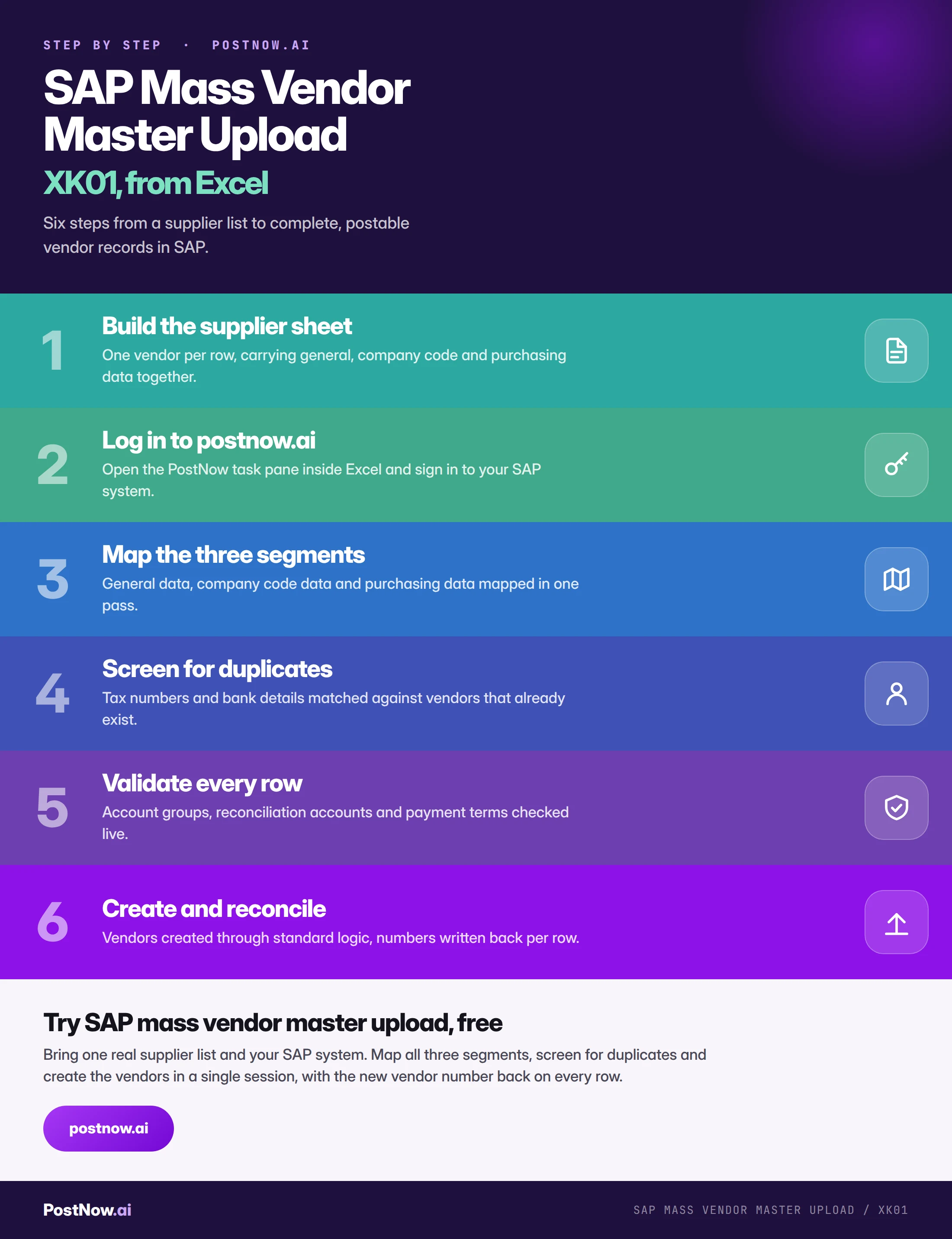
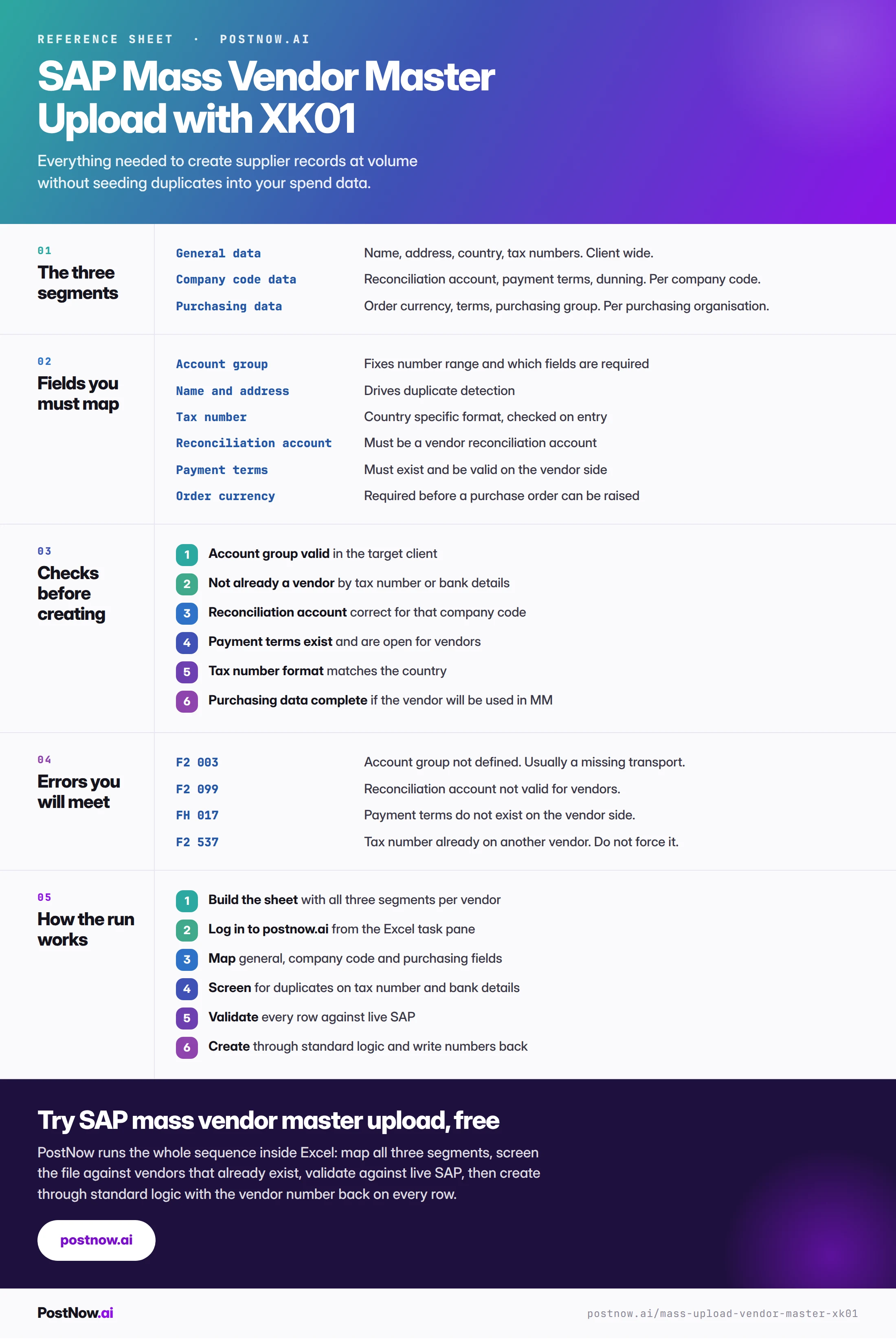
The complete XK01 mass upload reference
The reference sheet below collects everything above into one image you can share before an onboarding run.
Go deeper
SAP master data mass upload
The hub for master data at volume: materials, vendors, customers, BOMs and HR master.
SAP mass upload
The pillar guide covering methods, validation, error handling and governance across every transaction.
SAP FICO mass posting
The invoices and payments that will hit the vendors you have just created.