SAP BOM upload from Excel loads bills of material — parents and their components — into SAP in one controlled run. A bill of material is not attribute data like a material or a customer record — it is structure, a relationship between a parent and the components beneath it. That single fact drives everything about loading BOMs at scale: a component has to exist before the assembly above it can reference it, so the load runs bottom-up, and one wrong quantity multiplies through every assembly that contains the part and every MRP explosion that reads it. This guide covers how BOM structure is built, the loading order that keeps it consistent, and how to upload a product's worth of them without corrupting the ones already there.
- Load bottom up, always. A component must exist before the assembly that consumes it, and a missing component fails every assembly above it.
- Base quantity is where silent errors live. Assuming 1 when the BOM uses 100 produces a structure wrong by two orders of magnitude that validates cleanly.
- Check components are extended to the plant. Existence at client level is not enough, and on a new plant this affects whole structures.
- Circular references are refused. SAP will not allow recursion, and catching it in the file tells you which link closed the loop.
- Only exploding a BOM proves the structure. A row count proves rows loaded; the explosion shows what planning and costing will actually see.
A BOM links a parent to the parts beneath it
SAP mass BOM upload is the practice of creating many bills of material in one controlled run from a structured file, instead of building each in CS01 component by component. A bill of material lists what a product is made of: a parent material, the components that go into it, the quantity of each, and the item category telling SAP how each component behaves.
Every other object in this cluster describes a thing. Material master describes a material, vendor master describes a supplier, a journal describes a transaction. A bill of material describes a relationship, and that single difference changes how the file must be built, validated and sequenced.
The consequence is a dependency that no other guide here has to deal with: rows depend on other rows. A component must exist before the assembly that consumes it, an assembly must exist before the product that contains it, and a file loaded in the wrong order fails from the bottom up.
Structure is not attribute data
The distinction is worth dwelling on because it drives every recommendation that follows.
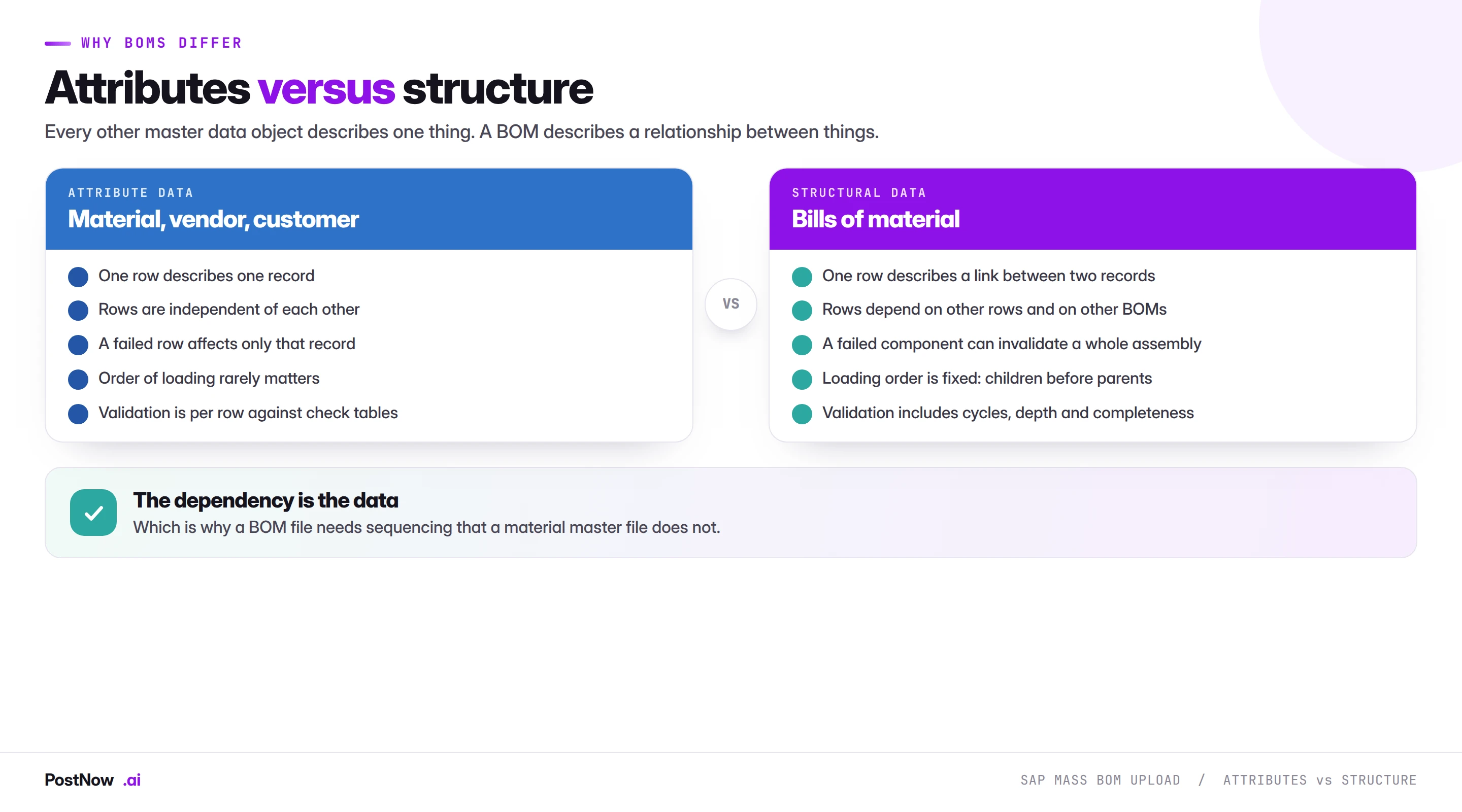
Attribute data is what the master data bridge mostly describes. One row describes one record. Rows are independent, so a failed row affects only itself. Loading order rarely matters, and validation is essentially per row against check tables.
Structural data behaves differently on all four counts. One row describes a link between two records. Rows depend on other rows and on other BOMs entirely. A single missing component can invalidate an assembly and everything above it. Loading order is fixed rather than convenient. And validation has to consider the structure as a whole, not just the fields on a row.
The practical implication is that a BOM file is not really a list. It is a graph flattened into rows, and the flattening loses information that has to be reconstructed: which rows belong to which parent, which parents belong to which assemblies, and whether the whole thing forms a valid tree.
In the database this structure spans three tables: MAST links a material and plant to a BOM, STKO holds the BOM header (base quantity and status), and STPO holds each component item — so adding a component is a new row in STPO, not a changed field on the material.
Loading order: bottom up, always
The sequence is fixed by the dependencies and there is no way around it.
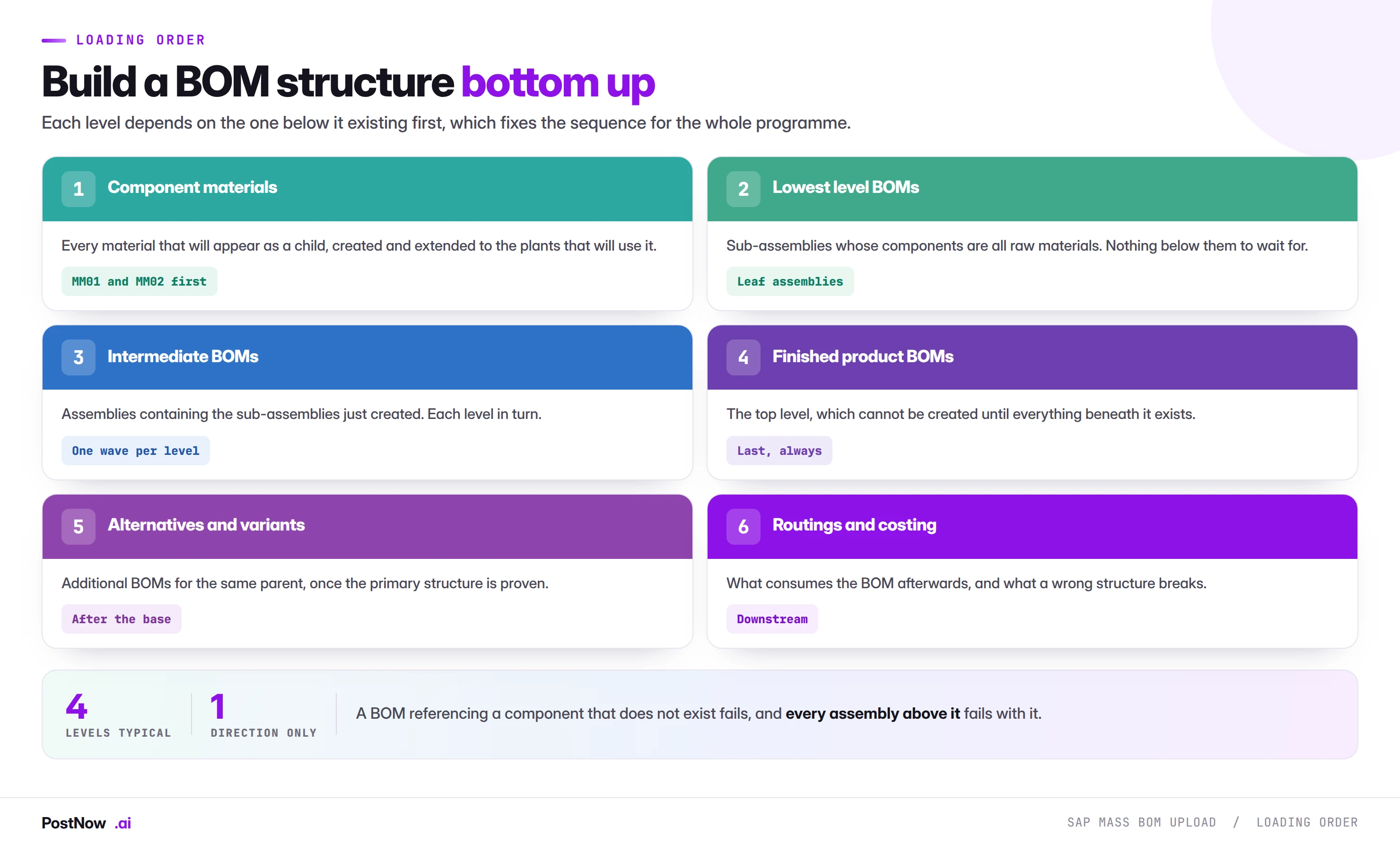
Component materials first. Every material that will appear as a child has to exist and be extended to the plants where it will be consumed. This is a material master job, and on a new product introduction it is usually the larger piece of work.
Lowest level BOMs next. Sub-assemblies whose components are all purchased or raw materials. Nothing beneath them has to be created first, so they can be built immediately.
Then each level in turn. Assemblies containing the sub-assemblies just created, one wave per structural level, working upward.
Finished products last. The top of the tree, which cannot exist until everything beneath it does.
Alternatives and variants afterwards. Additional BOMs for the same parent, once the primary structure is proven.
Determining the levels is itself work. A file of five thousand component rows does not announce how deep the structure is, and computing it means resolving which parents appear as components elsewhere. That analysis is worth doing before the first load rather than discovering the depth through successive failures.
What happens when the order is wrong
A BOM referencing a component that does not exist fails. That much is expected. What surprises people is the cascade: because the failed assembly does not exist, every BOM containing it also fails, and the error on those higher-level BOMs names a component that looks perfectly valid in the file.
Diagnosing upward from the last failure is slow. Diagnosing downward, by checking whether the lowest level loaded, is fast. On a multi-level failure, always look at the bottom first.
A BOM row is a parent, a component and a quantity
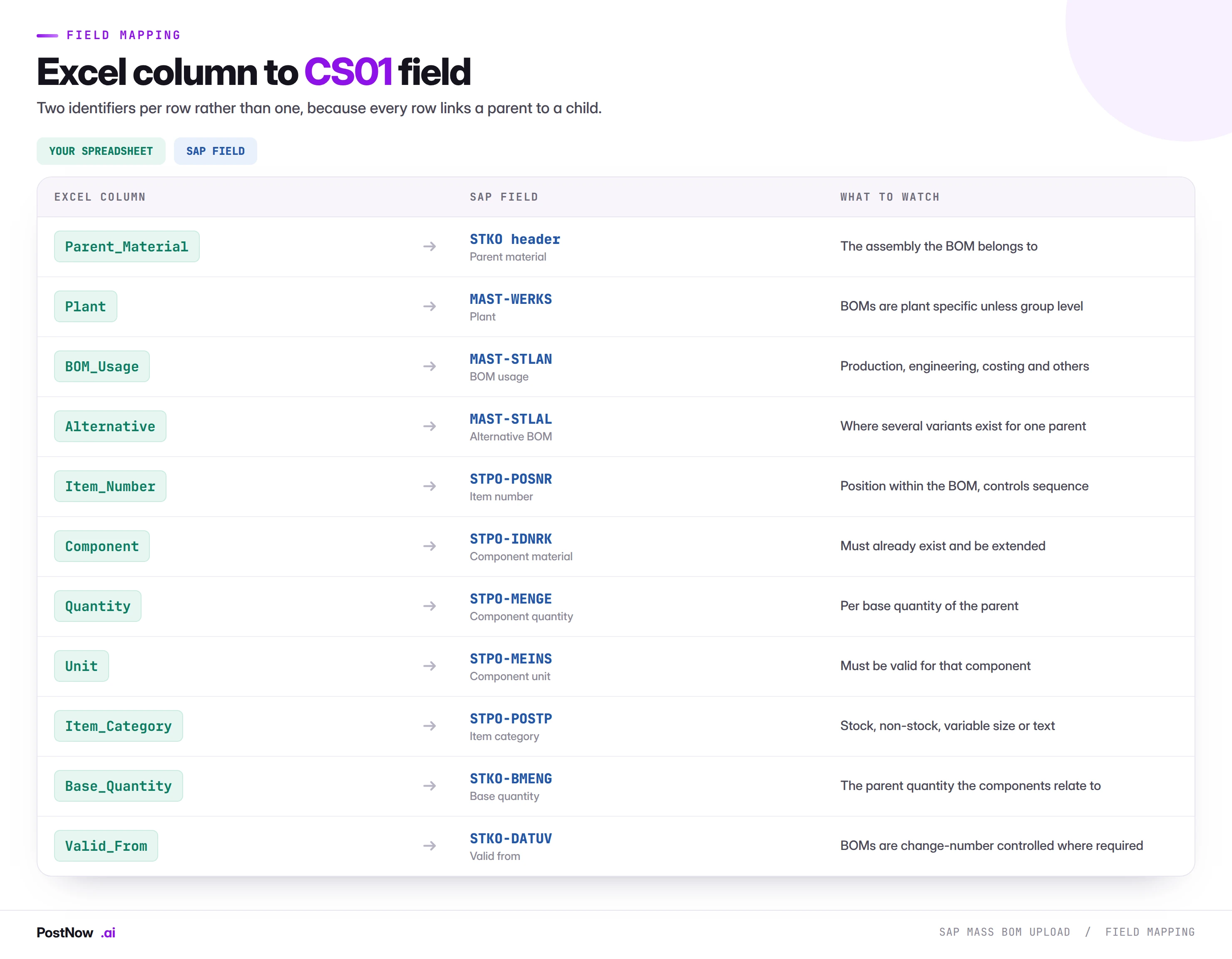
Two identifiers per row rather than one, and several fields whose meaning is not obvious from the name.
Usage and alternative
A material can have several BOMs serving different purposes: one for production, one for engineering, one for costing. That is the usage. It can also have several BOMs for the same usage, representing different ways of making the same thing. That is the alternative.
Together they form part of the key. A file that omits them either lands everything in the default combination, which may be wrong, or fails on the second BOM for a parent because the first already occupies the key. On any population with variants, both columns are mandatory.
Base quantity
Component quantities are stated relative to a base quantity of the parent, not per single unit. A BOM with a base quantity of 100 and a component quantity of 3 means three components per hundred parents, not three per one.
This is where the most damaging silent errors live. A file assuming a base quantity of 1 while the BOM is created with 100 produces a structure that is wrong by two orders of magnitude, validates cleanly, and only surfaces when planning proposes a hundred times too much of something.
Item category
Item category tells SAP what kind of component this is. Stock items are consumed from inventory. Non-stock items are procured directly for the order. Variable-size items carry dimensions. Text items carry information and consume nothing. Document items reference drawings.
The category determines which other fields are required, so a file mixing categories has columns populated on some rows and empty on others by design. A stock item without a material number fails; a text item with one is contradictory.
A parent cannot reference a component that isn't loaded yet
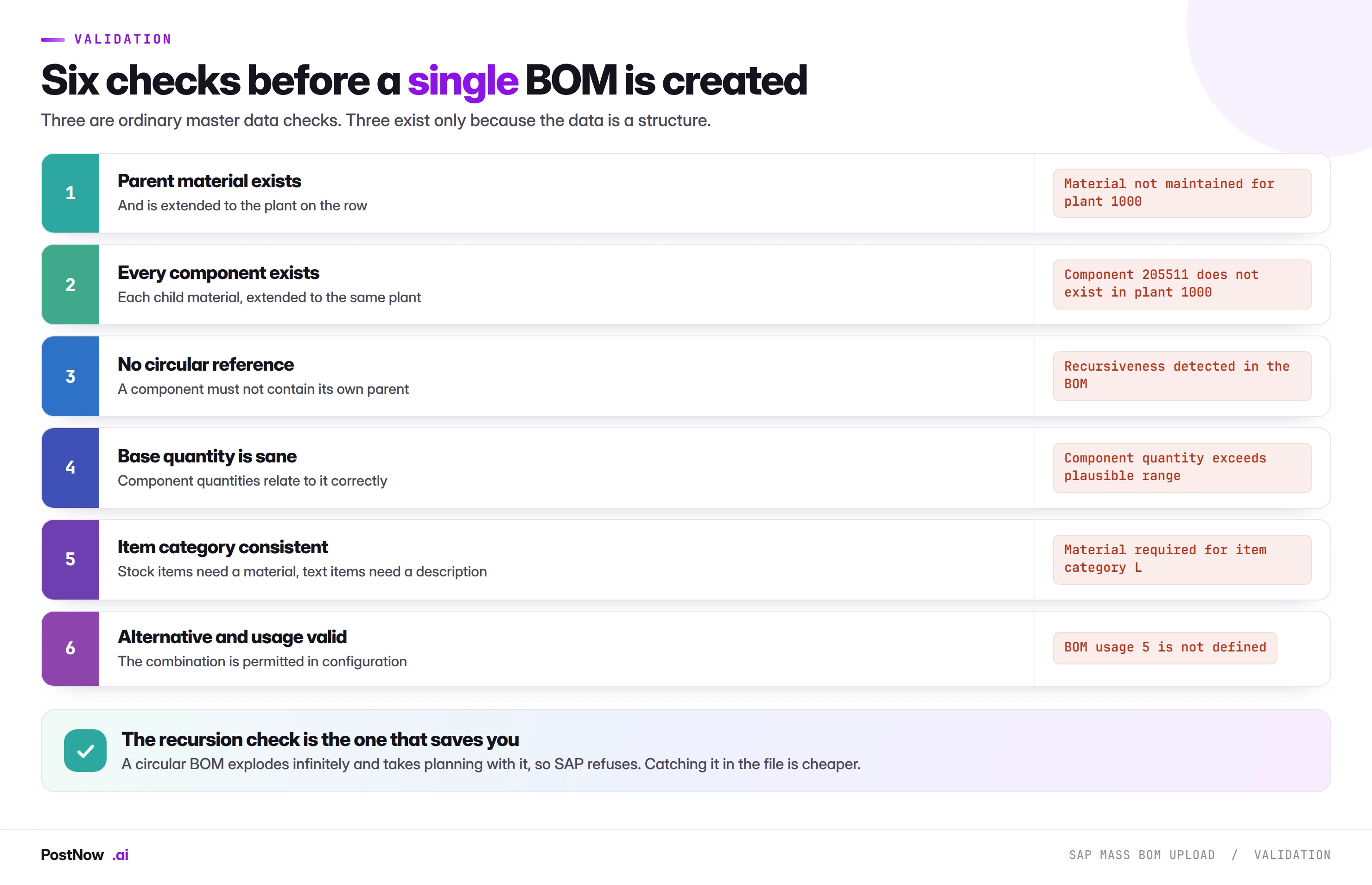
Three of these are ordinary master data checks. The other three exist only because the data is a structure, and they are the ones worth understanding.
Every component exists, extended to the same plant. Not just exists. A component present at client level but not extended to the plant the BOM belongs to will fail, and on a new plant this affects entire structures rather than individual rows.
No circular reference. A component must not, anywhere in its own structure, contain the parent it belongs to. SAP refuses recursion because an infinite explosion would take planning and costing with it. Catching it in the file is considerably cheaper than catching it at creation, because the file version tells you which link closed the loop.
Base quantity and component quantities proportional. Not a validation SAP performs, and worth doing anyway. A quantity that is plausible against a base of 1 and absurd against a base of 100 is exactly the error described above, and a proportionality check catches it before anything is created.
BOM explosion is why a wrong quantity multiplies
BOM errors have a property that makes them worse than most master data errors, and it follows from what a BOM is for.
A bill of material is exploded: planning takes a demand for the parent, multiplies through the structure, and derives demand for every component at every level. A wrong quantity at level three, in an assembly used by six products, propagates into every planning run for all six.
Three consequences.
- Planning proposes wrong quantities. Too much or too little of everything beneath the error, on every MRP run until it is corrected.
- Costing is wrong. Standard cost estimates roll up through the same structure, so a wrong component quantity produces a wrong product cost and therefore wrong margins.
- Production consumes wrongly. Where backflushing is configured, the BOM decides what is consumed on confirmation, so a wrong structure produces wrong stock as well as wrong plans.
This is the strongest argument for the verification step below. A BOM that was created successfully proves nothing about whether the structure is right, and the only way to see the structure is to explode it.
Bottom up, always: components before their parents
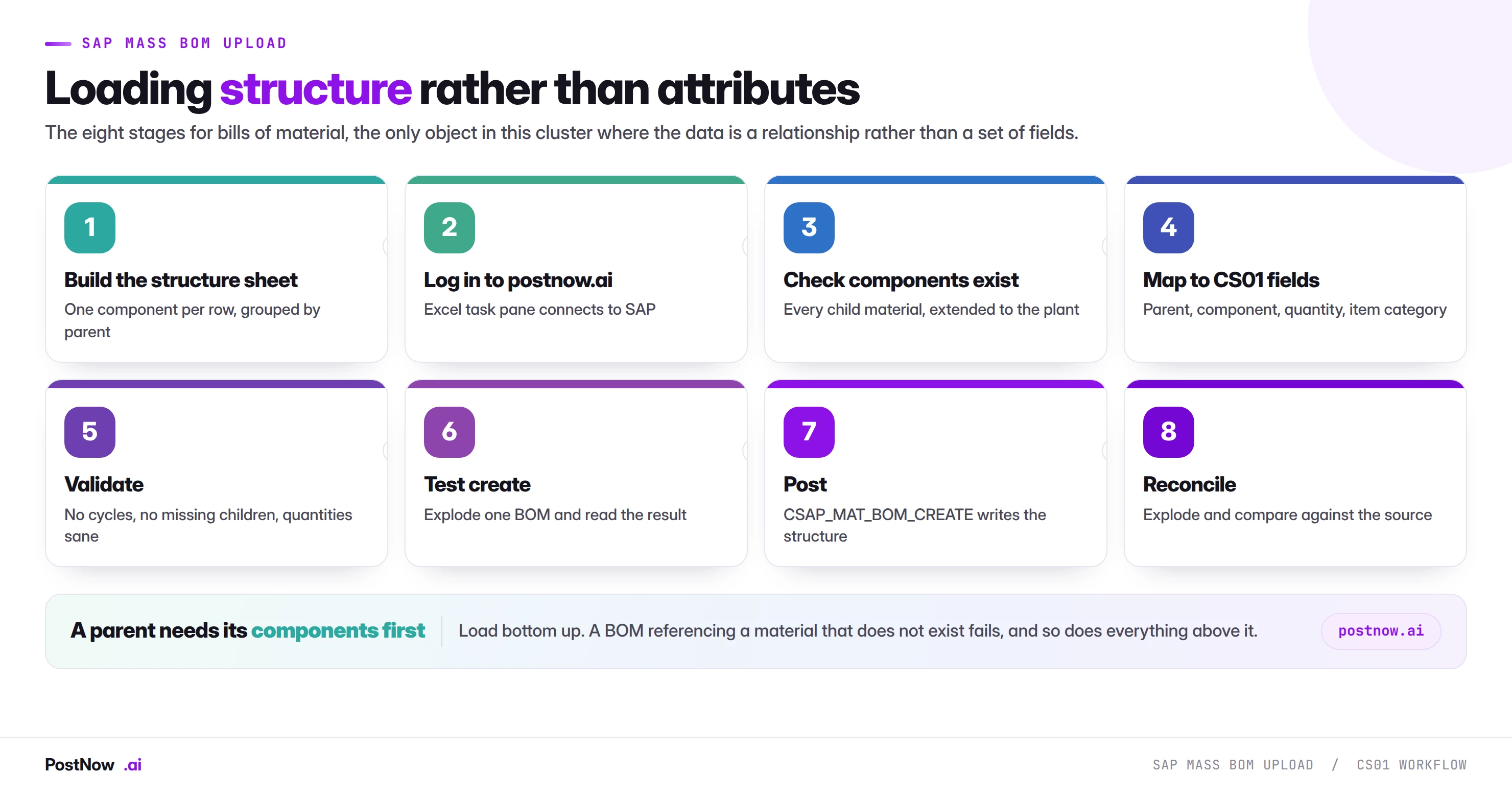
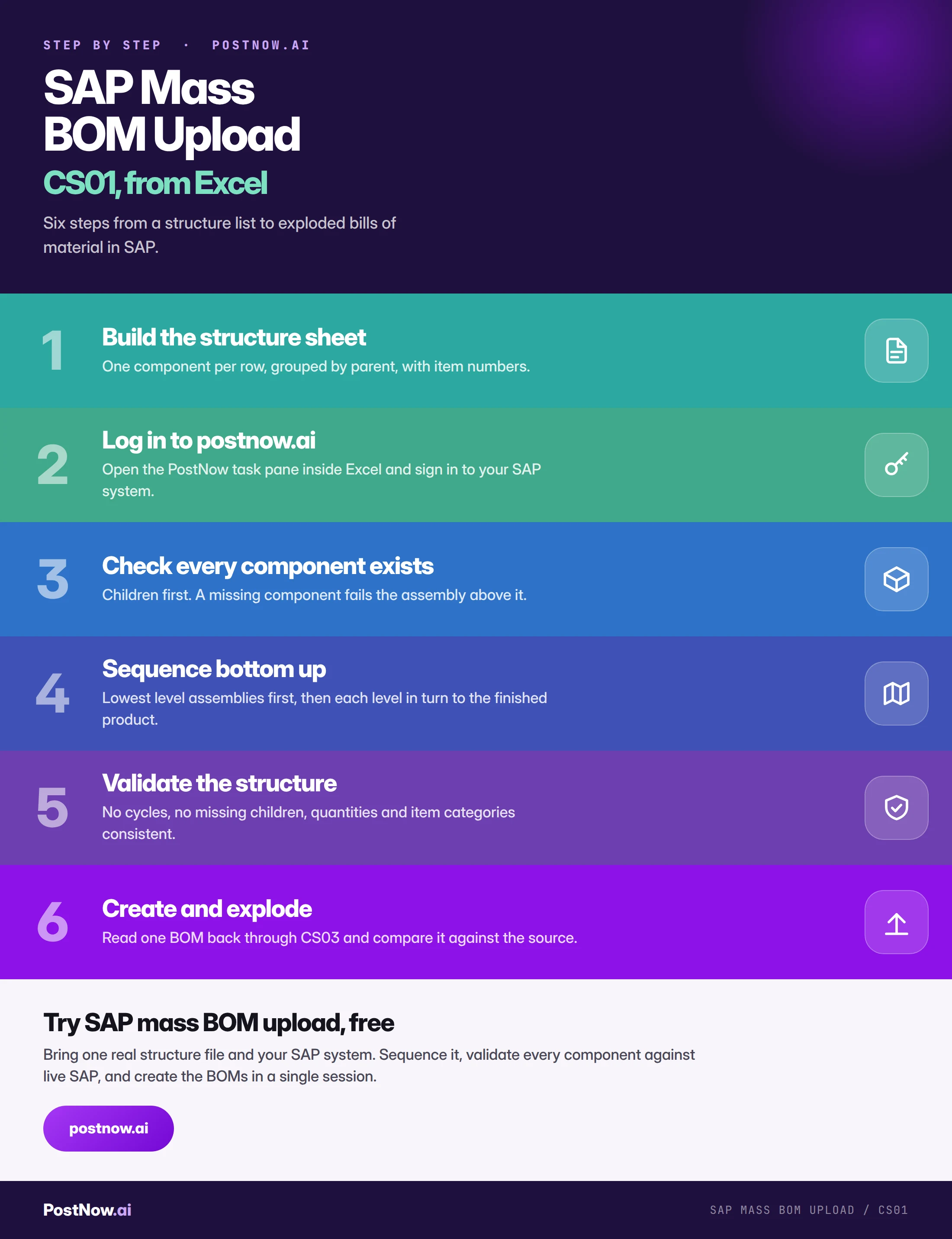
Draft the structure, level by level
One component per row, grouped by parent, with item numbers controlling the sequence within each BOM. Include usage, alternative and base quantity explicitly rather than relying on defaults.
Verify every component exists
Before anything is created. Each child material, extended to the plant the BOM belongs to. A missing component fails its assembly and everything above it, so finding them all first is far cheaper than discovering them in waves.
Sequence bottom up
Resolve which parents appear as components elsewhere, assign a level to each, and order the file so no BOM is created before its children exist.
Validate the structure
No cycles anywhere, quantities proportional to base quantities, item categories consistent with what each row carries, usage and alternative combinations valid.
Create a subset and explode it
Build one multi-level assembly in a quality client and explode it through CS12 or CS03. Compare the exploded quantities against the source. This is the only step that proves the structure rather than the rows.
Create through standard logic
The run calls CSAP_MAT_BOM_CREATE, SAP's published interface for material BOMs. Every check CS01 applies still applies, including recursion detection.
Explode the BOM to confirm it
Explode a sample across the population and compare against the source structure. Component count and quantity at every level, not just at the top.
Change numbers and validity
BOMs are frequently under engineering change control, which adds a dimension most master data does not have.
Where change management is active, a BOM change is not simply an edit. It is recorded against a change number with a validity date, so the structure valid today and the structure valid next month can both exist and both be correct. Planning explodes whichever is valid on the date it is planning for.
Three implications for a mass run:
- The change number may be mandatory. Where configuration requires it, a file without one is rejected regardless of how good the structure is.
- Validity dates decide when the structure takes effect. A file loaded with a future valid-from does nothing until that date, which is correct for a planned engineering change and confusing if unintended.
- Changing an existing BOM is not the same job as creating one. Adding a component to a live structure under a change number is a different transaction and a different file from building a new BOM, and the mass change pillar covers why the two should not be mixed.
The structure is built through SAP, respecting the load order
PostNow loads header and components bottom up
Engineering structures usually arrive as spreadsheets, and the sequencing work happens in the same file. PostNow adds a task pane to Excel, connects to your SAP system with your own credentials, and verifies components before anything is created.
Every component checked for existence and plant extension first.
Structure levels resolved so children are created before parents.
Cycles, proportionality and item category consistency across the whole file.
Explode a created BOM and compare it against the source.
BOM volume arrives with every new or revised product
- New product introduction. An engineering release producing structures for a product family, usually with a launch date that does not move.
- Migration and cutover. Existing structures carried into SAP from a legacy PLM or ERP system, where the source is authoritative and the volume is whatever the product range is.
- New plant. Existing products manufactured at a new site, needing plant-specific BOMs for structures that already exist elsewhere.
- Engineering change waves. A design revision affecting many assemblies, which is a change rather than a create and belongs in its own run.
- Acquisition. An acquired product range with its own structures, its own numbering and its own component overlap to resolve.
- Variant configuration setup. Super BOMs and their alternatives, which add their own complexity on top of everything here.
What these share is that the structure originates in engineering, in a system or a spreadsheet that is authoritative, and SAP is receiving a copy. That makes reconciliation against the source more important than usual: the question is not whether the BOMs are valid but whether they match what engineering designed.
Plant-specific structures, group BOMs and variants
The same product is rarely one BOM, and understanding which multiplication applies decides the size of the file.
Plant-specific BOMs. The default. A product made at three plants has three BOMs, potentially with different components because sourcing differs by site. Row counts multiply by plant exactly as organisational levels multiply everywhere else in master data.
Group BOMs. A structure defined once without a plant, then allocated to plants that use it unchanged. Where a product is genuinely identical everywhere, this collapses three BOMs into one plus allocations, and it is worth asking engineering whether it applies before building a file three times larger than necessary.
Variants and alternatives. Several ways of making the same product, each an alternative BOM under the same parent. Selection between them at planning time is driven by production versions or lot size ranges, which means the alternatives have to be loaded consistently or the wrong one gets selected.
Super BOMs for variant configuration. A single structure containing every possible component, with selection conditions deciding which apply to a given configuration. These are a different exercise: the structure is only half the data, and the object dependencies that drive selection are the other half. A file that loads the components without them produces a BOM that explodes everything for every configuration.
The question to settle before building anything is which of these the population actually is. A file assuming plant-specific BOMs for a range that uses group BOMs produces duplicates; the reverse produces gaps.
A wrong quantity multiplies through every parent above it
- Loading top down. Every assembly fails because its components do not exist yet, and the errors point at valid-looking components.
- Assuming a base quantity of 1. Produces a structure wrong by orders of magnitude that validates perfectly.
- Omitting usage and alternative. Everything lands in the default combination or collides on the key.
- Not checking components are extended to the plant. Existence at client level is not enough.
- Missing a circular reference. SAP will catch it, and the file version tells you which link caused it while the SAP error does not.
- Mixing creates and engineering changes. Different transactions, different validity handling, contradictory failures.
- Proving success with a row count. Only an explosion shows the structure.
- Diagnosing a multi-level failure from the top. Check whether the bottom loaded first; the rest usually follows.
S/4HANA leaves BOM structure alone but simplifies material
Bills of material survive the conversion structurally intact, which makes this a stable area to build capability in.
The interface is unchanged. CSAP_MAT_BOM_CREATE works across both releases, so a mapping built on ECC carries forward with a remap rather than a rebuild.
Material field lengths extend. Both the parent and the component fields, so a file built against ECC lengths may truncate on a system using the extended material number. This matters more here than elsewhere because every row carries two material numbers.
Fiori apps cover maintenance and display. Which makes the explosion check easier to perform than in the classic transaction, and which breaks any screen recording built against CS01.
Advanced variant configuration changes super BOMs. Where variant configuration is in use, S/4HANA offers a newer model, and a file built for classic variant configuration may not fit it. If your population includes configurable products, confirm which model applies before assuming an ECC-shaped file transfers.
Engineering owns the structure; the loader only executes it
BOM ownership is clearer than most master data and more often ignored, because the structure looks technical while being entirely a design decision.
Engineering owns the structure. What goes into what, in what quantity, in which unit. This is design authority. Nobody running a load should be adjusting a quantity to make a row validate, and a row that will not validate should go back rather than be fixed.
Production owns the usage. Whether a structure reflects how the item is actually built, which can differ from how it was designed. Production BOMs and engineering BOMs exist separately for exactly this reason.
Costing owns the consequence. Standard cost estimates roll up through the structure, so a BOM change is a cost change, and finance discovers it at the next costing run rather than at load time.
Whoever loads owns the fidelity. That the SAP structure matches the source exactly. Not that it is correct, which is engineering's question, but that nothing was lost, reordered or silently truncated in translation.
That last distinction matters. The reconciliation to run is not "does this BOM look right" but "does this BOM match what engineering sent", and those are different questions answered by different people.
Component reuse and the overlap nobody maps
On any real product range, components appear in many assemblies, and that overlap is both the reason BOM loading is efficient and the reason errors spread.
Reuse is the normal case. A fastener may appear in two hundred assemblies. A sub-assembly may feed six finished products. This is why the structure is a graph rather than a set of trees, and why one wrong component quantity can affect a product range rather than a product.
Three practical consequences for a mass load:
- Verify each distinct component once. A file of five thousand rows may contain only four hundred distinct components. Checking the distinct list is faster than checking rows and produces the same answer.
- A missing component blocks disproportionately. One material not extended to a plant can fail dozens of assemblies scattered across the file, which makes the failure look random when it is systematic.
- Where-used is your impact assessment. Before changing a structure, CS15 shows every assembly containing a component. On a change run this is the difference between knowing the blast radius and discovering it.
On an acquisition or a migration the overlap question becomes harder still, because two ranges may use physically identical components under different numbers. Resolving that mapping before loading is a data exercise that belongs to engineering, and doing it after the load means changing structures rather than building them.
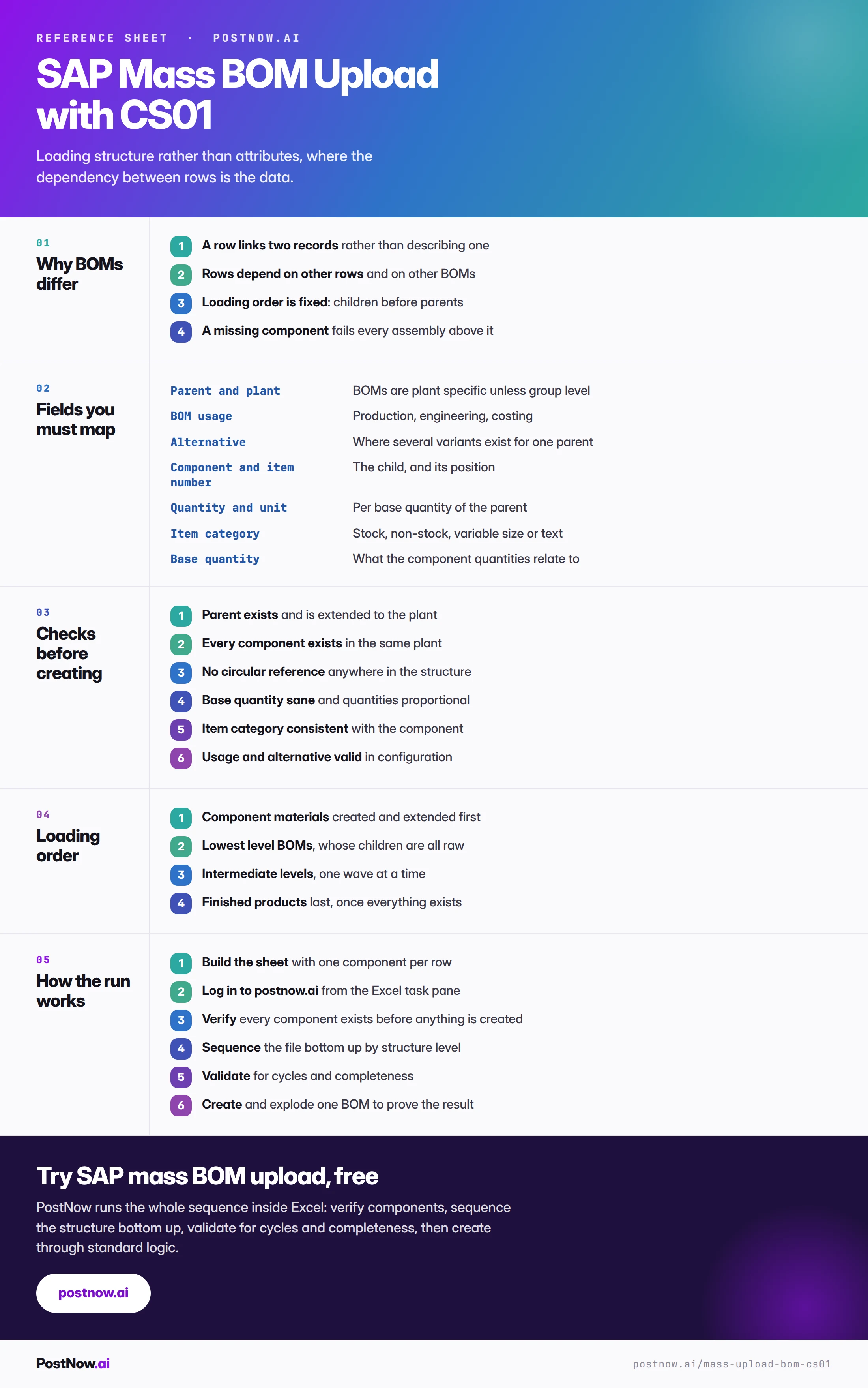
Everything a CS01 mass upload needs, in one place
The reference sheet below collects everything above into one image you can share before a structure load.
How BOM loading connects to material and routing
SAP master data mass upload
The hub covering create, change and extend across every master data object.
SAP mass change
Engineering changes to existing structures are a change run, not a create.