Executive summary
SAP sales order automation is the practice of turning an incoming customer purchase order into a confirmed sales order in SAP automatically, reading the order, checking it, creating it, and confirming it back to the customer without manual keying.
Order entry sits at the start of the order-to-cash cycle, and everything downstream depends on it. An order keyed late or wrongly delays fulfilment, misprices a deal, or promises stock that is not there. Yet in many organizations a customer service representative still retypes each customer purchase order into SAP, line by line, from an email or a PDF. Automation removes that bottleneck and the errors that come with it.
This page explains how to automate sales order creation in an SAP environment. It covers what the capability is, why it matters to revenue and service, how the workflow runs, its components, the pricing and availability checks that make an order valid, the use cases it serves, a maturity framework, and where the discipline is heading.
The order-reading capability draws on SAP Document AI, and the broader move to automate SAP transactions is set out on the SAP process automation pillar.
What is SAP sales order automation?
SAP sales order automation is the automated conversion of a customer purchase order into a sales order in SAP, including reading the order, validating it against master data and rules, creating it, and confirming it.
A customer sends a purchase order in their own format, by email, portal, or electronic message. Manually, someone interprets it and keys a matching sales order into SAP. Automation reads the customer purchase order, identifies the customer, products, quantities, prices, and dates, checks them, creates the sales order, and returns a confirmation, escalating to a person only when something does not reconcile.
The terms are straightforward. SAP sales order automation and sales order automation in SAP describe the same capability. Purchase order to sales order names the specific transformation at its heart: the customer's purchase order becomes the seller's sales order. The customer's document is a buying instruction; the sales order is the seller's commitment to fulfil it, and automation bridges the two reliably.
Done well, an order received in the morning can be a confirmed sales order minutes later, rather than waiting in a queue for manual entry.
Why sales order automation matters
Because it sits at the start of order-to-cash, automating order entry improves revenue capture, service, and cost at once.
Speed to fulfilment. Orders entered immediately move to fulfilment sooner, shortening lead times and improving the chance of meeting the customer's required date. Time lost in a manual entry queue is time lost from the whole cycle.
Order accuracy. Reading and validating the order against master data prevents the wrong product, price, or quantity from entering the system, avoiding the costly downstream corrections, wrong shipments, and credit notes that order errors cause.
Customer experience. Fast, accurate confirmations signal reliability. A customer whose orders are acknowledged promptly and fulfilled correctly experiences a supplier that is easy to do business with.
Cost and capacity. Removing manual order entry frees customer service teams to handle exceptions and customer relationships rather than transcription, and lets order volume grow without proportional headcount.
Revenue assurance. Correct pricing and terms at entry protect margin and prevent the revenue leakage that mispriced or miskeyed orders create.
How sales order automation works
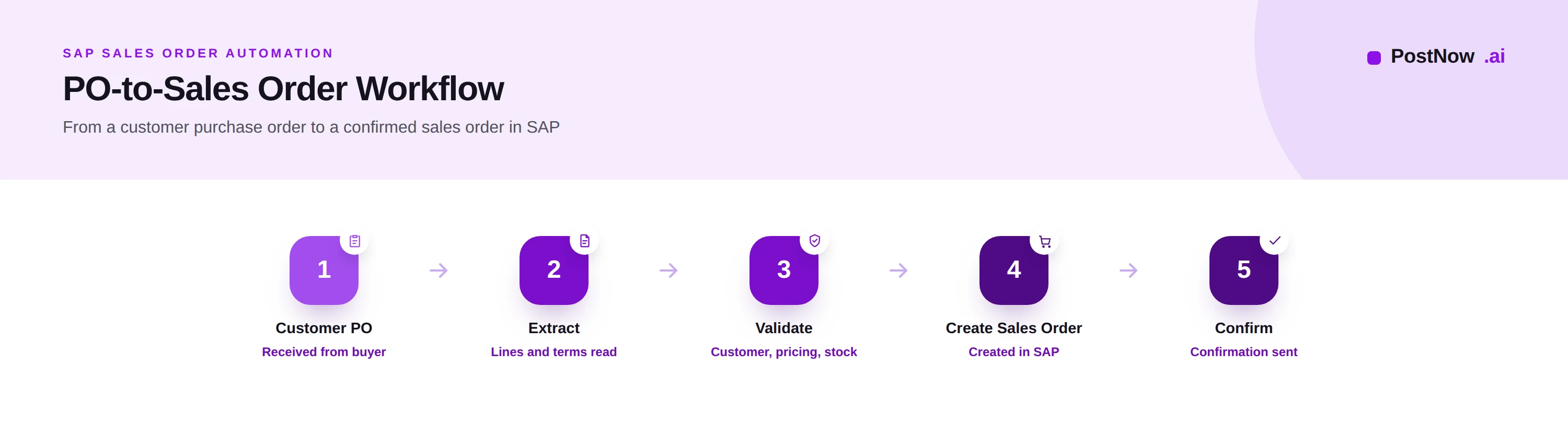
The workflow transforms a customer purchase order into a confirmed sales order through five stages.
Customer PO. The order arrives from the buyer in whatever form they use. The first task is to capture it into the process reliably, whatever channel it came through.
Extract. The order is read: the customer, the products and their quantities, the prices and terms, and the requested dates are identified and converted into structured data, including the individual order lines.
Validate. The extracted data is checked. Is the customer recognized, do the products exist, do the prices agree with the pricing held in SAP, and is the requested quantity available. Validation turns raw order data into something that can become a valid sales order.
Create sales order. Once validated, the sales order is created in SAP, with the correct customer, materials, quantities, pricing, and dates, ready to drive fulfilment.
Confirm. An order confirmation is returned to the customer, acknowledging what will be supplied and when, closing the loop on the request.
A clean order from a known customer for available products at agreed prices can pass through this workflow automatically, while one with a discrepancy is routed to a person with the issue highlighted.
Core components
Several components combine to make order automation accurate and dependable.
Order capture brings customer purchase orders from every channel into one managed flow, so none is processed from a personal inbox.
Extraction reads the order, including its line detail, mapping each field to its meaning regardless of the customer's layout, drawing on the document-understanding capability described under Document AI.
Master data lookup connects extracted values to SAP: matching the customer to its record and each ordered item to a material, so the order speaks SAP's language.
Validation and checks confirm the customer, products, pricing, and availability, deciding what can be created automatically and what must be reviewed.
Order creation integration writes the sales order into SAP through governed interfaces, applying the system's own controls.
Exception handling routes orders that do not reconcile, an unknown product, a price mismatch, insufficient stock, to the right person with context, so they are resolved quickly rather than silently delayed.
Clean master data underpins all of this; without accurate customer and material records, matching and pricing cannot be automated, which is why master data management is a prerequisite rather than an afterthought.
Pricing and availability checks
Two checks turn an extracted order into a commitment the business can stand behind: is the price right, and can the order be filled.
Customer validation confirms the order comes from a recognized customer in good standing, and resolves the buyer to the correct account, so the order is attributed and credit-checked correctly.
Product validation matches each ordered item to a material in SAP, catching unknown or discontinued products before they reach an order, and ensuring the right item is supplied.
Pricing checks compare the prices on the customer purchase order against the pricing held in SAP, including contracts and agreements. Where they agree, the order proceeds; where they differ, the discrepancy is raised rather than silently accepted, protecting margin and preventing disputes.
Availability checks confirm whether the requested quantity can be supplied by the required date, drawing on the available-to-promise logic in SAP. This sets a realistic commitment and surfaces shortfalls early, so the customer can be given an accurate date rather than a hopeful one.
Together these checks are what distinguish a created order from a sound one. An order that passes them is a commitment the business can fulfil profitably; one that fails them is an exception worth catching before it ships.
Common use cases
Order automation applies across the order patterns a typical seller encounters.
High-volume repeat orders from established customers, for familiar products at agreed prices, are the most automatable, flowing to confirmation with little human involvement.
Emailed PDF orders, the most common channel for many businesses, are read and converted without a representative retyping them, removing the single largest source of order-entry effort.
Electronic orders arriving as structured messages are validated and created with the highest accuracy, and automation handles them alongside document-based orders in one flow.
Complex or configured orders, with many lines or special terms, benefit from automated extraction and validation even when a person confirms the final detail, because the heavy reading and checking are done for them.
Exception-prone customers, whose orders frequently mismatch on price or product, are themselves a use case: automation surfaces the pattern so the underlying master data or agreement can be corrected.
Consider a distributor receiving hundreds of emailed orders daily across thousands of products. Manual entry caps how many can be processed and guarantees a rate of error; automation lets every order be read, checked, and confirmed quickly, with people focused only on the orders that do not reconcile.
Best practices
These practices separate order automation that scales from automation that merely speeds typing.
- Capture orders from every channel into one managed flow.
- Keep customer and material master data clean, since matching and pricing depend on it.
- Validate the customer and resolve the buyer to the correct account before creating an order.
- Match every line to a material, catching unknown products early.
- Check prices against SAP, including contracts, and raise discrepancies rather than accepting them.
- Run availability checks so commitments and dates are realistic.
- Define exception paths for unknown products, price mismatches, and shortfalls.
- Create orders through governed interfaces with SAP validations applied.
- Return prompt confirmations so customers know what will be supplied and when.
- Route only genuine exceptions to people, letting clean orders flow through.
- Encourage structured ordering where possible to raise accuracy at the source.
- Measure straight-through order rate and target the steps that block it.
- Track order accuracy and cycle time, and improve the weakest.
- Keep people accountable for created orders, consistent with AI in SAP automation.
- Review recurring exceptions and fix their root cause in master data or agreements.
The benefit is felt most acutely at peak periods, when order volume spikes and a manual team simply cannot keep pace; an automated flow absorbs the surge without the backlog and overtime that manual entry would otherwise require.
Common challenges
Order automation programs meet a familiar set of obstacles, each with a practical response.
Inconsistent order formats. Customers order in countless layouts. Mitigate by relying on extraction that understands orders rather than templates tied to each customer.
Product and customer mismatches. Ordered items or buyers cannot be matched to SAP. Mitigate with clean master data, sensible matching, and a clear path to resolve genuine unknowns.
Pricing disputes. The customer price differs from SAP. Mitigate by checking against contracts, raising differences as exceptions, and resolving them before the order is committed.
Availability shortfalls. The requested quantity is not available. Mitigate with availability checks that set realistic dates and surface shortfalls for early communication.
Integration complexity. Creating orders cleanly in SAP takes care. Mitigate by governing the integration and validating each order against SAP requirements before creation.
The PostNow sales order automation maturity framework
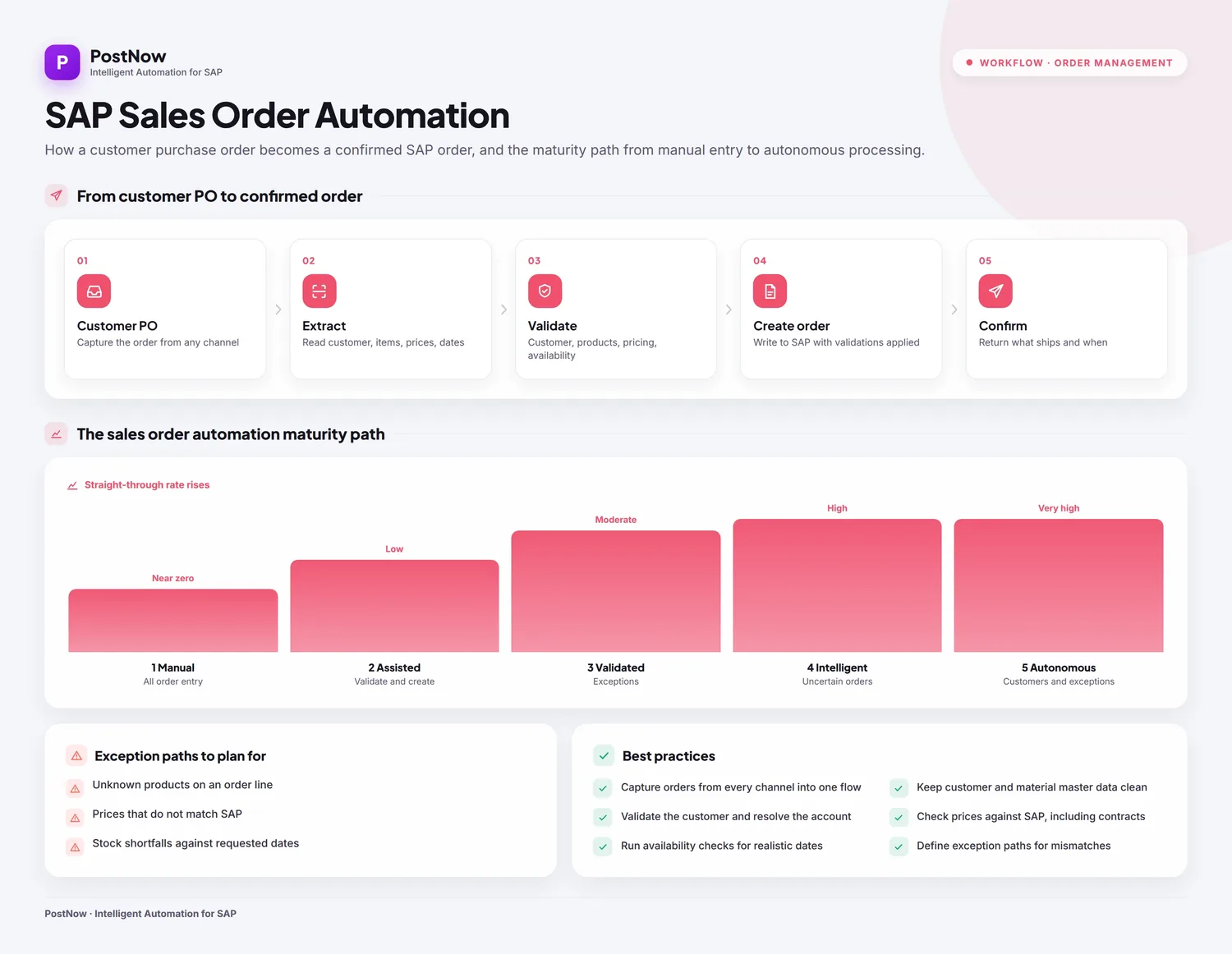
Order automation maturity is measured by how many orders reach confirmation without human touch. This framework describes five levels.
Level 1, manual. Every order is keyed by a representative; the straight-through rate is effectively zero.
Level 2, assisted. Extraction pre-fills order data, but validation and creation remain manual.
Level 3, validated. Customer, product, pricing, and availability checks are applied consistently, and clean orders are created with little effort.
Level 4, intelligent. Orders of any format are read and validated automatically, and only exceptions reach a person.
Level 5, autonomous. The routine majority of orders flow from receipt to confirmation without human involvement, and service teams focus on exceptions and customers.
| Level | Straight-through rate | Human focus |
|---|---|---|
| 1 Manual | Near zero | All order entry |
| 2 Assisted | Low | Validate and create |
| 3 Validated | Moderate | Exceptions |
| 4 Intelligent | High | Uncertain orders |
| 5 Autonomous | Very high | Customers and exceptions |
Most sellers sit between levels two and four. The framework helps locate the current level and choose whether to invest next in extraction, validation, or integration.
The future of sales order automation
Order management is moving toward intelligent, largely autonomous order capture, with service teams supervising rather than typing.
AI reads orders of any format and resolves ambiguous products and customers with less manual help, while intelligent workflows adapt handling to the order and the customer. Continuous availability and pricing intelligence let commitments reflect real-time stock and agreed terms rather than a snapshot.
Autonomous order capture is the direction this implies: routine orders read, validated, created, and confirmed without human involvement, and people focusing on complex orders, exceptions, and the customer relationship. As elsewhere in SAP automation, accountability stays human; the system accelerates and checks, while people own the commitments the business makes to its customers.
Frequently asked questions
What is SAP sales order automation?
How does purchase order to sales order conversion work?
Can SAP read customer purchase orders from PDF and email?
What checks are run before a sales order is created?
How does sales order automation handle pricing differences?
What happens when stock is not available?
How does order automation improve customer service?
Does sales order automation work with SAP S/4HANA?
Conclusion and next steps
SAP sales order automation removes the manual bottleneck at the start of order-to-cash, turning incoming customer purchase orders into fast, accurate, confirmed sales orders.
The workflow is consistent: capture the order, read it, validate the customer, products, pricing, and availability, create the sales order, and confirm it. Pricing and availability checks are what make the order sound, and clear exception paths keep the rare mismatch from becoming a delay. The destination is largely autonomous order capture, with service teams focused on customers and exceptions.
A practical first step is to automate high-volume repeat orders from known customers, where validation is straightforward and the straight-through rate is highest, then extend to more complex orders. To go further, see Document AI, SAP process automation, and master data management.