Executive summary
SAP invoice management is the discipline of moving a supplier invoice from the moment it arrives to the moment it is paid and archived, accurately, on time, and under control. For most enterprises it is one of the highest-volume, highest-risk processes in finance, and one of the most rewarding to get right.
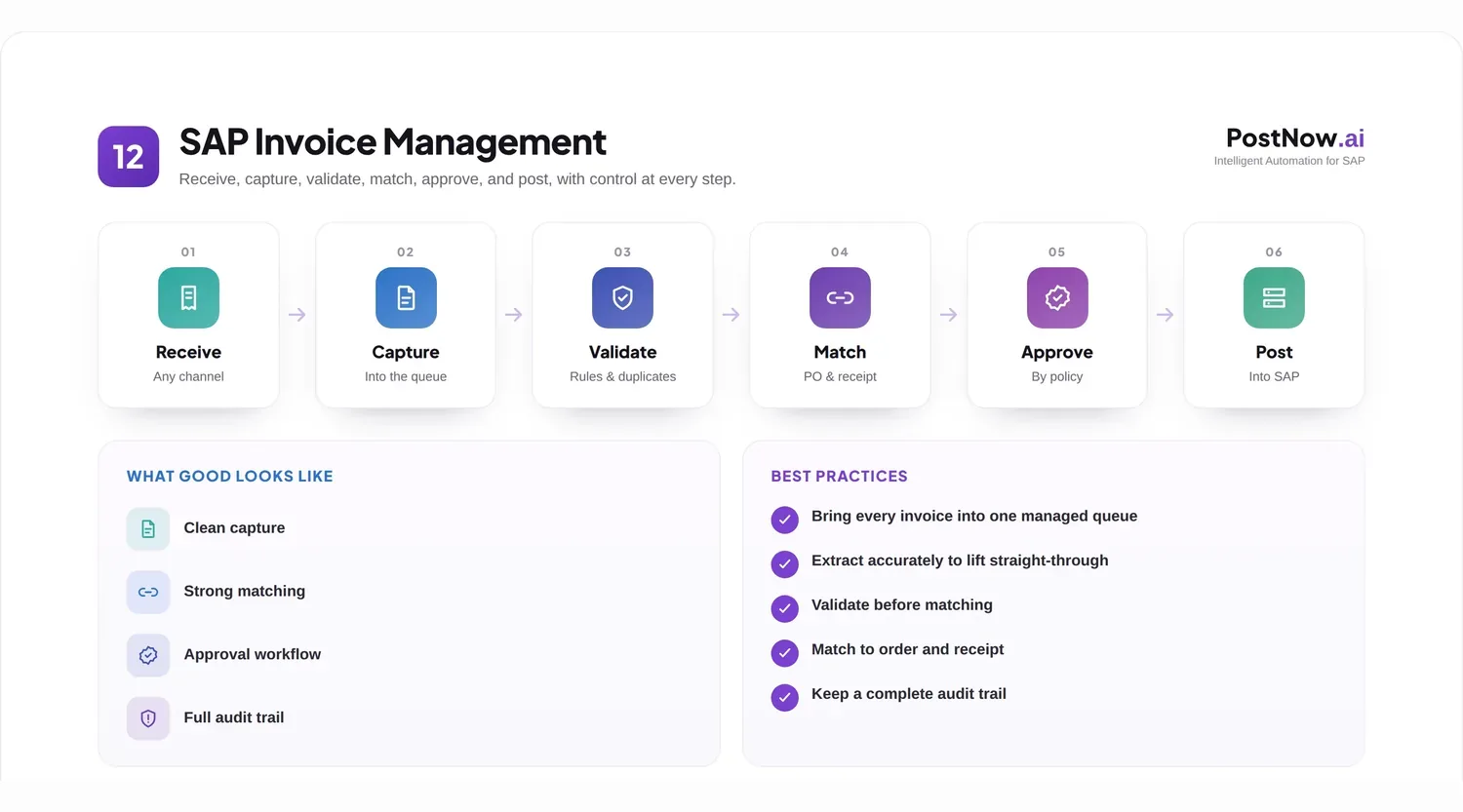
An invoice is deceptively simple. Behind each one sits a chain of questions: is it genuine, does it match what was ordered and received, is the tax correct, who must approve it, and how does it post cleanly into SAP. Answered manually, that chain is slow and error prone. Answered with a well-designed process, it becomes fast, auditable, and largely automatic.
This resource is a complete reference for SAP invoice management. It defines the discipline, walks the full invoice lifecycle, compares processing approaches from manual entry to AI, and goes deep on the parts that matter most: capture, extraction, validation, matching, approval, and posting. It covers automation, optical character recognition, best practices, implementation challenges, and where the field is heading.
The aim is that a finance leader, an SAP architect, or an accounts payable manager could read this page and need no other to plan a credible invoice management program.
What is SAP invoice management?
SAP invoice management is the end-to-end handling of supplier invoices within an SAP landscape, from receipt through validation, matching, approval, posting, payment, and archiving.
It sits at the heart of the accounts payable function. Where procurement commits to spend and goods receipt confirms delivery, invoice management is where the organization confirms that a bill is correct and authorizes money to leave the business. It is the financial control point between buying and paying.
In SAP terms, invoice management spans several areas: the materials management invoice verification process for purchase-order-based invoices, the financial accounting postings for invoices without a purchase order, and the workflow, master data, and reporting that surround them. A single invoice may touch the vendor master, the purchase order, the goods receipt, tax determination, and the general ledger before it is paid.
Why it matters is straightforward. Invoices are high in volume and directly tied to cash. An error does not just create rework; it can mean an overpayment, a duplicate payment, a missed discount, a strained supplier relationship, or an audit finding. Managing invoices well protects cash, relationships, and compliance at the same time.
The lifecycle below frames the rest of this guide. Each stage is a place where value is added or risk is introduced, and each is a candidate for automation.
Why organizations struggle with invoice processing
Invoice processing is rarely difficult in principle and frequently painful in practice. The difficulty comes from volume, variety, and the number of checks each invoice must pass.
Manual entry. In many organizations a person still reads each invoice and keys its header and line data into SAP. This is slow, costly, and a steady source of typos that surface later as payment errors or reconciliation problems. As volume grows, manual entry becomes a permanent bottleneck rather than a temporary one.
Data quality issues. Invoices arrive with missing purchase order numbers, mismatched vendor names, inconsistent tax codes, and unclear line descriptions. Each gap forces a clerk to stop and investigate, and each investigation delays the invoice and the supplier behind it.
Approval delays. Invoices often wait in inboxes for an approver who is travelling, unavailable, or simply unaware the invoice is there. Without routing and escalation, approval becomes the longest and least visible part of the process.
Matching problems. When an invoice does not agree with its purchase order or goods receipt, it goes on hold. Resolving these exceptions, chasing the price difference or the missing receipt, consumes a disproportionate share of an accounts payable team's time.
Duplicate invoices. The same invoice can arrive twice, by email and by post, or be submitted again by a supplier chasing payment. Without reliable duplicate detection, an organization risks paying the same bill more than once.
Audit concerns. If approvals happen by email and postings lack a clear trail, the process becomes hard to audit. Auditors want to see who approved what, on what basis, and when, and a manual process struggles to produce that evidence quickly.
Consider a mid-sized manufacturer receiving tens of thousands of invoices a year across dozens of suppliers and several plants. A small percentage of exceptions, multiplied across that volume, becomes a team permanently occupied with chasing differences rather than improving the process. This is the pattern invoice management is designed to break.
The SAP invoice management lifecycle
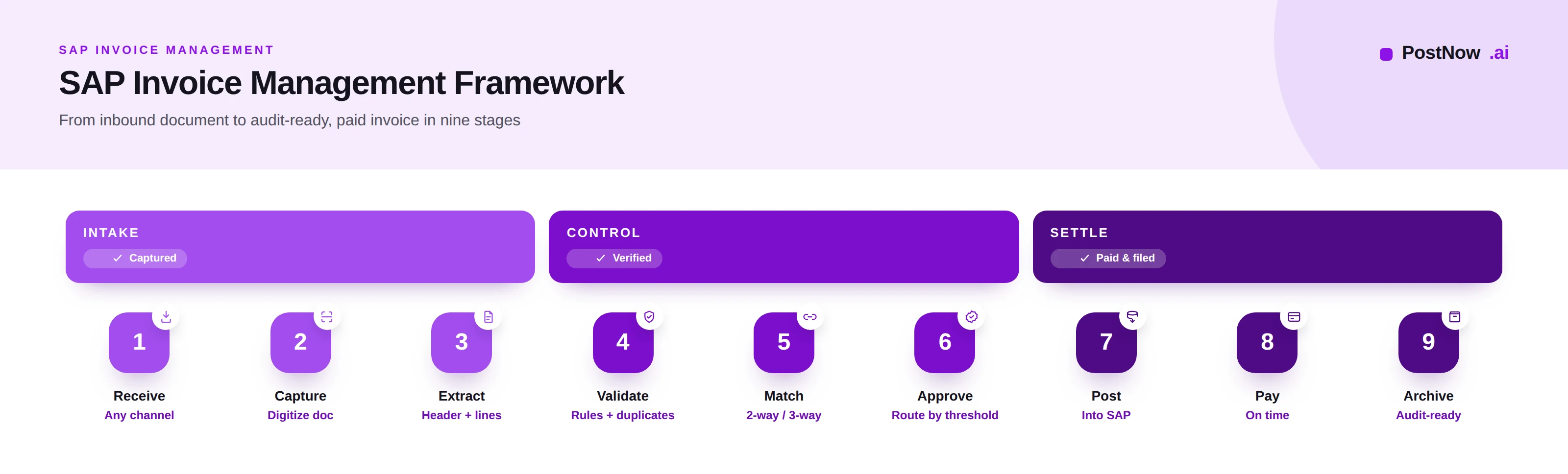
Every invoice, however it arrives, travels the same nine-stage path. Understanding each stage is the foundation for improving or automating any of them.
1. Receive. The invoice enters the organization through one of many channels: email, post, a supplier portal, or an electronic data feed. The first task is simply to gather every inbound invoice into one controlled place rather than scattered inboxes.
2. Capture. The invoice is converted into a digital, processable form. A paper invoice is scanned; an emailed attachment is ingested. Capture turns a document a human can read into a document a system can begin to work with.
3. Extract. The relevant data is read from the document: header fields such as vendor, invoice number, date, and total, and line items such as quantities, descriptions, and amounts. Extraction is where a picture of an invoice becomes structured data.
4. Validate. The extracted data is checked for completeness and correctness: required fields present, vendor recognized, tax plausible, currency valid, and the invoice not a duplicate. Validation stops bad data before it travels further.
5. Match. For purchase-order invoices, the invoice is compared against the purchase order and, where relevant, the goods receipt. Matching confirms the organization is being billed for what it ordered and received, at the agreed price.
6. Approve. The invoice is routed to the people authorized to approve it, based on amount, cost center, or exception type. Approval is the human authorization that the invoice is legitimate and should be paid.
7. Post. The approved invoice is recorded in SAP, creating the accounting document and the liability to the supplier. Posting is the moment the invoice becomes part of the official books.
8. Pay. The posted invoice is settled according to its terms, ideally on time and capturing any early-payment discount. Payment is the outcome the whole lifecycle exists to enable.
9. Archive. The invoice and its processing history are stored as an auditable record. Archiving closes the loop and provides the evidence that the invoice was handled correctly.
The lifecycle is sequential, but its stages are not equally costly. The greatest effort and risk concentrate in capture, extraction, validation, and matching, which is precisely where automation pays back fastest.
Invoice lifecycle management in SAP covers receipt, verification, blocking, release and payment, and the tooling market divides along those stages. Where teams most often need help is the entry point, because invoices arriving outside an EDI or OCR channel still have to be created by hand. PostNow posts incoming invoices into SAP ECC and S/4HANA from Excel through MIRO and FB60, validating vendor, tax and cost assignment before the document is written, which leaves the downstream blocking and release workflow untouched in SAP.
Invoice processing approaches
Organizations process invoices in one of four broad ways, each more capable and more autonomous than the last.
Manual processing relies on people to read, key, check, and route every invoice. It needs no technology investment and handles any format, but it is slow, costly, and error prone, and it does not scale.
Traditional optical character recognition reads text from scanned documents and pre-fills fields. It reduces typing but depends on fixed templates, so it struggles whenever a supplier changes a layout, and it still leaves validation and matching to people.
Rules-based automation adds logic on top of capture: if the invoice matches the purchase order within tolerance, post it; otherwise route it. It automates the predictable cases well but requires every rule to be written and maintained, and it handles only the situations it was explicitly told about.
AI-powered invoice processing uses machine learning and document understanding to read invoices in any layout, extract header and line data, score its own confidence, and learn from corrections. It automates the routine majority and surfaces only genuine exceptions for people to handle.
| Approach | New formats | Accuracy | Exceptions | Scales | Best for |
|---|---|---|---|---|---|
| Manual | Any | Variable | All manual effort | Poorly | Very low volume |
| Traditional OCR | Needs templates | Moderate | Mostly manual | Limited | Stable layouts |
| Rules-based | Needs new rules | Good if covered | Routed by rules | Moderate | Predictable flows |
| AI-powered | Handles natively | High, improving | Only true exceptions | Strongly | High, varied volume |
Most enterprises today are moving from the first two approaches toward the last two, often combining rules for well-understood flows with AI for everything else.
Invoice capture methods
Before anything can be processed, the invoice has to be captured. Suppliers send invoices in many ways, and each channel brings its own challenge.
Email invoices are the most common channel, usually as a PDF attachment. The challenge is sorting genuine invoices from other mail, handling multiple attachments, and pulling the document into the process reliably.
PDF invoices may be digitally generated, with selectable text, or scanned images of paper. The former are far easier to read accurately; the latter require image-based recognition and introduce more risk of misread fields.
Scanned documents from paper invoices depend heavily on scan quality. Skewed, faint, or low-resolution scans degrade extraction and increase the number of invoices that need human correction.
Supplier portals let vendors submit invoices directly into a structured form. This improves data quality at the source but requires suppliers to adopt the portal, which not all will.
Electronic data interchange exchanges invoices as structured messages between systems. It offers the highest data quality and lowest handling effort but requires setup with each trading partner and suits larger, stable supplier relationships.
Electronic invoices in standardized formats are increasingly mandated by tax authorities. They arrive as structured data rather than documents, which removes the need for extraction entirely but adds compliance requirements that vary by country.
A mature capture strategy accepts every channel, normalizes them into one stream, and steadily nudges suppliers toward the structured options that need the least handling.
Invoice data extraction
Extraction turns the captured document into structured data SAP can use. Its quality sets the ceiling for everything downstream, because a field read wrongly here becomes an error everywhere it travels.
Optical character recognition converts the image of an invoice into machine-readable text. It is the starting point for any document-based invoice but, on its own, it only produces characters, not an understanding of which characters are the invoice number and which are the total.
AI extraction goes further, identifying what each piece of text means regardless of where it sits on the page. It can find the vendor, the invoice number, the tax, and the line items across layouts it has never seen before, which is what frees an organization from maintaining a template per supplier.
Field recognition distinguishes the specific data points the process needs. Header data includes the invoice-level fields: vendor, number, date, currency, and total. Line-item extraction reads each individual line, its description, quantity, and amount, which is essential for detailed matching and is the harder part to get right.
Confidence scoring is the quiet hero of modern extraction. For each field, the system reports how sure it is. High-confidence fields can flow straight through; low-confidence ones are flagged for a quick human check. Confidence is what lets an organization automate safely without pretending extraction is ever perfect.
Because every later stage depends on extraction, investment here returns more than anywhere else. An invoice extracted cleanly validates, matches, and posts with little intervention; one extracted poorly generates exceptions at every subsequent step.
Invoice validation
Validation is the gate that stops incomplete, incorrect, or duplicate invoices from progressing. It is cheap to perform early and expensive to skip.
Required field validation confirms that every field the process needs is present, such as a vendor, an invoice number, a date, and a total. An invoice missing a key field is held before it can cause problems later.
Vendor validation checks that the invoice comes from a known, active supplier in the vendor master and that its bank and tax details match what is on record. This is a primary defense against fraud and misdirected payment.
Tax validation confirms that the tax codes and amounts are plausible and consistent with the supplier, the country, and the goods or services involved. Tax errors are both a financial and a compliance risk.
Currency validation ensures the invoice currency is valid and handled correctly, particularly for cross-border suppliers, so that conversions and postings are accurate.
Duplicate detection compares each invoice against those already received, using the vendor, invoice number, date, and amount, to catch a bill that has arrived or been submitted more than once. Reliable duplicate detection directly prevents paying twice.
Business rules apply organization-specific checks, such as required references for certain spend categories or limits on particular suppliers. These encode the policies that matter to a given business.
Validation is critical because it is the last inexpensive moment to catch a problem. An error stopped here costs a moment; the same error discovered after posting or payment costs an investigation, a correction, and sometimes the unwinding of a payment.
Invoice matching
Matching is the control at the center of invoice management. It confirms that a supplier is billing the organization only for what was genuinely ordered and received, at the agreed price.
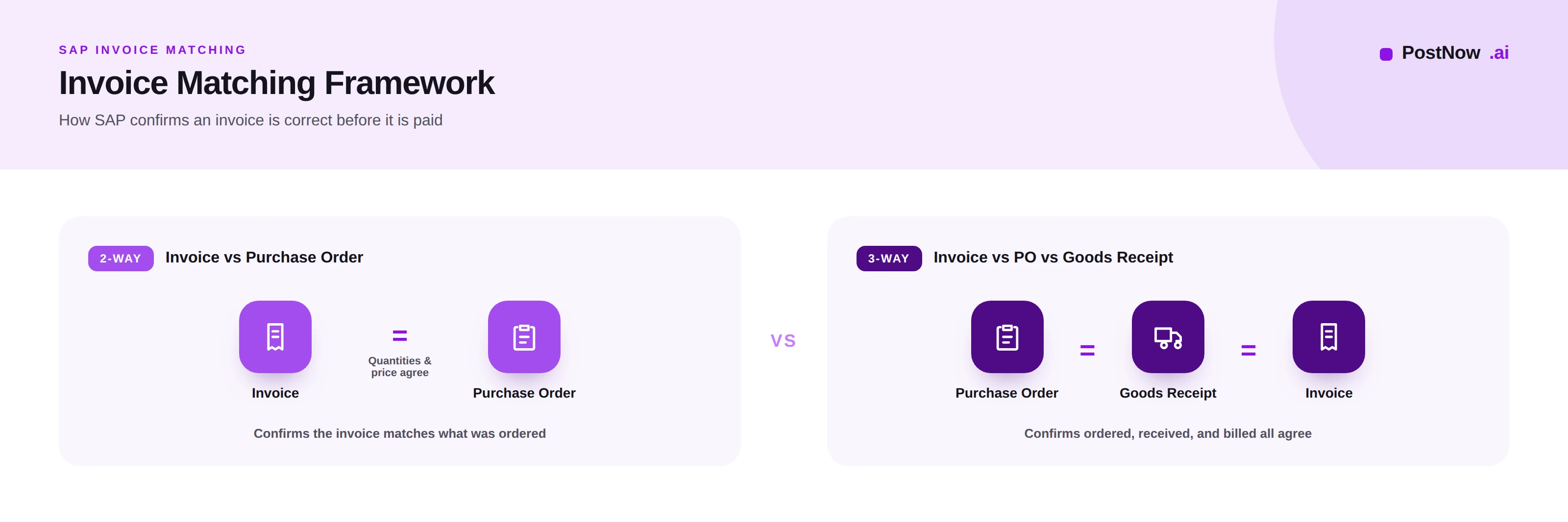
Two-way matching compares the invoice against the purchase order. It confirms that the quantities and prices billed agree with what was ordered. It is suited to situations where a separate proof of delivery is unnecessary, such as services or framework agreements.
Three-way matching adds the goods receipt to the comparison, checking the invoice against both the purchase order and the confirmation that goods were actually received. It is the stronger control, protecting against paying for goods that were ordered but never delivered.
Purchase order matching links the invoice to its originating order, so the system knows what was authorized and at what price. Without a clean purchase order reference, automated matching cannot proceed and the invoice falls to manual handling.
Goods receipt matching confirms delivery, tying the invoice to the physical event of receiving goods. In a three-way match, an invoice cannot pass until the corresponding receipt exists.
Tolerance checks recognize that small differences are normal. Rather than blocking an invoice for a trivial rounding or price variance, the system allows differences within defined limits to pass automatically, reserving human attention for material discrepancies.
Exception handling governs what happens when a match fails. A price difference, a quantity mismatch, or a missing receipt sends the invoice down a defined path: hold, investigate, and resolve. The quality of exception handling largely determines how much time an accounts payable team spends firefighting.
Consider an invoice for one hundred units at ten units of currency each. The purchase order agrees on the price but the goods receipt shows only ninety units delivered. A three-way match catches the discrepancy immediately, holding the invoice for the ten undelivered units rather than paying for goods that never arrived. That single control, applied consistently, is among the most valuable in finance.
Approval workflows
Approval is where authority meets the invoice. A good workflow ensures the right person approves the right invoice quickly, and that nothing waits in a silent queue.
Approval routing directs each invoice to the appropriate approver automatically, based on attributes such as amount, cost center, company code, or spend category. Routing removes the guesswork of who should see an invoice.
Escalation paths ensure that an invoice does not stall if an approver is unavailable. After a defined wait, the invoice escalates to a deputy or a manager, so approval keeps moving even when an individual does not.
Delegations let an approver formally hand authority to someone else during absence, preserving control while preventing bottlenecks when people are on leave or travelling.
Threshold-based approvals match the level of scrutiny to the amount. Small invoices may need a single approver or pass automatically when fully matched; large ones may require several levels of sign-off. This focuses senior attention where it matters.
Exception workflows handle invoices that fail matching or validation, routing them to the people who can investigate and resolve, with the context they need attached. A well-designed exception workflow turns a blocked invoice from a mystery into a task.
The goal of approval design is invisibility in the normal case: clean, matched invoices flow through with minimal human touch, while genuine exceptions receive prompt, informed attention.
Posting invoices into SAP
Posting records the invoice in SAP, creating the accounting document and the payable. There are several ways to post, suited to different situations.
MIRO is the transaction for logistics invoice verification, used for purchase-order-based invoices. It is where matching against the purchase order and goods receipt comes together and the verified invoice is posted. It is the natural home for procurement-related invoices.
FB60 is the financial accounting transaction for entering vendor invoices without a purchase order, such as utilities, rent, or other non-procurement spend. It posts directly to the general ledger and cost objects.
BAPI approaches use SAP business interfaces to post invoices programmatically, applying the same validations as the manual transactions. They suit controlled, high-volume automated posting where consistency and auditability matter.
API approaches expose invoice posting to modern integrations, letting external systems submit invoices to SAP through documented services. They suit cloud and hybrid landscapes and straight-through processing from upstream tools.
Automated posting brings these together: validated, matched, approved invoices post without manual keying, while only exceptions reach a person. Automation here removes the slowest and most error-prone manual step entirely.
| Method | Typical use | Strength | Consideration |
|---|---|---|---|
| MIRO | PO-based invoices | Built-in matching | Manual for high volume |
| FB60 | Non-PO invoices | Direct to ledger | No automatic matching |
| BAPI | Automated posting | Consistent, auditable | Needs build and governance |
| API | Modern integration | Straight-through capable | Depends on landscape |
SAP invoice automation
Invoice automation connects the lifecycle into a flow that runs with minimal manual effort, handling the routine majority automatically and reserving people for judgement and exceptions.
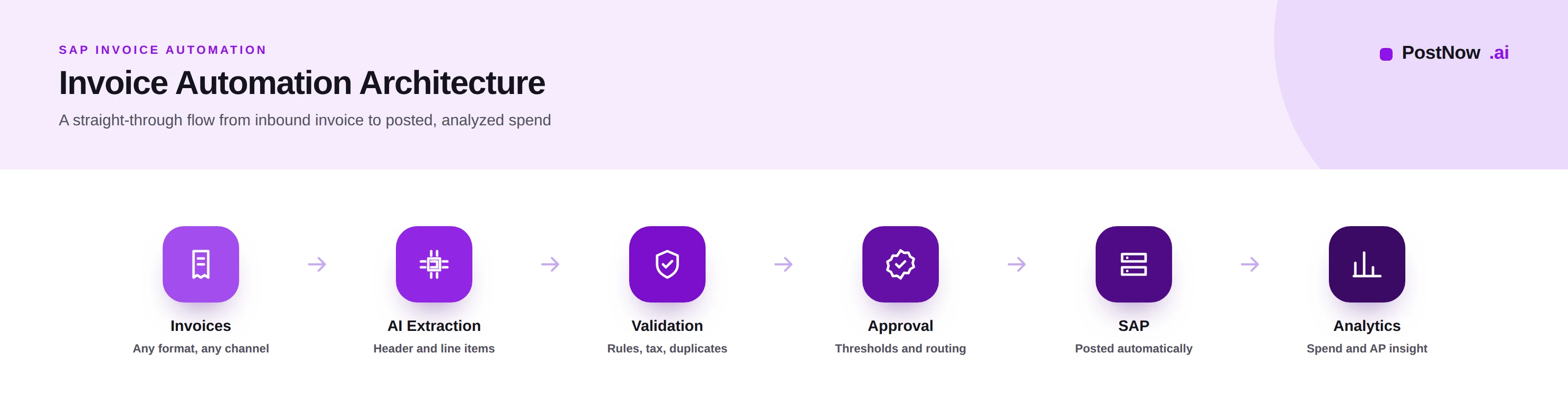
Workflow automation orchestrates the journey, moving each invoice from one stage to the next, applying rules, and routing exceptions without anyone shepherding it manually. It is the backbone that makes the rest of automation possible.
AI automation reads and understands invoices of any layout, extracts header and line data, and scores its confidence, so the routine cases proceed untouched and only uncertain ones surface for review.
Validation automation runs the completeness, vendor, tax, currency, and duplicate checks instantly on every invoice, catching problems the moment they appear rather than after they spread.
Approval automation routes, escalates, and reminds, so approvals happen promptly and nothing waits unseen. Fully matched, in-policy invoices can even be approved automatically within defined limits.
Exception management is where automation earns its keep. By handling everything routine, it lets the accounts payable team concentrate entirely on the genuine exceptions, with full context attached, turning a reactive function into a controlled one.
The destination is straight-through processing: a clean, matched, in-policy invoice arrives, is read, validated, matched, approved, and posted without a person touching it, while the team's expertise is reserved for the cases that truly need it. For organizations preparing structured invoice data in spreadsheets, an approach such as Excel to SAP automation provides a validated, governed path into SAP that complements this flow.
SAP invoice OCR and document understanding
Optical character recognition is the technology that turns an invoice image into text. How it is applied makes the difference between a brittle process and a resilient one.
Traditional OCR reads characters from a document but does not understand them. It produces text that still needs mapping to fields, and it struggles with anything other than clean, predictable documents.
Template OCR improves accuracy by defining, for each supplier layout, exactly where each field sits. It works well until a supplier changes its layout, at which point the template breaks and must be rebuilt, which becomes unmanageable across many suppliers.
AI OCR combines character recognition with machine learning to locate and interpret fields regardless of layout. It removes the need for per-supplier templates and handles new formats on arrival, which is the key to scaling across a large supplier base.
Document AI goes furthest, understanding the invoice as a structured document: it knows what an invoice is, identifies its parts, reads line items, and improves as it processes more. It is the foundation of modern, low-touch invoice processing.
| Technology | Handles new layouts | Line items | Maintenance |
|---|---|---|---|
| Traditional OCR | Poorly | Limited | High |
| Template OCR | No, needs new template | If templated | Very high |
| AI OCR | Yes | Good | Low |
| Document AI | Yes, natively | Strong | Self-improving |
The trajectory is clear: from reading characters, to reading templated fields, to understanding documents. Each step reduces maintenance and increases the share of invoices that process without a person.
Best practices for SAP invoice management
The following practices, drawn from mature accounts payable operations, separate an invoice process that scales from one that struggles.
- Consolidate all invoices into one intake so nothing is processed from scattered personal inboxes.
- Push suppliers toward structured channels such as portals and electronic invoicing to raise data quality at the source.
- Invest in extraction quality first, since every later stage inherits its accuracy.
- Use confidence scoring to route only uncertain fields to people and let the rest flow through.
- Validate early and completely, catching gaps and duplicates before an invoice progresses.
- Maintain a clean vendor master, grounded in master data management, so matching and payment are reliable.
- Apply three-way matching wherever goods are received, as the core protection against improper payment.
- Set sensible tolerances so trivial differences pass and only material ones are reviewed.
- Automate approval routing and escalation so invoices never wait in a silent queue.
- Match approval scrutiny to value, reserving senior sign-off for larger amounts.
- Design exception workflows deliberately, attaching the context an investigator needs.
- Prevent duplicate payment with reliable, multi-field duplicate detection.
- Keep a complete audit trail of who approved what and when, so the process is always auditable.
- Capture early-payment discounts by processing fast enough to pay within discount terms.
- Measure cycle time and exception rates, and use them to target the next improvement.
- Keep humans accountable for automated decisions, aligning with the principles in AI in SAP automation.
Common implementation challenges
Invoice automation programs meet a predictable set of obstacles. Naming them, and their mitigations, is the difference between a stalled project and a successful one.
Poor invoice quality. Faint scans and low-resolution images degrade extraction. Mitigate by improving capture, favoring digital channels, and using confidence scoring to catch what extraction is unsure about.
Missing data. Invoices arrive without purchase order references or key fields. Mitigate by validating early, returning incomplete invoices to suppliers, and encouraging structured submission that captures required fields up front.
Multiple formats. A large supplier base means endless layouts. Mitigate by adopting AI extraction that handles new formats natively rather than maintaining a template for each supplier.
Approval bottlenecks. Invoices stall waiting for approvers. Mitigate with automated routing, escalation, and delegation, so approval keeps moving regardless of any individual's availability.
Integration issues. Connecting capture and automation tools to SAP posting can be complex. Mitigate by choosing well-supported posting methods, governing the integration, and validating that posted data reconciles with the source invoice.
Across all of these, the pattern holds: most invoice automation problems are really data or process problems that automation exposes. Address the underlying quality and the automation succeeds.
The future of SAP invoice management
Invoice management is moving steadily toward higher autonomy, with people increasingly supervising rather than performing the work.
AI continues to improve extraction and decision support, handling a growing share of invoices without human involvement and learning from every correction it receives.
Document AI deepens the understanding of invoices and related documents, reading complex layouts and line items with less and less configuration.
Autonomous accounts payable describes the destination: a process where the routine majority of invoices flow from receipt to posting untouched, and people focus entirely on exceptions, supplier relationships, and control.
Intelligent workflows adapt routing and handling based on the invoice and its history, rather than following fixed rules, so the process becomes more responsive over time.
Continuous validation shifts checking from a single gate to an ongoing assurance, monitoring for anomalies and emerging risk across the whole invoice population rather than one invoice at a time.
None of this removes the need for governance and accountability. As more of the work becomes automatic, the human role concentrates on setting policy, handling judgement, and standing behind the controls, which is where experienced finance and SAP professionals add the most value.
Frequently asked questions
What is SAP invoice management?
What is the difference between 2-way and 3-way matching in SAP?
How does SAP invoice automation work?
Can SAP process invoices from PDF?
What is SAP invoice OCR?
What is the difference between MIRO and FB60?
How does AI improve SAP invoice processing?
What is invoice verification in SAP?
How are duplicate invoices detected in SAP?
What are tolerance limits in SAP invoice matching?
What is straight-through invoice processing?
How do you reduce invoice approval bottlenecks in SAP?
Conclusion
SAP invoice management is where buying, receiving, and paying meet, and where an enterprise either controls its cash and compliance or quietly loses ground on both.
The lifecycle is the same everywhere: receive, capture, extract, validate, match, approve, post, pay, archive. What separates leaders is how much of it they have made fast, accurate, and automatic, and how cleanly the exceptions are handled. The greatest gains come from strong extraction, disciplined validation, rigorous matching, and approval that never stalls.
The direction of travel is toward autonomous, AI-assisted processing, with people supervising the controls rather than keying the data. Organizations that build that capability deliberately, on clean data and clear governance, turn one of finance's most painful processes into one of its most dependable. For teams ready to begin, the practical first step is to capture every invoice in one place, validate it well, and automate the matching and posting of the routine majority.