
SAP data quality best practices, in short
Once a wrong value is stored in SAP, every document that uses it inherits the error, and cleaning it up later costs far more than stopping it. PostNow.ai catches problems before SAP stores them: template rules fix formats and restrict values, Validate checks every row offline, Simulate tests it against SAP, and each row's result is written back, so only genuine failures need attention. For data already in SAP, Report Library reports find duplicate vendors and customers and incomplete material masters, and Mass Change posts back only the rows you correct.
Most bad master data does not come from one careless user in one transaction. It arrives in bulk: a supplier list from procurement, a migration extract, a price or payment-terms update prepared in a spreadsheet. Excel quietly strips leading zeros, turns dates into serial numbers and keeps trailing spaces, and a single load can repeat the same mistake across hundreds of records. That is why the practices below focus on two jobs a data owner actually does: stopping bad values before SAP stores them, and finding and fixing the ones that are already there.
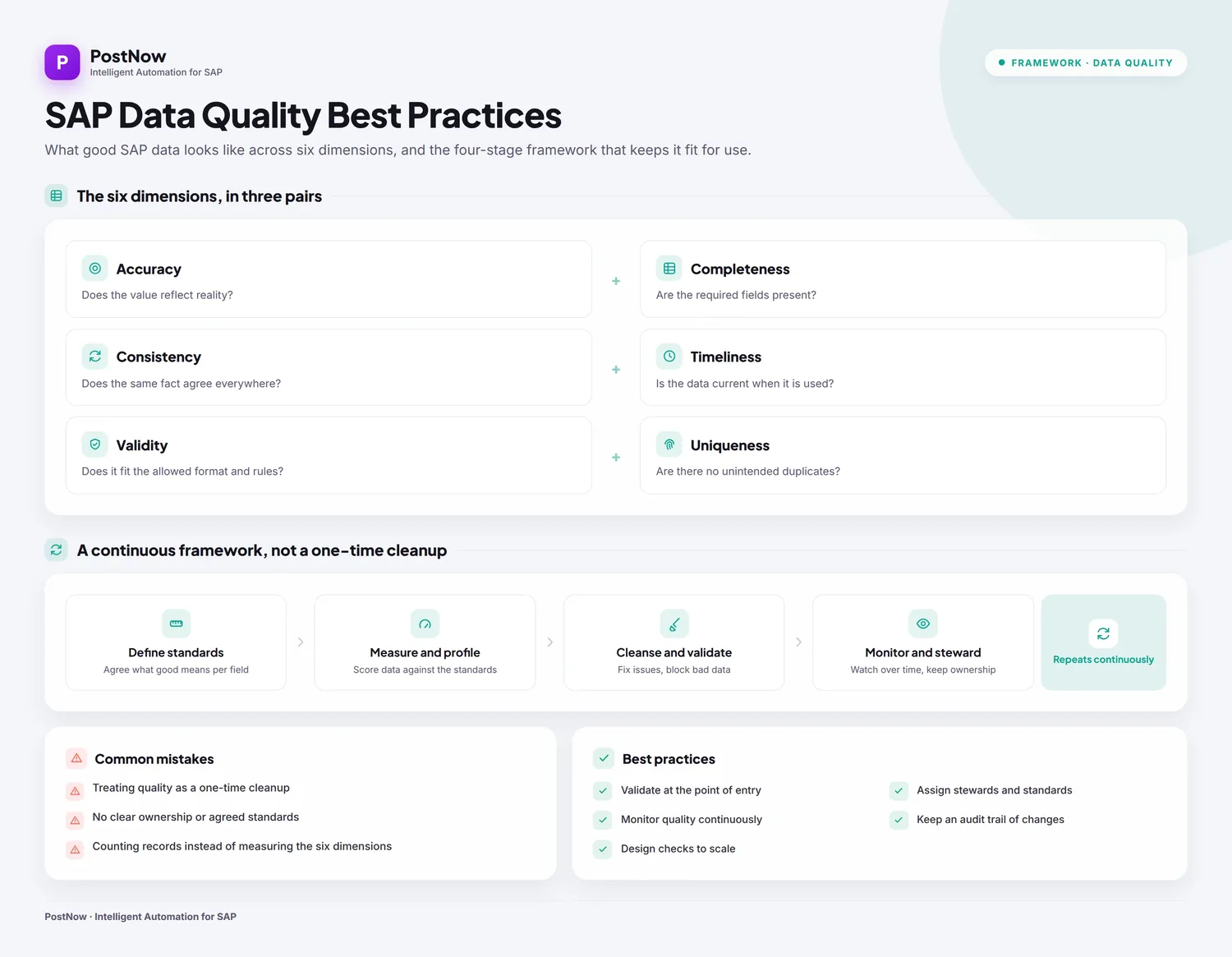
SAP data quality best practices: the standard picture
PostNow.ai covers part of this picture; the rest is standard SAP practice that applies whichever tools you use. Four habits matter most.
1. Turn each dimension into a concrete SAP check
| Dimension | What to check in SAP |
|---|---|
| Completeness | Every vendor in LFA1 has a company-code record in LFB1 (customers: KNA1 and KNB1; materials: MARA and MARC), with the fields your processes need, such as payment terms and reconciliation account |
| Validity | Values exist in their check tables, for example company code in T001, and follow the required format |
| Consistency | The same conventions across records: leading zeros, date formats, names and addresses written one way |
| Accuracy | Values match the real world (addresses, bank details, prices); usually confirmed by the business owner, not by a system check |
| Uniqueness | One record per real-world partner; the same name, country and VAT registration number (field STCEG in LFA1) points to a duplicate |
| Timeliness | Records change when the business changes; change documents (tables CDHDR and CDPOS) show who changed a record and when SAP Help |
2. Prevent at entry, then detect and cleanse what is already there
Prevention is cheaper than cleansing: required fields and field status in SAP customizing, check tables behind code fields, and validation of every bulk load before it posts. Detection works on data already in SAP: profile it, match likely duplicates, decide which record survives, then correct the rest through standard transactions or BAPIs so SAP records a change document for each correction.
3. Give every object an owner
Each master data object (vendor, customer, material, G/L account) needs a business owner who defines its rules and approves changes, and data stewards who fix what the checks find. IT runs the tools; it should not decide what a correct vendor record is.
4. Monitor on a schedule
Rerun the same checks after every large load and at a fixed interval after go-live, and track the counts over time so a rise in duplicates or gaps is visible early.
SAP-standard options. SAP Master Data Governance governs how master data is created and changed, and its consolidation and mass-processing processes can apply data quality rules during validation and activation SAP Learning; see the SAP master data governance guide. SAP Information Steward profiles data and monitors quality with dashboards and scorecards SAP. On SAP S/4HANA, vendors and customers are maintained as business partners (transaction BP) with supplier and customer roles, while tables such as LFA1, LFB1, KNA1 and KNB1 are still filled, so the checks above still apply.
Where PostNow.ai fits. PostNow.ai covers prevention for bulk loads prepared in Excel (template rules, Validate, Simulate and a per-row result), detection through Report Library reports for duplicate vendors and customers, completeness and change documents, and correction through Mass Change. It does not provide a change-request workflow for single records, survivorship rules or automatic merging of duplicates; that is the territory of SAP Master Data Governance or a similar tool.
How PostNow.ai handles SAP data quality
PostNow.ai checks a load in layers, each catching what the one before cannot. Cheap offline checks run first; SAP's own validation runs last and has the final word.
Write the rules into the template
A designer sets the rules once per field, and operators run the published template as-is. Required fields get a * in the Excel header. Each field can have value help: an F4 lookup from the SAP check table, or a custom list with descriptions, which Restrict turns into a hard allow-list (for example, only the payment terms your company actually uses). Per-field transformations clean values in a fixed order: trim, then default value, then leading zeros to a target length (vendor 100087 becomes 0000100087), then uppercase. A per-field date format (YYYYMMDD, DD.MM.YYYY, MM/DD/YYYY, Excel serial and others) stops 03/04 being read the wrong way round. For BAPI templates, regex rules (digits, alphanumeric, 3-letter currency, YYYYMMDD, amount) are enforced before the run.
Validate the file before SAP sees it
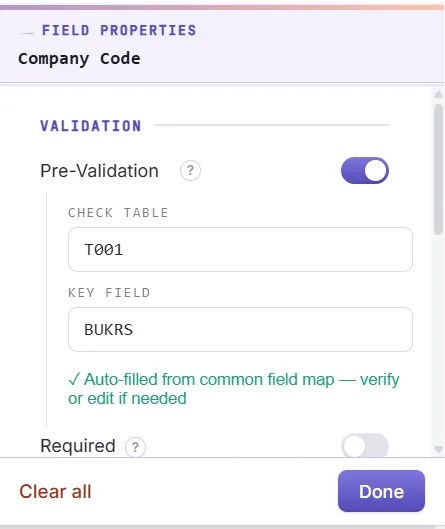
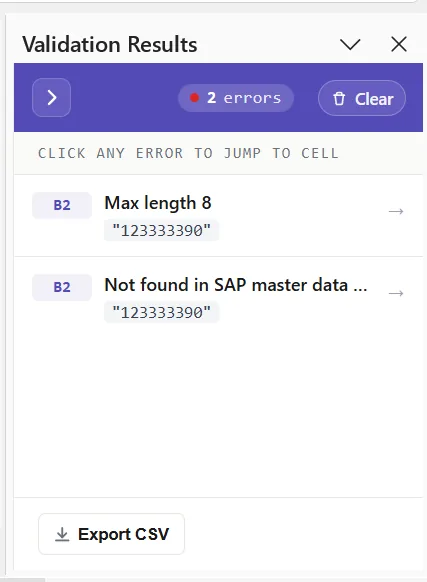
Validate checks every mapped cell for required values, type and number, length, invalid characters, date format, decimal places and allowed values. With pre-validation switched on, it also checks that master data exists in SAP through a check-table lookup, such as whether a vendor or cost centre is real. Each failing cell gets a coral fill and a message in the Run Log column, and the error list exports to CSV so you can send it back to whoever supplied the data.
Simulate against SAP
Simulate catches what only SAP knows. A BAPI simulate calls the BAPI and always rolls it back. A recorded (BDC) simulate gives a three-state verdict per row: would post (green), review (amber: warnings only, the row is not failed) or would not post (red). For FB50 and other FI postings that support a simulate code, SAP runs its full document check, including balance. Without such a code only the screens are checked, and the result says so: duplicate and balance checks then happen only on the real run.
Let SAP validate the run, row by row
Postings go through a standard BAPI or CALL TRANSACTION under the user's own SAP login, so SAP's normal validation, authorisations and change documents apply; there are no direct table writes. A BAPI commits only when SAP returns no error or abort message. Every row gets its result in the Run Log column and the document number written back. Retry Failed re-posts only rows whose Run Log starts with ERROR. For recorded transactions, PostNow.ai flags SAP message 00 349 ("Field does not exist on screen"), a value SAP would otherwise drop without failing the row. AI Review explains a failed row in plain language using the SAP messages and field structure, never the cell values.
Audit what is already in SAP
The Report Library includes ready data-quality reports, and the query builder's "has no matching record" filter finds orphans. Corrections go back through SAP Mass Change. The section on existing data below shows how.
Free Excel templates
Download the templates for these objects
Each workbook is mapped to its SAP BAPI, with required fields marked and an About, Field Guide and BAPI Mapping sheet. Free, no signup.
Common SAP data-quality problems and where they are caught
PostNow.ai maps each classic data-quality dimension to a concrete check. Use this table to decide which layer should own each problem in your own loads.
| PostNow.ai layer | Problem (dimension) | How it is caught |
|---|---|---|
| Template + Validate | Blank mandatory field (completeness) | * header marks it; Validate flags the cell in coral |
| Transformation | Leading zeros lost in Excel (consistency) | Padded to the target length you set, numeric values only |
| Template + Validate | Dates in mixed formats (consistency) | Per-field date format; Validate checks the result |
| Validate | Too long, wrong decimals, invalid characters (validity) | Length, decimal-place and character checks per cell |
| Allow-list / pre-validation | Code that does not exist in SAP (validity) | Restricted value list, or a lookup in the SAP check table |
| Simulate or run | FI document does not balance (accuracy) | Simulate with a simulate code, or SAP on the real run; there is no offline balance check |
| Run (BDC) | Value silently dropped by a screen (accuracy) | Message 00 349 flagged on the row |
| Report Library | Duplicate vendors or customers (uniqueness) | Duplicate reports, vendors grouped by name, country and VAT |
| Query builder + report | Incomplete material master (completeness) | Material master completeness report; "has no matching record" filter |
| Report Library | Who changed a record, and when (traceability) | Change documents report from CDHDR/CDPOS |
Timeliness is the one dimension no tool enforces for you: it depends on how often the owner reruns these reports, which is why the checklist below puts them on a schedule.
Worked example: a 300-row vendor file
PostNow.ai in a typical vendor load, with the pattern master data teams see every quarter.
Procurement sends 300 new suppliers for company code 1000 in a spreadsheet: name, country, VAT number, reconciliation account and payment terms. The vendor template was published earlier with country and VAT marked mandatory, payment terms restricted to the five keys in use, and the reconciliation account set to leading zeros with a target length of 10.
- Transformations, automatically. 12 rows carry the reconciliation account as
160000because Excel stored it as a number; it is padded to0000160000. Trailing spaces in names are trimmed and lower-case country keys such asdeare uppercased. - Validate. 5 rows use a payment term (
N30) that is not on the allow-list, and 3 rows have no VAT number. All 8 cells turn coral; the CSV of errors goes back to procurement, who return corrected values the same day. - Duplicate check before creating anything. The data owner runs the Duplicate Vendors report for the countries in the file and compares names and VAT numbers. Two suppliers already exist in SAP, so those rows are deleted from the file instead of being created a second time. PostNow.ai does not compare a load file with SAP for duplicates automatically; this step is deliberate.
- Simulate, then run. 298 rows go to SAP. One fails: SAP rejects a VAT number whose format does not fit its country. AI Review explains the message, the owner corrects the cell, and Retry Failed posts that single row. The Run Log now holds 298 vendor numbers next to the source rows.
Nothing in that file was fixed by retyping it into SAP, and the two duplicates never existed. The same pattern applies to customers, materials and GL accounts; the 75 free SAP Excel upload templates start each object with its BAPI fields already mapped.
Finding and fixing bad data already in SAP
PostNow.ai brings existing SAP records into Excel, under the user's own SAP authorisations, so a data owner can measure quality without asking IT for an extract.
Duplicate vendors and customers
The Duplicate Vendors report groups vendor records by name, country and VAT number; a matching Duplicate Customers report covers the customer side. Review the groups in Excel, decide which record survives, and block or flag the others in SAP. The Blocked and Deletion-flagged Vendors report then confirms what is already retired, which helps in accounts payable, where a duplicate vendor can split spend and payment history.
Incomplete material masters and other orphans
The material master completeness report shows records missing data a process needs. For a custom check, a designer builds a query with the "has no matching record" filter: materials in MARA with no plant record in MARC, vendors in LFA1 with no company-code record in LFB1, or customers in KNA1 with no KNB1 entry. Operators can then run the saved report themselves. For a wider view, the material master 360 and vendor master 360 reports put the main fields side by side.
Fix only what changed, and trace it
Mass Change downloads the records to a sheet, keeps a hidden baseline, and after you edit posts only the rows whose values actually changed; "10.50" and "10.5" count as equal, and trailing spaces are ignored. Because it posts through standard BAPIs or transactions, SAP writes change documents SAP Help, and the change documents report (CDHDR/CDPOS) shows who changed what, and when. For the wider data-ownership model, see SAP master data management.
What PostNow.ai does not check
PostNow.ai leaves some checks to SAP on purpose, and a data owner should know which ones.
- No offline debit/credit balance check. Balance is checked by a full Simulate (with a simulate code) or by SAP on the run.
- No duplicate-invoice check of its own. It does not search reference numbers; SAP's own duplicate check applies on the run or a full simulate.
- No undo. Stop cancels a run, but documents already posted stay in SAP. That is why Validate and Simulate come first.
SAP data quality checklist
PostNow.ai users who keep data clean tend to follow the same short routine, before a load and on a schedule after go-live.
- Mark mandatory fields in the template, not in an email to the people filling it in.
- Restrict codes such as payment terms or plants to an allow-list, or switch on the check-table lookup.
- Set leading zeros and date formats per field so Excel's habits never reach SAP.
- Validate, export the errors, send them back to the source rather than fixing them silently.
- Simulate before every financial load; use a simulate code where the transaction supports one.
- Check the Run Log and use Retry Failed instead of re-running the whole file.
- Run the duplicate and completeness reports before a migration and monthly after go-live; see the SAP data migration guide for load sequencing.
- Fix existing records with Mass Change so SAP keeps a change document for every correction.