SAP asset posting automation is the practice of capitalizing asset acquisitions from a spreadsheet, each balanced by an offsetting vendor or clearing account, rather than keying every one into F-90 or ABZON. PostNow runs it from Excel: each acquisition line is a row, and the add-in posts them with the standard BAPI_ACC_DOCUMENT_POST, carrying the asset number, transaction type, and value date on the line, checking the values, and committing in one run, with any SAP error rendered in plain language.

This is a twelve-step worked example of posting asset acquisitions from Excel to SAP, capitalizing values against a vendor or a clearing account, posted in one run. Keep the mapping, the document grouping included, and you have an asset posting Excel template ready for the next round of capital additions. It works on classic ECC and on S/4HANA, where Asset Accounting still posts acquisitions behind F-90 and ABZON and the same BAPI. After the one-off setup, whoever posts the acquisitions needs no ABAP and no developer.
Why post asset acquisitions from Excel instead of keying F-90
Posting an acquisition manually in F-90 or ABZON means entering the header, then a line that names the asset, its transaction type, and the asset value date, and an offsetting line for the vendor or clearing account so the entry balances. One acquisition is straightforward. A capital project with dozens of additions, or a wave of low-value assets, becomes line after line keyed one at a time, and a wrong transaction type or a value date in the wrong period quietly distorts depreciation.
Posting asset acquisitions from Excel changes the work. The additions already sit in a spreadsheet, a capital schedule or a fixed-asset addition log, and post to SAP, capitalized, in one run. For a routine bulk asset posting or a one-off mass asset acquisition, the awkward parts, picking the function, mapping the asset and offset fields, getting the transaction type and value date right, and reading FI-AA messages, are taken care of. The twelve steps below go through the whole flow.
Before you start: what you need
- Your acquisitions in Excel, one line per row, with a shared document reference where the asset line and its offset belong to one posting.
- SAP authorization to post asset acquisitions, the access you would use for
F-90orABZON, across the company codes you are posting. - PostNow in Excel, hooked into your SAP system. Its function modules are brought into SAP a single time with your Basis or ABAP team, after which the acquisition runs happen from the task pane.
Your asset posting Excel template: the fields SAP expects
An acquisition posting names the asset, the transaction type, and the value date on one line, and an offsetting account or vendor on the other. These are the fields an acquisition run depends on; carry them, and confirm the assets, vendors, and accounts they name already exist.
| Excel column | SAP field | Why it matters |
|---|---|---|
| Company code | COMP_CODE | Header; the company code the acquisition posts in |
| Asset / sub-number | ASSET_NO / SUB_NUMBER | Line; the asset being capitalized (ANLA) |
| Transaction type | ASSET_TX_TYPE | Line; 100 for an external acquisition, and so on |
| Asset value date | ASSETVALDATE | Line; the date that drives depreciation start |
| Amount | AMT_DOCCUR | The value being capitalized on the asset line |
| Offset account / vendor | GL_ACCOUNT / vendor | The clearing account or vendor that balances the entry |
BAPI_ACC_DOCUMENT_POST posts the accounting document from a DOCUMENTHEADER, an ACCOUNTGL line whose asset fields hold the asset number, sub-number, transaction type, and value date, and a CURRENCYAMOUNT table for the amounts, with an offsetting vendor or clearing line completing the entry. It returns the document key, and the posting is persisted once BAPI_TRANSACTION_COMMIT runs. Step 2 has PostNow's function finder pick the BAPI, pull its structures in, and take care of the commit.The asset acquisition run, step by step
Lay out and open your sheet
Put each acquisition line on a row under headers like Document Ref, Company Code, Posting Date, Asset Number, Transaction Type, Value Date, Amount, and Offset Account, with a shared Document Ref where the asset line and its offset form one posting. Open the workbook and call up the PostNow task pane alongside it.
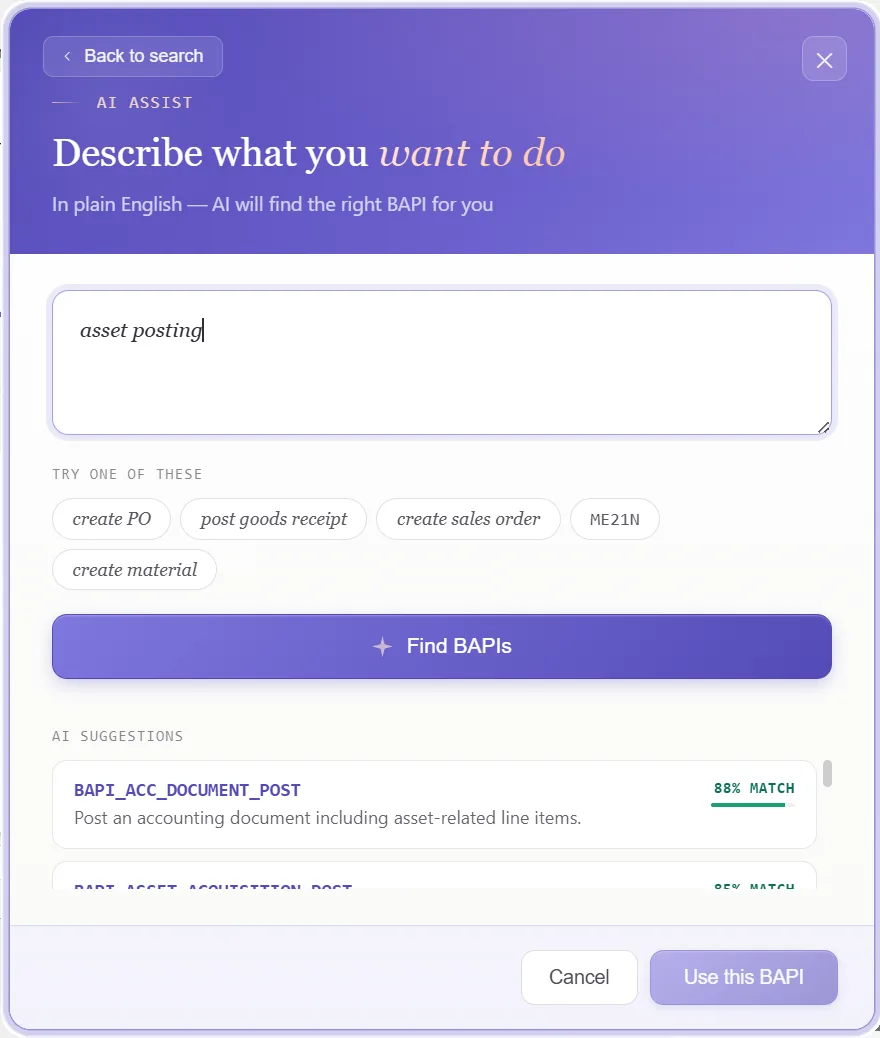
Choose the posting BAPI
A standard call books the document, so nothing is recorded. In the function finder, pick the one the job needs:
- Take
BAPI_ACC_DOCUMENT_POST, the posting call whose line can carry asset data - The asset line holds the asset number, transaction type, and value date, balanced by an offsetting vendor or clearing line
- The posting is saved on commit, which PostNow issues after each successful post, returning the document key
Confirm the function and PostNow brings in its header and line structures, ready to line up with your columns, so F-90 stays shut.
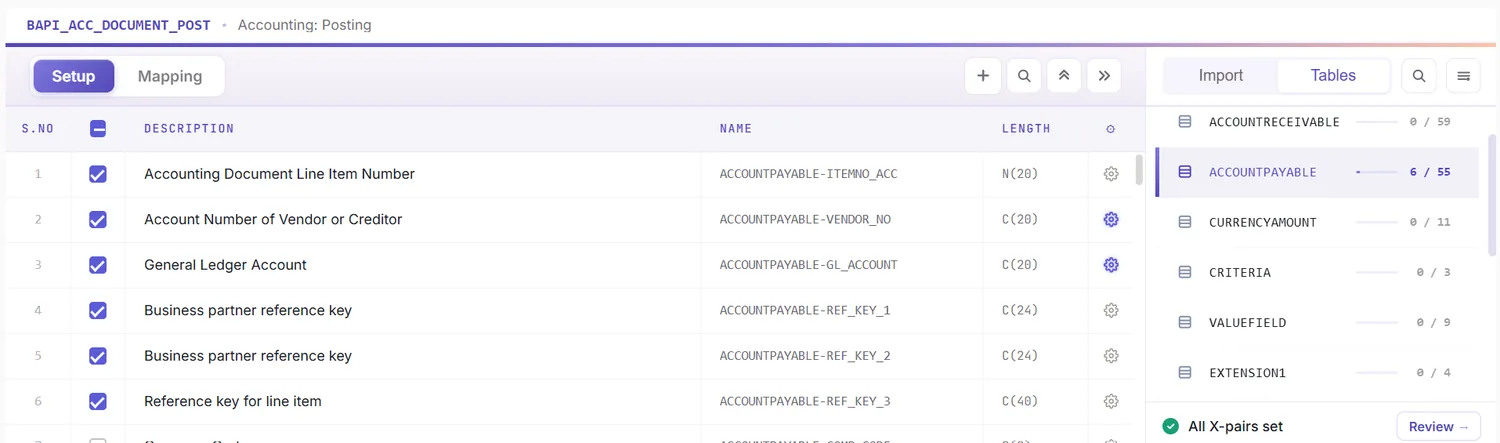
Look over the structures it returns
What comes back is a document header, an asset-bearing line, the offsetting line, and the result. Because it mirrors how an acquisition is built, a glance shows what belongs to the header and what belongs to each line:
That tells you, before any mapping, which columns are header-level and which carry the asset and offset.
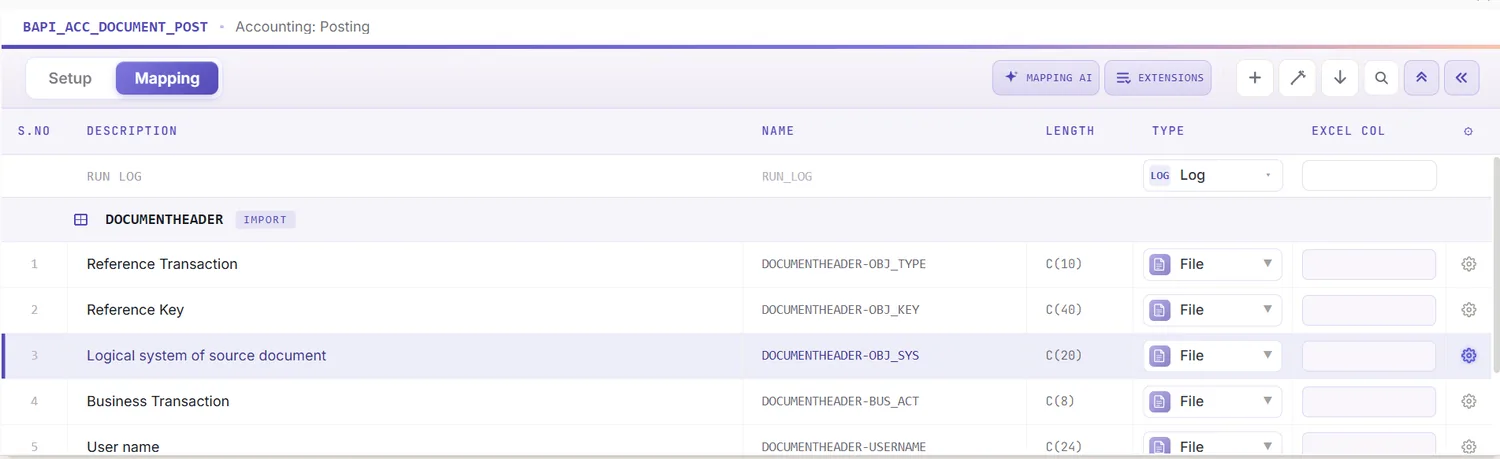
Open the Mapping Designer
Picking the BAPI opens the Mapping Designer with a line for every header and line-item field. Two things matter here:
- Extensions are detected. Append fields your system adds to the asset line are pulled in automatically.
- You can add your own. Anything not picked up you place manually, so standard and custom fields ride in one run.
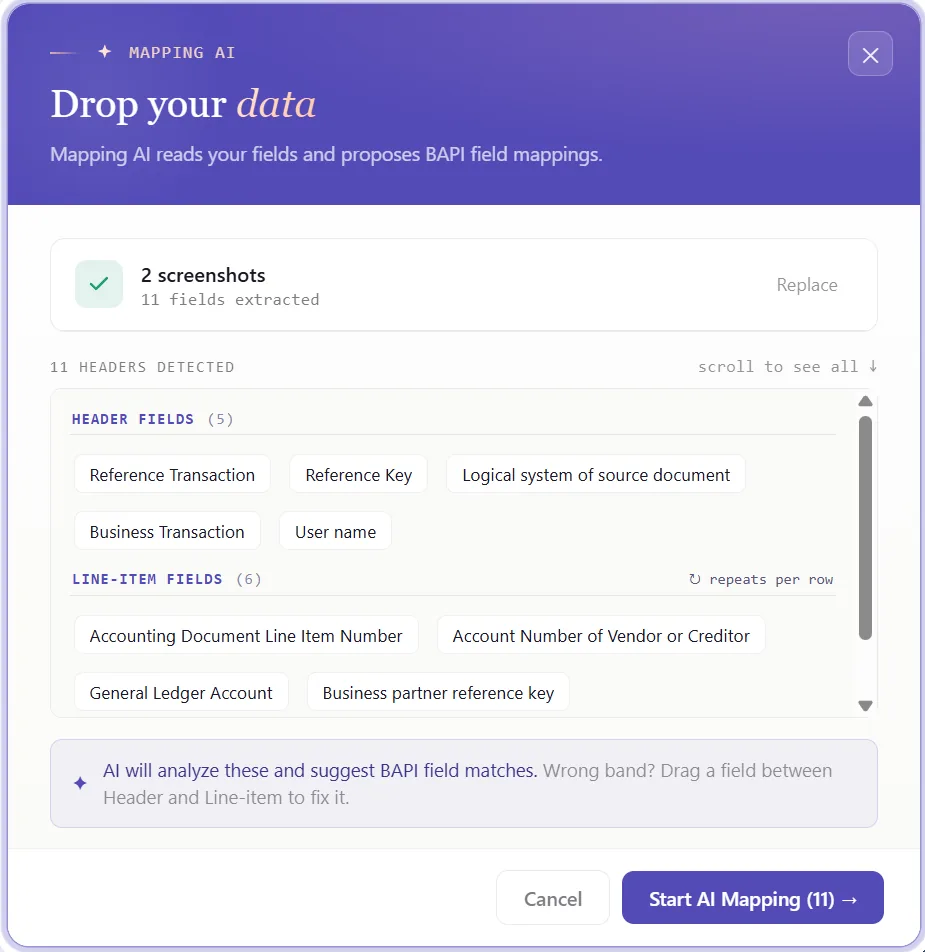
Match columns with Mapping AI AI
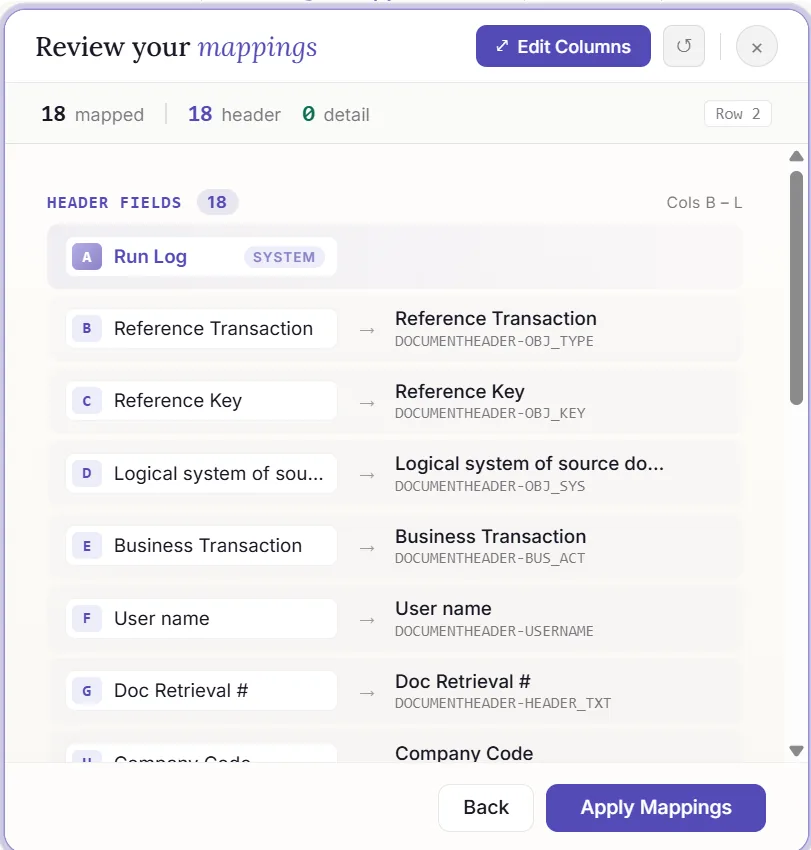
Now pair the structures with your data. Mapping AI proposes an Excel column for each header and line field, reading your headers or a screenshot you drop in, and you confirm or adjust, useful when a posting carries an asset line alongside its offset.
Auto Map and group lines under an acquisition
Run Auto Map to fix the mapping and write SAP-tagged headers across the sheet. Because an acquisition pairs an asset line with an offset, this is where you set the grouping: rows sharing a document reference post together as one document, the header read once and the lines read as postings. The workbook becomes your template here, and the grouping carries across.
Set formatting and the value date
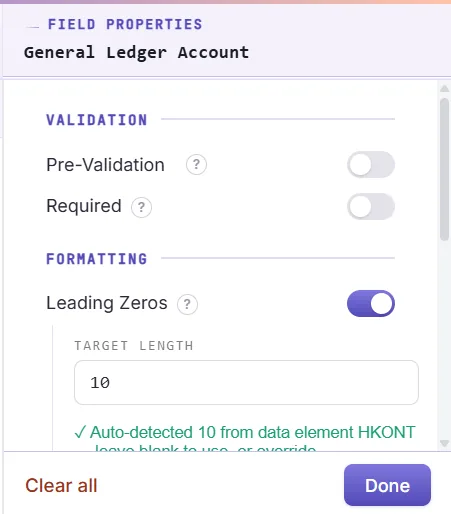
A field's properties dictate how its value posts: leading zeros on the asset and account numbers, upper case on codes, a date format on the asset value date, the right decimals on the amount, defaults for a constant company code, and regex. The asset value date deserves care, since it drives when depreciation begins, and the transaction type must suit the asset class.
Inspect the data in Excel first
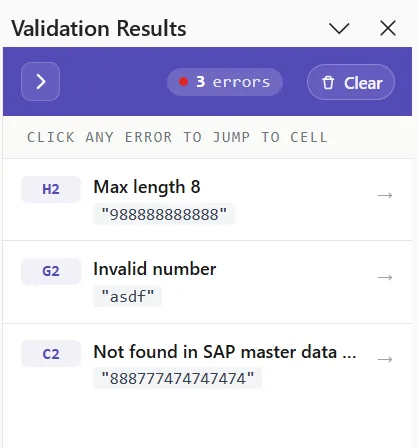
Far wiser before posting: an FI-AA error usually shows up as a short code once a document has already failed. Validate brings the check upstream, every row is measured against SAP's length, format, and required-field rules, the asset line and offset are checked to balance, and the problem cells are flagged, so the document is sound before anything is sent.
Confirm against live SAP
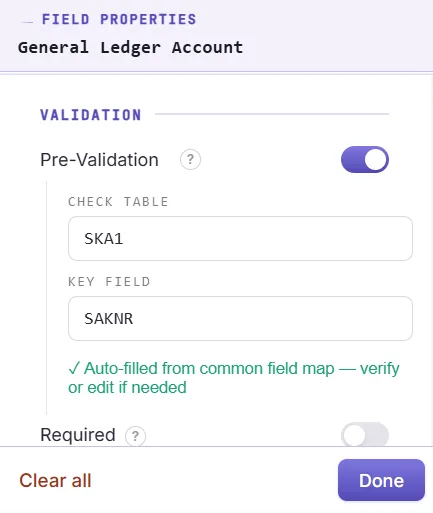
Clean formatting is no proof a value exists, an asset can read fine and be blocked or fully capitalized. To verify it, open the field's properties, enable field validation, and name the check table and field, an asset against ANLA, a vendor against LFA1, or a GL account against SKA1. Select the cell, run Validate master data, and PostNow asks live SAP whether the value exists and is open for posting.
Group lines into documents with loops
An acquisition pairing an asset line with its offset is a header/detail case, so this is where the structure pays off:
- Header/detail loops: rows sharing a document reference roll into one posting, the header taken once and each line added with its asset and transaction type or its offset.
- IF conditions: handle only the acquisitions you want, for example posting only where an asset value date is present, or holding back lines flagged as pending approval.
Set the scope, post, and review AI
Set the range with Run Scope, one acquisition first, then the rest, and press Run. A few aids:
- Run log: results post live and write into a log column next to each row in Excel.
- Payload view: open the exact data sent to SAP for any acquisition, header and lines together, so a failure is never a guess.
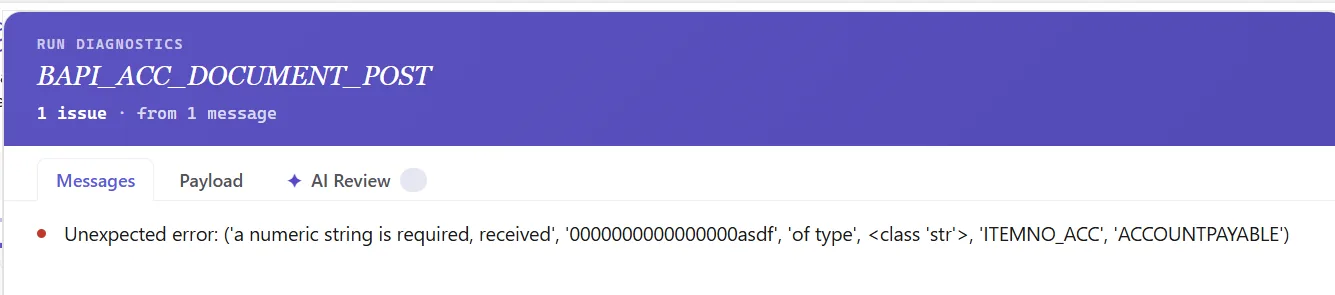
- AI error review: AI Review reads the FI-AA message and explains, plainly, what blocked the document and where to look.
- Document key: PostNow writes the document number back beside the acquisition it belongs to.
Publish and roll it out to the team
Once the run comes through clean, publish. The configuration, grouping and all, becomes a script the asset accounting team runs unchanged, they open it, paste their acquisitions, and post, with no mapping to rebuild and no need to know the BAPI underneath. A one-time build becomes the standard way to capitalize additions.
Let's talk
Bring a real capital schedule and a live SAP connection to a working session. We will set the asset, the transaction type, and the value date, map, validate, and post the acquisitions for real, with AI taking the strain. No slide decks.
Frequently asked questions
What is SAP asset posting automation?
F-90 or ABZON. With PostNow the acquisitions stay in Excel and post in one governed run via BAPI_ACC_DOCUMENT_POST, while AI maps the fields, checks the values, and explains any FI-AA error.How do you post asset acquisitions in SAP from Excel?
BAPI_ACC_DOCUMENT_POST, carries the asset fields on the line, and commits the document, so there is no F-90 keying and no ABAP.Which BAPI posts an SAP asset acquisition?
BAPI_ACC_DOCUMENT_POST posts the accounting document, with the ACCOUNTGL line carrying the asset number, sub-number, transaction type, and asset value date, and an offsetting vendor or clearing line completing the entry. It returns the document key and is persisted with BAPI_TRANSACTION_COMMIT, which PostNow handles for you.What makes an asset posting different from a journal entry?
BAPI_ACC_DOCUMENT_POST, but an asset posting carries asset-specific fields on the line, the asset number, sub-number, transaction type such as 100 for an external acquisition, and the asset value date that drives depreciation, while a plain journal posts only to GL accounts. The asset line is balanced by an offsetting vendor or clearing account, as in F-90 or ABZON.