Introduction
SAP does not offer a single way to load data; it offers several, each shaped by a different era and a different need. Choosing among them is easier once you can see what each one is actually for.
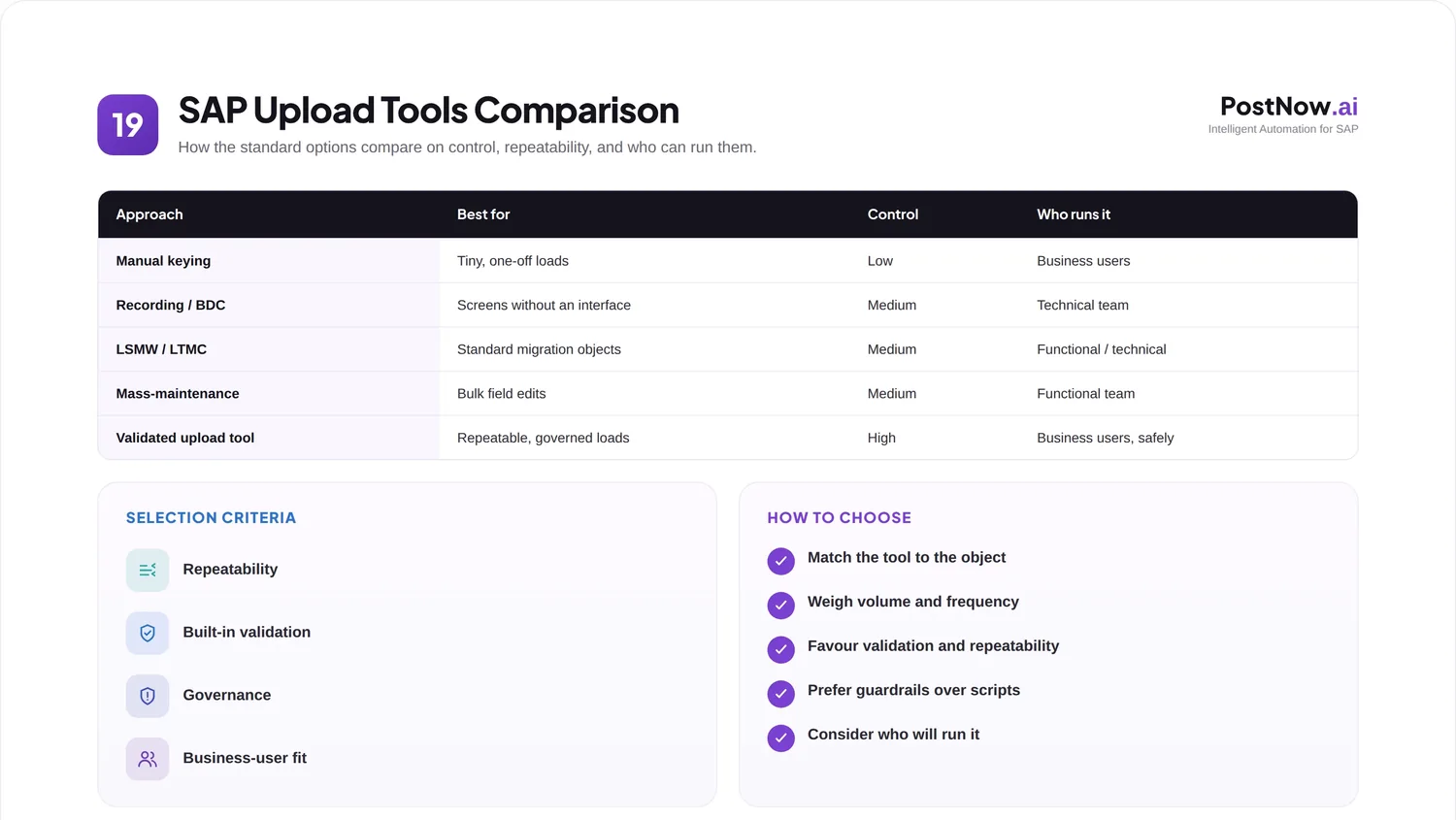
The question arises constantly. A team has data to load and reasonably asks which built-in option to use, only to find a confusing list of names, some modern and some decades old. Without a map, the choice can feel arbitrary, and the wrong pick leads to needless effort.
This is a neutral comparison of the standard approaches SAP provides. It explains what each is good for, how they differ on validation and upkeep, and how to choose, without favoring any vendor or product. For the wider category, the SAP automation tools pillar gives the bigger picture.
It is written for architects, consultants, and SAP teams who want to make a defensible choice rather than default to whatever they used last time.
A word on neutrality before we begin. The aim here is to describe each option fairly, not to steer you toward any one. Every approach below has earned its place for some situation, and the goal is to help you recognize which situation is yours.
It also helps to separate the tool from the discipline around it. Two teams using the same option can get very different results, because one validates and logs while the other does not. As you read, remember that how an approach is used often matters as much as which approach it is.
Throughout, the focus is on the options that ship with SAP, since those are the common starting point and the fairest basis for comparison. Where dedicated third-party tools fit alongside them is noted briefly, but the heart of this guide is the built-in toolkit every SAP customer already has.
One practical benefit of understanding the full set is confidence in conversations. When a colleague proposes a particular option, you can weigh it on its merits rather than simply deferring, and that shared understanding tends to produce better decisions across a team.
Core concepts: the standard options
A handful of built-in approaches cover most needs. Each sits at a different point between simplicity and power.
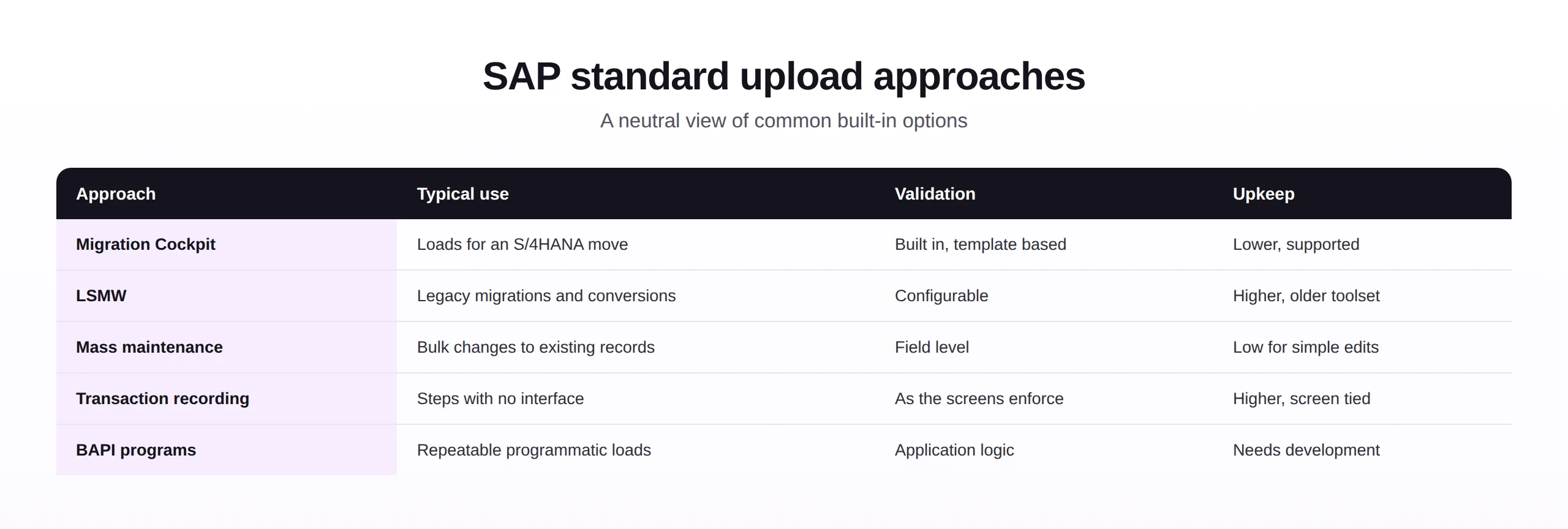
It helps to group the options loosely by purpose. Some exist mainly for migrations, some for routine bulk changes, and some for reaching transactions that nothing else can. Holding that rough grouping in mind makes the detailed differences easier to absorb.
The Migration Cockpit is the modern, supported route for loading data as part of a move to S/4HANA, working from templates or a staging area with validation built in. The older LSMW served the same broad purpose for years and is still seen in many ECC landscapes, though new migration work generally favors the cockpit.
Mass-maintenance transactions are designed for changing many existing records at once, which is a different job from creating them in bulk. Transaction recording replays a transaction as a user would, reaching steps that have no other interface. BAPI-based programs post through standard interfaces and suit repeatable programmatic loads, at the cost of needing development.
Seen together, they form a spectrum. At one end are quick, screen-based options anyone can run; at the other are robust, programmatic ones that need technical skill. The art is matching the point on that spectrum to the task in hand.
One more framing for the landscape: newer is not automatically better, and older is not automatically obsolete. A long-standing option that a team knows well and uses safely can be the right answer, just as a modern one can be overkill for a trivial task. Fit beats fashion.
Keep in mind, too, that these options are not mutually exclusive. A single program of work might use the cockpit for a migration, mass maintenance for ongoing edits, and a reusable approach for monthly loads. The comparison is about choosing per task, not about adopting one option forever.
With the options mapped out, the next question is simply which situation you are in, since that is usually what points most clearly to a sensible choice.
Business scenarios
The right option usually becomes obvious once the scenario is clear.
- An S/4HANA migration, where the cockpit is built for the job and well supported.
- A legacy ECC load, where established workbench tooling may already be in place.
- A bulk field change, such as updating terms across many records, suited to mass maintenance.
- A custom transaction, with no interface, where a recording is the practical route.
- A recurring operational load, where a validated, governed, reusable approach earns its keep.
Notice that some of these are one-time events and others repeat. That distinction matters as much as the object itself, because an approach that is fine for a single load can become a burden when it has to run every month.
It is worth writing down which of your loads are one-time and which recur, because that single list often makes the tool choices obvious. Recurring loads justify investment in something reusable, while genuine one-offs rarely do, and confusing the two is a common source of wasted effort.
When two options seem equally suitable, let governance and auditability break the tie. In most organizations the ability to control and prove a load matters more in the long run than a small difference in convenience, and it is the factor most often regretted when overlooked.
Recommended approaches
Rather than crown a single winner, match the approach to the shape of the work.
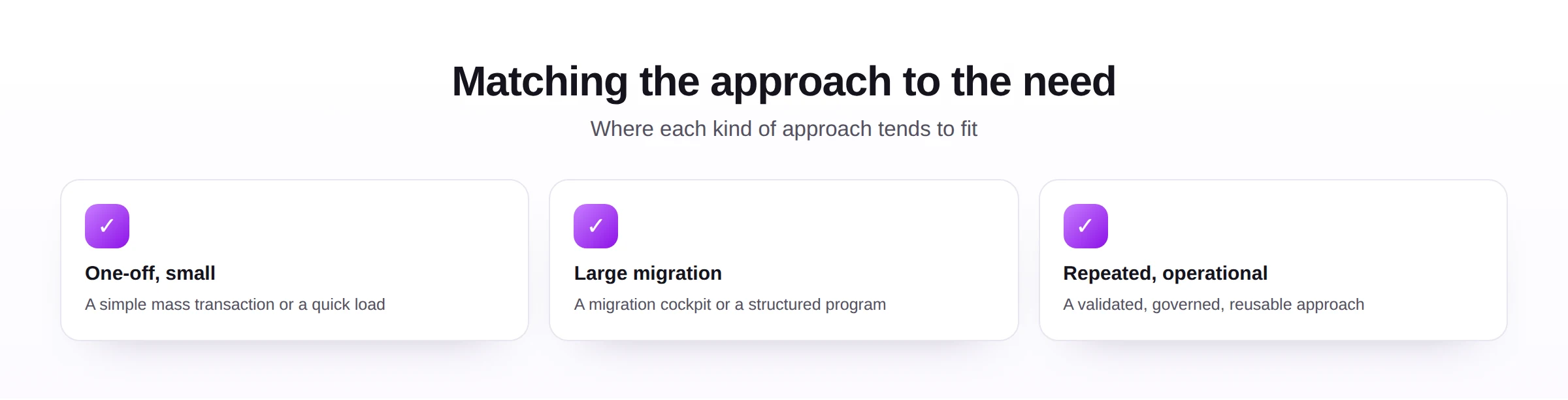
For one-off, small loads
A simple mass-maintenance transaction or a quick load is often enough. The effort of setting up something more elaborate is not justified when the task happens once and the volume is modest.
For these small tasks, resist the temptation to over-engineer. Building a robust, reusable program for a load that will never run again is effort spent for no return. The simplest safe option that gets the job done is usually the right one when the work is genuinely one-time.
For large migrations
Reach for a purpose-built option such as the Migration Cockpit, or a structured program, supported by a clear data migration plan. These handle volume and validation at scale, which ad hoc methods struggle to do safely.
Large loads are where the differences between options matter most, because volume magnifies every weakness. An approach that validates poorly or cannot scale will reveal those flaws painfully at migration scale, so this is the moment to favor proven, supported tooling over improvisation.
For repeated, operational loads
When the same load runs regularly and business users are involved, favor an approach that is validated, governed, and reusable. The underlying mechanism matters less than whether it can be run safely, again and again, by the people who own the data.
Across all three shapes of work, the same quiet question decides well: who will run this, how often, and how will we prove it worked. Answer those honestly and the field of options narrows quickly, often to one or two sensible candidates.
It is worth saying that no criterion should be applied in isolation. An option can score well on ease of use yet poorly on auditability, and which of those wins depends entirely on your context. The criteria are a lens for thinking, not a formula that produces a single answer.
Selection criteria
When the scenario alone does not decide it, weigh the options against a consistent set of criteria.
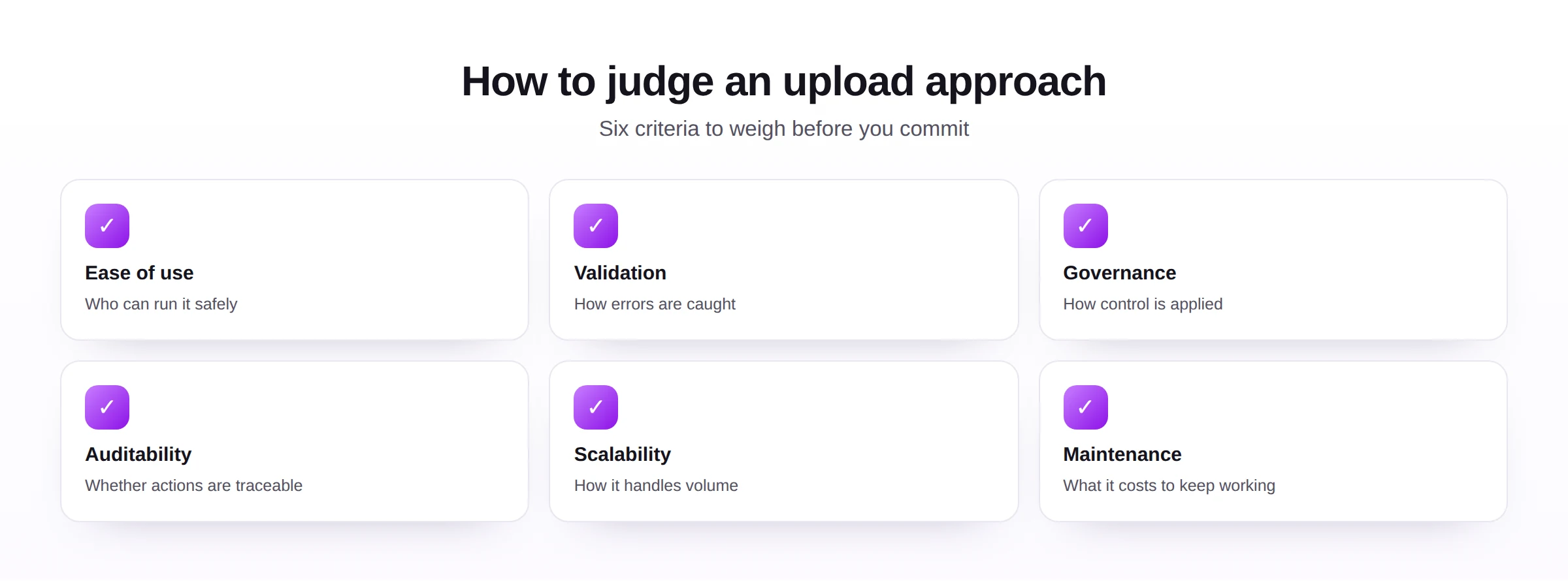
| Criterion | Ask yourself... |
|---|---|
| Ease of use | Can the people who own the data run it safely? |
| Validation | Are errors caught before posting, not after? |
| Governance | Can you control who loads what, and how? |
| Auditability | Is there a clear record of every load? |
| Scalability | Will it cope as volume grows? |
| Maintenance | What does it cost to keep working over time? |
Weighting these against your own situation matters more than any ranking. A criterion that is decisive for one team, such as letting business users run loads, may be irrelevant to another that has dedicated technical staff.
A practical way to use these criteria is to score each candidate roughly, even informally, against the ones that matter most to you. The exercise rarely produces a tie, and it replaces a vague preference with a reasoned choice you can explain to others later.
A final note on the criteria: revisit them as your needs change. An approach chosen when loads were small and occasional may no longer fit once they are large and frequent, and periodically rechecking the choice against these six points keeps your tooling aligned with reality.
Common mistakes
Most poor choices come from ignoring the scenario or the long-term cost.
The corrections are straightforward: match the approach to whether the load repeats, prefer supported options for new work, budget for maintenance, build in governance from the start, and let the choice vary by scenario rather than by habit.
The recurring theme in these mistakes is time. Almost every poor choice looks fine on the day it is made and only reveals its cost weeks or months later, when the load repeats, the screen changes, or the auditor asks a question. Choosing with that future in mind avoids most of them.
Best practices
Whichever approach you choose, a few practices keep it safe and maintainable.
- Validate before posting, so errors never reach SAP regardless of the method.
- Keep an audit trail, recording each load for review and compliance.
- Apply governance, grounded in master data governance, so control does not depend on the tool alone.
- Plan for maintenance, treating recordings and programs as assets that need upkeep.
- Reuse a consistent approach, so similar loads work the same way across the team.
None of these practices depends on a particular tool, which is deliberate. Validation, audit trails, governance, and maintenance planning make any approach safer, and a team that adopts them can change tools later without losing the discipline that kept their loads trustworthy.
Future trends
The standard toolset is consolidating, and the emphasis is shifting toward validation, governance, and ease of use.
- Consolidation, as modern, supported options replace older workbenches for new work.
- Built-in validation, increasingly expected rather than added afterward.
- Self-service loading, putting safe, governed loads in business users' hands.
- AI assistance, suggesting mappings and flagging likely errors before a load.
- Auditability by default, as compliance expectations rise across the board.
Whatever the toolset looks like in a few years, the criteria for judging it will hold. The best approach will still be the one that is easy to run, hard to get wrong, and simple to prove after the fact.
For teams deciding now, a sensible default is to use supported, validating options for new work, keep older tools only where they still serve, and add a reusable layer wherever the same load repeats. That blend tends to age well as the standard toolset continues to evolve.
The encouraging conclusion is that there is rarely a wrong family of options, only a wrong fit. Almost any of these approaches, used with validation and governance, can serve well for the task it suits, and the comparison is really about steering each load to its natural home.