Introduction
Ask any SAP team where their data really lives before it reaches the system, and the answer is almost always the same: a spreadsheet. Excel to SAP automation is simply the discipline of making that last step, from workbook to SAP, fast, safe, and repeatable.
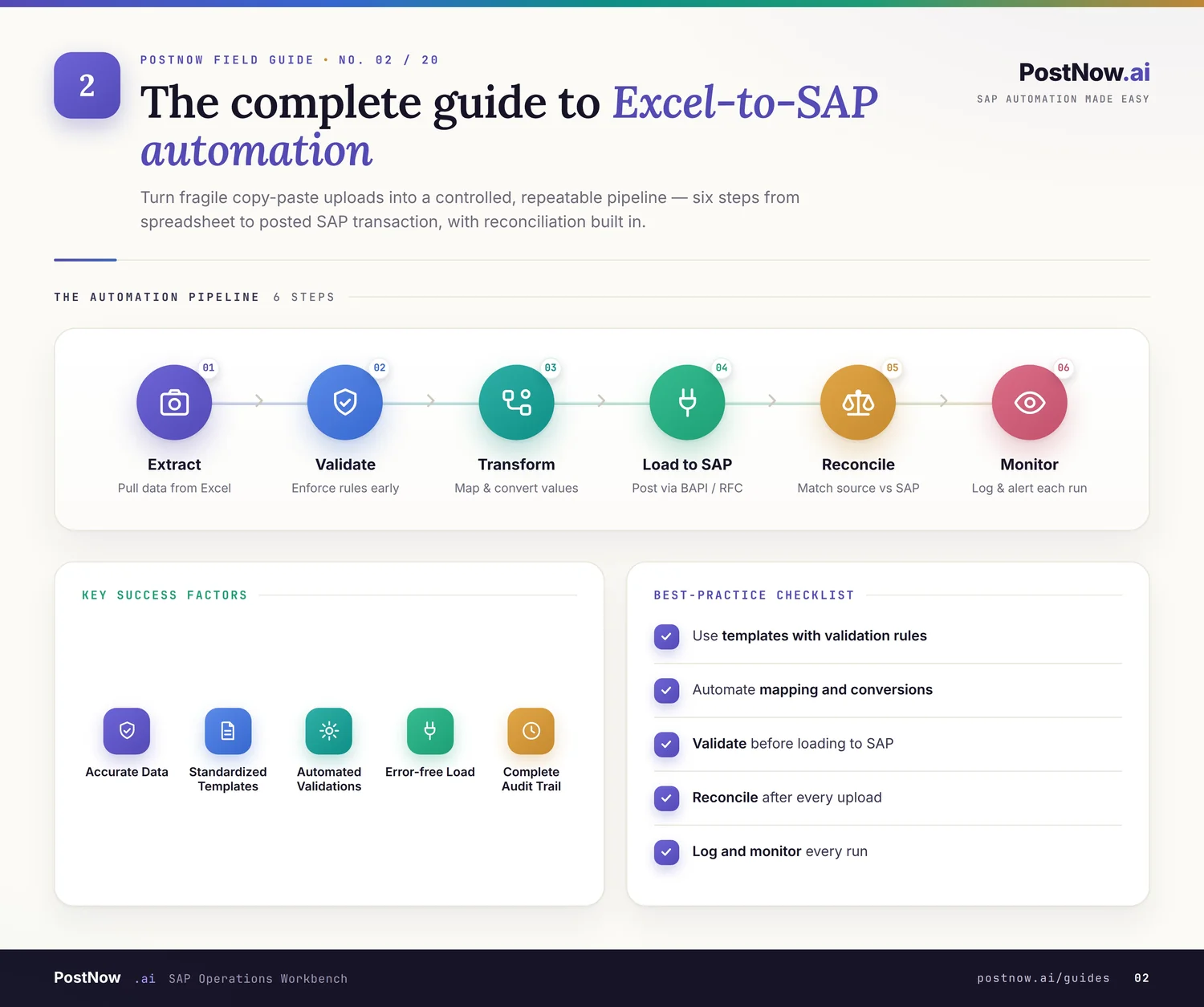
This guide is a practical companion to the Excel to SAP automation pillar. Where the pillar explains what the topic is, this article focuses on the decisions you face when you actually build an upload: which method to use, how to design the template, how to layer validation, and how to keep the whole thing governed.
It is written for the people who do the work, finance and procurement analysts, functional consultants, and the SAP teams who support them. The aim is to leave you able to choose well and avoid the traps, rather than just to define the term.
Before diving into mechanics, it is worth stating the goal plainly. The point of automating an Excel upload is not to remove Excel; it is to remove the risk and tedium of the final step, so the spreadsheet stays useful and the data that lands in SAP is reliable. Hold that goal in mind and the rest of the choices fall into place.
A quick note on scope: this guide is about getting prepared data into SAP, not about how to prepare it in the first place. Cleaning and shaping data in Excel is its own skill; here we pick up at the point where a workbook is ready and the question becomes how to load it well.
Core concepts
Every upload, however it is built, does the same four things. Understanding them makes every later choice clearer.
It is tempting to treat an upload as a single action, the click that sends data to SAP. In reality it is a short pipeline, and naming the stages makes it far easier to reason about where a problem lives and which choice affects what.
A weak upload skips one of these, usually validation or logging, and that is exactly where trouble starts. A strong upload treats all four as non-negotiable, no matter how small the load.
It also helps to separate the spreadsheet from the mechanism. The workbook is where people think and correct; the upload mechanism is the careful bridge that carries their work into SAP without losing or distorting it. Keeping that line clear stops a messy file from becoming a messy posting.
One more idea is worth adding to the four: reversibility in review. You cannot always undo a posting, but you can make sure that what happened is fully visible afterward. A load that can be explained line by line, long after the fact, is far easier to trust than one that simply succeeded quietly.
These stages also map neatly onto where things tend to break. Mapping errors show up as data in the wrong field, validation gaps show up as bad records inside SAP, and missing logs show up as questions no one can answer later. Knowing the stage usually tells you where to look.
Common challenges
The difficulties of moving Excel data into SAP are familiar to anyone who has tried it by the manual route.
- Ambiguous templates, where two people fill the same column in different ways.
- Hidden formatting, where dates, leading zeros, and decimals quietly change on the way in.
- Late error discovery, where a problem only appears after a record has posted.
- Volume, where a list of hundreds of rows is simply impractical to key one screen at a time.
- No trail, where there is no clean record of who loaded what.
None of these is a reason to abandon Excel, which remains the right place to prepare data. They are reasons to automate the upload, so the strengths of the spreadsheet are kept and its risks are contained.
It is also worth being clear about scale. A single record typed once is fine; the case for automation grows with every additional row and every repeat of the same task. If you find yourself doing the same upload monthly, or pasting hundreds of lines, that is the signal to invest in doing it properly.
Recommended approach
A good upload is the sum of a few deliberate choices. Take them in order: method, template, validation, then governance.
The order of these four choices matters. Method, template, validation, and governance build on each other, and skipping ahead, picking a tool before designing the template, tends to bake in problems that are awkward to remove later. Taking them in sequence keeps each decision clean.
Choosing a method
There is no universal best method. The right one depends on the object, the volume, and how often the load repeats.
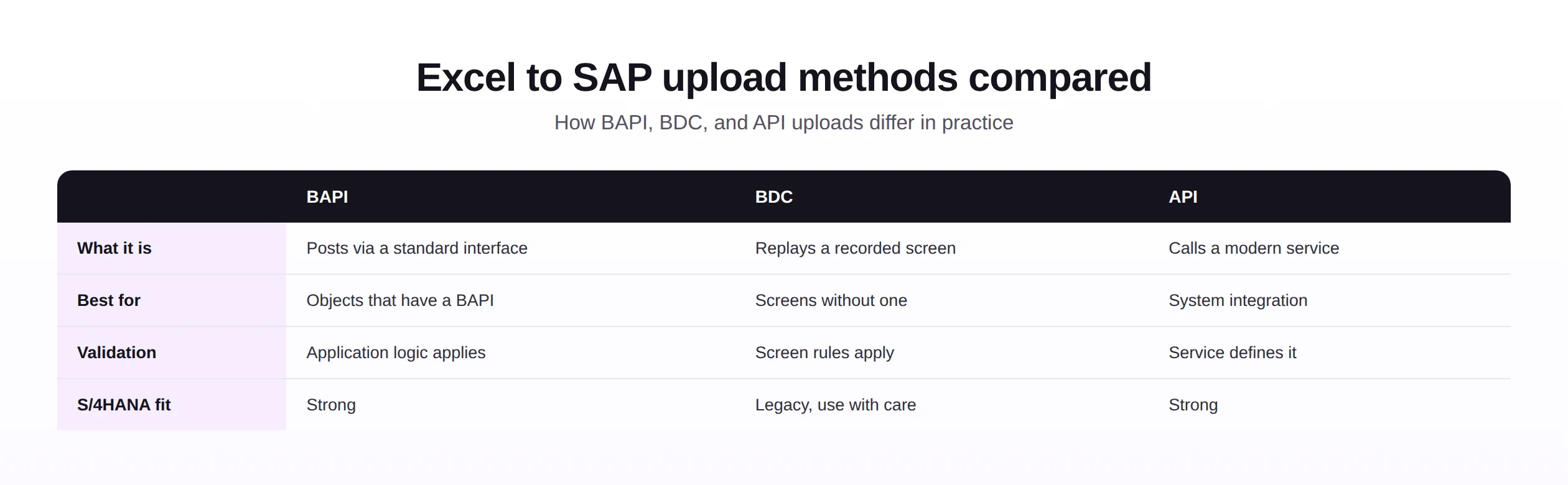
As a rule of thumb, prefer a BAPI where one exists, because it posts through the application's own logic. Reach for a recorded transaction when a screen has no interface, and use an API when the job is really about integration between systems. A capable tool will make this choice for you per object.
The method is the part users worry about most and tools handle best. What matters from a business point of view is not which interface is used, but that the chosen one validates properly and posts reliably. That is why the comparison above is useful for understanding, not something most users should have to decide on every load.
Designing the template
The template is the part users actually touch, so it deserves real care. A clear template prevents more errors than any amount of downstream checking.
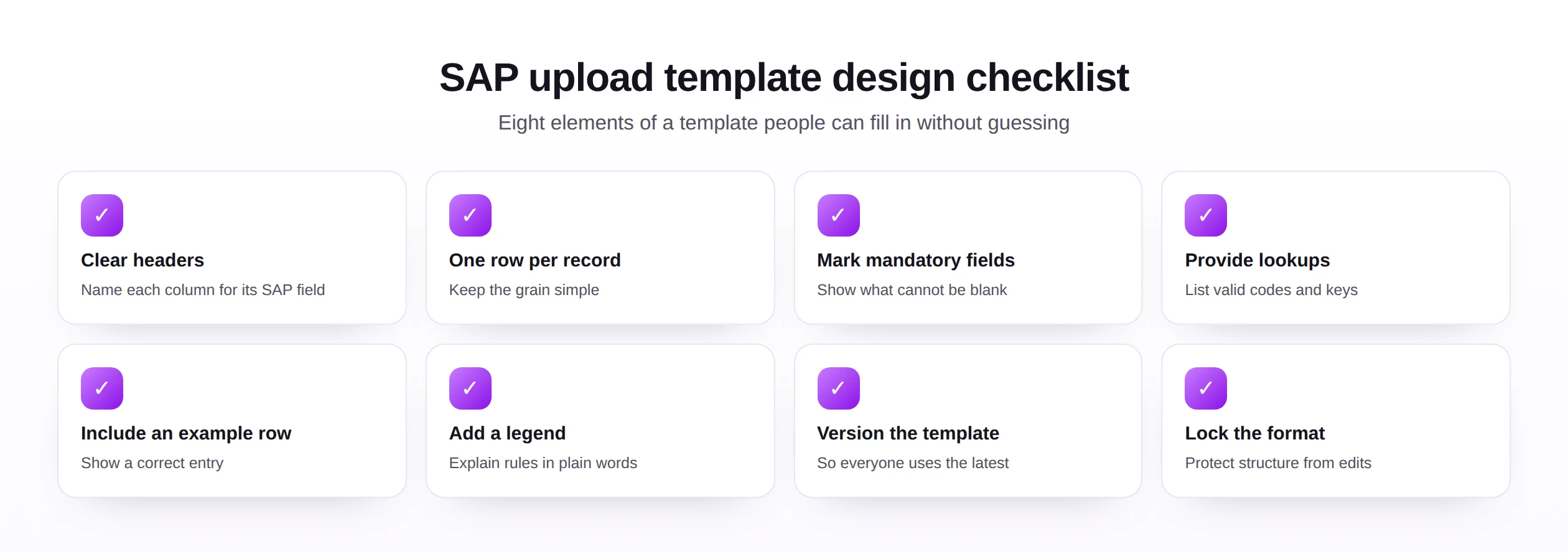
Treat the template as a shared, versioned asset rather than a personal file. When it carries the field names, the mandatory markers, the valid codes, and a worked example, anyone on the team can prepare a clean upload, and the knowledge does not leave with one person.
A surprising amount of upload pain disappears with a good template alone. When the structure is fixed, the headers are unambiguous, and the valid values are listed, people simply cannot make many of the mistakes that plague free-form spreadsheets. The template is the cheapest quality control you will ever build.
Layering validation
Validation is most effective when it is layered, with each layer catching a different class of problem before anything reaches SAP.
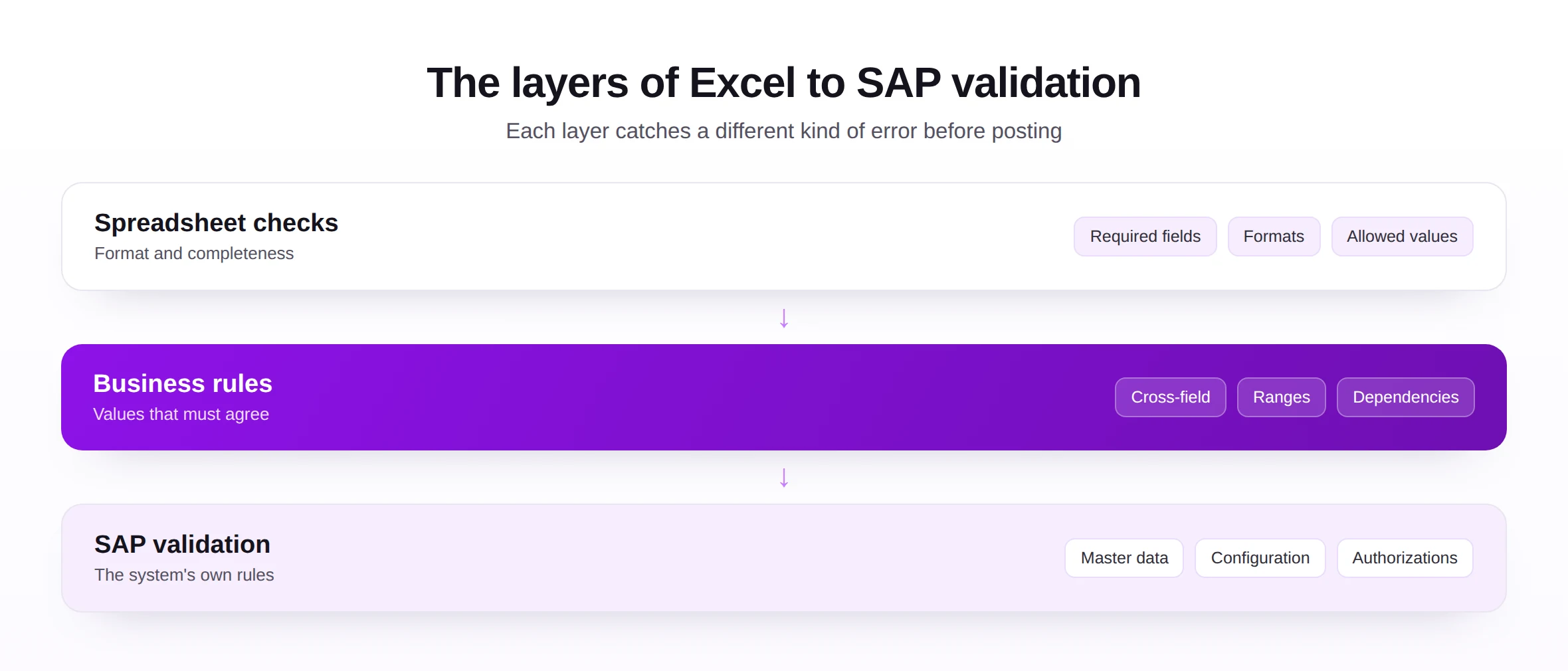
Simple format and completeness checks come first, then business rules that test whether values agree with one another, and finally the system's own rules through a check against SAP. By the time a row reaches the posting step, it has already survived three different kinds of scrutiny.
The reason to layer validation, rather than rely on a single check, is that errors come in different kinds. A value can be perfectly formatted yet wrong for the business, or correct in isolation yet invalid once SAP applies its own configuration. Only by checking at each level do you catch all three, and only before posting does catching them stay cheap.
Keeping it governed
- Decide who may load which objects, and respect SAP roles and segregation of duties.
- Keep a log of every upload, so any load can be reviewed after the fact.
- Test each new upload on a safe set of records before it touches production data.
Governance is what lets an upload grow from one analyst desk to a whole team without turning into a free-for-all. It is not about slowing people down; it is about making the safe path the default one, so doing the right thing is also the easy thing.
Worth saying plainly: the four choices are not one-time decisions. Templates evolve, validation rules tighten as you learn, and governance widens as more people join. Treat the approach as something you revisit, not a setup you complete once and forget.
A method-selection framework
When the choice of method is not obvious, a few questions settle it quickly.
| Question | If yes, lean toward |
|---|---|
| Does the object have a standard BAPI? | BAPI-based posting |
| Is the screen custom or without an interface? | A recorded transaction |
| Is the real need integration between systems? | An API |
| Will the same load run many times? | A validated, repeatable tool |
| Will business users run it themselves? | A tool with guardrails, not a script |
Run the same reasoning across the objects you load most, from the vendor and material masters to journal entries and sales orders. For loads that feed a system move, pair the same templates with a clear data migration plan.
The framework is intentionally simple, because the choice rarely needs to be agonized over. In most real cases one or two of these questions point clearly to an answer, and the remaining nuance is something a good tool absorbs. Spend the saved energy on the template and the validation, where it has more impact.
It also pays to write the chosen method down alongside the template, so the next person does not have to rediscover it. A one-line note that an object posts through a particular interface saves real time when something needs to change months later.
Common mistakes
The failures below are common precisely because each one feels harmless in the moment.
Each has a simple antidote from the approach above: a clear template, layered validation, a safe test, a complete log, and a shared, documented process. None of them is expensive, and together they turn a risky habit into a dependable routine.
Notice that none of these mistakes is really technical. They are shortcuts, each taken to save a little time now at the cost of more time later. Recognizing them as shortcuts is half the cure, because it reframes the extra few minutes of setup as the bargain it actually is.
If there is a single rule to remember, it is to validate against SAP rather than against the spreadsheet. A file can look immaculate and still be rejected by the system, so only a check against SAP itself tells you the truth before you commit to a posting.
Future trends
Uploads are getting more assisted and more self-service, while the need for validation stays constant.
- Assisted mapping, where a tool proposes how columns line up with SAP fields.
- Smarter validation, flagging values that look wrong before a load runs.
- Self-service uploads, letting business users build their own safely.
- Low-code building, reducing the technical effort an upload needs.
- Tighter governance, as more teams share standards and controls through automation tools.
For all the progress, the measure of an upload will not change: did the right data reach SAP, was it checked, and can you prove what happened. The fundamentals outlast every new feature.
The practical takeaway is to lean into the assistance without surrendering judgment. Let a tool suggest a mapping or flag an odd value, and accept the help gladly, but keep the human checks that confirm the data is genuinely right. Speed and safety are not in tension when the safety is built in.
For most organizations, the honest near-term opportunity is unglamorous: take the handful of uploads that consume the most manual hours each month and make them clean, validated, and repeatable. That alone frees more time than any speculative future feature, and it lays the groundwork for smarter tooling when it arrives.