What is SAP test automation?
SAP test automation means software runs SAP business-process tests instead of people. It posts transactions, reads back what SAP saved, compares key reports and records the evidence after every change. PostNow.ai SAP Testing is an SAP test automation tool that does this through BAPIs, SAP table checks and SE38 report baselines, from a runner on your own machine.
- Judge a tool by what it proves, not by how many screens it can click. A test should read the document back from SAP.
- Start with one posting process and one scenario that SAP must reject, then grow the suite.
This guide is for SAP test leads, functional consultants and IT managers choosing how to automate SAP testing, with a list of SAP testing tools and how they compare. Testing done by hand is covered under manual testing in SAP.
SAP automation testing vs manual SAP testing
SAP automation testing, or automated testing in SAP, lets software execute SAP test cases, check the results in SAP and keep the evidence, so that people only design tests and judge failures. PostNow.ai SAP Testing runs those tests from automations your team already uses to post data into SAP.
Manual SAP testing means a tester keys a sales order, a goods receipt or a journal entry, then opens the document and compares it by eye. That works once. It doesn't work every time a transport, SAP Note or support package lands, because the same postings have to be repeated in every company code and document type they cover.
SAP is harder to automate than most applications for three reasons:
- The result lives in tables, not on the screen. A posting is right only if
EKKO,MATDOCorACDOCAhold the right values afterwards. - Organizational units multiply every test. The same posting behaves differently per company code, plant and sales organization.
- Changes arrive as transports. Teams need to know which tests to run when a request reaches the test system.
Its most common use is regression testing: proving that a change broke nothing. The other types of testing in SAP follow the same pattern.
SAP automated testing with PostNow.ai SAP Testing
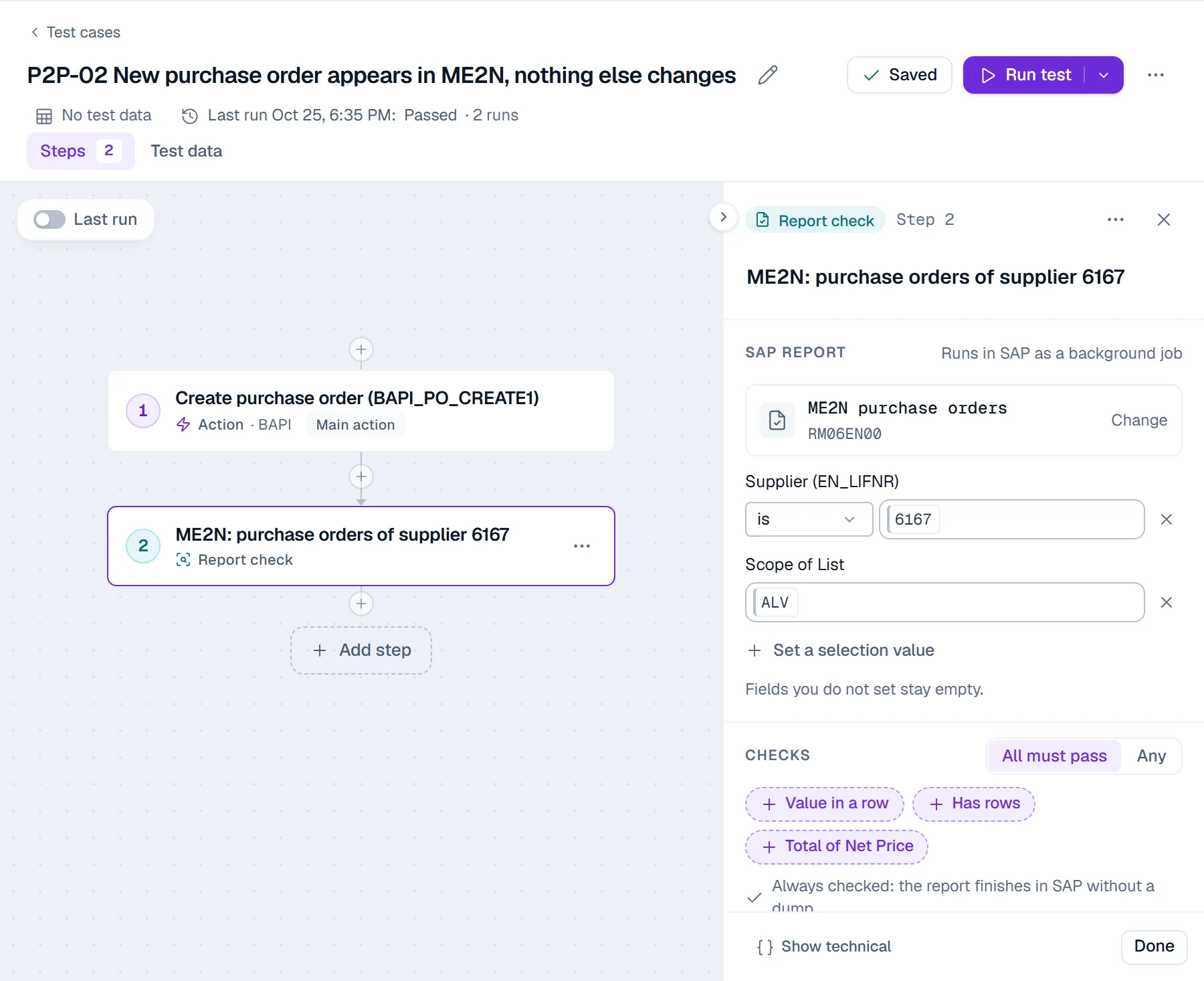
PostNow.ai SAP Testing builds each automated test as a chain of steps in the browser, from automations you have already published for posting data into SAP. A test case combines three kinds of step:
| Step | What it does | Example |
|---|---|---|
| Action | Posts through a published BAPI or API automation, the same engine used for SAP mass upload from Excel. SAP GUI recording steps run through PostNow.ai on your own computer, with your own SAP login, once SAP GUI scripting is enabled. | Create a purchase order with BAPI_PO_CREATE1 |
| Check | Reads SAP tables and compares fields with the test data or a fixed value | Supplier and quantity in EKKO / EKPO |
| Report check | Runs an SE38 report in SAP as a background job and checks its output, or compares it with a baseline | ME2N (program RM06EN00) for one supplier |
Variables carry values between steps: the purchase order number from step 1 becomes the filter of step 2, so every check reads exactly the document the test created.
SAP test automation framework: six layers
An SAP test automation framework is the set of layers every automated SAP test needs: data, actions, checks, report comparison, execution and evidence. PostNow.ai SAP Testing provides all six in one product, so a team builds tests instead of the framework around them.
1. Test data and scenarios
Each row of a test data set runs as one scenario. A row is marked Expect success or Expect rejection, so a negative case, such as an unknown supplier, passes only when SAP refuses it. Data sets come from Excel and go back to Excel. Generate scenarios proposes extra rows with AI from the column names only, so SAP values stay with you.
2. Actions that post
Actions post through a BAPI or an API wherever one exists, because a BAPI applies SAP's own checks and is independent of screen layouts. SAP GUI recording steps cover transactions without a suitable BAPI. The trade-offs between the two routes are in BAPI vs BDC in SAP.
3. Checks on SAP tables
A check runs a read query on the tables a posting must change and asserts field values: equal, greater than, within a tolerance, against the test data or a fixed value. After an S/4HANA migration that means reading MATDOC, ACDOCA and PRCD_ELEMENTS, the tables SAP writes there.
4. Report comparison
A report step runs an allow-listed SE38 report and compares every row with a baseline: a pinned earlier run, or the same report run just before the first posting. Rules describe the changes you expect, rows are matched by key, and the full output can be downloaded to Excel. Most teams start with the reports finance and logistics already check by hand.
5. Execution
An environment pairs an SAP system and client with a runner and the SAP login tests run under. The runner is installed on your own Windows machine and connects out over HTTPS. SAP logins are encrypted in your browser for that runner, so PostNow.ai's server cannot read them. Production environments are validation-only, so tests there read and compare.
6. Evidence and defects
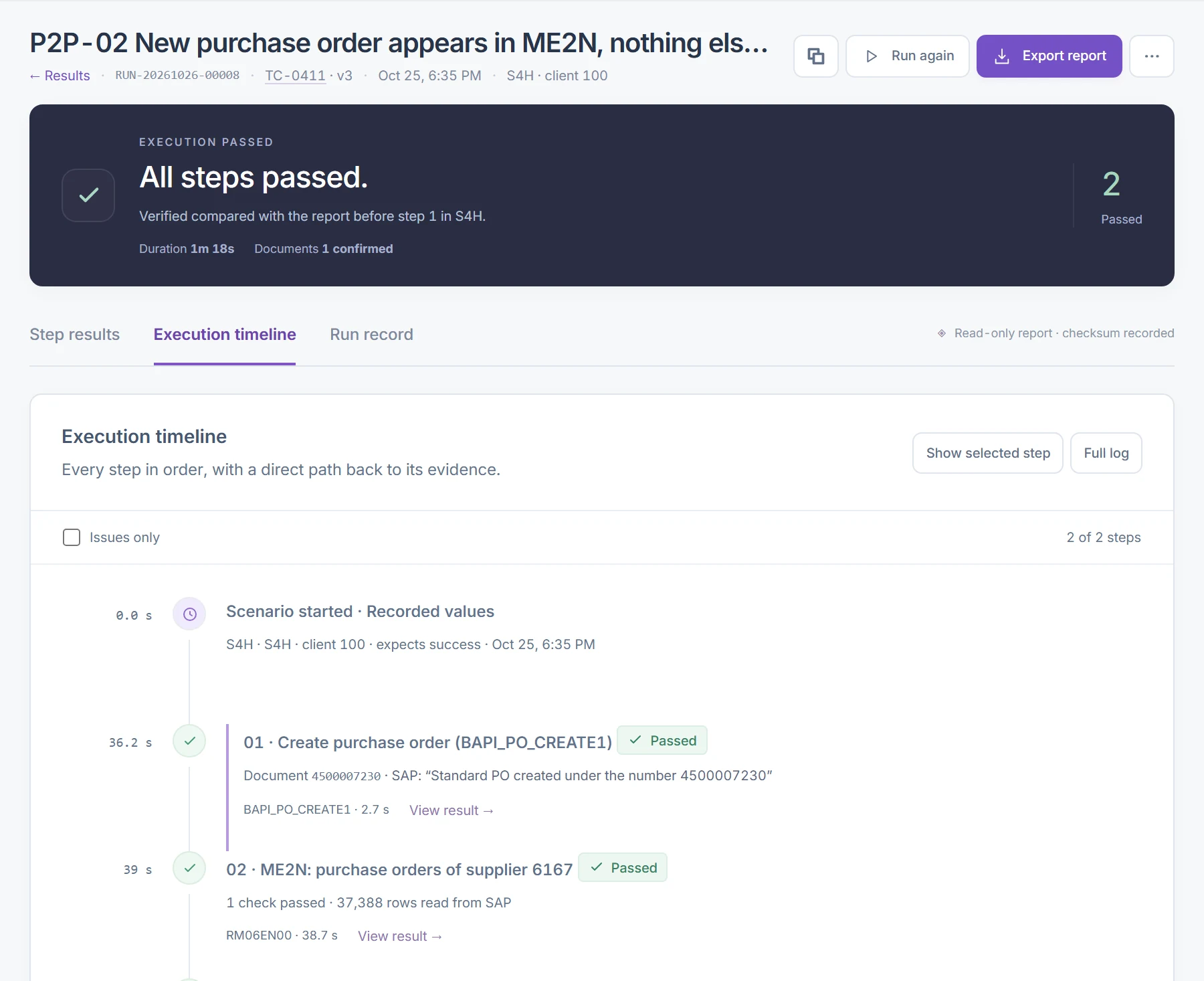
Every run leaves a read-only run record: inputs, SAP messages, document numbers and expected against actual for every check, with a SHA-256 checksum and a retention of one, three or seven years. From a failed run, Log defect records a defect against that run and its failed step.
Which SAP processes to automate first
Start where a wrong posting costs money, and pair each posting with the tables that prove it. Typical first candidates in PostNow.ai SAP Testing:
| Process | Post through | Check in |
|---|---|---|
| Procure to pay | BAPI_PO_CREATE1 | EKKO, EKPO, report ME2N |
| Order to cash | BAPI_SALESORDER_CREATEFROMDAT2 | VBAK, VBAP |
| Record to report | BAPI_ACC_DOCUMENT_POST | ACDOCA on S/4HANA, BKPF and BSEG on ECC |
| Inventory | BAPI_GOODSMVT_CREATE | MATDOC on S/4HANA, MSEG on ECC, report MB51 |
Organizing SAP test automation: suites, cycles and schedules
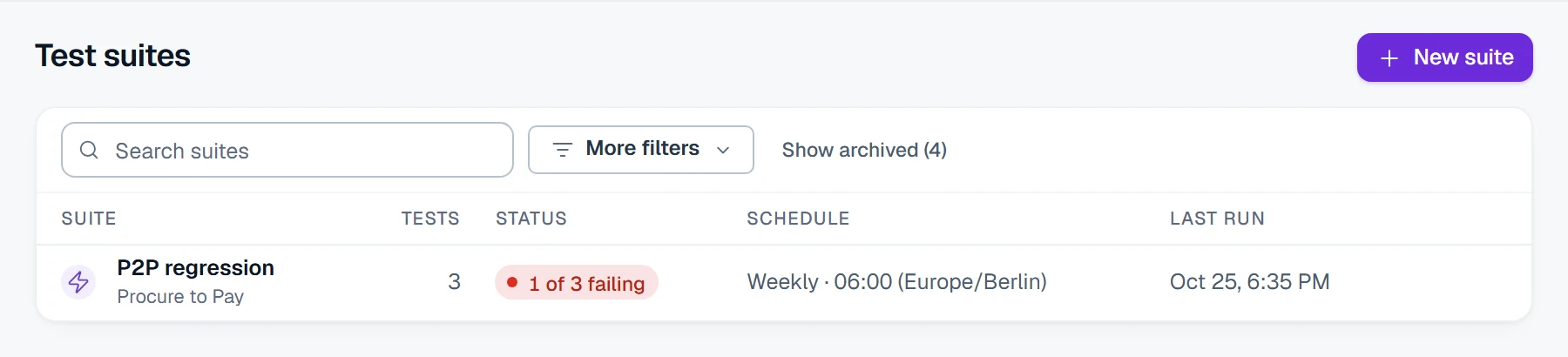
PostNow.ai SAP Testing organizes automated tests in three levels: suites group tests by process, cycles track a test phase or release, and projects tie them to an environment and dates. A suite runs on a schedule (daily, weekdays, weekly or monthly, in your time zone) with all scenarios or only those that failed last time.
Four roles keep the work separated: the Testing Manager owns environments and projects, the Test Designer builds tests, the Test Executor runs them and the Viewer reads results. When a transport reaches the test system, start a transport run: it lists the tests that use its objects; the details are in regression testing per transport.
SAP testing tools compared
The main SAP test automation tools are PostNow.ai SAP Testing, Tricentis Tosca, Worksoft Certify, Panaya, Leapwork, Opkey, and SAP's own eCATT, CBTA and Cloud ALM. They differ most in the level they automate at: the screen, the BAPI and table level, or the business process model. Other vendors' descriptions come from their own public material.
| SAP testing tool | Automates at | Built for | Notes |
|---|---|---|---|
| PostNow.ai SAP Testing | BAPI and API postings, SAP table checks, SE38 report baselines, SAP GUI recordings | SAP teams who need proof of what SAP saved | Runner on your own Windows machine, SAP logins sealed to it, read-only run records with a checksum |
| Tricentis Tosca | Model-based, codeless UI and API automation | Enterprise SAP and connected applications | Per Tricentis. SAP separately offers Tricentis Test Automation for SAP to Enterprise Support customers |
| Worksoft Certify | Codeless automation of business processes | Business process teams | Per Worksoft, built for users who don't write code |
| Panaya | Test management and codeless automation (Test Dynamix) | Upgrades and S/4HANA moves | Per Panaya, combined with change impact analysis (Release Dynamix) |
| Leapwork | Visual, no-code automation flows | Teams testing SAP alongside other applications | Per Leapwork's own positioning |
| Opkey | No-code test automation for ERP | Oracle, Workday and SAP customers | Per Opkey, with pre-built tests across ERPs |
| SAP eCATT, CBTA, Cloud ALM | Scripts, test components, and a Tricentis tenant provisioned from Cloud ALM | SAP-native landscapes | Per SAP; CBTA follows Solution Manager support |
A short list for an SAP landscape usually starts from one question: do you need to automate the user interface itself, or to prove that SAP posted correctly and that key reports still match? Both are SAP automated testing tools; teams buy them for different reasons.
SAP's own test automation tools: eCATT, CBTA, Solution Manager and Cloud ALM
SAP has shipped its own test automation tools over several generations. Before you compare them with PostNow.ai SAP Testing, it helps to know what each one is:
- eCATT (transaction
SECATT): SAP's built-in tool for recording SAP GUI transactions and calling function modules in scripts. - CBTA (Component Based Test Automation) in SAP Solution Manager: per SAP, it is supported as long as Solution Manager is supported and will not be extended to SAP's cloud products. Solution Manager mainstream maintenance ends at the end of 2027.
- SAP Cloud ALM: per SAP, customers provision a Tricentis tenant from their Cloud ALM tenant and create automated tests there. SAP calls the offering Tricentis Test Automation for SAP integrated with SAP Cloud ALM.
For SAP Solution Manager automated testing, plan the CBTA replacement before that date. For automating postings rather than tests, see SAP automation tools for posting data.
How to choose the best SAP testing software
Choose SAP testing software by what it proves, where your SAP passwords live and what it tells you after a change. The criteria below are the questions to put to every vendor. The last column shows how PostNow.ai SAP Testing answers each one.
| Criterion | Why it matters in SAP | Ask the vendor | PostNow.ai SAP Testing |
|---|---|---|---|
| Proves what SAP saved | A success message can hide an update that never reached the database | Does a test read the document back from the tables? | Check steps read SAP tables with assertions |
| Reports people trust | Finance and logistics sign off on reports, not on screens | Can a test compare a report with a baseline? | SE38 report baselines with expected-change rules |
| Same path as real postings | A test that posts differently from users proves little | Does the test use the same interface users post through? | Action steps use the published automations users post with |
| Scenarios that must fail | A check that can't fail proves nothing | Can a scenario expect a rejection? | Expect rejection per data row |
| Where SAP passwords live | Test logins can post real documents | Who can read the stored SAP login? | Encrypted in the browser for your runner; PostNow.ai's server cannot read it |
| Production safety | There is no undo for a posting in production | Can a test post in production by mistake? | Production environments are validation-only: tests there read and compare |
| What to run after a change | Transports arrive every week | How do I find the tests a transport touches? | Transport runs read E070, E07T and E071 and list the related tests |
| Audit evidence | Auditors ask what ran, on which data, under which user | What does a run record contain, and for how long? | Read-only record with a SHA-256 checksum, kept 1, 3 or 7 years |
| AI and data privacy | SAP data is often confidential | What does the AI see? | Scenarios are generated from column names only |
Then run a two-week pilot on one posting process, with one scenario that SAP must reject, before buying for the whole landscape.
Benefits of SAP test automation
The benefit of SAP test automation is that every change gets the same full check, not only the one people have time for. With PostNow.ai SAP Testing that means:
- Every transport gets its related tests. Start a transport run when a request reaches the test system, and the full suite runs on its schedule.
- Postings are proven in the database. A check catches a document SAP numbered but never saved, which a success message alone would hide.
- Reports stay trustworthy. Baseline comparisons show exactly which rows changed after a posting.
- Evidence is ready for audit. Each run record names the test version, data, SAP user and results, with a checksum.
Getting started: your first automated SAP test
Your first automated SAP test in PostNow.ai SAP Testing reuses an automation you already post with, so it takes five steps:
- Pick one published automation, for example purchase order creation through
BAPI_PO_CREATE1. - Add a check that reads the document back from
EKKOandEKPO. - Add three scenarios, including one that SAP must reject.
- Run it on a test environment and open the run record.
- Put it in a suite with a schedule, so it runs without anyone starting it.
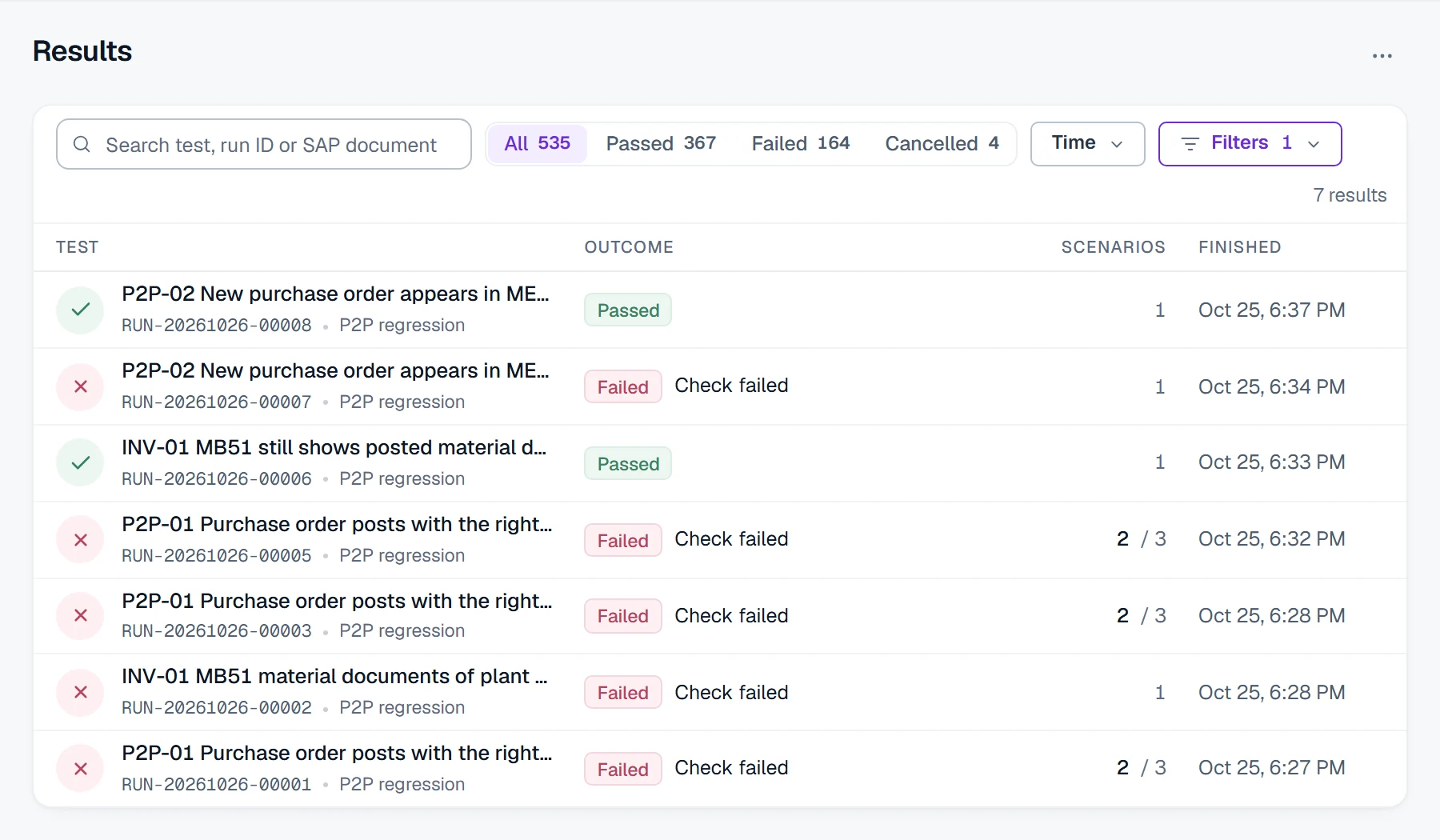
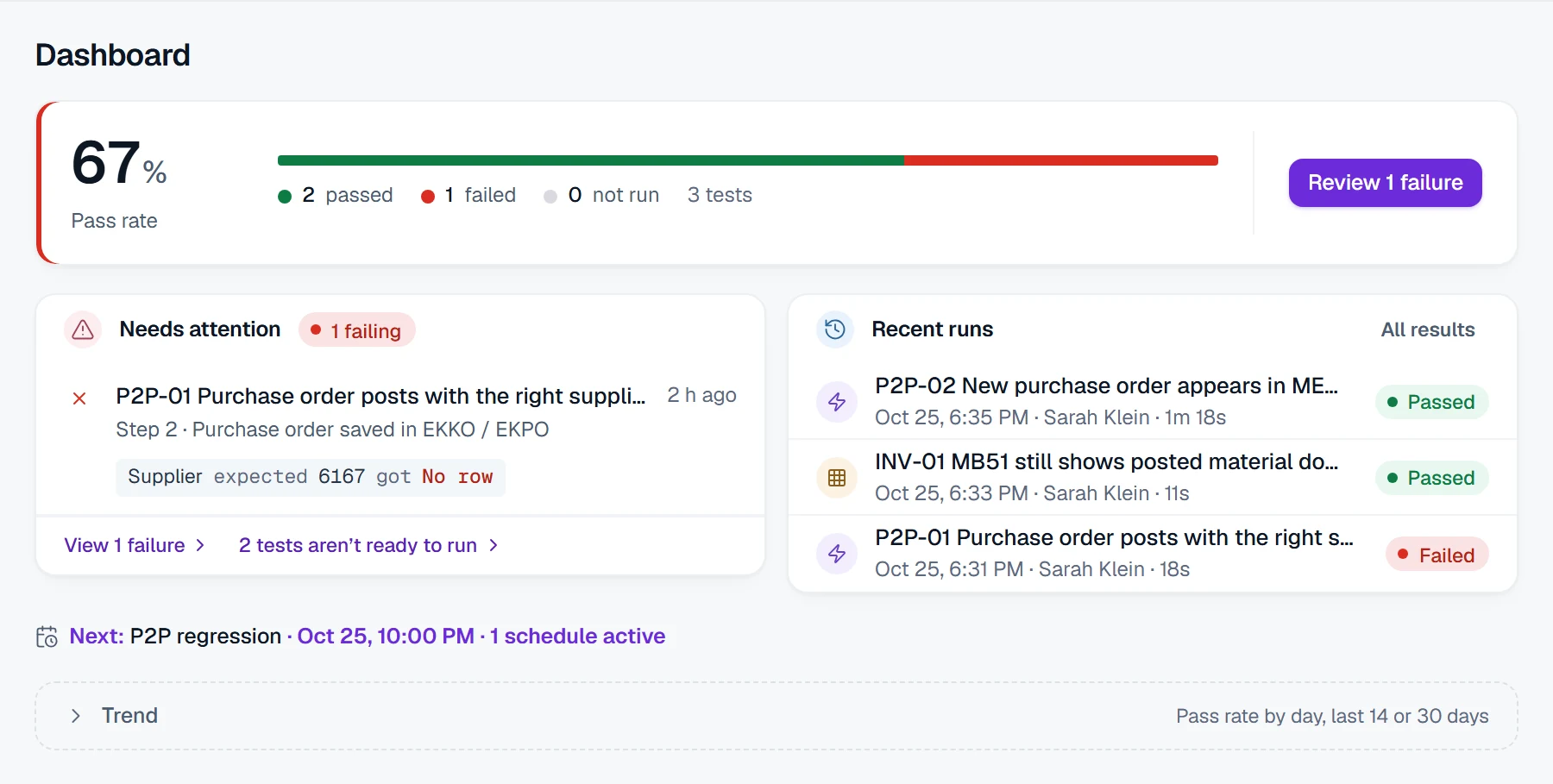
From then on the dashboard shows the pass rate, what needs attention and the trend, so failures surface before users find them.