
What is SAP testing?
SAP testing checks that SAP business processes, configuration and custom code produce the correct documents, postings and table data before and after every change. PostNow.ai SAP Testing runs each test as a chain of steps (a posting, an SAP GUI recording or a table check) and keeps a read-only record of every run.
- Test the chain, not one step. Most SAP defects appear where one module hands data to the next.
This guide is for SAP functional consultants, QA leads and project managers who plan or run SAP testing. It follows one purchase order and one MB51 report through every kind of test.
What is SAP testing for?
SAP testing protects the things a company cannot afford to get wrong: postings, financial balances, stock and the integrations between modules. It is needed whenever something changes underneath them, such as configuration, a transport, an SAP Note, an upgrade or a data load. PostNow.ai SAP Testing re-runs the same checks after each of these changes.
SAP ERP testing and SAP software testing mean the same thing in practice. What sets SAP apart from testing a web application is where the truth lives. A screen can say "Standard PO created" while the update that writes the document fails later. The reliable test reads the database: EKKO and EKPO for a purchase order, MATDOC for a goods movement on S/4HANA, ACDOCA for a journal entry on S/4HANA (BKPF/BSEG on ECC).
Types of testing in SAP
The main types of testing in SAP are unit, functional, integration (SIT), end-to-end, negative, regression and report testing. Each answers a different question about the same process. PostNow.ai SAP Testing runs all seven as steps in one test case; the last column shows how.
| Type | Question it answers | SAP example | How PostNow.ai runs it |
|---|---|---|---|
| Unit | Does one transaction post correctly? | One purchase order | One action step plus a table check |
| Functional | Does the process follow the business rule? | Supplier and quantity saved in EKKO / EKPO | Check steps assert table fields |
| Integration (SIT) | Does data pass correctly between modules? | The PO number reused for the goods receipt | Variables carry values between steps |
| End-to-end | Does the whole process complete? | Procure to pay | One test case chaining every step |
| Negative | Does SAP refuse bad input? | A supplier that does not exist | Expect rejection rows; Generate scenarios proposes more from the column names only |
| Regression | Did a change break what worked? | A re-run after a transport | Suites, schedules and transport runs: SAP regression testing after every transport |
| Report | Does a report still return the right rows? | ME2N, MB51 | Report checks against a baseline |
SAP unit testing
SAP unit testing has two meanings. Developers test ABAP code with SAP's ABAP Unit framework. Functional teams test one transaction at a time: does a single posting produce the right document? In PostNow.ai, the functional kind is a one-step test case with a check step behind it.
SAP functional testing
Functional testing in SAP proves that a business process follows its rules: the right price, plant, account or quantity in the right document. PostNow.ai SAP Testing passes a functional test only when the data in SAP is right, not when a success message appears.
A functional test has two parts. The action step posts through a published BAPI automation or an SAP GUI recording; the trade-offs between those routes are in BAPI vs BDC in SAP. The check steps then read the tables the posting must change and compare each field with the test data or a fixed value. When one field differs, the check shows the expected value, the value SAP holds and the difference.
SAP integration testing (SIT)
SAP integration testing, or system integration testing (SIT), proves that data hands off correctly between SAP modules. In PostNow.ai SAP Testing, steps pass values to each other, so the purchase order number created in one step becomes the input of the next.
Integration defects hide in the hand-off. The purchase order posts, but the goods receipt picks the wrong storage location, or the invoice can't match the receipt. Testing each transaction alone never finds those; testing the chain does.
SAP end-to-end testing
SAP end-to-end testing runs a whole business process as one test, such as procure to pay: purchase order (ME21N), goods receipt (MIGO) and supplier invoice (MIRO). In PostNow.ai each posting is followed by a table check, so a failure names the exact step and field where the process broke.
Manual testing in SAP
Manual testing in SAP follows a test script: the transaction code, the input data, the expected result and the evidence the tester records. PostNow.ai SAP Testing keeps that structure and lets the system do the keying and the comparing.
Two features carry a manual script into PostNow.ai. SAP GUI recording steps replay a transaction in a new SAP GUI window on the tester's own computer, in a logon they have open or with their own stored SAP login; SAP GUI scripting must be enabled on the server and in SAP Logon. Test data sets turn the script's rows into scenarios, each marked to expect success or rejection. How the main tools compare for automating this is covered in SAP test automation tools compared, and acceptance by key users with sign-off in user acceptance testing in SAP.
SAP testing process: 7 steps
The SAP testing process has seven steps: scope the business processes, set up environments, design test cases, prepare test data, execute in cycles, log and retest defects, and close with evidence. PostNow.ai SAP Testing has a place for each step, so the whole process stays in one place.
1. Scope the business processes
Rank processes by financial and operational risk, and group the tests for one release or program into a project with its own dates and environment.
2. Set up environments
An environment pairs an SAP system and client with a runner and the SAP login tests run under. The runner is installed on your own Windows machine and connects out over HTTPS. Production environments are validation-only: queries and checks run there, postings do not.
3. Design test cases
Build each test as a chain of action, recording and check steps, so it reads the documents it creates back from SAP.
4. Prepare test data
Load data sets from Excel, mark each row to expect success or rejection, and let Generate scenarios propose extra rows from the column names only.
5. Execute in cycles
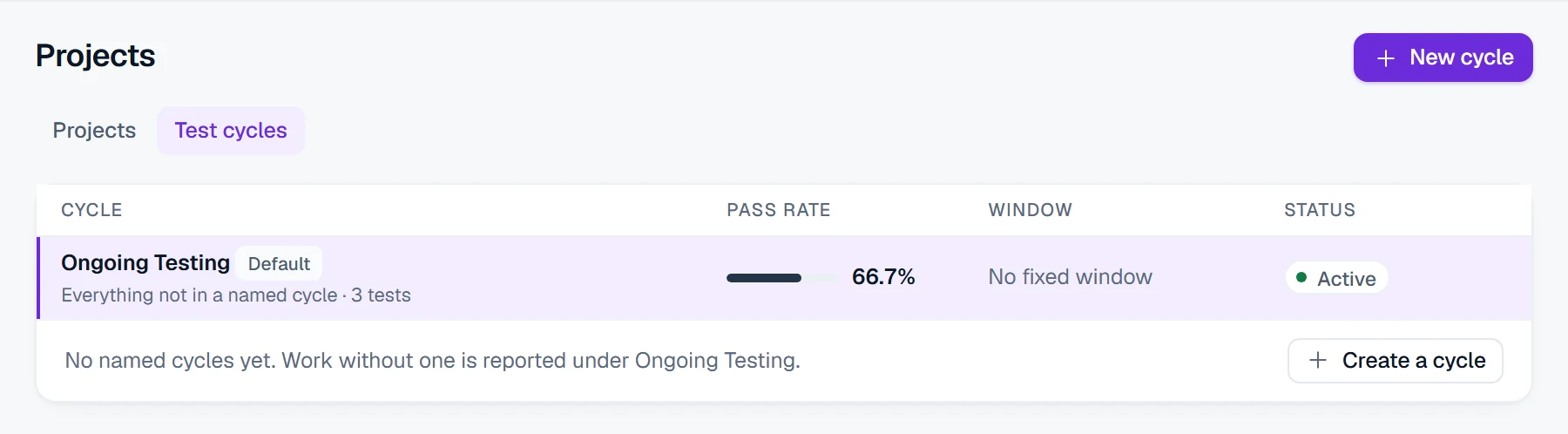
Run suites inside a test cycle and put the core suite on a schedule.
6. Log and retest defects
From a failed run, Log defect records a defect against that run and its failed step, with a severity and an owner. The fix is confirmed by re-running the same scenario.

7. Close with evidence
Every run leaves a read-only record with its inputs, SAP messages, document numbers and checks, a SHA-256 checksum and a retention of one, three or seven years. The dashboard shows the pass rate and its trend.
SAP testing life cycle
The SAP testing life cycle groups these steps into four phases: plan (steps 1 and 2), design (3 and 4), execute (5 and 6) and close (7). On an S/4HANA move the cycle repeats for every rehearsal, as described in SAP S/4HANA testing.
SAP testing strategy
An SAP testing strategy fixes five things before the first test runs: the scope by business process, the environments, the test data, who does what, and the exit criteria with their evidence. In PostNow.ai SAP Testing each has a home: projects, environments, data sets, roles and run records.
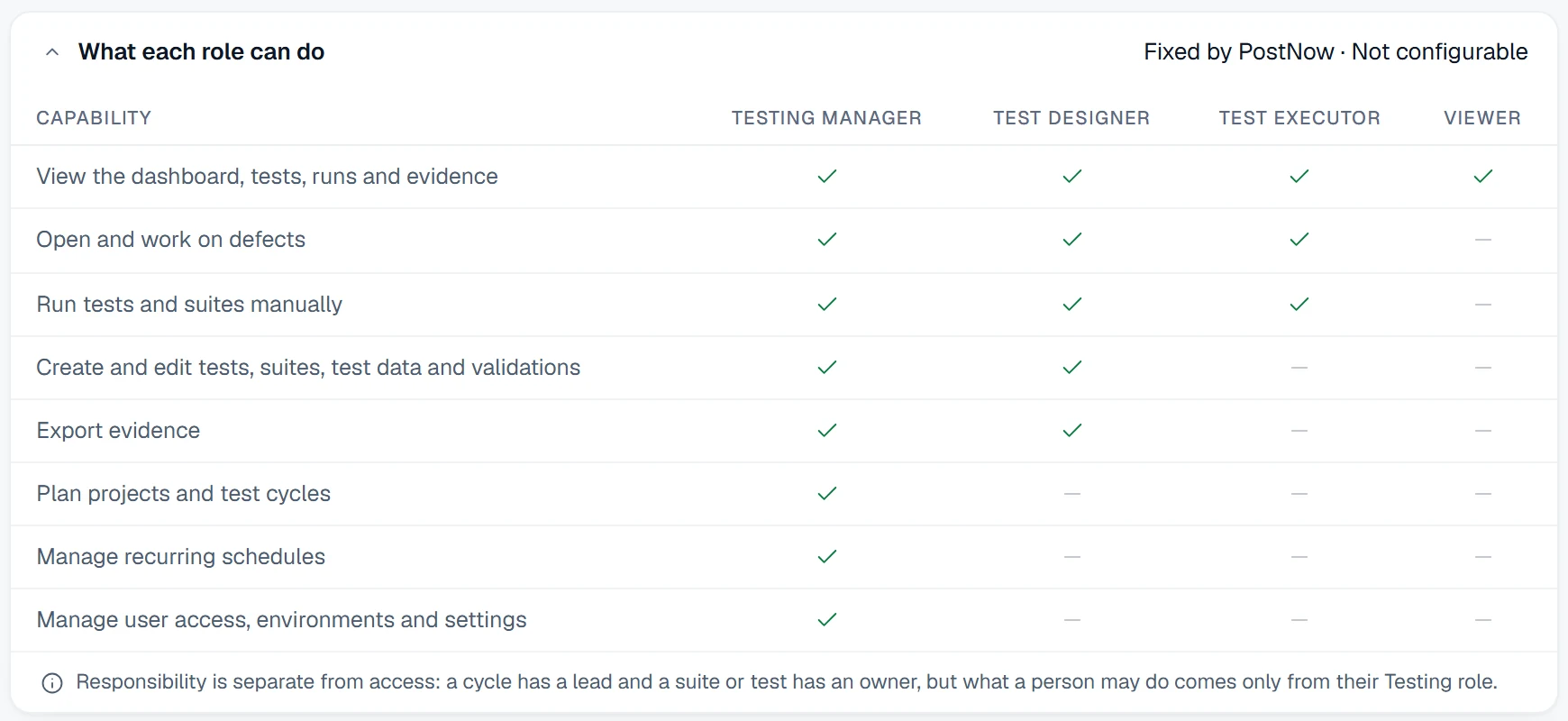
Who does what is set by role:
| Role in PostNow.ai | Responsible for |
|---|---|
| Testing Manager | Projects, test cycles, schedules, environments, user access and settings |
| Test Designer | Tests, suites, test data and checks; runs tests and exports evidence |
| Test Executor | Runs tests and suites, and works on defects |
| Viewer | Reads the dashboard, tests, runs and evidence |
Exit criteria should be measurable: every in-scope process has a passing test, every negative scenario is rejected as expected, and no open defect of high severity remains.
Testing in SAP MM: a worked example
Testing in SAP MM with PostNow.ai SAP Testing combines a posting test, a negative scenario and a report check. These are real runs from an S/4HANA test system, plant 1010.
- Unit test of a purchase order. One action step posts through
BAPI_PO_CREATE1for supplier 6167; one check readsEKKOandEKPOand asserts the supplier and the quantity of 24 pieces. - Negative scenario. A data row with supplier 9999999 expects rejection, and passes only because SAP refused it.
- Report check. MB51 (program
RM07DOCS) runs for plant 1010 and asserts known documents: material document 5000006191 still shows 500.00, and 5000006010 is a reversal with movement type 102.
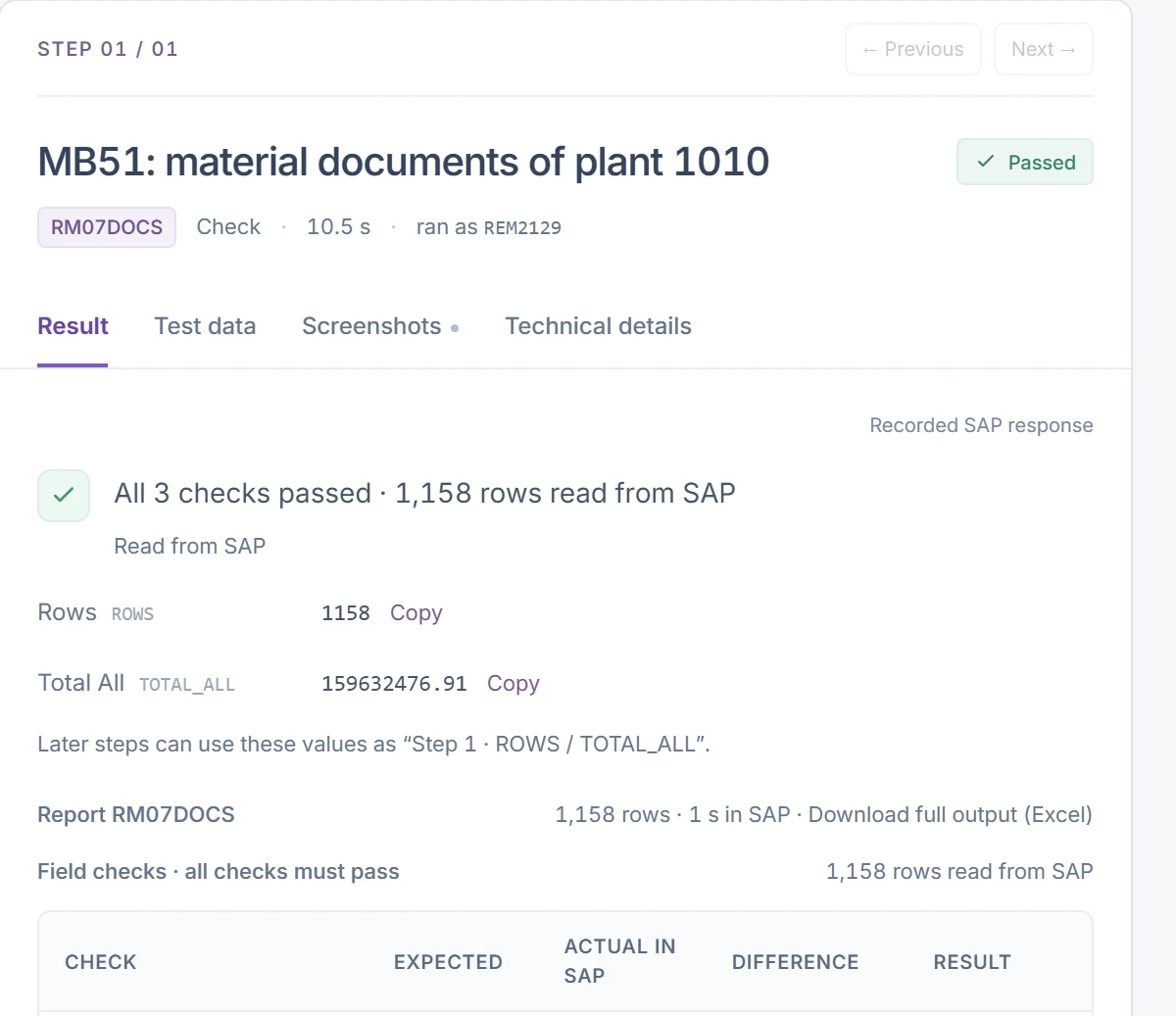
All three runs passed, and each is stored read-only with its checksum. On ECC the same goods movement checks read MKPF and MSEG; on S/4HANA they read MATDOC.
SAP testing best practices
PostNow.ai SAP Testing supports six SAP testing best practices that separate tests people trust from tests people rerun by hand:
- Assert table data. Read the document back from SAP after every posting.
- Include rejection rows. A test that can't fail proves nothing.
- Tie tests to transports. Start a transport run for each request to run its related tests.
- Schedule the core suite. A weekly run catches what nobody thought to retest.
- Keep read-only evidence. Store each run with its inputs, results and checksum.
- Track the trend. Watch the pass rate across cycles, not only the last run.
For a data migration, add reconciliation of the loaded data to these practices; the SAP migration checklist lists the steps.