
What is SAP regression testing?
SAP regression testing re-runs tests of business processes that already work, such as posting a purchase order and reading the tables it writes, after a transport, SAP Note, support package or upgrade. It proves the change broke nothing. PostNow.ai SAP Testing posts through BAPIs, checks the tables, compares SE38 reports with a baseline and stores each run with a checksum.
- A success message is not proof. Check the table the posting must change, such as EKKO and EKPO for a purchase order.
- A report has to stay the same, apart from what you expected. Compare it with its baseline and describe the changes you expect, so every other change fails the test.
This guide is for SAP functional consultants and test leads preparing for a transport wave, a support package or an upgrade. It covers when to run regression tests, which kind to run, a six-step approach with screens from PostNow.ai SAP Testing, a real run from an S/4HANA test system, and a checklist. Moving from ECC to S/4HANA is a larger job, covered in the ECC to S/4HANA migration guide.
What is regression testing in SAP? Meaning and how it differs from other SAP tests
Regression testing in SAP means re-running tests of processes that already worked, after something changed, to prove they still work. In PostNow.ai SAP Testing, such a test posts a real document through the same BAPI your users' postings go through, then reads SAP to confirm what was saved.
It answers a different question from the other test types:
| Test type | Question it answers | Typical SAP example |
|---|---|---|
| Unit test | Does the new piece of code work? | ABAP Unit test of a new pricing routine |
| Integration test | Do the connected steps work together? | Purchase order, goods receipt and invoice in one chain |
| Regression test | Does what worked yesterday still work today? | The same purchase order posting, run again after a transport |
| User acceptance test | Does the business accept the result? | A buyer confirms the new release strategy (SAP UAT testing) |
| Performance test | Is it fast enough under load? | A month-end billing run timed with production volumes |
Regression is one part of SAP testing types and process. SAP is especially exposed to regressions: one customizing entry, user exit or table change can affect every company code, document type and report that reads it, often far from the place that changed.
When do you need SAP regression testing?
You need SAP regression testing whenever something changes underneath processes that already run in production. With PostNow.ai SAP Testing you decide how much to re-run for each kind of change:
| Change | Example | What to re-run |
|---|---|---|
| Transport | Customizing, a Z table, a changed user exit | The tests that use the transported objects, plus their process neighbors |
| SAP Note | A correction in purchasing or pricing | The processes in the Note's application area, end to end |
| Support package | A support package stack | The full suite for every module you use |
| Upgrade or conversion | Enhancement package, S/4HANA release, ECC to S/4HANA | Everything, plus report comparisons against the old state |
| Master data or configuration | New payment terms, tolerance groups, output types | The postings that use them |
SAP upgrade testing
SAP upgrade testing covers a change to SAP's own code everywhere at once, so you can't narrow the test down to one changed object. Run the whole suite before and after, and compare the key reports row by row. For an ECC to S/4HANA move, the tables themselves change too: material documents are in MATDOC instead of MKPF/MSEG, and pricing conditions are in PRCD_ELEMENTS instead of KONV. Reads of MSEG still work on S/4HANA through compatibility views, but check the table SAP actually writes. Testing the conversion itself is covered in SAP S/4HANA testing.
Types of regression testing in SAP
There are three common types of regression testing, plus the retest that closes a defect, and an SAP landscape uses all of them at different moments. PostNow.ai SAP Testing groups tests into suites, so each type is one choice of what to run:
- Full regression: every test, every scenario. For support packages, upgrades and conversions.
- Selective (partial) regression: only the tests that touch what changed. The practical default between releases, driven by what a transport actually contains.
- Risk-based regression: the processes that move money or goods first, such as procure-to-pay, order-to-cash, period-end postings and the postings your interfaces create, when time is short.
- Retest (confirmation): re-running a failed test after the fix is transported, to close the defect. Strictly this is a retest rather than regression, but it belongs in the same suite.
Selective regression saves time, but it can't see dependencies it doesn't know about. Keep a scheduled full run alongside it.
SAP regression testing approach: 6 steps
In this SAP regression testing approach, PostNow.ai SAP Testing builds regression tests from automations you have already published for posting, so a test follows the real posting path. The six steps below use one procure-to-pay suite from an S/4HANA test system, company code 1010, plant 1010.
1. Pick the processes that post money or goods
Start with the postings whose failure costs real money: purchase orders, goods movements, supplier and customer invoices, journal entries, sales orders and billing. For each, write down three things: the posting (for example BAPI_PO_CREATE1), the tables that prove it was saved (EKKO, EKPO), and the report people check afterwards (ME2N, program RM06EN00). These become the steps of your test.
2. Build each test from an action and its checks
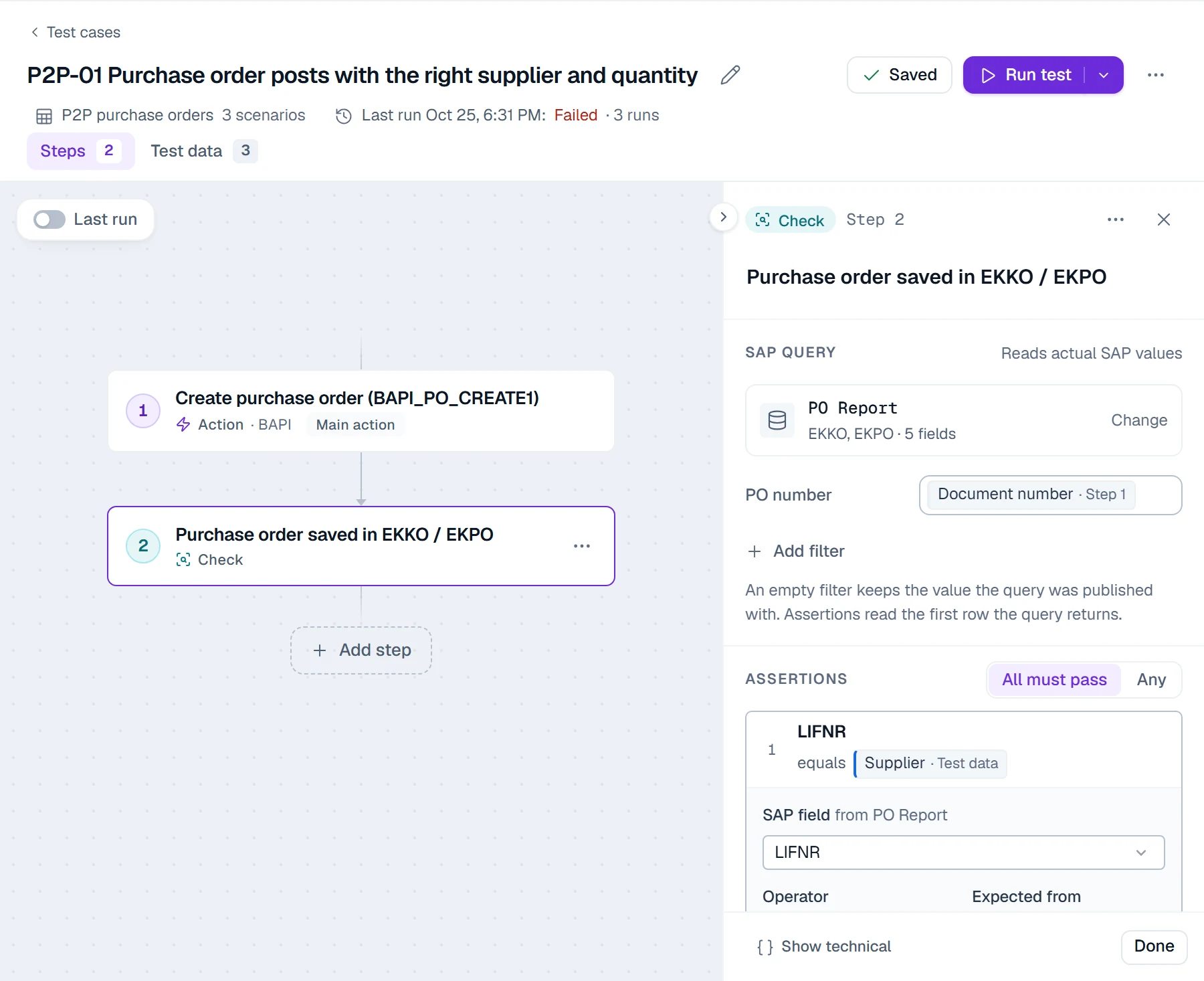
A PostNow.ai test case is a chain of steps. An action posts through a published BAPI automation, or through an SAP GUI recording that runs on your own computer in your own SAP session. A check runs a read query against SAP tables and compares fields with expected values. Step 1's document number flows into step 2's filter, so the check reads exactly the document the test just created.
3. Add test data, including the scenarios that must fail
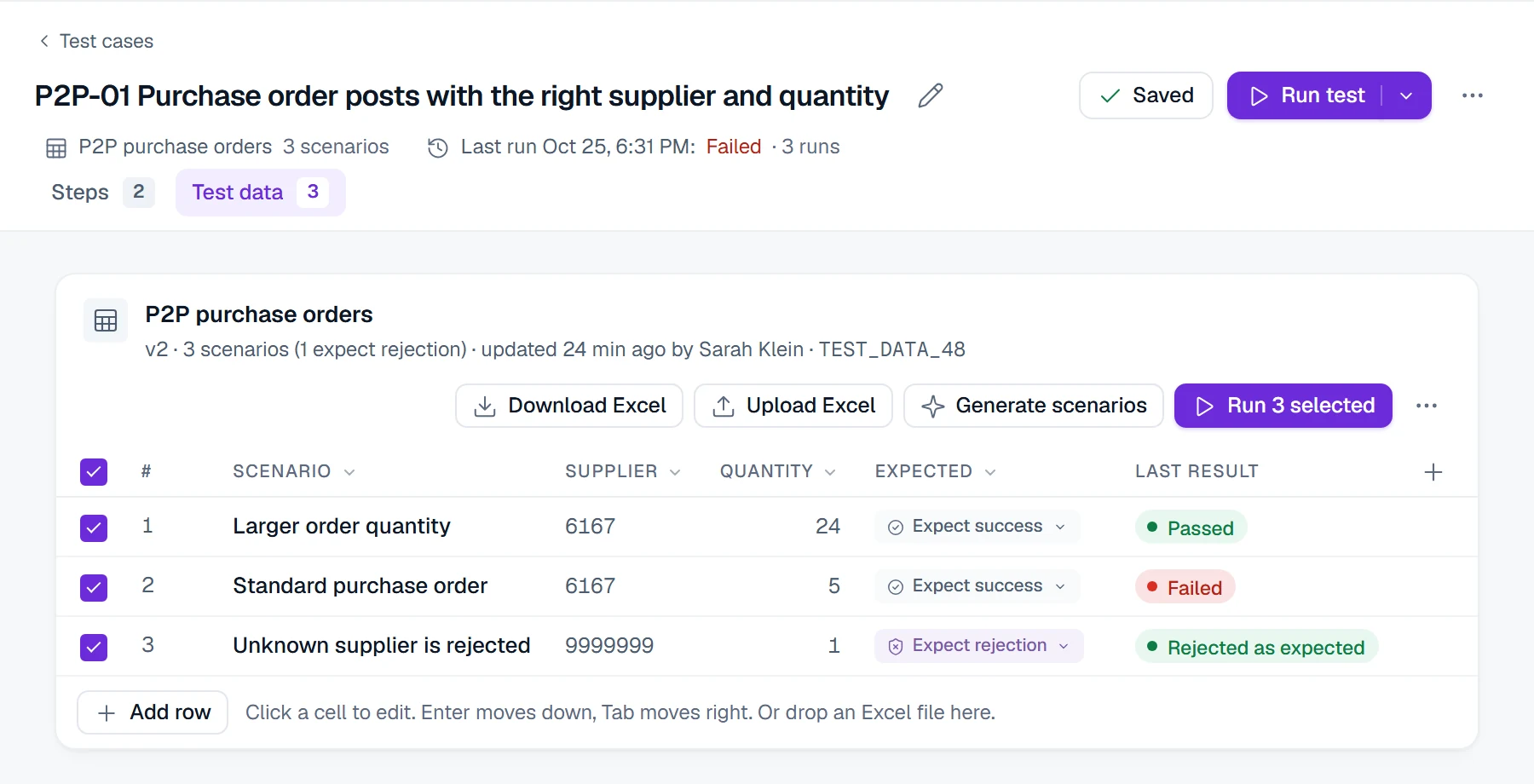
Each row of a test data set runs as its own scenario. Mark each row Expect success or Expect rejection: a negative scenario passes only when SAP refuses it, such as a purchase order for a supplier that does not exist. Data sets come from Excel (upload and download) or are typed in the grid. Generate scenarios proposes extra rows with AI from the column names only, never from SAP values.
4. Baseline the reports people trust
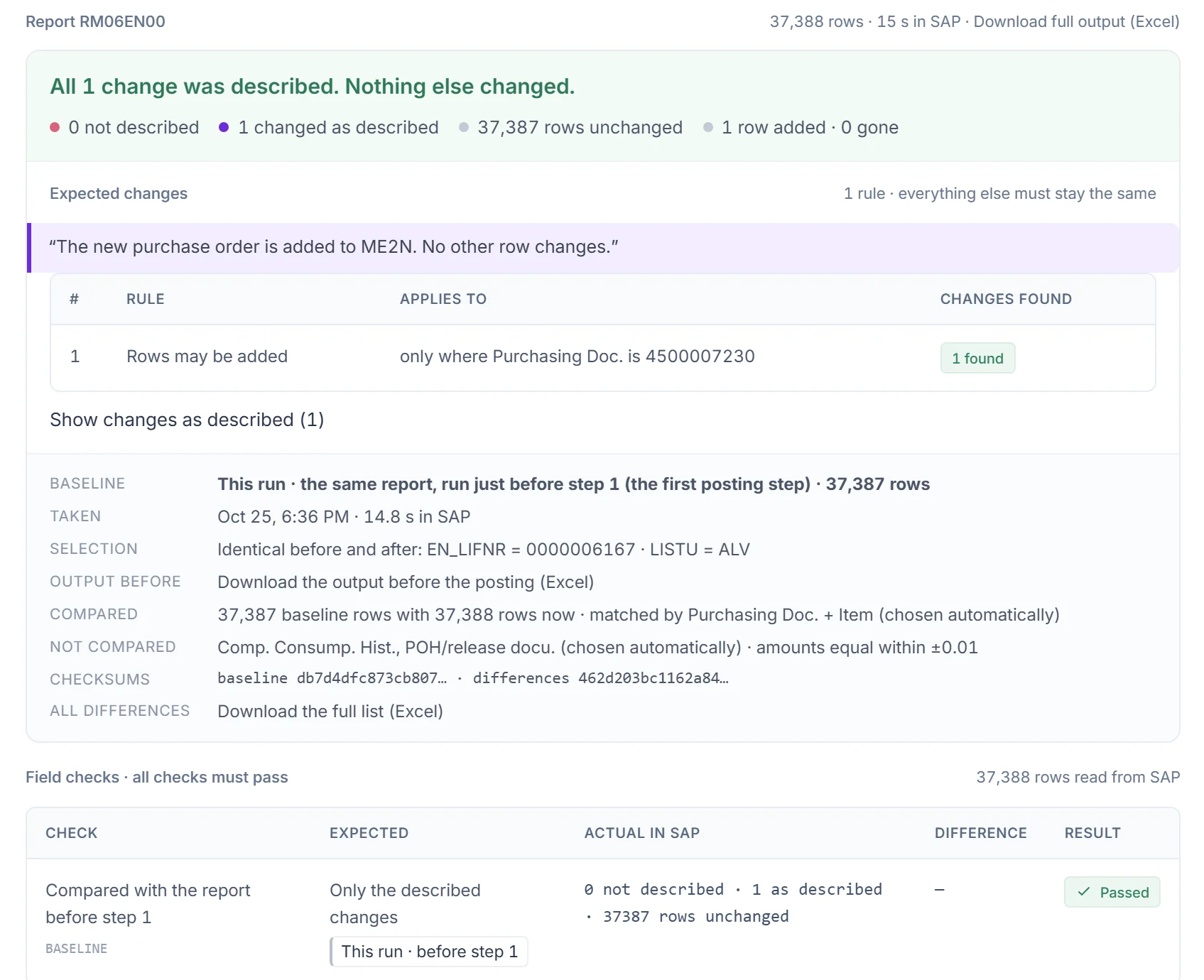
A table check proves one document. A report comparison proves that nothing else moved. A report step runs an SE38 report (ALV output, on an allow-list your Basis team keeps), compares every row with a baseline and matches rows by key. The baseline is either a pinned earlier run or the same report run just before the posting step. You describe the change you expect, for example "rows may be added only where Purchasing Doc. is the new PO". Any other difference fails the test.
5. Run against a test environment, never production
An environment is an SAP system and client, the runner that reaches it, and the SAP login tests run under. The runner is installed on your own Windows machine and connects out over HTTPS. SAP logins are encrypted in your browser for that runner, so PostNow.ai's server cannot read them. Production environments are validation-only: a run that would post is refused, so production can only be read, never changed. BAPI, table and report steps run on the runner service. SAP GUI steps run on your own computer, in a new SAP GUI window of a logon you have open or with your own stored SAP login, and need SAP GUI scripting enabled.
6. Schedule the suite, and run it per transport
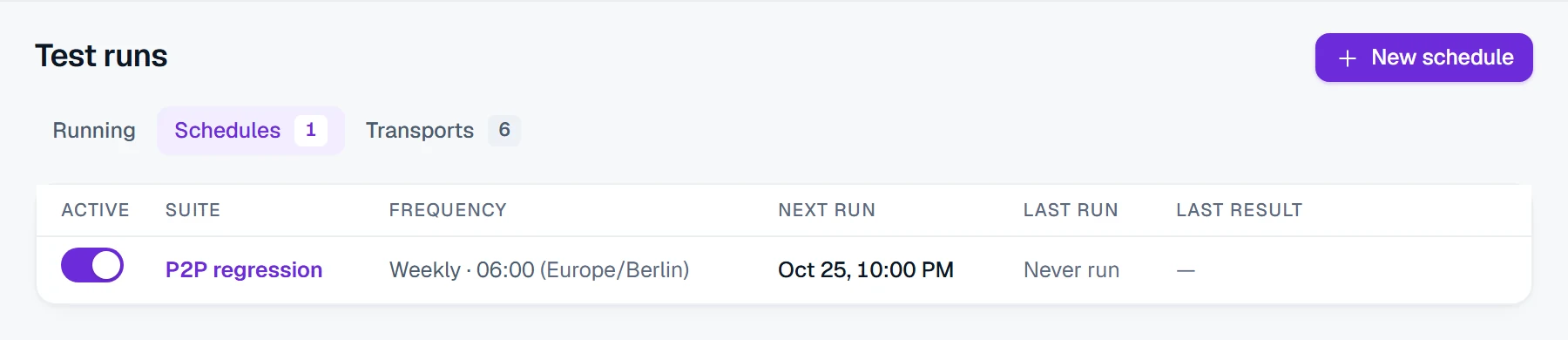
Put the tests in a suite and give it a schedule: daily, weekdays, weekly or monthly, in your time zone, with all scenarios or only the ones that failed last time. Between scheduled runs, start a transport run when a request reaches the test system (next section).
SAP regression testing per transport: object matching
PostNow.ai SAP Testing reads a transport request and shows which of your tests use what it contains. Enter the request number (for example DEVK912345). The runner reads the header from E070, the description from E07T and the object list from E071 through RFC. PostNow.ai then matches those objects against the BAPIs, transactions, programs and tables your tests use, and lists the related tests so you can run them in one go.
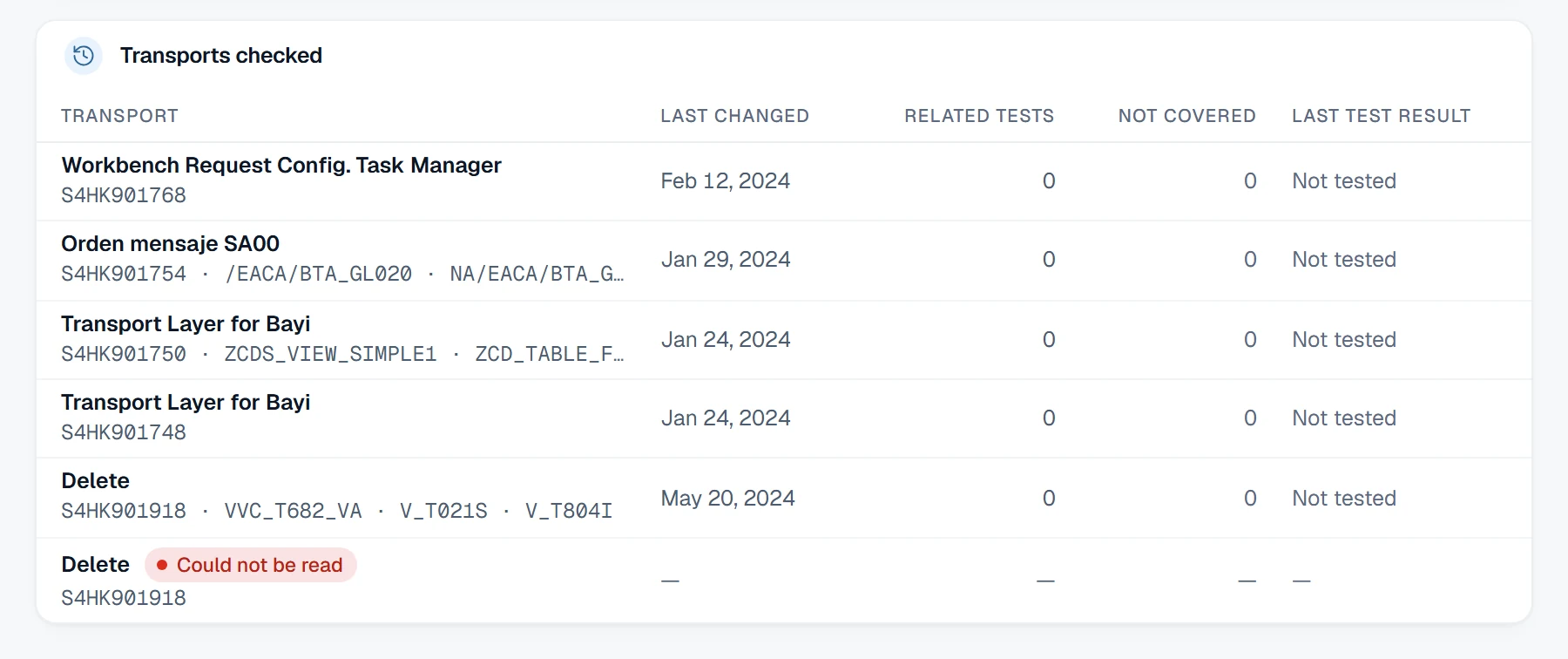
What object matching covers, and how to cover the rest:
| Object matching | How to cover the rest |
|---|---|
| Finds tests that use an object in the transport by name: a table, a program, a BAPI, a transaction | For a changed include such as MV45AFZZ, or a function module called inside a BAPI, name it in the test so it matches. |
| Shows the transport's objects that no test uses | Use the transport's description and your process owners to judge the risk. |
| Runs the related tests together against the environment you pick | Keep the scheduled full suite running alongside. |
Change impact analysis in SAP testing means tracing a change through where-used relationships to the processes it can affect. PostNow.ai object matching is fast and explainable, and it shows the gaps. Pair it with a scheduled full run.
Worked example: a purchase order that SAP numbered but did not save
This example is a real PostNow.ai SAP Testing run from October 2026 on an S/4HANA test system (client 100, company code 1010). Nothing in it is staged. It shows why a regression test must read SAP after it posts.
The test. P2P-01 posts a purchase order through BAPI_PO_CREATE1 (document type NB, supplier 6167, plant 1010) and then reads EKKO and EKPO for the returned PO number. It asserts that the supplier and the quantity match the test data. Its data set has three scenarios: 24 pieces, 5 pieces, and an unknown supplier that SAP must reject.
The result. The 24-piece scenario passed. The unknown supplier was rejected, as expected. The 5-piece scenario failed. Step 1 passed: the BAPI returned purchase order 4500007225. Step 2 read 0 rows for that number, so both field checks had nothing to compare.
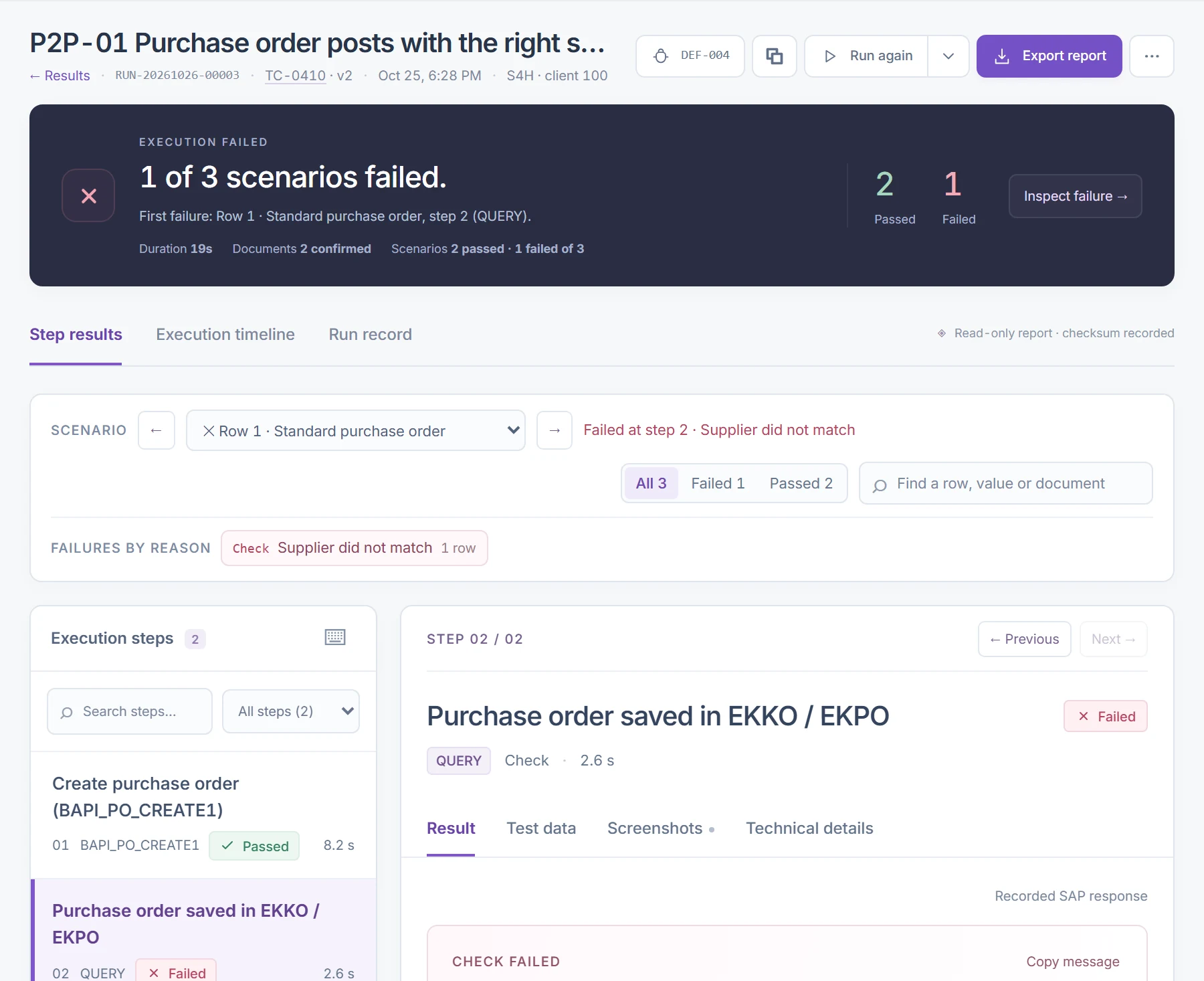
Ruling out timing. A read-only check of the same PO number minutes later still found no row, while the 24-piece PO from the same run was there. The second test told the same story from the report side. P2P-02 ran ME2N for supplier 6167 before and after posting a one-piece order. SAP returned PO 4500007229, yet the report after the posting matched the baseline row for row: 37,387 rows unchanged, and the expected new row never appeared.
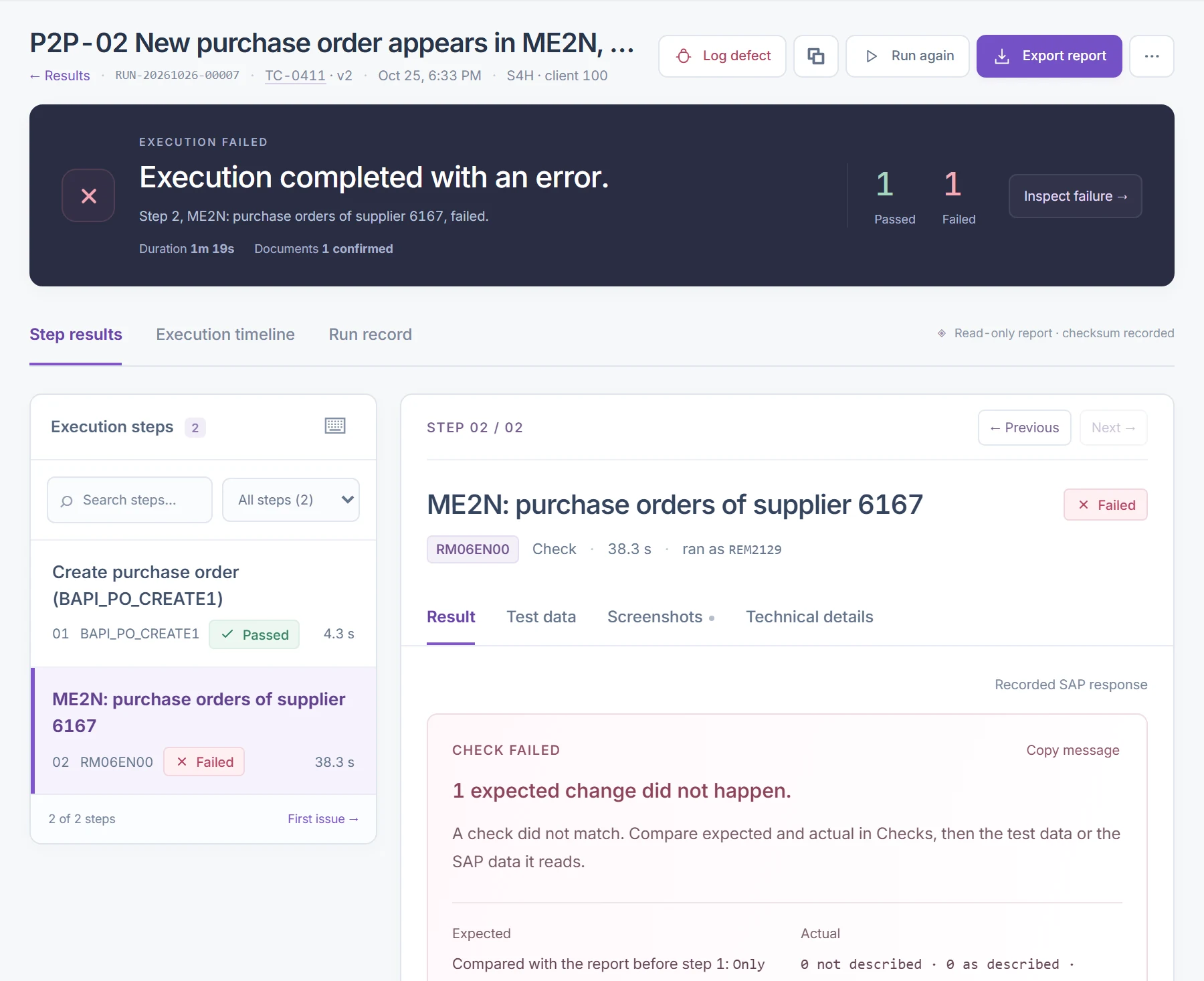
What it means. A posting can return a document number and still leave nothing in the database. The cause is not yet known; SM13 (update requests) and ST22 (short dumps) are where to look first. A test that stopped at the success message would have reported both purchase orders as posted. The defect is logged against the failed run, and the fix will be confirmed by re-running the same scenario.
Evidence an auditor can follow
PostNow.ai SAP Testing stores a run record for every run, written by the runner and read-only after the run finishes. It contains:
- the test version and the exact data set version that ran;
- the environment and the SAP user the run used;
- the inputs of every step, SAP's messages and the document numbers;
- expected against actual for every check, and the query results.
A SHA-256 checksum is recorded when the run completes. The record is kept for the retention you set: one, three or seven years.
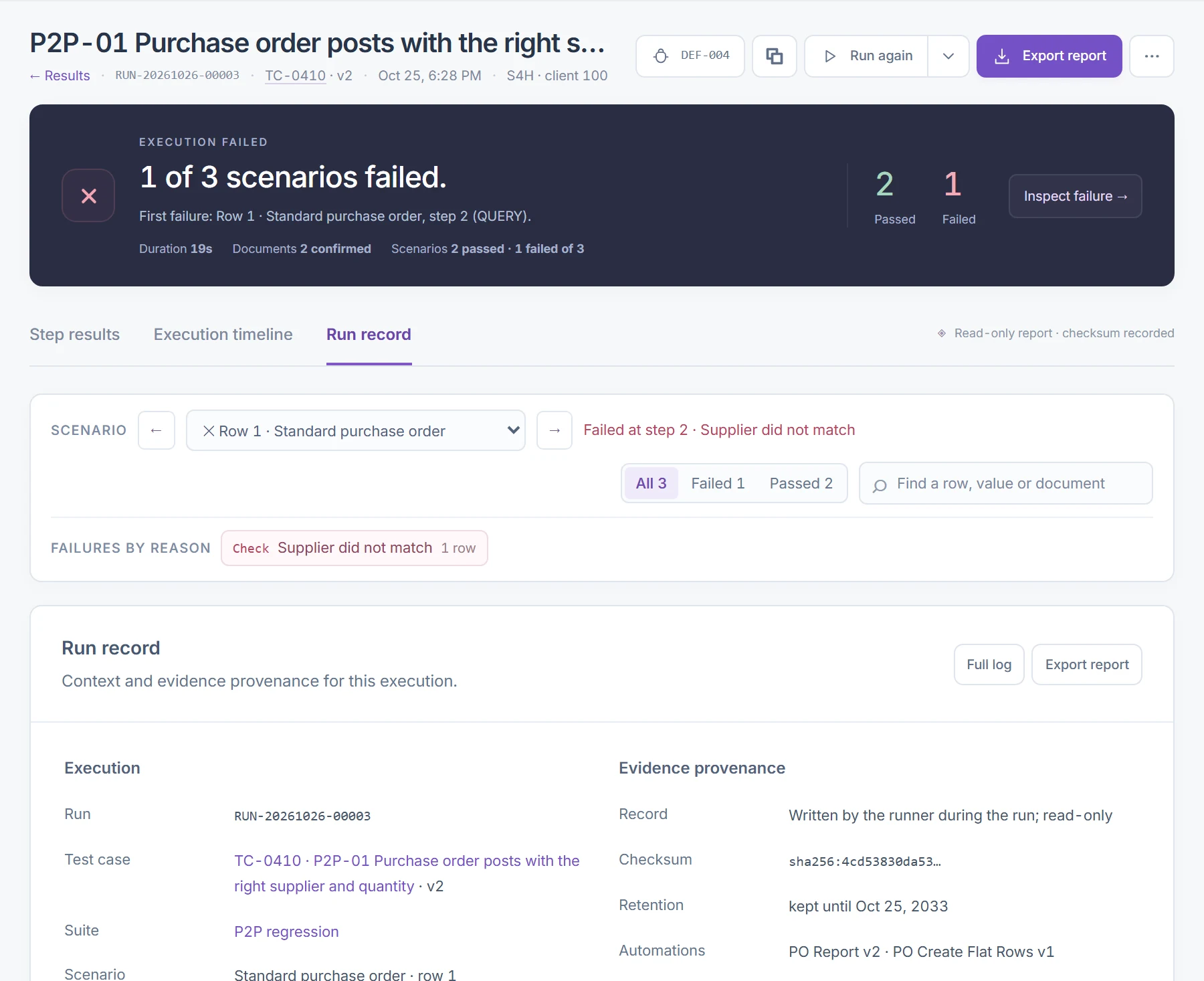
From a failed run, Log defect opens a defect linked to that run and step, with a severity and an owner. It moves from Open through In progress, Fixed and Retest to Closed, and every status change is audited. Close it after a passing re-run: the failed run itself is never edited.
SAP regression testing automation: what it changes
Manual regression testing in SAP means people re-keying the same transactions after every change and comparing the screens by eye. PostNow.ai SAP Testing replaces the re-keying, the comparison and the write-up. The difference shows up in four places:
| Manual | Automated with PostNow.ai | |
|---|---|---|
| Coverage per cycle | What the team has time for | Every scenario in the suite, on a schedule |
| What gets compared | The screen someone looks at | Table fields and every report row against a baseline |
| Evidence | Screenshots pasted into a document | A run record with inputs, messages, results and a checksum |
| Stability across GUI changes | Not affected | BAPI and table steps are independent of screens. SAP GUI recording steps are re-recorded when a screen changes. |
Keep people for what they are good at: judging whether a result makes business sense. The repetition should be automated.
SAP regression testing tools compared
The main SAP regression testing tools are PostNow.ai SAP Testing, Tricentis Tosca with LiveCompare, Panaya, Worksoft Certify and SAP's own eCATT, CBTA and Cloud ALM. They differ in the level they test at (screens, BAPIs, tables or reports) and in how they choose what to re-run after a change. Other vendors' descriptions come from their own public material.
| Tool | Tests at | After a change | Notes |
|---|---|---|---|
| PostNow.ai SAP Testing | BAPI postings, SAP table checks, SE38 report baselines, SAP GUI recordings | Transport object matching (E070, E07T and E071) plus scheduled suites | Runner on your own Windows machine. SAP logins sealed to it. Production is validation-only. |
| Tricentis Tosca with LiveCompare | Model-based UI automation of SAP screens | Per Tricentis, LiveCompare analyzes change impact and reports test hits and gaps | Per Tricentis. SAP separately offers Tricentis Test Automation for SAP to Enterprise Support customers |
| Panaya | Test management and codeless automation (Test Dynamix) | Change impact analysis (Release Dynamix) | SaaS, aimed at upgrades and S/4HANA moves |
| Worksoft Certify | Codeless business process automation through the UI | Per Worksoft, re-runs recorded processes | Positioned by Worksoft for business users |
| SAP's own tools | eCATT, CBTA in SAP Solution Manager, test automation in SAP Cloud ALM | Test plans per change in Solution Manager or Cloud ALM | Solution Manager mainstream maintenance ends at the end of 2027 |
When you compare SAP regression testing tools, ask each vendor three questions. Does a test read what SAP saved, or only what the screen shows? Where do the SAP passwords live? Can I see which objects in a transport have no test at all? A wider comparison is in the guide to SAP test automation tools.
SAP regression testing best practices
The SAP regression testing best practices that matter most: assert on the tables a posting writes, not on its message; include a scenario SAP must reject; baseline key reports; describe expected changes exactly; never post in production; and run both per transport and on a schedule. In PostNow.ai SAP Testing each one maps to a setting:
- Assert on tables, not on messages. Every posting step needs a check step that reads the document back.
- Read the table your release writes. On S/4HANA:
MATDOCinstead ofMKPF/MSEG,PRCD_ELEMENTSinstead ofKONV, andACDOCAfor the universal journal. - Include a scenario that must fail. An unknown supplier or a blocked material proves your checks can fail at all.
- Baseline the reports finance and logistics rely on. Examples are ME2N, MB51 and supplier balances, compared before and after the posting.
- Describe every expected change, and nothing more. A loose rule hides the regression you are looking for.
- Keep one data set per company code and plant, so a failure points at one org unit.
- Never post in production. PostNow.ai refuses runs that post there, so keep production for read-only checks.
- Run per transport and on a schedule. Object matching is fast. The scheduled run catches indirect dependencies.
- Re-baseline only after an intended change, and say why in the test's version note.
- Treat the suite as a living asset. Add or update a test with every transport that changes a process, and retire tests for processes you no longer run.
- Plan for test-system refreshes. After a client copy, document numbers and master data change, so re-check data sets and re-baseline reports before the next run.
What to measure
Three numbers tell you whether regression testing is working: the pass rate per suite, the transport objects that no test covers (a coverage gap), and the defects found before a change reached production. PostNow.ai SAP Testing charts the daily pass rate, counts the uncovered objects on each transport and lists the defects logged against failed runs.
Regression testing in SAP MM
For SAP MM, post the core documents through their BAPIs, for example BAPI_PO_CREATE1 for purchase orders and BAPI_GOODSMVT_CREATE for goods movements. Check EKKO and EKPO, and MATDOC on S/4HANA or MSEG on ECC. Compare ME2N and MB51 with their baselines, and include one scenario SAP must reject, such as an unknown supplier.
Data quality decides how useful any of this is. The SAP data migration guide covers loading and reconciling the master data your tests post against.