
What is SAP S/4HANA testing?
SAP S/4HANA testing proves that business processes, data and reports still work after moving from SAP ECC to S/4HANA or between S/4HANA releases. PostNow.ai SAP Testing runs posting tests, checks the S/4HANA tables such as MATDOC and ACDOCA, and compares the same data in the source and the target system.
- Test what changed underneath. Material documents, the universal journal, pricing and the business partner all moved to new tables.
- Reconcile the data, not just the screens. Totals by key in the source and the target must match after every load.
This guide is for SAP project leads, test managers and functional consultants planning the testing of an S/4HANA move. The move itself, its approaches and its roadmap are covered in the ECC to S/4HANA migration guide; this page is about proving it worked.
What does S/4HANA testing cover?
SAP S/4HANA testing proves that the processes, data and reports the business ran before still work: after a conversion from ECC, a greenfield implementation, a selective data transition or a release upgrade. PostNow.ai SAP Testing runs the same tests on every system in the landscape, so results can be compared.
S4 HANA testing differs from testing an ECC upgrade in one important way: the data model changes underneath processes that look the same on the screen. A goods receipt in MIGO still looks familiar, but the document it writes lands in a different table. Tests that read the old tables, or compare screens instead of data, miss exactly what changed.
What changes in S/4HANA and what to test
The differences between ECC and S/4HANA that matter most for testing sit in the data model: material documents, the universal journal, document pricing, the business partner, document status and the material number. PostNow.ai SAP Testing checks each one with a table check, a compare check or test data rows, as the last column shows.
| In SAP ECC | In SAP S/4HANA | What to test | How PostNow.ai checks it |
|---|---|---|---|
Material documents in MKPF / MSEG | One table, MATDOC; MKPF and MSEG remain as compatibility views and stock quantities are calculated from MATDOC | Goods movements post, and stock per plant and storage location is right | A check on MATDOC after each goods movement; stock totals compared between systems |
Line items in BSEG, FAGLFLEXA, COEP, ANEP and others, plus totals tables such as GLT0 and FAGLFLEXT | The universal journal ACDOCA holds the line items; BKPF and BSEG are still written, and replaced tables are read through compatibility views | Postings land with the right ledger, account, profit center and amount | A check on ACDOCA; balances compared by company code, account and period |
Document conditions in KONV | PRCD_ELEMENTS; condition records are unchanged | Prices and conditions on sales, billing and purchasing documents | A check on PRCD_ELEMENTS for the document the test created |
| Customer and vendor master (XD01, XK01) | The business partner (transaction BP, general data in BUT000); customer/vendor integration (CVI) keeps KNA1 / LFA1 in sync | Business partner creation, roles and synchronization | Checks on BUT000 and on KNA1 / LFA1 |
Document status in VBUK / VBUP | Status fields on VBAK / VBAP, LIKP / LIPS and VBRK | Delivery, billing and goods movement status | Assertions on the status fields in the new tables |
| Material number up to 18 characters | MATNR is 40 characters long; numbers over 18 characters work only after the extended material number is activated | Numbers with leading zeros and long numbers in uploads and interfaces | Test data rows that expect success or rejection |
| Custom and standard reports | The same reports on the new data model | Report output is unchanged after the move | Report checks against each report's baseline |
The full list of changes is in SAP's simplification list for each S/4HANA release; check it for the modules in scope before writing tests.
SAP S/4HANA testing strategy
An SAP S/4HANA testing strategy ranks business processes by risk, decides which tests run in which phase, and defines how source and target data are reconciled. PostNow.ai SAP Testing keeps each of those in one place: projects, cycles per rehearsal, and compare checks.
- Rank processes by risk. Start with the processes that post money or goods and touch the changed tables: procure to pay, order to cash, inventory and period-end closing.
- Plan the test types per phase. Functional and integration tests on each rehearsal, data reconciliation after each load, user acceptance testing before cutover and regression after go-live; the test types are defined in the SAP testing guide.
- Define the reconciliation. For each data object, decide which totals by which key must match between the source and the target, and within what tolerance.
- Keep evidence per rehearsal. One cycle per rehearsal keeps each rehearsal's results and defects apart.
SAP S/4HANA testing approach
The SAP S/4HANA testing approach that holds up best runs the same posting test on both sides. In PostNow.ai a test case runs against whichever environment is picked, so one posting test runs on the ECC system and on the S/4HANA system. Where the tables differ, such as MSEG and MATDOC, each system gets a test with the check for the table it writes.
How to compare ECC and S/4HANA data after migration
To compare ECC and S/4HANA data after a migration, read the same selection in both systems, group it by the same keys and compare the totals for each group. PostNow.ai SAP Testing does this in a single check: the compare check.
A compare check reads a query in the source system and in the target system through the same runner, up to 100,000 rows on each side. It groups both sides by the key pairs you choose, such as material and plant, and compares the value pairs, such as unrestricted stock and the number of rows, within a tolerance. You can also require every key to exist on both sides.
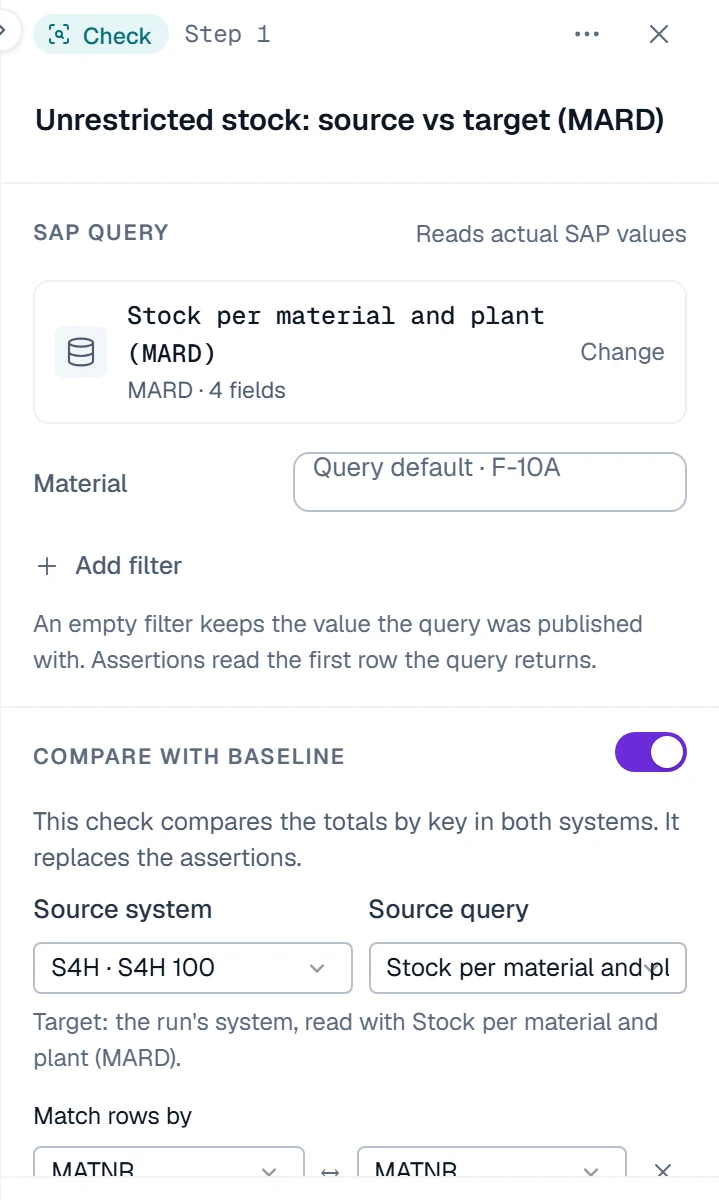
The result counts the groups that match, the groups with different values, and the groups that exist only on one side. It shows up to 200 sample differences and records the SHA-256 checksum of each side's data, so the evidence shows exactly which data was compared. A side that could not be read completely never passes. Results export to PDF and Excel.
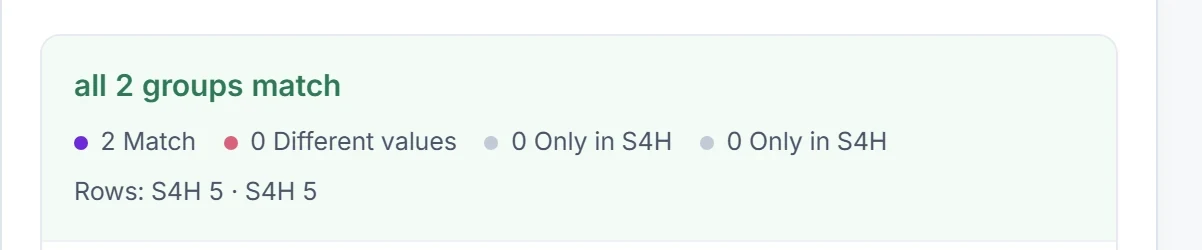
The runs below read MARD, stock per material and plant, which exists in both ECC and S/4HANA; in S/4HANA its stock quantities are calculated from MATDOC. They are from an S/4HANA test system, compared with itself so the outcome is known. In the first, both sides read the same selection, and all groups match.
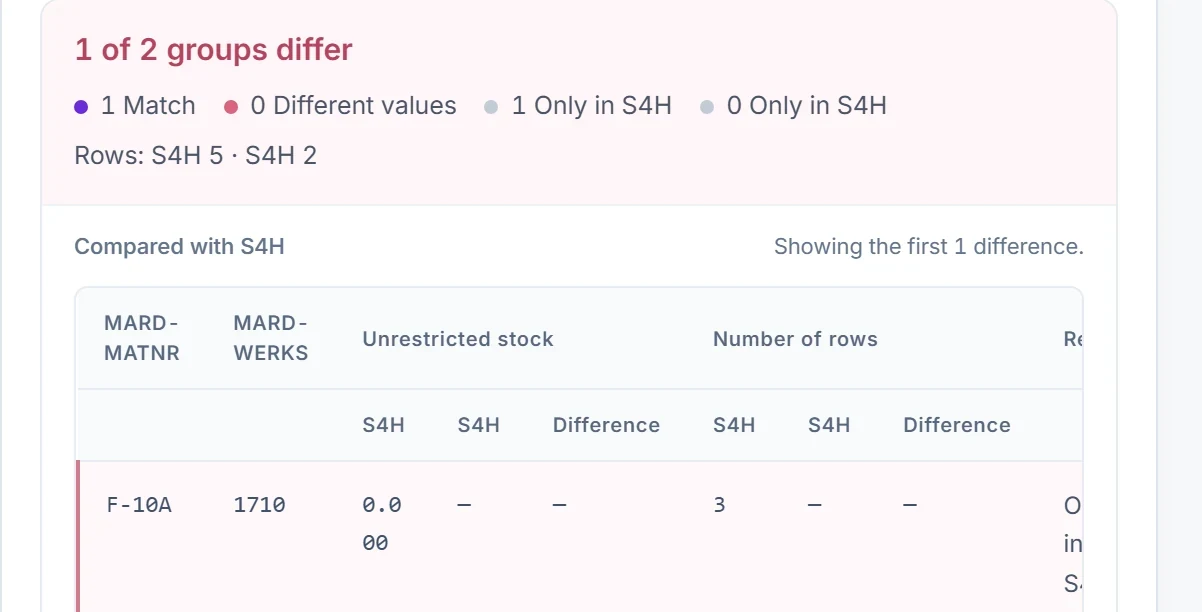
In the second, the target side was limited to plant 1010, the way an incomplete load would look, and every key had to exist on both sides. The group for material F-10A in plant 1710 existed only in the source, so the check failed and named it.
The same check reconciles any two systems or clients: ECC and S/4HANA in a greenfield or selective migration, or two S/4HANA systems after a copy. Reconciliation is one part of SAP data migration: the full test approach per mock load is in data migration testing, and the wider process is in the SAP data migration guide.
How to test an S/4HANA migration: five phases
SAP S/4HANA testing runs in five phases: baseline the source, test every rehearsal, run integration and user acceptance testing, reconcile at cutover, and keep testing after go-live. PostNow.ai SAP Testing gives each phase its own cycle, so results never mix.
1. Baseline the source system
Build test cases for the key processes, capture report baselines in the source system and load the test data, before anything changes.
2. Test every rehearsal
Give each rehearsal its own cycle. Run the suite against the rehearsal system, run the compare checks between source and target, and log defects until a rehearsal is clean.
3. Integration and user acceptance testing
Run the end-to-end suites by business process, then let key users accept them in SAP UAT testing.
4. Cutover
Run the compare checks on the final load and export the results to PDF and Excel for the go-live decision. Production environments are validation-only: queries and checks run there, postings do not.
5. After go-live
Keep the suites on a schedule, compare reports with their baseline and test each transport. Release-to-release changes are covered in SAP regression testing after upgrades.
SAP S/4HANA testing tools
SAP S/4HANA testing tools fall into three groups: SAP's own test automation, UI and process automation tools, and tools that test at the data level. PostNow.ai SAP Testing works at the data level, with posting tests through BAPIs and APIs, checks on SAP tables, report baselines and compare checks.
| Tool | Focus in an S/4HANA project |
|---|---|
| PostNow.ai SAP Testing | BAPI posting tests, checks on S/4HANA tables, report baselines and compare checks between source and target |
| SAP Cloud ALM with Tricentis | Per SAP, customers provision a Tricentis tenant from Cloud ALM for test automation |
| Tricentis Tosca, Worksoft Certify, Panaya | Per their vendors, UI and process automation, test management and change analysis |
A wider comparison is in the guide to SAP test automation tools.
S/4HANA automated testing
S/4HANA automated testing repeats the same checks after every load, transport and release without anyone re-keying them. In PostNow.ai SAP Testing, suites run on a schedule, transport runs test each transport, and every run is stored read-only with a SHA-256 checksum for one, three or seven years.
Automation matters most in the rehearsal phase: each rehearsal produces a new system to test, and the same suite and compare checks run against each one.