
What is SAP data migration testing?
SAP data migration testing proves that data moved from a legacy system into SAP arrived complete, correct and usable: record counts match, fields hold the mapped values, balances reconcile and key users accept a sample. PostNow.ai SAP Testing runs these checks on every mock load, reading SAP tables and comparing totals by key between source and target.
- Test every mock load, not only cutover. The same checks run on mock 1, mock 2, the dress rehearsal and the production load.
- Reconcile data, not screens. Counts and totals by key in the source and in SAP must match within an agreed tolerance.
This guide is for SAP data migration leads, test managers and the functional consultants who own each migration object. It covers the types of migration testing, a test strategy per mock load, field-level checks against the SAP tables, reconciliation of counts, totals and balances, a worked vendor example and a short checklist. Loading the data itself is covered in the SAP data migration guide; this page is about proving the load worked.
Types of data migration testing
Data migration testing combines several kinds of test, each answering a different question about the same load: was the file valid, did the conversion rules work, did every record arrive, do the fields and balances match, and can the business work with the result. PostNow.ai SAP Testing covers the checks after the load in one test run:
| Test | Question it answers | SAP example |
|---|---|---|
| PostNow.ai migration test | Do counts, field values and totals in SAP match the source? | Compare check on LFB1 by company code and vendor; table check on LFA1 for sampled vendors |
| Pre-load validation | Is the load file complete and in SAP's format? | Mandatory fields, value lists, date and number formats; the Migration Cockpit simulation |
| Conversion rule tests | Did the transformation rules produce the target values? | Legacy unit "PCS" becomes base unit PC; legacy payment terms map to ZTERM values |
| Completeness (record counts) | Did every record that should load arrive, and nothing extra? | Vendors per company code in LFB1 vs the source extract |
| Field-level validation | Does each field hold the mapped value? | Material type, base unit and material group in MARA; MRP type in MARC |
| Balance reconciliation | Do amounts and quantities match the source? | Trial balance by G/L account; open items by vendor; stock per material and plant |
| Process testing on migrated data | Do business transactions work on the loaded data? | Goods receipt against a migrated purchase order; payment of a migrated open item |
| User acceptance (sample) | Do key users accept what they see? | A buyer checks 20 vendors in the BP transaction against the legacy system |
| Load timing | Does the load fit the cutover window? | Run time of each object in the dress rehearsal |
Data conversion testing
Data conversion testing checks the rules that turn legacy values into SAP values, one rule at a time: unit conversions, value mappings, leading zeros, date formats and number ranges. Test each rule with rows that hit it, and with one row that must be rejected, such as a payment term that has no mapping. A rule that passes on mock 1 can still break when a new legacy system joins in mock 2, so the rule tests run on every mock.
The test types in this table are part of the wider set described in the overview of SAP testing types and process.
Data migration test strategy and migration test plan per mock load
A data migration test strategy states, for each migration object, which checks prove the load, which totals must match the source and within what tolerance, and which mock load each check runs on. In PostNow.ai SAP Testing each mock load gets its own test cycle, so the same tests run again and every mock's results and defects stay apart.
Plan the mocks so that each one tests more than the last:
| Load | Goal | Tests that run | Exit criteria |
|---|---|---|---|
| Mock 1 | The objects load at all | Record counts, conversion rules, error lists per object | Every object loads; each error has an owner |
| Mock 2 | Full volume, correct content | Counts, field-level checks, totals and balances, first process tests | Counts match; no high-severity defect open |
| Mock 3 / dress rehearsal | The cutover sequence works in time | The full suite, load timing, key-user sample | Everything reconciles; the cycle is signed off |
| Production load | Go-live decision | Read-only reconciliation checks | Business owners sign the go/no-go |
Migration test plan
A migration test plan turns the strategy into a schedule. It names the objects in scope and their load order, the source and target systems and clients for each mock, the check list per object, the tolerances, the defect severity levels, who signs off each object, and the entry and exit criteria for every mock. Keep one plan for the whole migration and one cycle per mock; the plan changes only when the scope does.
- Object owners. One functional owner per object, such as the AP lead for vendors and open payables.
- Source of truth for expected values. The source system itself, a signed-off extract, or the mapping workbook, named per check.
- Tolerances. Zero for counts; for amounts, the rounding the currency conversion allows, such as 0.01 per key.
- Re-test rule. A defect is closed only by a passing check on a later mock or a re-load, never by editing a result.
Data migration validation: field-level checks against SAP tables
Data migration validation reads the loaded records back from the SAP tables and compares each critical field with the value the mapping says it should have. PostNow.ai SAP Testing does this with table checks: a query reads the table, filtered by the key from a test data row, and each assertion compares one field with its expected value.
Check the tables the object actually writes. On S/4HANA several of them differ from ECC, as the guide to SAP S/4HANA testing explains for MATDOC and ACDOCA. The tables and interface behind each master data object are listed in SAP master data migration.
| Object | SAP tables | Fields worth checking |
|---|---|---|
| Material master | MARA, MARC, MBEW | Material type MTART, base unit MEINS, material group MATKL; MRP type DISMM and procurement type BESKZ per plant; valuation class BKLAS and price control VPRSV |
| Business partner / vendor | BUT000, LFA1, LFB1, CVI_VEND_LINK | BP grouping, name and country; reconciliation account AKONT and payment terms ZTERM per company code; the BP-to-vendor link |
| Customer | BUT000, KNA1, KNB1, KNVV | Reconciliation account and payment terms; sales area data such as customer pricing procedure |
| Open items and balances | BKPF / BSEG; ACDOCA on S/4HANA | Company code, G/L account, vendor or customer, amount in local currency, due date |
| Purchase orders | EKKO, EKPO | Supplier, purchasing organization, material, open quantity and net price |
| Stock | MARD; MATDOC on S/4HANA | Unrestricted stock per material, plant and storage location |
How to validate data after migration
To validate data after migration, work from the whole to the detail. First compare record counts per object and key, then totals and balances, then sampled field values, and finally let key users work with the data. A count difference points at a missing record; a total that matches while a field is wrong points at the conversion rules.
- Counts by key. Vendors per company code, materials per plant, open items per company code.
- Totals and balances. Amounts and quantities by the same keys, within the tolerance.
- Field samples. Every critical field for a risk-based sample, plus every record a conversion rule touched.
- Process tests. Post a goods receipt, an invoice or a payment against migrated records.
- Key-user sample. Business users compare records with the legacy system and record a verdict.
Data reconciliation: counts, totals and balances, source vs target
Data reconciliation compares the same data in the source and in SAP, grouped by the same keys: the number of records, the sum of quantities and amounts, and the balances per account. Every group must match within a tolerance, and a key found on only one side is a missing or an extra record. PostNow.ai SAP Testing reconciles two SAP systems in one compare check.
| What to reconcile | Key | SAP side |
|---|---|---|
| Record counts | Object and org unit, such as company code or plant | Rows in LFB1, KNB1, MARC |
| Trial balance | Company code, G/L account | G/L account balances (S_ALR_87012277); ACDOCA on S/4HANA |
| Open items | Company code, vendor or customer, debit/credit indicator | FBL1N and FBL5N; the open item tables, or ACDOCA |
| Stock quantities | Material, plant, storage location | MMBE and MB52; table MARD |
| Stock values | Valuation area, or company code and stock account | MB52 with values; MB5L against the stock accounts |
| Open purchase orders | Supplier, purchasing document | ME2N; EKKO / EKPO |
Trial balance and open items
Reconcile the trial balance by company code and G/L account, and the open items by company code and business partner. Most projects post opening balances and open items against migration offset accounts. Once every financial object is loaded, those accounts must net to zero: a balance left on one of them is the clearest sign that an object is incomplete. Split open-item totals by the debit/credit indicator, so a credit memo loaded as an invoice shows up even when the net balance looks right.
Stock values: MB52, MMBE and MB5L
Reconcile stock first by quantity per material, plant and storage location, the level MMBE and MB52 show, and then by value. MB5L compares the stock value from the material valuation with the balance of each stock G/L account, which proves the inventory load and the financial load agree. Load the stock after the material valuation data, or the values will not match the source.
How PostNow.ai tests a migration load
PostNow.ai SAP Testing tests a migration load with three kinds of check that read SAP after the load: compare checks between the source and the target system, table checks for field values, and report checks on totals. Each mock load runs as its own cycle, every run is stored read-only, and failed checks become defects that the next mock re-tests.
1. Point the tests at the mock load
An environment in PostNow.ai is an SAP system and client, the runner that reaches it, and the SAP login the tests run under. Give each mock load target its own environment, such as the quality client refreshed for mock 2, and run the same tests against it. Production environments are validation-only: checks read production, and a run that would post there is refused, so the reconciliation of the production load is safe.
2. Compare counts and totals by key between two systems
A compare check reads a query in the source system and a query in the target system through the same runner, up to 100,000 rows on each side. It groups both sides by the key pairs you choose, ignoring leading zeros, and compares the value pairs, such as stock quantity and the number of rows, within a tolerance. The two queries can read different tables, so an ECC source and an S/4HANA target are compared on fields that mean the same thing.
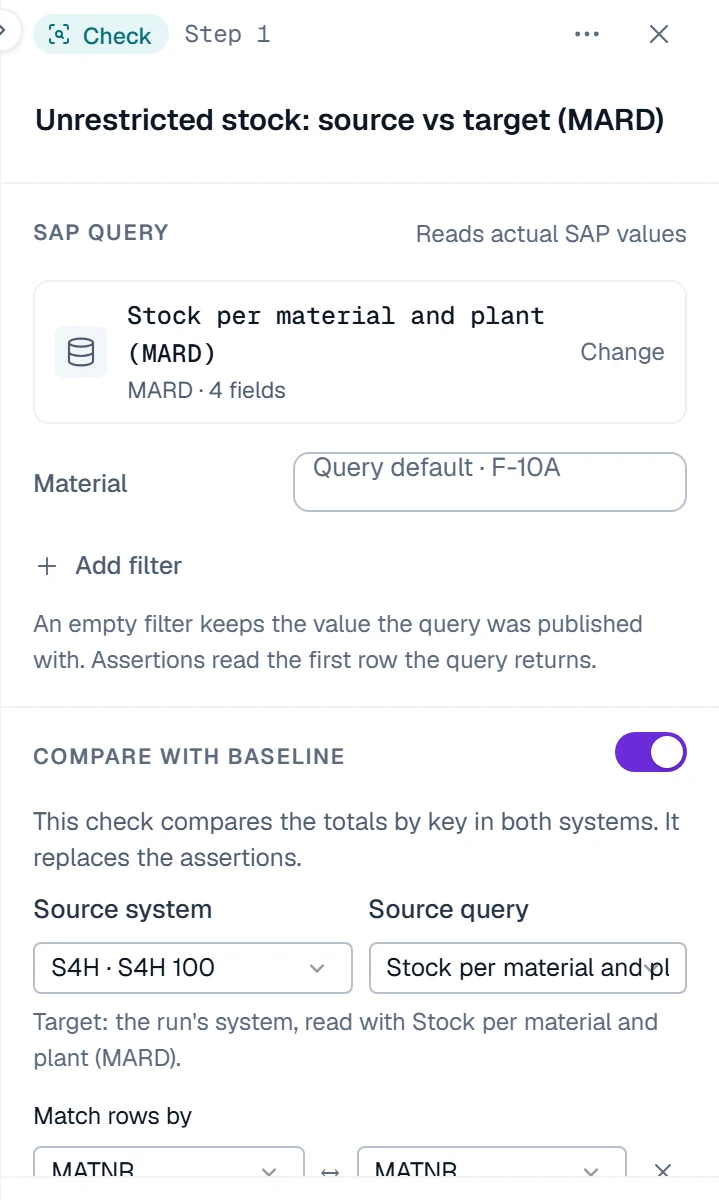
The result counts the groups that match, the groups with different values, and the groups that exist only in the source or only in the target. With every key on both sides switched on, a missing record fails the check even when the totals look right.
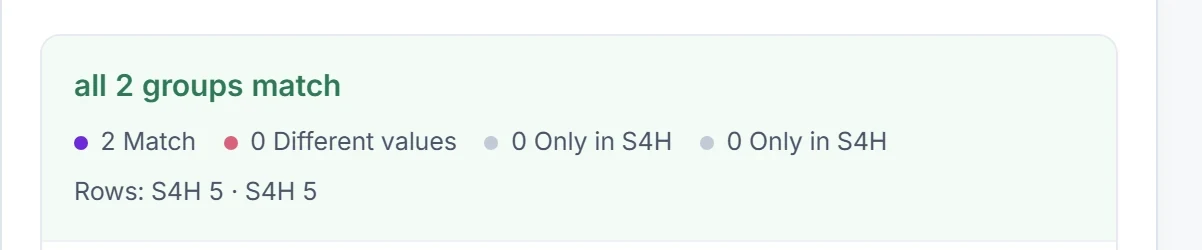
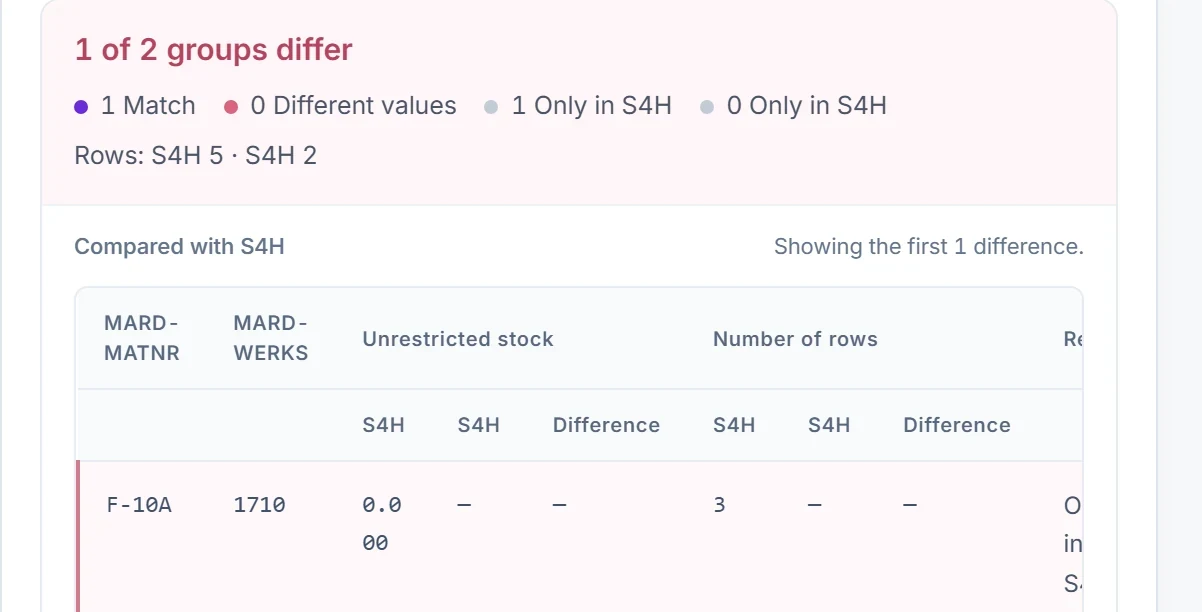
Both screenshots come from an S/4HANA test system compared with itself, so the outcome is known; in the second, the target side was limited to one plant, the way an incomplete load looks. The check records the SHA-256 checksum of each side's data and up to 200 sample differences. A side that could not be read completely never passes.
3. Check field values with a test data set
For field-level validation, put the sampled records and their expected values in a test data set, uploaded from Excel or typed in the grid: one row per vendor or material, with columns such as reconciliation account and payment terms. A table check reads LFA1 and LFB1, or MARA and MARC, filtered by the row's key, and asserts each field against the row's value. Each row runs as its own scenario.
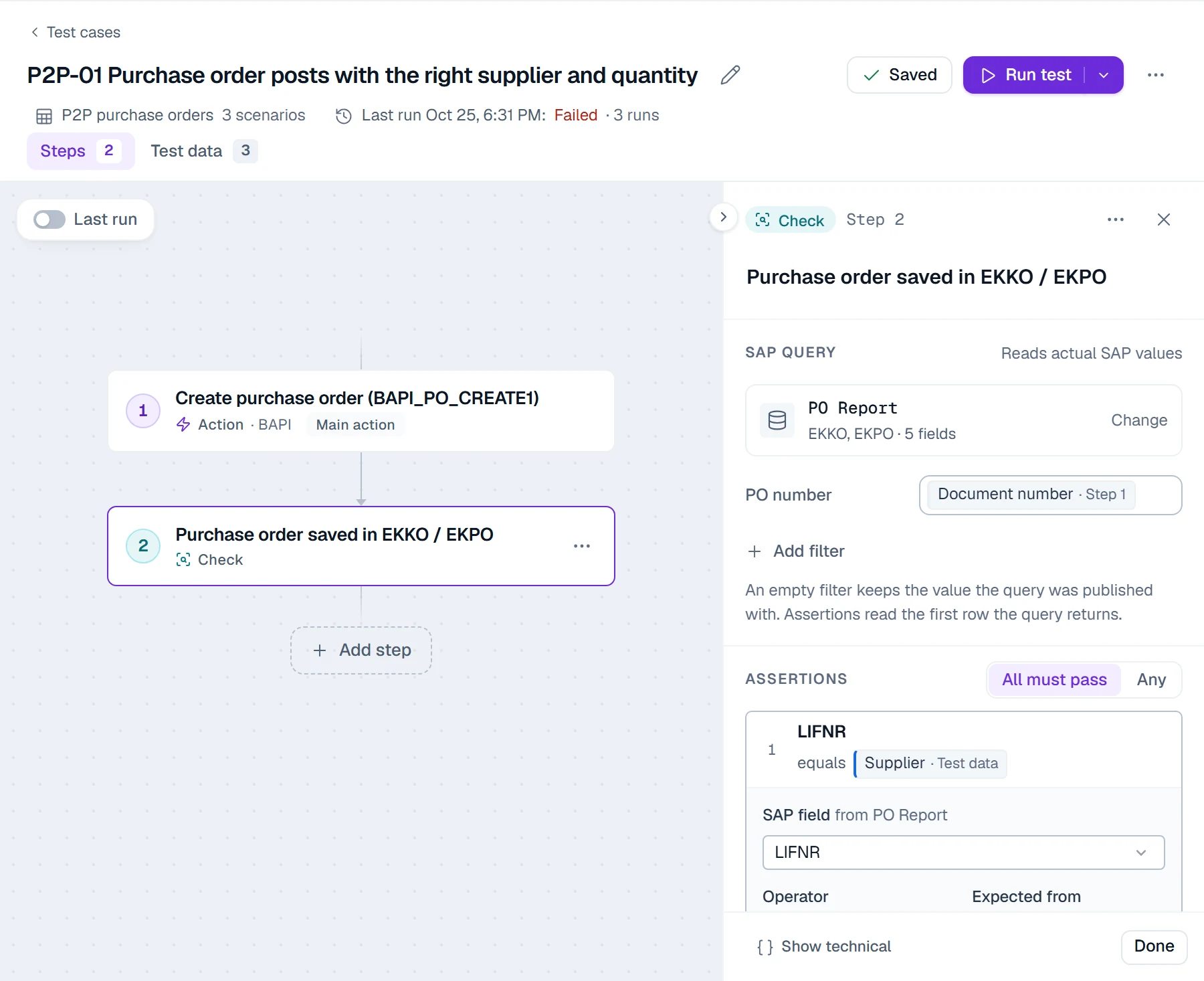
The test shown posts a purchase order and then reads EKKO and EKPO. A migration check uses only the check step, because the data is already loaded.
4. Check report totals
A report check runs an SE38 report as a background job, from an allow-list your Basis team keeps, and can assert on totals over the full output: the sum of a column, its minimum or maximum, or the row count. Use it where finance and logistics already trust a report, such as the stock list or the G/L account balances, and take the expected total from the source.
5. Log defects and re-test on the next mock
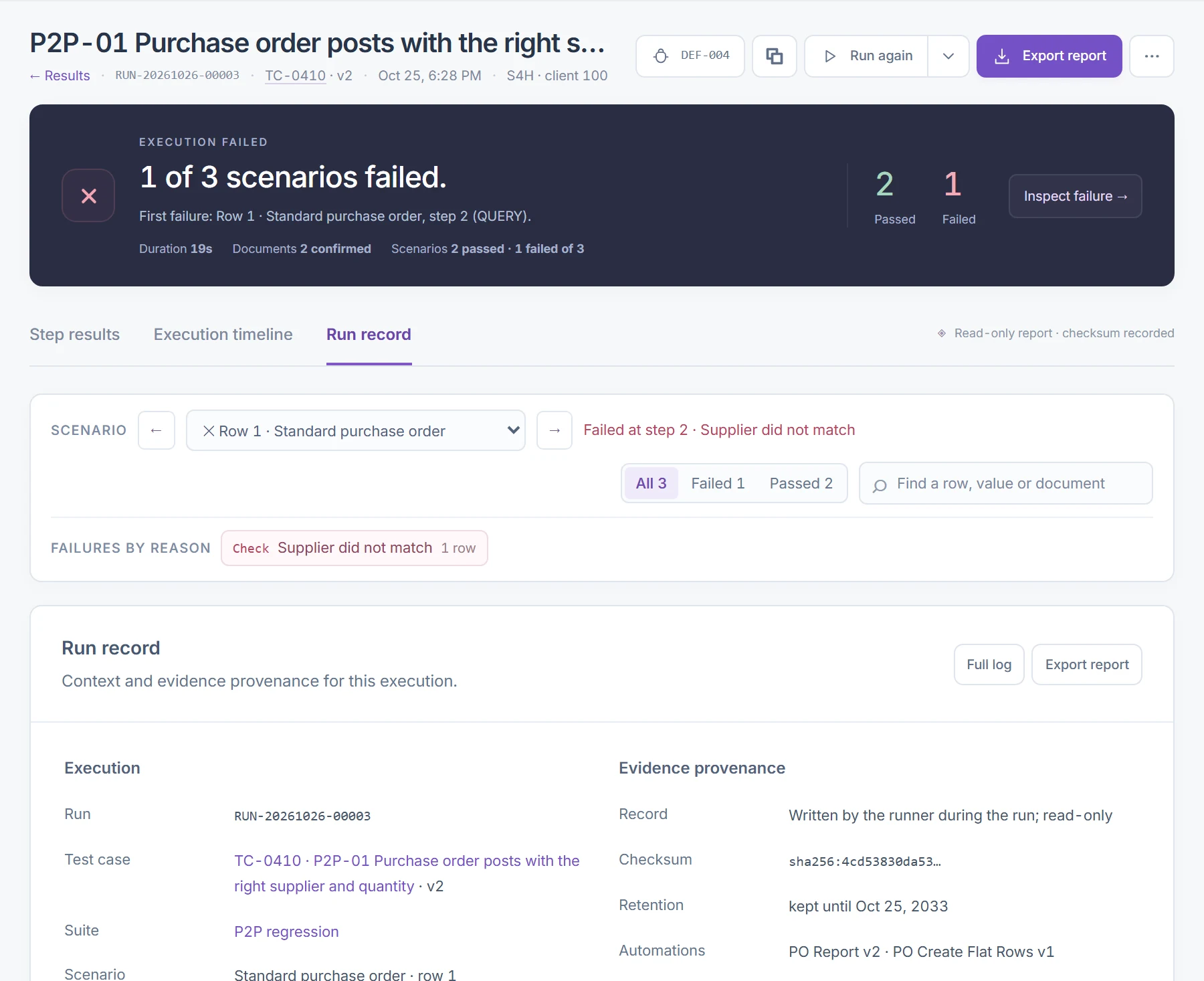
From a failed run, Log defect opens a defect linked to the run and the step, with a severity and an owner. The failed run stays as it was. Rerun the test on the next mock or re-load; once a passing result is on record, the owner sets the defect to Closed, and the original failed run stays on the record.
6. Sign off the mock and export the evidence
A key user can confirm a sample inside the same test with a manual step, as shown in SAP UAT testing. The cycle sign-off covers the newest finished run of every test in the mock's cycle and records their evidence checksums. Results export to PDF and Excel for the go/no-go meeting, and every run record is kept for one, three or seven years.
Worked example: vendor load, mock 2 against the ECC source
This example shows how PostNow.ai SAP Testing checks a vendor load in mock 2 of an ECC to S/4HANA migration. The setup is a common one; the numbers are illustrative, chosen to show how each check reports a defect. Source: ECC, company code 1000. Target: the S/4HANA quality client, where vendors were created as business partners and keep their vendor numbers.
The test suite
| Test | Check | Keys and values |
|---|---|---|
| V-01 Vendors per company code | Compare check, LFB1 in ECC vs LFB1 in S/4HANA | Company code + vendor; number of rows; every key on both sides |
| V-02 Open payables by vendor | Compare check, open vendor items in ECC vs the loaded items in S/4HANA | Company code + vendor + debit/credit indicator; sum of the local-currency amount, tolerance 0.01 |
| V-03 Vendor field sample | Table check on LFA1 and LFB1, 40 rows of test data | Country, reconciliation account, payment terms, payment methods |
| V-04 Offset account is zero | Manual step: the GL accountant checks the migration offset account in FAGLB03 | Balance after all AP objects are loaded; screenshot required |
Mock 2 results
- V-01 failed. 1,248 vendors in the source, 1,245 in the target: three vendors exist only in the source.
- V-02 failed. The three missing vendors' open items appear only in the source. One more vendor appears as a credit group only in the source and as a debit group only in the target: a credit memo was loaded as an invoice.
- V-03 failed on 2 of 40 rows. Payment terms were blank for two vendors whose legacy terms code N45 had no mapping.
- V-04 failed. The offset account showed a balance equal to the missing and mis-signed items, which confirmed the first two findings.
| Defect | Cause | Fix before mock 3 |
|---|---|---|
| 3 vendors missing | The extract skipped vendors with a posting block, although they still had open items | Extract rule changed: load blocked vendors that have open items, with the block |
| Credit memo loaded as invoice | The document type mapping ignored the legacy sign field | Mapping uses the sign; the item is reversed and reloaded |
| Blank payment terms | Legacy code N45 missing from the value mapping | N45 mapped to the agreed ZTERM value; the extract now rejects any unmapped code |
Each finding was logged as a defect against its failed run. Mock 3 runs the same suite in a new cycle; the owners close the defects once its runs pass, and the offset account must show zero before the cycle is signed off.
Data migration testing checklist
A data migration testing checklist keeps every mock load to the same standard: the same checks, the same tolerances and the same sign-off. In PostNow.ai SAP Testing most items are a test in the suite or a field of the cycle, so each mock re-runs them without anyone re-keying:
- Keys agreed per object for reconciliation, with the old-to-new number mapping where numbers change.
- Tolerances written down: zero for counts, the agreed rounding for amounts.
- Record counts by object and org unit, with every key required on both sides.
- Field checks on the tables each object writes, for a risk-based sample and every converted value.
- Trial balance by company code and G/L account, and migration offset accounts at zero.
- Open items by business partner and debit/credit indicator.
- Stock by material, plant and storage location, then by value against the stock accounts.
- Process tests on migrated data: a goods receipt, an invoice, a payment.
- Key-user sample confirmed and the mock's cycle signed off.
- Defects closed only by a passing re-test on a later mock.
The full cutover list, from data freeze to go-live, is in the SAP data migration checklist.
Data migration testing tools
Data migration testing tools for SAP fall into three groups: tools that test the loaded data in SAP, SAP's own load-time checks, and ETL-side validation. PostNow.ai SAP Testing tests the loaded data, reading SAP tables and comparing source and target. The SAP tools below are described from SAP Help.
| Tool | What it checks |
|---|---|
| PostNow.ai SAP Testing | Compare checks between a source and a target SAP system (counts and totals by key, tolerance, keys on one side only), table checks on loaded fields, report totals, defects per mock, cycle sign-off and read-only evidence with a SHA-256 checksum |
| SAP S/4HANA migration cockpit: simulation | Per SAP Help, no data is written to the target during simulation, but you see every message a real transfer would raise |
| Data Migration Status app | Per SAP Help, the status and messages of simulated or migrated instances, an audit function and export to spreadsheet, for the staging tables approach |
| SAP Data Services | Per SAP Help, the Validation transform checks source data against business rules, the Data Profiler compares source and target content, and audit rules check that a data flow loaded the correct data |
| SAP standard reports | MB52, MMBE and MB5L for stock; FBL1N and FBL5N for open items; S_ALR_87012277 for G/L account balances; ME2N for purchase orders |
The cockpit's simulation and the Validation transform check the data on its way in; a test of the loaded data checks what SAP saved. Most projects use both. How each loader works is compared in the guide to SAP data migration tools.
Data reconciliation tools
Data reconciliation tools compare two data sets by key and report what differs. With PostNow.ai SAP Testing the comparison runs inside SAP testing: both sides are read from the SAP systems at run time, the result names each differing group, and the checksum of each side is kept as evidence. After go-live, the same checks keep running in SAP regression testing on a schedule.