
What is SAP UAT?
SAP UAT testing (user acceptance testing) is the final test phase in which business users run real processes in a QA system and accept or reject the result before go-live. PostNow.ai SAP Testing runs UAT inside the test itself: testers answer manual steps with comments and screenshots, and the run or cycle is signed off.
- UAT full form in SAP: User Acceptance Testing.
- The outcome of UAT is a decision, approve or reject, recorded against the evidence it covers.
This guide is for SAP project leads, functional consultants and the key users who run acceptance tests. It explains what UAT in SAP means, how it differs from SIT and regression testing, the seven steps of an SAP UAT, a test script template you can copy, and how a run and a cycle are signed off.
What is UAT in SAP? Meaning and full form
UAT in SAP means user acceptance testing: key users from the business run their own processes in the QA system, after the changes have been transported there, and decide whether the system is ready for production. PostNow.ai SAP Testing gives those users a test case to follow, a place to record what they saw, and a sign-off that captures their decision.
UAT full form in SAP: User Acceptance Testing. The SAP UAT meaning is the same in every project: the people who will use the process accept it. Consultants build and integration-test the solution; key users accept it. Without that acceptance there is no go-live decision.
SAP user acceptance testing vs SIT and regression testing
SAP user acceptance testing is the last of three test phases that are often confused: SIT proves that the parts work together, regression testing proves that a change broke nothing, and UAT proves that the business accepts the result. In PostNow.ai SAP Testing one test case can combine automated and manual steps:
| Test | Question it answers | Who runs it | When |
|---|---|---|---|
| PostNow.ai UAT test | Does the process work, and does the business accept it? | The system posts and checks; a key user confirms | In the QA system, before go-live |
| UAT | Does the business accept the result? | Key users | After SIT, before go-live |
| SIT | Does data pass correctly between modules and connected systems? | Consultants and testers | After unit tests, before UAT |
| Regression testing | Did a change break what worked? | Testers, often with automated suites | After transports, support packages and upgrades |
The other test types are described in the overview of SAP testing types and process.
How to do UAT testing in SAP: 7 steps
UAT testing in SAP follows seven steps: define the scope and acceptance criteria, name the key users and approvers, write the test scripts, prepare the QA system, execute with evidence, fix and retest defects, and sign off. PostNow.ai SAP Testing has a place for each of them.
1. Define scope and acceptance criteria
Scope UAT by business process, not by transaction: "procure to pay for stock materials" rather than "ME21N". For each process, write what acceptance means, such as the right supplier, quantity and delivery date on every purchase order.
2. Name key users and approvers
Key users run the tests; approvers sign the result off. In PostNow.ai a test cycle can name its approvers, and Testing Managers can always sign off.
3. Write test scripts
Turn each process into a test script with steps, test data and an expected result for every step. The template below shows the columns.
4. Prepare the QA system
Transport the changes to the QA client, load the master data and the test data, and give each key user the authorizations their process needs.
5. Execute and capture evidence
Key users run the scripts and record the actual result of every step, with a screenshot or a document number where an auditor will ask for one.
6. Log defects, fix and retest
Every failed step becomes a defect with an owner. After the fix is transported, the same scenario runs again in a new run.
7. Sign off the cycle and archive the evidence
An approver accepts or rejects the cycle's results, and the evidence is archived for the retention the company requires.
SAP UAT test script template
An SAP UAT test script template breaks one business scenario into ordered steps, each with test data, an expected result and room for the actual result and evidence. Copy the tables below into Excel or Word as your SAP UAT testing template; PostNow.ai SAP Testing uses the same fields inside a test case.
Script header
| Field | Example |
|---|---|
| Script ID | UAT-P2P-01 |
| Scenario | Create a purchase order for a stock material |
| Business process / module | Procure to pay / MM |
| Transaction | ME21N, displayed in ME23N |
| Preconditions | Supplier V-1000, material M-01 and a purchasing info record for both exist; the user has the buyer role |
| Tester, date, cycle | Key user, execution date, UAT cycle 1 |
Test steps
| Step | Action | Test data | Expected result | Actual result | Pass / fail | Evidence | Defect |
|---|---|---|---|---|---|---|---|
| 1 | Enter the header in ME21N | Supplier V-1000, purchasing org PORG1, purchasing group PG1, company code CC01 | Supplier name and payment terms appear | ||||
| 2 | Enter the item | Material M-01, 24 PC, plant PL01 | Net price is taken from the info record | ||||
| 3 | Save | - | Message "Standard PO created under the number …" | PO number | |||
| 4 | Display the order in ME23N | The new PO number | Supplier, quantity and delivery date match the request | Screenshot |
SAP UAT sign-off template
Close the UAT document with a sign-off block. This SAP user acceptance testing template records who accepted what, and on which evidence:
| Field | Example |
|---|---|
| Decision | Approved or rejected |
| Approver and role | Name of the business owner, e.g. head of purchasing |
| Date | The date of the decision |
| Comment | Required when rejecting, or when accepting a result with failures |
| Evidence reference | The run or cycle it covers, and its evidence checksum |
In PostNow.ai the same model maps field by field: the action is the step's instruction, the expected result is its expected result, and the tester records the verdict, a comment, screenshots and finally the sign-off.
Running UAT with PostNow.ai SAP Testing
PostNow.ai SAP Testing runs user acceptance testing in SAP as part of a normal test case, next to the SAP test automation steps it already has. The system does what a system can do, a key user confirms what only a person can judge, and both end up in one run record. The example below is a real run on an S/4HANA test system.
A manual step inside the test
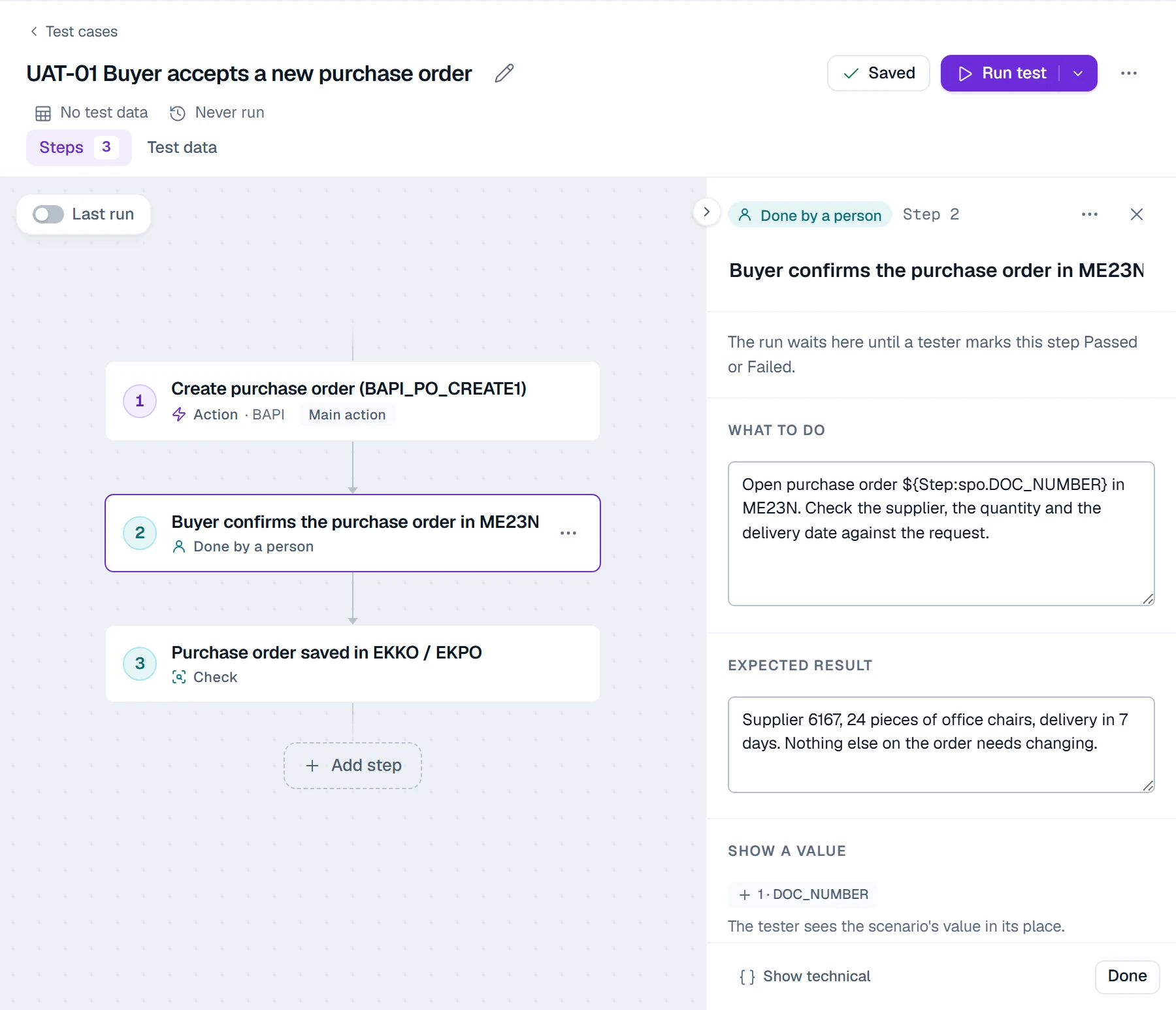
A step marked Done by a person has two fields: what to do and the expected result. It can show values from earlier steps, so the instruction names the exact purchase order the test just created. Here, step 1 posts the order through BAPI_PO_CREATE1, step 2 asks the buyer to confirm it in ME23N, and step 3 reads EKKO and EKPO.
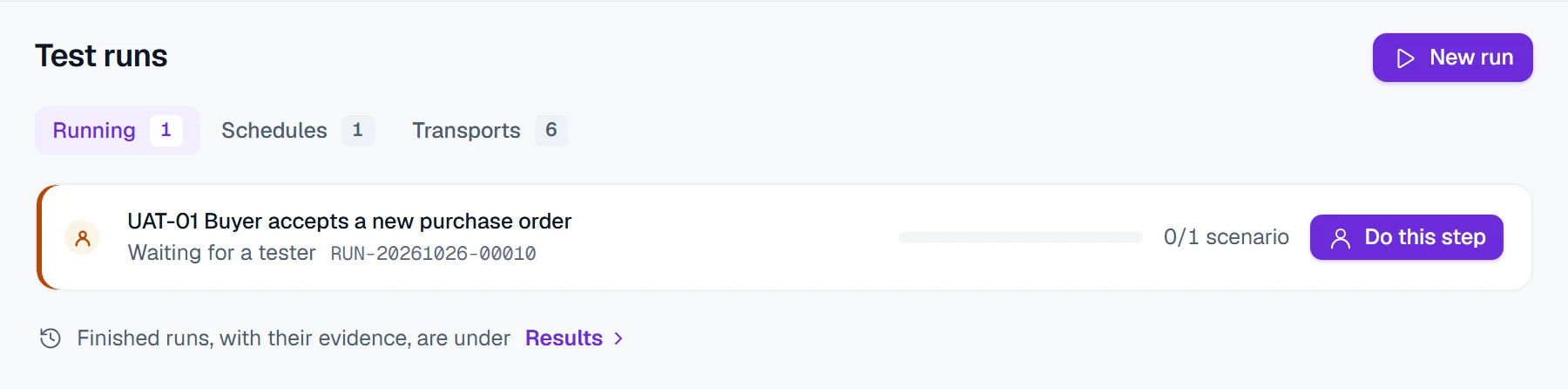
The run waits for the tester
When the run reaches the manual step, it waits for a tester and shows who it is waiting for. The tester opens the step from the run.
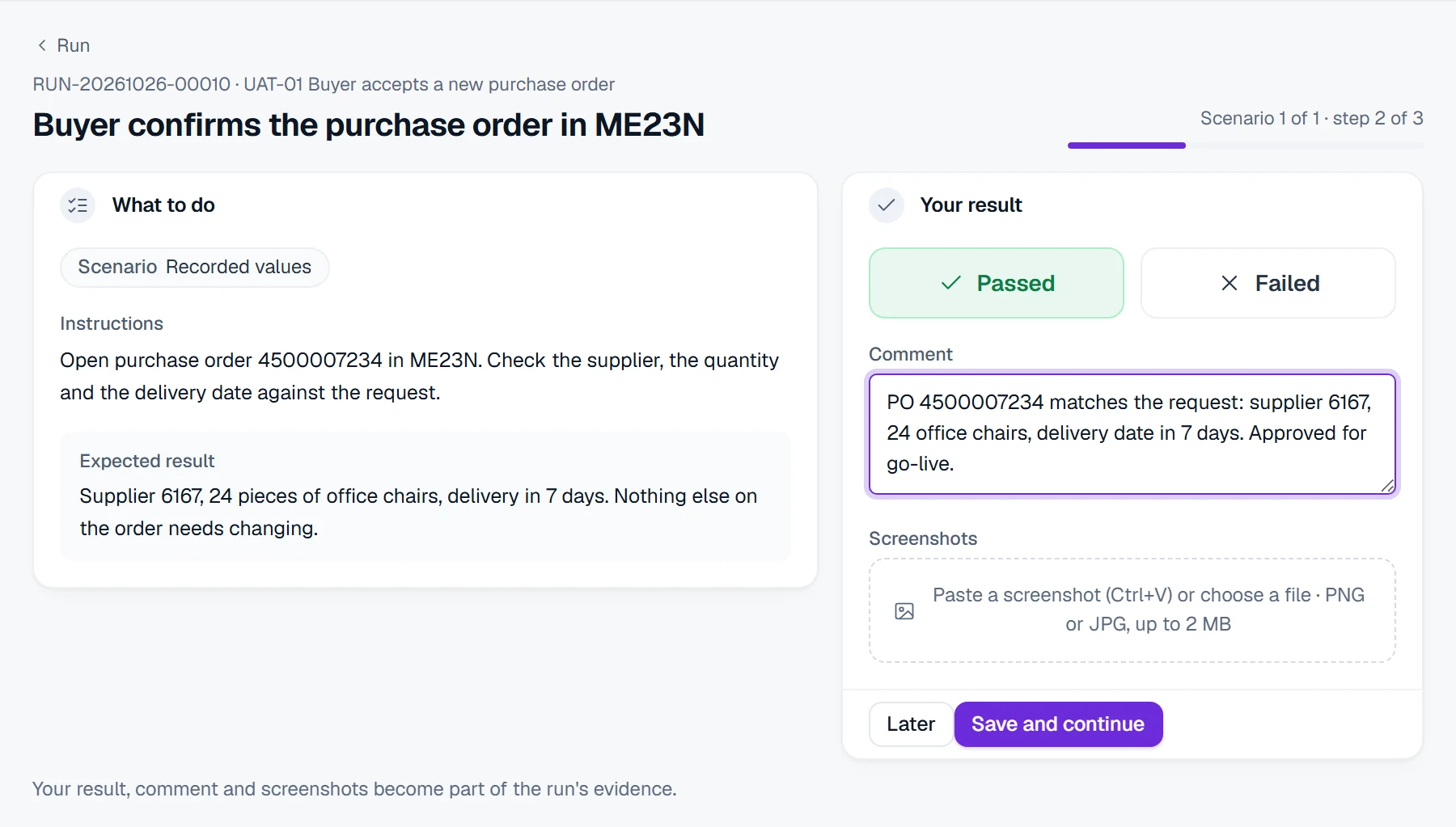
The tester sees the instruction with the real purchase order number, the expected result, and three fields to fill: Passed or Failed, a comment, and up to five screenshots. A comment is required when the step fails, and a step can require a screenshot.
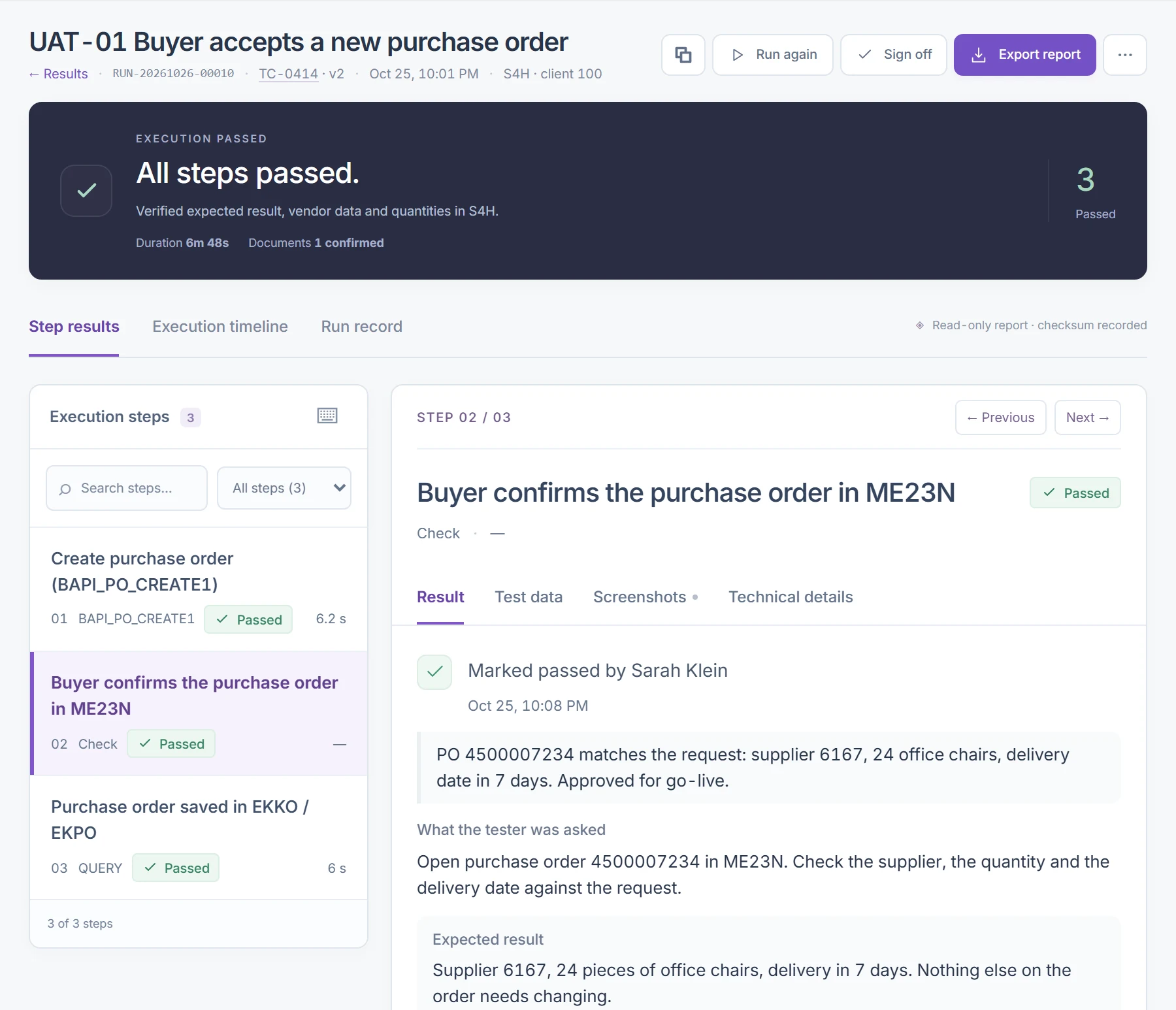
One run, three kinds of proof
The run record now holds the BAPI posting, the buyer's verdict with the comment, and the table check. Anyone reviewing the run sees who marked the step, when, what they were asked and what they wrote.
SAP UAT sign-off and evidence
SAP UAT sign-off is the recorded decision that a run or a whole test cycle is accepted or rejected. In PostNow.ai SAP Testing a sign-off records the decision, a comment, the signer's name and role, and the evidence checksum it covers.
- Approve or reject. A comment is required when the approver rejects, or when not every scenario passed and the result is accepted anyway.
- Tied to the evidence. The sign-off covers the run's evidence checksum. If the evidence no longer matches it, the sign-off is refused.
- Never edited. A later sign-off replaces an earlier one; neither can be changed.
- Who signs. Testing Managers can always sign off, and a test cycle can name its own approvers, such as the business owner.
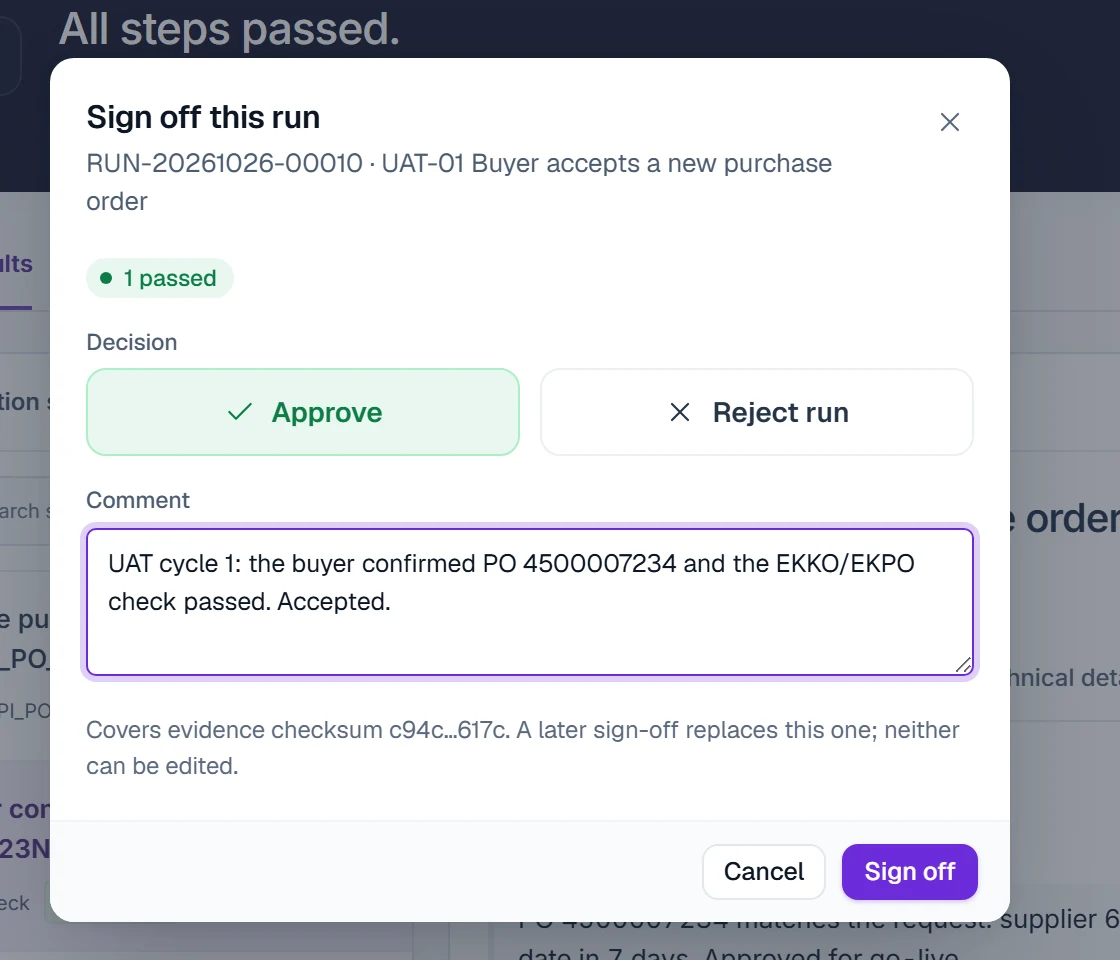
A cycle sign-off works the same way for a whole UAT cycle. It covers the newest finished run of every test in the cycle and records their evidence checksums as they are at that moment. A signed run shows the decision at the top of its result.
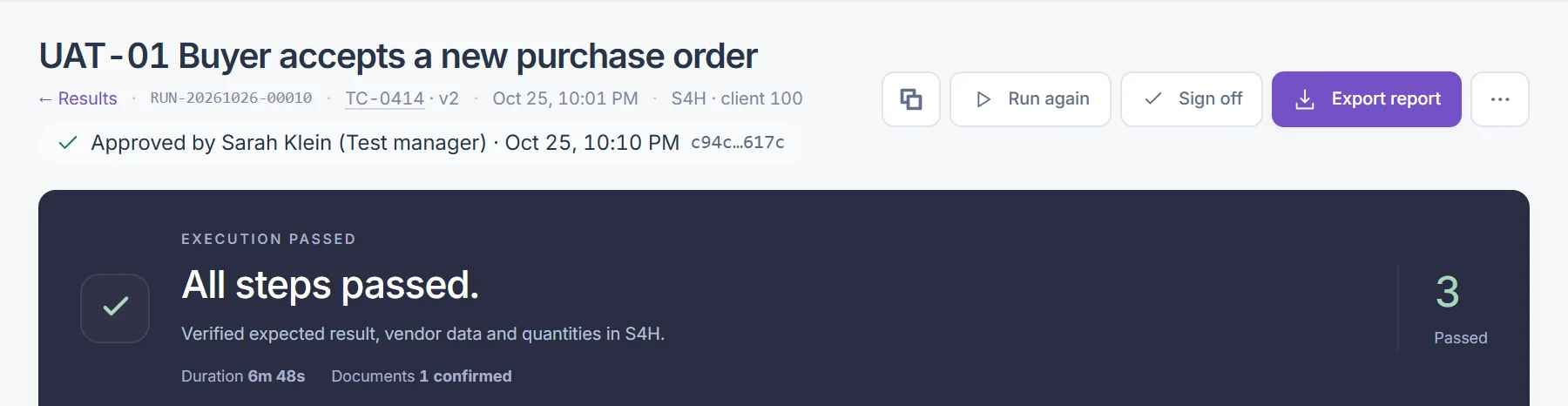
The run record behind the sign-off is read-only and has a SHA-256 checksum, and it is kept for one, three or seven years. Exporting the evidence report prints the sign-off with it.
SAP UAT test plan: entry and exit criteria
An SAP UAT test plan states the scope, the schedule, the key users and approvers, the QA client, the defect severity levels, and the criteria for starting and finishing UAT. In PostNow.ai SAP Testing the plan lives in a project with a UAT cycle, its environment and its approvers.
| Entry criteria | Exit criteria |
|---|---|
| SIT passed for every process in scope | Every critical scenario passed |
| Transports imported into the QA client | Every failed step logged as a defect and retested |
| Master data and test data loaded | No open defect of high severity |
| Key users trained and authorized | The UAT cycle signed off by its approvers |
A failed step in PostNow.ai turns into a defect with Log defect, linked to the run and the step it came from.
SAP UAT testing best practices
Five SAP UAT testing best practices make acceptance faster and easier to defend: script business scenarios, require screenshots where auditors will ask, include a scenario SAP must reject, retest in a new run, and keep automated suites after go-live. PostNow.ai SAP Testing supports each of them:
- Script business scenarios, not transactions. Key users accept processes; a list of transaction codes is not a process.
- Ask for a screenshot where an auditor will ask for one. Mark those steps so a screenshot is required.
- Include a scenario SAP must reject. An order for a blocked supplier should fail; a data set with one row that expects rejection runs the same script for both cases.
- Retest in a new run. Keep the failed run as it was; the fix is proven by a new, passing run, and that run is the one signed off.
- Keep automated suites after go-live. Once the process is accepted, SAP regression testing after go-live keeps it working.
For data loaded before UAT starts, data migration testing covers validation and reconciliation, and the SAP data migration checklist lists every check.