Introduction
Many of the SAP tasks that consume the most time are also the best candidates for automation. Knowing which ones, and why, is the difference between automating for effect and automating for habit.
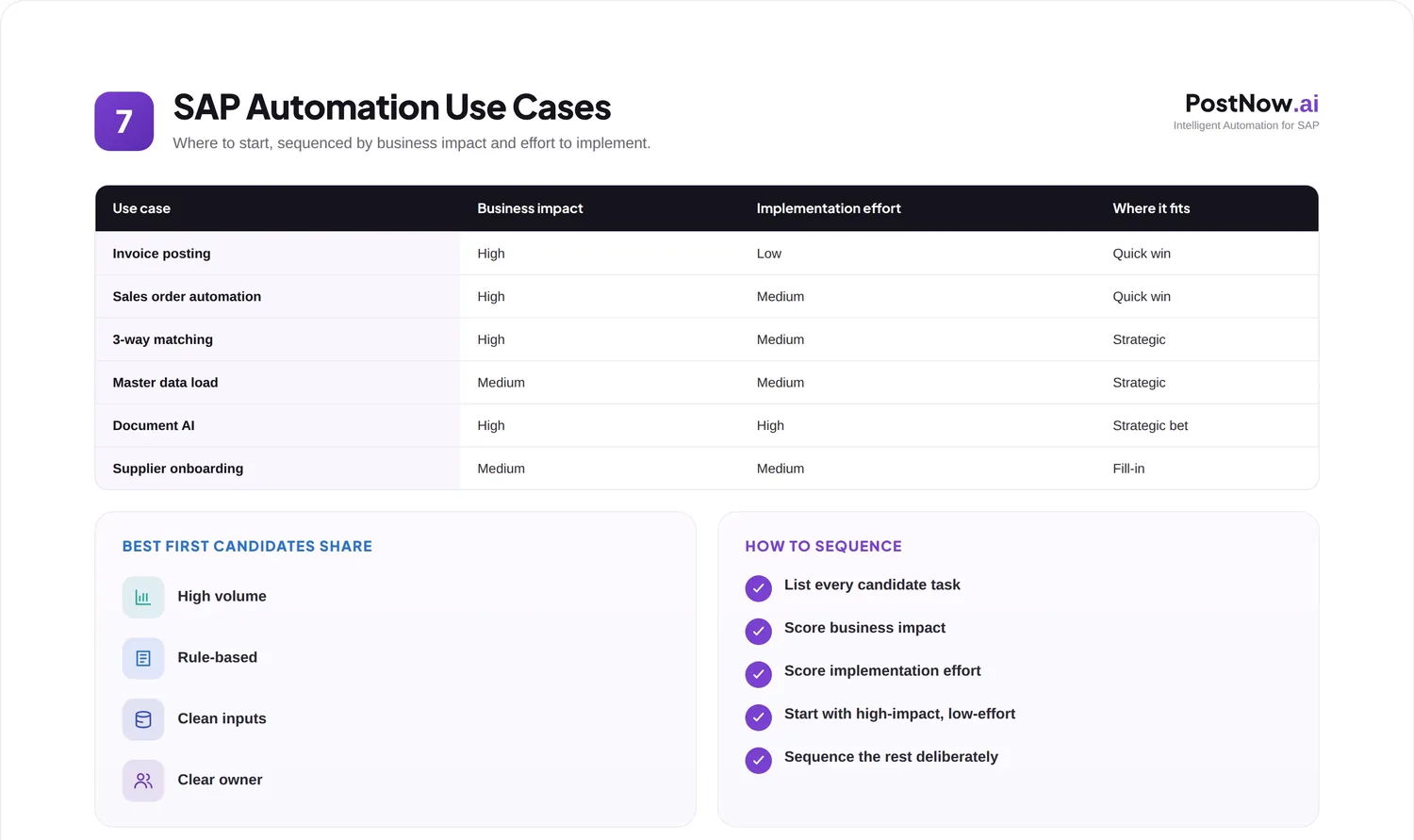
The question of what to automate comes up the moment a team accepts that manual data entry is holding it back. The instinct is to automate the most annoying task first, but a clearer view of the common use cases, and their benefits and challenges, leads to better choices.
This guide surveys the most common SAP automation use cases across master and transactional data, summarizes the benefit and challenge of each, and offers a simple way to decide where to begin. It complements the SAP process automation pillar and the automation readiness checklist.
It is written for teams deciding where automation will repay the effort soonest, and how to sequence the rest.
A useful way to read this guide is as a menu rather than a mandate. Not every use case belongs on every roadmap, and the value lies in recognizing which ones fit your volumes, your data, and your priorities. The survey below is meant to inform that choice, not to prescribe it.
It also helps to view the use cases as a portfolio rather than a queue. Some can be automated in parallel, some depend on shared preparation such as data cleansing, and seeing them together reveals efficiencies that tackling them one by one would miss.
Why this matters
Choosing the right use cases is what turns automation from a scattering of pilots into a compounding capability.
The business impact depends heavily on the choice. Automating a high-volume, repetitive task with clean data delivers quick, visible value, while automating a rare or messy one delivers frustration. The same effort produces very different returns depending on where it is aimed.
There is a governance angle too. Each use case touches different SAP objects, owners, and controls, so understanding them helps ensure automation respects the right roles and standards rather than cutting across them. Good use-case selection is partly a governance decision.
Operationally, the common use cases share a shape: structured data, prepared in a spreadsheet, that needs to reach SAP cleanly and repeatedly. Recognizing that shared shape is what lets a single, well-built approach serve many tasks rather than one.
It is worth stating plainly that the use cases here are illustrative, not exhaustive. They are the ones most teams meet first because they are common and high in volume, but the same logic extends to many other objects. Once the pattern is clear, applying it to a new use case is straightforward.
Throughout, the focus is on what makes each use case a good or poor candidate, not on the mechanics of any single object, which the dedicated solution guides cover in depth. This is the map; the guides are the detailed routes.
The guide is organized to move from selection to execution: why the choice matters, what the common use cases are, how to sequence them, and the challenges, practices, and mistakes that surround the effort. Readers in a hurry can jump to the prioritization guide for an immediate sense of where to begin.
One framing worth carrying through: automation is a portfolio decision, and like any portfolio it benefits from spreading effort sensibly rather than betting everything on the single most visible task. The survey that follows is the raw material for that decision.
Core concepts: the common use cases
The most frequent use cases fall into two families: creating and maintaining master data, and posting transactional documents.
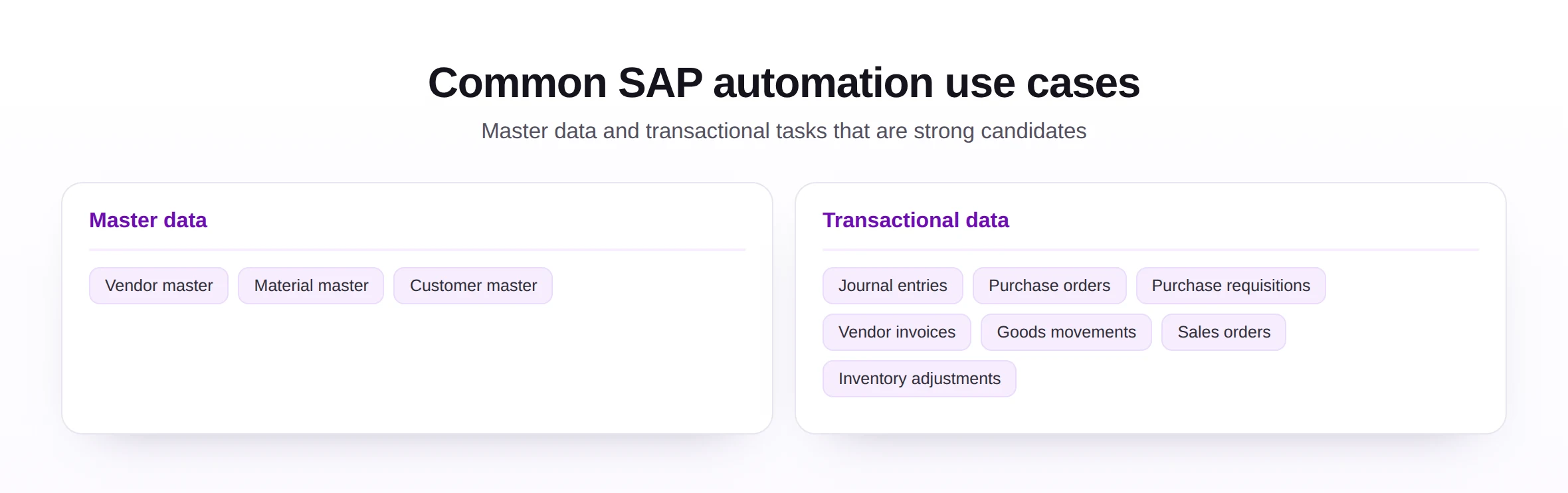
The split between master and transactional data is more than tidy categorization; it shapes how each use case behaves. Master data is created less often but matters lastingly, so accuracy dominates, while transactional data is created constantly, so throughput and timeliness dominate. The right emphasis differs accordingly.
On the master data side, the classic candidates are vendor master, material master, and customer master creation. These records have many fields, must be unique and consistent, and are often loaded in batches during onboarding or cleanup, so templated, validated loads remove both effort and error.
On the transactional side, the common candidates include journal entries, purchase orders, purchase requisitions, vendor invoices, goods movements, sales orders, and inventory adjustments. These are higher in volume and more time-sensitive, which is exactly why posting them from a prepared workbook, with validation, pays off.
Across both families the benefit is consistent: less manual keying, fewer errors, and faster turnaround. The challenge is also consistent: each depends on clean source data and the right access, which is why preparation matters as much as the tool.
It is worth resisting the urge to treat all ten use cases as equivalent. They differ in volume, complexity, and data readiness, and lumping them together obscures the fact that some are ready to automate today while others need preparation first. The value of surveying them is precisely to draw those distinctions.
It is worth remembering that a use case is a candidate, not a commitment. Surveying them is about understanding the field of options, after which the readiness assessment and prioritization decide which ones actually proceed and in what order.
Benefits and where to start
A quick view of the benefit per use case, followed by a simple way to sequence them, turns a long list into a plan.
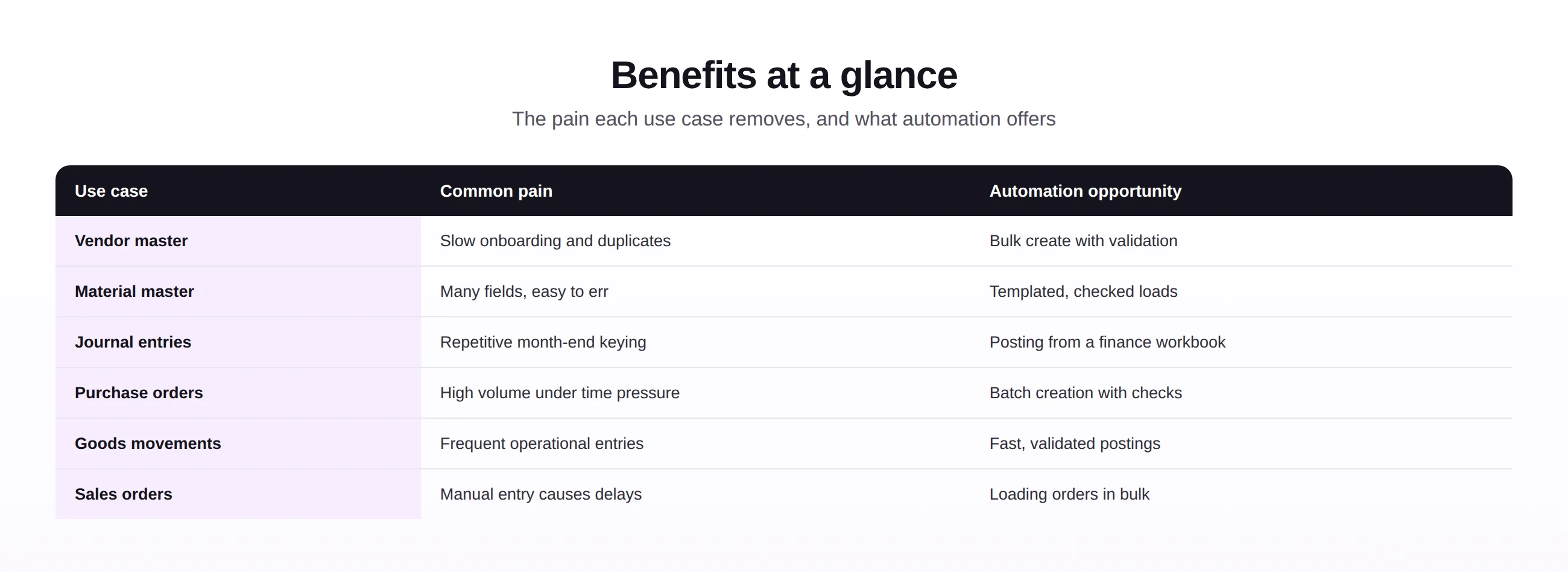
Behind every row in the table is the same underlying trade. Manual entry is flexible but slow and error-prone, while a prepared, validated load is structured but fast and reliable. For repetitive work the structured option wins easily, which is why these particular use cases recur on automation roadmaps.
The table makes the shared logic clear: each use case trades repetitive manual entry for a prepared, validated, repeatable load. The specifics differ by object, but the shape of the benefit does not.
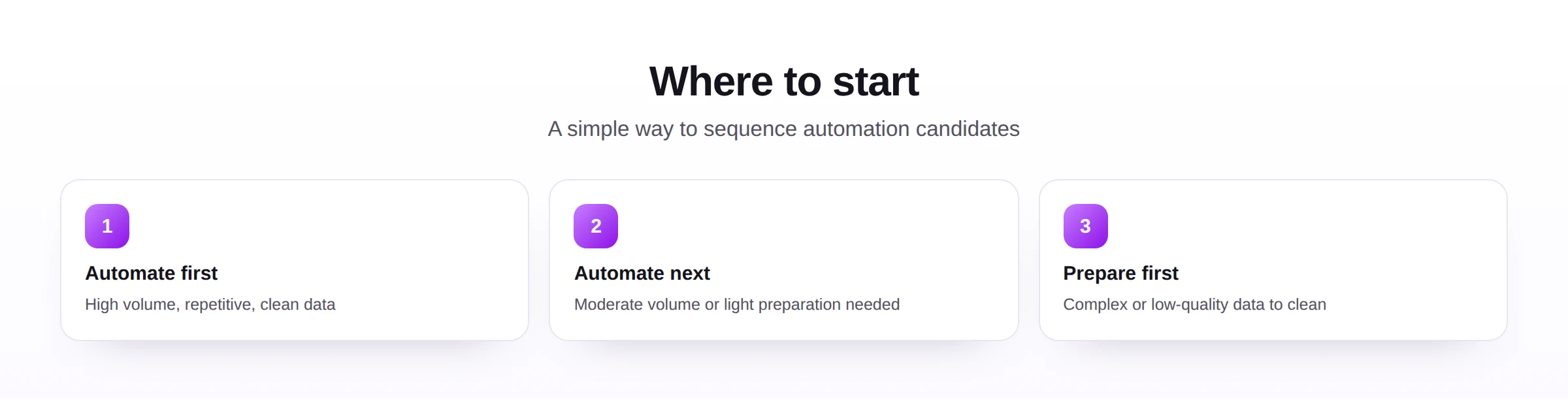
To sequence them, start where volume is high, the task is repetitive, and the data is already clean, because that combination delivers value fastest. Tackle moderate cases next, and reserve complex or low-quality ones until their data has been prepared. This ordering, paired with the readiness checklist, keeps early wins coming while harder cases are made ready.
The prioritization is deliberately simple because a simple rule gets used. Elaborate scoring models look rigorous but tend to gather dust, whereas a three-way sort into automate first, automate next, and prepare first is quick enough to apply to a whole portfolio in an afternoon. Simplicity here is a feature.
One more consideration when sequencing: early visible wins matter for momentum. An automation that quickly relieves a well-known pain point builds the support and confidence needed to tackle the harder use cases later, so the first choice is partly a matter of strategy, not just readiness.
Common challenges
A few challenges recur across use cases, and each points back to preparation rather than the task itself.
- Unclean source data, which undermines any use case until the data is cleansed first.
- Object complexity, as some records have many interdependent fields that demand careful mapping.
- Access and roles, where the right authorizations must be in place before automating.
- Volume variability, where a use case worth automating at scale is not worth it for a handful of records.
- Process variation, where the same nominal task is done differently across teams, complicating a single approach.
The common root cause is that a use case is judged by the task alone, without its surroundings. Considering the data, access, volume, and process variation together gives a truer picture of how ready a use case really is.
Notice that the challenges are largely independent of which use case you pick. Data quality, complexity, access, volume, and process variation apply across the board, which means the preparation that readies one use case often readies several. Effort spent here tends to pay off more broadly than expected.
It is reassuring that these challenges are familiar rather than novel. Every one of them is a known quantity in SAP work, with established ways to address it, so meeting them in the context of automation is less about new problems than about applying existing discipline to a new purpose.
Best practices
A few habits make use-case automation deliver value reliably and keep it maintainable across many tasks.
- Start with clean data, grounded in master data management, so the use case rests on a sound base.
- Validate every load, so each use case posts only correct records to SAP.
- Reuse one approach across objects, so master and transactional loads share a trusted path via Excel to SAP automation.
- Govern access per use case, grounded in master data governance.
- Keep an audit trail, so every automated use case is traceable and reviewable.
These practices favor governance, validation, auditability, scalability, and maintainability across the whole portfolio of use cases. A team that builds them once can extend automation to new objects with confidence rather than starting over each time.
The thread through these practices is reuse. The real prize is not automating one use case but building an approach that extends cleanly to the next, and the one after that. A practice designed for reuse turns each new use case into a small extension rather than a fresh project.
Common mistakes
Most use-case mistakes come from choosing or sequencing them poorly.
Each is avoided by judging a use case in the round, by volume, data quality, access, and process consistency, and by sequencing accordingly. The right first use case is rarely the most painful one; it is the one most ready to succeed.
Underlying these mistakes is a tendency to let emotion, rather than evidence, choose the first target. The most painful task feels like the obvious place to start, but pain often signals complexity or poor data, the very things that make a use case a hard first project. Letting the evidence choose leads to better early outcomes.
Future trends
The range of automatable use cases is widening, and selecting among them is becoming more guided.
- Broader coverage, as more objects and processes become straightforward to automate.
- Guided selection, with tools suggesting which use cases are ready to automate first.
- Assisted setup, reducing the effort to configure each new use case.
- Self-service for business users, letting the owners of a process automate it safely.
- Built-in governance, so each automated use case is controlled and audited by default, supported by modern automation tools.
However the list of use cases grows, the way to choose among them will hold: favor the volume, repetition, and clean data that deliver value fastest, prepare the rest, and extend a single trusted approach across them all.
For a team ready to begin, the practical next step is to list the candidate use cases, sort them by volume and data readiness, and pick the strongest. Automating that one well, with validation and a clear owner, creates both a quick win and a template that makes every later use case easier.
Seen as a whole, the lesson is that automation rewards good selection as much as good execution. The teams that benefit most are not those that automate the most tasks, but those that automate the right ones first and extend a single trusted approach across the rest.