Executive summary
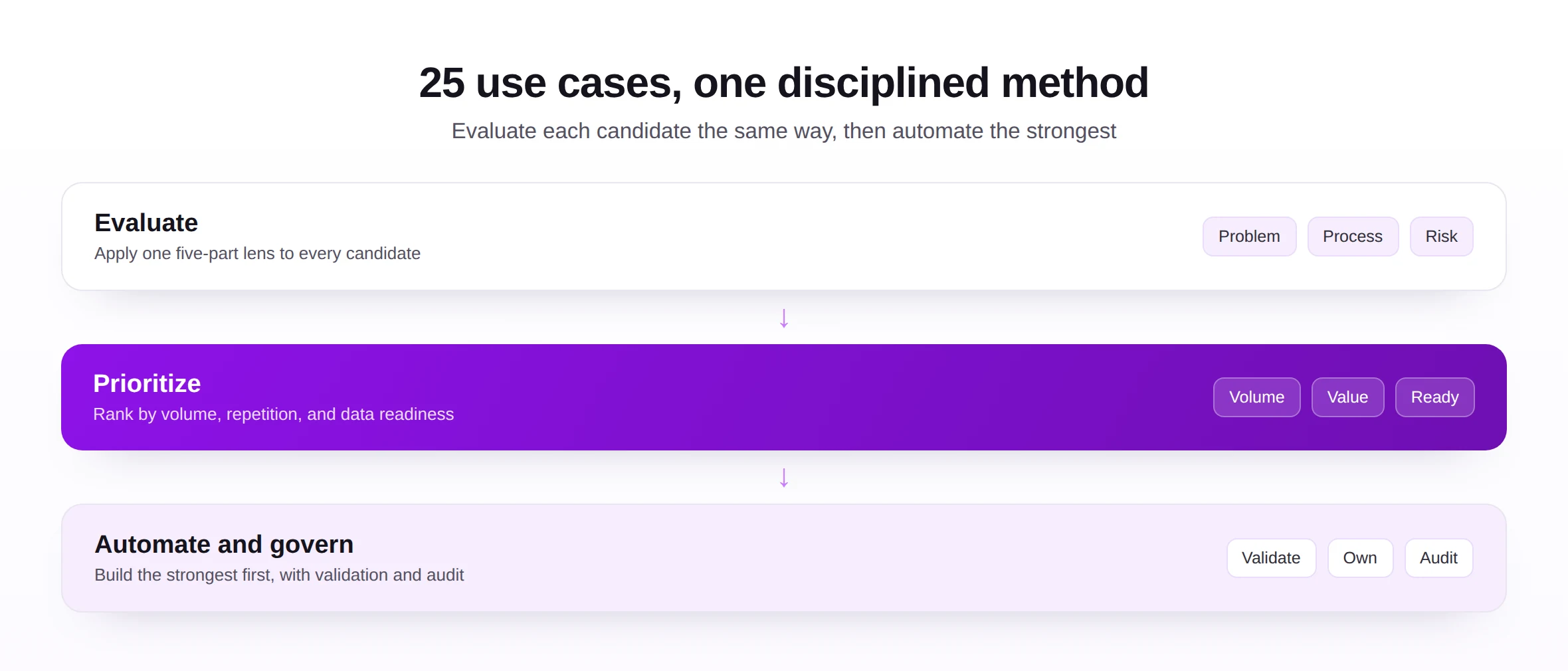
Most enterprises have far more SAP automation opportunities than they realize, and far less method for choosing among them than they need. This resource provides both: a catalog of twenty-five use cases and a disciplined way to evaluate them.
It is written for directors, architects, and process owners who must decide where automation will repay the effort, in what order, and under what controls. Rather than a sales list, it applies a consistent five-part lens to each use case, business problem, manual process, common challenges, automation opportunity, and governance, so that very different tasks can be compared on the same terms.
Three ideas organize the guide. The same evaluation lens applies to every candidate, which makes prioritization possible. The strongest candidates share a shape, high volume, repetitive, structured data, clean enough to trust, which is why some appear obvious once seen. And every automated use case, however routine, still requires validation, ownership, and an audit trail.
Read in full, the guide gives an enterprise a ready-made portfolio to assess and a method to extend it. It builds on the overview in the SAP automation use cases article and the discipline of the readiness assessment framework.
This resource is built to be used, not just read. A director can take the executive summary, the use-case map, and the prioritization model and decide where to invest. An architect can work through the lens and the catalog in detail. A process owner can jump straight to the use cases that touch their area. Each finds what they need without working through the rest.
It is also written to stay current as the catalog grows. The twenty-five use cases are a strong starting set, not a closed list, and the evaluation lens applies equally to any candidate an enterprise adds. As more objects become practical to automate, the method for choosing among them does not change.
One framing is worth settling before anything else. The hard part of automation is rarely the building; it is the choosing. An enterprise that can evaluate and sequence its candidates well will outperform one that automates energetically but indiscriminately, which is why this guide spends as much effort on selection as on the use cases themselves.
A note on scope: every use case here concerns structured data that originates outside SAP, usually in a spreadsheet, and must reach the system accurately and repeatedly. That shared origin is why a single, well-built path from a workbook to SAP can serve so many of them, and why the catalog rewards a portfolio approach over piecemeal tooling.
The audiences for this guide are wider than for most. Finance, procurement, logistics, controlling, and engineering all appear in the catalog, because automation opportunities are spread across the enterprise rather than concentrated in one function. That breadth is itself an argument for a shared method, so each function evaluates its candidates on the same terms.
The guide deliberately spans the whole SAP data estate rather than focusing on one module, because the same evaluation method serves every corner of it. A controlling team assessing cost centers and a logistics team assessing goods movements are asking the same five questions, which is what lets an enterprise govern its automation portfolio as one thing rather than many.
Why this topic matters
The choice of what to automate, and in what order, determines whether an automation program compounds value or scatters effort.
Business impact
Each use case represents recurring manual effort and recurring risk. Automating a high-volume, repetitive one with clean data returns value on every future execution, while automating a rare or messy one returns mostly frustration. A clear catalog and a consistent lens turn that choice from instinct into a defensible decision.
Surveying use cases together also reveals shared opportunities. Several master data objects, for instance, benefit from the same validated loading approach, so a single capability can serve many use cases. Seeing the portfolio as a whole exposes efficiencies that tackling tasks one by one would miss.
Governance impact
Different use cases touch different objects, owners, and controls, from payment-sensitive bank data to revenue-relevant pricing. Evaluating each through a governance lens ensures automation respects the right roles and approvals rather than cutting across them, an approach grounded in master data governance.
Operational impact
Operationally, the common use cases share a shape: structured data, prepared in a spreadsheet, that must reach SAP cleanly and repeatedly. Recognizing that shared shape is what lets one well-built, validated approach, such as Excel to SAP automation, serve many tasks rather than one.
SAP-specific impact
In SAP, object dependencies and shared data mean these use cases interact. Master data must exist before transactions reference it, and a flaw in one record radiates across many documents. Evaluating use cases with this interdependence in mind produces a sequence that respects how SAP actually works.
The value of these use cases compounds across the portfolio rather than accruing in isolation. A validated loading capability built for vendor master serves material and customer master too; a posting approach proven on journal entries extends to invoices and movements. Seen this way, the portfolio is not twenty-five separate projects but a handful of reusable capabilities applied many times.
This shared structure is also where the economics turn favorable. The first use case carries the cost of building the approach; each subsequent one mostly reuses it, so the return improves as the portfolio grows. An enterprise that recognizes this invests in a reusable capability rather than a series of one-off automations.
The interdependence of SAP data shapes the whole exercise. Because master data underpins transactions and a single record feeds many documents, the use cases cannot be considered in any order; master data generally comes first, and quality there pays off across everything downstream. The catalog is organized with that dependency in mind.
The lens doubles as a filter for readiness. A candidate with a clear problem and a tedious manual process is worth automating, but only if its challenges are manageable and its governance can be respected. Reading the lens as a whole, rather than fixating on the appealing automation opportunity alone, is what separates a ready use case from a tempting but premature one.
It is worth being explicit that not every use case belongs on every roadmap. An enterprise with little asset activity will rank asset postings low, while a high-volume distributor will prize goods movements and deliveries. The catalog is a superset; each organization draws its own shortlist from it according to where its volume and pain actually sit.
The interplay between use cases also creates natural sequences. Clean vendor and material master data makes purchase order and invoice automation far easier, so master data use cases often earn their place partly by enabling the transactional ones that follow. Reading the catalog with these dependencies in mind turns a flat list into a sensible order of work.
It is worth adding that the catalog favors breadth of recognition over depth of instruction. Each entry says enough to evaluate a use case and decide whether to pursue it; the detailed mechanics of any single object belong in its dedicated solution guide. This is the map of the territory, and the guides are the routes through it.
Throughout, the emphasis falls on judgement rather than volume. The aim is not to automate as many of these twenty-five use cases as possible, but to automate the right ones in the right order, under the right controls. A smaller, well-chosen, well-governed portfolio outperforms a larger, hastily assembled one every time.
Core concepts: the evaluation lens
A consistent lens is what makes twenty-five very different tasks comparable. Every use case in this guide is described through the same five questions.
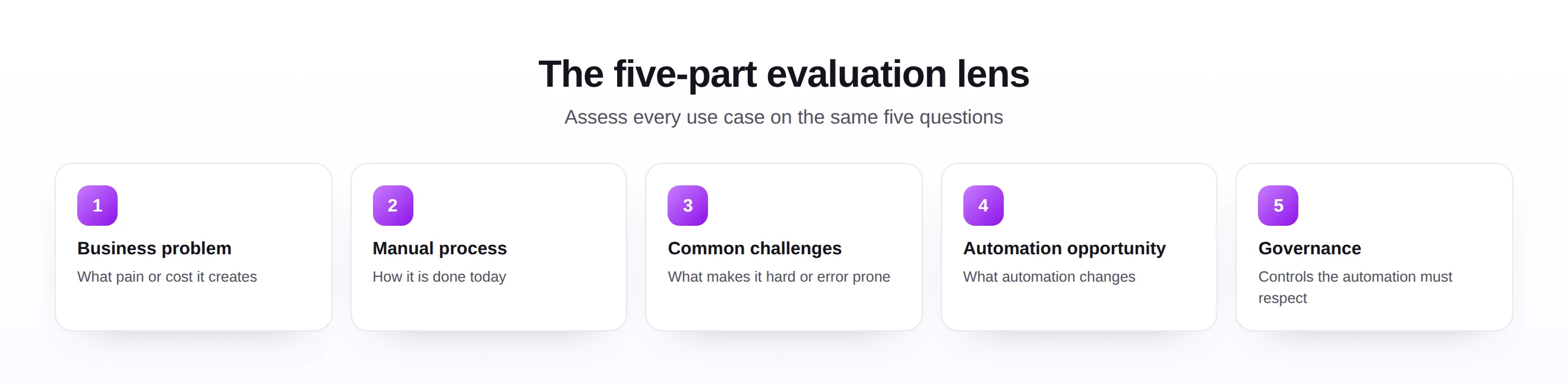
The business problem names the pain or cost a use case creates, which is what justifies automating it at all. The manual process describes how the task is done today, revealing the effort automation would remove. The common challenges capture what makes the task hard or error prone, which often determines its readiness.
The automation opportunity states what automation actually changes, usually replacing repetitive manual entry with a prepared, validated, repeatable load. The governance considerations name the controls the automation must respect, from segregation of duties to approval and audit. Together these five questions give a complete, comparable view of any candidate.
This lens is also a filter. A use case with a clear business problem, a tedious manual process, manageable challenges, a strong automation opportunity, and respectable governance is a strong candidate; one that scores poorly on several is a signal to prepare before automating. The catalog that follows applies the lens to twenty-five use cases worth evaluating.
It is worth stating plainly that this catalog is illustrative, not exhaustive. The twenty-five use cases are the ones enterprises most commonly meet, but the same lens applies to many more, from specialized master data to industry-specific transactions. Once the pattern is clear, adding a new use case to the portfolio is a matter of applying the lens, not inventing a method.
The split between master data and transactional use cases is more than tidy grouping; it reflects a real difference in behavior. Master data is created less often but matters lastingly, so accuracy dominates its evaluation, while transactional data is created constantly, so throughput and timeliness dominate. The lens is the same, but the weight given to each question shifts accordingly.
A practical way to use the catalog is to skim it against your own pain points first. The use cases that make you nod in recognition are your candidates; the rest are reference. From that shortlist, the prioritization model that follows decides which to pursue first, turning a long catalog into a short, ordered plan.
Applying the lens consistently is what makes the catalog more than a list. Without it, each use case would invite its own ad hoc debate; with it, twenty-five very different tasks become directly comparable, and a leadership team can discuss them in one vocabulary. The discipline is less in the answers than in asking the same five questions every time.
The lens also surfaces hidden work. A use case may have an appealing automation opportunity but a governance question that demands segregation of duties, or a manual process that conceals significant variation across sites. Naming all five aspects ensures these complications are seen during evaluation rather than discovered during a build.
| Lens question | What it reveals |
|---|---|
| Business problem | Whether the use case is worth automating at all. |
| Manual process | How much effort automation would remove. |
| Common challenges | What might make the use case hard or risky. |
| Automation opportunity | What automation actually changes. |
| Governance considerations | The controls the automation must respect. |
One further benefit of the lens is that it makes disagreements productive. When two leaders differ on whether to automate something, the lens locates the disagreement precisely, in the data readiness, perhaps, or the governance, rather than leaving it as a clash of instincts. A debate anchored to the five questions resolves far more quickly than one conducted in generalities.
The 25 SAP automation use cases
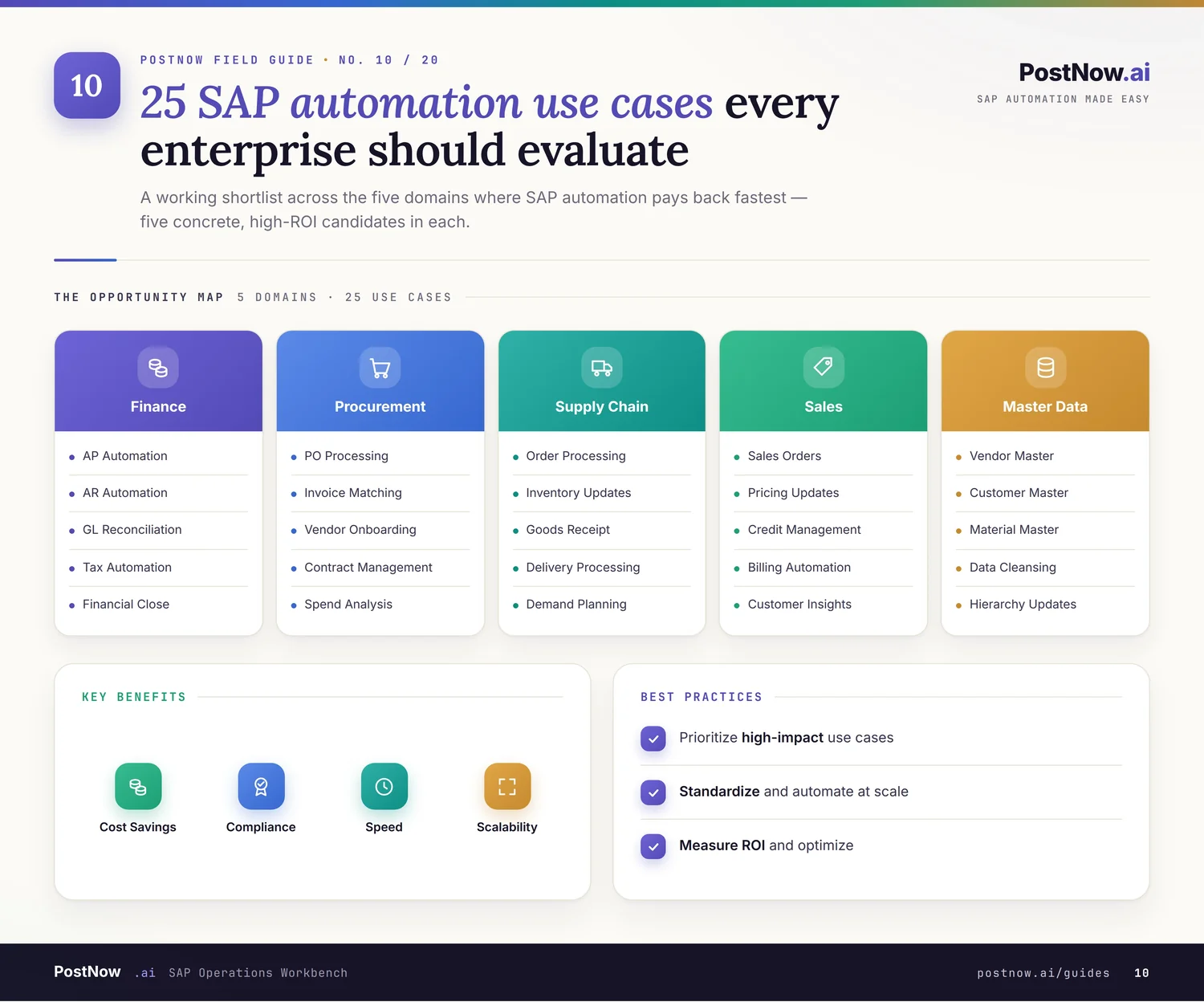
The catalog below covers twenty-five use cases across master data, finance, procurement, sales and logistics, and configuration. Each is described through the five-part lens so you can compare and prioritize them.
Master data use cases
1. Vendor Master
Business problem: Slow vendor onboarding delays purchasing and payments, and duplicate vendors fragment spend and weaken negotiation. Manual process: Buyers or master data teams key each vendor into many screens, retyping bank, tax, and address fields. Common challenges: Many mandatory fields, duplicate detection, and bank-detail accuracy make manual creation slow and risky. Automation opportunity: Validated bulk creation from a workbook lets teams onboard many vendors at once, with duplicate and format checks before posting. Governance considerations: Bank and tax changes need segregation of duties and an audit trail, so every create and change is traceable. See the vendor master automation guide.
2. Material Master
Business problem: Incomplete or inconsistent material records stall production, procurement, and sales across multiple views. Manual process: Specialists maintain each material view separately, often re-keying overlapping data into basic, sales, and plant views. Common challenges: The sheer number of views and fields, and cross-view consistency, make manual maintenance error prone. Automation opportunity: Templated, validated loads populate the needed views together, checking consistency before the record is created. Governance considerations: View-level ownership and validation rules keep materials consistent and changes accountable. See the material master automation guide.
3. Customer Master
Business problem: Errors in customer records misroute deliveries and invoices, and duplicates distort credit and reporting. Manual process: Sales or finance teams enter customer data into sales-area and company-code views one record at a time. Common challenges: Address accuracy, credit data, and duplicate prevention are hard to manage manually at scale. Automation opportunity: Bulk creation with address and duplicate validation onboards customers reliably and consistently. Governance considerations: Credit and pricing-relevant fields require controlled change and a clear ownership model. See the customer master automation guide.
4. Business Partner
Business problem: In S/4HANA the Business Partner model unifies customers and vendors, and inconsistent roles cause downstream errors. Manual process: Teams maintain Business Partner roles and relationships manually, often missing required role-specific data. Common challenges: Role complexity and the customer-vendor integration make manual maintenance confusing and inconsistent. Automation opportunity: Validated loads create Business Partners with the correct roles and data together, reducing role gaps. Governance considerations: Because Business Partner spans finance and logistics, governance must coordinate ownership across both. See the business partner automation guide.
5. G/L Account Master
Business problem: Inconsistent general ledger accounts undermine reporting and complicate consolidation across company codes. Manual process: Finance maintains accounts in the chart of accounts and per company code, repeating data manually. Common challenges: Keeping accounts consistent across many company codes and charts is laborious and error prone. Automation opportunity: Bulk maintenance with consistency checks aligns accounts across company codes from a single source. Governance considerations: Account changes affect reporting integrity, so they require approval and a recorded change history. See the g/l account master automation guide.
6. Cost Center
Business problem: Missing or inconsistent cost centers distort cost allocation and management reporting. Manual process: Controlling teams create cost centers and hierarchies manually, often in bulk at period boundaries. Common challenges: Hierarchy consistency and validity dates make manual creation tedious, especially during reorganizations. Automation opportunity: Validated loads create cost centers and update hierarchies together, with checks on validity and assignment. Governance considerations: Cost center structures drive reporting, so changes need ownership and an audit trail. See the cost center automation guide.
7. Profit Center
Business problem: Inconsistent profit centers weaken segment reporting and profitability analysis. Manual process: Controlling maintains profit centers and assignments manually across the relevant master data. Common challenges: Aligning profit centers with the organizational structure manually is slow and prone to gaps. Automation opportunity: Bulk creation and assignment with validation keeps profit center data aligned and complete. Governance considerations: Because profit centers shape segment reporting, their maintenance must be controlled and traceable. See the profit center automation guide.
8. Asset Master
Business problem: Incomplete asset master data disrupts depreciation, reporting, and capital project tracking. Manual process: Asset accountants create asset records manually, entering class, valuation, and assignment data per asset. Common challenges: Asset class rules, depreciation areas, and high volumes during projects make manual creation burdensome. Automation opportunity: Validated bulk creation populates asset records with class and valuation data checked before posting. Governance considerations: Asset data affects financial statements, so creation and change require approval and audit. See the asset master automation guide.
Finance use cases
9. Journal Entries
Business problem: Manual journal posting at period close is slow, repetitive, and a frequent source of error. Manual process: Finance keys recurring and adjustment entries line by line, often from spreadsheets, under time pressure. Common challenges: Balancing entries, cost assignments, and high close-period volumes make manual posting error prone. Automation opportunity: Posting validated journals from a finance workbook clears balances faster, with checks before they hit the ledger. Governance considerations: Postings affect the books, so they demand balanced validation, approval, and a complete audit trail. See the journal entries automation guide.
10. Vendor Invoices
Business problem: Manual invoice entry delays payments, risks duplicates, and strains accounts payable at volume. Manual process: AP clerks key invoice header and line data, matching to purchase orders and goods receipts manually. Common challenges: Three-way matching, tax handling, and duplicate detection make manual entry slow and risky. Automation opportunity: Validated invoice loads, with matching and duplicate checks, speed processing and reduce payment errors. Governance considerations: Payment-relevant data requires controlled entry, matching rules, and a traceable approval path. See the vendor invoices automation guide.
11. Asset Postings
Business problem: Manual asset transactions such as acquisitions and retirements are slow and easy to misclassify. Manual process: Asset accountants post acquisitions, transfers, and retirements individually through asset transactions. Common challenges: Correct transaction types, valuation, and timing make manual asset postings exacting. Automation opportunity: Validated bulk asset postings apply the right transaction types and values with checks before posting. Governance considerations: Asset transactions affect valuation and reporting, so they require approval and audit. See the asset postings automation guide.
Finance and procurement use cases
12. Purchase Orders
Business problem: High purchase order volume under time pressure makes manual creation a bottleneck for procurement. Manual process: Buyers enter purchase order headers and line items manually, repeating vendor, material, and pricing data. Common challenges: Line-item volume, pricing accuracy, and account assignment make manual creation slow. Automation opportunity: Batch creation from a workbook, with validation, lets buyers raise many orders quickly and accurately. Governance considerations: Purchase commitments require approval limits, account assignment controls, and an audit trail. See the purchase orders automation guide.
13. Purchase Requisitions
Business problem: Slow requisition entry delays procurement and frustrates the business users who raise demand. Manual process: Requesters or buyers key requisitions manually, entering account assignment and source data per line. Common challenges: Account assignment accuracy and high request volumes make manual requisitioning tedious. Automation opportunity: Validated bulk requisition creation accelerates demand capture with checks on assignment and data. Governance considerations: Requisitions begin a spending chain, so they need approval workflow and traceability. See the purchase requisitions automation guide.
Sales and logistics use cases
14. Sales Orders
Business problem: Manual sales order entry delays fulfilment and introduces pricing and availability errors. Manual process: Sales staff key order headers and lines, entering customer, material, quantity, and pricing data. Common challenges: Pricing accuracy, availability checks, and order volume make manual entry slow and error prone. Automation opportunity: Loading orders in bulk with validation speeds order capture and reduces fulfilment errors. Governance considerations: Order data affects revenue and delivery, so pricing and credit controls must be respected. See the sales orders automation guide.
15. Goods Movements
Business problem: Frequent goods movements done manually slow operations and risk inventory inaccuracy. Manual process: Warehouse and logistics staff post movements such as receipts, issues, and transfers individually. Common challenges: High frequency, correct movement types, and stock accuracy make manual posting demanding. Automation opportunity: Fast, validated movement postings from a workbook keep inventory accurate at operational speed. Governance considerations: Stock movements affect inventory valuation, so movement types and authorizations need control. See the goods movements automation guide.
16. Inventory Adjustments
Business problem: Manual inventory adjustments after counts are slow and can introduce valuation errors if mistyped. Manual process: Staff post adjustment documents individually to reconcile physical counts with system stock. Common challenges: Reconciling counts, choosing correct reasons, and timing make manual adjustment error prone. Automation opportunity: Validated bulk adjustments reconcile counts efficiently with checks on quantities and reasons. Governance considerations: Adjustments change valuation, so they require reason codes, approval, and an audit trail. See the inventory adjustments automation guide.
Configuration, engineering, and additional scenarios
17. Pricing Conditions
Business problem: Maintaining pricing conditions manually is slow and a frequent source of incorrect pricing. Manual process: Pricing teams key condition records per key combination, often across many products and customers. Common challenges: Key combination complexity and high volumes make manual condition maintenance laborious. Automation opportunity: Validated bulk maintenance updates condition records consistently, checking keys and values before posting. Governance considerations: Pricing drives revenue, so condition changes need approval and a recorded history. See the pricing conditions automation guide.
18. Bill of Materials
Business problem: Inaccurate or outdated bills of materials disrupt production planning and costing. Manual process: Engineering or planning teams maintain BOM components and quantities manually, item by item. Common challenges: Component accuracy, alternatives, and large structures make manual BOM maintenance tedious. Automation opportunity: Validated BOM loads create and update structures consistently, checking components before posting. Governance considerations: BOM changes affect planning and cost, so they require controlled change and traceability. See the bill of materials automation guide.
19. Bank Master Data
Business problem: Incorrect bank master data causes failed or misdirected payments and reconciliation problems. Manual process: Treasury or master data teams enter bank keys and account details manually for many banks. Common challenges: Format accuracy and country-specific rules make manual bank data entry error prone. Automation opportunity: Validated bulk maintenance loads bank data with format and rule checks before it is used. Governance considerations: Bank data is payment sensitive, so it demands segregation of duties and a full audit trail.
20. Exchange Rates
Business problem: Stale or mistyped exchange rates distort valuations, reporting, and intercompany transactions. Manual process: Finance enters exchange rates manually, often daily, across rate types and currency pairs. Common challenges: Daily frequency and many currency pairs make manual rate entry repetitive and error prone. Automation opportunity: Scheduled, validated rate loads keep rates current and accurate with checks before they apply. Governance considerations: Rates affect valuation, so their source and changes should be controlled and recorded. See the exchange rates automation guide.
21. Purchasing Info Records
Business problem: Missing or outdated purchasing info records weaken pricing and source determination in procurement. Manual process: Buyers maintain info records linking vendors, materials, and conditions manually. Common challenges: Keeping the vendor, material, and pricing links current manually is laborious at scale. Automation opportunity: Validated bulk maintenance keeps info records aligned with current vendors and conditions. Governance considerations: Because info records influence pricing and sourcing, their maintenance should be controlled.
22. Equipment Master
Business problem: Incomplete equipment master data disrupts maintenance planning and asset tracking. Manual process: Maintenance teams create equipment records manually, entering technical and location data. Common challenges: Technical attributes and hierarchy links make manual equipment creation detailed and slow. Automation opportunity: Validated bulk creation populates equipment records with technical data checked before posting. Governance considerations: Equipment data supports maintenance and assets, so changes should be owned and traceable.
23. Open Item Clearing
Business problem: Manual clearing of open items in receivables and payables is slow and delays reconciliation. Manual process: Finance matches and clears open items individually, identifying offsetting entries manually. Common challenges: Matching logic and high item volumes make manual clearing time consuming and error prone. Automation opportunity: Validated bulk clearing matches and clears items efficiently with checks before posting. Governance considerations: Clearing affects account balances, so it requires controlled rules and an audit trail.
24. Routings and Work Centers
Business problem: Inaccurate routings and work centers undermine production scheduling and costing. Manual process: Planning teams maintain operation sequences and work center data manually per material. Common challenges: Operation detail and capacity data make manual routing maintenance painstaking. Automation opportunity: Validated loads create routings and work center assignments consistently with checks before posting. Governance considerations: Routings affect scheduling and cost, so their maintenance should be controlled and recorded.
25. Outbound Deliveries
Business problem: Manual outbound delivery creation slows shipping and can introduce picking and quantity errors. Manual process: Logistics staff create deliveries from orders individually, entering picking and shipping data. Common challenges: Order references, quantities, and timing make manual delivery creation error prone at volume. Automation opportunity: Validated bulk delivery creation accelerates shipping with checks on references and quantities. Governance considerations: Deliveries affect fulfilment and stock, so authorizations and data accuracy must be controlled.
The prioritization deliberately uses a small number of factors, because a simple rule actually gets applied. Elaborate scoring models look rigorous and tend to gather dust, while a quick judgement on volume, readiness, and risk can be made for a whole portfolio in an afternoon. Simplicity is what lets prioritization happen at all.
It helps to view the candidates as a portfolio rather than a queue. Some can be automated in parallel, several depend on the same preparation such as a data cleanse, and seeing them together reveals shared work that sequencing them one by one would hide. The map is a tool for spotting exactly those overlaps.
As with any readiness judgement, the weakest factor tends to govern the outcome. A high-volume use case with poor data is not ready, because the data will determine the result; a clean one that is rarely run may not be worth the effort. Prioritization is the art of balancing these factors rather than chasing any single one.
Readers in a hurry can treat the catalog as a reference and jump straight to the prioritization model, returning to individual use cases as candidates emerge. The catalog is designed to be navigable in both directions: read end to end for a full survey, or consulted entry by entry as specific needs arise.
It is also worth noting how often the same automation opportunity recurs across entries: a validated, repeatable load replacing slow manual entry. That repetition is not a lack of imagination but the central insight of the catalog, namely that a single capability, applied with care to each object's rules, addresses a large share of routine SAP data work.
The catalog also rewards a second reading over time. A use case that ranks low today, because its data is poor, may become a strong candidate once that data is cleansed for another reason entirely. Revisiting the catalog periodically, rather than treating an early assessment as final, keeps the portfolio aligned with the enterprise's changing readiness.
Prioritization and portfolio maturity
Twenty-five candidates need a way to sequence them. Prioritization turns the catalog into a plan, and a maturity model shows how systematically an enterprise automates over time.
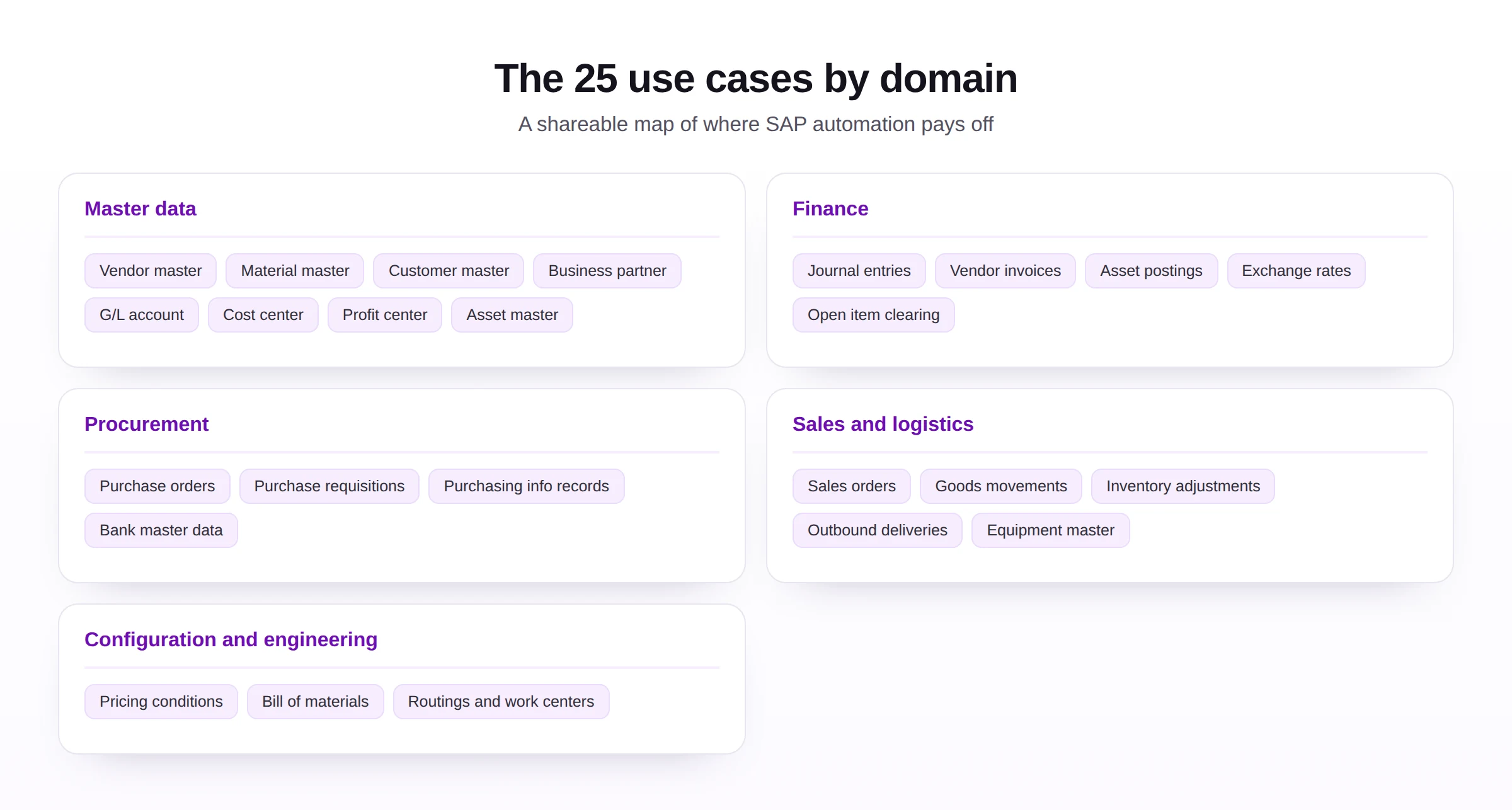
To prioritize, score each use case on three factors: volume and repetition, which determine how much effort automation saves; data readiness, which determines how soon it can succeed; and risk, which determines how much governance it needs. Use cases that are high in volume, repetitive, and clean are automated first; complex or low-quality ones are prepared before they proceed.
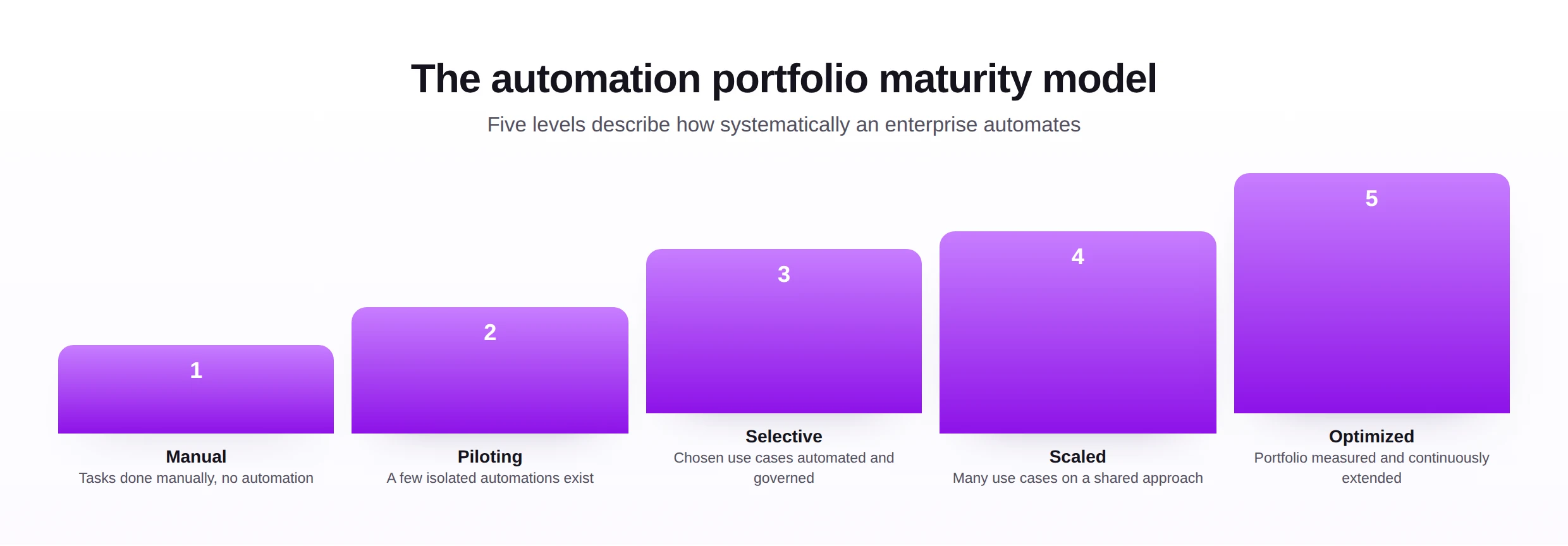
The portfolio maturity model describes the broader journey. At the manual level, tasks are performed manually with no automation; at the optimized level, a measured portfolio is continuously extended on a shared approach. Most enterprises progress through piloting, selective, and scaled levels as they build the capability and the confidence to automate more.
| Priority tier | Characteristics | Action |
|---|---|---|
| Automate first | High volume, repetitive, clean data, modest risk | Build now for quick value |
| Automate next | Moderate volume or some preparation needed | Schedule after early wins |
| Prepare first | Complex, low-quality data, or high risk | Cleanse and govern before automating |
The real prize of the roadmap is reuse. Automating one use case well is useful; building an approach that extends cleanly to the next, and the one after, is transformative. A program designed for reuse turns each new use case into a small extension rather than a fresh project, which is what allows a portfolio to grow without a proportional growth in effort.
Early, visible wins matter for more than morale. An automation that quickly relieves a well-known pain point earns the credibility and sponsorship that fund the harder use cases later, so the first choice is partly strategic. The roadmap therefore favors a candidate that is both valuable and ready, not merely one that is technically interesting.
Piloting before scaling is what keeps the program honest. A contained first build reveals the real effort, the data issues, and the governance needs before they are multiplied across many use cases. The pilot is less a proof of concept than a rehearsal of the approach the whole portfolio will reuse.
A simple three-tier sort, automate first, automate next, and prepare first, is usually enough to turn the scored catalog into a plan. The first tier funds the program with quick wins, the second extends it once the approach is proven, and the third names the candidates whose data or process must be readied before they can succeed.
The maturity model is best read as encouragement rather than judgement. Most enterprises begin at the manual or piloting level not through neglect but because no shared method existed, and the model's value is to show the next step. Moving up one level, by automating and governing a few more use cases, is a realistic goal for a single planning cycle.
Prioritization should also account for dependency, not just standalone value. A modest use case that unblocks several others, by cleaning the master data they all rely on, can be worth more than a higher-scoring one considered in isolation. The map and the scoring together help reveal these enabling candidates that a flat ranking would miss.
Implementation roadmap
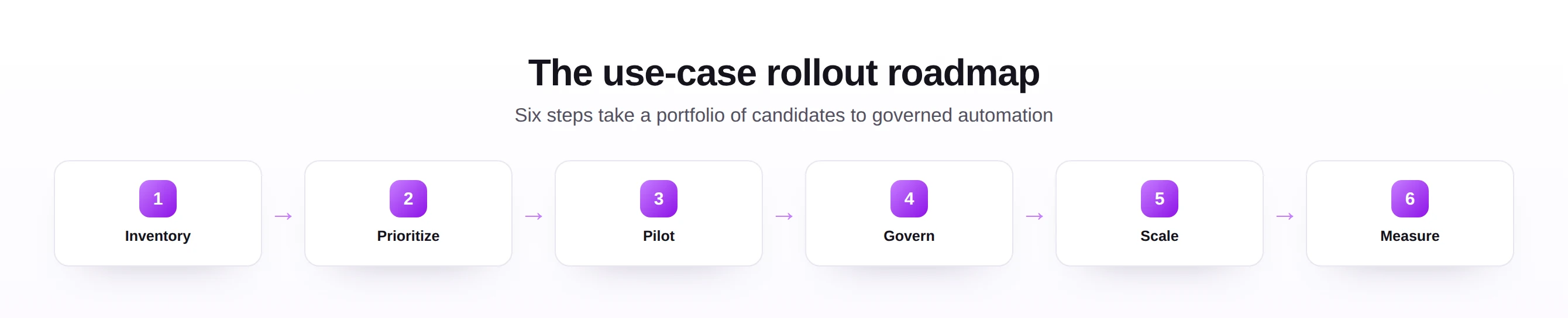
This roadmap turns a prioritized catalog into a governed program, with planning, execution, governance, monitoring, and continuous improvement.
Planning: inventory and prioritize
Begin by inventorying candidate use cases, using this catalog as a starting point and adding any specific to your landscape. Then prioritize them with the three-factor scoring, producing a ranked list with the strongest, readiest candidates first.
Execution: pilot and govern
Pilot the top candidate, proving the approach on a contained scope, then put governance in place, validation, ownership, and an audit trail, before widening use. Reusing one trusted approach across use cases, rather than building each from scratch, is what makes the program efficient.
Scaling, monitoring, and improvement
Scale to further use cases as each earns confidence, monitor outcomes against the value expected, and feed lessons back so the next use case is faster to automate. Over time this rhythm moves the enterprise up the portfolio maturity model.
These practices work as a connected set rather than in isolation. Clean data makes validation meaningful, validation makes governance credible, governance makes audit possible, and a reusable approach makes all of them affordable across many use cases. An enterprise that adopts them as a connected discipline gains far more than one that picks a convenient few.
They also scale with the risk of each use case. A low-risk reference load needs little ceremony; a payment-sensitive or revenue-relevant one needs the full apparatus of validation, ownership, and audit. Matching the rigor to the stakes keeps the discipline proportionate and prevents it from being resented where it adds little.
Finally, each use case automated should leave the enterprise more capable. The templates, validations, and governance built for one become the starting point for the next, so the portfolio matures as it grows. Treating every use case as an investment in a reusable capability, not a disposable fix, is what moves an organization up the maturity model.
Sequencing for early wins is as much about perception as economics. A visible success on a well-known pain point earns the program credibility, while an early stumble on a hard candidate colors how the whole effort is judged. Choosing a first use case that is both valuable and ready is therefore a strategic decision, not merely a technical one.
Governance should be designed alongside the automation, not added afterward. The same validation that ensures correct records also produces the audit trail governance requires, so building one mechanism serves both purposes. Treating control as part of the design from the first use case avoids the costly retrofitting that undermines so many programs.
A final practice worth naming is restraint. Not every task that can be automated should be, and a disciplined program is as willing to leave a low-value or high-risk use case manual as it is to automate a strong one. Knowing where automation does not belong is part of the same judgement that decides where it does.
Best practices
A set of disciplines makes use-case automation deliver value reliably across a whole portfolio.
- Start with clean data, grounded in master data management, so each use case rests on a sound base.
- Validate every load, so each use case writes only correct, rule-checked records into SAP.
- Reuse one approach across objects, so master and transactional use cases share a trusted, maintainable path.
- Govern per use case, matching controls to the risk each carries, from bank data to pricing.
- Keep an audit trail, so each automated use case can be traced and reviewed long after it runs.
- Sequence for early wins, automating ready, high-value use cases first to build momentum.
These practices place governance, validation, security, auditability, scalability, and maintainability at the center of the portfolio. A team that builds them once can extend automation to new use cases with confidence rather than starting over each time.
Notice that these challenges trace back to preparation rather than to automation itself. Unclean data, undefined access, and process variation are conditions that exist before any automation is built, and they would trouble the manual process too. Automation simply makes them visible and consequential, which is why addressing them is part of evaluating a use case, not an afterthought.
It is reassuring that the challenges are familiar rather than novel. Each is a familiar feature of SAP work with a known remedy, so encountering it during automation calls for applying existing discipline rather than solving something genuinely new. The responses are well understood and broadly applicable.
Most of these challenges also announce themselves early. A quick profile reveals unclean data; a glance at the process reveals variation; an access review reveals authorization gaps. An enterprise that looks for these signals while evaluating a use case can decide to prepare rather than discover the problem mid-build.
A useful test before committing to a use case is whether its data could be trusted today. If a quick profile shows the source is clean and complete, the use case is likely ready; if it reveals gaps and duplicates, the honest conclusion is to prepare first. This single check prevents a large share of disappointing automations.
The practices are mutually reinforcing precisely because they share infrastructure. The validation logic, the templates, and the governance built for one use case become assets the next can reuse, so the cost of doing things well falls with each application. An enterprise that invests in this shared base finds quality and speed stop being in tension.
Common challenges
A familiar set of challenges recurs across use cases, and each points back to preparation rather than the task itself.
Unclean source data
The root cause is that the data was never profiled or cleansed. The risk is automating errors at scale. The mitigation is to cleanse the relevant data before automating the use case that depends on it.
Object complexity
The root cause is that some objects, such as material master or BOM, have many interdependent fields. The risk is incomplete or inconsistent records. The mitigation is careful mapping and validation tuned to the object.
Access and authorizations
The root cause is that the right authorizations are not in place for automated posting. The risk is a use case that fails or over-reaches on permissions. The mitigation is to confirm a least-privilege access model per use case before automating.
Process variation
The root cause is that the same nominal task is done differently across teams or sites. The risk is an automation that fits one variant and breaks the others. The mitigation is to standardize the process before, or as part of, automating it.
Misjudged volume
The root cause is automating a task that is rare rather than frequent. The risk is effort that never repays itself. The mitigation is to weigh volume and repetition honestly in prioritization.
Beneath these mistakes runs a habit of letting frustration, rather than evidence, pick the first candidate. The task that hurts most seems like the natural starting point, yet that hurt usually points to complexity or weak data, which are precisely what make a first automation difficult. Letting the evidence choose leads to better early outcomes and a stronger foundation for the rest.
The mistakes also share a remedy: apply the full lens and the full scoring before committing. Each error corresponds to skipping one of them, automating before checking data, ignoring volume, omitting validation, overlooking governance, or rebuilding rather than reusing. The discipline is, in effect, a structured way of not making these mistakes.
Most of the challenges are visible before a single record is loaded, which makes them manageable rather than alarming. Profiling reveals data quality, a process walkthrough reveals variation, and an access review reveals authorization gaps, all during evaluation. The point of the lens is to bring these into view early, when the response is still inexpensive.
It also helps to remember that preparing a use case is progress, not delay. Cleansing the data or standardizing the process that a use case depends on often readies several others at the same time, so the effort rarely benefits only one candidate. Time spent on preparation tends to pay back more broadly than it first appears.
Common mistakes
The mistakes below come from choosing or sequencing use cases poorly rather than from automation itself.
Each is avoided by judging a use case through the full five-part lens and sequencing with the three-factor scoring. The right first use case is rarely the most painful one; it is the one most ready to succeed and most able to prove the approach.
These trends widen the catalog without changing the method. As more objects become practical to automate and tooling helps suggest candidates, the number of use cases worth evaluating grows, but the way to choose among them, volume, repetition, readiness, and risk, holds steady. The lens is designed to remain useful precisely as the list it is applied to expands.
None of the trends removes the judgement at the center of the exercise. Deciding which use cases matter, which are ready, and which controls they need remains a human, accountable act, and as tooling handles more of the building, that selection judgement becomes the scarce and valuable skill. The framework keeps people firmly in that role.
The remedy for every mistake is the same pair of disciplines: evaluate through the full lens, and sequence with honest scoring. The right first use case is rarely the most painful one; it is the one most ready to succeed and most able to prove an approach the rest of the portfolio will reuse.
Treating a deferred candidate as a success of the method, not a failure of nerve, is part of the discipline. A catalog that only ever says automate now is not really being evaluated; the willingness to say prepare first, backed by a quick profile or an access review, is what keeps the program out of trouble.
Future trends
The range of automatable use cases is widening and selecting among them is becoming more guided, while the evaluation discipline holds.
- Broader coverage, as a widening set of objects and processes becomes practical to automate.
- Guided selection, with tooling suggesting which use cases are ready to automate next.
- Assisted setup, reducing the effort to configure each new use case, explored in practical AI applications.
- Self-service for business users, so the people who own a process can automate it within safe limits.
- Governance by default, so each automated use case is controlled and audited from the start, supported by modern automation tools.
However the list of use cases grows, the way to choose among them will hold: favor volume, repetition, and clean data, prepare the rest, and extend a single trusted approach across them all.
The single most important move is to start with one use case and finish it well. Automating one strong candidate, with validation, ownership, and an audit trail, produces both a quick win and a template that makes every later use case easier. The temptation to begin broadly is exactly what the action plan is designed to resist.
From there, the program grows by reuse rather than repetition. Each new use case borrows the approach, the validations, and the governance proven on the last, so the effort per use case falls even as the portfolio expands. This compounding is what turns a handful of early automations into a genuine enterprise capability over time.
For leaders specifically, these trends sharpen the role rather than diminishing it. As building becomes easier and tooling suggests candidates, leadership's contribution concentrates in setting priorities, demanding evidence of readiness, and ensuring governance keeps pace. The method gives that role a clear and durable structure.
The catalog, the lens, and the prioritization model are designed to be used together: the catalog supplies the candidates, the lens makes them comparable, and the model orders them into a plan the enterprise can act on with confidence and defend to its sponsors.
Action plan
This step-by-step plan turns the catalog into a program an enterprise can begin now.
- Inventory your candidates, starting from these twenty-five and adding any specific to your landscape.
- Apply the five-part lens to each, capturing problem, process, challenges, opportunity, and governance.
- Score by volume, readiness, and risk, producing a ranked, defensible priority list.
- Pick the strongest first candidate, high volume, repetitive, clean, and modest risk.
- Pilot it on a contained scope with validation and a clear owner.
- Put governance in place, matching controls to the risk and keeping an audit trail.
- Reuse the approach for the next use cases rather than rebuilding each time.
- Measure and extend, tracking value and moving steadily up the portfolio maturity model.
Followed in order, this plan produces a governed automation portfolio that delivers early wins and grows in a controlled, defensible way.
A closing word on mindset. This catalog is not a checklist to complete but a menu to choose from, and the discipline lies in choosing well. The enterprises that benefit most are not those that automate the most use cases, but those that automate the right ones first and extend a single trusted approach across the rest.
Used over time, the lens and the catalog also create a valuable record: which use cases were evaluated, how they scored, which were automated, and how they performed. That history is both an audit asset and the raw material for extending the portfolio, and it lets an enterprise demonstrate, with evidence, that its automation program is deliberate and well governed.
Followed steadily, the approach turns a daunting catalog into an orderly program. Twenty-five candidates feel like a great deal at once, but evaluated through one lens, scored on a few factors, and tackled a strong one at a time, they become a manageable sequence that compounds into a real enterprise capability.
The catalog rewards returning to it as the enterprise matures. Use cases deferred today become candidates tomorrow as data is cleansed and confidence grows, so the list is less a one-time assessment than a living portfolio that the same lens and scoring keep current.