In short

SAP Mass Upload Without LSMW

Teams asking how to run SAP mass uploads without LSMW usually have one specific problem rather than a general one: a monthly load nobody understands, a broken project, lost skills, or an approaching conversion. The right answer differs in each case, so naming the situation comes before choosing a tool.

  • Only one of six situations is a migration problem. The other five are operational, and operational loads were never what LSMW was designed for.
  • Try standard mass maintenance first. MM17 and KS12 are free, installed, and adequate where the field is exposed.
  • Extract the mapping before decommissioning anything. The project is often the only documentation of what it does.
  • Run both routes in parallel for one cycle. The cheapest possible proof that the replacement does what the original did.
  • Retire the old project deliberately. Leaving it runnable means it will be run by accident.

Loading SAP data without LSMW

Teams asking how to do mass upload without LSMW usually have one specific problem rather than a general one. A monthly load runs that nobody understands, a project has broken and cannot be fixed, the skills have left, or a conversion is approaching. The right answer differs in each case, which is why naming the situation comes before choosing a tool.

The LSMW alternative guide covers what replaces it across a whole estate. This page is narrower: what to do about the load in front of you.
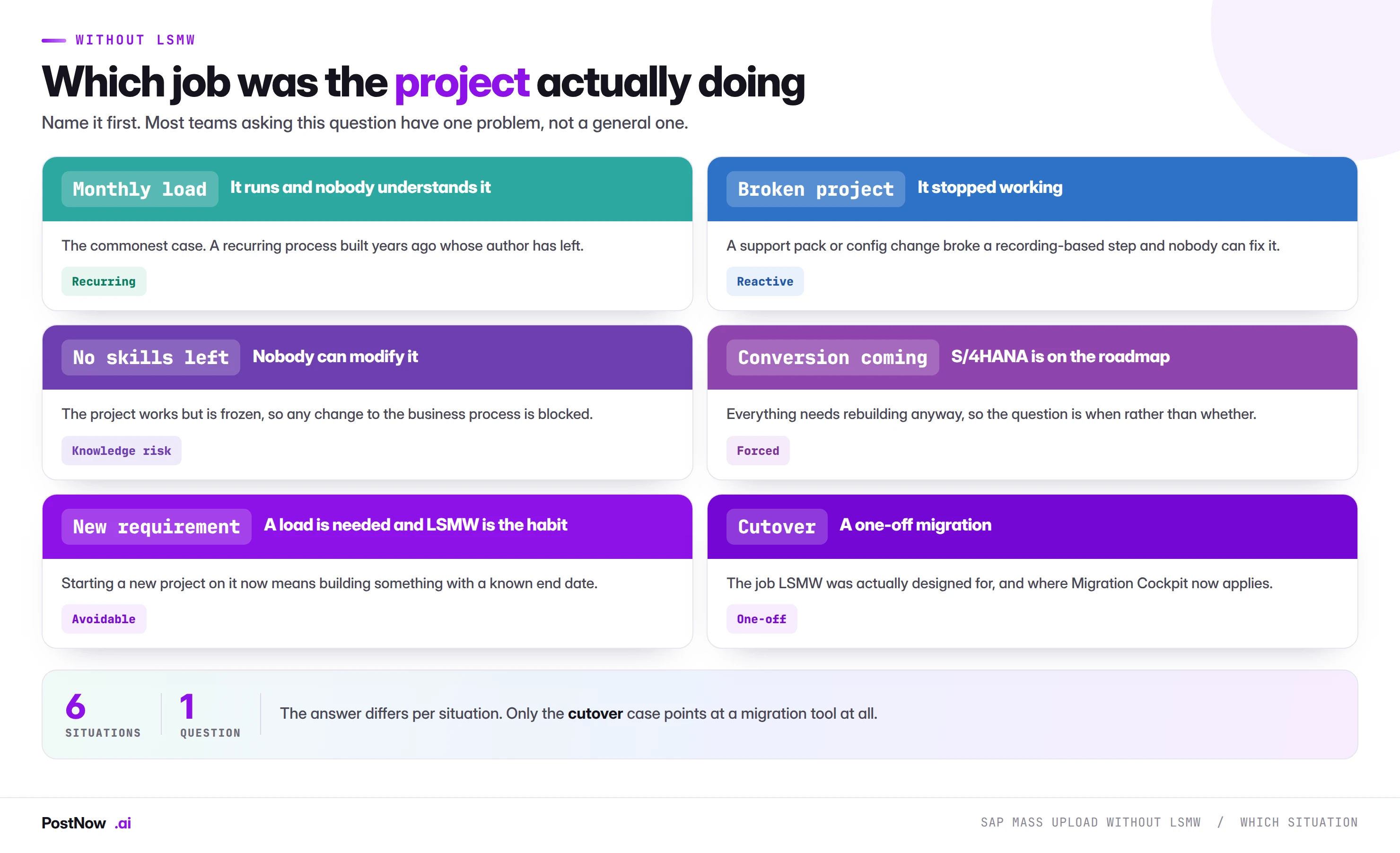
Six situations that lead teams to ask about SAP mass upload without LSMW: a monthly load nobody understands, a broken project, lost skills, an approaching conversion, a new requirement, and genuine cutover.
Diagram Name the situation first, because the answer differs in each case.

Which situation are you in

The monthly load nobody understands. The commonest case by some distance. It runs, it works, and the person who built it left three years ago. Nothing is broken yet, and that is exactly why it is worth addressing now rather than when it breaks.

The broken project. A support pack or configuration change has stopped a recording-based step working, and nobody can diagnose it. Reactive, urgent, and often the trigger for finally replacing rather than patching.

The frozen project. It works, but no change to the underlying business process is possible because nobody can modify the load. This blocks more than it appears to: process improvements get abandoned because the load cannot follow.

The approaching conversion. Everything needs rebuilding anyway, so the question is when rather than whether. Doing it deliberately beforehand costs about the same as doing it under go-live pressure.

The new requirement. A load is needed and LSMW is the habit. Worth resisting, because starting a project on it now means building something with a known end date.

Genuine cutover. The one case that points at a migration tool. If the job really is a one-off conversion load, Migration Cockpit is the intended path and this page is not about your problem.

💡
Only the last of these is a migration problem. The other five are operational, and operational loads were never what LSMW was designed for. That mismatch is usually the root of the difficulty.

What to use instead

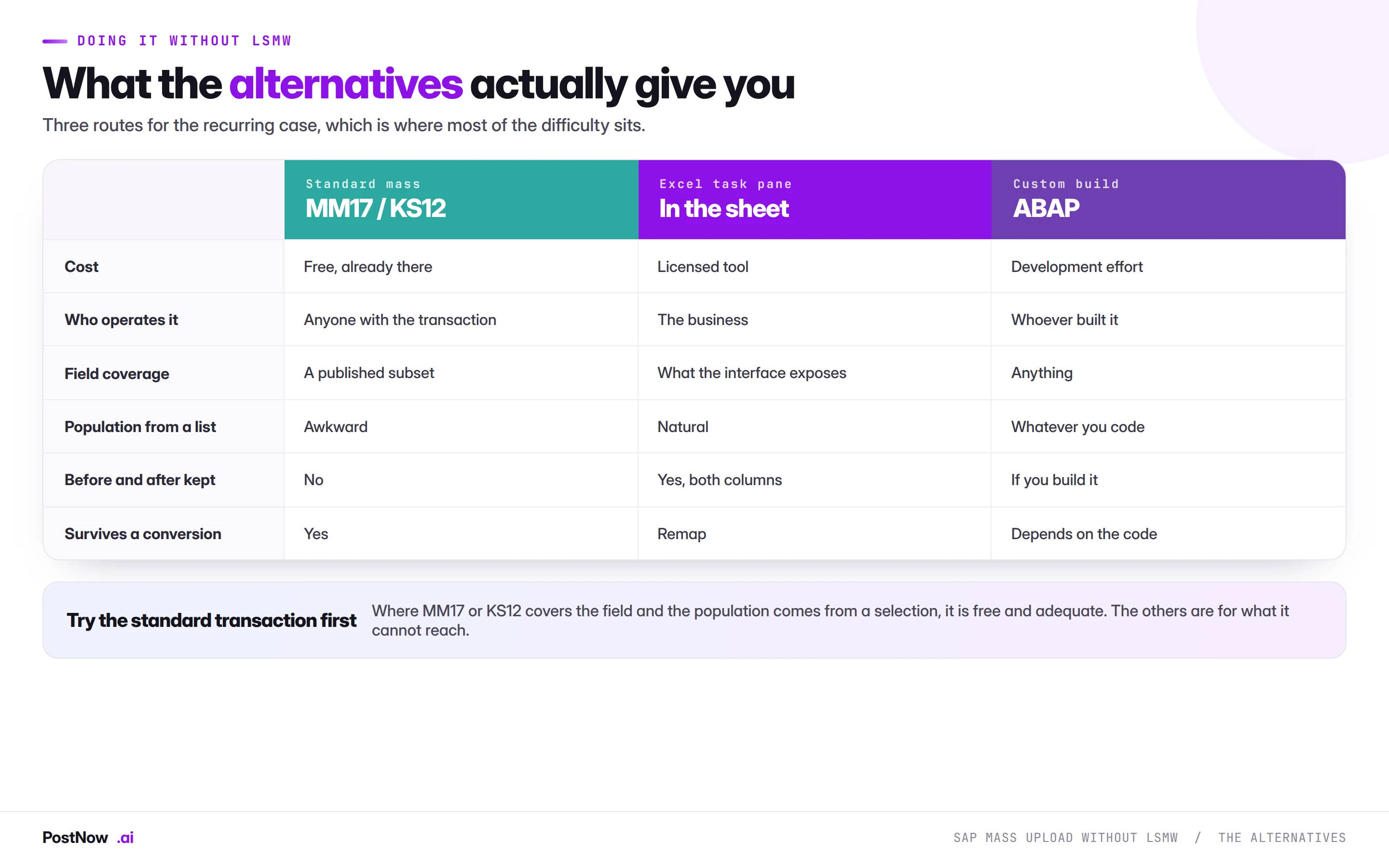
Comparison of alternatives to SAP LSMW for recurring loads: standard mass transactions such as MM17 and KS12, an Excel task pane, and a custom ABAP build, across cost, who operates it, field coverage and whether before and after values are kept.
Diagram Try the standard transaction first. The others are for what it cannot reach.

Three routes cover the recurring case, and they are worth trying in order.

Standard mass maintenance first. MM17 for material master, KS12 for cost centres, and their equivalents elsewhere are free, already installed, and adequate for a large share of simple sweeps. Where the field is exposed and the population comes from a selection screen, this is the answer and there is nothing more to do.

An Excel task pane where the population comes from a list. Selection screens are built for criteria rather than for four thousand record numbers supplied by the business. Where the file arrives from finance, procurement or HR, and each record needs a different value, this is the shape that fits.

A custom build where neither reaches. Real, occasionally necessary, and the most expensive of the three to maintain. Worth reaching for only after the first two have genuinely been ruled out.

Replacing a recurring load
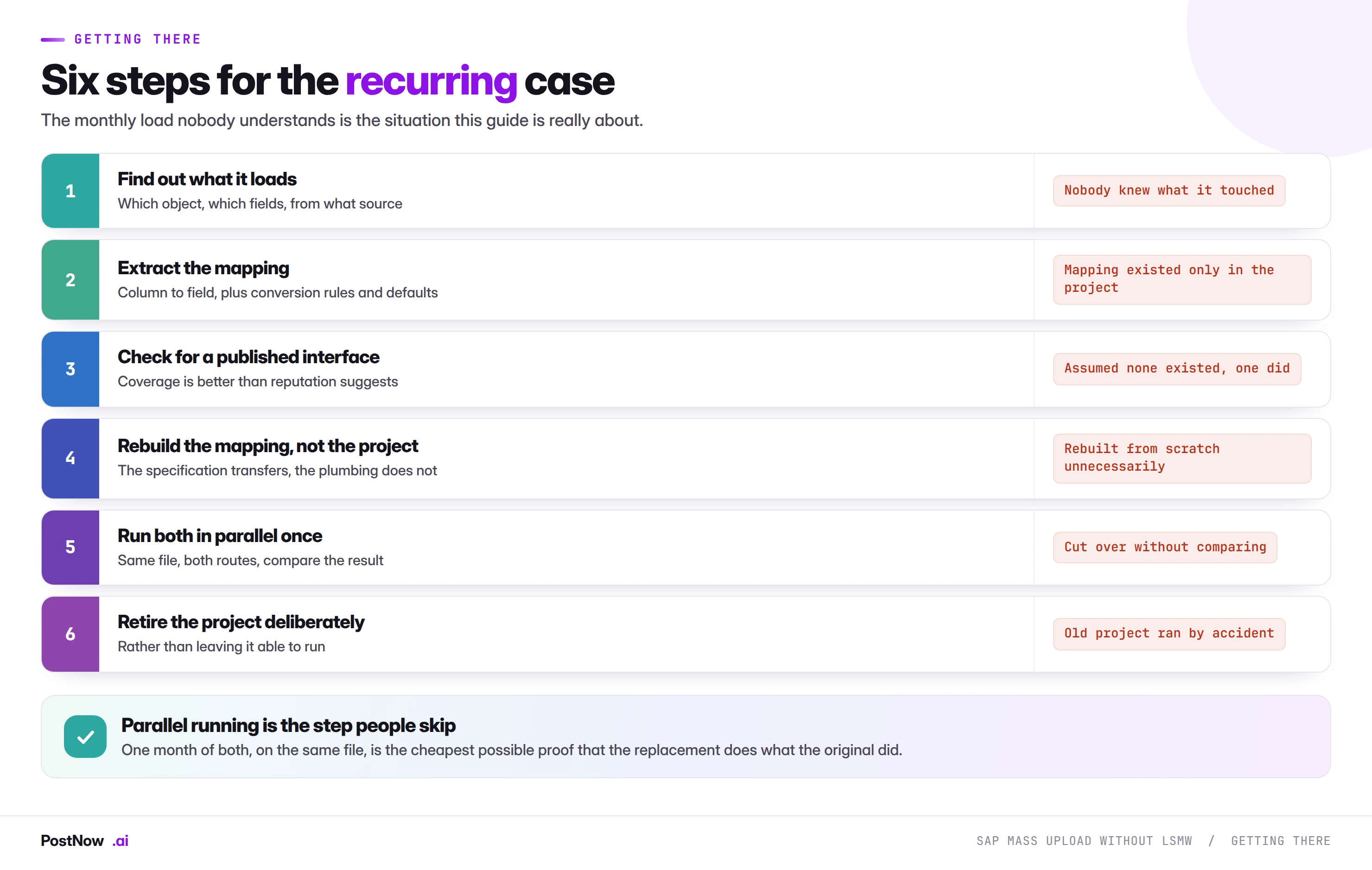
Six steps to replace a recurring SAP LSMW load: find out what it loads, extract the mapping, check for a published interface, rebuild the mapping not the project, run both in parallel once, and retire the project deliberately.
Diagram The monthly load nobody understands is the situation this is really about.

Six steps, and two of them are the ones people skip.

Extract the mapping before decommissioning anything. The column-to-field relationships, conversion rules and validation logic inside an LSMW project are frequently the only documentation of what it does. Once the project is gone, so is that knowledge. This is the single most important step on the page.

Run both in parallel for one cycle. Same file, both routes, compare the result. It is the cheapest possible proof that the replacement does what the original did, and it turns a leap of faith into a verification. Teams skip it because it feels like duplicated effort, and it is the step that prevents discovering a difference in production.

The others are straightforward: find out what the project actually loads, check whether a published interface covers the object before assuming it does not, rebuild the mapping rather than the project structure, and retire the old project deliberately so it cannot be run by accident.

Where PostNow fits

Try this in your own system

PostNow covers the recurring load case

Most LSMW projects still running monthly are doing what a published interface handles directly. PostNow adds a task pane to Excel, signs in with your own credentials, and keeps the mapping where the business can see it.

Visible

The mapping lives in the workbook, not inside a project nobody can open.

Standard

Published interfaces, so validation and change documents behave normally.

Operable

Run by whoever prepares the file, not only by whoever built it.

Portable

Remaps at conversion rather than needing a rebuild.

Start free trial 14-day trial · posts through published SAP interfaces, never to tables

Step by step

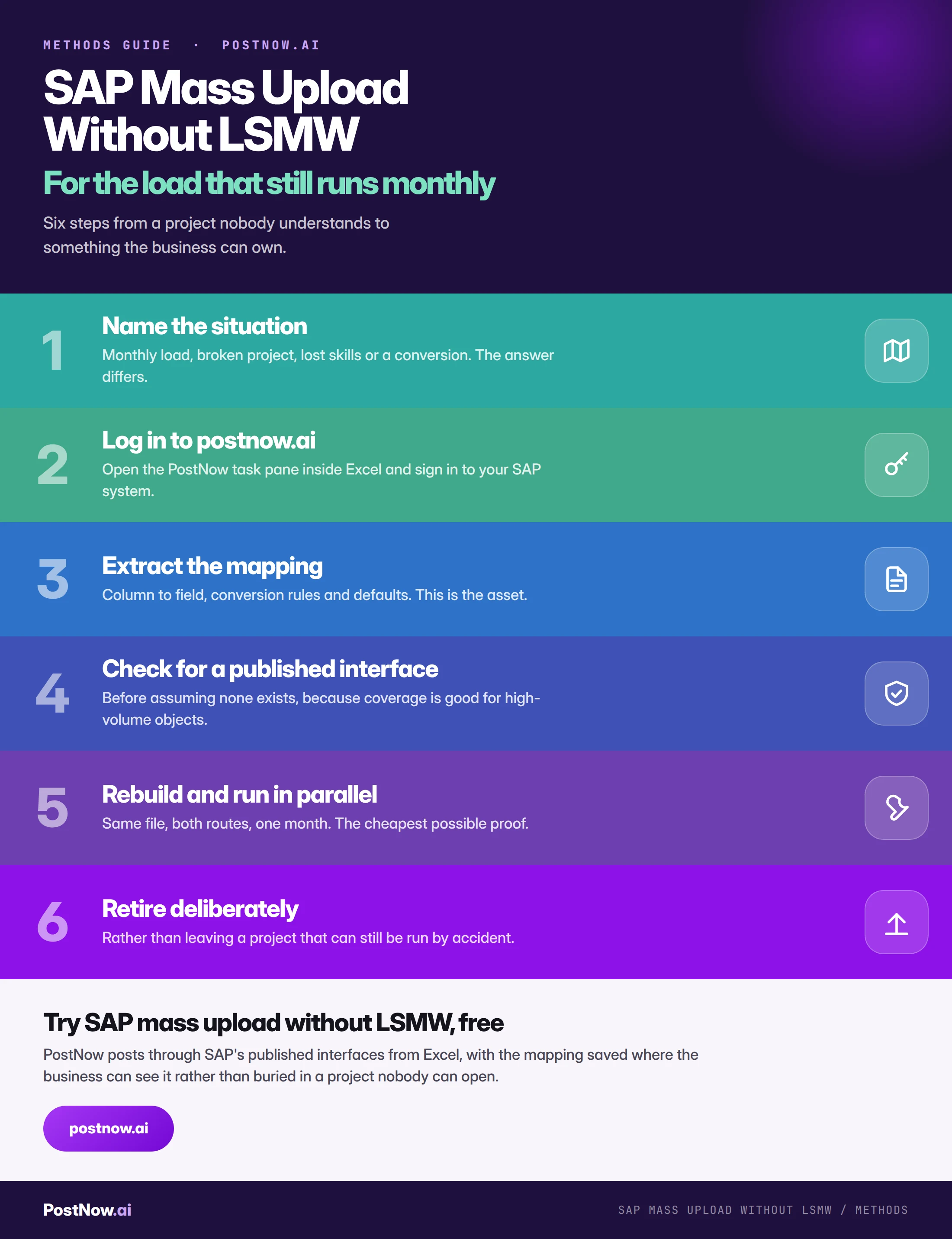
Step by step infographic for SAP mass upload without LSMW: name the situation, log in to postnow.ai, extract the mapping, check for a published interface, rebuild and run in parallel, then retire deliberately.
Infographic Six steps from a project nobody understands to something the business can own.

Common mistakes

  • Treating it as a general problem. Five of the six situations are operational and only one is a migration question.
  • Decommissioning before extracting the mapping. The project is often the only documentation of what it did.
  • Skipping the parallel run. One cycle of both is the cheapest verification available.
  • Assuming no published interface exists. Coverage is better than reputation suggests for high-volume objects.
  • Not trying MM17 or KS12 first. Free, installed, and adequate for simple sweeps.
  • Leaving the old project runnable. It will be run by accident eventually.

Complete reference
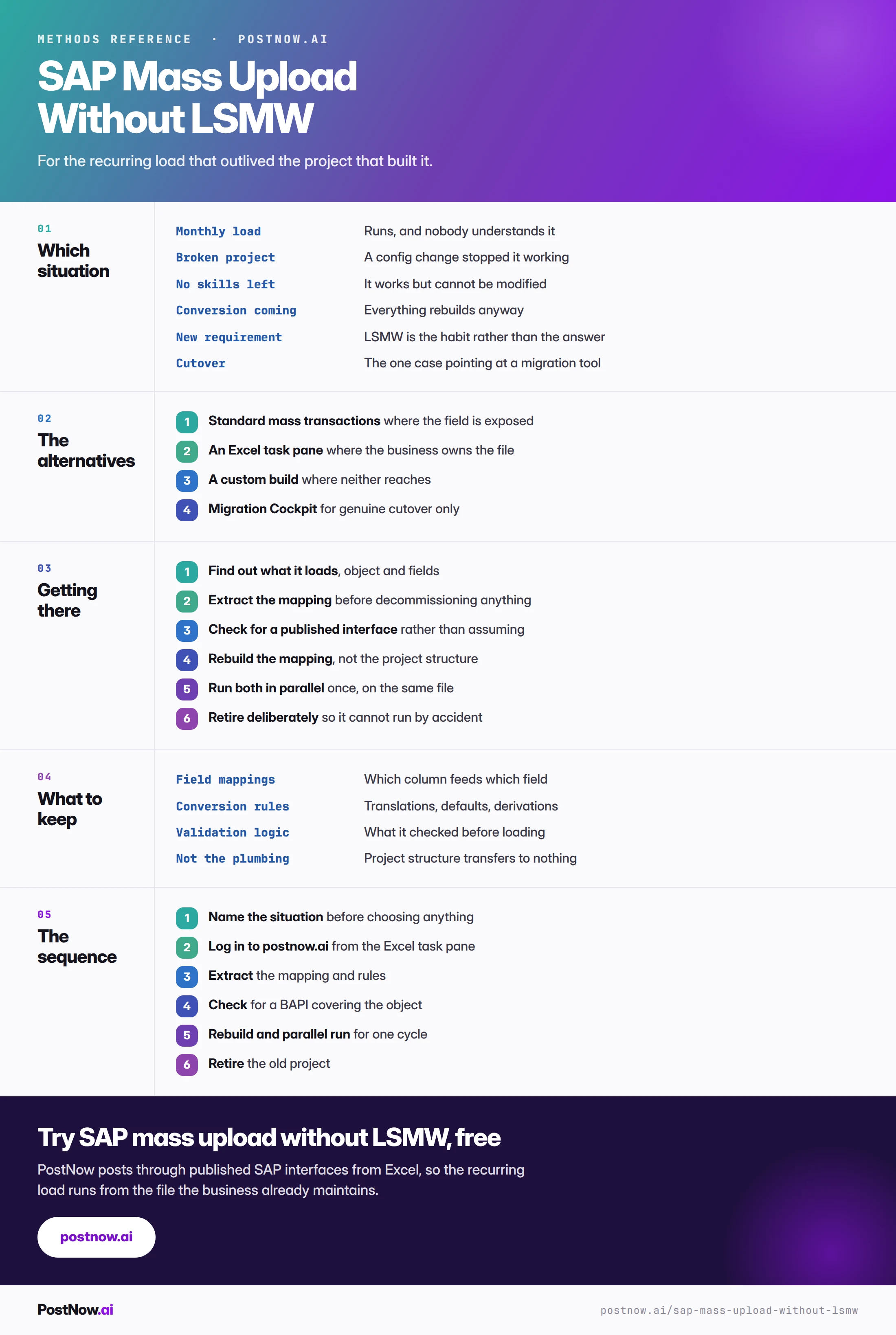
SAP mass upload without LSMW reference infographic covering which situation applies, the alternatives, how to get there, what to keep, and the sequence.
Infographic The complete reference: situations, alternatives, and the replacement sequence.

Go deeper

Moving off LSMW

The estate-level view: what replaces LSMW by scenario and how to retire it.

Method comparison

Whether a published interface covers your object, and what to do if not.

SAP mass upload

The pillar guide covering validation, error handling and governance.

Master data

The objects most LSMW projects were built to load.

Frequently asked questions

How do I run an SAP mass upload without LSMW?
Name which situation you are in first, because the answer differs. For a recurring load, try standard mass maintenance such as MM17 or KS12 where the field is exposed, an Excel task pane where the population comes from a list supplied by the business, or a custom build where neither reaches. For genuine one-off cutover, Migration Cockpit is the intended path.
Is LSMW required for SAP mass upload?
No, and for recurring operational loads it was never the natural fit. LSMW was designed for one-off migration work. The monthly accrual, the quarterly price list and the plant extension that keeps coming back are better served by published interfaces, which apply the same validation and return a structured message per row.
What should I do about an LSMW project nobody understands?
Find out what it loads, extract the mapping including conversion rules and validation logic, check whether a published interface covers the object, rebuild the mapping rather than the project structure, run both routes in parallel for one cycle on the same file, then retire the old project deliberately. The extraction step matters most, because the project is often the only documentation of what it does.
Can MM17 or KS12 replace an LSMW project?
Sometimes, and it is worth checking first because they are free and already installed. They work where the field you need is exposed and the population comes from a selection screen. They run out when the field is not exposed, when the population is a list of record numbers supplied by the business, when each record needs a different value, or when you need to keep before and after values.
Why should I run both routes in parallel before switching?
Because it is the cheapest possible proof that the replacement does what the original did. One cycle, the same input file, both routes, compare the output. Teams skip it because it feels like duplicated effort, and it is precisely the step that prevents discovering a behavioural difference in production after the old project has been retired.
What happens if I decommission an LSMW project before documenting it?
You lose the only record of what it did. The field mappings, conversion rules, value translations and validation logic inside the project are frequently undocumented anywhere else, and reconstructing them afterwards means reverse-engineering from the data rather than reading a specification. Extract first, always.
Is a new LSMW project ever the right choice today?
For a one-off migration on an ECC system that is not moving to S/4HANA, it remains defensible. For anything recurring, or on any system with a conversion on the roadmap, it means building something with a known end date and a heavy setup cost per object, using skills that are becoming harder to find.
Do I need a developer to replace an LSMW load?
Not necessarily, and that is often the point. Where the load posts through a published interface and the file comes from the business, the run can belong to whoever prepares the data rather than requiring a developer. A process that needs its author is a dependency rather than a process, which is usually what made the original LSMW project a problem.
What should I keep when replacing an LSMW project?
The mapping and the rules: which source column feeds which SAP field at which organisational level, value translations and defaults, whatever the project validated before loading, and the sequence in which objects had to load. The project structure itself is a tool artefact that transfers to nothing and does not need preserving.
Will replacing LSMW change what SAP records?
No, provided the replacement posts through published SAP interfaces. Records created that way produce the same change documents as manual maintenance and apply the same validation. What changes is who can run the load, how failures are reported, and whether the process survives the next upgrade.
Start with a real file

Run your next sap mass upload from Excel

Map your columns once, validate every row against live SAP, and post through standard logic. Each row comes back with the document number it created.

Start free trial
  • 14-day free trial
  • Works with ECC and S/4HANA
  • Your data stays in your systems