
The SAP testing tool for every change.
PostNow.ai is an AI-powered SAP testing tool. AI drafts the tests, and every run re-posts your real postings and checks what SAP actually saved.
AI builds the test. SAP proves the result.
AI does the slow part of SAP testing, which is writing tests and test data. You review what it drafts, and every run is still checked against what SAP saved.
Describe the process. AI drafts the test.
Write the process in plain words. AI drafts the posting steps, the checks on SAP's tables and the test data rows, including a case SAP must reject. You review the draft before it runs.
- 1You describe the process
- 2AI drafts steps, checks and data
- 3You review, then it runs
Create a purchase order, post the goods receipt, then check the material document. An unknown supplier must be rejected.
- ActionCreate the purchase order
- ActionPost the goods receipt
- CheckMaterial document saved in SAP
- DataUnknown supplier · SAP must reject
AI test data, row by row
AI proposes extra test data rows from the column names of your data set. You review the rows in the grid before they run.
| Supplier | Material | Qty | Expect |
|---|---|---|---|
| 100045 | RM-90311 | 10 | Posts |
| 100046 | RM-90312 | 5 | Posts |
| AI100045 | RM-90311 | 0 | SAP rejects |
| AI999999 | RM-90311 | 10 | SAP rejects |
Tell AI what should change
Describe the change you expect in a report. AI turns it into rules, so that change passes and anything else fails the test.
- +PO line addedExpected · passes
- ~Supplier total changedNot described · fails
- =Other rowsUnchanged
Six types of SAP testing, one tool
The same tests, checks and evidence serve every kind of SAP testing your project needs.
Regression testing
Prove that a change broke nothing that already worked.
- Suites re-run the postings your team already publishes
- When a transport reaches the test system, the tests that use its objects are listed and run
- Schedule runs daily, weekly or monthly, with all scenarios or only those that failed last time
User acceptance testing
Give business users a test to follow and a recorded sign-off.
- Key users answer manual steps with comments and screenshots, inside the same run
- Approvers accept or reject the run or the whole cycle
- The decision, the comment and the evidence it covers are kept on the record
S/4HANA testing
Run the same suite on every rehearsal and compare the two systems.
- Read the same data in ECC and S/4HANA and group it by key
- Compare totals within a tolerance you set
- Export the comparison to PDF or Excel
Data migration testing
Reconcile what arrived in SAP with what you loaded.
- Checks read SAP's tables after the load
- Compare counts, totals and fields by key between source and target
- Run the same checks on every mock load
Report testing
Compare an SAP report with its last known-good run.
- Run the report and compare every row with an earlier run
- Describe the changes you expect
- Anything else fails the test
End-to-end process testing
Chain posting, checking and human steps into one test.
- Actions post through the same BAPI or API automations your team publishes
- Checks read SAP's tables and compare fields
- Manual steps and report checks sit in the same chain, for example purchase order to report
Create your SAP test data with the same tool
A test can only run when its data is in SAP. PostNow.ai creates that data too: our Excel-to-SAP tool loads the records a test needs into your test system, straight from a sheet.
Start every cycle with fresh master data
List the materials, suppliers and customers your tests need. PostNow.ai creates them in your SAP test system and writes each new number back to the sheet.
| Record | What the sheet asks for | SAP result |
|---|---|---|
| Material | Valve housing, plant 1100 | CreatedFG-24017 |
| Supplier | Northline Metals | Created100482 |
| Customer | Harbor Packaging | Created200731 |
Give purchasing tests real documents to work on
Create the purchase requisitions, purchase orders and goods receipts a procure-to-pay test starts from, without keying them one by one.
| Record | What the sheet asks for | SAP result |
|---|---|---|
| Purchase requisition | 20 pcs of the new material | Created10014302 |
| Purchase order | 10 pcs from the new supplier | Created4500018204 |
| Goods receipt | Received against the order | Created5000006469 |
Set up the orders your sales tests need
Create sales orders, deliveries and billing documents in the test system, so order-to-cash tests have open documents to pick up.
| Record | What the sheet asks for | SAP result |
|---|---|---|
| Sales order | 5 pcs for the new customer | Created0000012841 |
| Delivery | Delivery for the order | Created0080003127 |
| Billing document | Invoice for the delivery | Created0090004216 |
Post the open items finance tests rely on
Create cost centers, post journals and vendor invoices in the test system, so month-end and payment tests have balances and open items.
| Record | What the sheet asks for | SAP result |
|---|---|---|
| Cost center | Plant maintenance 1100 | CreatedCC-41020 |
| Journal entry | Accrual, two lines | Created0100002385 |
| Vendor invoice | Invoice from the new supplier | Created1900000742 |
Every SAP change puts money and stock at risk
SAP changes arrive every week. Testing them by hand does not keep up, and a green message on screen is not proof.
Book a demo on your processWhat manual testing misses
- Changes never stop. Transports, SAP Notes, support packages and upgrades each touch processes that already work in production.
- Manual retesting does not scale. The same posting behaves differently per company code, plant and document type. Nobody can key them all, every time.
- Auditors want evidence, not screenshots in an inbox. Who tested what, on which data, with which result, and who accepted it. That record has to exist afterwards.
Four steps from posting to proof
- 01
Reuse the postings you already run
Tests start from the automations your team publishes to post data into SAP, or from an SAP GUI recording.
- 02
Check what SAP saved
Add checks that read SAP tables, and report checks that compare a report with its baseline.
- 03
Run on a schedule or per transport
Suites run daily, on weekdays, weekly or monthly. When a transport reaches test, run the tests that use its objects.
- 04
Review, log defects, sign off
Every run keeps its evidence. Log a defect from a failed step; approvers accept or reject the run or cycle.
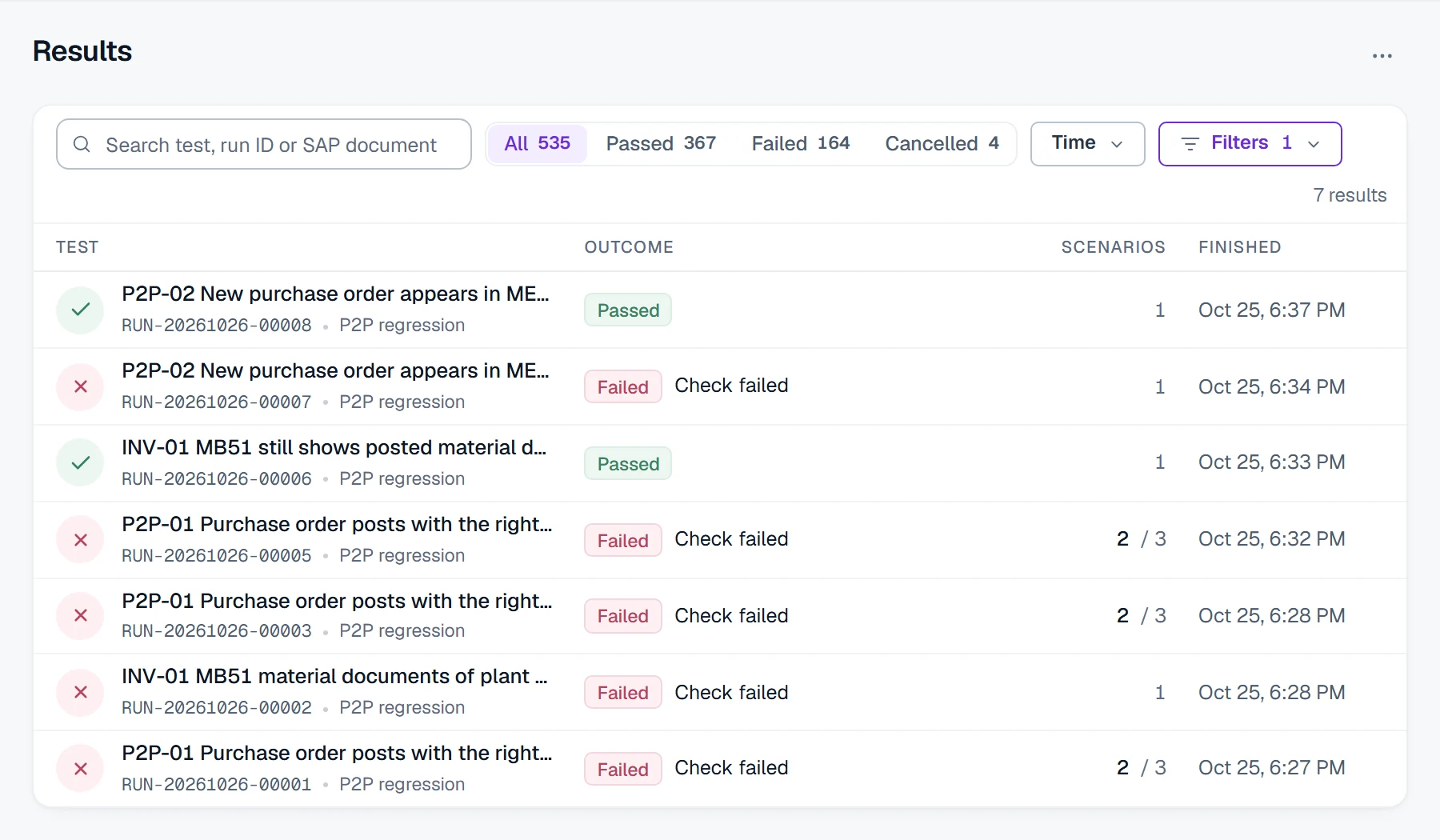
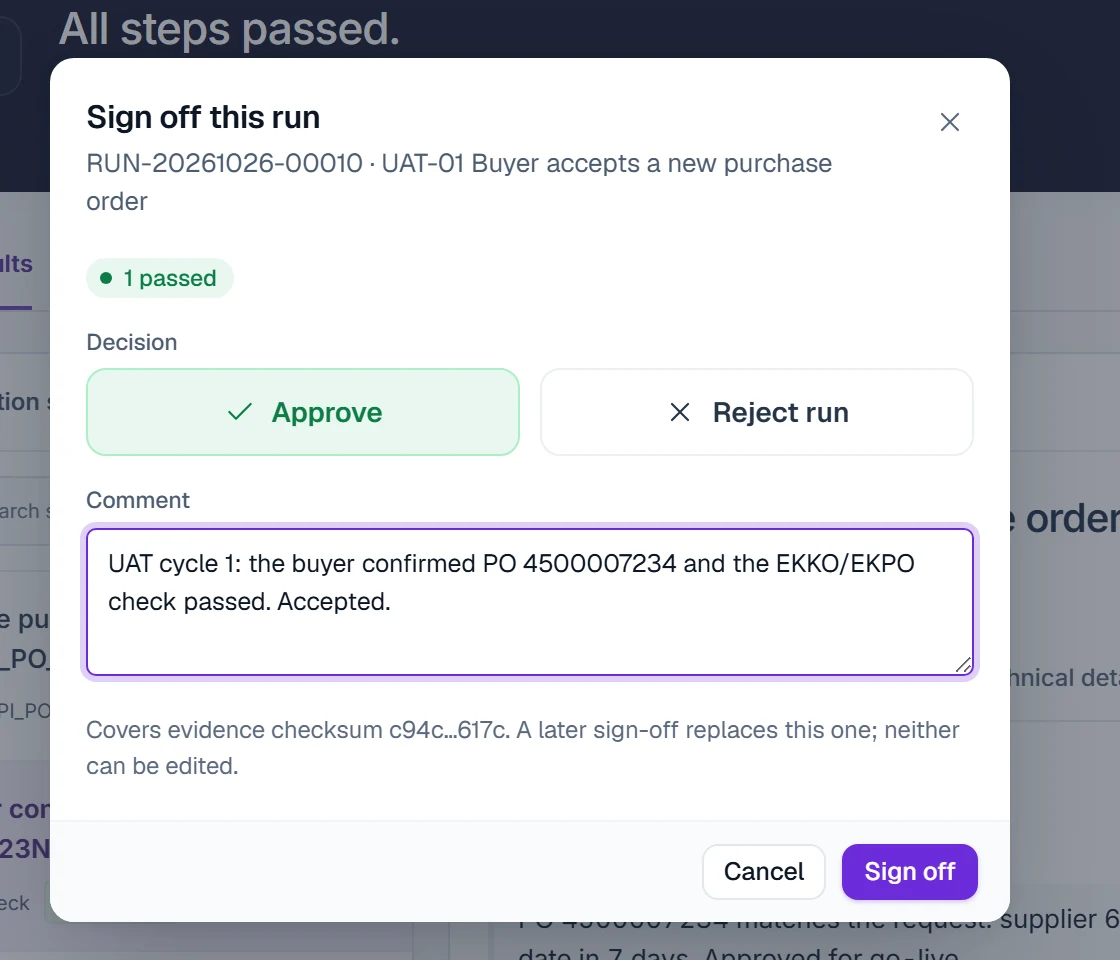
The framework behind these four steps, and how SAP testing tools compare, is in the guide. Read the SAP test automation guide →
Manual retesting vs PostNow.ai SAP Testing
Keyed again, checked by eye
- Testers key the same postings again after every change
- A green message on screen is taken as proof
- Only some company codes, plants and document types get retested
- Evidence ends up as screenshots in an inbox
- Who accepted the result is hard to show afterwards
Re-run, read back, on the record
- Tests re-run the postings your team already publishes, on a schedule or per transport
- Checks read SAP's tables to confirm what was saved
- Each Excel test data row is a scenario that runs every time
- Every run is kept read-only with a SHA-256 checksum
- Approvers accept or reject the run or cycle, on the record
SAP testing software for the whole test cycle
Actions post through SAP BAPIs or APIs; SAP GUI recordings cover the rest, on your own computer with your own SAP login.
Read what the posting changed and compare fields with the test data, a fixed value or a tolerance.
Each row is a scenario. Mark rows that SAP must reject, so an unknown supplier passes only when SAP refuses it.
Group tests by process, track a release in a cycle, and schedule runs with all scenarios or only those that failed last time.
When a transport reaches the test system, list and run the tests that use its objects.
A key user confirms what only a person can judge, with comments and screenshots, inside the same run.
Run an SAP report and compare every row with an earlier run. Describe the changes you expect; anything else fails.
Read the same data in ECC and S/4HANA, group it by key and compare totals within a tolerance. Export to PDF or Excel.
Read-only run records with a SHA-256 checksum, kept for one, three or seven years. In production, tests read and compare.
Clear roles, from test design to sign-off
Testing Manager
Owns environments and projects, and can always sign off.
QA lead · SAP CoE leadTest Designer
Builds tests from postings, checks and reports.
Functional consultantTest Executor
Runs tests; key users answer the manual steps.
Key user · testerViewer and approver
Viewers read results and evidence; approvers named on a test cycle accept or reject it.
Process owner · auditorQuestions test leads ask
What is an SAP testing tool?
How does PostNow.ai SAP Testing test SAP changes?
How is this different from recording screen clicks?
Where do tests run, and who can see our SAP logins?
Can we run tests in production?
How does AI help build test scenarios?
Does it work for an ECC to S/4HANA move?
Which SAP testing tools does SAP provide?
What is the best testing tool for SAP?

See a test of your own process
Pick one posting that matters, like a purchase order or a journal entry, and see it as a PostNow.ai test: posted, checked in SAP and signed off.
Request a demoBring one SAP process. We show it end to end.
Tell us where to reach you and which process matters. The PostNow.ai team replies by email to arrange the demo.
- 01You send the formIt goes straight to the PostNow.ai team.
- 02We agree a timeWe reply to your work email to set up the call.
- 03You see your own processA process from your own SAP work, shown from start to finish.
Request your demo
Name, work email and company are needed.